
Image

FloppoScope Is A Disk Image Analyzer

If you’re a big retro tech fan, you might still have a floppy drive on hand, or even some sort of high-end disk imaging solution. If you’re a little less committed, you may still have plenty of disk images on your hard drive for various reasons. Either way, you might find [0ldStaph]’s latest project to be useful for examining any disk images you have on hand.

FloppoScope is a browser-based tool for analyzing floppy disk images. Despite being browser-based, everything runs locally, so you’re not actually risking any sensitive data by using the tool—though we can’t imagine you’ve got too much Top Secret intel stored as floppy disk images, anyway.

The tool will draw you a nicely color-coded map of the disk layout and shows all the pertinent data for the filesystem of the image. It will even let you preview common file types if you need. The tool can also convert images between various formats, and spit out reports on things like bad sectors or corrupted files that have been detected. FloppoScope can handle everything from PC and Apple format disks, to Amiga, Atari DOS, and BBC Micro stuff. Oddities like various Sharp MZ machines and the NeXTSTEP format are included too. It works with both image and flux files, as well, so whichever way you captured your disks, it should work here.

We’ve looked at the importance of imaging remaining floppy disks quite recently. If you’ve got unpreserved disks sitting in your bedroom, shed, or study, consider getting on that as a matter of priority at this point!

Image

It’s Like LightScribe, But For Floppies!

Back when CD-Rs were the thing, there were CD burner drives which would etch images in the unoccupied areas of a CD-R. These so-called LightScribe drives were a novelty of which most users soon tired, but they’re what’s brought to our mind by [dbalsom]’s project. It’s called PNG2disk, and it does the same job as LightScribe, but for floppies. There’s one snag though; the images are encoded in magnetic flux and thus invisible to the naked eye. Instead, they can be enjoyed through a disk copying program that shows a sector map.

The linked GitHub repository has an example, and goes in depth through the various options it supports, and how to view images in several disk analysis programs. This program creates fully readable disks, and can even leave space for a filesystem. We have to admit to being curious as to whether such an image could be made physically visible using for example ferrofluid, but we’d be the first t admit to not being magnetic flux experts.

PNG2disk is part of the Fluxfox project, a library for working with floppy disk images. Meanwhile LightScribe my have gone the way of the dodo, but if you have one you could try making your own supercaps.

Image

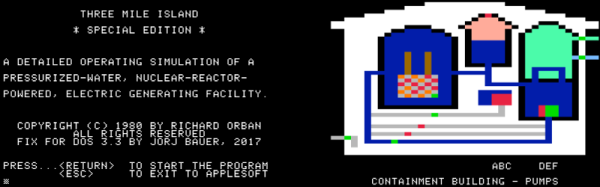
Fixing Bugs In A 37 Year Old Apple II Game

Emulators are a great way to reminisce about games and software from yesteryear. [Jorj Bauer] found himself doing just that back in 2002, when they decided to boot up Three Mile Island for the Apple II. It played well enough, but for some reason, crashed instantly if you happened to press the ‘7’ key. This was a problem — the game takes hours to play, and ‘7’ is the key for saving and restoring your progress. In 2002, [Jorj] was content to put up with this. But finally, enough was enough – [Jorj] set out to fix the bug in Three Mile Island once and for all.

The project is written up in three parts — the history of how [Jorj] came to play Three Mile Island and learn about Apple IIs in the first place, the problem with the game, and finally the approach to finding a solution. After first discovering the problem, [Jorj] searched online to see if it was just a bad disk image causing the problem. But every copy they found was the same. There was nothing left for it to be but problem in the binary.

Continue reading “Fixing Bugs In A 37 Year Old Apple II Game” →