

There is no safe way to kill a thread in Java from the outside, so we ask the thread to stop, either with Thread.interrupt() or with a volatile flag, and the thread ends itself by returning from run(). The old Thread.stop() method throws UnsupportedOperationException since Java 20.
We need to stop threads when a user cancels a long job, such as a report export, when a timeout ends or when the app shuts down. A cooperative stop lets the thread close files and connections and leave shared data in a consistent state.
The following example starts a worker that loops until it is interrupted, interrupts it and waits for it to end.
Thread worker = Thread.ofPlatform().start(() -> {
    while (!Thread.currentThread().isInterrupted()) {
        // process the next batch
    }
});
worker.interrupt();                     // asks the worker to stop
worker.join();
boolean alive = worker.isAlive();       // false
The call interrupt() only sets a flag, and the worker checks it at the top of every loop. We cover why Thread.stop() is gone, stopping with a flag, stopping with an interrupt, threads that ignore both and the way executors stop their tasks.
1. Why Java Has No Method to Kill a Thread
The JDK used to have one. The Thread.stop() method made the target thread throw ThreadDeath at whatever line it was running. As the exception moved up the stack, the thread released every monitor it held, so other threads could see objects in the middle of an update.
For example, a banking thread that has taken money from one account but not yet added it to the other would leave the money missing when stopped between the two lines. Because of that risk, the JDK phased the method out step by step.
| Java version | Change |
|---|---|
| 1.2 | Thread.stop(), suspend() and resume() deprecated |
| 14 | suspend() and resume() deprecated for removal |
| 18 | Thread.stop() deprecated for removal |
| 20 | Thread.stop(), suspend() and resume() throw UnsupportedOperationException |
| 23 | Thread.suspend(), Thread.resume(), ThreadGroup.stop(), suspend() and resume() removed |
In Java 25 the method still compiles, with a removal warning, and it always throws.
Thread job = Thread.ofPlatform().unstarted(() -> {});
job.stop();                             // UnsupportedOperationException
The replacement for Thread.stop() is a cooperative stop. The thread checks a variable regularly and returns from run() when the variable says so, and if it waits for long periods, we interrupt the wait.
2. Stopping a Thread With a volatile Flag
A flag is a boolean field that the stopping code sets and the thread reads on every loop iteration. The field must be volatile, or an AtomicBoolean, because without it the JVM may keep the value in a register or cache of the worker thread, which never sees the change. Our article on volatile explains that visibility rule.
Some examples need a thread that works slowly, so they call the helper pause(). It parks the thread with LockSupport.parkNanos(), which returns early on an interrupt but does not throw InterruptedException.
static void pause(long ms) {
    LockSupport.parkNanos(TimeUnit.MILLISECONDS.toNanos(ms));
}
The following ReportJob class writes report pages until someone calls stop(). The loop checks the flag before every page, so the job ends after the page it is writing.
class ReportJob implements Runnable {
    private volatile boolean running = true;
    private final AtomicInteger pages = new AtomicInteger();

    void stop() {
        running = false;
    }

    int pages() {
        return pages.get();
    }

    @Override
    public void run() {
        while (running) {
            pages.incrementAndGet();    // writes one page
            pause(10);
        }
        // close the report file here
    }
}
ReportJob job = new ReportJob();
Thread thread = Thread.ofPlatform().start(job);
pause(50);
job.stop();
boolean stopped = thread.join(Duration.ofSeconds(1)); // true
boolean wrotePages = job.pages() > 0; // trueA flag has one weakness. A thread that is blocked in a call such as BlockingQueue.take() does not look at the flag until the call returns, and the call may never return.
BlockingQueue<String> orders = new LinkedBlockingQueue<>();
AtomicBoolean keepGoing = new AtomicBoolean(true);
Thread listener = Thread.ofPlatform().start(() -> {
    try {
        while (keepGoing.get()) {
            orders.take();
        }
    } catch (InterruptedException e) {
        Thread.currentThread().interrupt();
    }
});
pause(50);
keepGoing.set(false);
boolean endedByFlag = listener.join(Duration.ofMillis(200));   // false, take() still blocks
listener.interrupt();
boolean endedByInterrupt = listener.join(Duration.ofSeconds(1));   // true
3. Stopping a Thread With interrupt()
Every thread has an interrupt flag. Calling interrupt() sets it, and the thread can read it with isInterrupted(). Blocking methods react to the flag on their own, so an interrupt reaches the thread both while it computes and while it waits.
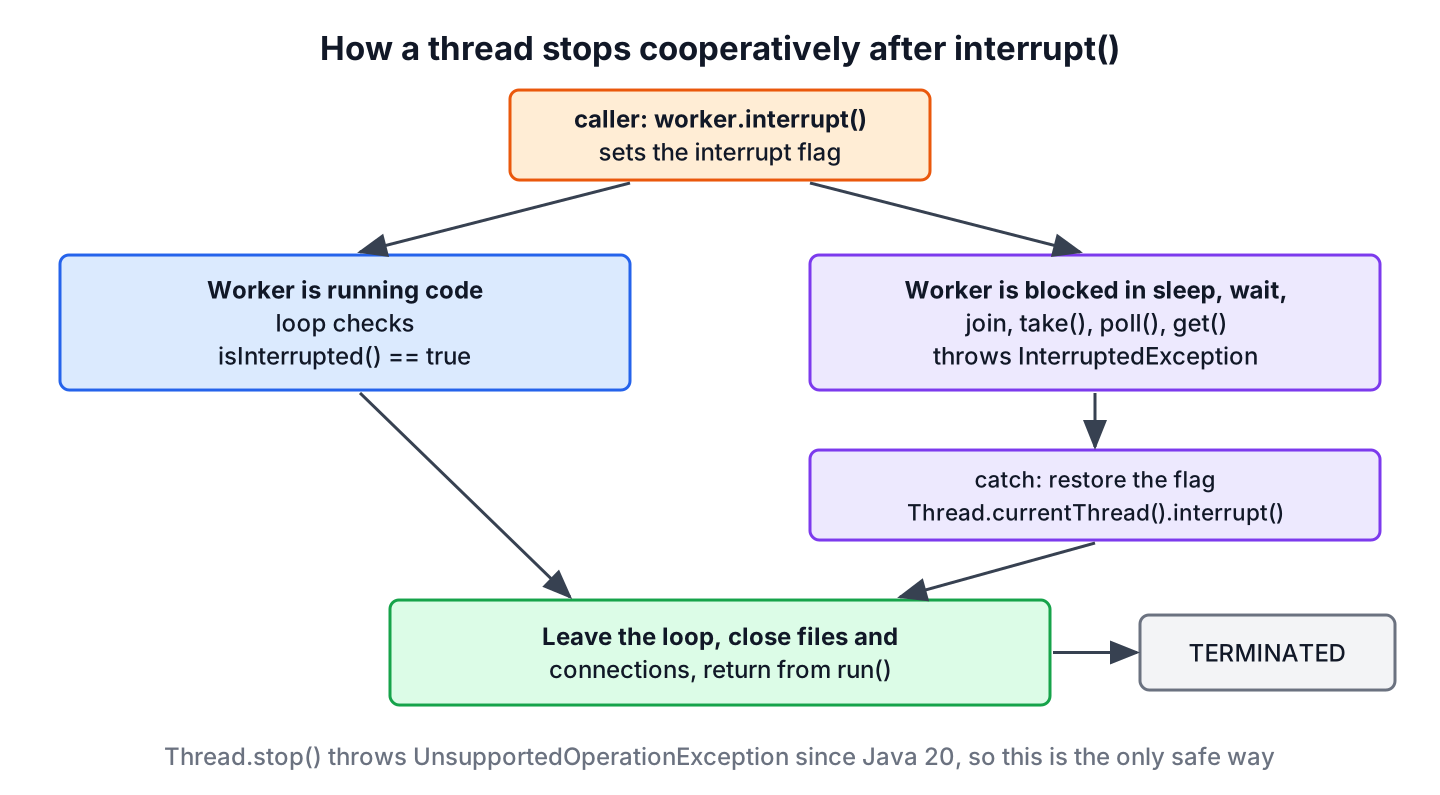
- The methods Thread.sleep(), Object.wait(), Thread.join(), BlockingQueue.take(), poll(timeout), Future.get() and Lock.lockInterruptibly() throw InterruptedException and clear the flag.
- An I/O call on an InterruptibleChannel closes the channel and throws ClosedByInterruptException.
- Code that does not block keeps running until it checks isInterrupted().
Say a mail app syncs an inbox in a background thread, and the user presses Cancel. The following InboxPoller polls a queue with a timeout, so it either finds a message or wakes up after 100 ms, and an interrupt ends both kinds of waiting.
class InboxPoller implements Runnable {
    private final BlockingQueue<String> inbox;
    private final List<String> handled = new CopyOnWriteArrayList<>();

    InboxPoller(BlockingQueue<String> inbox) {
        this.inbox = inbox;
    }

    List<String> handled() {
        return handled;
    }

    @Override
    public void run() {
        try {
            while (!Thread.currentThread().isInterrupted()) {
                String message = inbox.poll(100, TimeUnit.MILLISECONDS);
                if (message != null) {
                    handled.add(message);
                }
            }
        } catch (InterruptedException e) {
            Thread.currentThread().interrupt();   // keep the flag for the caller
        }
        // close the mail connection here
    }
}
BlockingQueue<String> inbox = new LinkedBlockingQueue<>(List.of("a", "b"));
InboxPoller poller = new InboxPoller(inbox);
Thread sync = Thread.ofPlatform().start(poller);
pause(50);
sync.interrupt();
boolean ended = sync.join(Duration.ofSeconds(1)); // true
List<String> mails = poller.handled(); // [a, b]The catch block sits outside the loop and restores the flag, so the thread leaves the loop after an interrupt. A catch block inside a loop that checks only its own flag does the opposite, because after an interrupt the wait throws again on every iteration and the loop spins until the flag changes.
Two methods read the flag, and they differ in one detail.
Thread.currentThread().interrupt();
boolean first = Thread.interrupted();    // true, and clears the flag
boolean second = Thread.interrupted();   // false
The instance method isInterrupted() only reads the flag, whereas the static method Thread.interrupted() reads and clears it. We use isInterrupted() in loop conditions, so the flag stays set for code further up the call stack.
4. Threads That Ignore Interrupts
Some blocking calls do not react to interrupt(), so a thread stuck in one of them keeps waiting. For each of them, the stopping code has to remove the reason for the wait.
| Thread is blocked in | Reaction to interrupt() | How to stop it |
|---|---|---|
| Reading a classic java.net.Socket stream | None | Close the socket, the read throws SocketException |
| Entering a synchronized block | None, stays BLOCKED | Fix the lock holder, or use lockInterruptibly() |
| Lock.lock() | None, only sets the flag | Use lockInterruptibly() or tryLock(timeout) |
| A long CPU loop without checks | Flag set, nothing else | Check isInterrupted() inside the loop |
| Third-party code that swallows InterruptedException | Lost | Use the library’s own cancel or close method |
For threads that may still hang, we add a time limit with join(Duration) and log the thread name and a thread dump, so we find the call that did not respond.
5. Stopping Tasks in an ExecutorService
Most code runs tasks on an executor and never holds the Thread. The executor uses the same interrupt mechanism, so a task that handles interrupts as in section 3 also stops through the executor API.
- The method Future.cancel(true) interrupts the thread that runs one task.
- The method shutdownNow() interrupts all running tasks and returns the tasks that never started.
- The method close(), since Java 19, waits for running tasks and calls shutdownNow() if the waiting thread is interrupted.
ExecutorService pool = Executors.newSingleThreadExecutor();
Future<?> sync = pool.submit(new InboxPoller(new LinkedBlockingQueue<>()));
pause(50);
boolean cancelled = sync.cancel(true);  // true, interrupts the task thread
Future.State state = sync.state();      // CANCELLED
pool.close();
The call pool.close() returns because the poller ended after the interrupt. A task that ignored the interrupt would keep close() waiting, which is why the task code matters more than the API we use to stop it. More on this is in cancelling a task in ExecutorService and shutting down an ExecutorService.
6. Stopping Threads When the App Exits
The JVM exits when the last non-daemon thread ends. A daemon thread does not keep the JVM alive, so it is cut off at exit without running its finally blocks, and virtual threads are always daemon threads.
For a clean shutdown, we register a shutdown hook with Runtime.getRuntime().addShutdownHook() that interrupts or closes our workers and waits for them with a timeout. Calling System.exit() runs the hooks but does not stop other threads cooperatively, so it is not a replacement for interrupting them. The Java concurrency guide links the related topics.
7. Killing a Thread FAQs
Searches for force-killing a thread mostly come from a thread that hangs, so most of these answers are about what to do when the polite way fails.
7.1. Can we force-kill a thread in Java?
No. Since Java 20, Thread.stop() throws UnsupportedOperationException, and no other API ends a thread from outside. If code must be killable, we run it in a separate process and end it with Process.destroy() or destroyForcibly().
7.2. Does interrupt() stop a thread right away?
No. It sets the interrupt flag and wakes the thread from interruptible blocking calls. The thread stops only when its code reacts, either by checking isInterrupted() or by leaving the loop after InterruptedException.
7.3. Why was Thread.stop() deprecated?
Because it stopped the thread at any line and released all its monitors, so objects that were halfway through an update became visible to other threads. Such damage shows up later and far away from the cause.
7.4. Should the stop flag be volatile?
Yes. Without volatile, or an AtomicBoolean, the worker thread may never see the new value and keeps running. A synchronized getter and setter also work, but volatile is simpler for one flag.
7.5. How do we stop a thread that runs an infinite loop?
We change the loop condition to while (!Thread.currentThread().isInterrupted()) or to a volatile flag, as in section 2, and call interrupt() or set the flag from outside. A loop that never checks either cannot be stopped short of ending the JVM.
7.6. Can we restart a thread after stopping it?
No. A terminated thread cannot be started again, and start() throws IllegalThreadStateException. To run the work again, we create a new Thread object or resubmit the task to an executor.
8. Conclusion
Java stops threads only cooperatively. We call interrupt() or set a volatile flag, and the thread checks it, cleans up and returns from run(), whereas Thread.stop() throws UnsupportedOperationException since Java 20.
The interrupt is the better default, because it also wakes threads that wait in sleep, wait(), join() or a queue. We restore the flag after catching InterruptedException, close sockets that ignore interrupts and use Future.cancel(true) or shutdownNow() for executor tasks.
9. References
- Thread Javadoc (Java 25)
- Java Thread Primitive Deprecation (Java 25)
- JDK 20 Release Notes, Thread.stop Changed to Throw UnsupportedOperationException
- Oracle JDK 25 Migration Guide, Removed APIs
Happy Learning !!

