
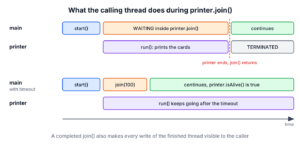
In Java, Thread.join() makes the current thread wait until another thread terminates. When thread A calls b.join(), A stops at that line, and it continues only after B has finished its run() method, or after a timeout if we pass one.
We use join() when one step needs the result or the side effects of a thread that runs another step, for example when a report thread must wait for a data import thread. A successful join() also makes every write of the finished thread visible to the joining thread.
The following example starts a thread that prints wedding cards, and the main thread joins it before it sends them.
List<String> steps = Collections.synchronizedList(new ArrayList<>());
Thread printer = Thread.ofPlatform().start(() -> steps.add("cards printed"));
printer.join();                         // main waits here until printer ends
steps.add("cards sent");
List<String> order = List.copyOf(steps);   // [cards printed, cards sent]
The line “cards sent” always comes second, no matter how the scheduler runs the two threads. We cover the three join() overloads and the newer join(Duration), interrupts, deadlocks, the memory guarantee of join() and the difference between yield() and join(). To wait for many threads or tasks at once, see waiting for threads to finish.
1. Introduction to Thread Joining
A thread runs independently of the thread that started it, so the starting thread does not know when the work is done. Joining connects the two, because the joining thread waits in the WAITING state until the joined thread reaches TERMINATED.
Say a wedding planner app runs three steps in separate threads. The cards are printed only after the venue is booked, and they are delivered only after printing. Each step joins the thread of the step before it, so the steps run in order although each one has its own thread.
static Thread startAfter(Thread previous, Runnable step) {
    return Thread.ofPlatform().start(() -> {
        try {
            previous.join();
            step.run();
        } catch (InterruptedException e) {
            Thread.currentThread().interrupt();
        }
    });
}
List<String> plan = Collections.synchronizedList(new ArrayList<>());
Thread venue = Thread.ofPlatform().start(() -> plan.add("venue booked"));
Thread printing = startAfter(venue, () -> plan.add("cards printed"));
Thread delivery = startAfter(printing, () -> plan.add("cards delivered"));
delivery.join();
List<String> done = List.copyOf(plan); // [venue booked, cards printed, cards delivered]The helper startAfter() restores the interrupt flag when the join is interrupted, so the step is skipped instead of running too early. A chain like this works, but when each step depends on the previous result, a CompletableFuture chain with thenRun() expresses the same order without extra threads that only wait.
2. Java Thread.join() API
The join() methods are final instance methods of Thread. We call them on the thread we want to wait for, and the thread that makes the call is the one that waits.
| Method | Waits | Returns |
|---|---|---|
| join() | Until the thread terminates | void |
| join(long millis) | At most millis ms, 0 means forever | void |
| join(long millis, int nanos) | At most millis ms plus nanos ns | void |
| join(Duration duration), Java 19 | At most the duration | true if the thread has terminated |
All four throw InterruptedException when the waiting thread is interrupted.
2.1. Joining Without a Timeout
The no-argument join() behaves like join(0) and waits as long as the thread runs. If the thread has not been started, join() returns at once, because a thread that never started is not alive.
Thread idle = Thread.ofPlatform().unstarted(() -> {});
idle.join();                            // returns at once, idle was never started
boolean alive = idle.isAlive();         // false
2.2. Joining With a Timeout
A timeout protects the caller from a thread that hangs. The void overloads do not tell us whether the thread finished, so we check isAlive() after the call. The timing depends on the OS scheduler, so the method can return a little later than the timeout.
The examples simulate slow work with the helper pause(), which parks the current thread for the given number of milliseconds, the same way Thread.sleep() would.
static void pause(long ms) {
    LockSupport.parkNanos(TimeUnit.MILLISECONDS.toNanos(ms));
}
Thread export = Thread.ofPlatform().start(() -> pause(500));
export.join(100);
boolean stillRunning = export.isAlive(); // true, join gave up after 100 ms
export.join();
boolean finished = !export.isAlive(); // true2.3. Joining With a Duration
Java 19 added join(Duration), which returns true if the thread has terminated and false if the time ran out. That saves the extra isAlive() call. Unlike join(), it throws IllegalThreadStateException for a thread that was never started.
Thread upload = Thread.ofVirtual().start(() -> pause(300));
boolean quick = upload.join(Duration.ofMillis(50));      // false
boolean done = upload.join(Duration.ofSeconds(2));       // true
Thread draft = Thread.ofPlatform().unstarted(() -> {});
boolean never = draft.join(Duration.ofMillis(10));       // IllegalThreadStateException
The method works the same for virtual threads. When the joining thread is itself virtual, the JVM unmounts it from its carrier while it waits, so many virtual threads can wait for each other at low cost.
3. Interrupting a Joined Thread
An interrupt affects the thread that waits in join(), not the thread it waits for. The waiting thread gets InterruptedException, its interrupt flag is cleared, and the joined thread keeps running.
AtomicReference<String> outcome = new AtomicReference<>();
Thread worker = Thread.ofPlatform().start(() -> pause(300));
Thread coordinator = Thread.ofPlatform().start(() -> {
    try {
        worker.join();
        outcome.set("joined");
    } catch (InterruptedException e) {
        outcome.set("interrupted");
        Thread.currentThread().interrupt();
    }
});
pause(50);
coordinator.interrupt();
coordinator.join();
String result = outcome.get();              // "interrupted"
boolean workerAlive = worker.isAlive();     // true, the worker is not affected
worker.join();
The catch block restores the flag, so code further up in the coordinator can see that someone asked it to stop. If we want the worker to stop as well, we interrupt the worker too, as described in our guide to stopping a thread.
4. Watch Out for Deadlocks
Two threads that join each other wait forever, because each one terminates only after the other does. The same happens when a thread joins itself, since it cannot terminate while it waits. A timeout turns the hang into a value we can check.
boolean selfJoined = Thread.currentThread().join(Duration.ofMillis(100)); // falseA less obvious case is a thread that holds a lock and joins a thread that needs the same lock. The joined thread stays BLOCKED, the joining thread stays WAITING, and a thread dump shows both. We avoid calling join() inside synchronized blocks, and we use a timeout when the other thread runs code we do not control. More patterns are in writing and resolving a deadlock.
5. join() and Memory Visibility
Everything a thread writes before it terminates is visible to a thread that returns from join() on it. This guarantee is a happens-before relation, so we can read the results of the joined thread without volatile or locks.
int[] total = new int[1];
Thread adder = Thread.ofPlatform().start(() -> total[0] = 42);
adder.join();
int seen = total[0];                    // 42
The guarantee holds once the joining thread has seen that the thread terminated, either because join() returned for that reason or because isAlive() returned false. After a timed join() that gave up, or while isAlive() returns true, we have no such guarantee and need proper synchronization.
6. Difference Between yield() and join()
The two methods are often compared in interviews, but they do different jobs. The Thread.yield() method is a static hint that the current thread is willing to give up the CPU, and the scheduler is free to ignore it. The join() method waits for another thread with a clear result.
Thread.yield(); // a hint only, the thread may keep runningOlder tutorials explained yield() with thread priorities and printed outputs where two threads take turns line by line. That output is not reproducible. Priorities are only hints to the OS, virtual threads ignore setPriority() and always run with NORM_PRIORITY, and yield() is rarely appropriate in application code. For a busy-wait loop, Thread.onSpinWait() is the better hint, and for waiting on another thread, join() or a latch is the correct tool.
| Aspect | Thread.yield() | t.join() |
|---|---|---|
| Kind of method | static, current thread | Instance method, called on the thread to wait for |
| Effect | Hint to let other threads run | Waits until t terminates or the timeout ends |
| Guaranteed result | None | The current thread continues only after t ends |
| Thread state | Stays RUNNABLE | WAITING or TIMED_WAITING |
| Throws InterruptedException | No | Yes |
| Typical use | Rare tuning of spin loops | Waiting for a result or side effect of another thread |
Neither method releases a lock, and neither replaces wait() and notify(). The sleep vs wait article covers the methods that pause a thread for a time or until a signal.
7. join() Compared With Higher-Level Tools
The join() method needs a Thread object, so it fits code that creates threads with Thread.ofPlatform(), Thread.ofVirtual() or new Thread(). Code that submits tasks to an executor has no Thread to join, and it waits through the task API instead.
- To wait for one task, we call get() on its Future.
- To wait for all tasks of an executor, we close it with try-with-resources, because ExecutorService has been AutoCloseable since Java 19.
- To wait for a fixed number of events from any thread, we use a CountDownLatch.
- To combine asynchronous results, we use CompletableFuture.allOf().
Each of them gets a full example in our article on waiting for all threads to finish, and the Java concurrency guide lists the rest of the toolbox.
8. Thread join() FAQs
Edge cases come up as soon as join() leaves a textbook example, such as a thread that never started or a thread that joins itself.
8.1. Does join() start the thread?
No. The join() method only waits. On a thread that was never started, join() returns at once, and join(Duration) throws IllegalThreadStateException, so we always call start() first.
8.2. What is the difference between join() and join(0)?
There is none. The method join() behaves the same as join(0), and a timeout of 0 means wait forever. A negative timeout throws IllegalArgumentException for the long overloads.
8.3. Does join() release locks?
The join() method does not release monitors that the calling thread holds. On platform threads it is built on wait() on the Thread object, but that releases only the monitor of the Thread object, which is why the JDK tells us not to use wait() or notify() on Thread instances ourselves.
8.4. How do we join multiple threads?
We call join() on each thread in a loop. The loop takes about as long as the slowest thread, since join() on a thread that has already finished returns at once. For tasks in an executor, closing the executor or invokeAll() is simpler, as shown in invokeAll().
8.5. Is join() the same as yield()?
No. The join() method waits for another thread to terminate, whereas yield() is a hint about the current thread that the scheduler may ignore, as the table in section 6 shows.
9. Conclusion
The join() method makes the current thread wait until another thread terminates, and join(long) and join(Duration) add a timeout, where only the Duration overload tells us the outcome. An interrupt stops the waiting thread, not the joined one.
A completed join() also makes the results of the finished thread visible. We avoid joins inside synchronized code and joins between threads that wait for each other, and we leave yield() out of application code.
10. References
Happy Learning !!


The example given in section 3 is not right.
Thanks for providing the feedback. I have updated the code.