Icon of program: Glogg

Glogg for Windows

  • Free
  • 4
    12
  • 34.2K
  • V1.1.4
Free Download for Windows

View an ad to download for free

Image

Kyle Juffs

Updated 2 years ago

Open and Read Log Files Easily with this App

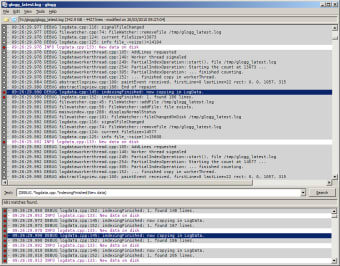
Glogg is an open-source and small but powerful cross-platform log viewer app that lets you browse and search through long or complex log files on your computer system. Log files are created for every action and command happening in your system in order to track all progress made by the computer. Thus, when any issue arises due to the coding, programmers or system administrators can check out the log files to find where the source of the problem came from and start working out a solution from there. Since log files can be massive and complicated to read, log viewers like Glogg are created to handle large amounts of log data to be easy to use. 

Top Recommended Alternative

No More Needle in a Haystack

Log files are very important and must be easily accessible, even for complex online networks. It's for this reason that your log viewer should be easy to navigate. Glogg’s great performance relies on its simple and intuitive design. There’s no tutorial and manual in the app itself, but it’s quite easy to use, even while supporting multiple platforms such as Windows, macOS, and Linux. The app mostly serves as a graphical and interactive log viewer. You can use regular expressions to search for what you’re looking for, whether an error you need to fix or the result of a code you tried to test. The app displays its findings on a results window, letting you further isolate the lines you need. Glogg’s main features are its colorization of the log and search results, reading directly from the disk and not loading the log through the memory, and its ability to follow the log in real-time. These allow the app to perform surprisingly fast. Its performance is not even hindered by the size of the files. It also lets you easily see what you need to see despite the clutter of various lines and text in the log. All in all, Glogg is an app that is highly reliable and recommended for programmers and system administrators.


Image

Kyle Juffs

Kyle Juffs combines more than 15 years of gaming experience with a background in digital marketing. He specializes in writing about games, technology, and online marketing, producing long-form content that is both authoritative and approachable, with a focus on clarity and reader engagement.

  • Pros

    • Colored text
    • Fast in opening and searching the log
    • Can read in real-time
    • Cross-platform
  • Cons

    • Features may be too simple for experts
    • Lacks tutorial and manual
Image
 0/1

App specs

  • License

    Free

  • Version

    1.1.4
  • Latest update

  • Platform

    Windows

  • OS

    Windows 10

  • Language

    English

  • Downloads

    34.2K

    Last month's downloads

    • 74
  • Size

    6.78 MB

  • Developer

Program available in other languages


Icon of program: Glogg

Glogg for PC

  • Free
  • 4
    12
  • 34.2K
  • V1.1.4
Free Download for PC

View an ad to download for free


User reviews about Glogg

Have you tried Glogg? Be the first to leave your opinion!

Add review

You may also like

Alternatives to Glogg

Explore Apps

Latest articles

Laws concerning the use of this software vary from country to country. We do not encourage or condone the use of this program if it is in violation of these laws.
Softonic

Is Glogg safe?

100/100

Score result: Clean

This file passed a comprehensive security scan using VirusTotal technology. It is safe to download.

  • Virus free
  • Spyware free
  • Malware free
  • Verified by Security Partners

    VirusTotal logo

Scan Info

Last scan
Wednesday, September 30, 2020
Scan provider
VirusTotal · Full report

File Integrity

File
glogg-latest-x86_64-setup.exe
SHA256
08fe13b713327bef93298b6d11717a93bbaa9d49165995be93f4a3282e76b22f
SHA1
b943e14c5bea9ec4b7e527fb2fcc0d4d02b82697

Softonic security commitment

Glogg has been thoroughly scanned by our advanced security systems and verified by industry-leading partners. This file comes from the official developer and has passed all our security checks, showing no signs of viruses, malware, or spyware. For more information, visit our Security and Trust Center