
Keep your PC active without lifting a finger
Move Mouse is a free and handy productivity tool developed by ellabi. It is designed to simulate user activity and prevent your PC from going idle. Whether you’re giving a presentation, watching a movie, or staying online in messaging apps, this lightweight tool keeps your screen awake and your status active—all without physical interaction.
Top Recommended Alternative
Unlike many basic mouse jigglers, Move Mouse offers a suite of automation features: customizable intervals, random or scheduled movements, multi-monitor support, application-specific triggers, blackout periods, logging, and even screen capturing—all designed for flexible, human-like interaction.
Custom actions and scheduling flexibility
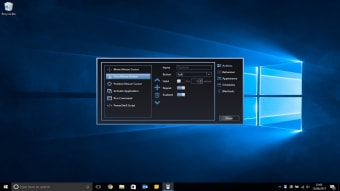
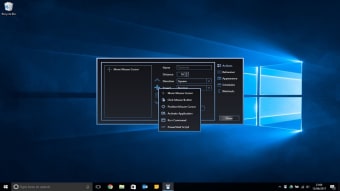
Move Mouse allows for mouse cursor movements, clicks, mouse cursor positions, and keystrokes, all customizable through a clean interface. Advanced users can create automated scripts for precise behavior and scheduling. It includes a built-in feature to execute custom PowerShell scripts, allowing users to automate complex tasks alongside its activity simulation. The blackout and timing features make it especially useful for remote workers or anyone needing to maintain activity during long sessions.
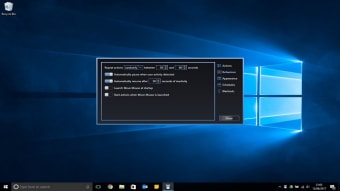
Another notable feature of this program is that it can pause when it detects mouse or keyboard input, then resume automatically after a set period of inactivity. There’s also an option to launch at Windows startup, start running immediately, operate while locked, or pause when on battery power. While it’s user-friendly for basic use, the scripting capabilities can overwhelm less tech-savvy users.
However, it remains a solid option for both casual and power users due to its rich configuration options and minimal system footprint. It is particularly handy for remote work or long-running tasks, as it helps maintain session continuity without manual intervention. This app doesn’t transmit your data, operating silently in the background, making it suitable for environments like remote work or IT sessions.
Simple yet powerful idle management tool
Move Mouse is a lightweight, free utility that keeps your PC active by simulating user activity through customizable mouse movements, clicks, and keystrokes. With advanced scheduling, scripting, blackout periods, and app-specific triggers, it offers flexibility for both casual and power users. Ideal for remote work and long-running tasks, it operates quietly without transmitting data, ensuring session continuity while remaining secure, unobtrusive, and easy to configure for varied needs.