scantron

Bubbles, Belts, And Bulbs: How The Scantron Works

Many of us remember back in our school days taking tests and filling out answers on a Scantron sheet, those long rows of A, B, C, D, and E that had to be filled in with a #2 pencil. Ever wonder why it needed a #2 pencil, or what the point of using a Scantron was at all? That question is answered in the latest video from [SimonRetro], where he takes a look at the Scantron and how it works.

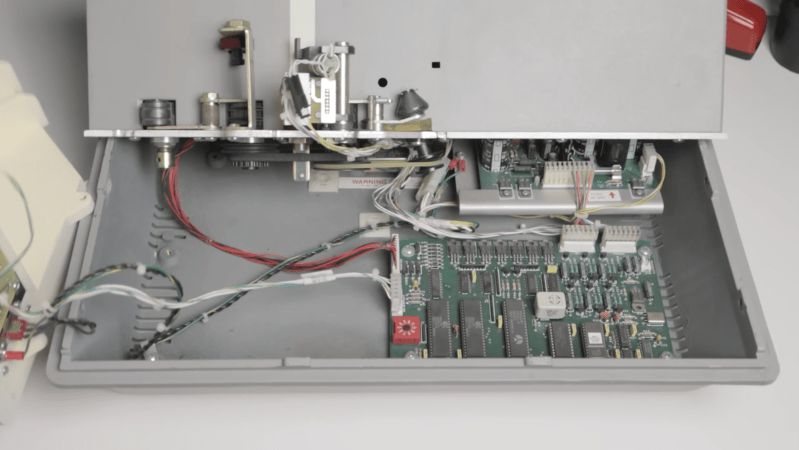
One of the more interesting things about the Scantron is that it’s such a standalone device. No software needed, no keypad to mess with just two rocker switches. The on/off switch is also the way you tell it to forget the last answer sheet and allow you to program in a new test. Upon booting, you feed in a Scantron sheet with some specific boxes filled in, and then it’s programmed and ready to take in and grade all the students’ answers. Opening up the Scantron reveals it’s pretty interesting inside: one control board with early-’90s-era chips. There’s also a lightbulb (no LEDs) shining through the six reading sections of the card, as well as an arrangement of belts and motors to move the card through the machine. The printer is a seven-pin printer used in conjunction with a pair of ink rollers to print out the results on the cards.

[SimonRetro] also went ahead and tried different ways to mark the sheets including pens, Sharpies, colored pencils, and different thicknesses of pencils besides the #2 to see which would and wouldn’t work in the Scantron. Thanks [SimonRetro] for exploring this machine from many of our childhoods and sharing its inner workings. Be sure to check out some of our other reverse engineering articles that explore how classic devices work.

Continue reading “Bubbles, Belts, And Bulbs: How The Scantron Works”
Image

Mirror Turns Webcam Into Document Camera

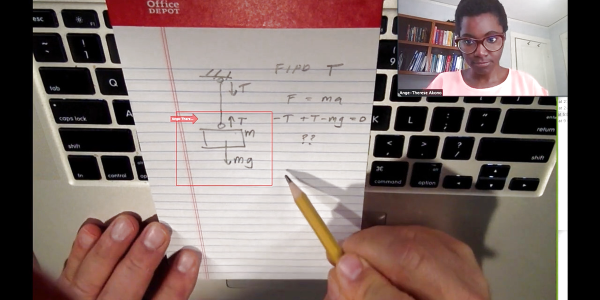
This is one of those so-simple-I-wish-I-invented-it hacks. Professor [Michael Peshkin] is teaching his engineering students remotely. While he has a nice second camera that he can use to transmit whatever he doodles on paper, most of his students just have the single webcam built into their laptops.

The solution is to put a mirror in front of the laptop cam, and flip the image left-to-right in software. They use Zoom, which has a mirror mode. Done.

The trick is making a nice frame. [Michael] has bent one out of wire, but suggests that a mirror compact works about as well in a pinch. It’s super important that his students can ask him questions backed up by drawings, and this reduces the startup cost to nearly nothing, making it universally useful.

[Prof. Peshkin] is not a stranger to mirror-based pedagogical hacks. Seven years ago, he showed us how to make a transparent whiteboard for video lectures, and it blew up on Hackaday. Since then, there are hundreds or thousands of Lightboards in the wild. We hope this idea catches on as well!

Image

MakerBot Targets Schools With Rebranded Printers

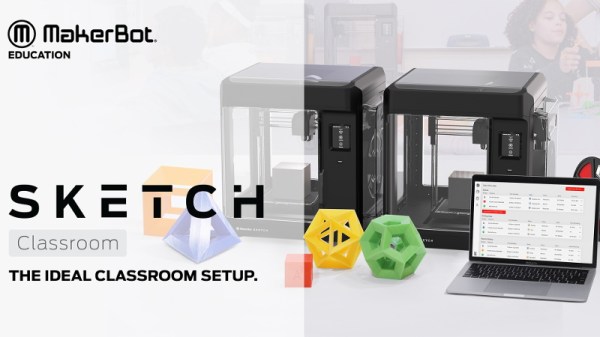
MakerBot was poised to be one of the greatest success stories of the open source hardware movement. Founded on the shared knowledge of the RepRap community, they created the first practical desktop 3D printer aimed at consumers over a decade ago. But today, after being bought out by Stratasys and abandoning their open source roots, the company is all but completely absent in the market they helped to create. Cheaper and better printers, some of which built on that same RepRap lineage, have completely taken over in the consumer space; forcing MakerBot to refocus their efforts on professional and educational customers.

This fundamental restructuring of the company is perhaps nowhere more evident than in the recent unveiling of “SKETCH Classroom”: an $1,800 package that includes lesson plans, a teacher certification program, several rolls of filament, and two of the company’s new SKETCH printers. It even includes access to MakerBot Cloud, a new online service that aims to help teachers juggle student’s print jobs between multiple SKETCH printers.

Of course, the biggest takeaway from this announcement for the average Hackaday reader is that MakerBot is releasing new hardware. Their last printer was clearly not designed (or priced) for makers, and even a current-generation Replicator costs more than the entire SKETCH Classroom package. On the surface, it might seem like this is a return to a more reasonable pricing model for MakeBot’s products; something that could even help them regain some of the market share they’ve lost over the years.

There’s only one problem, MakerBot didn’t actually make the SKETCH. This once industry-leading company has now come full-circle, and is using a rebranded printer as the keystone of their push into the educational market. Whether they were unable to build a printer cheap enough to appeal to schools or simply didn’t want to, the message is clear: if you can’t beat them, join them.

Continue reading “MakerBot Targets Schools With Rebranded Printers”

Image

School’s In Session With Arduboy Curriculum

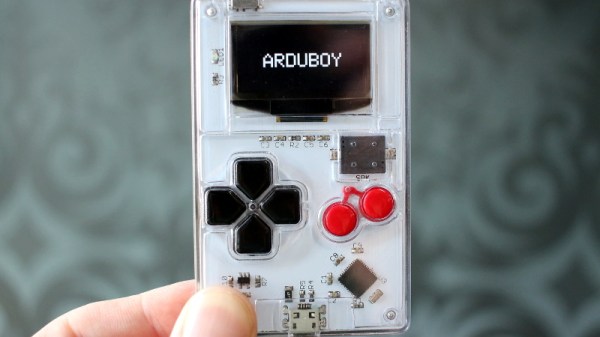
It’s hard not to be impressed by the Arduboy. In just a few short years, [Kevin Bates] went from proof of concept to a successful commercial product without compromising on his original open source goals. Today, anyone can develop a game for the Arduboy and have it distributed to owners all over the world for free. If you’ve ever dreamt of being a game developer, the Arduboy community is for you.

Realizing the low-cost hardware and open source software of the Arduboy makes it an excellent way to learn programming, [Kevin] is now trying to turn his creation into a legitimate teaching tool. He’s kicking off this new chapter in the Arduboy’s life with a generous offer: giving out free hardware to educators all over the world. Anyone who wants to be considered for the program just needs to write-up a few paragraphs on how they’d utilize the handheld game system in their class.

Image[Kevin] already knows the Arduboy has been used to teach programming, but those have all been one-off endeavours. They relied on a teacher that was passionate enough about the Arduboy to put in their own time and effort to create a lesson plan around it. So one of the main goals right now is getting an official curriculum put together so educators won’t have to start from scratch. The community has already developed 16 free lessons, but they’re looking for help in creating more and translating them into other languages.

While the details are still up in the air, [Kevin] also plans to travel to schools personally and help them get their Arduboy classes off the ground. He’s especially interested in developing countries and other areas that are disadvantaged educationally. Believing that the Arduboy is as much a way to teach effective leadership and teambuilding as it is programming, he thinks this program can truly make a difference.

Since [Kevin] first Rickrolled us with his prototype in 2014, we’ve seen the Arduboy project spread like wildfire through the hacker community. From figuring out how to play its games on other gadgets to developing an expansion cartridge for the real thing, the Arduboy has already done its fair share of inspiring. Here’s hoping it has just as much of an impact on the next generation of hackers once they get their hands on it.

Image

Expert Says Don’t Teach Kids To Code

I was a little surprised to see a news report about Andreas Schleicher, the director of education and skills at OECD — the Organization for Economic Cooperation and Development. Speaking at the World Innovation Summit for Education in Paris, Schleicher thinks that teaching kids to code is a waste of time. In particular, he seems to think that by the time a child today grows up, coding will be obsolete.

I can’t help but think that he might be a little confused. Coding isn’t going away anytime soon. It could, of course, become an even deeper specialty, and thus less generally applicable. But the comments he’s made seem to imply that soon we will just tell smart computers what we want and they will just do that. Somewhat like computers work on Star Trek.

What is more likely is that most people will be able to find specific applications that can do what they want without traditional coding. But someone still has to write something for the foreseeable future. What’s more, if you’ve ever tried to tease requirements out of an end user, you know that you can’t just blurt out anything you want to a computer and expect it to make sense. It isn’t the computer’s fault. People — especially untrained people — don’t always make sense or communicate unambiguously.

Continue reading “Expert Says Don’t Teach Kids To Code”

Image

Computer Programming Unplugged For Kids

There was a time when computers were far too expensive to let mere students use them. In those days, we wrote fake programs for fictitious machines and checked them by hand. That wasn’t fun, but it did teach you to think about the algorithm. You weren’t worried about how many tabs to indent code in the editor, or checking your social media feed, or changing the track on your Spotify playlist. Maybe that was the idea behind Computer Science Unplugged. The site is aimed at educators and gives them lesson plans to teach kids about computer concepts through activities that don’t use a computer.

The target ages are from 5 to 14 and topics range from binary numbers, sorting, searching, error detection, and robotics. For example, one exercise has students line up to be bits in a binary number. Each kid holds a card that is blank on one side or has the right number of dots on the other (for example, bit 0 has 1 dot, bit 2 has 4 dots, and so on).

Continue reading “Computer Programming Unplugged For Kids”

Image

Kniwwelino Is An ESP8266 Micro:Bit

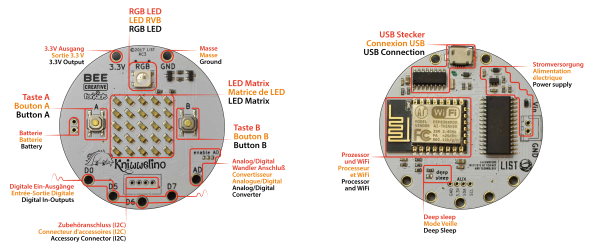
Kniwwelino is the latest in a line of micro:bit-inspired projects that we’ve seen, but this one comes with a twist: it uses an ESP8266 and WiFi at the core instead of the nR51 ARM/BTLE chip. That means that students can connect via laptop, cellphone, or anything else that can get onto a network.

That’s not the only tradeoff, though. In order to get the price down, the Kniwwelino drops the accelerometer/magnetometer of the micro:bit for a programmable RGB LED. With fewer pins to break out, the Kniwwelino is able to ditch the love-it-or-hate-it card-edge connector of the micro:bit as well. In fact, with all these changes, it’s hard to call this a micro:bit clone at all — it’s more like a super-blinky ESP8266 development kit.

ImageSo what have they got left in common? The iconic 5×5 LED matrix in the center, and a Blockly visual programming dialect dedicated to the device. Based on the ESP8266, the Kniwwelino naturally also has an Arduino dialect that students can “graduate” to when they’re tired of moving around colored blobs, and of course you could flash the chip with anything else that runs on an ESP8266.

We don’t have one in our hands, but we like the idea. An RGB LED is a lot of fun on Day One, and the fact that the Kniwwelino fits so neatly into existing bodies of code makes the transition from novice to intermediate programmer a lot easier. These things are personal preference, but WiFi beats Bluetooth LE in our book, for sheer ubiquity and interoperability. Finally, the Kniwwelino comes in at about half the manufacturing cost of a micro:bit, which makes it viable in schools without large manufacturer subsidies. They’re estimating $5 per unit. (Retail is higher.) On the other hand, the Kniwwelino is going to use more juice than its ARM-based competitor, and doesn’t have an accelerometer.

Kniwwelino is apparently derived from a luxembourgish word “kniwweln” that apparently means to craft something. The German Calliope Mini is named after Zeus’ daughter, the programmer’s muse. We’re stoked to see so many cute dev boards getting into the hands of students, no matter what you call them.