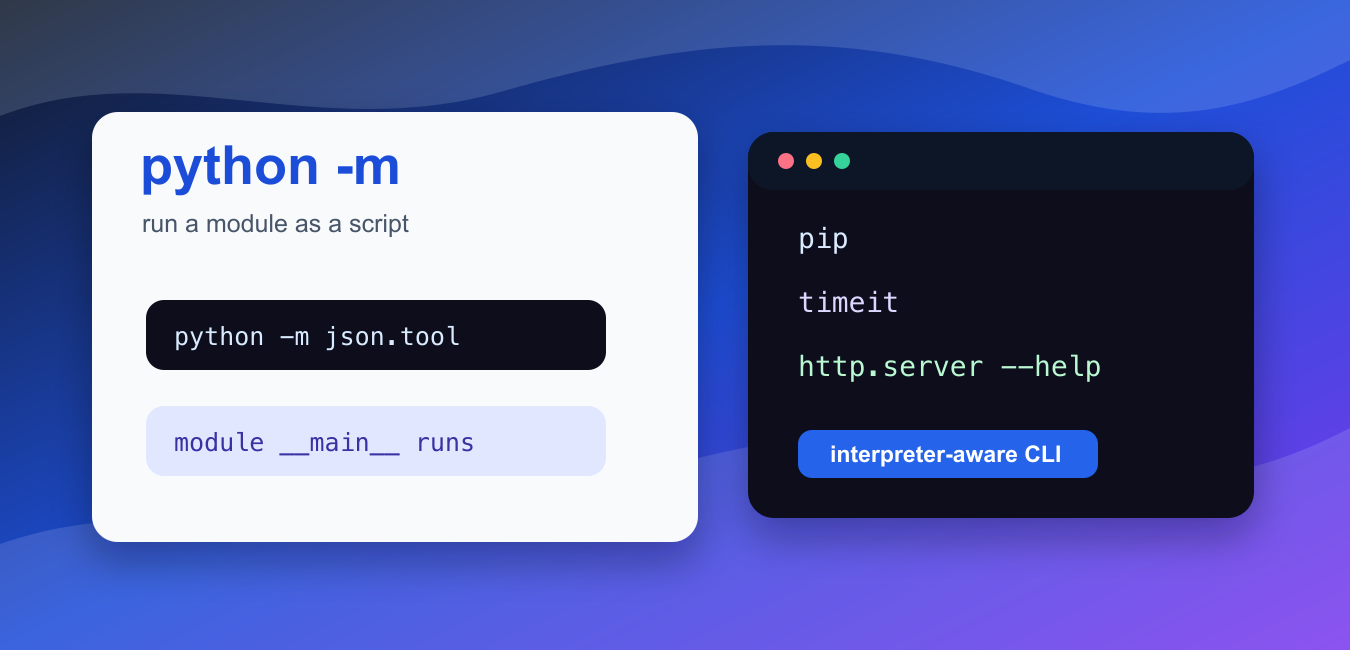
Quick answer: python -m locates a module through the selected interpreter’s import system and runs it as __main__. It is useful for environment-aware tools such as pip and venv and for packages that provide a __main__.py entry point.

The Python -m flag runs a module as a script. Instead of passing a file path, you pass a module name, and Python finds that module on the import path and executes it as __main__.
This is useful for tools such as pip, json.tool, timeit, http.server, unittest, and packages that provide a command entry point through a __main__.py file.
The official Python documentation explains the -m command-line option, the runpy module, and __main__ behavior.
The most important practical benefit is interpreter selection. python -m pip uses the pip module from that exact Python interpreter, which avoids many environment mix-ups.
Use -m when the module is meant to be run as a command, when you want the active interpreter to choose the tool, or when a package provides a __main__.py file.
Do not use -m for arbitrary import-only modules unless they were designed to run as commands. Some modules expose functions but have no command-line behavior.
The module name is written with dots, not slashes. For example, json.tool is a module name, while json/tool.py is a file path. Python resolves the module using the same import machinery it uses for normal imports.
This means the current working directory and environment still matter. If a local package shadows a real package, -m may run the local one. Use virtual environments and clear project layouts to avoid surprises.
The flag is also useful in documentation because it avoids guessing whether the executable is called python, python3, or a full virtual-environment path. In scripts, sys.executable gives the same interpreter path programmatically.
Run pip With The Active Python
python -m pip is safer than calling a random pip executable because it uses the current interpreter.
import subprocess
import sys

result = subprocess.run(
    [sys.executable, "-m", "pip", "--version"],
    text=True,
    capture_output=True,
)

print(result.returncode)
print("pip" in result.stdout)
This pattern is useful in virtual environments, CI jobs, and notebooks where several Python versions may be installed.
If a package installs into one Python but your program runs under another, imports can fail even though installation looked successful. Running pip through -m is the simplest way to target the interpreter you care about.
Format JSON With json.tool
Many standard-library modules have small command-line interfaces. json.tool validates and pretty-prints JSON.
import subprocess
import sys

raw_json = '{"name": "Ada", "active": true}'
result = subprocess.run(
    [sys.executable, "-m", "json.tool"],
    input=raw_json,
    text=True,
    capture_output=True,
    check=True,
)

print(result.stdout.splitlines()[0])
print('"name"' in result.stdout)
The module is imported and executed as a command. The input arrives on standard input, and the formatted JSON is written to standard output.
This pattern is handy for quick validation because it uses a tool that ships with Python. If the JSON is invalid, the command exits with an error instead of silently accepting bad input.
Read Help For A Module Command
You can ask command-style modules for help without starting their normal service behavior.
import subprocess
import sys

result = subprocess.run(
    [sys.executable, "-m", "http.server", "--help"],
    text=True,
    capture_output=True,
    check=True,
)

print("usage" in result.stdout.lower())
This confirms that http.server has command-line behavior. Running it without --help would start a local server, so use help output for safe inspection.
Help checks are a safe way to learn module options before running a command that opens a port, writes files, or performs a longer task.
Run timeit As A Module
timeit can benchmark a short statement from the command line.
import subprocess
import sys

result = subprocess.run(
    [sys.executable, "-m", "timeit", "-n", "1", "-r", "1", "sum(range(10))"],
    text=True,
    capture_output=True,
    check=True,
)

print("loop" in result.stdout or "loops" in result.stdout)
This is the same idea as typing python -m timeit ... in a terminal, but the example uses sys.executable so it works with the current interpreter.
For quick timing checks, python -m timeit is often easier than writing a separate script. For repeatable benchmarking, keep the command in documentation or a project task so others can run the same measurement.
Run A Package __main__.py
A package can support python -m package_name by defining a __main__.py file.
import subprocess
import sys
from pathlib import Path
from tempfile import TemporaryDirectory

with TemporaryDirectory() as directory:
    root = Path(directory)
    package = root / "demo_package"
    package.mkdir()
    (package / "__init__.py").write_text("", encoding="utf-8")
    (package / "__main__.py").write_text("print('package command')\n", encoding="utf-8")

    result = subprocess.run(
        [sys.executable, "-m", "demo_package"],
        cwd=root,
        text=True,
        capture_output=True,
        check=True,
    )

print(result.stdout.strip())
Python finds the package on the import path, then executes its __main__.py. This is how packages can expose a module-based command.
Packages that do not include __main__.py cannot be run this way. They may still be importable, but Python needs a clear entry point for command execution.
Check A Module Before Running It
importlib.util.find_spec() can check whether a module is importable before you try to run it.
import importlib.util

for name in ["json.tool", "timeit", "missing_demo_module"]:
    found = importlib.util.find_spec(name) is not None
    print(name, found)
This does not prove the module has command-line behavior, but it tells you whether Python can locate it in the current environment.
Common mistakes include writing python -m path/to/file.py instead of a module name, using the wrong interpreter, or expecting every importable module to behave like a command.
Another mistake is running -m from a directory where a local file has the same name as the intended package. If output looks wrong, print the module location or run from a clean project directory.
Use direct script paths when you need to run one specific file. Use -m when you want Python to resolve a module or package through the import system.
In short, use python -m module_name when a module or package is designed to run as a command. It keeps the command tied to the active interpreter and avoids many path and environment surprises.
Module Name Versus Script Path
python script.py executes a file path. python -m package.module resolves a module on sys.path and executes it as the main module, without requiring a .py extension. The active interpreter, current directory, and installed environment therefore affect what can be found.
# Run a module, not a filename:
# python -m http.server 8000

import sys
print(sys.argv[0])
Keep Tools In The Same Environment
Use python -m pip so pip belongs to the interpreter that will run the program. The same principle applies to venv, pytest, and other installed module tools. It prevents a shell PATH from silently selecting a different Python installation.
# These commands target the named python interpreter:
# python -m pip install requests
# python -m venv .venv
# python -m pip show requests
Run A Package Entry Point
When the module name identifies a package, Python looks for that package’s __main__.py and executes it. Arguments after the module name become sys.argv entries, so a package can expose a command-line interface without relying on a fragile working-directory path.
# project/cli/__main__.py
# Run it from the project environment:
# python -m cli --verbose

import sys
print(sys.argv)
Read the Python -m command-line documentation for module resolution and argument behavior.
For environment-safe command execution, compare checking the active Python version, pip versus pip3, and the current directory.
Frequently Asked Questions
What does python -m do?
It locates a module using Python’s standard import mechanism and executes its contents as the __main__ module.
Why use python -m pip instead of pip?
python -m pip runs pip for the exact Python interpreter named by python, reducing environment and PATH mismatches.
Can I include .py after -m?
No. The argument is a module name, so use python -m package.module without the .py extension.
How does -m run a package?
When a package is supplied, Python executes that package’s __main__.py file, if present, as the entry point.
