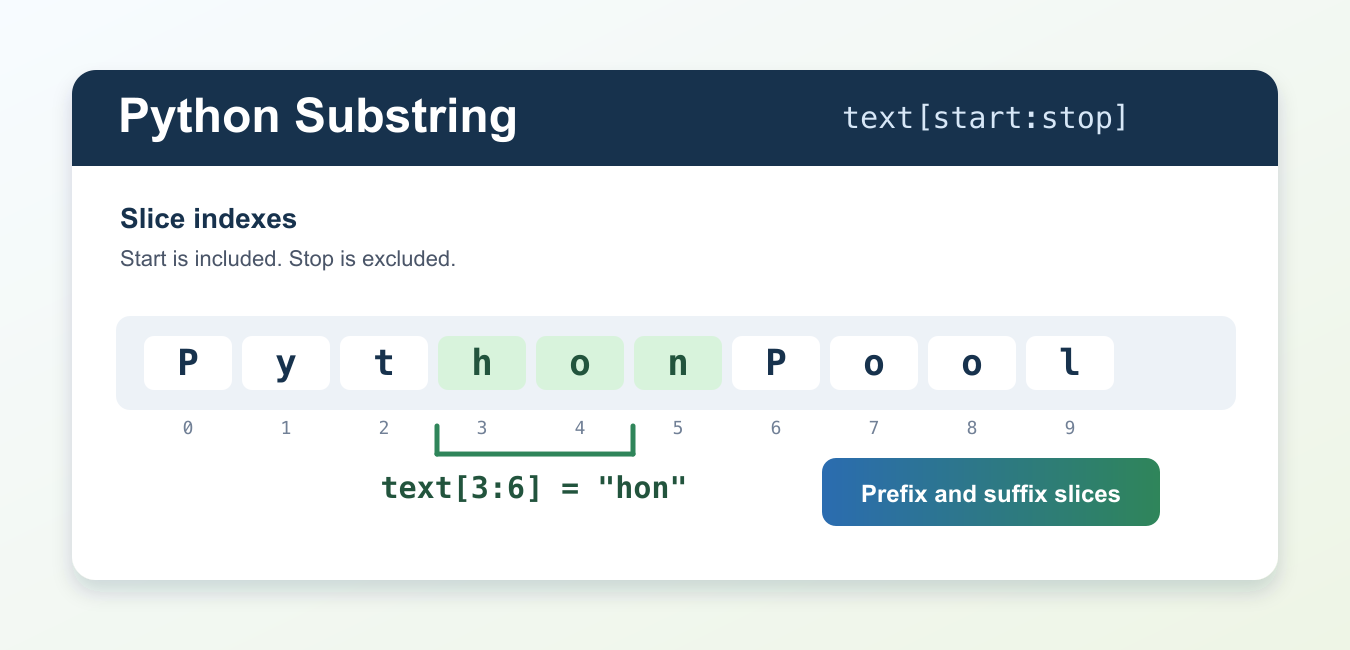
Quick answer: Use string slicing such as text[start:stop] to extract a Python substring. Use in for a yes/no search, find() when you need the starting index, and partition() when a separator should split the string into three parts.
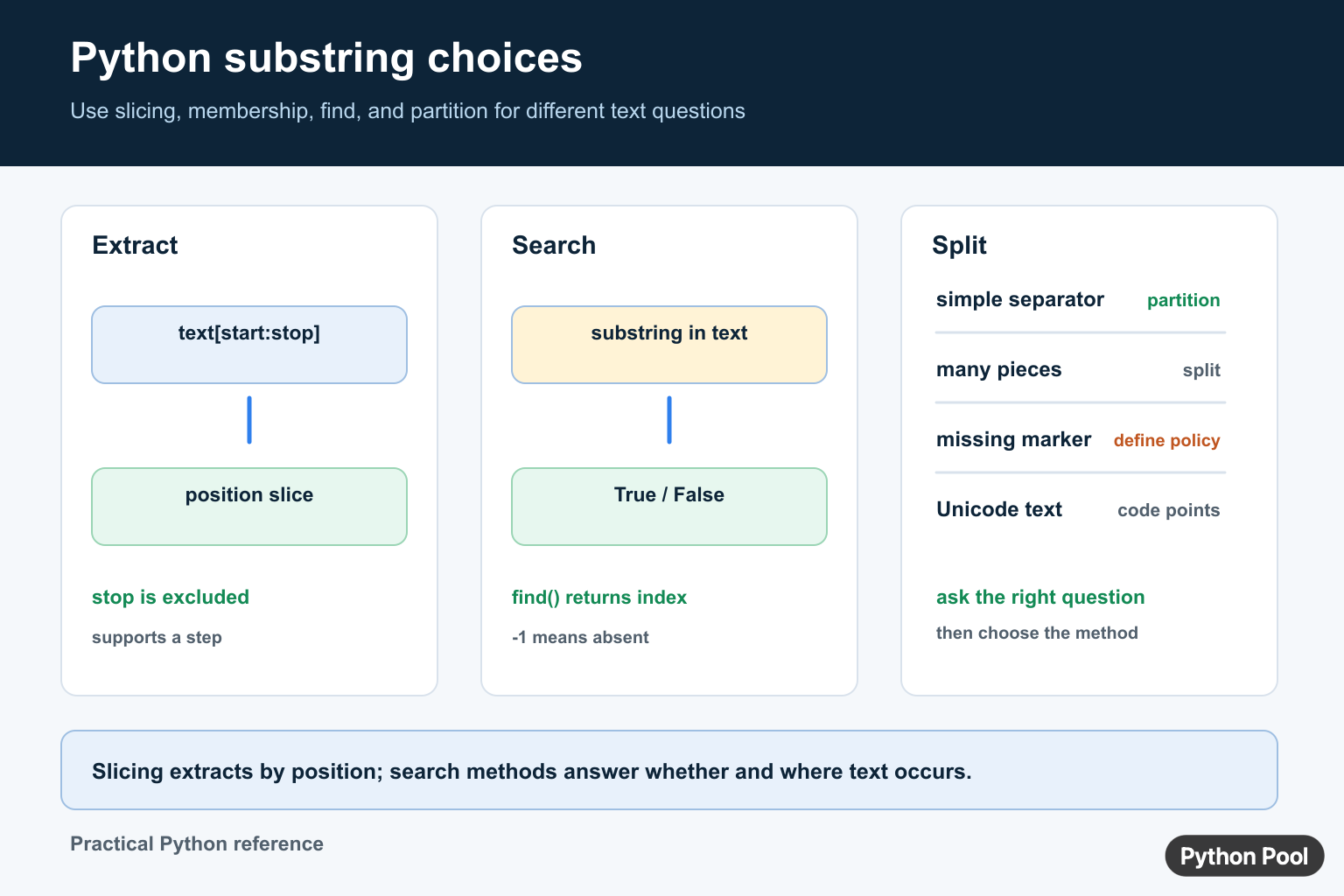
A Python substring is a smaller piece of text taken from a larger string. Python does not have a separate substring method because string slicing already handles the common cases. Use text[start:stop] to take characters from the start index up to, but not including, the stop index.
The official Python references for this topic are the string type documentation, the sequence operations reference, and the string tutorial.
Slicing is the best starting point when you already know the positions you need. The first character is at index 0, the second is at index 1, and so on. A slice stop is exclusive, so text[0:6] returns six characters rather than seven. That rule keeps adjacent slices clean because text[0:6] and text[6:] meet without overlap. Slicing supplies the shortest palindrome check; Palindrome in Python: Strings and Numbers compares that method with loops, normalization, numbers, and longest-palindrome logic.
For unknown positions, find the boundary first with find(), index(), partition(), or a parser that matches your format. Then slice with those positions. This keeps extraction logic readable and avoids counting characters by hand in more than one place.
Take A Basic Substring
Use two indexes inside square brackets. The left number is included, and the right number is excluded.
text = "Python Pool"

first_word = text[0:6]
second_word = text[7:11]

print(first_word)
print(second_word)
The first slice returns Python, and the second returns Pool. The space sits at index 6, so the second slice starts at 7.
This direct form is useful for fixed-width data, compact identifiers, or trusted input where each position has a documented meaning. If the source text can change shape, calculate the boundary instead of hard-coding every index.
Use Omitted Bounds
You can leave out either side of a slice. A missing start means the beginning of the string, and a missing stop means the end.
text = "substring"

prefix = text[:3]
suffix = text[3:]
last_four = text[-4:]

print(prefix)
print(suffix)
print(last_four)
Negative indexes count from the right side. text[-4:] returns the last four characters without needing len(text).
Omitted bounds make intent clearer when you are taking a prefix, suffix, or everything after a marker. They also reduce off-by-one mistakes because Python handles the outer edge.
Slice With A Step
A slice can include a third part: text[start:stop:step]. The step tells Python how many positions to move after each character.
text = "abcdefg"

every_second = text[::2]
middle_every_second = text[1:6:2]
backward = text[::-1]

print(every_second)
print(middle_every_second)
print(backward)
The step form is helpful for sampling text, skipping known filler characters, or reversing a string. Use it carefully in application code because heavy step slicing can be less obvious than a named helper.
When the step is negative, Python walks from right to left. The compact reverse form text[::-1] is common in examples and quick checks.
Find A Boundary Before Slicing
When a substring starts after a marker, locate the marker first. find() returns the starting index or -1 when the marker is missing.
text = "status=ok;id=2570"
marker = "id="

start = text.find(marker)
if start != -1:
    post_id = text[start + len(marker):]
    print(post_id)
else:
    print("missing id")
Adding len(marker) moves the slice past the marker itself. This is safer than copying a number such as 3 because the code still works if the marker text changes.
Use find() when a missing marker is allowed. Use index() when a missing marker should raise an error immediately. Both methods give positions that can feed a slice.
Extract Between Two Markers
For text between two known markers, find both boundaries and then slice between them.
text = "<title>Python Substring</title>"
open_tag = "<title>"
close_tag = "</title>"

start = text.find(open_tag)
stop = text.find(close_tag)

if start != -1 and stop != -1 and start < stop:
    title_text = text[start + len(open_tag):stop]
    print(title_text)
This pattern is fine for small, controlled strings. Do not use it as a full HTML parser. Real markup can contain attributes, nesting, comments, entities, and malformed input, so use a parser when the document shape is not fully under your control.
The important detail is the stop index. Since the stop is exclusive, slicing up to the first character of the closing marker keeps the marker out of the result.
Use partition For Simple Separators
partition() is often cleaner than manual indexes when you need the text before and after one separator. It always returns three parts: before, separator, and after.
email = "[email protected]"

name, separator, domain = email.partition("@")

if separator:
    print(name)
    print(domain)
else:
    print("not an email address")
This avoids a separate find() call and makes the separator check explicit. If the separator is not present, the middle part is an empty string and the original text stays in the first part.
Choose slicing when positions are already known or when you need start and stop control. Choose partition() when one separator divides the text into a left side and a right side. Choose split() when repeated separators should produce a list of pieces.
Common Substring Mistakes
The most common mistake is forgetting that the stop index is exclusive. If you want the first three characters, use text[:3], not text[:2]. The second form returns only two characters.
Another mistake is treating slices as errors when indexes are outside the string. Python slicing is forgiving: text[:100] simply returns the available text. This is useful for truncation, but it can hide bad assumptions in strict parsers. Add checks when the exact length matters.
Be careful with user-facing text that contains emoji, accents, or combined characters. Python slices by string positions, not by what a reader may see as one visual character. For display-safe text segmentation, use a library that understands grapheme clusters.
The practical rule is simple: use text[start:stop] for a Python substring, omit bounds for prefixes and suffixes, add a step only when skipping or reversing is truly intended, and calculate boundaries with string methods when the positions are not fixed.
Choose Search Or Extraction
Slicing is positional: it returns the characters between a start index and a stop index without including the stop. Membership with in answers whether text occurs anywhere. find() gives the first index or -1 when the text is absent. Use the operation that matches the question instead of slicing first and then guessing what an empty result means.
text = "python pool"

print("pool" in text)
print(text.find("pool"))
print(text[7:])
Test Boundaries Explicitly
Substring bugs usually come from off-by-one stops, empty input, or a marker that does not exist. Test the beginning, middle, end, and missing cases. If a missing marker is an error, raise it rather than silently returning a misleading slice.
Python string indexes refer to Unicode code points, not bytes. If the application works with encoded bytes, decode at the boundary before applying text indexes and encode only when the destination requires bytes.
Frequently Asked Questions
How do I get a substring in Python?
Use string[start:stop] slicing to extract characters by position; the stop index is excluded.
How do I check whether a substring exists?
Use the in operator for a boolean membership check, such as ‘pool’ in text.
How do I find the position of a substring?
Use str.find() when you want the first index, remembering that it returns -1 when the substring is absent.
What is the difference between split() and partition()?
split() produces multiple pieces, while partition() separates at one marker and returns the text before, marker, and text after it.
