Quick Answer
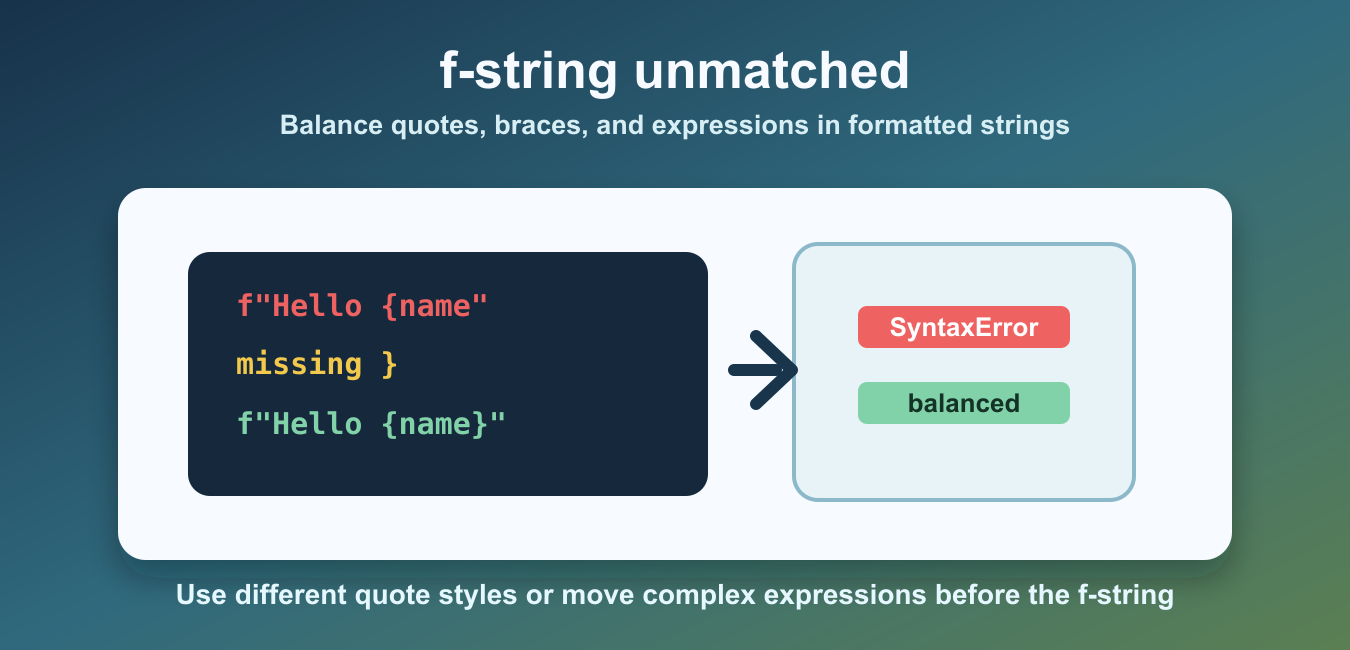
An f-string unmatched error usually comes from an unbalanced quote or brace inside a replacement field. Check that every expression has matching {}, use a different quote style or a temporary variable for nested strings, and double literal braces as {{ and }}. Python 3.12 relaxed some older f-string restrictions, so test with the interpreter that will run the code.
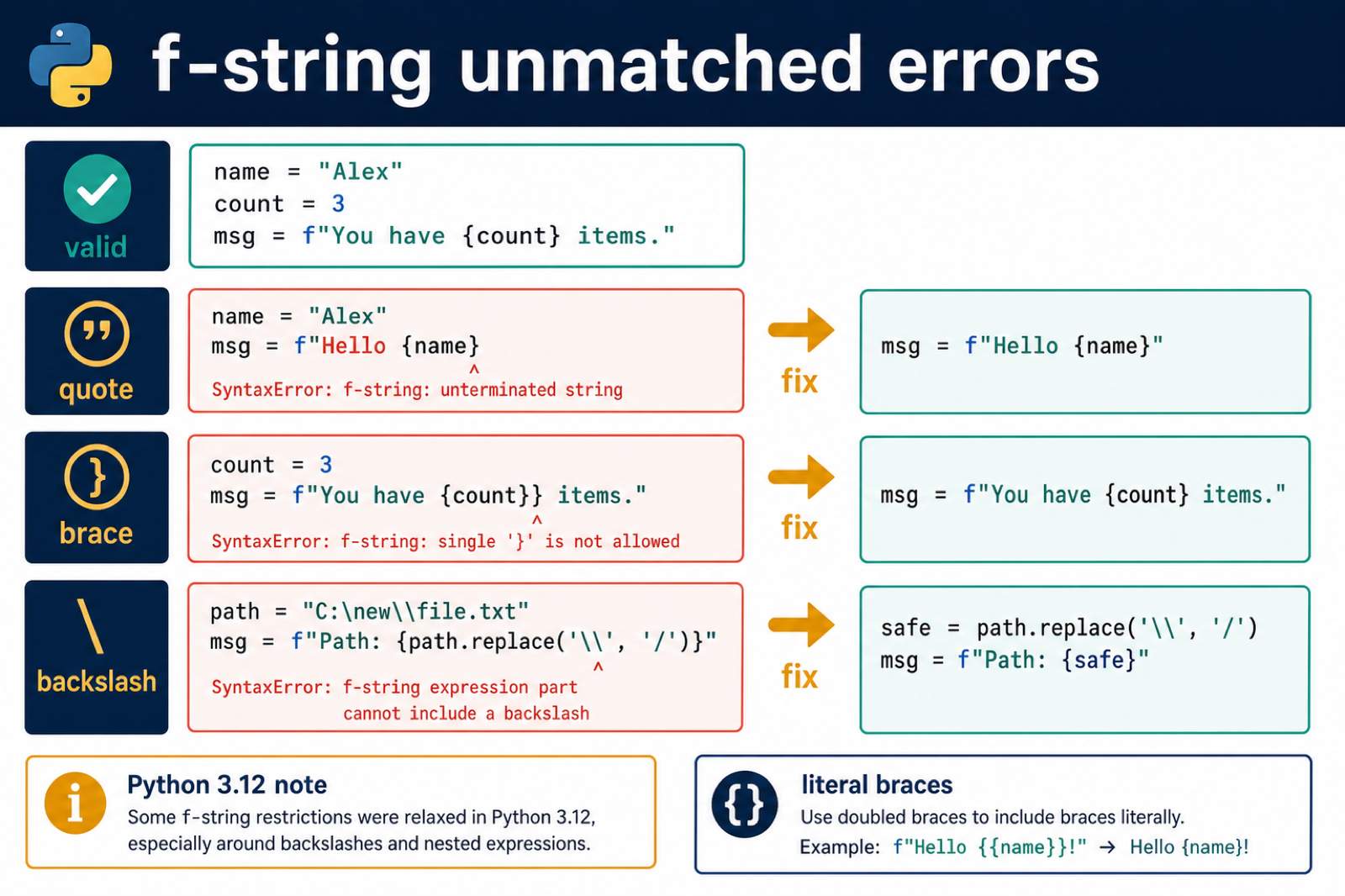
Python f-string unmatched errors happen when the parser cannot match quotes, braces, or expression boundaries inside an f-string. The error is a SyntaxError, so Python stops before the program can run.
F-strings are formatted string literals. They let you place expressions inside braces and have Python insert the result into the string. The syntax is compact, but every opening quote and brace must have a matching closing part.
Because f-strings are parsed before the program runs, these errors cannot be fixed with a runtime check around the broken line. You must fix the source text so Python can parse it first.
The official Python f-string documentation explains the grammar. For related string cleanup, see the remove quotes from string guide.
Start With A Valid F-String
A valid f-string has a matching quote pair and balanced braces around each expression.
name = "Maya"
score = 97

message = f"{name} scored {score}"

print(message)
This works because the outer quotes match and each expression is contained inside one pair of braces.
When debugging, start by reducing the f-string to one expression. After that works, add formatting, function calls, or nested quotes back one piece at a time.
Fix Unmatched Quotes
A common cause is using the same quote style inside and outside the f-string without escaping or changing quote style.
source = 'name = "Maya"\nprint(f"User: {name.replace("M", "m")}")'

try:
    compile(source, "<example>", "exec")
except SyntaxError as error:
    print(error.__class__.__name__)
    print(error.msg)
The parser reaches the inner quote and thinks the f-string ended too early. Use a different outer quote style, escape the inner quotes, or move the expression into a separate step.
This is especially common when calling string methods inside braces. The expression may be valid by itself, but the surrounding f-string quote style can still make the full line invalid.
Use Different Quote Styles
When the expression needs double quotes, choose single quotes for the outer f-string, or the other way around.
name = "Maya"

message = f'User: {name.replace("M", "m")}'

print(message)
This version is easier to read than a heavily escaped string. It also makes the f-string boundary obvious.
You can also use triple-quoted f-strings for longer text, but they still need balanced braces and a matching closing quote sequence. Triple quotes help with multiline text; they do not remove f-string syntax rules.
Fix Unmatched Braces
Another common cause is opening a brace and forgetting to close it. You can reproduce that safely by compiling the source text.
source = 'name = "Iris"\nprint(f"Hello {name")'

try:
    compile(source, "<example>", "exec")
except SyntaxError as error:
    print(error.__class__.__name__)
    print(error.msg)
The fix is to close the expression with }. If the braces are meant to appear as literal text, escape them by doubling them.
Brace errors are easy to miss in templates, dictionary displays, and JSON-like text. Look carefully for the difference between braces that belong to Python expressions and braces that should be printed literally.
Print Literal Braces
Use {{ and }} when you want braces to appear in the final string instead of starting an f-string expression.
name = "Noah"

message = f"User data: {{name: {name}}}"

print(message)
The doubled braces become literal braces in the output. The single pair around name still formats the Python expression.
This is the correct approach for examples, small templates, and output that needs visible braces. Do not add extra single braces around text unless Python should evaluate an expression there.
Simplify Nested Expressions
If an f-string expression becomes hard to quote or hard to balance, compute the value first and format the simpler name.
first = "Ada"
last = "Lovelace"

display_name = f"{last}, {first}"
message = f"Author: {display_name}"

print(message)
This is often the cleanest fix. F-strings are best for formatting, not for hiding complex expression logic inside braces.
Precomputing also improves error messages. If the helper expression fails, Python reports the normal line of code rather than pointing into a dense f-string.
Common Causes
The first cause is quote collision. This happens when the outer f-string and an inner string use the same quote character. Change one of the quote styles or split the expression into a separate line.
The second cause is an unmatched brace. Every { that starts an expression needs a matching }. Literal braces must be doubled.
The third cause is making an expression too complex. Function calls, indexing, and conditional expressions can work inside f-strings, but complicated formatting becomes harder to debug. Simpler expressions produce clearer error messages and easier code reviews.
To fix f-string unmatched errors, check quote pairs first, then brace pairs, then nested expressions. If the line is still hard to read, move part of the expression before the f-string and format the prepared value.
A practical rule is to keep f-string expressions short. If an expression needs several function calls, nested indexing, or multiple quote styles, compute it above the f-string and format the result on the next line.
Balance Quotes and Replacement Fields
Replacement fields contain Python expressions between braces. If a nested string reuses the outer quote in an older Python version, the parser can terminate the f-string early.
name = "Alex"
count = 3

message = f"Hello, {name}! You have {count} items."
print(message)
When a field becomes difficult to read, compute the value first and interpolate the variable. This makes the syntax error smaller and the intent easier to test.
Escape Literal Braces and Handle Backslashes
Use doubled braces when the output itself must contain braces: f"{{name}}" produces {name}. Before Python 3.12, backslashes inside f-string expression parts were restricted, so move a replacement such as a path cleanup into a separate statement.
path = r"C:\new\file.txt"
clean = path.replace("\\", "/")
message = f"Path: {clean}"
print(message)
If an example behaves differently across Python versions, report the interpreter version and reduce the expression to the smallest failing f-string before changing punctuation at random.
Frequently Asked Questions
What causes f-string unmatched errors?
Most are caused by an unmatched quote, opening brace, or closing brace inside the f-string or one of its replacement expressions.
How do I print literal braces in an f-string?
Double them: use {{ and }} in the f-string source when the output should contain a literal brace.
How do I fix a backslash error inside an f-string?
Compute the backslash-containing expression in a normal statement first, then interpolate the resulting variable.
Does Python 3.12 change f-string syntax?
Python 3.12 relaxed several restrictions, including some quote reuse and backslash cases. Test against the version used by your deployment.
