Summary: In this tutorial, you will learn how to use the JavaScript Array includes() method to check if an array includes an element.
Introduction to the JavaScript Array includes() method #
The Array includes() method returns true if an array contains an element or false otherwise.
Here’s the syntax of the includes() method:
array.includes(searchElement, fromIndex)The includes() method accepts two arguments:
searchElementis the array element you want to search.fromIndexis a zero-based index at which the method starts searching forsearchElement. The default is zero.
The fromIndex can be positive or negative.
If fromIndex >= array.length, then the includes() will not search for the searchElement and returns false.
When 0 <= fromIndex < array.length , then the includes() searches from the fromIndex to the end of the array.
In case -array.length <= fromIndex < 0, fromIndex + array.length , the includes() method searches entires array for searchElement.
JavaScript Array includes() method examples #
Let’s take some examples of using the Array includes() method.
1) Basic Array includes() method examples #
The following example uses the includes() method to check if a number is included in an array:
const numbers = [1, 2, 3];
const result = numbers.includes(1);
console.log({ result });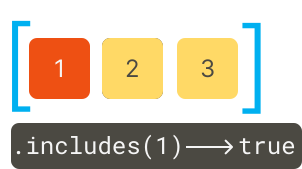
Output:
{ result: true }How it works.
First, define an array of numbers:
const numbers = [1, 2, 3];Second, check if the number 1 is included in the array using the includes() method:
const result = numbers.includes(1);Third, display the result in the console:
console.log({ result });Since the number 1 is included in the array, the includes() method returns true.
The following example uses the includes() method to check if the number 3 is included in the numbers array:
const numbers = [1, 2, 3];
const result = numbers.includes(4);
console.log({ result });Output:
{ result: false }The includes() method returns false because the numbers array does not contain the number 4.
2) Using the fromIndex argument #
The following example uses the includes() method with the fromIndex to check if an array contains the number 1 from the index 1:
const numbers = [1, 2, 3];
const result = numbers.includes(1, 1);
console.log({ result });Output:
{ result: false }The includes() returns false because there is no number 1 starting from the index 1.
3) Using Array includes() method with arrays of objects #
The following example uses the includes() method to check if an object is in an array.
const bmw = { name: 'BMW' };
const toyota = { name: 'Toyota' };
const ford = { name: 'Ford' };
const cars = [ford, toyota];
console.log(cars.includes(ford));
console.log(cars.includes(bmw));How it works.
First, create some objects that have the name property with different values:
const bmw = { name: 'BMW' };
const toyota = { name: 'Toyota' };
const ford = { name: 'Ford' };Second, initialize the cars array with two objects ford and toyota:
const cars = [ford, toyota];Third, check if the cars array contains the ford object using the includes() method and display the result to the console:
console.log(cars.includes(ford));It returns true because the cars object contains the ford object.
Finally, check ifbmw object is included in the cars array:
console.log(cars.includes(bmw));It returns false.
includes vs. indexOf #
In JavaScript, NaN is not equal to NaN, so both expressions below return false:
let result = NaN == NaN;
console.log({result});
result = NaN === NaN;
console.log({result});The indexOf() method returns -1 when you check if an array contains NaN, but the include() method returns true. For example:
const arr = [1, NaN, 2, 3];
let result = arr.indexOf(NaN);
console.log({ result }); // -1
result = arr.includes(NaN);
console.log({ result }); // trueOutput:
{ result: -1 }
{ result: true }Summary #
- Use the JavaScript Array
includes()method to check if an element is included in an array.
Thank you for your feedback!
