Summary: in this tutorial, you will learn how to use the JavaScript appendChild() method to add a node to the end of the list of child nodes of a specified parent node.
Introduction to the JavaScript appendChild() method #
The appendChild() is a method of the Node interface. The appendChild() method allows you to add a node to the end of the list of child nodes of a specified parent node.
The following illustrates the syntax of the appendChild() method:
parentNode.appendChild(childNode);In this method, the childNode is the node to append to the given parent node. The appendChild() returns the appended child.
If the childNode is a reference to an existing node in the document, the appendChild() method moves the childNode from its current position to the new position.
JavaScript appendChild() method examples #
Let’s take some examples of using the appendChild() method.
1) Basic appendChild() example #
Suppose that you have the following HTML markup:
<ul id="menu">
</ul>The following example uses the appendChild() method to add three list items to the <ul> element:
function createMenuItem(name) {
let li = document.createElement('li');
li.textContent = name;
return li;
}
// get the ul#menu
const menu = document.querySelector('#menu');
// add menu item
menu.appendChild(createMenuItem('Home'));
menu.appendChild(createMenuItem('Services'));
menu.appendChild(createMenuItem('About Us'));How it works:
- First, the
createMenuItem()function creates a new list item element with a specified name by using thecreateElement()method. - Second, select the
<ul>element with idmenuusing thequerySelector()method. - Third, call the
createMenuItem()function to create a new menu item and use theappendChild()method to append the menu item to the<ul>element
Output:
<ul id="menu">
<li>Home</li>
<li>Services</li>
<li>About Us</li>
</ul>Put it all together:
<!DOCTYPE html>
<html>
<head>
<meta charset="utf-8">
<title>JavaScript appendChild() Demo</title>
</head>
<body>
<ul id="menu">
</ul>
<script>
function createMenuItem(name) {
let li = document.createElement('li');
li.textContent = name;
return li;
}
// get the ul#menu
const menu = document.querySelector('#menu');
// add menu item
menu.appendChild(createMenuItem('Home'));
menu.appendChild(createMenuItem('Services'));
menu.appendChild(createMenuItem('About Us'));
</script>
</body>
</html>2) Moving a node within the document example #
Assuming that you have two lists of items:
<ul id="first-list">
<li>Everest</li>
<li>Fuji</li>
<li>Kilimanjaro</li>
</ul>
<ul id="second-list">
<li>Karakoram Range</li>
<li>Denali</li>
<li>Mont Blanc</li>
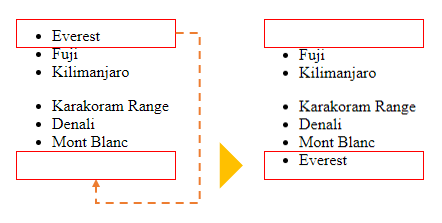
</ul>The following example uses the appendChild() to move the first child element from the first list to the second list:
// get the first list
const firstList = document.querySelector('#first-list');
// take the first child element
const everest = firstList.firstElementChild;
// get the second list
const secondList = document.querySelector('#second-list');
// append the everest to the second list
secondList.appendChild(everest)How it works:
- First, select the first element by its id (
first-list) using thequerySelector()method. - Second, select the first child element from the first list.
- Third, select the second element by its id (
second-list) using thequerySelector()method. - Finally, append the first child element from the first list to the second list using the
appendChild()method.
Here is the list before and after moving:
Summary #
- Use
appendChild()method to add a node to the end of the list of child nodes of a specified parent node. - The
appendChild()can be used to move an existing child node to a new position within the document.
Quiz #
Understanding appendChild() Method
Thank you for your feedback!
