Summary: in this tutorial, you’ll learn how to use the insertAdjacentHTML() method to insert HTML into the document.
Introduction to JavaScript insertAdjacentHTML() method #
The insertAdjacentHTML() is a method of the Element interface so that you can invoke it from any element.
The insertAdjacentHTML() method parses a piece of HTML text and inserts the resulting nodes into the DOM tree at a specified position:
element.insertAdjacentHTML(positionName, text);The insertAdjacentHTML() method has two parameters:
1) position #
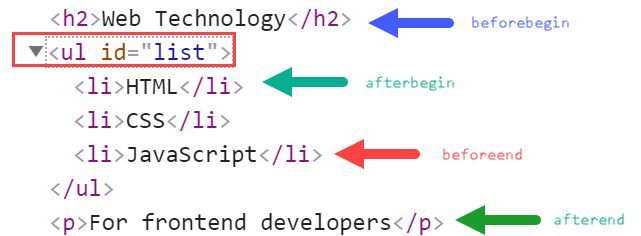
The positionName is a string that represents the position relative to the element. The positionName accepts one of the following four values:
'beforebegin': before the element'afterbegin': before its first child of the element.'beforeend': after the last child of the element'afterend': after the element
Note that the 'beforebegin' and 'afterend' are only relevant if the element is in the DOM tree and has a parent element.
The insertAdjacentHTML() method has no return value, or undefined by default.
The following visualization illustrates the position name:
2) text #
The text parameter is a string that the insertAdjacentHTML() method parses as HTML or XML. It cannot be Node objects.
Security consideration #
Like the innerHTML, if you use the user input to pass into the insertAdjacentHTML() method, you should always escape it to avoid security risks.
JavaScript insertAdjacentHTML() method example #
The following JavaScript example uses the insertAdjacentHTML() method to insert various elements into the page with the positions relative to the ul element:
<!DOCTYPE html>
<html lang="en">
<head>
<meta charset="UTF-8">
<meta name="viewport" content="width=device-width, initial-scale=1.0">
<title>insertAdjacentHTML() Demo</title>
</head>
<body>
<ul id="list">
<li>CSS</li>
</ul>
<script>
let list = document.querySelector('#list');
list.insertAdjacentHTML('beforebegin', '<h2>Web Technology</h2>');
list.insertAdjacentHTML('afterbegin', '<li>HTML</li>');
list.insertAdjacentHTML('beforeend', '<li>JavaScript</li>');
list.insertAdjacentHTML('afterend', '<p>For frontend developers</p>');
</script>
</body>
</html>How it works:
- First, select the
ulelement by its idlistusing thequerySelector()method. - Next, use the
insertAdjacentHTML()method to insert a heading 2 element before theulelement. The position is'beforebegin'. - Then, use the
insertAdjacentHTML()method to insert a new list item element before the first child of the ul element. The position is'afterbegin'. - After that, use the
insertAdjacentHTML()method to insert a new list item element after the last child of the ul element with the position'beforeend'. - Finally, insert use the
insertAdjacentHTML()method to insert a new paragraph element after the ul element with the position'afterend'.
Summary #
- Use the
insertAdjacentHTML()method to insert a text as Nodes into the DOM tree at a specified position. - Always escape the user input text that you pass into the
insertAdjacentHTML()method to avoid security risks.
Quiz #
Understanding insertAdjacentHTML() Method
Thank you for your feedback!
