Summary: in this tutorial, you’ll learn about the JavaScript DocumentFragment interface to compose DOM nodes and update them to the active DOM tree.
Introduction to the JavaScript DocumentFragment interface #
The DocumentFragment interface is a lightweight version of the Document that stores a piece of document structure like a standard document. However, a DocumentFragment isn’t part of the active DOM tree.
If you change the document fragment, it doesn’t affect the document or incur any performance.
Typically, you use the DocumentFragment to compose DOM nodes and append or insert it to the active DOM tree using appendChild() or insertBefore() method.
To create a new document fragment, you use the DocumentFragment constructor like this:
let fragment = new DocumentFragment();Alternatively, you can use the createDocumentFragment() method of the Document object:
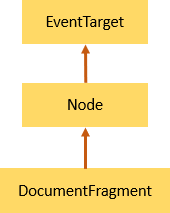
let fragment = document.createDocumentFragment();This DocumentFragment inherits the methods of its parent, Node, and also implements those of the ParentNode interface such as querySelector() and querySelectorAll().
JavaScript DocumentFragment example #
Suppose that you have a <ul> element with the id language:
<ul id="language"></ul>The following code creates a list of <li> elements (<li>) and append each to the <ul> element using the DocumentFragment:
let languages = ['JS', 'TypeScript', 'Elm', 'Dart','Scala'];
let langEl = document.querySelector('#language')
let fragment = new DocumentFragment();
languages.forEach((language) => {
let li = document.createElement('li');
li.innerHTML = language;
fragment.appendChild(li);
})
langEl.appendChild(fragment);How it works:
- First, select the
<ul>element by its id using thequerySelector()method. - Second, create a new document fragment.
- Third, for each element in the
languagesarray, create a list item element, assign the list item’sinnerHTMLto thelanguage, and append all the newly created list items to the document fragment. - Finally, append the document fragment to the
<ul>element.
Put it all together:
<!DOCTYPE html>
<html lang="en">
<head>
<meta charset="UTF-8">
<meta name="viewport" content="width=device-width, initial-scale=1.0">
<title>DocumentFragment Demo</title>
</head>
<body>
<ul id="language"></ul>
<script>
let languages = ['JS', 'TypeScript', 'Elm', 'Dart', 'Scala'];
let langEl = document.querySelector('#language');
let fragment = new DocumentFragment();
languages.forEach((language) => {
let li = document.createElement('li');
li.innerHTML = language;
fragment.appendChild(li);
})
langEl.appendChild(fragment);
</script>
</body>
</html>Summary #
- Use the
DocumentFragmentto compose DOM nodes before updating them to the active DOM tree to get better performance.
Quiz #
Understanding DocumentFragment
Thank you for your feedback!
