Summary: in this tutorial, you will learn how to get the parent node of an element by using the JavaScript parentNode attribute of the Node object.
Introduction to parentNode attribute #
To get the parent node of a specified node in the DOM tree, you use the parentNode property:
let parent = node.parentNode;The parentNode is read-only.
The Document and DocumentFragment nodes do not have a parent. Therefore, the parentNode will always be null.
If you create a new node but haven’t attached it to the DOM tree, the parentNode of that node will also be null.
JavaScript parentNode example #
See the following HTML document:
<!DOCTYPE html>
<html>
<head>
<meta charset="utf-8">
<title>JavaScript parentNode</title>
</head>
<body>
<div id="main">
<p class="note">This is a note!</p>
</div>
<script>
let note = document.querySelector('.note');
console.log(note.parentNode);
</script>
</body>
</html>The following picture shows the output in the Console:
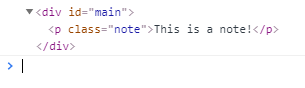
How it works:
- First, select the element with the
.noteclass by using thequerySelector()method. - Second, find the parent node of the element.
Summary #
- The
node.parentNodereturns the read-only parent node of a specified node ornullif it does not exist. - The
documentandDocumentFragmentdo not have a parent node.
Quiz #
Understanding JavaScript parentNode
To test you understand how to use the parentNode property in JavaScript to navigate the DOM.
Thank you for your feedback!
