Search the Community
Showing results for tags 'admintools'.
Found 4 results
-
Version 2.0.6
761 downloads
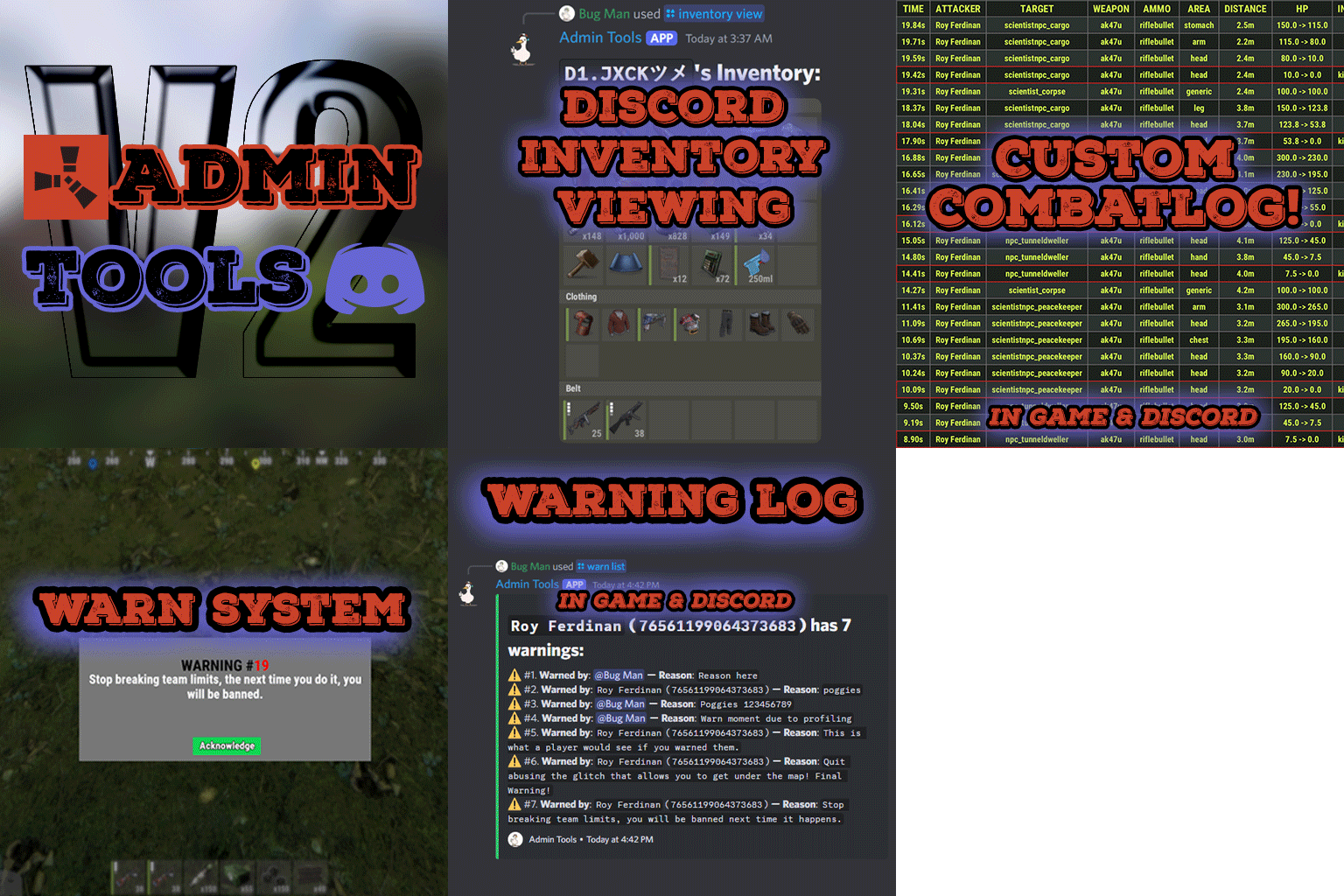
Admin Tools is an all-in-one plugin designed to make your job as a server owner/admin easier. This plugin has a wide range of features and commands that allow you to control your server easily, both in-game and via Discord. It also adds custom quality of life features exclusive to this plugin! ★ Inventory Viewing System - View an NPC or player's inventory in Discord and in-game ★ Multi-Server Support - Allows you to manage multiple Rust servers from a single bot ★ Custom Combatlog System - View a player's combatlog in Discord and in-game ★ Backpack Viewing System - View a player's backpack (uMod plugin) in Discord ★ Custom ID System - Get the ID of players on your server quick and easy, copy directly from chat ★ Warn System - Inform players of their wrongdoings and keep track of them (Warn Visuals: UI, Chat, Chat + Toast/Gametip) ★ Watchlist System - Lets you put suspicious players on a list for you to monitor, logs in-game and to discord ★ Server Command System - Reload/load/unload plugins and other console commands in Discord and in-game ★ F7 Report Logging System - Log F7 reports to discord with their combat log attached (if enabled) ★ and more! (Rest of features below) Please note, the Permissions UI Shown on screen towards the start of this video is FROM CARBON, NOT THE PLUGIN Please note, the Permissions UI Shown on screen towards the start of this video is FROM CARBON, NOT THE PLUGIN (Changed/Exclusive): * Timestamps for video in video's description - Make sure to up video quality if watching from this site. * Timestamps for video in video's description - Make sure to up video quality if watching from this site. ★ Permission System - Grant/revoke permissions to groups and players from Discord and in-game ★ Minecraft Creative System - While enabled, hold middle click to get the item you're looking at ★ Rename System - Rename the players who think they are funny (toggle in config) ★ Tempban System - Tempban players with no database required ★ Unique ID System - Find players even when they have the same or similar names -- Thanks to nivex ★ Kill, Wound, Revive & Respawn System - Kill, wound (down), revive and respawn players from Discord and in-game ★ Team Viewing System - View a player's team members from Discord and in-game Q: Does this plugin have a GUI or do its commands use GUI? A: No. The only UI in-game for this plugin is the warning screens. Please do not purchase this plugin thinking it has GUI for its commands, they are ALL commands entered into chat, Discord, or RCON. There are however, 'modals' for Discord, but nothing GUI based for within the game other than the warning screens displayed when '/warn'ing a user (which can be configured by the user). Q: How do I set up the bot? A: Set Up Instructions - If you miss any permissions, can always add them to the Admin Tools role in discord after you invite the bot. Q: Does this plugin link players to Rust? A: No. You can use the free plugin DiscordCore by MJSU if you would like to link your players. Q: Does this plugin log kills/PMs/F1 Spawn/chat? A: No. Admin Tools only logs the following if enabled: F7 Reports, Bans, commands from this plugin, and players who are watchlisted. You can always view a player's combatlog from discord though. You can use the free logging plugins DiscordLogger by MONoH or DiscordChat by MJSU depending on your goal. However, personally, I recommend against using logging functionality that would be occurring very frequently due to Discord's rate limiting. Though, DIscordLogger is made in a way that combines messages if possible to prevent limiting. Q: Can this log to multiple Discord servers? A: YES. All you need to put for logging to multiple servers is the channel ID you want to log to in the list of channel IDs in the config. Q: Does this plugin ONLY work with Discord Extension 3.0.0+? A: YES. You need to download the 3.0.0+ version from GitHub, it is linked at the top (and right here) as a required dependency. Any version prior to 3.0.0 will not work with this plugin, but any version 3.0.0 and later will. Q: Will this work on a shared hosting server? A: Yes, BUT you will not be able to take advantage of the threading done within the plugin. It should still work fine, but when you're on a shared host, you may only have access to a single core/thread (not positive on which) and as a result the threading I am doing in the plugin will just be ran on the main thread. As a result some of the discord functionality (ie: image generation) may affect the server as its now running on the main thread (what the server uses to run the game on) instead of a separate thread which would normally not affect the server. The image generation stuff (backpack and inventory) is normally pretty quick depending on number of items and pictures being used/sent, and can be between 100-250ms to generate on my server, however that was while no players were on. Q: How do I fix this error Response Code: Forbidden Discord Error Code: 50001 Discord Error: Missing Access ? A: All you need to fix this issue is MFA/2FA on the account used to create the bot. This issue is caused by Discord requiring your account to have either MFA or 2FA due to the bot being in a Community Discord server. After you add 2FA/MFA this error will go away. Q: Renaming isn't working, how do I fix this? A: The issue is likely that you don't have it enabled in the config, make sure to enable it in the config, its above the warning options and the discord API options. Q: My commands aren't appearing, how do I fix this? A: You can do the following in an attempt to try and force the bot to update its commands: Discord > Server Settings > Integrations > Admin Tools Bot > Toggle one of the checkboxes it shows in either Roles & Members or Channels > Save > Undo toggle > Save again. Q: Does this work with Rustcord? A: Yes, however you need this version here by MJSU as it has been updated to work with DiscordExtension 3.0.0+ versions. Q: How do I set up Multi-Server Support? A: Do as follows: Enable the bool (true/false) config option for multi-server system. Fill and keep the list of servers order the same if possible between configs (not required, but recommended). Use the /server command in discord to swap to the server you want to start listening to/sending commands to. On first use of command, it will error in all but one server console (tries to reply to a message more than once), that is expected and doesn't do that after that first command. It is used to set it up. If you want the activity information to change when swapping servers, make sure to enable that functionality in the config. Special thanks to Nivex for both creating and allowing me to use the method used to generate unique IDs for players. For support, please make a support ticket or join the Cobalt Studios Discord.$29.99 -
Version 1.0.2
20 downloads
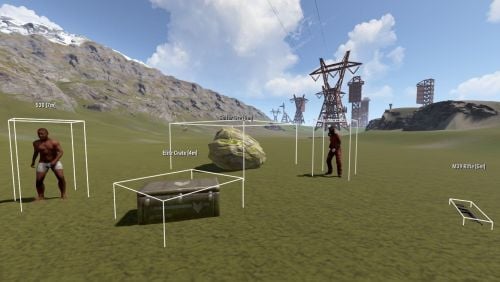
AdminUltimateVision is a high-performance ESP tool designed for Rust server administrators to monitor entities in real-time. Key Features Entity Tracking: Players, NPCs, Wildlife, Loot Containers, Dropped Items, Ores, and Corpses. Intuitive UI: Compact, non-obstructive interface with toggleable categories. Customization: Adjustable render distance (50m–500m), 3D wireframe boxes, and real-time distance labels. Optimization: Highly efficient update system to ensure minimal server impact. Commands /atool or /avision: Opens the main interface.$1.99 -
Version 1.2.1
68 downloads
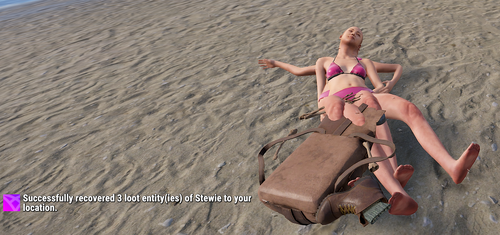
RecoverCorpse allows admins to recover player corpses and loot bags if they glitch under the map or become inaccessible. This ensures that no loot is permanently lost due to game bugs or terrain issues. Features: Recover player corpses and loot bags with a simple command Works for skinned corpse backpacks (item_drop_backpack) Works for small and large dropped backpacks Prevents players from losing loot due to terrain glitches Optimized for performance Permissions-based access for server admins Commands: /recovercorpse <steamid> Recovers the corpse and loot bag(s) of the specified player and moves them to the admin’s location. Permissions: recovercorpse.use Allows the admin to use /recovercorpse. Why Choose My Plugins? All of my plugins are built with performance in mind. Each plugin is highly optimized for minimal hook times and efficient memory usage, ensuring smooth server performance even on high-population servers. I carefully profile and test each release to maintain stability and responsiveness. Plus, you’ll get top-tier support whether you have a question, hit a snag, or need a feature tweak, I'm always available and quick to help. You can also see my plugins in action on Brit’s PvE servers, where they’re fully installed and running live. It’s a great way to test features and experience how everything performs in a real server environment. [EU] Brits 2x PvE 1 connect 131.153.158.249:28015 [US] Brits 2x PvE 1 connect 125.253.87.83:28015$2.99 -
Version 1.5.1
120 downloads
ServerBridge makes it quick and easy for players to join other Rust servers using an intuitive in-game UI. Players can use a server list that is customizable by the admin. Due to Rust's own Nexus system, players can be connected smoothly to the server they want without having to disconnect and connect manually. Player Command: /servers — opens the server list Admin Command: /serverbridge — opens the admin panel • ServerBridge.use – access the server list • ServerBridge.admin – manage servers via admin panel All edits of this file can be done with the /serverbridge Admin Panel { "Server with Domain & no Port": { "Name": "Server with Domain & no Port", "IP": "mycool-rustserver.com", "Port": null, "Description": "I disabled the Port with -1 in the Port field!", "ImageUrl": "" }, "Server with IP Address & Port": { "Name": "Server with IP Address & Port", "IP": "192.168.2.1", "Port": 28015, "Description": "This is my cool Rust Server!", "ImageUrl": "" } } { "ui.serverlist.title": "SERVER LIST", "ui.admin.title": "SERVER MANAGEMENT", "ui.addserver.title": "ADD NEW SERVER", "ui.editserver.title": "EDIT SERVER", "ui.button.connect": "CONNECT", "ui.button.add": "ADD", "ui.button.save": "SAVE", "ui.button.addserver": "ADD NEW SERVER", "ui.form.servername": "SERVER NAME", "ui.form.ipaddress": "IP ADDRESS OR DOMAIN", "ui.form.port": "PORT", "ui.form.description": "DESCRIPTION", "ui.table.server": "SERVER", "ui.table.address": "ADDRESS", "ui.table.actions": "ACTIONS", "msg.noperm.serverlist": "You don't have permission to open the server list.", "msg.noperm.admin": "You don't have permission for this command.", "msg.server.notfound": "Server '{0}' not found.", "msg.server.redirect": "You are being redirected to server '{0}'...", "msg.server.noname": "No server name specified.", "msg.server.deleted": "Server '{0}' has been deleted.", "msg.server.fillfields": "Please fill in all required fields.", "msg.server.exists": "A server with the name '{0}' already exists.", "msg.server.invalidport": "Invalid port. Please enter a number between 1 and 65535.", "msg.server.added": "Server '{0}' has been added.", "msg.server.updated": "Server '{0}' has been updated.", "msg.connection.redirect": "Connecting to {0} - Have fun!", "ui.button.nextpage": "NEXT →", "ui.button.prevpage": "← PREV", "ui.pagination.info": "PAGE {0} OF {1}" }$7.99- 1 comment
- 1 review
-
- 4
-

-
- #serverswitch
- #serverportal
- (and 11 more)