Search the Community
Showing results for tags 'easy'.
-

Version 1.0.0
2 downloads
yNkes's Ultimate 3X Full Server Setup Carbon-only, BetterLoot v4 I built this pack as a clean starting point for an English 3X server: the rates work together, the everyday player features are already configured, and the files are ready to copy into a fresh Carbon installation. Install the required plugins, copy the pack to your server root, add your own branding and credentials, grant the included permissions, then woila! Please note: This is a configuration pack, not a copy of a running server; RustDedicated, Carbon, SteamCMD, plugin source files, maps, and third-party licenses are not included. What's Already Set Up - 3X gathering: Carbon GatherManager applies 3X rates to nodes, ground pickups, quarries, and Excavator output. - Practical stack sizes: Carbon StackManager uses 3X ammunition, components, and electrical stacks, 5X medical stacks, and 10X resource stacks while keeping sensitive consumable containers protected. - Custom BetterLoot: BetterLoot v4 data covers supported barrels, roadside loot, monuments, underwater labs, supply drops, Bradley, Patrol Helicopter, and other containers with 3X scrap, duplicate protection, blueprint conversion, balanced probabilities, and a cleaned item blacklist. - 3X smelting: CarbonAuto handles both normal and blacklist-classified ovens at 3X speed, so the pack does not need QuickSmelt. - Instant crafting: Crafting Controller removes normal craft times without enabling random skins, full-inventory crafting, shutdown completion, or extra crafting notices. - Early blueprints: Blueprint Manager gives default players Tier 0 and Tier 1 blueprint access through the supplied permissions. - Team blueprint sharing: Blueprint Share passes researched and Tech Tree blueprints to current and newly joined native Rust teammates without requiring Friends or Clans. - Team AutoAuth: Automatic Authorization shares cupboards, turrets, key locks, code locks, doors, boxes, and other supported locked entities with native teammates. - Barrel pickup: Auto Pickup Barrel collects barrel loot automatically for permitted players within three meters. - Cleaner furnace use: Furnace Splitter handles standard and large furnaces with vanilla fuel use and does not include anyone's saved preferences. - Short building correction time: Hammer Time gives the building owner 60 seconds to rotate or demolish placed pieces without restart or relationship bypasses. - Useful starter kit: Kits provides a free English Starter Kit every 12 hours with two sleeping bags, a large box, sheet-metal door, hammer, building plan, code lock, cupboard, furnace, bandage, resources, food, and cloth. - Clean kit setup: There are no autokits, NPC examples, player claim records, purchase costs, hidden VIP tiers, or external skin-plugin requirements. - Branded loading screen: Loading Messages cycles editable English connection text every five seconds and introduces the server rates, team limit, and rules. - Raid and Combat block: No Escape applies a three-minute combat block and five-minute raid block to teleporting, trading, kits, recycling, crafting, building, repairing, upgrading, and other configured escape actions. - Homes and teleporting: NTeleportation includes two homes, team-only TPR, TPB, and automatically detected Outpost and Bandit destinations with 15-second countdowns, 10-minute cooldowns, five daily uses, building checks, unsafe-state interruption, and No Escape support. - Faster recyclers: Recycle Manager speeds up recyclers without increasing output or changing vanilla efficiency. - Real population monitor: Server Pop reports actual online, sleeping, joining, and queued players through a private game tip with a 60-second cooldown. - Short Nights: Time Of Day runs approximately 55 minutes of daylight and five minutes of night without freezing or skipping the night. - Trade System: uMod Trade provides 30-slot remote exchanges through /trade and /trade accept with a five-minute cooldown, a 25-second request window, building, movement, radiation, vehicle, and No Escape checks. - Ready server profile: The supplied server.cfg uses a four-player team limit, a recommended 3500 Procedural Map, a Thursday 18:00 UTC weekly wipe template, and clearly marked fields for your own name, description, website, Discord, and header image. - Neutral starting point: Teleport costs, Economics, Server Rewards, VIP profiles, webhooks, fake players, fake wipe dates, player impersonation, and custom-map or monument claims are deliberately left out. What You Get The archive contains 16 cleaned plugin configs, the Carbon GatherManager, StackManager, and CarbonAuto settings, BetterLoot v4 data, a clean Starter Kit, English language files, and the complete ynkes_3x server identity template. Also includes: - A step-by-step README. - The required plugin names, baseline notes, and exact player permissions. - Safe example startup arguments with placeholders for the seed, ports, player limit, and RCON password. Requirements and Setup You need a current RustDedicated server, the production version of Carbon, access to the server files and console, and the plugins listed in PLUGIN-LIST.txt. The package targets uMod Trade 1.2.48 with the small Carbon compatibility fix used by the original server; the current official download still contains the unsupported OnlinePlayers attribute, so the unmodified file will not compile on Carbon. 1. Install or update RustDedicated through SteamCMD. 2. Install production Carbon and start the server once. 3. Download the plugins named in PLUGIN-LIST.txt from their official pages and place them in carbon/plugins. 4. Copy this package into the Rust server root and use ynkes_3x as the server identity. 5. Replace every CHANGE_ME value and enter your own branding, seed, ports, player limit, and unique RCON password. 6. Check the PERMISSIONS.txt and complete the README.txt test checklist before opening the server publicly. With Rust, Carbon, and the plugins ready, the initial setup should take around 15–30 minutes. Before You Buy Version 1.0.0 Server startup complete on RustDedicated build 2633.288.1 and Carbon 2.0.259.0 test on 12 September 2026. If you want a tidy 3X base with sensible rates, curated loot, the common quality-of-life features players expect, and clear documentation for everything the owner needs to do, this pack is ready for your server.$20.00 -
Version 1.0.0
43 downloads
Get ready to elevate your Rust server with 30 all-new, hand-crafted Raidable Bases, each one bursting with personality, challenge, and a healthy dose of chaos. These bases are designed to keep your players on their toes and make every raid feel fresh and unique. [Heads up] Some bases contain in-game art featuring semi-nude imagery (AI generated) Each base is saved with its included decorative images, which contributes to the larger file sizes. You’re free to edit the bases and strip out images as needed – but we’ve kept them intact to preserve the original vibe and flair. Important: These bases are visually rich and asset-heavy. Running them on a low-performance (" potato ") server is not recommended. Number of bases per difficulty: Easy: 7 Medium: 7 Hard: 6 Expert: 6 Nightmare: 4 In main config file /config/raidablebases.json set parameter below to true to keep pre defined skins and keep the vibe of the bases "Ignore If Skinned Already": true, Rename bases or just add bases with these commands (note that your profiles may vary): Easy Bases: rb.config add "Easy Bases" Boom-Easy-HillbillyHank Boom-Easy-ArcticPlantation Boom-Easy-BobDog Boom-Easy-Kryptofarm Boom-Easy-ArcticWeedFarm Boom-Easy-DoubleFarm AK-Easy-Gingerbread Medium Bases: rb.config add "Medium Bases" Boom-Medium-Clay Boom-Medium-Disco Boom-Medium-Police_v2 Boom-Medium-FallenAngel Boom-Medium-Crusader Boom-Medium-SourFarm SirSlush-Medium-PoopFarm Hard Bases: rb.config add "Hard Bases" Boom-Hard-LasEscortas Boom-Hard-LasAmazonas Boom-Hard-LasDamasRosas Boom-Hard-LasToxiChicas Magnumk-Hard-Rustamano Expert Bases: rb.config add "Expert Bases" Boom-Expert-Stinanna Boom-Expert-Psychodelic Boom-Expert-Golem Boom-Expert-Voodoo Boom-Expert-Piano Boom-Hard-VanGogh Boom-Expert-SmallLiving Nightmare Bases: rb.config add "Nightmare Bases" Boom-Nightmare-Darkscope Boom-Nightmare-Midgard Boom-Nightmare-Asgard Boom-Nightmare-Souffle You want help!? Contact us on our discord: https://discord.12guys.se/$25.00 -
Version 1.5.0
72 downloads
30 Raid Pack Unlock 30 meticulously crafted Raidable Bases for Rust, each uniquely designed with its own flair, perfect for players who crave variety and a new challenge every time! [ATTENTION] Art in bases may include semi nude pictures Number of bases per difficulty: Easy: 11 Medium: 5 Hard; 9 Expert: 4 Nightmare: 1 In main config file /config/raidablebases.json set parameter below to true to keep pre defined skins and keep the vibe of the bases "Ignore If Skinned Already": true, Rename bases or just add bases with these commands (note that your profiles may vary): Easy Bases: rb.config add "Easy Bases" Boom-Easy-Art Boom-Easy-BewareOfBob Boom-Easy-Cottage Boom-Easy-ElectricFence Boom-Easy-Fishing Boom-Easy-Glencoe Boom-Easy-Manik Boom-Easy-Pumpkin Boom-Easy-Saloon Boom-Easy-Tie Boom-Easy-WoodyTower Medium Bases: rb.config add "Medium Bases" Boom-Medium-Bricks Boom-Medium-HomerHouse Boom-Medium-OnAir Boom-Medium-Pyramid Boom-Medium-Xipil Hard Bases: rb.config add "Hard Bases" Boom-Hard-Brutal Boom-Hard-Caretaker Boom-Hard-Disfear Boom-Hard-Dragon Boom-Hard-Enterprise Boom-Hard-JoesGarage Boom-Hard-Molecule Boom-Hard-TheCube Boom-Hard-Triskelion Expert Bases: rb.config add "Expert Bases" Boom-Expert-Camelot Boom-Expert-Demonology Boom-Expert-Squaw Boom-Expert-Trimurti Nightmare Bases: rb.config add "Nightmare Bases" Boom-Nightmare-Virus Boom approx amount through doors to find all loot: Boom-Easy-Glencoe = 3 Boom-Easy-Manik = 3 Boom-Easy-Art = 3-4 Boom-Easy-Fishing = 3-4 Boom-Easy-ElectricFence = 4-5 Boom-Easy-Cottage = 5 Boom-Easy-BewareOfBob = 5-6 Boom-Easy-Pumpkin = 6 Boom-Easy-Tie = 6 Boom-Easy-WoodyTower = 6 Boom-Easy-Saloon = 7-8 Boom-Medium-Bricks = 5-6 Boom-Medium-OnAir = 11 Boom-Medium-Pyramid = 11 Boom-Medium-Xipil = 12 Boom-Medium-HomerHouse = 16 Boom-Hard-Brutal = 11 Boom-Hard-Disfear = 10-16 Boom-Hard-Triskelion = 15-20 Boom-Hard-JoesGarage = 22 Boom-Hard-Caretaker = 25 Boom-Hard-Enterprise = 25 Boom-Hard-Dragon = 28 Boom-Hard-TheCube = 35 Boom-Expert-Squaw = 25-30 Boom-Expert-Molecule = 30-34 Boom-Expert-Camelot = 40-45 Boom-Expert-Demonology = 40-45 Boom-Expert-Trimurti = 40-45 Boom-Nightmare-Virus = 40-45 Please note: The images are hardcoded into the copypaste file, which is causing the file size to be quite large. All bases made by Boom$25.00 -

Version 1.0.0
18 downloads
This bot allows you to create embeds for your server info channel. /embed create → create an embed To add a server to an embed run /embed edit → select embed → add server /embed delete → delete an embed /embed edit → edit an embed /embed resend → resend an embed (e.g. it got deleted) Create an embed Questions: - title - description - thumbnail url (optional) - color - channel id Thumbnail url Has to be an url You can upload your desired thumbnail to any upload services e.g. https://gls.cx/ Edit an embed After selecting the embed you want to edit you can choose your desired option Edit options: - title - description - thumbnail url - channel - add server - remove server Adding server Questions: - name - description Setup 1. install python -> https://www.python.org/downloads/ version 3.10 or higher 2. install discord.py -> pip install discord.py version 2.3.2 or higher 3. fill out the config.json -> bot token and staff role id Example Config { "botToken": "FAKIFIFIAWFIOKFKIFFWF.fafAA2fFAFAa", "staffRoleId": 1252523552, "embeds": [ ] }Free-
- 1
-

-
- #discordbot
- #easy
- (and 5 more)
-
Version 1.0.5
423 downloads
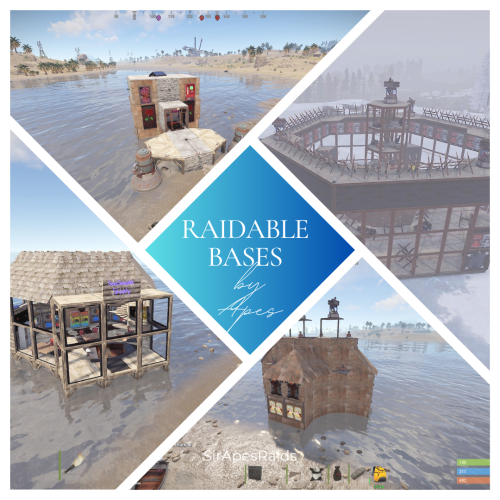
About Raidable Bases By Apes (200+ Pack) All Tiers! DUE TO THE NEW TOS: please remove the ability for your players to pick up deployables in your raids! This pack uses several DLC content and skins to hide traps! Torture your players with these Raidable Bases that have death around every corner! Tons of sneaky traps and layouts guaranteed to make your players hate you! Hand crafted by the great SirApesALot these bases will leave your players running back naked over and over again, definitely not beginner friendly raids. Bring your skills (and grenades)! Because you will need every raiding trick in the book to conquer these. In the "Bases" Folder you will find over 200 raidable bases (I try to add regularly, so the number goes up) that you can add to your servers Raidable Bases by Nivex. All levels are included (60+ easy, 50+ medium, 25+ hard, 25+ expert and 25+ nightmare) including Christmas and Halloween packs! Everyone of these torture chambers was created by me for my vanilla gather rate weekly server. These are best suited for servers that are more balanced loot wise, and a more advanced player base with experience raiding (beginners WILL rage quit). None of these are walk throughs, I have no mercy on my players....do you? I recommend giving more satchels and C4 in the lower tier raids to increase the effectiveness of traps (rockets ruin everything lol) and players are more likely to blow themselves up with satchels which is always entertaining. These are not simple raids for beginners, if they don't understand how to use twig and ladders to work around traps, or pay attention for eco raidable walls they will struggle. They also may never trust rugs or spiral stairs ever again! Understanding when to take your time, and when to jam a med stick in your arm and push past a trap is necessary! But, they will laugh and feel a sense of accomplishment after completing a raid! Raids in this pack marked with an s in the file to remember to turn stability to "true" on that base if you have it false. they have collapsing floor mechanics that requires it. Near everything is skinned, some just to look pretty, some themed. Traps are everywhere, containers already placed for loot If upgrading or replacing doors be sure to check if a door controller is attached. Loot Tables: As said on Raidable Bases plugin you need your own loot tables. Additional 40+ raids are included in case there is a few you are not happy with and want to remove (10+ easy, 10+ medium, 5+ hard, 5+ expert and 5+ nightmare). Otherwise they are just an added value! So 190+ raids in total in this pack! All raids are tested on Planet of the Apes PvE. It is recommended you have NPC's inside and configured to "spawn on bags" --- Easy - 1, Medium - 2, Hard - 3, Expert - 4, Nightmare - 5 Check out the other configuration and data settings below to get the most out of these bases. With Tesla coils, swinging doors, collapsing structures along with features like automatic lights, sprinklers and music to help distract the raider a lot can be done with these bases. If you have any questions feel free to stop in our discord (https://discord.gg/M228N2F79m), or if you would like to test our raids that can be arranged If you previously purchased any of the following, you will be purchasing duplicate bases: Easy Bases by Apes Pack 1 (25 pack) Easy Bases by Apes Pack 2 (25 pack) Medium Bases by Apes Pack 1 (25 pack) Medium Bases by Apes Pack 2 (25 pack) Hard Bases by Apes Pack 1 (25 pack) Expert Bases by Apes Pack 1 (25 pack) Nightmare Bases by Apes Pack 1 (20 pack) Halloween Bases by Apes (30 pack) Christmas Bases by Apes (15 Pack) Helpful Configuration and Data Settings: The following settings will help you get the most from these bases Configuration: "Entities Allowed To Drop Loot": { "Auto Turrets": true, "Flame Turret": true, "Fog Machine": false, "Gun Trap": true, "SAM Site": true "Allow Players To Loot Traps": false, "Allow Npcs To Target Other Npcs": false, "Turn Lights On At Night": false, "Turn Lights On Indefinitely": false, "Skins": { "Boxes": { "Preset Skins": [], "Ignore If Skinned Already": false, "Use Identical Skins": false, "Use Random Skin": false, "Use Workshop Skins": false, "Use Imported Workshop Skins File": true, "Use Approved Workshop Skins Only": false }, "Npcs": { "Use Identical Skins": true, "Use Random Skin": true, "Use Workshop Skins": true, "Use Imported Workshop Skins File": true, "Use Approved Workshop Skins Only": false }, "Deployables": { "Partial Names": [ "door", "barricade", "chair", "fridge", "furnace", "locker", "reactivetarget", "rug", "sleepingbag", "table", "vendingmachine", "waterpurifier", "skullspikes", "skulltrophy", "summer_dlc", "sled" ], "Preset Door Skins": [], "Skin Everything": false, "Ignore If Skinned Already": false, "Use Identical Skins": false, "Use Random Skin": false, "Use Workshop Skins": false, "Use Imported Workshop Skins File": true, "Use Approved Workshop Skins Only": false } "Weapons": { "Infinite Ammo": { "AutoTurret": false, "FlameTurret": false, "FogMachine": false, "GunTrap": false, "SamSite": false }, "Ammo": { "AutoTurret": 90, "FlameTurret": 40, "FogMachine": 50, "GunTrap": 32, "SamSite": 24 }, "Fog Machine Allows Motion Toggle": true, "Fog Machine Requires A Power Source": true, "Spooky Speakers Requires Power Source": false, "Test Generator Power": 100.0, "SamSite Repairs Every X Minutes (0.0 = disabled)": 5.0, "SamSite Range (350.0 = Rust default)": 100.0, "SamSite Requires Power Source": false }, Profiles (Raidable Bases Data Folder): This needs to be done for all 5 levels "Entities Not Allowed To Be Picked Up": [ "generator.small", "generator.static", "autoturret_deployed" ], "NPC Levels": { "Level 2 - Final Death": true }, "Spawn Inside Bases": { "Spawn On Floors": false, "Spawn On Beds": true, "Spawn On Rugs": false, "Spawn On Rugs With Skin Only": 1, "Bed Health Multiplier": 1.0, "Rug Health Multiplier": 1.0, "Spawn Murderers Outside": true, "Spawn Scientists Outside": true, "Minimum Inside (-1 = ignore)": 1, "Maximum Inside (-1 = ignore)": 1 }, "Event Traps And Turrets Ignore Npcs": true, "Auto Turrets": { "Aim Cone": 5.0, "Wait To Power On Until Event Starts": false, "Start Health": 1000.0, "Sight Range": 30.0, "Double Sight Range When Shot": false, "Set Hostile (False = Do Not Set Any Mode)": true, "Requires Power Source": false, "Sam Site": { "Repairs Every X Minutes (0.0 = disabled)": 5.0, "Range (350.0 = Rust default)": 100.0, "Requires Power Source": false, "Minimum Health": 1000.0, "Maximum Health": 1000.0 }, "Tesla Coil": { "Requires A Power Source": true, "Max Discharge Self Damage Seconds (0 = None, 120 = Rust default)": 0.0, "Max Damage Output": 35.0, "Health": 250.0 }, "Add Code Lock To Unlocked Or KeyLocked Doors": true, "Add Key Lock To Unlocked Or CodeLocked Doors": false, "Add Code Lock To Tool Cupboards": true, "Add Key Lock To Tool Cupboards": false, "Add Code Lock To Boxes": false, "Add Key Lock To Boxes": false, "Add Code Lock To Lockers": true, "Add Key Lock To Lockers": false, "Close Open Doors With No Door Controller Installed": true, "Allow Duplicate Items": false, "Allow Players To Pickup Deployables": true, "Allow Players To Deploy A Cupboard": true, "Allow Players To Deploy Barricades": true, "Divide Loot Into All Containers": true, "Empty All Containers Before Spawning Loot": true,$24.99 -

Version 1.0.0
7 downloads
xOnlinePlayers lets players use a command to open a compact, scrollable list of everyone currently online. It displays each players name, Steam avatar, and current session time. Preview Chat Commands /players$6.90 -
Version 2.6.1
41 downloads
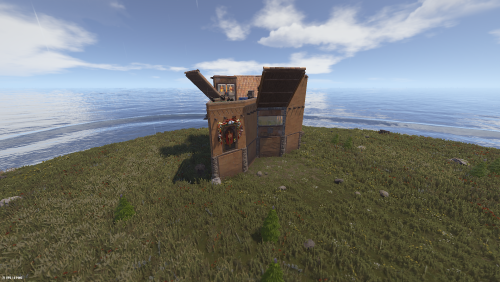
This is a premium pack with 20 unique Easy difficulty Raidable Bases for the Nivex Raidable Bases plugin. The Bases were Tested on 3 Different Online Servers with more than 50 pop! What's included in the pack: 20 Custom Easy Bases (all built with high foundations for perfect stability) Each base has a unique and beautiful exterior + interior design Easy.json (Loot profile) - Balanced and rewarding Easy loot with 2-5 Wind Turbines per base RaidableBases.json (Main configuration file) - Fully configured with loot distribution, anti-hammer protection, infinite turret ammo, vending machines & lockers support README.txt - Complete installation guide and information Main Features: All bases are unique (no copies) High foundations - no stability or sinking issues Loot distributes correctly into lockers, vending machines and all containers Balanced Loot: The loot tables are carefully tuned to ensure players can recover their raiding costs while still making a profit. Optimized specifically for the paid/premium version of Raidable Bases 🛠 Installation & Setup Guide: Base Files (.json): Move all 20 base files from the Easy folder into oxide/data/copypaste. The folder name must be all lowercase: copypaste. If it is capitalized ("CopyPaste"), the plugin will not find the bases. Loot Profile (Easy.json): Move this file to oxide/data/RaidableBases/Profiles. Main Configuration (RaidableBases.json): Move this file to oxide/config. Final Step: Once files are moved, type rb.reload in your server console or RCON. Tips: Ensure you have the CopyPaste plugin and the premium version of Raidable Bases installed for all features (like vending machine loot) to function properly. These bases are built with high foundations to prevent sinking on uneven terrain, but always ensure your spawn points are clear of steep cliffs for the best results. IMPORTANT: Remove Stone Walls (Enclosures): By default, the plugin spawns a giant stone wall around bases. To remove it: Open oxide/config/RaidableBases/Profiles/Easy.json Find "Spawns Enclosure": true and change it to false. Run command: rb.reload in console. [!IMPORTANT] To maintain the intended experience, please set Allow Players To Pickup Items to false. This prevents players from simply picking up your traps/deployables with a hammer! Perfect for monthly, weekly or modded Rust servers. Just drop the files in the correct folders, reload the plugin and you're ready to go.$3.00 -
Version 0.0.3
80 downloads
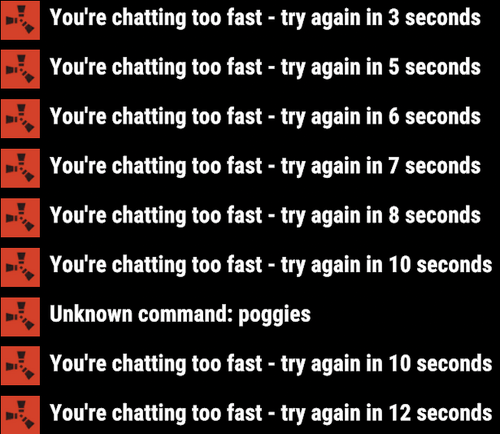
This harmony plugin makes it so that you can use commands even while typing too quickly. You will also not extend your cooldown by opening chat and pressing enter anymore, as I have fixed that as well. These two changes are a LARGE QoL improvement, in my opinion at least, that you will likely notice pretty quickly. This plugin is a drag and drop, just drop it into your normal plugins folder and you're good to go! Will do everything by itself. Example: You send a message and press a keybind for a chat command, you get told you're chatting to fast, or even just trying to type a command right after typing. With this plugin, you will NEVER have that issue again. Example 2: Send a message, and then have a cooldown of 5 seconds, you open chat and press enter to close it, your cooldown will not be updated.$1.69 -
Version 1.0.1
12 downloads
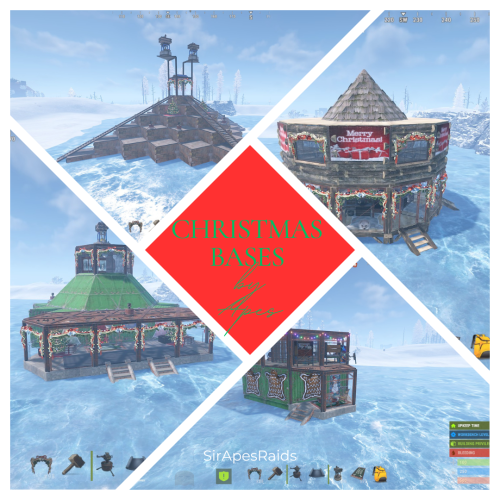
About Christmas Bases by Apes (20 Base Pack) All Tiers! Due to the new TOS: Please remove the ability for your players to pick up deployables in your raids! This pack uses several DLC content and skins to hide traps! Give your players the gift of many deaths this Christmas! Torture your players with these Christmas Bases that have death around every corner! Tons of sneaky traps and layouts guaranteed to make your players hate you! Hand crafted by the great SirApesALot these bases will leave your players running back naked over and over again, definitely not beginner friendly raids. Bring your skills (and grenades)! Because you will need every raiding trick in the book to conquer these. In the "Bases" Folder you will find 20 raidable bases that you can add to your servers Raidable Bases by Nivex. All levels are included There is currently 6 - Easy /5 - Medium /4 - Hard / 3- Expert / 2- Nightmare Raid costs: (Easy 6-8 mollies) (Medium 26-30 satchels) (Hard 14-18 rockets) (Expert 34-36 rockets) (Nightmare 55-60 rockets) Everyone of these torture chambers was created by me for my vanilla gather rate weekly server. These are best suited for servers that are more balanced loot wise, and a more advanced player base with experience raiding (beginners WILL rage quit). None of these are walk throughs, I have no mercy on my players....do you? I recommend giving more satchels and C4 in the lower tier raids to increase the effectiveness of traps (rockets ruin everything lol) and players are more likely to blow themselves up with satchels which is always entertaining. These are not simple raids for beginners, if they don't understand how to use twig and ladders to work around traps, or pay attention for eco raidable walls they will struggle. They also may never trust rugs or spiral stairs ever again! Understanding when to take your time, and when to jam a med stick in your arm and push past a trap is necessary! But, they will laugh and feel a sense of accomplishment after completing a raid! Raids in this pack marked with an s in the file to remember to turn stability to "true" on that base if you have it false. they have collapsing floor mechanics that requires it. (xmaseasy1s, xmashard1s and xmashard2s) Make sure to have your config set so autoturrets and sam sites do not require power. It is recommended you have NPC's spawn inside and configured to "spawn on bags" --- Easy - 1, Medium - 2, Hard - 3, Expert - 4, Nightmare - 5 Near everything is skinned for Christmas, with sound effects and more traps than you can shake a stick at! Traps are everywhere, containers already placed for loot If upgrading or replacing doors be sure to check if a door controller is attached. Loot Tables: As said on Raidable Bases plugin you need your own loot tables. All raids are tested on Planet of the Apes PvE. If you have any questions feel free to stop in our discord (https://discord.gg/M228N2F79m), or if you would like to test our raids that can be arranged Attached is a Raidable Bases configuration for those in need RaidableBases.json$4.50 -
Version 1.0.3
108 downloads
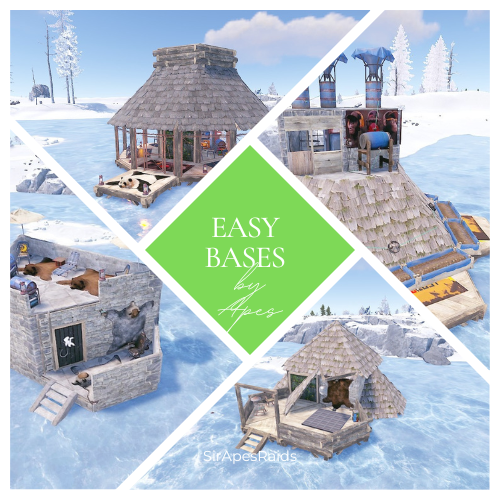
About Easy Bases by Apes Pack 2 (25 Pack) Due to the new TOS: Please remove your players ability to pick up deployables in raids! This pack uses several DLC content and skins to hide traps! Torture your players with these "Easy Bases" that aren't so easy! Tons of sneaky traps and layouts guaranteed to make your players hate you! Hand crafted by the great SirApesALot these bases will leave your players running back naked over and over again, definitely not beginner friendly raids. All of these easy raids are eco/flame raidable, but bring your skills! Because you will need every raiding trick in the book to conquer these. About Easy Bases by Apes (25 pack) In the "Bases" Folder you will find 25 easy bases total that you can add to your servers Raidable Bases by Nivex. Everyone of these torture chambers was created by me for my vanilla gather rate weekly server. These are best suited for servers that are more balanced loot wise, and a more advanced player base with experience raiding (beginners WILL rage quit). None of these are walk throughs, I have no mercy on my players....do you? Here is a video of us testing the decaying base themed easy from a previous pack on my friends server https://youtu.be/WTRZ7HQNdPg These are not simple raids for beginners, if they don't understand how to use twig and ladders to work around traps, or pay attention for eco raidable walls they will struggle. But, they will laugh and feel a sense of accomplishment after completing a raid! Easy's #026 and 037 of this pack is marked with an "s" in the file to remember to turn stability to "true" on that base if you have it false. They have collapsing mechanics that require it Near everything is skinned, some just to look pretty, some themed. If upgrading or replacing doors be sure to check it a door controller is attached. The average raid cost in this pack is 6-8 molotov's + an eco raidable wall or two. Loot Tables: As said on Raidable Bases plugin you need your own loot tables. All raids are tested on Planet of the Apes PvE. The only auto turrets in these have trumpets equipped It is recommended you have a NPC inside and configured to "spawn on bags" Check out the other configuration and data settings below to get the most out of these bases. With Tesla coils, swinging doors, collapsing structures along with features like automatic lights, sprinklers and music to help distract the raider a lot can be done with these bases. Bases are labeled easy026-easy050 If you have any questions feel free to stop in our discord (https://discord.gg/M228N2F79m), or if you would like to test our raids that can be arranged Helpful Configuration and Data Settings: The following settings will help you get the most from these bases Configuration: "Entities Allowed To Drop Loot": { "Auto Turrets": true, "Flame Turret": true, "Fog Machine": false, "Gun Trap": true, "SAM Site": true "Allow Players To Loot Traps": false, "Allow Npcs To Target Other Npcs": false, "Turn Lights On At Night": false, "Turn Lights On Indefinitely": false, "Skins": { "Boxes": { "Preset Skins": [], "Ignore If Skinned Already": false, "Use Identical Skins": false, "Use Random Skin": false, "Use Workshop Skins": false, "Use Imported Workshop Skins File": true, "Use Approved Workshop Skins Only": false }, "Npcs": { "Use Identical Skins": true, "Use Random Skin": true, "Use Workshop Skins": true, "Use Imported Workshop Skins File": true, "Use Approved Workshop Skins Only": false }, "Deployables": { "Partial Names": [ "door", "barricade", "chair", "fridge", "furnace", "locker", "reactivetarget", "rug", "sleepingbag", "table", "vendingmachine", "waterpurifier", "skullspikes", "skulltrophy", "summer_dlc", "sled" ], "Preset Door Skins": [], "Skin Everything": false, "Ignore If Skinned Already": false, "Use Identical Skins": false, "Use Random Skin": false, "Use Workshop Skins": false, "Use Imported Workshop Skins File": true, "Use Approved Workshop Skins Only": false } "Weapons": { "Infinite Ammo": { "AutoTurret": false, "FlameTurret": false, "FogMachine": false, "GunTrap": false, "SamSite": false }, "Ammo": { "AutoTurret": 90, "FlameTurret": 40, "FogMachine": 50, "GunTrap": 32, "SamSite": 24 }, "Fog Machine Allows Motion Toggle": true, "Fog Machine Requires A Power Source": true, "Spooky Speakers Requires Power Source": false, "Test Generator Power": 100.0, "SamSite Repairs Every X Minutes (0.0 = disabled)": 5.0, "SamSite Range (350.0 = Rust default)": 100.0, "SamSite Requires Power Source": false }, Profiles (Raidable Bases Data Folder): "Entities Not Allowed To Be Picked Up": [ "generator.small", "generator.static", "autoturret_deployed" ], "NPC Levels": { "Level 2 - Final Death": true }, "Spawn Inside Bases": { "Spawn On Floors": false, "Spawn On Beds": true, "Spawn On Rugs": false, "Spawn On Rugs With Skin Only": 1, "Bed Health Multiplier": 1.0, "Rug Health Multiplier": 1.0, "Spawn Murderers Outside": true, "Spawn Scientists Outside": true, "Minimum Inside (-1 = ignore)": 1, "Maximum Inside (-1 = ignore)": 1 }, "Event Traps And Turrets Ignore Npcs": true, "Auto Turrets": { "Aim Cone": 5.0, "Wait To Power On Until Event Starts": false, "Start Health": 1000.0, "Sight Range": 30.0, "Double Sight Range When Shot": false, "Set Hostile (False = Do Not Set Any Mode)": true, "Requires Power Source": false, "Sam Site": { "Repairs Every X Minutes (0.0 = disabled)": 5.0, "Range (350.0 = Rust default)": 100.0, "Requires Power Source": false, "Minimum Health": 1000.0, "Maximum Health": 1000.0 }, "Tesla Coil": { "Requires A Power Source": true, "Max Discharge Self Damage Seconds (0 = None, 120 = Rust default)": 0.0, "Max Damage Output": 35.0, "Health": 250.0 }, "Add Code Lock To Unlocked Or KeyLocked Doors": true, "Add Key Lock To Unlocked Or CodeLocked Doors": false, "Add Code Lock To Tool Cupboards": true, "Add Key Lock To Tool Cupboards": false, "Add Code Lock To Boxes": false, "Add Key Lock To Boxes": false, "Add Code Lock To Lockers": true, "Add Key Lock To Lockers": false, "Close Open Doors With No Door Controller Installed": true, "Allow Duplicate Items": false, "Allow Players To Pickup Deployables": true, "Allow Players To Deploy A Cupboard": true, "Allow Players To Deploy Barricades": true, "Divide Loot Into All Containers": true, "Empty All Containers Before Spawning Loot": true,$3.50 -

Version 2.1.5
450 downloads
Premium 10x is a quick template to get a server up as soon as possible. All features you get with this server template: - Better Loot - Better No Workbench - Clans Reborn - Instant Crafting - Automated Events - Much Higher Stack Sizes - Welcome Controller - Better Chat - Remover Tool - Dynamic Cup Share and Automatic Authorisation - QuickSmelt - Vanish - Permissions Manager - No Escape (Raid / Combat Block) - Simple Splitter - NTeleportation / Home system - Always Bonus - 10x Gather Rates - Instant Barrels - Auto Broadcast and Scheduled Messages - Faster Airdrops - No Blueprints - Faster Recycler Speed - SkinBox - Always Day and Time of Day$14.99 -

Version 2.1.5
367 downloads
Premium 5x is a quick template to get a server up as soon as possible. All features you get with this server template: - Better Loot - Better No Workbench - Clans Reborn - Instant Crafting - Automated Events - Decently Higher Stack Sizes - Welcome Controller - Better Chat - Remover Tool - Dynamic Cup Share and Automatic Authorisation - Quick Smelt - No Escape (Raid / Combat Block) - Simple Splitter - NTeleportation / Home system - Always Bonus - 5x Gather Rates - Instant Barrels - Auto Broadcast and Scheduled Messages - Faster Airdrops - No Blueprints - Faster Recycler Speed - SkinBox - Always Day and TOD - Vanish - Permissions Manager$14.99 -

Version 2.1.5
263 downloads
Premium 3x is a quick template to get a server up as soon as possible. All features you get with this server template: - Better Loot - Faster Airdrops - Clans Reborn - Faster Crafting - Automated Events - Higher Stack Sizes - Welcome Controller - Better Chat - Remover Tool - Dynamic Cup Share and Automatic Authorisation - QuickSmelt Smelt - No Escape (Raid / Combat Block) - Simple Splitter - NTeleportation / Home system - 3x Gather Rates - 50 Minute Day / 10 Minute Night - Level 1 BPs - Auto Broadcast and Scheduled Messages - Faster Airdrops - SkinBox - Permissions Manager - Vanish$14.99 -

Version 2.1.5
445 downloads
Premium 2x is a quick template to get a server up as soon as possible. All features you get with this server template: - Better Loot - Faster Airdrops - Clans Reborn - Faster Crafting - Automated Events - Slightly Higher Stack Sizes - Welcome Controller - Better Chat - Remover Tool - Dynamic Cup Share and Automatic Authorisation - No Escape - Permissions Manager - Simple Splitter - NTeleportation / Home system - 2x Gather Rates - 40 Minute Day / 20 Minute Night - Level 1 BPs - Auto Broadcast and Scheduled Messages - Faster Airdrops - SkinBox - QuickSmelt - Vanish Join my support discord for more: here$14.99 -
Version 0.1.0
23 downloads
What is it? Zone Command Blocker is a tool which prevents using specific commands (in data folder) in specific zones Permissions: zonecommandblocker.bypass - None of your command will be blocked in any zone zonecommandblocker.clear - Access for the /zcb.clear command Commands: /zcb.clear - Clears/wipes the data folder which contains zones with saved permissions etc.. Features: Zone Command Blocker will make your life easy and will on load take all zones and add them into it's data file where you can just add blocked commands Multiple blocked commands - Supports multiple blocked commands for specific zone Data file: Data of all reports and staff's statistics are being saved into a data file. Path: Your_Server\oxide\data\ZoneCommandBlocker\ZoneCommandBlocker.json Localization: { "CommandBlocked": "This command cannot be used in zones!", "DataFileClear": "Cleared data folder" }$4.99 -
Version 1.7.3
47,640 downloads
The easiest and fastest way to build a Rust server Functions: Server Config Installer Wipe Manager Custom Map Support - Server Config: Here you can set up all the settings for your server. Server Name Server Tag Server Description Server URL Server Logo URL Map Size Map Seed Generate Maps Seed MAX Player RCON Password Server Port Query Port RCON Port App Port Game Mode Custom Map - Installer: Here you can easily install your server and mods. Install or Update your Server Verify your server files Install or Update Oxide (Detects new version) Install or Update Carbon (Detects new version) Install or Update RustEdit (for Custom Map Users) Install or Update Discord Extension (to run Discord Plugins) - Wipe Manager: Here you can easily Wipe your Server Full Wipe Blueprints Map Oxide Data Backpacks Logs Player Deaths Player Identities Player Stats Player Tokens New Map Seed on Wipe HowTo: - Start Rust Server Tool as Admin - Install Server - Make your settings and save - Start Server That's allFree- 193 comments
- 18 reviews
-
- 28
-
-

-
- #server
- #installer
- (and 7 more)
-
Version 1.5.9
821 downloads
PluginCleaner is a Rust server management tool designed to keep your server’s plugin directories organized and free of unused files. It scans the plugin folder to detect active plugins and checks the associated data, config, and lang folders for files related to plugins that are no longer installed. This helps reduce clutter and prevent potential performance issues by removing outdated or orphaned files. Automated Cleanup: Scans the plugins directory to identify installed plugins and removes files without matching plugins. Optimized Server Maintenance: Helps keep server directories clean, ensuring a more streamlined setup and improved performance. Customizable Execution: Run the cleanup specifically for Oxide or Carbon plugins with the console command. Execute the following command in the console to initiate the cleanup: cleanplugins <oxide|carbon> The settings and options for this plugin can be configured in the PluginCleaner.json file under the oxide/config or carbon/configs directory. { "AutoRemoveFiles": true, "CustomDataMappings": { "BuildingSkins": [ "BuildingSkins_Data" ], "NTeleportation": [ "NTeleportationbandit", "NTeleportationoutpost" ], "StatsController": [ "statscontroller" ], "BetterVanish": [ "BetterVanish-SafePoints", "BetterVanish-PersistPlr" ], "PluginName": [ "PluginName_Data", "pluginname" These are for the data folder in ether Oxide or Carbon ] }, "IgnoredFiles": { "config": [], "lang": [], "data": [ "oxide.users.data", "oxide.lang.data", "oxide.groups.data", "oxide.covalence.data", "vendordata_cf.db", "vendordata_svowner.db" ] } } RustForge is a Discord server dedicated to aiding both novice and seasoned server owners, as well as plugin developers. If you require assistance with any of my plugins or prefabs, I strongly advise joining the server to receive support. RustForge Invite Note: Use this tool with caution, as it will permanently delete files related to plugins not currently installed.Free -
Version 1.0.0
4 downloads
About x10 Jungle, Beginner Eco Raidable Bases This Pack contains 10 Jungle Themed Beginner/Eco Raid bases with the insides filled, decorated and skinned! Note: This Pack was made for Eco Raiding early on in PvE servers, although the walls are "Stone" with the Jungle DLC skin applied, all doors are still wooden making it ideal for Eco-Raiding still! The idea behind this was to get players into raiding, especially for beginner or new players. You can add these into your Easy raid bases or even create a new Category that would be easier than easy! The Pack Doesn't include, Loot table, All skinned Items at the time of uploading are also free on the workshop. This Pack Does Include, DLC and Skinned Items. Installation: Make sure you have Raidable Bases and copy-paste plugin installed. Copy and paste the files into your folder oxide\data\copypaste Enter the following command into your console window rb.config add "Easy Bases" EcoRaidJungle01 EcoRaidJungle02 EcoRaidJungle03 EcoRaidJungle04 EcoRaidJungle05 EcoRaidJungle06 EcoRaidJungle07 EcoRaidJungle08 EcoRaidJungle09 EcoRaidJungle10 You can rename the files to suit the difficulty you want to put them in or even create a new difficulty.$2.99 -
.thumb.jpg.e6f37a70b0c6594fa1761ed9cc51d870.jpg)
Version 1.0.0
84 downloads
0xF's CUI TOOL is a tool that allows you to make UIs for Rust plugins in minutes with loaded game assets directly in Unity and in an exportable easy to understand format. This tool is suitable for Unity 2021, version 2021.3.29f is recommended. Download here. Features: Working with game assets of the game you have installed. You will always have all sprites, materials, fonts available. Easy to understand exportable UI code using advanced CUI library by 0xF. Multifunctional interface that allows you to write your own variables with code with the ability to use in most fields of components, as well as If statements and parts of the code before and after the object. Tagging system allowing to insert automatically the necessary parts depending on the object, such as the name of the object or their child index. Installation instruction: Installation Instructions: Create a 2D project. After loading the project, transfer 0xF's CUI Tool.unitypackage file to the project explorer window, then click import. After the import is complete, open a scene named UI. Go to the Game tab, click Free Aspect and create a new one with a resolution of 1280x720. Enjoy. Quick start to get started with the tool: To get started, install the tool according to the instructions without skipping a step (especially the last one). If something is not clear, you can ask it in the discussion section or write to the author in private messages with a question. Look at the scene hierarchy on the left, you can see the objects that correspond to the layers in the game (Overall, OverlayNonScaled, Overlay, Hud.Menu, Hud, Under, UnderNonScaled). They are sorted according to their priority in the game and each is displayed on its own display in the Game tab (the display number for the layer is specified in the Canvas component). Open the tool window by selecting 0xF -> CUI Tool (near File, Edit, ..., Window, Help). Attach the window to a convenient part of the Unity interface. Select the appropriate layer in the object hierarchy and then select the desired element to create in the tool window. I think Panel will do for you for starters. If necessary, familiarize yourself with how to create UIs in Unity by watching tutorials on youtube or other sources. Try each of the presented variants of objects in the tool window. When you're done with the UI creation, click Export to export the UI to code. How do I use the exported code? In your plugin, change the access specifier of your plugin class to partial Go to GitHub and copy the library code Paste it to the end of your plugin file, change the text YourPartialPluginClassName to the name of your plugin class, move usings to the top of the file. Paste the exported code in the place you want in your plugin and call it in a convenient way. The access specifier, as well as arguments in the exported method can be changed in the ExportProperties component. An example of exported code from a product preview:$50.00 -
Version 1.6.5
136 downloads
For beginners and certified amateurs alike, setting up a Rust server can quickly become time-consuming. This is why we offer you our all-in-one server setup. This includes files already pre-configured for your plugins. (Not all plugins in the list have a pre-configured file, as some do not need one). With this, your server will be ready in 10 minutes. Documentation detailing the installation process is provided. It also includes explanations of the plugins as well as the steps to take if you wish to make changes. Perfect for your first Rust server. The icons and designs used are also provided (in .jpg and .psd format) Server Features: 3x Gather Rates 3x (Better) Loot Table 2x Recycler & Smelt Speed 2x Speed Craft on basic items 5 Preconfigured Kits Automatic Authorization Custom WelcomePanel Custom Outpost (More recycler, vending machine, fourniture) Custom VendingMachine Permission Groups (default, VIP, & Admin) SkinBox & BuildingSkin BGrade WorkBench extended to the base BluePrint Share NTeleportation No-Escape Shop w/ economics Kill Rewards + More! Plugins are not provided with this pack. You need to download them yourself. A document containing the main links is provided. However, you don't have to use all the plugins if you don't want to. For more information, visit our website.$5.50 -
Version 1.0.0
10 downloads
About This Raid Pack This Pack contains 10 Beginner/Eco Raid bases with the insides filled, decorated and skinned! The idea behind this was to get players into raiding, especially for beginner or new players. You can add these into your Easy raid bases or even create a new Category that would be easier than easy! The Pack Doesn't include, Loot table or DLC content, All skinned Items at the time of uploading are also free on the workshop, does not contain paid skins. Installation: Make sure you have Raidable Bases and copy-paste plugin installed. Copy and paste the files into your folder oxide\data\copypaste Enter the following command into your console window rb.config add "Easy Bases" EcoRaid01 EcoRaid02 EcoRaid03 EcoRaid04 EcoRaid05 EcoRaid06 EcoRaid07 EcoRaid08 EcoRaid09 EcoRaid10 You can rename the files to suit the difficulty you want to put them in or even create a new difficulty.$2.99 -

Version 1.0.2
51 downloads
Tired of running back and forth to the vending machines or public marketplaces? This plugin revolutionizes the player experience by integrating marketplace access directly into the Computer Station. With just a few clicks, players can now: Browse nearby marketplaces via a dedicated channel on the Computer Station Purchase items remotely without leaving the safety of their base Automatically receive purchased items at the Computer Station for easy pickup This plugin is perfect for PvE and PvP servers alike, offering both convenience and strategic value. Whether you're deep in your bunker or managing your outpost from afar, the market is always just a screen away. Note: To use this feature, players must have the permission: marketplacenet.use Easy to set up, fully configurable, and optimized for performance — give your players the trading quality-of-life upgrade they’ve been waiting for!$10.00-
- 1
-
-
- #net
- #marketplace
- (and 5 more)
-
Version 1.0.1
147 downloads
AutoUnload Plugin A simple, lightweight plugin that automatically unloads specified plugins on your Rust server. Configure it once, and it will keep those plugins unloaded either immediately upon starting AutoUnload or every 15 minutes on a timer. It can be used to keep plugins hidden while using an automated restart without having to remove the file's. Warning: Server performance can be hurt when using it on 40+ plugins (depending on plugin size). I highly recommend using it on 15 or less plugins to minimize performance impact. Plugin works with the latest rust version Features: Automatically unload plugins listed in the config file Option to unload plugins instantly when AutoUnload is enabled Automatic unload repeats every 15 minutes Simple configuration by adding plugin names to the config Permissions: autounload.admin — Grants access to all in-game AutoUnload commands Commands: /autounload.enable — Activate the AutoUnload functionality /autounload.disable — Deactivate the AutoUnload functionality /autounload.check — View which plugins are currently being unloaded /autounload.help — Display all available AutoUnload commands A.I. Has been used to identify bugs and clean up my messy work.Free- 2 comments
-
- 1
-
-
- #performancefriendly
- #servermanagement
- (and 6 more)
-
Version 1.0.0
778 downloads
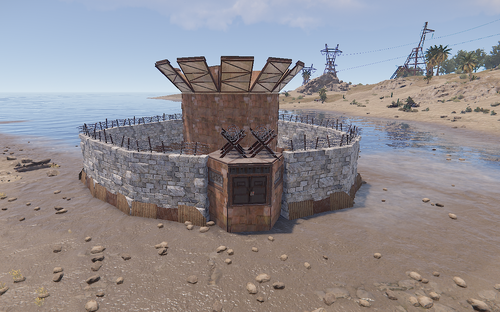
Simple Raid Base 1.0.0 By TGMotionz Hey everyone so i thought i might give it a little go building some bases that you all can use, this is my first attempt so reviews would be appreciated! Traps 1 Turrets You can add much more to it and more updated versions will be coming out! Installation Guide Place the file in your oxide/data/copypaste directory.Free-
- 1
-
-
- #raid
- #raidable baes
- (and 1 more)
-
Version 1.0.0
461 downloads
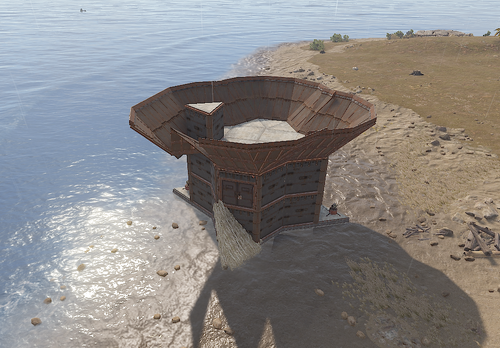
Easy Raid Base 1.0.0 By TGMotionz Hey everyone so i thought i might give it a little go building some bases that you all can use, this is my first attempt so reviews would be appreciated! Traps 7 Turrets 3 Shotgun Traps Installation Guide Place the file in your oxide/data/copypaste directory.Free






.thumb.png.cd61e0af4e7220df08c8f8d8e114f09d.png)







.thumb.png.ccf8a947948c9eb1445ad21a7931247b.png)