Search the Community
Showing results for tags 'groups'.
Found 15 results
-
Version 0.1.4
430 downloads
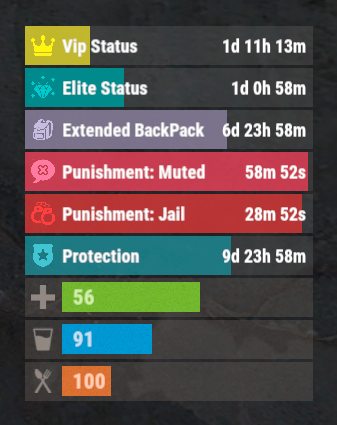
The plugin that displays temporary permissions and groups in the status bar. Depends on AdvancedStatus plugin. The ability to display temporary and permanent permissions; The ability to display temporary and permanent groups; The ability to display temporary and permanent permissions from groups; The ability to automatically generate language files for different languages(filled in English); The ability to customize the bar for each permission and group; The ability to choose between bar types(TimeCounter and TimeProgressCounter); The ability to specify the order of the bar; The ability to change the height of the bar; The abillity to customize the color and transparency of the background; The ability to set a material for the background; The ability to switch between CuiRawImageComponent and CuiImageComponent for the image; The ability to get images from the local folder(*SERVER*\oxide\data\AdvancedStatus\Images); The abillity to set own image and customize the color and transparency of the image; The abillity to set sprite instead of the image; The ability to customize the color, size, font and outline of the text. { "Chat command": "pstatus", "Is it worth enabling GameTips for messages?": true, "List of language keys for creating language files": [ "en" ], "Is it worth clearing saved settings for permissions and groups upon detecting a wipe?": false, "Is it worth displaying the status bar only when players are in the safe zone or have building privilege?": false, "Default display mode for new permissions(Disabled, Temporary, UntilWipe, Permanent, All)": "Temporary, UntilWipe", "Default display mode for new groups(Disabled, Temporary, UntilWipe, Permanent, All)": "Temporary, UntilWipe", "Wipe ID": null, "Version": { "Major": 0, "Minor": 1, "Patch": 4 } } P.S. The default status bar configuration can be adjusted in *SERVER*\oxide\data\PermissionsStatus\BarsConfig.json under the key "_default". EN: { "CmdFailed": "The entered command is incorrect! Try '/{0} display'", "CmdDisplayEnabled": "Displaying the bar is enabled!", "CmdDisplayDisabled": "Displaying the bar is disabled!", "BarUntilWipe": "Until wipe", "BarPermanent": "Permanent" } RU: { "CmdFailed": "Введена не верная команда! Попробуйте '/{0} display'", "CmdDisplayEnabled": "Отображение бара включено!", "CmdDisplayDisabled": "Отображение бара выключено!", "BarUntilWipe": "До вайпа", "BarPermanent": "Постоянный" } The language file is generated during the plugin initialization process. Additionally, when creating a new permission or group, a key for it will be automatically added. Note: You can also specify in the configuration file the generation of language files for other languages besides en and ru. In the "\data\PermissionsStatus\" folder, there are three files: BarsConfig.json - stores status bar settings with their unique keys. GroupsConfig.json - contains settings for groups. PermissionsConfig.json - contains settings for permissions.$9.99 -
Version 1.2.7
462 downloads
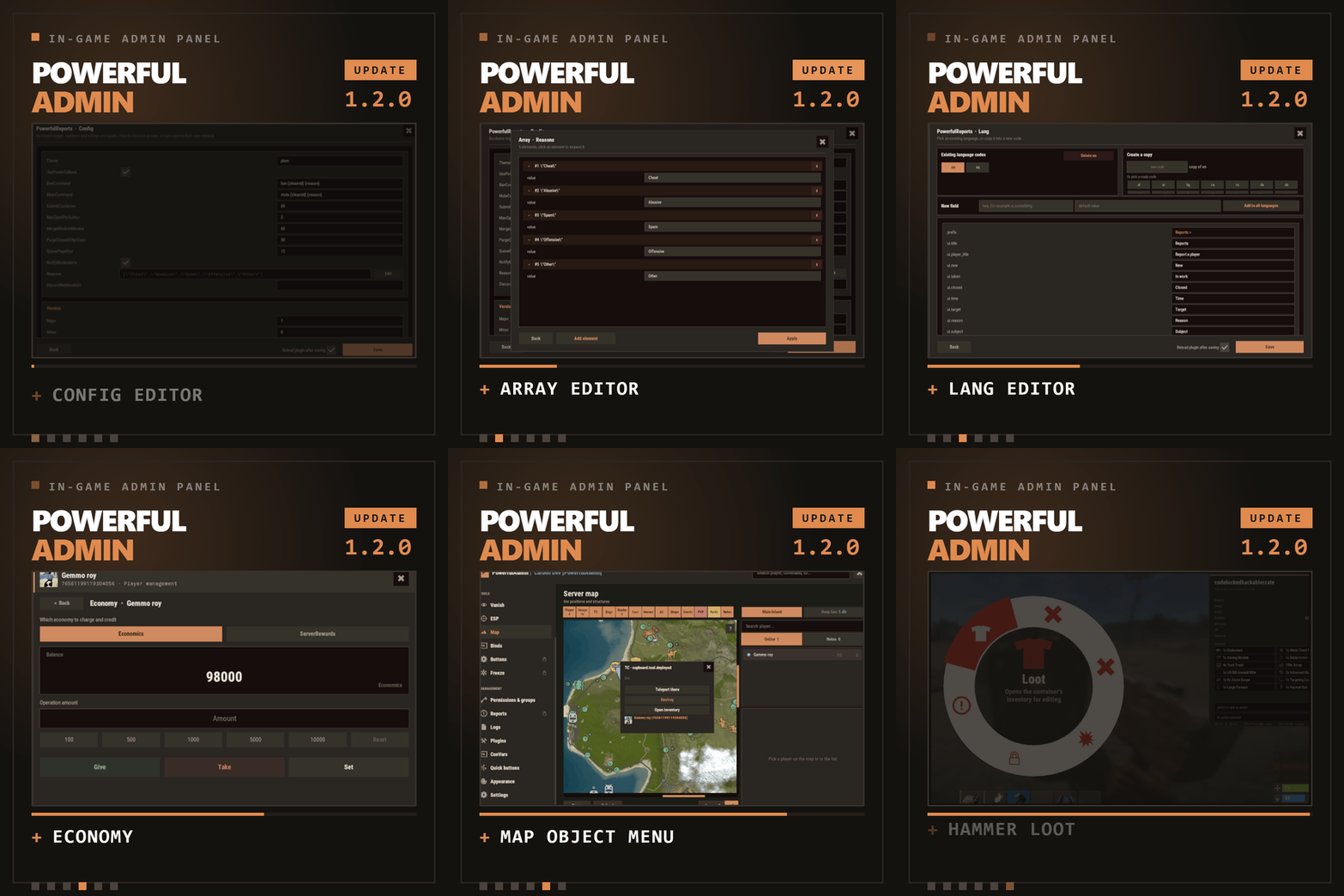
In-game admin panel Oxide & Carbon Our Discord Everything you open RCON for, without leaving the game. PowerfulAdmin is an admin panel that lives inside Rust. Fourteen pages in the sidebar cover players, permissions, plugins, the live console, ConVars, a working server map and your own buttons. Four more tools work out in the world, on whatever you happen to be looking at. Every page and every action has a permission of its own, so a junior moderator gets what you hand them and nothing else. /padmin opens it. After that it is point and click, or a key you bound yourself. 00 New in 1.2.0 Five things this version adds Config editor Open any plugin from the Plugins page and edit its config as a form. Booleans become switches, numbers and strings become fields, an object becomes a group, an array opens in its own window. Save writes the file and can reload the plugin for you. Lang editor The same form for language files. Copy the open language into a new code to start a translation, delete one you no longer need, or add a key and push it into every localization at once. Map objects Cupboards, bags and stashes on the map used to be dots. Click one and a menu opens with the owners and their avatars, a teleport, a remote inventory, and a destroy behind a confirmation. Economy If you run Economics, ServerRewards or IQEconomic, the player card shows the balance and lets you add to it, take from it or set it. Reading and changing are separate permissions. Hammer & hints The hammer edits container contents instead of only listing them, its action menu moved to a radial you open by holding E, and its HUD can be dragged. Tooltips were added across the sidebar, the actions and the toggles. 01 The sidebar Fourteen pages, plus whatever docks in The panel reopens on the page you left. Add-ons appear in the same sidebar, use the same permission system and follow the theme the admin picked. Dashboard Live console Players Vanish ESP Server map Binds Permissions Logs Plugins ConVars Quick buttons Appearance Settings Bans DLC Freeze DLC Whitelist DLC Your own sections land here too, through the API at the bottom of this page 02 Out in the world Walk up to it and deal with it Most moderation starts with you standing in front of a base, a player or a locked crate, not in a menu. Four tools cover that, and none of them asks the admin to install anything on their client. Vanish You leave the world properly: networking, colliders, entity queries and the game's own AI target list. NPCs stop shooting and forget you were standing there. Radiation, cold, wetness, hunger, thirst and drowning stop touching you, and everything is restored the way it was when you switch Vanish off. A silhouette for other admins, auto vanish on connect, opening locks and noclip riding along are all optional, and each has a permission. Admin hammer Hold a hammer, look at anything, and the HUD reads out the owner, position, health, upkeep, power, who is authorized, the code lock codes and what is in the container. Hold E to pick an action from the radial menu, then Shift+LMB runs it: delete, delete with gibs, delete the whole linked structure, edit the container contents, or on a hackable crate unlock it now and set its timer to any value you type. Inspect Look at a player and act on them without typing a name. E opens their inventory, RMB opens their full card. A hint on screen keeps telling you which key does what. Server ESP The server draws it with the engine's own debug draw and sends it only to admins who hold the permission. Players and sleepers carry their name, HP and held item. Loot, boxes, cupboards, bags, traps, stashes, NPCs, scientists, turrets and vehicles each get their own colour. You set the radius, the opacity and the text size, and enemy, team and admin are coloured apart. 03 The player card One card per player, awake or asleep A searchable, paginated roster of everyone the server has ever seen. The card holds the SteamID, live status, current session and total playtime, total Rust hours from the Steam API, groups, first and last seen, the balance if you run an economy plugin, and the IP behind a permission of its own. Under that sit the actions. Heal Kill Strip Kick Ban Freeze Mute Teleport Inventory Spectate Give Blueprints Modifiers Vitals Permissions Notes Show on map Each of these has its own permission Give is a cart, not a single item. Search the item list, stack up what you want, edit any quantity by clicking the number, then send the lot. Vitals reads the real limits off the prefab, so a raised max HP or a frozen metabolism survives death, respawn, reconnect and wipe. 04 The map The server map, drawn inside the panel The island and the Deep Sea, with zoom. Layers go on one at a time, so you look at what you came for and nothing else. Layers Players, sleepers, cupboards, bags, stashes, cars, horses, air, shops, events and map notes. Cars, boats, submarines, trains, horses and player helicopters each have their own icon and an arrow showing where they are heading. The cargo ship, the cargo plane and the chinook are on the map with the rest. Click an object Cupboards, bags and stashes open a menu that names the owners and shows their Steam avatars. From there you can teleport to it, open its inventory from where you are standing, or destroy it behind a confirmation. Each of the three actions has a separate permission, so a moderator can be allowed to look without being allowed to delete. Heat PVP and raid heat build up from kills that actually happened and explosive damage that actually landed, over a window you set. It shows where the server is loud right now rather than guessing. Side panel A player search next to the map, and a card for whoever you picked with the same actions as the full player card. Hold Shift and place a map note to teleport straight to it. 05 Server control The parts you used to need RCON for Live console Server output as it happens, filtered by category, with a command line and history. It can be switched off entirely for everyone in Settings. Permissions Every permission on the server, grouped under the plugin that owns it. Toggle per user or per group, create and delete groups, set a parent group, and search across thousands of entries. PowerfulAdmin's own permissions can be locked so nobody edits them from inside the panel. Plugins Load, unload and reload anything on the server, then open its config and language files as a form and edit them without touching the filesystem. Editing is a separate permission from reloading, so an admin can restart a plugin without being able to rewrite it. ConVars Edit the server ConVars that matter, grouped and searchable. The panel keeps them in its own cfg file and applies them again on boot, so a restart does not quietly undo your work. Logs Commands, chat, joins, leaves, errors and warnings, colour coded and capped at a number you choose. Companion plugins write into the same log through the API. 06 Make it yours Bend it to how your team works Quick buttons Your own console commands as buttons, each with an icon, a colour, an optional confirmation and a permission of its own. You decide where a button shows up: the player card, the map, the dashboard or the floating widget. Binds Ready bind lines for the panel, Vanish, god mode, noclip, ESP, the hammer, inspect and the map. Type the key you want, select the generated line, Ctrl+C, paste into F1. One key toggles both ways. Appearance Three themes, Rust, Midnight and Plum, chosen per admin. Fonts are picked per slot, the window can be dragged, and the ESP text size is adjustable. Fonts without Cyrillic are marked in the picker. Notifications Panel messages go through Notify or NCP if you have either installed, or through chat, or nowhere at all. You pick the provider in Settings and the add-ons follow it. Storage SQLite by default, and it needs no setup. MySQL is there for networks that share data between servers, JSON for people who prefer files. Moving between them is one click in Settings and the data comes along. Discord An optional companion plugin ships in the same archive. Two way chat relay, feeds for bans, actions and errors, a bot with a live status line, and roles that decide who may run commands from Discord. It is set up in game, not in a config file. 07 Permissions Twenty seven of them, and that is the point A trial moderator can be given Vanish, the player card and nothing else. A head admin gets the lot. The panel greys out what an admin cannot reach instead of hiding it, so nobody has to guess why a page is missing. powerfuladmin.use Open the panel at all powerfuladmin.players Player page and player cards powerfuladmin.map Map page powerfuladmin.map.teleport Teleport to an object on the map powerfuladmin.map.loot Open an object's inventory from the map powerfuladmin.map.remove Destroy an object from the map powerfuladmin.esp ESP page and the overlay itself powerfuladmin.vanish Vanish powerfuladmin.vanish.unlock Open locked doors and boxes while vanished powerfuladmin.hammer Admin hammer powerfuladmin.hammer.codes See code lock codes in the hammer HUD powerfuladmin.hammer.loot Edit container contents with the hammer powerfuladmin.plugins Plugin page, load and reload powerfuladmin.plugins.edit Edit plugin configs and language files powerfuladmin.economy See a player's balance powerfuladmin.economy.edit Change a player's balance powerfuladmin.console Live console page powerfuladmin.perms Permission manager powerfuladmin.logs Logs page powerfuladmin.convars ConVar editor powerfuladmin.quickbuttons Create and edit quick buttons powerfuladmin.settings Settings, storage and Discord powerfuladmin.godmode God mode toggle powerfuladmin.noclip Noclip toggle powerfuladmin.viewip Reveal player IP addresses powerfuladmin.candisablevitals Edit player vitals and metabolism powerfuladmin.countableondashboard Counts toward the admins online figure On top of that, every action in the player card carries powerfuladmin.player.NAME, and every quick button you create carries powerfuladmin.quickbtn.NAME. You do not have to grant them one by one on day one: pa.setup <steamid or name> in the server console hands a player the whole set at once. 08 Commands One in chat, three in console There is nothing else to memorise. The console ones exist mainly so you can bind them to keys. /padmin Open the panel pa.open <page> Open the panel straight on a page, for example pa.open map pa.toggle <feature> Flip vanish, god, noclip, ESP, hammer or inspect. Called without a value it toggles, so one key does both directions pa.setup <steamid|name> Grant the full permission set to a player, once, on install Install 1 Drop the plugin into your scripts folder. It loads and writes a clean config on its own. Oxide and Carbon both work. 2 Run pa.setup with your name or steamid once in the server console. 3 Type /padmin in game. You are in. 4 Optional, later, in Settings: switch to MySQL, connect Discord, add a Steam API key for Rust hours, and copy your binds out of the Binds page. 09 Add-ons Bans, Freeze and Whitelist, sold separately Three companion plugins drop into the sidebar and share the card, the permissions and the storage backend. They are extras rather than missing pieces: everything above this line works without them. PowerfulBans Timed and permanent bans in their own database, reason templates, per role duration caps, ban history and login enforcement. Runs standalone too. PowerfulFreeze Freeze a player where they stand while you talk to them, from the card, the map or the world, with live countdowns and three freeze modes. PowerfulWhitelist Closed server whitelisting with JSON, SQLite or MySQL storage and its own standalone commands. 10 Before you buy The questions that actually get asked Will it lag my server? It is built not to. Objects are pooled and buffers reused, only the element that changed repaints instead of the whole panel, saves are debounced, state is cached behind signatures, and ESP, inspect and the map run on intervals you can tune. Nothing runs for an admin who is not looking at it. Is the ESP a cheat? There is no client mod involved. The server draws it through the engine's own debug draw and sends it only to admins holding powerfuladmin.esp. Take the permission away and it stops existing for that admin. Can a junior moderator abuse it? Only as far as you let them. Every page has a permission, every action in the player card has one, every quick button you make has one, and the plugin's own permissions can be locked so they cannot be edited from inside the panel. Do I need a database? No. SQLite is the default and needs no configuration. MySQL is there for networks that want shared data, JSON for people who like plain files, and moving between them is one click in Settings. Do I have to set up Discord or a Steam API key? Neither. Discord is optional and configured in game when you want it. The Steam key only fills in the total Rust hours figure on player cards. Without it that one line reads n/a and nothing else changes. Can I manage players who are offline? Yes. Teleport to a sleeper, heal them, strip them, edit the inventory, mute, change permissions. Only the actions that need a live connection are disabled while a player is away. Oxide or Carbon? Both. On Carbon the panel's internal commands are protected on top of that, so nothing outside the panel can call them, while the public ones stay open for your binds. What language does it speak? English and Russian out of the box, and every string lives in a language file. Adding another locale is a translation rather than a code change, and you can now do it from inside the panel. I write plugins. Can I hook into it? Yes, and the section below shows how. 11 For developers Your plugin, inside the panel Any plugin can register its own sidebar section and draw inside the panel, in the player's language and in whichever theme the admin picked. Bans, Freeze and Whitelist are built on this same public API, so it gets exercised on every release. [PluginReference] private Plugin PowerfulAdmin; var definition = new Dictionary<string, object> { ["id"] = "mystats", ["icon"] = "assets/icons/star.png", ["category"] = "nav.cat.tools", ["permission"] = "myplugin.view", ["title"] = (Func<BasePlayer, string>)(p => "My Stats"), ["hint"] = (Func<BasePlayer, string>)(p => "Kills, deaths, playtime"), ["open"] = (Action<BasePlayer>)OpenSection, ["cardRows"] = (Func<string, List<string[]>>)CardRows, ["settings"] = (Action<BasePlayer, CuiElementContainer, string, int>)DrawSettings, ["settingsHeight"] = (Func<BasePlayer, int>)(p => 180), ["popupActions"] = new Dictionary<string, Action<BasePlayer, ulong, string>> { ["ban"] = OnBan } }; PowerfulAdmin.Call("API_AddSection", definition); Only id is required. Every other key is optional, and the permission is registered for you if no plugin has claimed it yet. Read API_SectionContext on every render to get the parent layer, the body size, the padding, the player's language and the full theme palette, because the admin can switch themes while your page is open. API_AddSection(def) Register or replace a section API_RemoveSection(id) Unregister, call it in Unload API_OpenSection(player, id) Send a player to your section API_SectionContext(player) Geometry, language and palette for rendering API_ReopenPanel(player) Reopen the panel where it was API_RefreshPlayerCard(steamId) Repaint a player card after your data changes API_RefreshSettings(player) Repaint the settings page after saving a value API_Notify(player, message, isError) Notify through the admin's chosen provider API_Log(message, category) Write a line into the Logs page API_KnownPlayers() Every player the server has seen API_RustHours(steamId) Total Rust playtime from the Steam API, cached Support, updates and feature requests Bugs get fixed and requests get read. LR Development Discord$39.99- 14 comments
- 14 reviews
-
- 6
-

-

-
- #admin
- #adminpanel
- (and 15 more)
-
Version 1.3.14
1,699 downloads
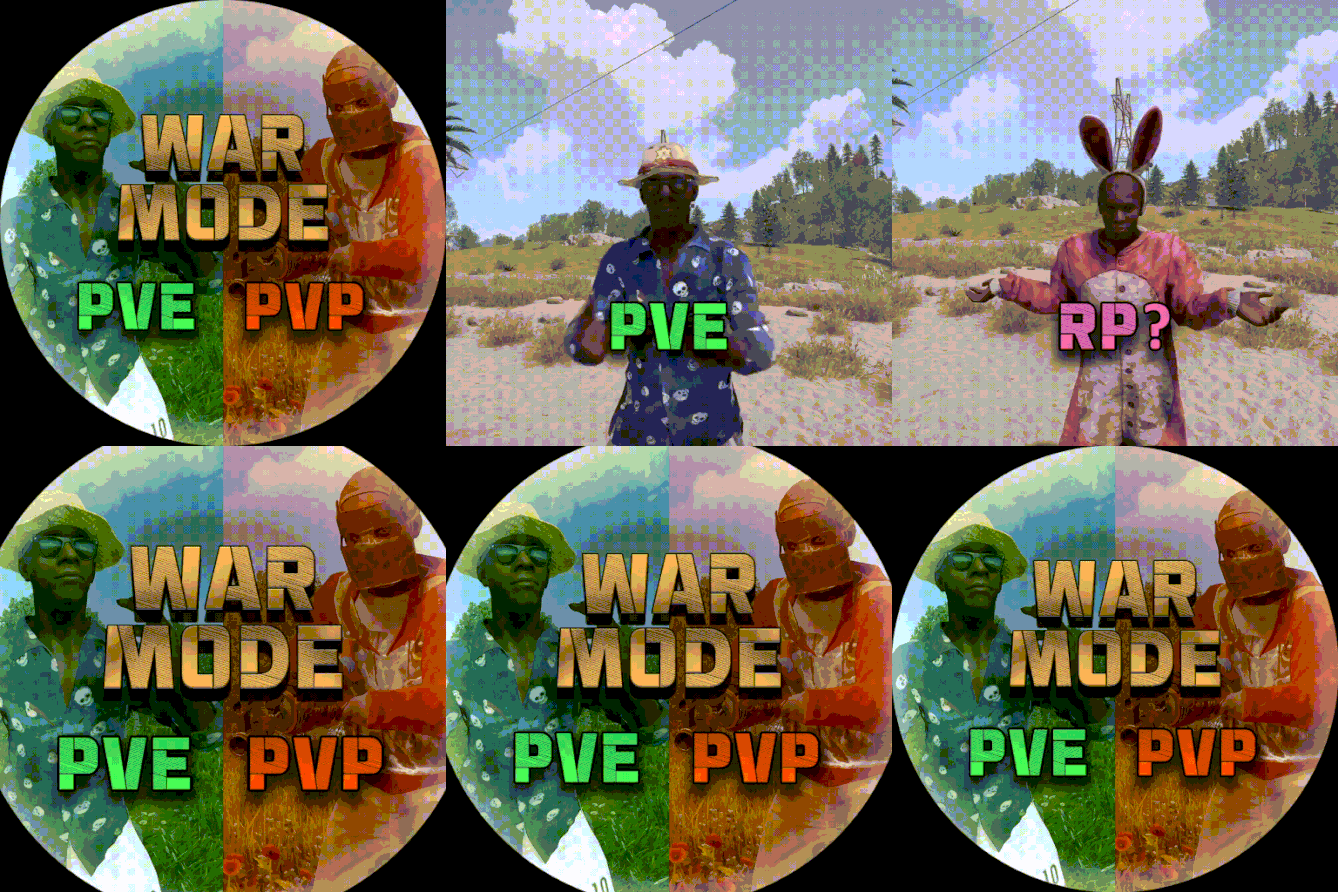
Allows both PVE and PVP players to exist on a server at the same time. PVE players will have certain configurable protections and restrictions. You can have players use a command to flag themselves as PVP/PVE or you can assign it to them when they first spawn. If you have ZoneManager you can also designate specific zones to force player's to be PVE or PVP. Plugin is also compatible with SimpleStatus. Note: Video is outdated, see documentation for a full list of new features! Documentation: A full readme including permissions, commands, and config options is available in this google doc link. Disclaimer: Like all of my plugins - this plugin is sold as is. I will be happy to take feature requests into consideration but make no guarantees about which ones get implemented. Please refer to the feature list before you make your purchase! Developer API: API Methods // Returns the mode of the given entity. Also takes into account if the entity is in a forced mode zone. string GetEntityMode(BaseEntity entity); // Returns the group name for the given mode. For example if given 'pve' will return 'warmodepve' string GetModeGroup(string modeId); // Returns the target type for a given entity. Target types are the category that an entity falls into. // For example, if given a BasePlayer entity, it will return 'players'. If given a horse entity is will // return 'horses'. string GetEntityTargetType(BaseEntity entity); Hooks - place these in your plugin and WarMode will call them. // Called when a player's mode has been updated or config changes have ocurred that may affect the mode. private void WarMode_PlayerModeUpdated(string userid, string modeId) // Used to override WarMode logic for taking damage. // If true/false is returned then WarMode logic will be skipped. Return null to continue WarMode logic. private object CanEntityTakeDamage(BaseCombatEntity target, HitInfo info) // Used to override WarMode logic for targeting. // If true/false is returned then WarMode logic will be skipped. Return null to continue WarMode logic. private object CanEntityBeTargeted(BasePlayer target, BaseEntity attacker, bool skipVendingCheck) // Used to override WarMode logic for triggering a trap. // If true/false is returned then WarMode logic will be skipped. Return null to continue WarMode logic. private object CanEntityTrapTrigger(BaseTrap trap, BasePlayer basePlayer) // Used to override WarMode logic for looting an entity. // If true/false is returned then WarMode logic will be skipped. Return null to continue WarMode logic. private object CanEntityLoot(BasePlayer looter, BaseEntity target, bool skipVendingCheck) FREE Extension Plugins: War Mode Admin Panel Use the /warmode.config or /wmc command to open a panel that allows admins to update mode rules in game without having to reload the pluign. Requires the warmode.admin permission to use. I HIGHLY recommend you use this extension! WarModeAdminPanel.cs War Mode Spawn UI Provides a UI that is shown to players when they first spawn that prompts them to choose whether they want to be PVP or PVE. Also supports custom modes. Localization and config options available. This can also be configured to appear when players use the /flag command. WarModeSpawnUI.cs War Mode Rules UI Using the /rules command (which is configurable) players can see a list of what restrictions they have for their current mode. These ruling will update dynamically based on your config settings. WarModeRulesUI.cs War Mode Badges Customizable UI elements that will appear on the player's HUD to indicate what their current mode is. WarModeBadges.cs$24.99 -

Version 2.5.4
157 downloads
TITLE SELECTOR Customize Chat Titles Without Losing Permission Groups by romzar.games Description TitleSelector provides an intuitive UI for players to select, hide, or show their chat titles from BetterChat. It also integrates seamlessly with SkillTree, giving players independent control over their Level and Prestige indicators. Players can customize which titles appear in chat without losing their permission groups. Key Features Visual Title Selection — Clean modal UI with green/gray/orange/locked states Title Presets — 5 slots, quick-switch via buttons or keybinds Collectible Display — Shows locked titles players can work towards SkillTree Integration — Independent toggle for Level/Prestige indicators Hide All Option — One-click hide all titles, keep SkillTree/Clan visible Clan Tag Preservation — Clan tags always visible, even with Hide All Emoji Toggle — Hide emoji-only titles or strip emojis from mixed titles Permission-Based Title Limits — Different max titles per group/VIP tier Title Exclusion System — Prevent conflicting titles simultaneously Pagination — Handles large title collections with configurable pages Multi-language Support — Fully translatable via Oxide lang system Persistent Data — Auto-saved per-player, survives restarts/reloads BetterChatGradients Support — Native gradient color support Installation Upload TitleSelector.cs to oxide/plugins/ or carbon/plugins/ Ensure BetterChat is installed and configured Grant permission: o.grant group default titleselector.use Reload the plugin if needed: o.reload TitleSelector (Optional) Customize the config and lang files Dependencies Required: BetterChat — hooks into BetterChat to modify title display Optional: SkillTree — toggle Level/Prestige visibility Clans (Reborn) — clan tags forced visible BetterChatGradients — gradient colors render natively Permissions titleselector.use — Access to the title selector UI titleselector.default — Grants "default" max title limit (default: 3) titleselector.vip1 — Grants "vip1" max title limit (default: 4) titleselector.vip2 — Grants "vip2" max title limit (default: 5) Permission names match keys in "Max titles per permission" config. Player gets the HIGHEST limit from all matching permissions. Permission Examples: # Grant to all players o.grant group default titleselector.use o.grant group default titleselector.default # Grant VIP tiers o.grant group vip titleselector.vip1 o.grant group vip+ titleselector.vip2 # Grant to specific player o.grant user PlayerName titleselector.use o.grant user 76561198000000000 titleselector.use Commands /title — Opens the Title Selector UI (main command) /titulo — Alternative command (configurable) /titulos — Alternative command (configurable) /titlepreset <1-5> — Switch to a specific preset titleselector.preset <1-5> — Console/bind command for preset switching Configuration File: oxide/config/TitleSelector.json or carbon/configs/TitleSelector.json { "Allow hide all titles": true, "Allow toggle SkillTree (level + prestige)": true, "Allow toggle emoji titles": true, "Force show clan tags (Clans)": false, "Emoji patterns (regex)": [ "\\s*:\\w+:\\s*" ], "Extra patterns (regex) - applied with emoji toggle": [ "\\s*\\[#[\\w,\\s#]+\\]\\[\\+\\d+\\]\\s*:\\w+:\\s*\\[/\\+\\]\\[/#\\]\\s*", "\\s*\\[#[\\w,\\s#]+\\]\\s*:\\w+:\\s*\\[/#\\]\\s*", "\\s*<color=[^>]*>:\\w+:</color>\\s*" ], "Max titles per permission": { "default": 3, "master1": 4, "master2": 4, "master3": 5, "fullmaster": 5 }, "Default max titles (no permission)": 2, "Main command": "title", "Alternative commands": [ "titulo", "titulos" ], "Ignored groups (hidden from UI)": [ "default", "player", "guest" ], "Permanent groups (always shown)": [ "admin" ], "Title exclusion groups (mutual exclusion)": [ [ "master1", "master2", "master3", "master4", "master5" ], [ "bradleymaster1", "bradleymaster2" ], [ "helimaster1", "helimaster2" ] ], "Items per page": 8, "UI - Background color": "0.1 0.1 0.1 0.95", "UI - Header color": "0.15 0.15 0.15 1", "UI - Available item color": "0.2 0.2 0.2 0.9", "UI - Locked item color": "0.12 0.12 0.12 0.7", "UI - Selected item color": "0.1 0.4 0.1 0.9", "UI - Close button color": "0.8 0.2 0.2 1", "UI - Active checkbox color": "0.3 0.8 0.3 1", "UI - Restricted item color": "0.35 0.25 0.1 0.9", "UI - Inactive checkbox color": "0.3 0.3 0.3 1", "UI - Edit mode button color": "0.4 0.35 0.15 1", "UI - Edit mode active color": "0.6 0.5 0.1 1", "Max preset name length": 16, "PlayerRanks integration": { "Enable PlayerRanks titles (requires AddTitleHoldersToGroup=true in PlayerRanks)": false, "Title color (hex)": "#FFD700", "Title size": 15, "Title prefix": "", "Title suffix": "", "Priority (lower = higher in list)": 500, "Suppress PlayerRanks third-party title in chat (recommended: also set MaxDisplayedTitles=0 in PlayerRanks)": true, "Refresh interval (seconds)": 60.0 }, "UltimateLeaderboard integration": { "Enable UltimateLeaderboard titles (requires 'Custom Titles' enabled in UltimateLeaderboard)": true, "Title color (hex)": "#7FFFD4", "Title size": 15, "Title prefix": "", "Title suffix": "", "Base priority (lower = higher in list; each title adds its own UltimateLeaderboard priority)": 600, "Suppress UltimateLeaderboard third-party title in chat (recommended: keeps only the titles the player selected)": true, "Refresh interval (seconds)": 60.0 }, "Title categories (filter dropdown) - group: [titles]": { "VIP": [ "vip1", "vip2", "vip3", "vip_diamond" ], "Mestres": [ "master1", "master2", "master3", "master4", "master5", "fullmaster" ], "Bradley": [ "bradleyeasy", "bradleymedium", "bradleyhard", "bradleyexpert", "bradleyelite", "bradleynightmare", "bradleyinferno", "bradleyarmageddon", "bradleyapocalipse", "bradleyromzar", "bradleymaster1", "bradleymaster2" ], "Heli": [ "helieasy", "helimedium", "helihard", "heliexpert", "helielite", "helinightmare", "heliinferno", "heliarmageddon", "heliultimato", "heliapocalipse", "helimaster1", "helimaster2" ], "Raid": [ "raideasy", "raidmedium", "raidhard", "raidexpert", "raidnightmare" ], "Conquistas": [ "bosskiller", "npcslayer", "dgmaster2", "semigod", "explorer", "tryhard" ], "Profissoes": [ "farmer", "wildhunter", "rareminer", "fisherman" ], "Ranking": [ "king", "prince", "noble", "admin" ], "Comunidade": [ "discord", "legacy", "mentorado" ], "Temporadas": [ "season012026", "season022026", "season032026", "season042026", "season052026" ] } } Configuration Options: Allow hide all titles — Enable/disable the "Hide All" button Allow toggle SkillTree — Enable/disable SkillTree toggle Allow toggle emoji titles — Enable/disable Emoji toggle Force show clan tags — Keep clan tags visible when hiding Emoji/Extra patterns — Regex patterns for emoji detection Max titles per permission — Named permission entries with limits Default max titles — Fallback when no permission matches Main/Alternative commands — Chat commands to open UI Ignored groups — BetterChat groups hidden from UI Permanent groups — Always-displayed groups Title exclusion groups — Mutually exclusive title lists Items per page — Titles per page in UI UI colors — Customize interface appearance Title Exclusion System Prevents conflicting titles from being active simultaneously. { "Title exclusion groups (mutual exclusion)": [ ["vip", "mvp", "elite"], ["admin", "moderator"] ] } A player cannot have "vip" and "mvp" active simultaneously Selecting "mvp" when "vip" is active auto-deselects "vip" Player receives a chat notification about the conflict Restricted titles show in orange in the UI Title Presets Players can save up to 5 different title configurations: Each preset stores: selected titles, hide all, emoji toggle, skilltree toggle Switch via numbered buttons (1-5) in the UI header Active preset highlighted in green Chat: /titlepreset 3 Keybind: bind f5 titleselector.preset 1 Hook events fire for changed titles when switching How It Works Player with titleselector.use permission types /title UI opens showing all available titles Titles organized by status: Active (green) | Available (gray) | Restricted (orange) | Locked Click titles to enable/disable them Use preset buttons (1-5) to save/switch configurations When no titles selected, BetterChat displays by priority Preferences saved automatically Title States Available — Player owns it, interactive checkbox, click to toggle Selected — Green checkbox, displays in chat Restricted — Orange indicator, conflicts with selected title Locked — Collectible/goal, locked icon, cannot select SkillTree Integration Toggle button in the Filters row of the UI Controls Level [Lv.X] and Prestige [Pr.X] visibility Uses skilltree.notitles permission internally Emoji Toggle Controls emoji-only titles (:coffeecan:, , etc.) Strips emojis from mixed titles (e.g., "Admin :star:" becomes "Admin") Works with selected titles and Hide All mode Extra patterns applied when emoji toggle is OFF Gradient Collors Support Gradient colors render correctly when selecting titles Supports hex colors: #ff0000, #00ff00, #0000ff Supports named colors: red, green, blue, yellow, orange, purple, pink, cyan, white, black, gray, gold, silver Multi-color gradients: red,orange,yellow,green No additional configuration required Clan Tag Preservation Clan tags remain visible even with "Hide All" Don't count towards max title limit Prevents hiding clan identity on solo/trio servers Requires Clans Reborn plugin Hide All Feature One-click hide all BetterChat titles Respects SkillTree and Emoji toggle settings Clan tags preserved when configured "Show All" button reverses the action Player Workflow Type /title to open the UI Browse titles using pagination Click checkboxes to select titles (up to max limit) Toggle SkillTree/Emoji visibility Use "Hide All" for quick hiding Save configurations using presets (1-5) Close UI — preferences saved automatically Admin Workflow Install plugin with BetterChat dependency Configure ignored groups Set up permission-based max titles Configure exclusion groups if needed Set permanent groups Customize UI colors Grant permissions to groups Translate lang file if needed API Methods API_GetSelectedTitles(string odId) — Returns List<string> of selected titles API_IsHidingTitles(string odId) — Returns bool hide status API_SetSelectedTitles(string odId, List<string> titles) — Set titles programmatically API_RefreshTitles() — Refresh title cache after config changes Developer Hooks OnTitleSelected(BasePlayer player, string groupName) — Fires on select and preset switch OnTitleDeselected(BasePlayer player, string groupName) — Fires on deselect, exclusion, and preset switch OnTitlesCleared(BasePlayer player, List<string> previousTitles) — Fires on Clear button API Usage Example [PluginReference] private Plugin TitleSelector; void Example(BasePlayer player) { var titles = TitleSelector?.Call<List<string>>( "API_GetSelectedTitles", player.UserIDString); var isHiding = TitleSelector?.Call<bool>( "API_IsHidingTitles", player.UserIDString) ?? false; TitleSelector?.Call("API_SetSelectedTitles", player.UserIDString, new List<string> { "vip", "donator" }); TitleSelector?.Call("API_RefreshTitles"); } Localization File: oxide/lang/en/TitleSelector.json or carbon/lang/en/TitleSelector.json { "NoPermission": "<color=#ff5555>You do not have permission.</color>", "BetterChatNotLoaded": "<color=#ff5555>BetterChat is not loaded!</color>", "TitleLocked": "<color=#ff5555>You do not own this title!</color>", "MaxTitlesReached": "<color=#ff5555>Maximum of {max} titles reached!</color>", "UITitle": "TITLE SELECTOR", "UIStatusHidden": "All titles are hidden", "UIStatusDefault": "Showing default titles (by priority)", "UIStatusSelected": "{count}/{max} titles selected", "UILocked": "Locked", "UISelected": "Active", "UIAvailable": "Available", "UIRestricted": "Restricted", "UIClear": "Clear", "UIHideAll": "Hide All", "UIShowAll": "Show All", "UIClose": "Close", "PresetSwitched": "<color=#55ff55>Preset {num} activated!</color>", "TitleExclusionRemoved": "<color=#ffaa55>Title removed (conflicts).</color>" } Troubleshooting UI not opening? — Check titleselector.use permission Titles not showing in chat? — Ensure BetterChat is loaded SkillTree toggles missing? — Install SkillTree + enable in config Titles missing from UI? — Check "Ignored groups" config Can't select more titles? — Max limit reached, check permissions Changes not saving? — Check data folder permissions Emoji toggle not working? — Enable in config Gradients broken? — Ensure hex colors are right Title shows "Restricted"? — Conflicts with selected title (exclusion groups) Preset not switching? — Needs titleselector.use permission Performance Lightweight and optimized Per-player data files with lazy loading UI rendered on-demand only Safe for high-population servers Compatibility Requires BetterChat (mandatory) Optional: SkillTree, Clans Works with Oxide and Carbon No conflicts with other chat plugins Use Cases VIP Customization — Let VIP players customize chat appearance VIP Tiers — Different limits per donation level Roleplay Servers — Choose titles that fit character Clean Chat — Minimalist players hide all titles Quick Switching — Presets for instant config swaps Exclusive Ranks — Exclusion groups prevent conflicts Clan Identity — Force clan tags for accountability Gradient Titles — Beautiful color gradients Collectibles — Motivate players to unlock titles UltimateLeaderboard Integration Leaderboard titles ([Hunter], [Killer], ...) become selectable entries in the title menu, so players choose which one to display instead of having them all forced into chat. ## Setup **1. UltimateLeaderboard config** (`UltimateLeaderboard.json`) ```json "Custom Titles": { "Enabled": true, "Working with BetterChat?": true, "Max Titles": 5 } 2. TitleSelector config (TitleSelector.json) "UltimateLeaderboard integration": { "Enable UltimateLeaderboard titles ...": true } Reload both plugins. Titles are read straight from UltimateLeaderboard's config — nothing to duplicate. Set Max Titles to the number of titles you have This is the one setting that decides whether the integration is worth anything. Max Titles limits how many titles a player owns, not how many are shown. Left at the default 1, a player only ever owns the highest-priority title — every other title stays locked, and there is nothing to choose from. Set it to the number of titles in your list. Players then own everything they earned, and TitleSelector controls what actually appears in chat (using its own titleselector.max.* permissions). Expect a delay Titles are only recalculated when UltimateLeaderboard finishes a leaderboard cache cycle. With the default Leaderboard Cache Interval of 600, a player who takes first place waits up to 10 minutes. Do not drop that interval to a very low value to compensate — each cycle aborts the one still running, so on a populated server the cycle never completes and titles stop being assigned entirely. 300–600 is a safe range. Grouping them in the filter Leaderboard titles work with the category dropdown like any other title: "Title categories (filter dropdown) - group: [titles]": { "Leaderboard": [ "ul_Hunter", "ul_Builder", "ul_Gatherer", "ul_Killer" ], "Ranks": [ "vip", "vip2" ] } © 2025-2026 romzar.games — All rights reserved. Thank you for using Title Selector! Give your players control over their chat identity!$14.99- 24 comments
- 6 reviews
-
- 1
-
-
- #title
- #betterchat
- (and 16 more)
-

Version 1.1.7
511 downloads
Multi permission based entity limit system Limit number of entities per player/group/team/clan UI config setup options Auto updating player permissions Chat Commands: /limits: Opens the user interface (UI) for managing entity limits Console Commands: ael.createnew <advancedentitylimit.NAME> <optional: copy from advancedentitylimit.NAME>: Adds new permissions for entities. Optionally, you can copy permissions from an existing entity limit. Player Permissions: advancedentitylimit.ui: Allows players to seethe UI. advancedentitylimit.default: Applies the default entity limits advancedentitylimit.vip: Applies the vip entity limits You can create custom permission groups to have various limits per group. Admin Permissions: advancedentitylimit.setlimit: Grants permission to set limits for entities. advancedentitylimit.createperm: Allows the creation of new permissions for entities. advancedentitylimit.admin: Provides full access. { "Auto-fill missing entities?": true, "Chat prefix": "<color=red>[Limits]</color>: ", "A message when the player reaches the maximum limit of objects": "You have <color=red>reached</color> the limit of this object ({0})", "Use teams for sum them constructions": false, "Use clans?": false, "Clans plugin for sum player constructions (Mevent, k1lly0u)": "Mevent" } Credit to @MuB-Studios the original author of this plugin$15.99- 81 comments
- 14 reviews
-
- 5
-
-

-
- #limit
- #advanceentitylimit
- (and 21 more)
-

Version 1.1.6
892 downloads
Team Tracker is your is the best admin tool for monitoring player associations and enforce team size rules. Whether you need to ban an entire team or track players abusing the system, Team Tracker has you covered. It offers live logging, team queries, and auto-banning—all in one customizable and performant package. Dynamic identification of player teams Live discord logging Query a player team at any time Automatic custom ban system Battlemetrics integration High Performance clearplayerdata - deletes a players team data/history teamcheck - Sends a discord embed with a report of group data, warnings and current team players to discord. Note: All chat commands are universal meaning they can be used via the console, rcon(for import commands) and can be customized via the configuration. teamtracker.whitelist - Whitelists a player from being included in any team alerts (Admins and Developers are automatically whitelisted) teamtracker.admin - allows the use of the checkteam and whitelist commands Proximity - configurable distance between players Sleeping bag placement - bags given or placed within building Codelock authorization - authorized players on a codelock Turret authorization - authorized players on a turret Toolcupboard authorization - authorized players on a toolcupboard Healing - healing and reviving of other players Vehicle mounting - mounting of the same vehicle at the same time Team-members - history of team members PVP - players breaking team limits when pvping/roaming Raiding - players raiding together Looting - looting other players together Alerts: All alert types can be customized via the plugin config. Options include: Enable - this toggles any usage of the alert type to enable or disable the alert type Log to discord - Enables discord logs Warn Players - Sends an ingame warning to a player up to 30 seconds after the offense Weighting - configures how important the alert type is. This contributes to the ban by association score value. Warnings: Warnings are logged as a type of violation. This provides discord logs and the optional in game warning display to the violator. Display Warnings to Players - option to disable in game warnings Length of time to display warning - optional length of time to display warnings Warning Text - customizable warning text Bans: Team-Tracker allows for customizable automatic bans of players, who go over the group limits. Enable Bans - allows toggeling of the ban system Ban text - text to display as the reason for a player ban Log Bans to Discord - optionally log bans to discord. Logging Only Mode: Set Enable Bans & Log Bans to Discord to true and set Local Bans and Battlemetrics Bans to False Enable Ban by Max Association - enables banning a player or a team by summing all association values to create a total weighting. Example: if the team limit is 5 players and the Max Association Weighting is 10, if a player has more than 5 players with an association weighting of more than 10 this will apply a ban. Max Association Weighting - set the max association weighting per player in a group Ban Duration - length of time to ban for Ban Team - ban all team members of a banned player Ban Associations - bans all players over Max Association Weighting in relation to a banned player Local Bans - apply bans locally An API token for your battlemetrics org is required to use the battlemetrics ban features. A token can be acquired by visiting: https://www.battlemetrics.com/developers Server ID - set the BM server ID Go to https://www.battlemetrics.com/rcon, click into the select server. Check the address bar in your browser, the address will be ending with the Server Id, for example: https://www.battlemetrics.com/rcon/servers/123456 means 123456 is the Server Id. Org ID - set an organisation ID Go to https://www.battlemetrics.com/rcon/orgs, click into the org. Check the address bar in your browser, the address will be ending with the Organization Id, for example: https://www.battlemetrics.com/rcon/orgs/edit/123456 means 123456 is the Organization Id. BanList ID - adds a ban to a specific ban list Go to https://www.battlemetrics.com/rcon/ban-lists, click "View Bans". Check the address bar in your browser, the address will be ending with the Banlist Id, for example: https://www.battlemetrics.com/rcon/bans/?filter[banList]=abcdef-123456-example-banlist-example91011 means abcdef-123456-example-banlist-example91011 is the Banlist Id. Org Wide Ban - true if the ban should be applied to all servers in your organization Auto Add - true if the ban should automatically ban new identifiers after kicking a matching player. Native Enabled - true if native bans should be issued for this ban$24.99- 22 comments
- 5 reviews
-
- 4
-
-
-
- #teamalerts
- #team
- (and 28 more)
-

Version 1.0.6
813 downloads
Simple plugin that allows crafting speed multipliers to be set per permission group. Adjust how fast each group can craft, from slower progression to instant crafting, depending on your server’s needs. Commands These commands can be ran via ingame console (with permission) or RCON. gcraft gcraft <group> <multiplier> Permissions The following permission is only needed to allow users to access commands via ingame console. groupcrafting.admin Configuration The config can be edited directly or can be adjusted with the commands above. "group": Multiplier, "group2": Multiplier Existing server groups are automatically detected when the plugin loads. The default multiplier is 1, higher values increase crafting speed, and a value of 0 enables instant crafting. Thanks to @SawyerWD for icon!Free -

Version 0.1.9
105 downloads
GUI and sound announcements for online teammates. Announcements about teammates who have connected, disconnected, been wounded or killed while sleeping. Additionally, announcements from the team leader, in Team chat channel using "!" as a first char. { "Chat command": "teama", "Is it worth enabling GameTips for messages?": true, "Is it worth using Notify plugins for messages instead of the vanilla UI?": false, "Specify the regular message type for notify": 0, "Specify the warning message type for notify": 1, "Is it worth enabling sound announcements?": true, "Is it worth enabling leader's group announcements?": true, "Radius within which a wounded ally notification is received": 100.0, "Radius within which a sound effect is triggered when an ally is wounded": 50.0, "Sound effect triggered when an ally is wounded": "assets/bundled/prefabs/fx/player/beartrap_scream.prefab", "Notification settings for each type": { "Connected": { "Is it worth using Notify plugins for notifications?": false, "Specify the message type for notify": 0, "Language_Key": "UiConnected", "Duration": 6.0, "Main_Color": "#4F6133", "Main_Transparency": 0.8, "Main_Material": "", "Image_URL": "https://gitlab.com/IIIaKa/images/-/raw/main/TeamAnnounce/TeamAnnounce_Connected.png", "Image_Sprite": "", "Image_IsRawImage": false, "Image_Color": "#8CBA42", "Image_Transparency": 1.0, "Text_Size": 16, "Text_Color": "#8CBA42", "Text_Font": "RobotoCondensed-Bold.ttf", "Sound_Effect": "assets/prefabs/npc/scientist/sound/chatter.prefab" }, "Disconnected": { "Is it worth using Notify plugins for notifications?": false, "Specify the message type for notify": 1, "Language_Key": "UiDisconnected", "Duration": 6.0, "Main_Color": "#BF3B26", "Main_Transparency": 0.8, "Main_Material": "", "Image_URL": "https://gitlab.com/IIIaKa/images/-/raw/main/TeamAnnounce/TeamAnnounce_Connected.png", "Image_Sprite": "", "Image_IsRawImage": false, "Image_Color": "#FFD173", "Image_Transparency": 1.0, "Text_Size": 16, "Text_Color": "#FFD173", "Text_Font": "RobotoCondensed-Bold.ttf", "Sound_Effect": "assets/prefabs/npc/scientist/sound/chatter.prefab" }, "LeaderAnnounce": { "Is it worth using Notify plugins for notifications?": false, "Specify the message type for notify": 1, "Language_Key": "", "Duration": 6.0, "Main_Color": "#216699", "Main_Transparency": 0.8, "Main_Material": "", "Image_URL": "http://gitlab.com/IIIaKa/images/-/raw/main/TeamAnnounce/TeamAnnounce_LeaderAnnounce.png", "Image_Sprite": "", "Image_IsRawImage": false, "Image_Color": "#82C7F5", "Image_Transparency": 1.0, "Text_Size": 16, "Text_Color": "#82C7F5", "Text_Font": "RobotoCondensed-Bold.ttf", "Sound_Effect": "assets/prefabs/missions/effects/mission_victory.prefab" }, "WoundedDistance": { "Is it worth using Notify plugins for notifications?": false, "Specify the message type for notify": 1, "Language_Key": "UiWoundedDistance", "Duration": 6.0, "Main_Color": "#FFC21A", "Main_Transparency": 0.8, "Main_Material": "", "Image_URL": "http://gitlab.com/IIIaKa/images/-/raw/main/TeamAnnounce/TeamAnnounce_Wounded.png", "Image_Sprite": "", "Image_IsRawImage": false, "Image_Color": "#FFF54C", "Image_Transparency": 1.0, "Text_Size": 16, "Text_Color": "#FFF54C", "Text_Font": "RobotoCondensed-Bold.ttf", "Sound_Effect": "assets/prefabs/npc/scientist/sound/death.prefab" }, "WoundedGrid": { "Is it worth using Notify plugins for notifications?": false, "Specify the message type for notify": 1, "Language_Key": "UiWoundedGrid", "Duration": 6.0, "Main_Color": "#FFC21A", "Main_Transparency": 0.8, "Main_Material": "", "Image_URL": "http://gitlab.com/IIIaKa/images/-/raw/main/TeamAnnounce/TeamAnnounce_Wounded.png", "Image_Sprite": "", "Image_IsRawImage": false, "Image_Color": "#FFF54C", "Image_Transparency": 1.0, "Text_Size": 16, "Text_Color": "#FFF54C", "Text_Font": "RobotoCondensed-Bold.ttf", "Sound_Effect": "assets/prefabs/npc/scientist/sound/death.prefab" }, "DeadWhileSleeping": { "Is it worth using Notify plugins for notifications?": false, "Specify the message type for notify": 1, "Language_Key": "UiDeadWhileSleeping", "Duration": 6.0, "Main_Color": "#FFC21A", "Main_Transparency": 0.8, "Main_Material": "", "Image_URL": "http://gitlab.com/IIIaKa/images/-/raw/main/TeamAnnounce/TeamAnnounce_Dead.png", "Image_Sprite": "", "Image_IsRawImage": false, "Image_Color": "#FFF54C", "Image_Transparency": 1.0, "Text_Size": 16, "Text_Color": "#FFF54C", "Text_Font": "RobotoCondensed-Bold.ttf", "Sound_Effect": "assets/bundled/prefabs/fx/player/howl.prefab" }, "Banned": { "Is it worth using Notify plugins for notifications?": false, "Specify the message type for notify": 1, "Language_Key": "UiBanned", "Duration": 6.0, "Main_Color": "#BF3B26", "Main_Transparency": 0.8, "Main_Material": "", "Image_URL": "https://gitlab.com/IIIaKa/images/-/raw/main/TeamAnnounce/TeamAnnounce_Banned.png", "Image_Sprite": "", "Image_IsRawImage": false, "Image_Color": "#FFD173", "Image_Transparency": 1.0, "Text_Size": 16, "Text_Color": "#FFD173", "Text_Font": "RobotoCondensed-Bold.ttf", "Sound_Effect": "assets/prefabs/missions/effects/mission_failed.prefab" } }, "Version": { "Major": 0, "Minor": 1, "Patch": 9 } } EN: { "CmdAllEnabled": "All teammate notifications enabled!", "CmdAllDisabled": "All teammate notifications disabled!", "CmdSoundEnabled": "Teammate notification sounds enabled!", "CmdSoundDisabled": "Teammate notification sounds disabled!", "CmdConnectedEnabled": "Teammate connect notifications enabled!", "CmdConnectedDisabled": "Teammate connect notifications disabled!", "CmdDisconnectedEnabled": "Teammate disconnect notifications enabled!", "CmdDisconnectedDisabled": "Teammate disconnect notifications disabled!", "CmdWoundedEnabled": "Teammate wounded notifications enabled!", "CmdWoundedDisabled": "Teammate wounded notifications disabled!", "CmdDeathEnabled": "Teammate sleeping death notifications enabled!", "CmdDeathDisabled": "Teammate sleeping death notifications disabled!", "UiConnected": "Your teammate '{0}' has been connected!", "UiDisconnected": "Your teammate '{0}' has been disconnected!", "UiTeamEmpty": "There is only you in your team!", "UiNotTeamLeader": "Only the team leader can send announcements!", "UiTeamOffline": "All your teammates are offline!", "UiWoundedDistance": "Your teammate '{0}' was wounded by '{1}'!\nHe is {2} meters away from you.", "UiWoundedGrid": "Your teammate '{0}' was wounded by '{1}' at '{2}'!", "UiDeadWhileSleeping": "Your teammate '{0}' was killed by '{1}' while he was sleeping at '{2}'!", "UiBanned": "Your teammate '{0}' has been banned!\nReason: {1}.", "unknown": "Unknown", "chicken": "Chicken", "snake": "Snake", "boar": "Boar", "stag": "Stag", "horse": "Horse", "wolf": "Wolf", "panther": "Panther", "tiger": "Tiger", "bear": "Bear", "polarbear": "PolarBear", "crocodile": "Crocodile", "simpleshark": "Shark", "patrolhelicopter": "Patrol Heli", "bradleyapc": "Bradley APC", "scientistnpc_arena": "Scientist", "scientistnpc_bradley": "Bradley Scientist", "scientistnpc_bradley_heavy": "Bradley Heavy Scientist", "scientistnpc_cargo": "Cargo Scientist", "scientistnpc_cargo_turret_any": "Cargo Scientist", "scientistnpc_cargo_turret_lr300": "Cargo Scientist", "scientistnpc_ch47_gunner": "Chinook Scientist", "scientistnpc_excavator": "Excavator Scientist", "scientistnpc_full_any": "Scientist", "scientistnpc_full_lr300": "Scientist", "scientistnpc_full_mp5": "Scientist", "scientistnpc_full_pistol": "Scientist", "scientistnpc_full_shotgun": "Scientist", "scientistnpc_heavy": "Heavy Scientist", "scientistnpc_junkpile_pistol": "Road Scientist", "scientistnpc_oilrig": "Oilrig Scientist", "scientistnpc_outbreak": "Jungle Scientist", "scientistnpc_patrol": "Patrol Scientist", "scientistnpc_patrol_arctic": "Arctic Patrol Scientist", "scientistnpc_peacekeeper": "Peacekeeper Scientist", "scientistnpc_ptboat": "Marine Patrol Scientist", "scientistnpc_rhib": "Marine Patrol Scientist", "scientistnpc_roam": "Roam Scientist", "scientistnpc_roam_nvg_variant": "Roam NVG Scientist", "scientistnpc_roamtethered": "Roam Scientist", "scientist2": "Scientist", "scientist2.heavy": "Heavy Scientist", "scientist2.shotgun": "Scientist" } RU: { "CmdAllEnabled": "Все уведомления о тиммейтах включены!", "CmdAllDisabled": "Все уведомления о тиммейтах отключены!", "CmdSoundEnabled": "Звуковые уведомления о тиммейтах включены!", "CmdSoundDisabled": "Звуковые уведомления о тиммейтах отключены!", "CmdConnectedEnabled": "Уведомления о подключении тиммейтов включены!", "CmdConnectedDisabled": "Уведомления о подключении тиммейтов отключены!", "CmdDisconnectedEnabled": "Уведомления об отключении тиммейтов включены!", "CmdDisconnectedDisabled": "Уведомления об отключении тиммейтов отключены!", "CmdWoundedEnabled": "Уведомления о ранении тиммейтов включены!", "CmdWoundedDisabled": "Уведомления о ранении тиммейтов отключены!", "CmdDeathEnabled": "Уведомления о смерти спящего тиммейта включены!", "CmdDeathDisabled": "Уведомления о смерти спящего тиммейта отключены!", "UiConnected": "Ваш союзник '{0}' подключился!", "UiDisconnected": "Ваш союзник '{0}' отключился!", "UiTeamEmpty": "У вас нет союзников!", "UiNotTeamLeader": "Только лидер группы может отправлять объявления!", "UiTeamOffline": "Все ваши союзники не в сети!", "UiWoundedDistance": "Вашего союзника '{0}' серьезно ранил '{1}'!\nОн в {2} метрах от вас.", "UiWoundedGrid": "Вашего союзника '{0}' серьезно ранил '{1}' в '{2}'!", "UiDeadWhileSleeping": "Вашего союзника '{0}' убил '{1}', пока тот спал в '{2}'!", "UiBanned": "Ваш союзник '{0}' был заблокирован!\nПричина: {1}.", "unknown": "Неизвестный", "chicken": "Курица", "snake": "Змея", "boar": "Кабан", "stag": "Олень", "horse": "Лошадь", "wolf": "Волк", "panther": "Пантера", "tiger": "Тирг", "bear": "Медведь", "polarbear": "Полярный медведь", "crocodile": "Крокодил", "simpleshark": "Акула", "patrolhelicopter": "Патрульный вертолет", "bradleyapc": "Танк", "scientistnpc_arena": "Ученый", "scientistnpc_bradley": "Член экипажа танка", "scientistnpc_bradley_heavy": "Элитный член экипажа танка", "scientistnpc_cargo": "Защитник карго", "scientistnpc_cargo_turret_any": "Защитник карго", "scientistnpc_cargo_turret_lr300": "Защитник карго", "scientistnpc_ch47_gunner": "Защитник чинука", "scientistnpc_excavator": "Защитник экскаватора", "scientistnpc_full_any": "Ученый", "scientistnpc_full_lr300": "Ученый", "scientistnpc_full_mp5": "Ученый", "scientistnpc_full_pistol": "Ученый", "scientistnpc_full_shotgun": "Ученый", "scientistnpc_heavy": "Элитный ученый", "scientistnpc_junkpile_pistol": "Road Scientist", "scientistnpc_oilrig": "Защитник нефтевышки", "scientistnpc_outbreak": "Jungle Scientist", "scientistnpc_patrol": "Patrol Scientist", "scientistnpc_patrol_arctic": "Arctic Patrol Scientist", "scientistnpc_peacekeeper": "Peacekeeper Scientist", "scientistnpc_ptboat": "Marine Patrol Scientist", "scientistnpc_rhib": "Marine Patrol Scientist", "scientistnpc_roam": "Странствующий ученый", "scientistnpc_roam_nvg_variant": "Roam NVG Scientist", "scientistnpc_roamtethered": "Странствующий ученый", "scientist2": "Ученый", "scientist2.heavy": "Элитный ученый", "scientist2.shotgun": "Ученый" } con - Personal enabling/disabling connected announcement; dis - Personal enabling/disabling disconnected announcement; wound - Personal enabling/disabling wounded announcement; death - Personal enabling/disabling sleeper's death announcement; sound - Personal enabling/disabling sound effects; all - Personal enabling all announcements; clear - Personal disabling all announcements(except leader and ban announces). Example: /teama con$3.99 -

Version 1.1.4
10 downloads
Wipe Permission Groups Tired of manually removing permission groups and player permissions every wipe? Players keeping their earned titles, ranks, and special permissions from the previous wipe when they shouldn't? Spending the first hours of every wipe cleaning up your permission system instead of enjoying the fresh start? WipePermissionGroups is your solution. How It Works On every map wipe, the plugin detects the OnNewSave event Automatically removes all players from your configured permission groups Revokes specified user permissions (supports wildcards like kits.* to remove all kit permissions at once) Logs everything to console so you know exactly what happened Features Zero Maintenance: Set it up once, never worry about it again Wildcard Support: Bulk permission removal with patterns like kits.* Manual Commands: /wipegroups and /wipepermissions available anytime Detailed Logging: Full console output (can be disabled in config) Perfect For Servers with progression-based rank systems Event rewards that should reset Raid tier permissions Any permission that should reset with the wipe Set it once, wipe worry-free.$1.99 -
Version 1.1.1
37 downloads
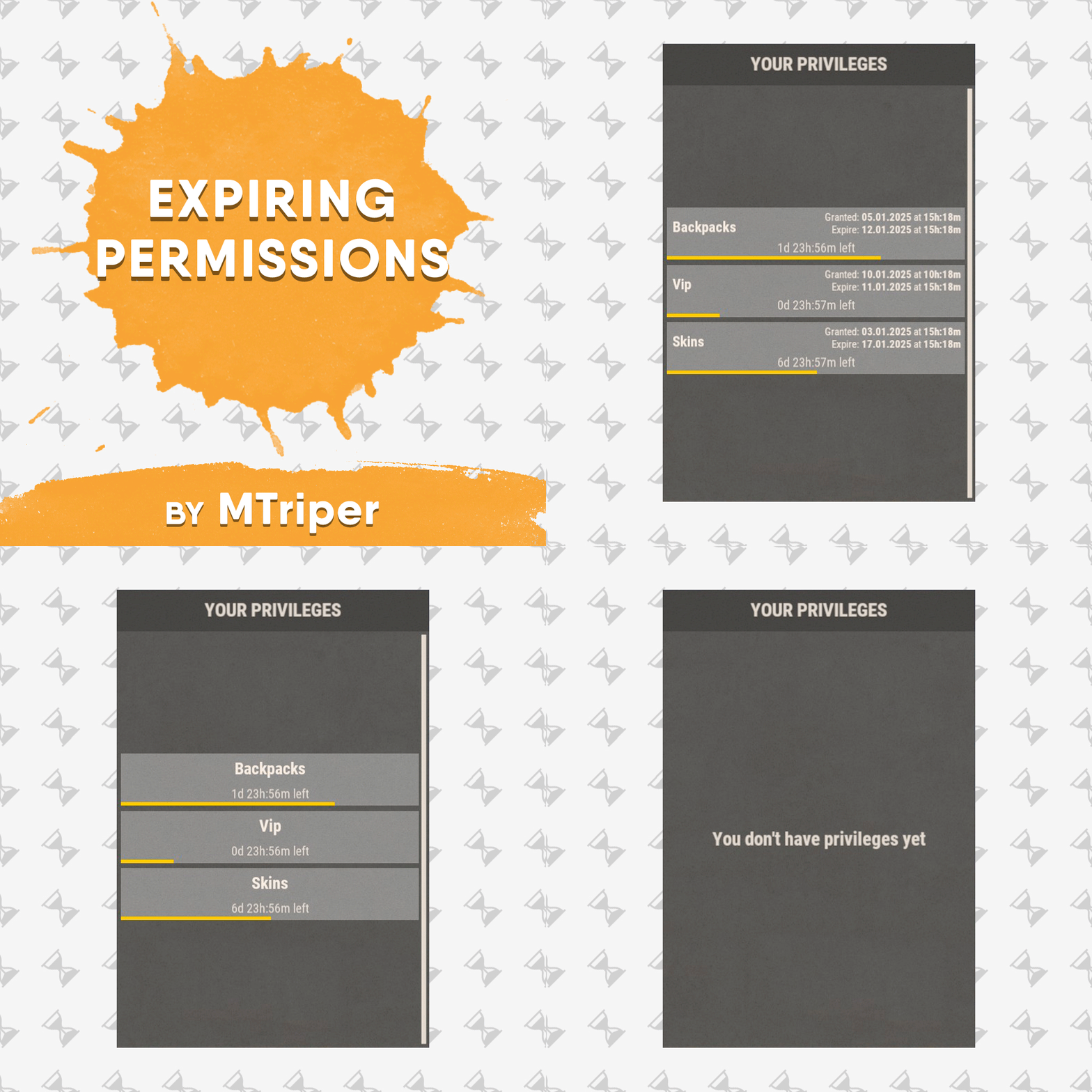
This is a simple, lightweight and easy to use plugin that allows you to grant permissions and groups for a specific amount of time. It also supports the creation of permission packs, which makes it easy to grant a large number of permissions at a time. Features Granting privileges until the end of the current wipe. Information panel with current user privileges. Customize notification in all popular notification plugins. Full-featured API for plugin developers (ability to create your own interface or integrate display of privileges into your game menu plugin). Ability to create privilege packs. Supported plugins: Notify, GUIAnnouncements - these plugins are used to display notifications. Permissions expiringpermissions.admin - to use commands to grant and revoke privileges. expiringpermissions.gui - to show a panel with the player's current privileges. Commands Commands can be entered from wherever you want: via chat, game console (F1) or server console. eperms (configurable) – shows a panel with the current privileges of the current player. setpack steamid/nickname packname time – to temporarily grant a pack of privileges to a player. revokepack steamid/nickname packname – forcibly revoke a pack of privileges from a player. grantperm steamid/nickname permission time title – temporarily grant a player a permission. revokeperm steamid/nickname permission – forcibly revoke a player's permission. addgroup steamid/nickname group time title – temporarily add a player to the group. removegroup steamid/nickname group – forcibly remove a player from a group. Description of command arguments: steamid/nickname - steamid or nickname of your choice. permission/group - plugin permission/oxide group. packname - package name from the Package name field in the config. time - duration of privileges, in the format 7d10h20m (e.g. 14d, 1d5h, 10m and etc.). You can also use the word "wipe" here. In this case the privilege will be valid until the end of the current wipe. title (optional) - name that will be displayed in the panel and indicated in messages to the player. If it is not specified, the plugin will write *title not specified*. General settings Check interval [sec] – interval for checking expiring player privileges. Show the start and end date of the permission in the panel (depends on the time on the physical server)? – in addition to the privilege name (if specified), the panel will display the privilege activation date and expiration date. Keep in mind that the plugin works with the time of the server machine (physical server). If the time and date are not configured there, they will be displayed incorrectly in the plugin. Type of notifications when permission are granted (none, title - only with name, all) none – the player will not be notified when a privilege is granted to him. title – the player will be notified about those privileges that have the name specified. all – the player will be notified when all privileges have been granted. If the privilege does not have a name set, *title not specified* will be displayed. Type of notifications when permission expire (none, title - only with name, all) – similar to the setting above, only when the privilege is revoked/expired. Show a notification if the permission is manually revoked? – show a notification to the player when an administrator manually removes a privilege. Notification settings Notification type (Chat, GameTips, Notify, GUIAnnouncements) – if this section is enabled, you must specify the type/plugin to notify the player of different warnings. Chat – notification to regular chat. GameTips – notification in the in-game Rust tooltips (blue or red at the bottom of the screen). Notify – notification in the Notify plugin by Mevent. GUIAnnouncements – notification in the GUIAnnouncements plugin by JoeSheep. Just below that are the customization fields for the specific type of notification. Setting permission packages To display privileges correctly in the panel, you can create packs. They allow you to collect several privileges or groups together. In this way you reduce the number of commands and assign a name to this pack, which will be displayed in the panel and when the player is notified. This is actually very convenient and saves problems and confusion. Display name – package name, it is displayed in the panel and in notifications. Package name – package short name, it is used when using commands. Permissions – list of permissions that will be included in the package. Groups – list of groups that will be included in the package. Then you just use the setpack command where you specify the name of the pack. Then everything in the pack (permissions and groups) will be given to the player. Plugin Api object ExpPermCanSetPackage(BasePlayer target, TimeSpan timeSpan, string packageName) { return null; } // before the pack is issued void ExpPermOnPackageSet(BasePlayer target, TimeSpan timeSpan, string packageName) // after issuing the pack object ExpPermCanRevokePackage(BasePlayer target, string packageName) { return null; } // before the pack is revoked void ExpPermOnPackageRevoked(BasePlayer target, string packageName) // after the pack is revoked object ExpPermCanGrantPermission(BasePlayer target, string permission, TimeSpan timeSpan, string title) { return null; } // before the permission is granted void ExpPermOnPermissionGranted(BasePlayer target, string permission, TimeSpan timeSpan, string title) // after the permission is granted object ExpPermCanRevokePermission(BasePlayer target, string permission) { return null; } // before the permission is revoked void ExpPermOnPermissionRevoked(BasePlayer target, string permission) // after the permission is revoked object ExpPermCanAddToGroup(BasePlayer target, string group, TimeSpan timeSpan, string title) { return null; } // before adding a player to the group void ExpPermOnAddedToGroup(BasePlayer target, string permission, TimeSpan timeSpan, string title) // after adding a player to the group object ExpPermCanRemoveFromGroup(BasePlayer target, string group) { return null; } // before a player is removed from the group void ExpPermOnRemovedFromGroup(BasePlayer target, string group) // after a player is removed from the group void ExpPermOnPackageExpired(string userId, string title, string packName) // when the privilege pack expired void ExpPermOnPermissionExpired(string userId, string title, string permName) // when the permission expired void ExpPermonGroupExpired(string userId, string title, string groupName) // when the group expired // *use the title to display the name of the privileges in your plugin // If timespan = TimeSpan.MaxValue then this privilege is valid until the end of the current wipe ExpiringPermissions.Call<bool>("HasActivePermissions", string userID); ExpiringPermissions.Call<bool>("TryGetPlayerData", out List<Dictionary<string, object>> packages, out List<Dictionary<string, object>> permissions, out List<Dictionary<string, object>> groups); /* packages/permissions/groups Dictionary contains: ["value"] = string ["title"] = string ["startDate"] = DateTime ["expireDate"] = DateTime If expireDate = DateTime.MaxValue then this privilege is valid until the end of the current wipe */ Plugin Config Example of plugin configuration in English: Example of plugin configuration in Russian. If you need Russian config, open it (ExpiringPermissions.cs) before loading the plugin, and at the top set the variable "isRus = true". Then save and upload this file to your server.$5.00 -
Version 1.2.6
700 downloads
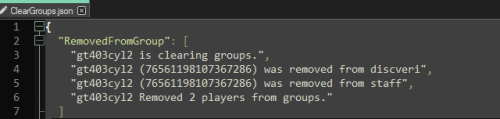
Clear Groups is a simple plugin that allows admin to remove all players from specific groups with a single command. In the configuration file you can: Specify which groups you want to clear. Specify to ignore admin. Set the command for clearing the group(s). Set the command for clearing the data file. Chat Commands: /cleargroups - Clear groups /cleargroupsdata - Clear data file Console Commands: cg - Clear groups cgd - Clear data file Permissions: "cleargroups.admin" - Allows admin to clear the data file and clear the selected group(s). Default Configuration File: { "Change Commands": { "Manually clear groups": "cleargroups", "Delete clear groups data": "cleargroupsdata" }, "Main Options": { "Ignore Admin": true, "Clear Data on wipe": false }, "Group Names": [ "", "" ] } Default Data File: { "RemovedFromGroup": [] } For support: Contact me here or on Discord: gt403cyl2Free -
Version 1.0.0
7 downloads
GroupLink is a lightweight Rust plugin designed for the Oxide modding framework, created to manage group relationships between leader (parent) groups and their associated subgroups. Its primary function is to automatically remove players from specified subgroups when they are no longer part of their corresponding leader group, ensuring that subgroup permissions are tied to leader group membership. This is particularly useful for servers using timed or subscription-based group systems, such as those managed by the TimedPermissions plugin. When a player loses membership in a leader group (either through manual removal or expiration via TimedPermissions), GroupLink checks for and removes them from all linked subgroups defined in its configuration. Upon each subgroup removal, it sends a private, customizable chat message to the affected player, informing them of the change. The plugin uses a periodic check system to ensure compatibility with external group management plugins, making it efficient with minimal server performance impact. Key features: Automatically removes players from subgroups when their leader group membership ends Sends private, styled chat messages (configurable size and color) to affected players Lightweight design with deferred operations using NextTick to reduce resource usage Configurable leader groups, subgroups, message format, and check interval Admin commands for testing and debugging group status Configuration Explanation The plugin generates a configuration file named GroupLink in the oxide/config directory. Below is the default configuration with an explanation of each field: json { "LeaderGroups": [ "vipplus", "mvp", "fanatic" ], "SubGroups": { "vipplus": [ "cvipplusbuilders", "cvipplusfarmers", "cvipplusindustrial" ], "mvp": [ "bmvpbuilders", "bmvpfarmers", "bmvpindustrial" ], "fanatic": [ "afanaticbuilders", "afanaticfarmers", "afanaticindustrial" ] }, "MessageFormat": "{0} you have left group {1} as your {2} subscription has ended", "MessageSize": 24, "MessageColor": "green", "CheckInterval": 60.0 } LeaderGroups: An array of strings listing the parent group names (e.g., "vipplus", "mvp", "fanatic"). These are the primary groups that, when removed from a player, trigger subgroup removal. SubGroups: A dictionary mapping each leader group to an array of its associated subgroups. For example, "vipplus" is linked to "cvipplusbuilders", "cvipplusfarmers", and "cvipplusindustrial". When a player loses the leader group, they are removed from all listed subgroups. MessageFormat: A string defining the chat message sent to players upon subgroup removal. It uses indexed placeholders: {0}: Player's username {1}: Subgroup name {2}: Leader group name Example output: "UrbanViking you have left group bmvpbuilders as your mvp subscription has ended" MessageSize: An integer setting the font size of the chat message (default: 24). MessageColor: A string defining the color of the chat message in HTML color format (default: "green"). Can be changed to other colors like "red", "#FF0000", etc. CheckInterval: A float specifying how often (in seconds) the plugin checks all connected players for leader group status (default: 60.0). Adjust this to balance responsiveness and server load. Adding/Removing Groups from the Config To modify the groups in the config, edit oxide/config/GroupLink.json and reload the plugin using oxide.reload GroupLink or /grouplink reload. Here's how to add or remove groups: Adding a New Leader Group and Subgroups Open GroupLink.json. In the "LeaderGroups" array, add the new leader group name: json "LeaderGroups": [ "vipplus", "mvp", "fanatic", "elite" // Added new leader group ] In the "SubGroups" dictionary, add a new entry for the leader group with its subgroups: json "SubGroups": { "vipplus": ["cvipplusbuilders", "cvipplusfarmers", "cvipplusindustrial"], "mvp": ["bmvpbuilders", "bmvpfarmers", "bmvpindustrial"], "fanatic": ["afanaticbuilders", "afanaticfarmers", "afanaticindustrial"], "elite": ["elitebuilders", "elitefarmers", "eliteindustrial"] // Added subgroups for "elite" } Save the file and reload the plugin. Removing a Leader Group and Its Subgroups Open GroupLink.json. In the "LeaderGroups" array, remove the leader group name: "LeaderGroups": [ "vipplus", "fanatic" // Removed "mvp" ] In the "SubGroups" dictionary, remove the corresponding entry: "SubGroups": { "vipplus": ["cvipplusbuilders", "cvipplusfarmers", "cvipplusindustrial"], "fanatic": ["afanaticbuilders", "afanaticfarmers", "afanaticindustrial"] // Removed "mvp" entry } Save the file and reload the plugin. Adding/Removing Subgroups for an Existing Leader Group To add a subgroup, append it to the array under the leader group in "SubGroups": "mvp": ["bmvpbuilders", "bmvpfarmers", "bmvpindustrial", "mvpraiders"] // Added "mvpraiders" To remove a subgroup, delete it from the array: "mvp": ["bmvpbuilders", "bmvpfarmers"] // Removed "bmvpindustrial" Save and reload the plugin. Hooks Needed by Other Plugins GroupLink uses the following Oxide hook, which other plugins might need to interact with or be aware of: OnUserGroupRemoved(BasePlayer player, string group): Called when a player is removed from a group via Oxide's permission system. GroupLink uses this as a fallback to catch manual group removals, though its primary mechanism is a periodic check for TimedPermissions compatibility. Other plugins can call this hook to trigger GroupLink's removal logic if they remove players from leader groups manually.$9.99 -
Version 3.1.2
897 downloads
Custom Gather allows you to have dynamic gather rates on your server! This allows you to assign different gather rates for as many groups of players as you would like. What this plugin offers that other gather rate plugins don't: Create custom gather rates based on oxide permission groups Example: Have a global 2x gather rate, but have VIPs gather at 4x, and Elite VIPs gather at 8x. Modify resources in Unloadable Train Wagons Set separate custom rates for Public and Private quarries Modify Fishing Rate Gather rate modifier includes grubs/worms picked from plants Configuring JSON Files This plugin creates two JSON files, one is located in Oxide/Config/CustomGather.json, and the other is in Oxide/Data/CustomGather.json. The config file is used to set the global on/off switches, unloadable train wagon settings, the blacklists and the global override list. The data file is used to create and specify custom groups to be assigned via oxide permissions. The 'default' group makes a permission named customgather.default and automatically assigns it to the default oxide group All other groups generate permissions titled customgather.{groupname} that then must be assigned to an oxide group or player. Do NOT delete the data json file during server wipe. It will reset all your custom group settings and need to be reconfigured. Tutorial Blacklists & Global Override List The Blacklists reverts an item's gather rate to 1x for the specified method of gathering that it is listed under. The Global Override List is similar, but you specify a custom gather rate for specific items that is then applied globally, regardless of permission groups or gather method. Items need to be entered in with their short names. Use this reference to find any item's short name. Insert items by their short names inside quotations and separated by commas. Chat Commands /cg info -- Displays each custom group and their gather rates Config JSON - Example { "Global On/Off Switches. Only set these to false if you use a separate plugin to control specific gather rates.": { "Modify rates for items picked off the terrain (ex: plants, tree stumps, small ore nodes)": true, "Modify rates for items grown in planters": true, "Modify rates for fishing": true, "Modify rates for PUBLIC Quarries and Pumpjacks": true, "Modify rates for PRIVATE Quarries and Pumpjacks": true, "Modify rates for the Giant Excavator": true, "Modify rates for Dispensers (ex: ore nodes, trees, animal corpses)": true, "Modify rates for Resource Train Wagons": true }, "Unloadable Train Wagon Settings": { "Multiplication Rate": 20, "Single Stack of Resources?": true }, "Blacklists (items to gather at vanilla rates)": { "Harvested Items": [ "human.skull", "skull.wolf" ], "Pickup Items": [ "cloth" ], "Planter Box Items": [ "clone.hemp" ], "Fishing": [ "fish.anchovy" ], "Quarries & Pumpjacks": [ "stones" ], "Excavator": [ "stones" ], "Train Resource Wagons": [ "metal.ore" ] }, "Global Override List": { "pumpkin": 20, "hq.metal.ore": 10 } } Data JSON - Example { "Custom Permission Group Settings": { "default": { "Gather Rate": 1, "PUBLIC Quarries & Pumpjacks Rate": 1, "PRIVATE Quarries & Pumpjacks Rate": 1, "Giant Excavator Rate": 1, "Fishing Rate": 1 }, "vip": { "Gather Rate": 2, "PUBLIC Quarries & Pumpjacks Rate": 2, "PRIVATE Quarries & Pumpjacks Rate": 2, "Giant Excavator Rate": 2, "Fishing Rate": 2 }, "Elite": { "Gather Rate": 3, "PUBLIC Quarries & Pumpjacks Rate": 3, "PRIVATE Quarries & Pumpjacks Rate": 3, "Giant Excavator Rate": 3, "Fishing Rate": 3 }, "SuperElite": { "Gather Rate": 4, "PUBLIC Quarries & Pumpjacks Rate": 4, "PRIVATE Quarries & Pumpjacks Rate": 4, "Giant Excavator Rate": 4, "Fishing Rate": 4 }, "MegaElite": { "Gather Rate": 5, "PUBLIC Quarries & Pumpjacks Rate": 5, "PRIVATE Quarries & Pumpjacks Rate": 5, "Giant Excavator Rate": 5, "Fishing Rate": 5 } } }$5.00- 21 comments
- 3 reviews
-
- 1
-
-
- #gathering
- #gather rates
- (and 11 more)
-
Version 1.0.2
27 downloads
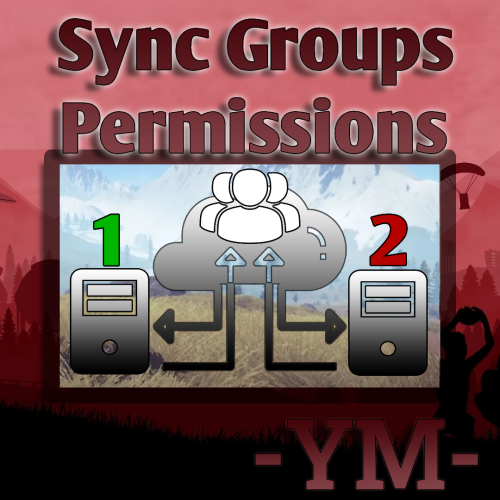
This plugin synchronizes groups, group permissions, player groups, and player permissions across multiple servers. Questions & Answer: Config: { "General Settings": { "Prefix": "[PG-Sync]", "SteamID": "0", "Debug": false }, "Sync Settings": { "Main Server (This should be true only on the main server among servers.)": false, "Main Server Redirect IP": "127.0.0.1", "Main Server Redirect Port": "28015", "Sync Groups?": true, "Sync Players Permissions?": true, "Sync Groups in Permissions?": true, "Sync Save Time (secs)": 60, "Exception for Auto Group Sync": [], "Exception for Auto Permissons Sync": [] }, "Mysql Settings (Recommended v5.7.37)": { "MySqlIp": "", "MySqlPort": 3389, "MySqlUsername": "", "MySqlPasword": "", "MySqlDatabase": "" }, "Version": { "Major": 1, "Minor": 0, "Patch": 0 } } This plugin was created at the request of the client.$30.00 -
Version 1.0.0.0
16 downloads
Rust Manager is a robust and user-friendly windows application designed to streamline the management of your Rust game server. Built on the latest .NET 8 framework, Rust Manager offers a comprehensive suite of tools to help you efficiently manage your server and its users, all from a local environment without the need to log on to any rust servers. Key Features: • User Management: Easily register, edit, and manage user accounts with a secure and intuitive interface. The application supports user authentication and email confirmation to ensure the integrity of your user base. • Local Management: All management tasks are performed locally, ensuring that your data remains secure and private. There is no need to log on to your rust servers, providing you with complete control over your server management. • Email Notifications: Integrated email sending capabilities allow you to send confirmation emails and other notifications directly from the application. • Profile Editing: Users can update their profiles, including changing their passwords, directly within the application. • Secure Authentication: The application uses ASP.NET Core Identity for secure user authentication and management, ensuring that your server remains protected from unauthorized access. • Permission Group Management: Easily manage permission groups and individual permissions through the intuitive UI. Create, delete, and sync groups across multiple Rust servers seamlessly. • Group Synchronization: Sync permission groups across multiple Rust servers, ensuring consistency and ease of management. • Permission Comparison: Compare permissions and groups across different servers to identify discrepancies and ensure uniformity. Rust Manager is the easiest way to manage permissions across a single or multiple servers. It runs on windows as a stand alone application and you maintain 100% of the information. No subscriptions or hosting is required. Rust Manager is the perfect solution for Rust server administrators who want a powerful, secure, and easy-to-use tool for managing their servers locally. DEMO VIDEO$39.99