Search the Community
Showing results for tags 'monitoring'.
Found 5 results
-

Version 1.0.0
11 downloads
AP Burden — find which Oxide / Carbon plugins eat your server frame time. In-game metrics plus a Windows desktop app (AP Burden Monitor) over WebRCON. Optional BurdenProfiler extension for deeper per-hook analysis of the collected data. Features - Measures plugin / hook load in readable metrics (ms/sec, %, top plugins) - In-game UI & chat + console reports - Configurable sample interval, exclusions, alerts, snapshots - **BurdenProfiler extension** (Oxide / Carbon) — dig into hooks and deep-profile a specific plugin hook when you need more detail than overview metrics - AP Burden Monitor (Windows) — live plugin table, FPS / players / entities, search, detail charts - Auto-updates for Monitor from the license server - Oxide & Carbon packages included Requirements - Rust server with Oxide or Carbon - WebRCON enabled (IP, RCON port, password) - Windows 10/11 for the Monitor app - Google Authenticator (or any TOTP app) for the customer cabinet (2FA) - Full server restart after installing the BurdenProfiler extension After purchase 1. You will receive a private message with a one-time invite code and a link to the customer cabinet. 2. Open the link → enter the invite code → create nickname + password → set up 2FA. 3. In the cabinet: download Monitor and copy your license key. 4. Install Monitor → paste the key → activate → connect via WebRCON. Important: download the installer only from the cabinet. Keep the invite code message until registration is finished (the invite code works once). Optional Link Discord in the cabinet to recover your password later via bot DM. 2FA is never bypassed. Permissions appluginburden.use Open the in-game `/burden` UI appluginburden.admin Admin actions in the plugin UI / admin features Server owners (IsAdmin) can use the tools without these permissions. Console commands require auth (RCON / server console). Commands / Chat /burden Open the burden UI (requires appluginburden.use or admin) |$15.00 -

Version 1.0.0
9 downloads
Spectate is an advanced administration tool that makes player monitoring fast and convenient. Start spectating any active player by name or Steam ID, switch between valid targets with the arrow keys, and view the current player's name and Steam ID in a clean on-screen panel. Features - Spectate players by partial name, Steam ID - Switch targets using the **Left** and **Right** keys - Displays the target's name and Steam ID - Automatically skips dead, sleeping, disconnected, and vanished players - Stops safely when the target disconnects - English and Russian localization included - Optional **Vanish** integration for status checks and direct spectate voice relay - When an administrator speaks in voice chat while spectating, the player being watched can hear them directly - Optional player notifications when an administrator starts or stops spectating them. This feature is disabled by default and can be enabled in `oxide/config/Spectate.json` Installation 1. Upload `Spectate.cs` to `oxide/plugins`. 2. Grant the required permission to your admin group. oxide.grant group admin spectate.use Permission `spectate.use` - Allows an administrator to use all spectate commands. Commands - `/spec <Part of name or Steam ID>` - Start spectating a player - `/stop` - Stop spectating and respawn While spectating, use the **A/D** keys to change targets. The **Vanish** plugin is optional and is only required for its related integration features.$40.00 -
Version 1.0.7
140 downloads
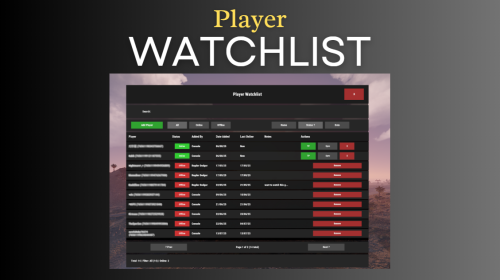
Watchlist is a lightweight but powerful tool that alerts admins when specific players connect to the server. Whether you're online or offline, you'll get real-time in-game notifications and Discord alerts with fully configurable message templates and role pings. The built-in UI makes managing the watchlist easy, with support for sorting, filtering, teleporting, and note-taking. Players can be added or removed manually or straight from RustAdmin with custom commands. Very useful tool to keep you and your staff one step ahead. Configuration { "Discord Webhook URL": "https://discord.com/api/webhooks/your/webhook/url", (Your Webhook URL) "Ping Role": false, (Whether to ping a role when player comes online on discord, e.g: @Admin) "Role ID": 0, (Discord Roll Id to ping) "Purge Watchlist on Wipe": false, "Purge Players List on Wipe": false, "Enable UI": true, "UI Color Scheme (Options: dark, light, rust)": "dark", "Custom Colors": { "PrimaryBackground": "0 0 0 0.95", "SecondaryBackground": "0.15 0.15 0.15 1", "HeaderBackground": "0.1 0.1 0.1 1", "ButtonPrimary": "0.2 0.7 0.2 0.9", "ButtonSecondary": "0.3 0.3 0.3 1", "ButtonDanger": "0.7 0.2 0.2 0.9", "TextPrimary": "1 1 1 1", "TextSecondary": "0.7 0.7 0.7 1", "OnlineIndicator": "0.2 0.8 0.2 1", "OfflineIndicator": "0.8 0.2 0.2 1", "RowEven": "0.12 0.12 0.12 0.95", "RowOdd": "0.15 0.15 0.15 0.95", "ActiveItem": "0.4 0.4 0.4 1", "AlertBackground": "0.8 0.2 0.2 0.95", "AlertText": "1 1 1 1", "AlertPanel": "0.11 0.11 0.12 0.98", "AlertHeader": "0.62 0.17 0.17 1", "AlertDivider": "0.25 0.25 0.27 1", "AlertLabel": "0.6 0.6 0.63 1" }, "Alert Position": { "AnchorMin": "0.775 0.60", "AnchorMax": "0.985 0.90" }, "Alert Cursor Enabled": false, "UI Scale": 1.0, "Main UI Position": { "AnchorMin": "0.2 0.1", "AnchorMax": "0.8 0.9" }, "UI Scale": 1.0, "Main UI Position": { "AnchorMin": "0.2 0.1", "AnchorMax": "0.8 0.9" }, "Font Size": { "Title": 20, "Header": 14, "Normal": 12, "Small": 10 }, "UI Animation": true, "Enable Sound Alert": true, "Alert Sound": "assets/bundled/prefabs/fx/notice/item.select.fx.prefab", "Alert Duration (seconds)": 10.0, "Show Visual Alert": true, "Send Discord Add/Remove Notifications": true, "Max Cached Players": 3000, "Player Cache Retention Days (0 = disabled)": 30, "Player Cache Save Delay Seconds": 60, "Alert Cooldown Seconds": 120, "Startup Alert Grace Seconds": 60, "Auto Expire Days (0 = disabled)": 0, "Send Prune Discord Notifications": true, "Prune Report Max Per Embed": 10, "Prune Report Include Notes": false, "Enable Diagnostics": false, "Max Audit Log Entries": 500 } COMMANDS Chat: /watchlist Opens the Watchlist UI (requires permission) /wl <steamid> "<note>" Adds a player to the watchlist with a note (requires watchlist.admin permission) /wlr <steamid> Removes a player from the watchlist (requires watchlist.admin permission) /wlist Lists all watched players in chat (requires watchlist.admin permission) Console: watchlist.add <steamid> "<note>" Adds a player to the watchlist Example: watchlist.add 76561198000000000 "Suspected Cheater" watchlist.remove <steamid> Removes a player from the watchlist watchlist.list Lists all watched players in the server console wl <steamid> "<note>" Adds a player to the watchlist with a note (can be used via rcon) wlr <steamid> Removes a player from the watchlist (can be used via rcon) wlist Lists all watched players in the server console (can be used via rcon) purgewl Clears the entire watchlist (requires watchlist.admin permission) watchlist.testalert fires the alert at yourself with sample data so you can position and colour it without waiting for someone to log in. You can also pass a Steam ID (watchlist.testalert 76561198000000000) to preview it with a real entry's details. PERMISSIONS watchlist.admin Full access to all commands and features watchlistui.toggle Allows UI toggle via `/watchlist` command RUSTADMIN INTEGRATION You can integrate Watchlist directly with **RustAdmin** to add or remove players with a single click. Add to Watchlist Command to Execute: wl ${playerSteamid} "From RustAdmin" Tick "Show Command Output in a Dialog" (optional) Remove from Watchlist Command to Execute: wlr ${playerSteamid} Tick "Show Command Output in a Dialog" (optional)$10.00 -
Version 1.6.2
93 downloads
RustVitals is a server health and performance monitoring plugin for Rust servers running Oxide/uMod. It gives admins a clean in-game dashboard to quickly check server FPS, frame time, entities, dropped items, corpses, NPCs, vehicles, turrets, locked crates, dense map areas, lag spikes, and overall server risk. RustVitals is made to help server owners spot common performance problems faster without digging through console logs or guessing what is causing lag. It also includes cleanup tools, useful recommendations, Discord webhook reports, RCON/server-console support, and optional language files. Key Features Clean in-game admin dashboard Main command: /vt ui Server FPS and frame-time monitoring Server risk score Top entity scanner High-density grid reports Dropped item and corpse cleanup Lag spike tracking Server health recommendations Live dashboard console Discord webhook reports RCON/server-console support Admin-only permission Optional language file support Permission rustvitals.admin Example: oxide.grant group admin rustvitals.admin Version RustVitals v1.6.2$19.99- 16 comments
- 1 review
-
- 1
-

-
- #performace
- #health
- (and 8 more)
-

Version 1.0.0
11 downloads
This plugin is an re-write of the free Google Analytics plugin on uMod (https://umod.org/plugins/analytics) that works with GA4. Works with Google Analytics 4 Developer API for use in other plugins Event queueing system to prevent rate-limiting Fast and performant { "Debug": false, // Enables debug logging in the console. "Measurement ID": "", // The measurement ID in your GA dashboard. "API Secret": "", // Your API Secret from your GA dashboard. "Client ID": "My Rust Server", // The server identifier in the events. "Send Data Interval": 3.0, // How often queued events are processed. "Analytics": { "player_join": true, "player_leave": true, "player_pvp_death": true, "player_chat": true, "player_command": true, "report_receive": true, "player_buy_vending": true, "player_kit_redeem": true } // Enable and disable events (you can also add events from other plugins here). If an event isn't in this list, it will be enabled by default } Plugin developers can integrate events into their plugins using our API. API Methods: API_QueueAnalytic(Dictionary<string, Dictionary<string,object>> events, ulong? userId = null) Example of queueing an event: GAPlugin.Call("API_QueueAnalytic", new Dictionary<string, Dictionary<string, object>>() // A list of events. { { "kit_redeem", // The event name. new Dictionary<string, object>() // Event parameters. { { "kit_name", kitName } } } }, userId // The user ID of a player (optional, should be set for events that involve a player). );$2.99