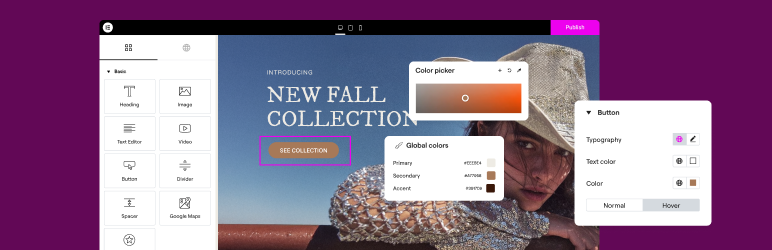

描述
THE #1 NO CODE DRAG & DROP WORDPRESS WEBSITE BUILDER POWERING 22M+ WEBSITES WORLDWIDE, NOW WITH AI.
Elementor, the leading WordPress website creation platform, empowers you to build professional, pixel-perfect websites seamlessly with its no-code, drag-and-drop Atomic Editor.
Elementor 支持完整的网站生命周期,让你能够自信地构建、优化和管理网站,同时提供扩展功能,如 AI 驱动的内容创建、图片优化、交易邮件投递、无障碍工具、性能增强等。
Now in version 4 – the Atomic Editor! Introducing a new generation of performance-first atomic building blocks that allow you to control every atomic part with no limits or locked layouts. Define your global design systems and reusable components once, and they apply everywhere instantly – turning hours or even days of work into single clicks.
Elementor One,解锁全部功能。
为你的 Elementor 网站寻求快速安全的云托管?
快来试用由 Google Cloud 与 Cloudflare 提供技术支持的 Elementor 托管服务。TrustPilot 评分高达 4.9/5。
🌟 Create professional stunning websites
- Intuitive drag & drop builder: Build any website with our no-code, drag-and-drop Editor. Achieve design precision with full control over layout and style.
- Pixel-perfect design tools: Upload SVGs, apply masks, gradients, box shadows, headline effects, shape dividers, and use built-in CSS controls for advanced customization.
- 模板库:应用完整的网站用于即时设置的套件,或从庞大的单页、块和弹出模板库中进行选择。
- Advanced widgets: Access over 40 FREE widgets, including heading, image, text editor, video, button, gallery, carousels, and more.
- AI capabilities: Revolutionize your design and content creation process with native AI integration. Instantly create sections, text, code, and images.
🗝️ Key features
- Design system: Use Variables and Classes for consistent colors, typography, and design elements, ensuring a cohesive, professional look that updates everywhere globally.
- Responsive design: Optimize your design for every device with custom breakpoints, ensuring a seamless desktop, tablet, and mobile experience.
- Mask shapes: Turning any element, like an image or video, into whatever shape you desire to create standout designs.
- CSS transform: Use CSS Transform to rotate, scale, and skew elements, adding dynamic styling to your site.
- Entrance animations: Add entrance animations to elements to create engaging and interactive user experiences.
- Revision history: Elementor’s Revision History feature enables users to track and revert to previous versions of their designs, providing peace of mind and flexibility during the creative process.
- Developer-friendly: Equipped with extensive documentation, API, developer tools, and custom code areas, Elementor offers a conducive environment for developers to extend its capabilities and create custom solutions.
- Floating buttons: Enhance user interaction with customizable, floating action buttons that stay in view as users scroll.
- Components [Pro]: Reuse the same building blocks across pages and sites, and update them everywhere they appear. Including controlled content editing, allowing collaborators and clients to update only exposed content properties without breaking layout or styling.
- 主题生成器 [专业版]:设计网站的每个部分(页眉、页脚、帖子和档案),以完全控制外观。
- 弹窗构建器 [专业版]:使用 Elementor 的弹窗构建器创建引人注目的弹窗,它配备了高级的定位与触发选项,助您优化用户互动并提升转化率。
- 表单 [ Pro]:设计和集成自定义表单,利用高级功能和集成来有效捕获和管理提交。
- WooCommerce Builder [Pro]: Integrate Elementor with WooCommerce to design custom product pages, shop layouts, archives, carts, checkout pages, my account, and more, enhancing your store’s visual appeal and functionality.
- 动态内容 [专业版]:通过将您的设计连接到各种数据源,利用动态内容功能来创建个性化和交互式 Web 体验。
- 协作笔记 [专业版]:使用 Elementor 的笔记功能,在设计界面上直接留下反馈与评论,从而提升团队协作效率。
- 自定义代码 [专业版]:插入自定义代码以扩展网站的功能,为高级自定义提供灵活性。
- 自定义 CSS [专业版]:应用自定义 CSS 来微调元素的样式,确保对设计方面的精确控制。
- Motion effects [Pro]: Add advanced motion effects to elements for a more dynamic and engaging user experience.
- Custom fonts and icons [Pro]: Upload and use custom fonts and icons to match your brand’s identity.
😍 Elementor 免费小部件
通过我们全面的免费小部件和工具套件释放 Elementor 的潜力,这些小部件和工具旨在增强您的网站创建过程并提升您的设计能力:
- Heading: Add eye-catching headlines.
- Image: Control the size, opacity and more.
- Text Editor: Just like the WordPress text editor.
- Video: Add YouTube, Vimeo, VideoPress, Dailymotion or self-hosted videos.
- Button: Create interactive buttons.
- Link in Bio: Build link in bio components to promote your business / services.
- Image Box: A box with image, headline and text.
- Testimonials: Customer testimonials.
- Icon: Place one or more of 600+ icons available.
- Icon Box: An icon, headline, and text with one widget.
- Social Icons: Link to your social pages with the Facebook/X (formerly Twitter) icons.
- Image Gallery: Display your images in a grid.
- Image Carousel: Create rotating carousels or sliders for chosen images.
- Icon List: Use any icon to create a bullet list.
- Counter: Show numbers in an escalating manner.
- Progress Bar: Include an escalating progress bar.
- Nested Tabs: Display content in vertical or horizontal tabs.
- Nested Accordion: Display any type of content in collapsible sections.
- Rating: Display how many stars (or another icon) other visitors gave.
- Alert: Include a colored alert box to draw visitor’s attention.
- HTML: Insert code into the page.
- Shortcode: Insert shortcodes from any plugin into the page.
- Menu Anchor: Link any menu to this anchor.
- Read More: Set the Read More cut-off for the excerpt in archive pages.
- Sidebar: Add sidebars onto the page.
- Google Maps: Embed maps into the page.
- SoundCloud: Add SoundCloud audio bits.
- Divider: Separate content with a designed divider.
- Spacer: Add space between elements.
- Text Path: Attach your text to a path.
- And counting…
🚀 Enhance your website
High-performing websites: Website performance impacts your visitors’ experience and search result ranking. Elementor, in partnership with Google Chrome, continuously enhances performance without compromising design.
主要功能包括:
- Reduced DOM output: Streamlined HTML structure for faster rendering.
- Improved media file loading: Optimized loading of images, videos, and other media assets.
- Reduced CSS and JS files: Minimized stylesheets and scripts individually loaded only on demand for quicker loading times.
- Lazy loading: Deferred loading of non-critical resources to improve initial page load speed.
- Faster font loading: Efficient delivery of web fonts to enhance text rendering speed.
- Optimized front-end asset loading: Efficient loading of assets like JavaScript and CSS to minimize render-blocking.
- Element caching: Cache frequently accessed design elements to reduce server response time and enhance overall performance.
🔥 Elementor Editor Pro features
使用 Elementor Editor Pro 的全站构建器,在节省时间、资金与资源的同时,打造无与伦比的网站。获取 100 多个专业部件、功能与工具的访问权限。
Editor Pro design widgets:
- 帖子:使用可自定义的布局和样式显示您的博客帖子。
- 分享按钮:允许访问者在各种社交媒体平台上轻松分享您的内容。
- 作品集:用令人惊叹的作品集布局展示您的作品或项目。
- 幻灯片:使用自定义动画和过渡创建动态幻灯片。
- 表单:设计和自定义高级表单以供用户交互和数据收集。
- 登录:向您的网站添加登录表单或用户注册模块。
- Nav Menu: Customize and style your website’s navigation menu for better user experience.
- 动画标题:使用动画效果创建引人注目的标题。
- 价格表:以结构化且具有视觉吸引力的格式显示定价计划或套餐。
- 价目表:展示具有可自定义样式选项的价格或服务列表。
- 图库:使用各种布局选项和灯箱支持创建精美的图像库。
- 翻转框:添加交互式翻转动画以突出显示内容或功能。
- 号召性用语:通过引人注目的号召性用语部分鼓励用户互动和转化。
- 媒体轮播:展示图像或视频等媒体文件的轮播。
- 推荐轮播:以轮播格式显示客户推荐,以进行社交证明。
- 嵌套轮播:创建嵌套轮播以实现更复杂的内容组织。
- 循环轮播:在循环轮播中显示内容以供连续查看。
- Table of Contents: Generate a table of contents for longer articles or guides to improve navigation.
- 倒计时:添加倒计时器以营造促销或活动的紧迫感。
- Facebook 页面:将您的 Facebook 页面提要或内容嵌入到您的网站上。
- 块引用:使用时尚的格式选项突出显示引用或感言。
- 模板:保存并重复使用设计模板,以实现一致的品牌和布局。
- 评论:展示客户评论和评级以建立信任和信誉。
- Facebook 嵌入:将 Facebook 帖子或内容嵌入到您的网站上。
- Facebook 嵌入:将 Facebook 帖子或内容嵌入到您的网站上。
- Facebook Comments: Enable Facebook comments on your website’s pages or posts.
- PayPal 按钮:集成PayPal按钮以方便在线支付。
- Stripe Button:集成Stripe支付按钮以促进安全的在线交易。
- Lottie 小部件:添加 Lottie 动画以增强视觉吸引力和参与度。
- 代码突出显示:显示带有语法突出显示的代码片段,以提高可读性。
- 视频播放列表:为您网站上的视频内容创建和自定义播放列表。
- 超级菜单:自定义高级菜单,以便更好地导航和显示复杂的内容。
- 画布外:创建画布外区域,滑入以显示额外信息或菜单,而不会扰乱主布局。
Editor Pro theme widgets:
Build and customize all the key parts of your website including headers, footers, 404 page, global archives, and more…
- 帖子标题:自定义各个博客帖子或页面的标题。
- 帖子摘录:显示博客帖子的简短摘要或预告片。
- 帖子内容:自定义博客帖子或页面的主要内容区域。
- 特色图片:为博客文章或页面设置和自定义特色图片。
- 作者框:在博客文章上显示作者信息和简介。
- 发表评论:自定义网站上评论部分的外观和功能。
- 帖子导航:向相邻帖子添加导航链接以方便浏览。
- 帖子信息:显示有关博客帖子的附加信息,例如作者和日期。
- Site Logo: Upload and customize your website’s logo for branding purposes.
- 网站标题:自定义网站的标题。
- 页面标题:自定义各个页面的标题。
- Search Bar: Add a search bar to allow users to search your website’s content.
- 面包屑:显示分层导航路径,以便更好地用户导航。
- 站点地图:生成站点地图以实现更好的搜索引擎索引和用户导航。
- 循环网格:为博客文章档案或产品列表设计和自定义网格布局。
Editor Pro WooCommerce widgets:
在整个网站上设计和定制完整的在线购物体验。
- 产品:显示具有可自定义布局和样式的单个产品。
- 面包屑:显示分层导航路径,以便用户在商店内更好地导航。
- 产品标题:自定义单个产品的标题。
- 产品图片:设置和自定义产品列表的图像。
- 产品价格:显示单个产品的价格。
- 添加到购物车:添加可自定义的“添加到购物车”按钮以方便购买。
- 产品评分:显示产品的评分和评论。
- 产品库存:显示产品的库存情况。
- 产品元数据:显示有关产品的附加信息,例如 SKU 和类别。
- 产品内容:自定义产品描述的主要内容区域。
- 简短描述:显示产品的简短摘要或预告片。
- 产品数据选项卡:将产品信息组织到选项卡式部分中,以便更好地组织。
- 其他信息:显示有关产品的其他详细信息,例如尺寸和重量。
- 产品相关:展示相关产品以鼓励额外购买。
- 追加销售:推广追加销售产品以提高平均订单价值。
- 产品:显示具有可自定义设置的产品网格或列表。
- 自定义添加到购物车:自定义特定产品的“添加到购物车”按钮。
- WooCommerce 页面:设计和自定义 WooCommerce 特定页面,例如购物车和结账页面。
- 产品类别:显示产品类别,以便在商店内轻松导航。
- 菜单购物车:在导航菜单中显示购物车图标,以便轻松访问购物车。
- 购物车:自定义购物车页面的外观和功能。
- 结帐:自定义结帐页面的外观和功能。
- 我的帐户:自定义客户帐户区域的外观和功能。
- 购买摘要:在结账过程中显示购买摘要。
- WooCommerce 通知:自定义 WooCommerce 通知的外观和功能,例如订单确认消息。
使用 Elementor Editor Pro,构建专业网站!
🔒 Security and compliance
Elementor places a paramount focus on security, evident through our acquisition of industry certifications such as ISO/IEC 27001, ISO/IEC 27017, ISO/IEC 27018, ISO/IEC 27701, and SOC 2 Type II. These certifications underscore our commitment to implementing robust security measures and highlight our dedication to adhering to recognized industry standards.
我们通过我们的漏洞赏金计划鼓励道德安全研究。我们与领先的错误赏金服务合作,为研究人员提供报告我们服务中的漏洞的机会。我们的赏金计划包括 24/7/365 的分流团队。
有关更多信息:信任中心。
♿ Accessibility best practices
Elementor 提供辅助功能工具和增强功能,帮助您为所有用户提供更好的体验。包括 HTML 5 语义、全键盘导航菜单、持续改进的功能、小部件等等。
🌐 翻译成超过 63 种语言,包括 RTL 支持
Elementor 支持多种语言、排版和 RTL,具有超过 63 种语言的编辑器翻译。
It’s also compatible with WPML, Polylang, TranslatePress, Weglot, and more. To contribute, add a new language via translate.wordpress.org. See our guide on how to translate and localize the plugin.
🧩 Use of 3rd-party services
为了改善用户体验,如果启用了所需的功能,Elementor 可能会使用以下第三方服务:
- Google Fonts are loaded to add additional fonts to your website. Google’s TOS and Privacy Policy apply.
- Some Elementor features require loading assets from Elementor.com. These assets are not used for tracking unless explicitly stated, and require your approval and manual opt-in. Learn more in our TOS and Privacy Policy.
📧 Related products by Elementor
Image Optimization: Superior image compression for faster, high-quality website performance.
Email Deliverability: Reliable email management without SMTP plugins, keeping your communications streamlined and efficient.
Web Accessibility: Enhances website usability for individuals with disabilities. Ally is designed to help web creators make their websites more inclusive. It scans, detects, and remediates key accessibility violations, working seamlessly on all WordPress and Elementor websites.
📣 See what our users have to say
“Elementor 毫无疑问是最好的页面构建器” – ★★★★★ Graphicvision1
“一个令人难以置信的用户友好插件” – ★★★★★ Hyeyoga
“Easily, my most used WP plugin” – …
屏幕截图


安装
最低要求
- WordPress 6.8 or greater
- PHP 版本 7.4 或更高版本
- MySQL version 5.6 or MariaDB version 10.5 or greater
- PHP Memory limit of 256 MB or greater
- WordPress Memory limit of 256 MB or greater
推荐要求
- WordPress 7.0 or greater
- PHP version 8.3 or greater
- MySQL version 8.0 or MariaDB version 10.6 or greater
- PHP Memory limit of 512 MB (768 MB for best performance) or greater
- WordPress Memory limit of 512 MB (768 MB for best performance) or greater
Note: These requirements are for Elementor and Elementor Pro only. If you are using additional plugins on your site that also have minimum requirements such as WooCommerce or Elementor addons, you may need to increase your PHP and WordPress Memory limit to help avoid loading issues. See also, the following documentation Elementor Widget Panel Not Loading.
安装
- 使用 WordPress 内置插件安装程序进行安装,或者解压 zip 文件并将内容放入 WordPress 安装的
wp-content/plugins/目录中。 - 通过WordPress中的“插件”菜单激活插件。
- 前往页面 > 新增
- 点击 ‘用Elementor编辑’ 按钮.
- 现在,您可以将小部件从左侧面板拖放到内容区域,并添加构成页面结构的新节和列。
如需文档和教程,请访问我们的知识库。
常见问题
-
如何安装 Elementor 编辑器?
-
To install the free version of Elementor Editor, follow the steps below:
From your WordPress dashboard -> Go to Plugins -> Click on ‘Add new’-> In the Search field, enter Elementor and choose Elementor website builder.
Press install -> After installation, click Activate. -
Elementor 编辑器与所有主题都兼容吗?
-
Elementor Editor works all the themes that respect the coding standards of WordPress set by its Codex. It is recommended to use Elementor’s Hello Theme, a lightweight blank canvas, to enjoy full flexibility when using Elementor Editor, and optimize your experience.
-
Elementor 编辑器与 Gutenberg 兼容
-
Elementor 编辑器与 Gutenberg 可以无缝协作。作为用户,您在编辑网站时,可以随时轻松决定在每一步使用哪个编辑器。
-
我可以创建在线商店吗?
-
是的,使用 Elementor 编辑器专业版的 WooCommerce 构建器,您可以自定义店铺的每一个页面,从而打造能够驱动销售的卓越客户体验。
-
它可以与其他 WordPress 插件一起使用吗?
-
它与几乎所有的插件都能协同工作。如果您遇到兼容性问题,请向我们并同时向与 Elementor 编辑器冲突的插件方报告此问题。
-
我需要知道如何编程吗?
-
不!Elementor 编辑器为您提供了构建一个专业网站所需的所有部件与功能,而无需使用任何代码。
-
我需要知道如何设计吗?
-
不,您可以在众多专业设计的工具包与模板中进行选择,它们适配各行各业,并已包含创建您自己的专业网站所需的一切。
-
Elementor 编辑器会降低我的网站速度吗?
-
由于 Elementor 将速度与性能置于优先地位,您在编辑器的每个新版本中都能享受到更优、更快的性能。当您在旧版本上测试相同的页面布局时,可以观察到显著的性能提升——例如在 Google PageSpeed Insight 的评分中,版本 3.1 为 82 分,而版本 3.5 已提升至 95 分。
-
使用 Elementor 编辑器,我的网站安全吗?
-
您网站的安全对我们来说极其重要,我们采取积极主动的措施来确保您网站的安全。 Elementor 已通过 ISO 27001 认证,并拥有一支由安全专业人员组成的专门团队,全天候 (24/7) 实施行业最佳实践,以实现最大程度的安全性和合规性。
还有一个托管安全漏洞赏金计划,通过启用 24/7/365 众包漏洞检测来利用社区力量。
-
我可以单独购买模板吗?
-
当然,你可以使用任何支持 Elementor 编辑器的模板。
-
Elementor 编辑器是否兼容文章和自定义文章类型?
-
当然是!您可以在“设置”页中设置将启用Elementor的帖子类型。
-
What is the difference between Elementor’s free Editor plugin and Elementor Editor Pro?
-
Elementor 编辑器的免费版允许您探索我们革命性的拖放式实时编辑器、基础部件与模板。
Elementor 编辑器专业版(Essential、Advanced、Expert、Studio 及 Agency 套餐)则为您提供更专业的工具,以加速您的工作流程、让您获得人工支持服务、帮助您构建更高级的内容,并实现更好的访客转化。
在此查看完整对比。 -
我该如何成为一名贡献者?
-
If you want to contribute, go to our Elementor GitHub Repository and see where you can help. You can also add a new language via translate.wordpress.org. We’ve built a short guide explaining how to translate and localize the plugin.
评价


贡献者及开发者

更新日志
4.1.4 – 2026-06-21
- Fix: Improved code security enforcement in query handling
4.1.3 – 2026-06-10
- Fix: Cloud Library screenshot errors could prevent users from saving templates locally
4.1.2 – 2026-06-08
- Tweak: Improved Global Classes usage tracking for safer deletion – Atomic Editor
- Fix: Image with Lightbox inherits default button styles – Atomic Editor
- Fix: Image settings are not saved when using Insert from URL – Atomic Editor
- Fix: Media attachments may be requested too many times in the Editor – Atomic Editor
- Fix: Pages using Global Classes may fail to publish or show missing styles on the live site – Atomic Editor
- Fix: Editor context may not sync correctly when navigating between documents
4.1.1 – 2026-05-27
- Security Fix: Improved code security enforcement in content handling
- Security Fix: Improved code security enforcement in template handling
- Fix: Hiding one filter prevents other filters from being applied – Atomic Editor
4.1.0 – 2026-05-26
- New: Introducing the Design System panel for managing Variables and Classes in one place – Atomic Editor
- New: Introducing Angie in the Editor to help generate and modify Atomic layouts, Components, Forms, Classes, and Variables – Atomic Editor
- New: Introducing Markdown rendering as an Alpha experiment to improve how content is structured for AI systems
- Tweak: Added import and export for Variables and Classes from the Design System panel – Atomic Editor
- Tweak: Increased the Class limit to 1000 – Atomic Editor
- Tweak: Added duplicate support for Variables in the Variables Manager – Atomic Editor
- Tweak: Added duplicate support for Classes in the Class field – Atomic Editor
- Tweak: Added support for Variables in additional style controls, including Effects, Filters, and Box Shadow – Atomic Editor
- Tweak: Added multi-select support to Direction control in Interactions – Atomic Editor
- Tweak: Added Interaction actions to the History panel – Atomic Editor
- Tweak: Added support for negative Box Shadow values – Atomic Editor
- Tweak: Improved reordering of Component properties with full drag-and-drop support – Atomic Editor
- Tweak: Updated Position and Z-index control visibility and behavior – Atomic Editor
- Tweak: Updated the minimum required WordPress version to 6.8
- Tweak: Added the External URL option to Image control – Atomic Editor
- Fix: Slide Interactions can be applied without selecting a direction – Atomic Editor
- Fix: Undo does not work as expected for individual Class properties – Atomic Editor
- Fix: Font family values persist on Global Classes after deletion – Atomic Editor
