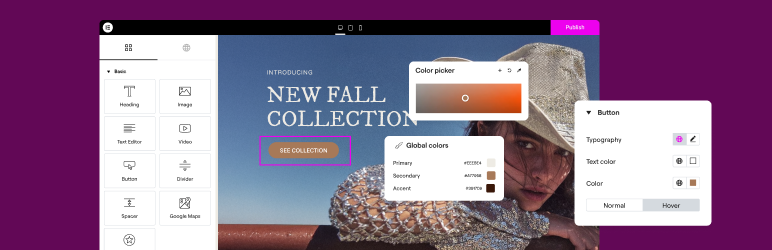

설명
전 세계 2200만 개 이상의 웹사이트를 지원하는 최고의 코드 없는 드래그 앤 드롭 워드프레스 웹사이트 빌더, 이제 AI 기능까지 탑재했습니다.
워드프레스 웹사이트 제작 플랫폼의 선두주자인 Elementor는 코딩이 필요 없는 드래그 앤 드롭 방식의 Atomic 편집기를 통해 전문가 수준의 완벽한 웹사이트를 손쉽게 구축할 수 있도록 지원합니다.
전체 웹사이트 수명주기를 지원하며, Elementor는 AI 기반 생성, 이미지 최적화, 트랜잭션 이메일 전송, 접근성 도구, 성능 향상 기능 등 확장된 기능을 통해 자신 있게 웹사이트를 구축하고 최적화하며 관리할 수 있도록 합니다.
Now in version 4 – the Atomic Editor! Introducing a new generation of performance-first atomic building blocks that allow you to control every atomic part with no limits or locked layouts. Define your global design systems and reusable components once, and they apply everywhere instantly – turning hours or even days of work into single clicks.
Elementor One으로 모든 기능의 잠금을 해제하세요.
Elementor 사이트에 빠르고 안전한 클라우드 호스팅이 필요하신가요? Elementor Host를 사용해 보세요. Google Cloud 및 Cloudflare에서 제공됩니다. TrustPilot 평점 4.9/5.
🌟 Create professional stunning websites
- Intuitive drag & drop builder: Build any website with our no-code, drag-and-drop Editor. Achieve design precision with full control over layout and style.
- Pixel-perfect design tools: Upload SVGs, apply masks, gradients, box shadows, headline effects, shape dividers, and use built-in CSS controls for advanced customization.
- 템플릿 라이브러리: 전체 웹사이트 키트를 적용하여 즉시 설정하거나 단일 페이지, 블록 및 팝업 템플릿으로 구성된 방대한 라이브러리에서 선택하세요.
- Advanced widgets: Access over 40 FREE widgets, including heading, image, text editor, video, button, gallery, carousels, and more.
- AI capabilities: Revolutionize your design and content creation process with native AI integration. Instantly create sections, text, code, and images.
🗝️ Key features
- Design system: Use Variables and Classes for consistent colors, typography, and design elements, ensuring a cohesive, professional look that updates everywhere globally.
- Responsive design: Optimize your design for every device with custom breakpoints, ensuring a seamless desktop, tablet, and mobile experience.
- Mask shapes: Turning any element, like an image or video, into whatever shape you desire to create standout designs.
- CSS transform: Use CSS Transform to rotate, scale, and skew elements, adding dynamic styling to your site.
- Entrance animations: Add entrance animations to elements to create engaging and interactive user experiences.
- Revision history: Elementor’s Revision History feature enables users to track and revert to previous versions of their designs, providing peace of mind and flexibility during the creative process.
- Developer-friendly: Equipped with extensive documentation, API, developer tools, and custom code areas, Elementor offers a conducive environment for developers to extend its capabilities and create custom solutions.
- Floating buttons: Enhance user interaction with customizable, floating action buttons that stay in view as users scroll.
- 구성 요소 [Pro]: 페이지와 사이트 전반에 걸쳐 동일한 구성 요소를 재사용하고, 표시되는 모든 곳에서 업데이트할 수 있습니다. 제어된 콘텐츠 편집 기능을 통해 공동 작업자와 클라이언트는 레이아웃이나 스타일을 손상시키지 않고 노출된 콘텐츠 속성만 업데이트할 수 있습니다.
- 테마 빌더 [Pro]: 헤더, 바닥글, 글, 자료실 등 사이트의 모든 부분을 디자인하여 모양을 완벽하게 제어할 수 있습니다.
- 팝업 빌더 [Pro]: Elementor의 팝업 빌더로 눈길을 끄는 팝업을 생성하세요. 고급 타겟팅 및 트리거 옵션을 갖춰 사용자 참여 및 전환을 최적화합니다.
- 양식 [Pro]: 고급 기능과 통합 기능을 활용하여 제출물을 효과적으로 캡처하고 관리할 수 있는 사용자 정의 양식을 디자인하고 통합하세요.
- WooCommerce Builder [Pro]: Integrate Elementor with WooCommerce to design custom product pages, shop layouts, archives, carts, checkout pages, my account, and more, enhancing your store’s visual appeal and functionality.
- 동적 콘텐츠 [Pro]: 동적 콘텐츠 기능을 활용하여 디자인을 다양한 데이터 소스에 연결하여 개인화된 인터랙티브 웹 경험을 제작하세요.
- 노트 [Pro]: Elementor의 노트 기능을 사용해 디자인 인터페이스에 직접 피드백과 댓글을 남겨 팀 협업을 강화하세요.
- 사용자 정의 코드 [Pro]: 사용자 정의 코드를 삽입하여 사이트의 기능을 확장하고 고급 사용자 정의를 위한 유연성을 제공하세요.
- 사용자 정의 CSS [Pro]: 사용자 정의 CSS를 적용하여 요소의 스타일을 미세 조정하고 디자인 측면을 정밀하게 제어하세요.
- Motion effects [Pro]: Add advanced motion effects to elements for a more dynamic and engaging user experience.
- Custom fonts and icons [Pro]: Upload and use custom fonts and icons to match your brand’s identity.
😍 Elementor 무료 위젯
웹사이트 제작 프로세스를 강화하고 디자인 역량을 향상하도록 설계된 포괄적인 무료 위젯 및 도구 모음으로 Elementor의 잠재력을 최대한 활용하세요:
- Heading: Add eye-catching headlines.
- Image: Control the size, opacity and more.
- Text Editor: Just like the WordPress text editor.
- Video: Add YouTube, Vimeo, VideoPress, Dailymotion or self-hosted videos.
- Button: Create interactive buttons.
- Link in Bio: Build link in bio components to promote your business / services.
- Image Box: A box with image, headline and text.
- Testimonials: Customer testimonials.
- Icon: Place one or more of 600+ icons available.
- Icon Box: An icon, headline, and text with one widget.
- Social Icons: Link to your social pages with the Facebook/X (formerly Twitter) icons.
- Image Gallery: Display your images in a grid.
- Image Carousel: Create rotating carousels or sliders for chosen images.
- Icon List: Use any icon to create a bullet list.
- Counter: Show numbers in an escalating manner.
- Progress Bar: Include an escalating progress bar.
- Nested Tabs: Display content in vertical or horizontal tabs.
- Nested Accordion: Display any type of content in collapsible sections.
- Rating: Display how many stars (or another icon) other visitors gave.
- Alert: Include a colored alert box to draw visitor’s attention.
- HTML: Insert code into the page.
- Shortcode: Insert shortcodes from any plugin into the page.
- Menu Anchor: Link any menu to this anchor.
- Read More: Set the Read More cut-off for the excerpt in archive pages.
- Sidebar: Add sidebars onto the page.
- Google Maps: Embed maps into the page.
- SoundCloud: Add SoundCloud audio bits.
- Divider: Separate content with a designed divider.
- Spacer: Add space between elements.
- Text Path: Attach your text to a path.
- And counting…
🚀 Enhance your website
High-performing websites: Website performance impacts your visitors’ experience and search result ranking. Elementor, in partnership with Google Chrome, continuously enhances performance without compromising design.
주요 기능: 다음이 포함됩니다
- Reduced DOM output: Streamlined HTML structure for faster rendering.
- Improved media file loading: Optimized loading of images, videos, and other media assets.
- Reduced CSS and JS files: Minimized stylesheets and scripts individually loaded only on demand for quicker loading times.
- Lazy loading: Deferred loading of non-critical resources to improve initial page load speed.
- Faster font loading: Efficient delivery of web fonts to enhance text rendering speed.
- Optimized front-end asset loading: Efficient loading of assets like JavaScript and CSS to minimize render-blocking.
- Element caching: Cache frequently accessed design elements to reduce server response time and enhance overall performance.
🔥 Elementor Editor Pro features
Elementor Editor Pro의 전체 웹사이트 빌더로 시간, 비용 및 자원을 절약하면서 비할 데 없는 웹사이트를 생성하세요. 100개 이상의 전문 위젯, 기능 및 도구에 접근할 수 있습니다.
Editor Pro design widgets:
- 글: 사용자 정의 가능한 레이아웃과 스타일로 블로그 글을 표시하세요.
- 공유 버튼: 방문자가 다양한 소셜 미디어 플랫폼에서 콘텐츠를 쉽게 공유하세요.
- 포트폴리오: 멋진 포트폴리오 레이아웃으로 작업이나 프로젝트를 소개하세요.
- 슬라이드: 사용자 정의 애니메이션과 전환으로 역동적인 슬라이드쇼를 만드세요.
- 양식: 사용자 상호작용 및 데이터 수집을 위한 고급 양식을 디자인하고 사용자 정의하세요.
- 로그인: 웹사이트에 로그인 양식 또는 사용자 등록 모듈을 추가하세요.
- Nav Menu: Customize and style your website’s navigation menu for better user experience.
- 애니메이션 헤드라인: 애니메이션 효과로 시선을 사로잡는 헤드라인을 만드세요.
- 가격표: 가격 책정 플랜 또는 패키지를 체계적이고 시각적으로 매력적인 형식으로 표시하세요.
- 가격 목록: 사용자 정의 가능한 스타일링 옵션으로 가격 또는 서비스 목록을 표시하세요.
- 갤러리: 다양한 레이아웃 옵션과 라이트박스 지원으로 멋진 이미지 갤러리를 만드세요.
- 플립 박스: 대화형 플립 애니메이션을 추가하여 콘텐츠나 기능을 강조하세요.
- 반응 유도: 매력적인 반응 유도 섹션으로 사용자 상호 작용과 전환을 장려하세요.
- 미디어 캐러셀: 이미지나 동영상과 같은 미디어 파일의 캐러셀을 표시하세요.
- 추천 캐러셀: 사회적 증거를 위해 고객 추천글을 캐러셀 형식으로 표시하세요.
- 중첩 캐러셀: 보다 복잡한 콘텐츠 구성을 위해 중첩 캐러셀을 만드세요.
- 루프 캐러셀: 콘텐츠를 루프 캐러셀로 표시하여 연속적으로 표시하세요.
- Table of Contents: Generate a table of contents for longer articles or guides to improve navigation.
- 카운트다운: 카운트다운 타이머를 추가하여 프로모션이나 이벤트의 긴박감을 조성하세요.
- Facebook Page: Facebook Page 피드 또는 콘텐츠를 웹사이트에 삽입하세요.
- 블록 인용문: 세련된 서식 옵션으로 인용문이나 추천글을 강조하세요.
- 템플릿: 일관된 브랜딩과 레이아웃을 위해 디자인 템플릿을 저장하고 재사용하세요.
- 리뷰: 고객 리뷰와 평점을 표시하여 신뢰와 공신력을 쌓으세요.
- Facebook 버튼: Facebook 페이지 또는 콘텐츠와의 상호 작용을 촉진하는 버튼을 추가하세요.
- Facebook 삽입: Facebook 글 또는 콘텐츠를 웹사이트에 삽입하세요.
- Facebook Comments: Enable Facebook comments on your website’s pages or posts.
- PayPal 버튼: PayPal 버튼을 통합하여 간편하게 온라인 결제를 할 수 있습니다.
- Stripe 버튼: Stripe 결제 버튼을 통합하여 안전한 온라인 거래를 촉진하세요.
- Lottie 위젯: Lottie 애니메이션을 추가하여 시각적 매력과 참여도를 높이세요.
- 코드 강조: 가독성을 높이기 위해 구문 강조 표시로 코드 스니펫을 표시하세요.
- 동영상 재생 목록: 웹사이트에서 동영상 콘텐츠 재생 목록을 생성하고 사용자 정의하세요.
- 메가 메뉴: 더 나은 탐색과 복잡한 콘텐츠 표시를 위해 고급 메뉴를 사용자 정의하세요.
- Off Canvas: 기본 레이아웃을 어지럽히지 않고 추가 정보나 메뉴를 표시하기 위해 밀어 넣는 캔버스 밖 영역을 만듭니다.
Editor Pro theme widgets:
Build and customize all the key parts of your website including headers, footers, 404 page, global archives, and more…
- 글 제목: 개별 블로그 글 또는 페이지의 제목을 사용자 정의하세요.
- 글 요약: 블로그 글의 간단한 요약 또는 티저를 표시하세요.
- 글 콘텐츠: 블로그 글 또는 페이지의 주요 콘텐츠 영역을 사용자 정의하세요.
- 추천 이미지: 블로그 글 또는 페이지의 추천 이미지를 설정하고 사용자 정의하세요.
- 작성자 상자: 블로그 글에 작성자 정보와 약력을 표시하세요.
- 댓글을 게시합니다: 웹사이트의 댓글 섹션의 모양과 기능을 사용자 정의하세요.
- 글 탐색: 인접한 글에 탐색 링크를 추가하여 쉽게 탐색하세요.
- 글 정보: 작성자, 날짜 등 블로그 글에 대한 추가 정보를 표시하세요.
- Site Logo: Upload and customize your website’s logo for branding purposes.
- 사이트 제목: 웹사이트의 제목을 사용자 정의하세요.
- 페이지 제목: 개별 페이지의 제목을 사용자 정의 설정하세요.
- Search Bar: Add a search bar to allow users to search your website’s content.
- 이동 경로: 계층적 탐색 경로를 표시하여 사용자 탐색을 개선하세요.
- 사이트맵: 더 나은 검색 엔진 인덱싱과 사용자 탐색을 위해 사이트맵을 만드세요.
- 루프 그리드: 블로그 글 아카이브 또는 상품 목록을 위한 그리드 레이아웃을 디자인하고 사용자 정의하세요.
Editor Pro WooCommerce widgets:
웹사이트 전체에서 완벽한 온라인 쇼핑 환경을 디자인하고 사용자 정의 설정하세요.
- 상품: 사용자 정의 가능한 레이아웃과 스타일로 개별 상품을 표시하세요.
- 이동 경로: 스토어 내에서 사용자 탐색을 개선하기 위해 계층적 이동 경로를 표시하세요.
- 상품 제목: 개별 상품의 제목을 사용자 정의하세요.
- 상품 이미지: 상품 목록의 이미지를 설정하고 사용자 정의하세요.
- 상품 가격: 개별 상품의 가격을 표시하세요.
- 장바구니에 추가: 간편한 구매를 위해 사용자 정의 가능한 장바구니 추가 버튼을 추가하세요.
- 상품 평점: 상품에 대한 평점 및 리뷰를 표시하세요.
- 상품 재고: 상품의 재고 가용성을 표시하세요.
- 상품 메타: SKU 및 카테고리와 같은 상품에 대한 추가 정보를 표시하세요.
- 상품 콘텐츠: 상품 설명의 기본 콘텐츠 영역을 사용자 정의하세요.
- 간단한 설명: 상품에 대한 간략한 요약 또는 티저를 표시하세요.
- 상품 데이터 탭: 상품 정보를 탭 섹션으로 구성하여 더 잘 정리할 수 있습니다.
- 추가 정보: 치수, 무게 등 상품에 대한 추가 세부 정보를 표시하세요.
- 관련 상품: 추가 구매를 유도하기 위해 관련 상품을 표시하세요.
- 상향 판매: 상향 판매 상품을 홍보하여 평균 주문 가치를 높이세요.
- 상품: 사용자 정의 가능한 설정으로 그리드 또는 상품 목록을 표시하세요.
- 사용자 정의 장바구니에 추가: 특정 상품에 대한 장바구니에 추가 버튼을 사용자 정의하세요.
- 우커머스 페이지: 장바구니 및 결제 페이지와 같은 우커머스 전용 페이지를 디자인하고 사용자 정의하세요.
- 상품 카테고리: 스토어 내에서 쉽게 탐색할 수 있도록 상품 카테고리를 표시하세요.
- 메뉴 장바구니: 탐색 메뉴에 장바구니 아이콘을 표시하여 장바구니로 쉽게 액세스하세요.
- 장바구니: 장바구니 페이지의 모양과 기능을 사용자 정의하세요.
- 체크아웃: 결제 페이지의 모양과 기능을 사용자 정의하세요.
- 내 계정: 고객 계정 영역의 모양과 기능을 사용자 정의하세요.
- 구매 요약: 결제 과정에서 구매 요약을 표시하세요.
- 우커머스 공지: 주문 확인 메시지와 같은 우커머스 알림의 모양과 기능을 사용자 정의하세요.
Elementor 편집기 Pro로 전문적인 웹사이트를 제작하세요!
🔒 보안 및 규정 준수
Elementor places a paramount focus on security, evident through our acquisition of industry certifications such as ISO/IEC 27001, ISO/IEC 27017, ISO/IEC 27018, ISO/IEC 27701, and SOC 2 Type II. These certifications underscore our commitment to implementing robust security measures and highlight our dedication to adhering to recognized industry standards.
저희는 버그 포상금 프로그램을 통해 윤리적 보안 연구를 장려합니다. 주요 버그 포상금 서비스와 협력하여 연구자가 서비스의 취약점을 신고할 수 있는 기회를 제공합니다. 포상금 프로그램에는 연중무휴 24시간 운영되는 분류 팀이 포함되어 있습니다.
자세한 정보를 확인하세요: 신뢰 센터.
♿ Accessibility best practices
Elementor는 모든 사용자에게 더 나은 경험을 제공할 수 있도록 접근성 도구와 개선 사항을 제공합니다. HTML 5 시맨틱, 전체 키보드 탐색 메뉴, 지속적인 기능 개선, 위젯 등이 포함됩니다.
🌐 63개 이상의 언어로 번역, RTL 지원 포함
Elementor는 여러 언어, 타이포그래피 및 RTL을 지원하며, 63개 이상의 언어로 번역된 에디터를 제공합니다.
It’s also compatible with WPML, Polylang, TranslatePress, Weglot, and more. To contribute, add a new language via translate.wordpress.org. See our guide on how to translate and localize the plugin.
🧩 Use of 3rd-party services
사용자 경험을 개선하기 위해 필요한 기능이 활성화된 경우 Elementor는 다음과 같은 타사 서비스를 사용할 수 있습니다:
- Google Fonts are loaded to add additional fonts to your website. Google’s TOS and Privacy Policy apply.
- Some Elementor features require loading assets from Elementor.com. These assets are not used for tracking unless explicitly stated, and require your approval and manual opt-in. Learn more in our TOS and Privacy Policy.
📧 Related products by Elementor
Image Optimization: Superior image compression for faster, high-quality website performance.
Email Deliverability: Reliable email management without SMTP plugins, keeping your communications streamlined and efficient.
Web Accessibility: Enhances website usability for individuals with disabilities. Ally is designed to help web creators make their websites more inclusive. It scans, detects, and remediates key accessibility violations, working seamlessly on all WordPress and Elementor websites.
📣 See what our users have to say
“Elementor는 최고의 페이지 빌더입니다.” – ★★★★★ Graphicvision1
“믿을 수 없을 정도로 사용자 친화적인 플러그인” – ★★★★★ Hyeyoga
“쉽게, 제가 가장 많이 사용하는 WP 플러그인” – …
스크린샷


설치
최소 요건
- WordPress 6.8 or greater
- PHP 버전 7.4 이상
- MySQL 버전 5.6 또는 MariaDB 버전 10.5 이상
- PHP 메모리 제한이 256MB 이상
- 워드프레스 메모리 제한 256MB 이상
권장 요구 사항
- WordPress 7.0 or greater
- PHP version 8.3 or greater
- MySQL 버전 8.0 또는 MariaDB 버전 10.6 이상
- PHP 메모리 제한 512MB(최고 성능을 위해서는 768MB) 이상
- 워드프레스 메모리 제한 512MB(최적 성능을 위해 768MB) 이상
참고: 이 요구 사항은 Elementor 및 Elementor Pro에만 해당됩니다. 사이트에서 WooCommerce 또는 Elementor 애드온과 같이 최소 요구 사항이 있는 추가 플러그인을 사용 중이라면, 로딩 문제를 방지하는 데 도움이 되도록 PHP 및 워드프레스 메모리 제한을 늘려야 할 수 있습니다. 또한 다음 문서를 참조하세요: Elementor 위젯 패널이 로드되지 않음.
설치
- 워드프레스 내장 플러그인 설치 프로그램을 사용하여 설치하거나 zip 파일을 추출하고 워드프레스 설치의
wp-content/plugins/디렉토리에 콘텐츠를 끌어 놓으세요. - 워드프레스의 ‘플러그인’ 메뉴를 통해 플러그인을 활성화하세요.
- 페이지 > 새로 추가로 이동
- ‘Elementor로 편집’ 버튼을 누르세요.
- 이제 왼쪽 패널에서 콘텐츠 영역으로 위젯을 끌어다 놓을 수 있을 뿐만 아니라 페이지 구조를 구성하는 새 섹션과 열을 추가할 수 있습니다.
설명서 및 튜토리얼를 보려면 기술 자료를 방문하세요.
FAQ
-
Elementor 편집기는 어떻게 설치하나요?
-
To install the free version of Elementor Editor, follow the steps below:
From your WordPress dashboard -> Go to Plugins -> Click on ‘Add new’-> In the Search field, enter Elementor and choose Elementor website builder.
Press install -> After installation, click Activate. -
Elementor 편집기(또는 편집자)가 모든 테마와 호환되나요?
-
Elementor Editor works all the themes that respect the coding standards of WordPress set by its Codex. It is recommended to use Elementor’s Hello Theme, a lightweight blank canvas, to enjoy full flexibility when using Elementor Editor, and optimize your experience.
-
Elementor 편집기는 구텐베르크와 호환되나요?
-
Elementor 편집기와 구텐베르크는 원활하게 함께 작동합니다. 사용자는 사이트를 편집하는 모든 순간에 어느 편집기(편집자)를 사용할지 쉽게 결정할 수 있습니다.
-
온라인 상점을 만들 수 있나요?
-
예 — Elementor 편집기 Pro WooCommerce 빌더를 사용하면 스토어의 모든 페이지를 사용자 정의하여 판매를 촉진하는 놀라운 고객 경험을 생성할 수 있습니다.
-
다른 워드프레스 플러그인과 작동하나요?
-
거의 모든 플러그인과 함께 작동합니다. 호환성 문제가 발생하면 저희와 Elementor 편집기와 충돌하는 플러그인에 신고해 주세요.
-
코딩 방법을 알아야 하나요?
-
아니요! Elementor 편집기는 코드 없이 전문 웹사이트를 구축하는 데 필요한 모든 위젯과 기능을 제공합니다.
-
디자인하는 방법을 알아야 하나요?
-
아니요. 모든 산업에 적합하고 자체 전문 웹사이트를 생성하는 데 필요한 모든 것을 갖춘 전문적으로 디자인된 키트와 템플릿 중에서 선택할 수 있습니다.
-
Elementor 편집기가 제 웹사이트를 느리게 하나요?
-
Elementor가 속도와 성능을 우선시하기 때문에, 각 새 버전의 편집기에서 더 나은 및 더 빠른 성능을 누릴 수 있습니다. 동일한 페이지 레이아웃을 이전 버전에서 테스트하면 성능이 크게 향상된 것을 확인할 수 있는데, 예를 들어 버전 3.1에서는 Google PageSpeed Insight 점수 82였던 것이 버전 3.5에서는 95로 향상되었습니다.
-
Elementor 편집기와 함께 내 사이트는 안전한가요?
-
귀하의 웹사이트 보안은 당사에게 매우 중요하며 당사는 귀하의 웹사이트가 안전한지 확인하기 위해 사전 조치를 취합니다. Elementor는 ISO 27001 인증을 받았으며 연중무휴 최대 보안 및 규정 준수를 위해 업계 모범 사례를 구현하는 전담 보안 전문가 팀을 보유하고 있습니다.
또한 24/7/365 크라우드 소싱 취약성 감지를 활성화하여 커뮤니티 권한을 활용하는 관리형 보안 Bug Bounty 프로그램도 있습니다.
-
템플릿만 따로 구매할 수 있나요?
-
물론 Elementor 편집기가 지원하는 어떤 템플릿이든 사용할 수 있습니다.
-
Elementor 편집기(편집자)가 글 및 커스텀 게시물 유형과 호환되나요?
-
물론이죠! 설정 페이지에서 Elementor를 활성화할 글 유형을 설정할 수 있습니다.
-
What is the difference between Elementor’s free Editor plugin and Elementor Editor Pro?
-
Elementor 편집기의 무료 버전은 혁신적인 드래그 앤 드롭 실시간 편집기, 기본 위젯 및 템플릿을 체험할 수 있게 해줍니다. Elementor 편집기 Pro(Essential, Advanced, Expert, Studio 및 Agency)는 작업 흐름을 가속하고 사람 기반 지원에 접근할 수 있게 하며, 더 고급 콘텐츠를 구축하고 방문자를 전환시키는 데 도움이 되는 보다 전문적인 도구를 제공합니다. 전체 비교는 여기에서 확인하세요.
-
기여자가 되려면 어떻게 하나요?
-
If you want to contribute, go to our Elementor GitHub Repository and see where you can help. You can also add a new language via translate.wordpress.org. We’ve built a short guide explaining how to translate and localize the plugin.
후기


기여자 & 개발자
“Elementor Website Builder – 단순한 페이지 빌더 그 이상”(은)는 오픈 소스 소프트웨어입니다. 다음의 사람들이 이 플러그인에 기여하였습니다.
기여자
변경이력
4.1.4 – 2026-06-21
- 수정: 쿼리 처리에서 개선된 코드 보안 적용
4.1.3 – 2026-06-10
- 수정: Cloud Library 스크린샷 오류로 인해 사용자가 템플릿을 로컬에 저장하지 못할 수 있음
4.1.2 – 2026-06-08
- 수정: 더 안전한 삭제를 위한 글로벌 클래스 사용 추적 개선 – Atomic Editor
- 수정: 라이트박스가 있는 이미지는 기본 버튼 스타일을 상속함 – Atomic 편집기
- 수정: Atomic 편집기에서 URL에서 삽입을 사용할 때 이미지 설정이 저장되지 않음
- 수정: 미디어 첨부파일이 편집기에서 너무 많이 요청될 수 있음 – Atomic 편집기
- 수정: 글로벌 클래스를 사용하는 페이지가 공개되지 않거나 라이브 사이트에서 스타일이 누락되어 표시될 수 있음 – Atomic 편집기
- 수정: 문서 간 이동 시 편집기 컨텍스트가 올바르게 동기화되지 않을 수 있음
4.1.1 – 2026-05-27
- Security Fix: Improved code security enforcement in content handling
- Security Fix: Improved code security enforcement in template handling
- 수정: 하나의 필터를 숨기면 다른 필터가 적용되지 않음 – Atomic 편집기
4.1.0 – 2026-05-26
- 새 기능: 변수와 클래스를 한곳에서 관리할 수 있는 디자인 시스템 패널을 소개합니다 – Atomic 편집기
- 신규: Atomic 편집기에서 Angie를 소개합니다. Atomic 레이아웃, 구성 요소, 양식, 클래스, 변수의 생성 및 수정을 도와줍니다. – Atomic 편집기
- 새 기능: AI 시스템을 위해 콘텐츠 구조를 개선하기 위한 알파 실험으로 Markdown 렌더링을 소개합니다
- 조정: 디자인 시스템 패널에서 변수와 클래스를 가져오기/내보내기 추가 – Atomic 편집기
- Tweak: Class 제한을 1000으로 늘림 – Atomic 편집기
- 수정: 변수 관리자 – Atomic 편집기에서 변수에 대한 중복 지원을 추가했습니다.
- 조정: Class 필드의 클래스에 중복 지원 추가 – Atomic 편집기
- Tweak: 추가 스타일 컨트롤(효과, 필터, 박스 섀도우 포함)에서 변수 지원 추가 – Atomic 편집기
- 수정: Interactions – Atomic Editor의 Direction 컨트롤에 다중 선택 지원을 추가했습니다.
- 조정: 히스토리 패널에 상호작용 작업 추가 – Atomic 편집기
- Tweak: 음수 Box Shadow 값 지원 추가 – Atomic 편집기
- Tweak: 전체 드래그 앤 드롭 지원으로 Component 속성 재정렬 개선 – Atomic 편집기
- 조정: 업데이트된 위치 및 Z-인덱스 제어 가시성 및 동작 – Atomic 편집기
- 조정: 최소 필수 워드프레스 버전을 6.8로 업데이트했습니다.
- 수정: 이미지 컨트롤에 외부 URL 옵션 추가 – Atomic 편집기
- 수정: 방향을 선택하지 않고도 슬라이드 상호작용을 적용할 수 있음 – Atomic 편집기
- 수정: 개별 Class 속성에 대해 실행 취소가 예상대로 작동하지 않음 – Atomic 편집기
- 수정: 삭제 후에도 전역 클래스에 글꼴 패밀리 값이 유지됨 – Atomic 편집기
