
Opis
THE #1 NO CODE DRAG & DROP WORDPRESS WEBSITE BUILDER POWERING 22M+ WEBSITES WORLDWIDE, NOW WITH AI.
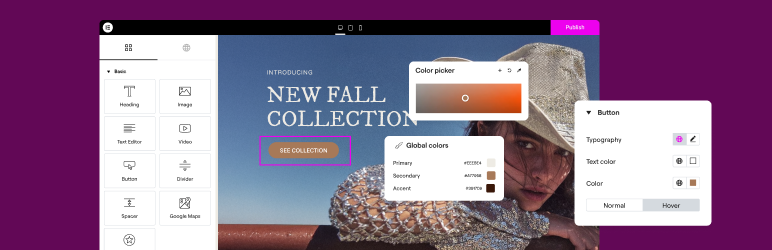
Elementor, the leading WordPress website creation platform, empowers you to build professional, pixel-perfect websites seamlessly with its no-code, drag-and-drop Atomic Editor.
Supporting the full website lifecycle, Elementor enables you to confidently build, optimize, and manage your website with extended capabilities such as AI-powered creation, image optimization, transactional email delivery, accessibility tools, performance boosters, and more.
Now in version 4 – the Atomic Editor! Introducing a new generation of performance-first atomic building blocks that allow you to control every atomic part with no limits or locked layouts. Define your global design systems and reusable components once, and they apply everywhere instantly – turning hours or even days of work into single clicks.
Unlock all features with Elementor One.
Need fast and secure cloud hosting for your Elementor site? Try out Elementor Host Powered by Google Cloud & Cloudflare. 4.9/5 TrustPilot score.
🌟 Create professional stunning websites
- Intuitive drag & drop builder: Build any website with our no-code, drag-and-drop Editor. Achieve design precision with full control over layout and style.
- Pixel-perfect design tools: Upload SVGs, apply masks, gradients, box shadows, headline effects, shape dividers, and use built-in CSS controls for advanced customization.
- Biblioteka predložaka: Primijenite kompletne komplete web stranica za trenutna podešavanja ili odaberite iz ogromne biblioteke pojedinačnih stranica, blokova i skočnih predložaka.
- Advanced widgets: Access over 40 FREE widgets, including heading, image, text editor, video, button, gallery, carousels, and more.
- AI capabilities: Revolutionize your design and content creation process with native AI integration. Instantly create sections, text, code, and images.
🗝️ Key features
- Design system: Use Variables and Classes for consistent colors, typography, and design elements, ensuring a cohesive, professional look that updates everywhere globally.
- Responsive design: Optimize your design for every device with custom breakpoints, ensuring a seamless desktop, tablet, and mobile experience.
- Mask shapes: Turning any element, like an image or video, into whatever shape you desire to create standout designs.
- CSS transform: Use CSS Transform to rotate, scale, and skew elements, adding dynamic styling to your site.
- Entrance animations: Add entrance animations to elements to create engaging and interactive user experiences.
- Revision history: Elementor’s Revision History feature enables users to track and revert to previous versions of their designs, providing peace of mind and flexibility during the creative process.
- Developer-friendly: Equipped with extensive documentation, API, developer tools, and custom code areas, Elementor offers a conducive environment for developers to extend its capabilities and create custom solutions.
- Floating buttons: Enhance user interaction with customizable, floating action buttons that stay in view as users scroll.
- Components [Pro]: Reuse the same building blocks across pages and sites, and update them everywhere they appear. Including controlled content editing, allowing collaborators and clients to update only exposed content properties without breaking layout or styling.
- Theme Builder [Pro]: Dizajnirajte svaki dio svoje web stranice – zaglavlja, podnožja, objave i arhive – za potpunu kontrolu nad izgledom.
- Popup Builder [Pro]: Create eye-catching popups with Elementor’s Popup Builder, equipped with advanced targeting and triggering options to optimize user engagement and conversions.
- Obrasci [Pro]: Dizajnirajte i integrirajte prilagođene obrasce, koristeći napredne značajke i integracije za učinkovito prikupljanje i upravljanje podnescima.
- WooCommerce Builder [Pro]: Integrate Elementor with WooCommerce to design custom product pages, shop layouts, archives, carts, checkout pages, my account, and more, enhancing your store’s visual appeal and functionality.
- Dinamički sadržaj [Pro]: Iskoristite mogućnosti dinamičkog sadržaja za stvaranje personaliziranih i interaktivnih web iskustava povezivanjem dizajna s različitim izvorima podataka.
- Notes [Pro]: Enhance team collaboration by using Elementor’s Notes feature to leave feedback and comments directly on the design interface.
- Prilagođeni kod [Pro]: Umetnite prilagođeni kod da biste proširili funkcionalnost svoje web stranice, nudeći fleksibilnost za napredne prilagodbe.
- Prilagođeni CSS [Pro]: Primijenite prilagođeni CSS za fino podešavanje stila elemenata, osiguravajući preciznu kontrolu nad aspektima dizajna.
- Motion effects [Pro]: Add advanced motion effects to elements for a more dynamic and engaging user experience.
- Custom fonts and icons [Pro]: Upload and use custom fonts and icons to match your brand’s identity.
😍 Elementor BESPLATNI widgeti
Otključajte potencijal Elementora s našim sveobuhvatnim paketom besplatnih widgeta i alata, dizajniranih da osnaže proces izrade vaše web stranice i poboljšaju vaše mogućnosti dizajna:
- Heading: Add eye-catching headlines.
- Image: Control the size, opacity and more.
- Text Editor: Just like the WordPress text editor.
- Video: Add YouTube, Vimeo, VideoPress, Dailymotion or self-hosted videos.
- Button: Create interactive buttons.
- Link in Bio: Build link in bio components to promote your business / services.
- Image Box: A box with image, headline and text.
- Testimonials: Customer testimonials.
- Icon: Place one or more of 600+ icons available.
- Icon Box: An icon, headline, and text with one widget.
- Social Icons: Link to your social pages with the Facebook/X (formerly Twitter) icons.
- Image Gallery: Display your images in a grid.
- Image Carousel: Create rotating carousels or sliders for chosen images.
- Icon List: Use any icon to create a bullet list.
- Counter: Show numbers in an escalating manner.
- Progress Bar: Include an escalating progress bar.
- Nested Tabs: Display content in vertical or horizontal tabs.
- Nested Accordion: Display any type of content in collapsible sections.
- Rating: Display how many stars (or another icon) other visitors gave.
- Alert: Include a colored alert box to draw visitor’s attention.
- HTML: Insert code into the page.
- Shortcode: Insert shortcodes from any plugin into the page.
- Menu Anchor: Link any menu to this anchor.
- Read More: Set the Read More cut-off for the excerpt in archive pages.
- Sidebar: Add sidebars onto the page.
- Google Maps: Embed maps into the page.
- SoundCloud: Add SoundCloud audio bits.
- Divider: Separate content with a designed divider.
- Spacer: Add space between elements.
- Text Path: Attach your text to a path.
- And counting…
🚀 Enhance your website
High-performing websites: Website performance impacts your visitors’ experience and search result ranking. Elementor, in partnership with Google Chrome, continuously enhances performance without compromising design.
Ključne značajke uključuju:
- Reduced DOM output: Streamlined HTML structure for faster rendering.
- Improved media file loading: Optimized loading of images, videos, and other media assets.
- Reduced CSS and JS files: Minimized stylesheets and scripts individually loaded only on demand for quicker loading times.
- Lazy loading: Deferred loading of non-critical resources to improve initial page load speed.
- Faster font loading: Efficient delivery of web fonts to enhance text rendering speed.
- Optimized front-end asset loading: Efficient loading of assets like JavaScript and CSS to minimize render-blocking.
- Element caching: Cache frequently accessed design elements to reduce server response time and enhance overall performance.
🔥 Elementor Editor Pro features
Create unparalleled websites while saving time, money and resources with Elementor Editor Pro’s full website builder. Get access to 100+ professional widgets, features, and tools.
Editor Pro design widgets:
- Postovi: Prikažite svoje postove na blogu s prilagodljivim izgledima i stilovima.
- Gumbi za dijeljenje: Omogućite posjetiteljima da jednostavno dijele vaš sadržaj na raznim platformama društvenih medija.
- Portfelj: Pokažite svoj rad ili projekte sa zadivljujućim izgledima portfelja.
- Slajdovi: Izradite dinamične dijaprojekcije s prilagođenim animacijama i prijelazima.
- Obrazac: Dizajnirajte i prilagodite napredne obrasce za interakciju korisnika i prikupljanje podataka.
- Prijava: Dodajte obrazac za prijavu ili modul za registraciju korisnika na svoju web stranicu.
- Nav Menu: Customize and style your website’s navigation menu for better user experience.
- Animirani naslov: Izradite naslove koji privlače pozornost s animiranim efektima.
- Tablica cijena: Prikažite planove cijena ili pakete u strukturiranom i vizualno privlačnom formatu.
- Cjenik: Prikažite popis cijena ili usluga s prilagodljivim opcijama stiliziranja.
- Galerija: Stvorite prekrasne galerije slika s različitim opcijama izgleda i podrškom za lightbox.
- Flip Box: Dodajte interaktivne animacije okretanja kako biste istaknuli sadržaj ili značajke.
- Poziv na radnju: potaknite interakciju korisnika i konverzije pomoću uvjerljivih odjeljaka s pozivom na radnju.
- Medijski vrtuljak: prikažite vrtuljak medijskih datoteka kao što su slike ili videozapisi.
- Vrtuljak svjedočanstava: Prikažite svjedočanstva klijenata u obliku vrtuljka za društveni dokaz.
- Ugniježđeni vrtuljak: Stvorite ugniježđene vrtuljke za složeniju organizaciju sadržaja.
- Vrtuljak petlje: prikažite sadržaj u vrtuljku s petljom za kontinuirano gledanje.
- Table of Contents: Generate a table of contents for longer articles or guides to improve navigation.
- Odbrojavanje: dodajte mjerače vremena za odbrojavanje kako biste stvorili hitnost za promocije ili događaje.
- Facebook stranica: Ugradite feed ili sadržaj svoje Facebook stranice na svoju web stranicu.
- Blockquote: Istaknite citate ili svjedočanstva s elegantnim opcijama oblikovanja.
- Predložak: spremite i ponovno upotrijebite predloške dizajna za dosljednu robnu marku i izgled.
- Recenzije: Prikažite recenzije i ocjene kupaca kako biste izgradili povjerenje i vjerodostojnost.
- Facebook gumb: Dodajte gumbe za promicanje interakcija s vašom Facebook stranicom ili sadržajem.
- Facebook Embed: Ugradite Facebook objave ili sadržaj na svoju web stranicu.
- Facebook Comments: Enable Facebook comments on your website’s pages or posts.
- PayPal gumb: Integrirajte PayPal gumbe za jednostavno online plaćanje.
- Gumb Stripe: Integrirajte Stripe gumbe za plaćanje kako biste olakšali sigurne online transakcije.
- Lottie Widget: Dodajte Lottie animacije kako biste poboljšali vizualnu privlačnost i angažman.
- Isticanje koda: prikažite isječke koda s isticanjem sintakse radi bolje čitljivosti.
- Popis videozapisa: izradite i prilagodite popise za videosadržaj na svojoj web-lokaciji.
- Mega Menu: Prilagodite napredne izbornike za bolju navigaciju i prikaz složenog sadržaja.
- Izvan radnog područja: Izradite područja izvan radnog područja koja klize za prikaz dodatnih informacija ili izbornika bez zatrpavanja glavnog rasporeda.
Editor Pro theme widgets:
Build and customize all the key parts of your website including headers, footers, 404 page, global archives, and more…
- Naslov objave: Prilagodite naslov pojedinačnih postova na blogu ili stranica.
- Izvadak objave: Prikažite kratak sažetak ili teaser svojih postova na blogu.
- Sadržaj objave: Prilagodite glavno područje sadržaja svojih postova ili stranica na blogu.
- Istaknuta slika: Postavite i prilagodite istaknute slike za postove na blogu ili stranice.
- Autorski okvir: Prikažite podatke o autoru i biografije na postovima na blogu.
- Objavi komentare: Prilagodite izgled i funkcionalnost odjeljaka s komentarima na svojoj web stranici.
- Navigacija postova: Dodajte navigacijske veze na susjedne postove radi lakšeg pregledavanja.
- Informacije o objavi: prikažite dodatne informacije o postovima na blogu, kao što su autor i datum.
- Site Logo: Upload and customize your website’s logo for branding purposes.
- Naslov web-mjesta: Prilagodite naslov web-lokacije.
- Naslov stranice: Prilagodite naslov pojedinačnih stranica.
- Search Bar: Add a search bar to allow users to search your website’s content.
- Krušne mrvice: prikažite hijerarhijske navigacijske putove za bolju navigaciju korisnika.
- Sitemap: Generirajte kartu web stranice za bolje indeksiranje tražilica i navigaciju korisnika.
- Loop Grid: Dizajnirajte i prilagodite izglede rešetke za arhive postova na blogu ili popise proizvoda.
Editor Pro WooCommerce widgets:
Dizajnirajte i prilagodite cjelovito iskustvo online kupnje na cijeloj web stranici.
- Proizvod: Prikažite pojedinačne proizvode s prilagodljivim izgledima i stilovima.
- Krušne mrvice: prikažite hijerarhijske navigacijske putove za bolju navigaciju korisnika unutar vaše trgovine.
- Naziv proizvoda: Prilagodite naslov pojedinačnih proizvoda.
- Slike proizvoda: Postavite i prilagodite slike za popise proizvoda.
- Cijena proizvoda: Prikažite cijenu pojedinih proizvoda.
- Dodaj u košaricu: Dodajte prilagodljive gumbe za dodavanje u košaricu za jednostavnu kupnju.
- Ocjena proizvoda: Prikažite ocjene i recenzije proizvoda.
- Zalihe proizvoda: Prikažite dostupnost zaliha za proizvode.
- Meta proizvoda: prikažite dodatne informacije o proizvodima, kao što su SKU i kategorije.
- Sadržaj proizvoda: Prilagodite glavno područje sadržaja opisa proizvoda.
- Kratki opis: Prikažite kratke sažetke ili najave proizvoda.
- Kartice s podacima o proizvodu: organizirajte informacije o proizvodu u odjeljke s karticama radi bolje organizacije.
- Dodatne informacije: Prikažite dodatne pojedinosti o proizvodima, kao što su dimenzije i težina.
- Povezano s proizvodom: Predstavite srodne proizvode kako biste potaknuli dodatne kupnje.
- Dodatne prodaje: Promovirajte proizvode za dodatnu prodaju kako biste povećali prosječnu vrijednost narudžbe.
- Proizvodi: prikažite rešetku ili popis proizvoda s prilagodljivim postavkama.
- Prilagođeno dodavanje u košaricu: Prilagodite gumb dodaj u košaricu za određene proizvode.
- WooCommerce stranice: Dizajnirajte i prilagodite stranice specifične za WooCommerce, kao što su stranice košarice i naplate.
- Kategorije proizvoda: Prikažite kategorije proizvoda za jednostavnu navigaciju unutar vaše trgovine.
- Košarica izbornika: Prikažite ikonu košarice u navigacijskom izborniku za jednostavan pristup košarici.
- Košarica: Prilagodite izgled i funkcionalnost stranice košarice.
- Naplata: Prilagodite izgled i funkcionalnost stranice za naplatu.
- Moj račun: Prilagodite izgled i funkcionalnost područja korisničkog računa.
- Sažetak kupnje: prikažite sažetak kupnji tijekom postupka naplate.
- WooCommerce obavijesti: Prilagodite izgled i funkcionalnost WooCommerce obavijesti, kao što su poruke za potvrdu narudžbe.
Build professional websites with Elementor Editor Pro!
🔒 Security and compliance
Elementor places a paramount focus on security, evident through our acquisition of industry certifications such as ISO/IEC 27001, ISO/IEC 27017, ISO/IEC 27018, ISO/IEC 27701, and SOC 2 Type II. These certifications underscore our commitment to implementing robust security measures and highlight our dedication to adhering to recognized industry standards.
Potičemo istraživanje etičke sigurnosti kroz naš program Bug Bounty. Surađujemo s vodećim servisima za nagrađivanje pogrešaka kako bismo istraživačima pružili prilike za prijavljivanje ranjivosti u našim uslugama. Naši programi nagrada uključuju trijažni tim dostupan 24/7/365.
Dodatne informacije: Centar za pouzdanost.
♿ Accessibility best practices
Elementor nudi alate za pristupačnost i poboljšanja koja će vam pomoći da pružite bolje iskustvo svim korisnicima. Uključujući HTML 5 semantiku, navigacijski izbornik s punom tipkovnicom, stalno poboljšanje značajki, widget i još mnogo toga.
🌐 Prevedeno na 63+ jezika, uključuje podršku za RTL
Elementor podržava više jezika, tipografije i RTL, s prijevodima uređivača na više od 63 jezika.
It’s also compatible with WPML, Polylang, TranslatePress, Weglot, and more. To contribute, add a new language via translate.wordpress.org. See our guide on how to translate and localize the plugin.
🧩 Use of 3rd-party services
Kako bi poboljšao korisničko iskustvo, Elementor može koristiti sljedeće usluge treće strane ako je omogućena potrebna značajka:
- Google Fonts are loaded to add additional fonts to your website. Google’s TOS and Privacy Policy apply.
- Some Elementor features require loading assets from Elementor.com. These assets are not used for tracking unless explicitly stated, and require your approval and manual opt-in. Learn more in our TOS and Privacy Policy.
📧 Related products by Elementor
Image Optimization: Superior image compression for faster, high-quality website performance.
Email Deliverability: Reliable email management without SMTP plugins, keeping your communications streamlined and efficient.
Web Accessibility: Enhances website usability for individuals with disabilities. Ally is designed to help web creators make their websites more inclusive. It scans, detects, and remediates key accessibility violations, working seamlessly on all WordPress and Elementor websites.
📣 See what our users have to say
“Elementor je bez sumnje najbolji alat za izradu stranica” – ★★★★★ Graphicvision1
“Nevjerojatno jednostavan dodatak” – ★★★★★ Hyeyoga
“Easily, my most used WP plugin” – …
Snimke zaslona


Instalacija
Minimalni zahtjevi
- WordPress 6.8 or greater
- PHP verzija 7.4 ili novija
- MySQL version 5.6 or MariaDB version 10.5 or greater
- PHP Memory limit of 256 MB or greater
- WordPress Memory limit of 256 MB or greater
Preporučeni zahtjevi
- WordPress 7.0 or greater
- PHP version 8.3 or greater
- MySQL version 8.0 or MariaDB version 10.6 or greater
- PHP Memory limit of 512 MB (768 MB for best performance) or greater
- WordPress Memory limit of 512 MB (768 MB for best performance) or greater
Note: These requirements are for Elementor and Elementor Pro only. If you are using additional plugins on your site that also have minimum requirements such as WooCommerce or Elementor addons, you may need to increase your PHP and WordPress Memory limit to help avoid loading issues. See also, the following documentation Elementor Widget Panel Not Loading.
Instalacija
- Instalirajte pomoću WordPress ugrađenog instalacijskog programa dodataka ili Izdvojite zip datoteku i ispustite sadržaj u
wp-content/plugins/direktorij svoje WordPress instalacije. - Aktivirajte dodatak putem izbornika ‘Dodaci’ u WordPressu.
- Idite na Stranice > Dodaj novo
- Pritisnite gumb ‘Uredi s Elementorom’.
- Sada možete povući i ispustiti widgete s lijeve ploče na područje sadržaja, kao i dodati nove odjeljke i stupce koji čine strukturu stranice.
Za dokumentaciju i upute posjetite našu bazu znanja.
ČPP
-
How do I install Elementor Editor?
-
To install the free version of Elementor Editor, follow the steps below:
From your WordPress dashboard -> Go to Plugins -> Click on ‘Add new’-> In the Search field, enter Elementor and choose Elementor website builder.
Press install -> After installation, click Activate. -
Does Elementor Editor work with all the themes?
-
Elementor Editor works all the themes that respect the coding standards of WordPress set by its Codex. It is recommended to use Elementor’s Hello Theme, a lightweight blank canvas, to enjoy full flexibility when using Elementor Editor, and optimize your experience.
-
Is Elementor Editor compatible with Gutenberg?
-
Elementor Editor and Gutenberg work seamlessly together. As a user, you can easily decide which editor to use at every point while editing your site.
-
Mogu li stvoriti internetsku trgovinu?
-
Yes, with the Elementor Editor Pro WooCommerce Builder you can customize every page of your store to create an amazing customer experience that drives sales.
-
Radi li s drugim WordPress dodacima?
-
It works with almost all the plugins. If you experience an incompatibility issue, please report it to us and to the plugin that conflicts with Elementor Editor.
-
Trebam li znati kodirati?
-
No! Elementor Editor provides you with all the widgets and features that you need to build a professional website without using code.
-
Trebam li znati dizajnirati?
-
No, you can choose between professionally designed kits and templates that fit to every industry and have all you need to create your own professional website.
-
Will Elementor Editor slow down my website?
-
As Elementor prioritizes speed and performance, you enjoy better and faster performance with each new version of the Editor. When testing the same page layout on older versions you can see a significant performance improvement, from a score of 82 in Google PageSpeed Insight in version 3.1, to a score of 95 i in version 3.5.
-
Is my site secure with Elementor Editor?
-
Sigurnost vaše web stranice iznimno nam je važna i poduzimamo proaktivne mjere kako bismo osigurali sigurnost vaših web stranica. Elementor ima certifikat ISO 27001 i ima posvećeni tim sigurnosnih stručnjaka koji implementira najbolje prakse u industriji za maksimalnu sigurnost i usklađenost, 24/7.
Tu je i upravljani sigurnosni program Bug Bounty, koji koristi moć zajednice omogućavajući 24/7/365 crowdsourcing otkrivanje ranjivosti.
-
Mogu li zasebno kupiti predloške?
-
Of course, you can use any template that supports Elementor Editor.
-
Is Elementor Editor compatible with Post and Custom Post Types?
-
Naravno! Na stranici postavki možete postaviti koje će vrste postova omogućiti Elementor.
-
What is the difference between Elementor’s free Editor plugin and Elementor Editor Pro?
-
Elementor Editor’s Free version allows you to explore our revolutionary drag & drop live editor, basic widgets and templates. Elementor Editor Pro (Essential, Advanced, Expert, Studio, and Agency) empowers you with more professional tools that speed up your workflow, give you access to human-powered support, help you build more advanced content, and convert visitors. See full comparison here.
-
How can I become a Contributor?
-
If you want to contribute, go to our Elementor GitHub Repository and see where you can help. You can also add a new language via translate.wordpress.org. We’ve built a short guide explaining how to translate and localize the plugin.
Recenzije


Suradnici i Programeri
“Elementor Website Builder – više od običnog alata za izradu stranica” je softver otvorenog koda. Sljedeće osobe su doprinijele ovom dodatku.
Suradnici
“Elementor Website Builder – više od običnog alata za izradu stranica” je preveden na 64 jezika. Zahvala prevoditeljima za njihov doprinos.
Prevedite “Elementor Website Builder – više od običnog alata za izradu stranica” na svoj jezik.
Zainteresirani ste za razvoj?
Pregledajte kôd, pogledajte SVN spremišteili se pretplatite na dnevnik razvoja od RSS.
Dnevnik promjena
4.1.4 – 2026-06-21
- Fix: Improved code security enforcement in query handling
4.1.3 – 2026-06-10
- Fix: Cloud Library screenshot errors could prevent users from saving templates locally
4.1.2 – 2026-06-08
- Tweak: Improved Global Classes usage tracking for safer deletion – Atomic Editor
- Fix: Image with Lightbox inherits default button styles – Atomic Editor
- Fix: Image settings are not saved when using Insert from URL – Atomic Editor
- Fix: Media attachments may be requested too many times in the Editor – Atomic Editor
- Fix: Pages using Global Classes may fail to publish or show missing styles on the live site – Atomic Editor
- Fix: Editor context may not sync correctly when navigating between documents
4.1.1 – 2026-05-27
- Security Fix: Improved code security enforcement in content handling
- Security Fix: Improved code security enforcement in template handling
- Fix: Hiding one filter prevents other filters from being applied – Atomic Editor
4.1.0 – 2026-05-26
- New: Introducing the Design System panel for managing Variables and Classes in one place – Atomic Editor
- New: Introducing Angie in the Editor to help generate and modify Atomic layouts, Components, Forms, Classes, and Variables – Atomic Editor
- New: Introducing Markdown rendering as an Alpha experiment to improve how content is structured for AI systems
- Tweak: Added import and export for Variables and Classes from the Design System panel – Atomic Editor
- Tweak: Increased the Class limit to 1000 – Atomic Editor
- Tweak: Added duplicate support for Variables in the Variables Manager – Atomic Editor
- Tweak: Added duplicate support for Classes in the Class field – Atomic Editor
- Tweak: Added support for Variables in additional style controls, including Effects, Filters, and Box Shadow – Atomic Editor
- Tweak: Added multi-select support to Direction control in Interactions – Atomic Editor
- Tweak: Added Interaction actions to the History panel – Atomic Editor
- Tweak: Added support for negative Box Shadow values – Atomic Editor
- Tweak: Improved reordering of Component properties with full drag-and-drop support – Atomic Editor
- Tweak: Updated Position and Z-index control visibility and behavior – Atomic Editor
- Tweak: Updated the minimum required WordPress version to 6.8
- Tweak: Added the External URL option to Image control – Atomic Editor
- Fix: Slide Interactions can be applied without selecting a direction – Atomic Editor
- Fix: Undo does not work as expected for individual Class properties – Atomic Editor
- Fix: Font family values persist on Global Classes after deletion – Atomic Editor
