

The SQL NOT EQUAL operator compares two values and returns true if they are not equal. It’s used to filter out matching records in queries. If the values are equal, it returns false; if either value is NULL, it returns NULL.
Example: First, we create a demo SQL database and table, on which we will use the NOT EQUAL operator.

Query:
SELECT customer_name, country
FROM customer
WHERE country <> 'Japan';
Output:

Syntax
SELECT * FROM table_name
WHERE column_name <> value;
Examples
We will create a geeksforgeeks table on which we will use the NOT EQUAL operator.
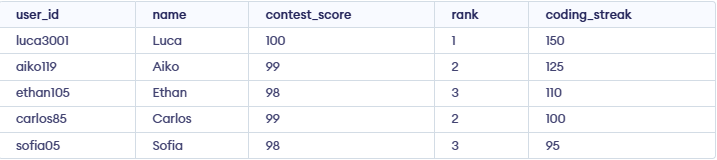
Example 1: SQL NOT EQUAL Operator For String
In this example, we display all those rows which do not have a name equal to 'Sofia'. We will use NOT EQUAL with WHERE clause in this case.
Query:
SELECT *
FROM geeksforgeeks
WHERE name != 'Sofia';
Output:

Example 2: SQL NOT EQUAL Operator with Multiple Condition
This query returns rows where the contest score is not 98, the rank is not 3 and the coding streak is at least 100, using the NOT operator with multiple conditions.
Query:
SELECT *
FROM geeksforgeeks
WHERE contest_score != 98
  AND rank != 3
  AND coding_streak >= 100;
Output:

Example 3: SQL NOT EQUAL Operator with GROUP BY Clause
In this example, we display all those ranks with their count that do not have their contest score as 100 using GROUP BY clause.
Query:
SELECT rank, COUNT(*) as count_score
FROM geeksforgeeks
WHERE contest_score != 100
GROUP BY rank;
Output:

Note: <> and != perform the same operation i.e. check inequality. The only difference between <> and != is that <> follows the ISO standard but != does not. So it is recommended to use <> for NOT EQUAL Operator.
