
numpy.argwhere() returns the coordinates of array elements that are nonzero or true. The result is an array of index rows: one row per matching element and one column per input dimension.
Quick Answer
Call np.argwhere(condition) when you want readable coordinate pairs or coordinate rows. Use np.nonzero(condition) for direct indexing, and use np.where(condition, x, y) when you need values selected from two branches.
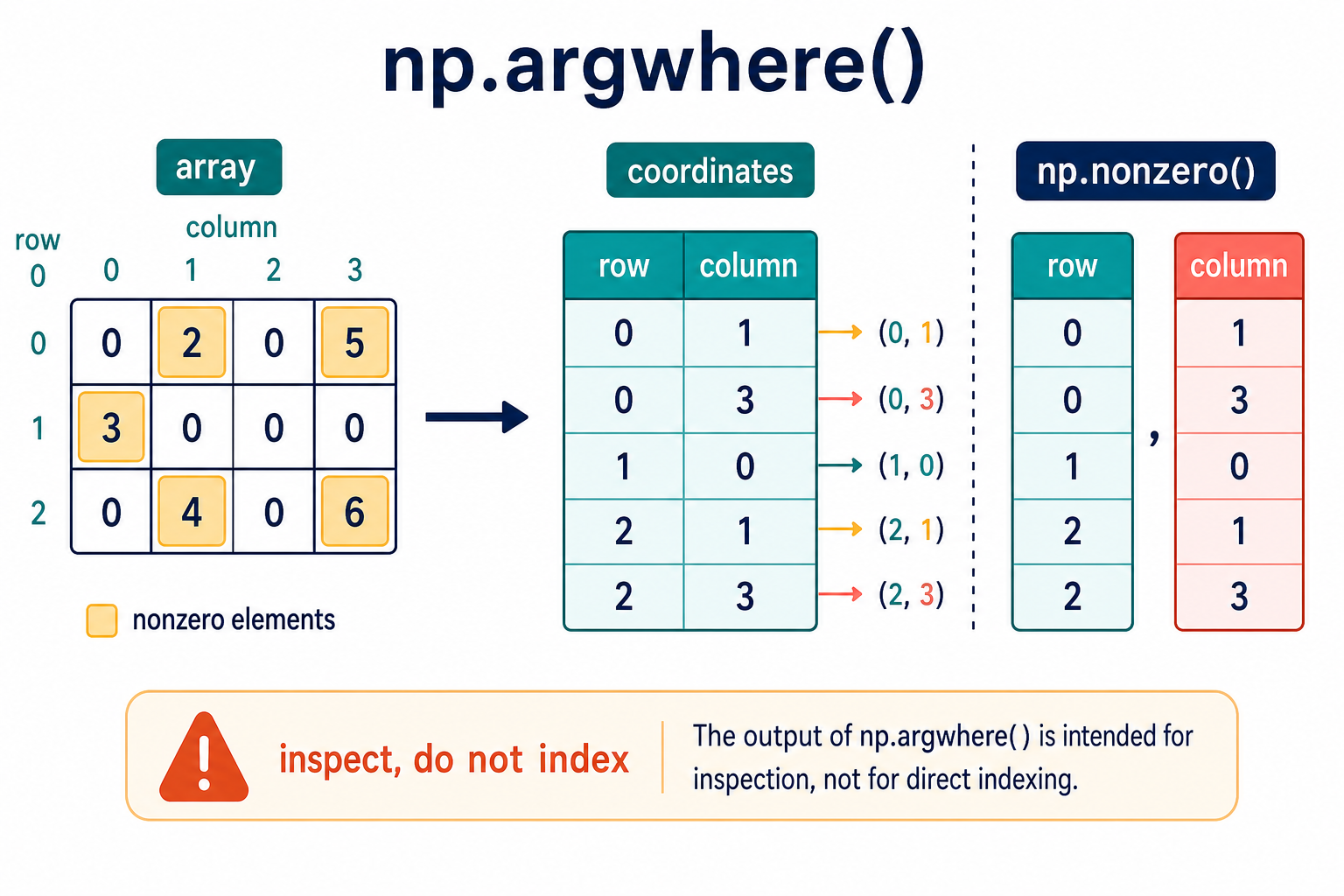
The official NumPy argwhere reference defines the output shape as (N, a.ndim). It also warns that the output is not suitable for indexing arrays directly. The related nonzero reference explains the tuple-of-arrays form.
Find Nonzero Coordinates In A 1D Array
For a one-dimensional array, each result row contains one index.
import numpy as np

values = np.array([0, 4, 0, 7])
coordinates = np.argwhere(values)

print(coordinates)
Every nonzero value becomes a row in the coordinate result. The nested shape can be useful when you need a consistent two-dimensional result for code that handles arrays with different dimensions.
Find Row And Column Coordinates
For a two-dimensional array, each result row contains a row index and a column index.
import numpy as np

matrix = np.array([
    [0, 2, 0, 5],
    [3, 0, 0, 0],
    [0, 4, 0, 6],
])

coordinates = np.argwhere(matrix > 0)
print(coordinates)
The condition can be any boolean array with a compatible shape. A comparison such as matrix > 0 marks the cells that should appear in the coordinate output.
Use A Boolean Condition
argwhere() is often clearer when the match rule is more specific than nonzero.
import numpy as np

scores = np.array([40, 72, 55, 91])
passing = np.argwhere(scores >= 60)

for row in passing:
    print('index:', row[0], 'score:', scores[row[0]])
Keep the coordinate and the original array together when reporting results. The coordinate points to the location; it does not contain the original value unless you use it to read the source array.
argwhere Versus nonzero
Both functions locate nonzero elements, but their output shapes differ:
| Function | Output | Good fit |
|---|---|---|
np.argwhere(a) |
One coordinate row per element | Display, loops, coordinate tables |
np.nonzero(a) |
One index array per dimension | Direct indexing and vectorized selection |
For a two-dimensional matrix, np.nonzero(matrix) returns a tuple containing row indices and column indices. argwhere() transposes that conceptual result into grouped rows, except that its documented behavior handles zero-dimensional arrays correctly.
Use nonzero For Direct Indexing
Do not pass the output of argwhere() directly as though it were a normal index tuple.
import numpy as np

matrix = np.array([
    [10, 0, 30],
    [0, 50, 0],
])

rows, columns = np.nonzero(matrix)
selected = matrix[rows, columns]
print(selected)
When you only need the matching values, boolean indexing is usually simpler:
import numpy as np

matrix = np.array([
    [10, 0, 30],
    [0, 50, 0],
])

print(matrix[matrix > 0])
Empty Results Need A Defined Policy
If no elements match, argwhere() returns an empty coordinate array. Check that result before assuming that a first row exists.
import numpy as np

values = np.array([1, 2, 3])
coordinates = np.argwhere(values > 10)

if coordinates.size == 0:
    print('no matches')
else:
    print(coordinates[0])
An empty result may be a normal outcome for a search or filter. If a match is required by the application, raise a clear validation error instead of allowing a later index error to hide the real condition.
Dimensions, Dtypes, And Performance
The coordinate array contains integer indices and has one coordinate column for each dimension of the input. For a high-dimensional or very large array, the number of matches can make the coordinate array large. Estimate the result size before collecting it for storage or display.
For sparse data or a repeated query, consider whether a sparse representation or a vectorized operation is more appropriate. argwhere() is excellent for explicit coordinates, but it is not automatically the fastest form for every downstream computation.
Common argwhere() Mistakes
- Using the coordinate rows directly as a normal index tuple.
- Confusing coordinate order with value order.
- Forgetting that a condition must be broadcastable to the array shape.
- Assuming an empty result always means a bug.
- Converting a very large coordinate result to a Python list unnecessarily.
The practical rule is to use argwhere() for readable coordinate rows, nonzero() for indexing, and where() for choosing values. Selecting the output shape that matches the next operation keeps NumPy code both clear and efficient.
Coordinate Order And Array Layout
For a two-dimensional array, coordinates are reported as row then column. The values are visited in row-major, C-style order for the usual dense array case. Do not reverse the pair merely because a plotting library displays x before y; convert the coordinate to the consumer’s convention explicitly.
If the source array is reshaped or transposed, its coordinate meaning changes with that shape. Keep the original shape and any transpose operation visible when coordinates are saved or passed to another system.
Use argwhere For Inspection And Reporting
A coordinate table is useful for diagnostics, quality checks, and producing a list of matching locations. Add the corresponding values when a report needs both location and measurement.
For a repeated numerical operation, prefer boolean masks or vectorized indexing. Turning every match into Python-level rows can add overhead when the next step could operate on the array directly.
Test Empty And Boundary Cases
Tests should include an array with no matches, one match, all elements matching, and more than one dimension. These cases expose assumptions about result shape and whether code treats a coordinate row as a scalar index.
Also test the condition’s dtype and shape. A boolean condition with an accidental broadcast can return valid-looking coordinates for the wrong data, so inspect the shape before calling argwhere when the input is assembled dynamically.
Zero-Dimensional Inputs
NumPy documents special handling for a zero-dimensional input. If scalar-like data is part of a generic pipeline, check the returned shape rather than assuming that every coordinate has two columns. A small shape assertion can prevent a later unpacking error.
For ordinary one-, two-, and three-dimensional arrays, the rule remains straightforward: one output row per match and one coordinate column per input dimension.
For array index workflows, compare argwhere() with input conversion and tolist(). Read numpy asarray and numpy array tolist for the related workflow.
Frequently Asked Questions
What does NumPy argwhere() return?
np.argwhere() returns an array of coordinate rows for elements that are nonzero or true. Its shape is (N, a.ndim), where N is the number of matches.
What is the difference between argwhere() and nonzero()?
argwhere() groups coordinates into rows, while nonzero() returns a tuple of index arrays, one for each dimension. nonzero() is the better fit for direct indexing.
Can I use argwhere() output to index an array?
The NumPy documentation warns that argwhere output is not suitable for direct indexing. Use nonzero(), boolean indexing, or a deliberately transformed index instead.
What happens when there are no matches?
argwhere() returns an empty coordinate array. Check its size before reading a first row, and decide whether no matches is valid for the application.
