
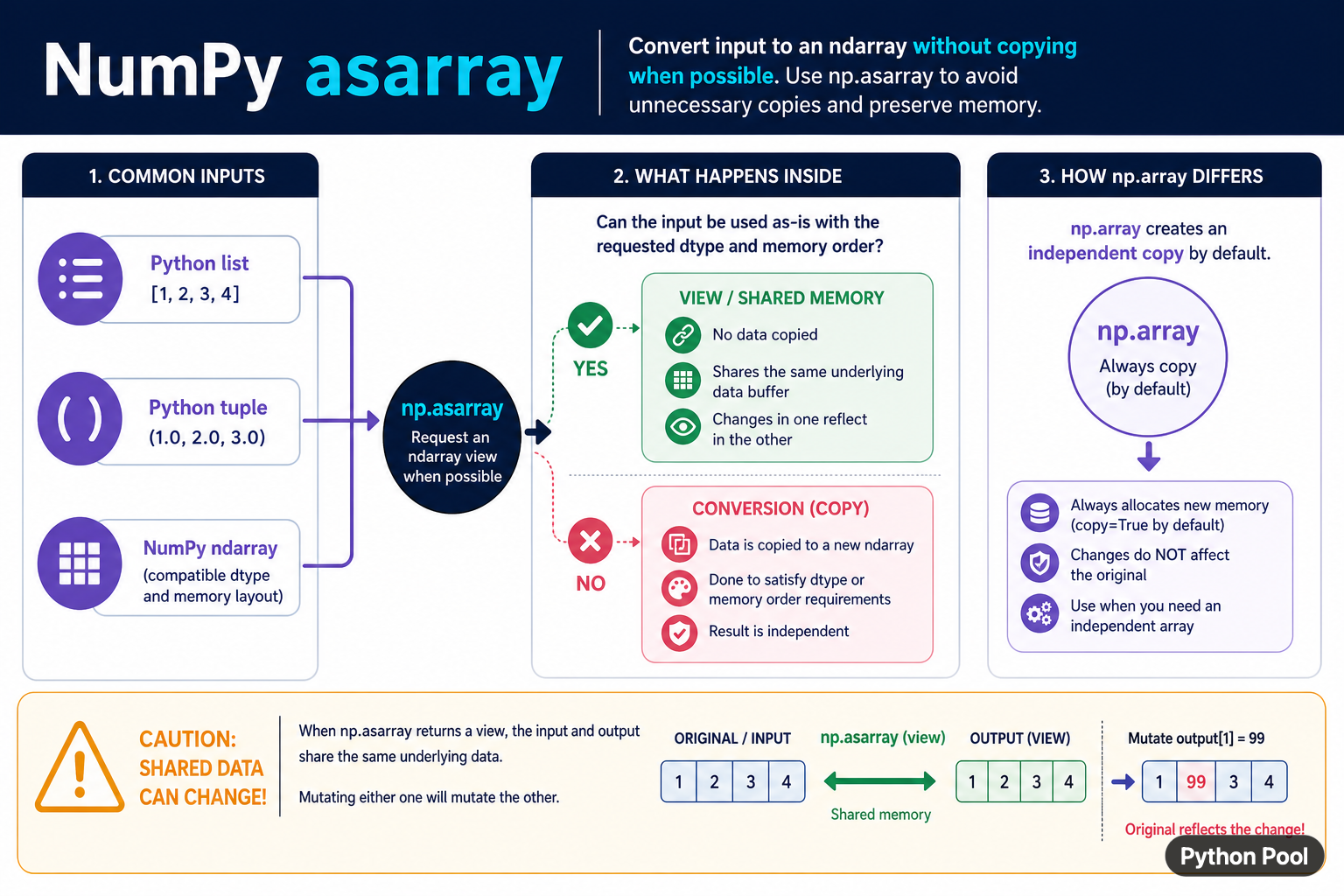
NumPy asarray() converts array-like input into an ndarray while avoiding an unnecessary copy when the input is already compatible. It accepts lists, tuples, scalars, and existing arrays. The key difference from np.array() is the copy preference: asarray() can return a view or the same object when possible, while array() is commonly used when an independent array is desired.
Quick answer
Use np.asarray(value) at the boundary of a numerical function when the function needs an ndarray but should avoid an unnecessary copy. Pass dtype when the calculation requires a specific data type. Remember that the returned array can share memory with an existing compatible ndarray, so mutating it may mutate the caller's data.
The official numpy.asarray reference documents conversion, dtype, order, and copy behavior. Compare it with numpy.array when ownership and independent storage matter.
Convert lists and tuples
Lists and tuples are converted into NumPy arrays with a shape inferred from their nesting. A regular nested sequence produces a multidimensional array. Use dtype to make numeric intent explicit when input could otherwise be inferred differently.
import numpy as np

values = [[1, 2], [3, 4]]
array = np.asarray(values, dtype=np.float64)

print(array)
print(array.shape)
print(array.dtype)
The conversion creates storage for a Python list because the list is not an ndarray buffer. Once converted, NumPy operations can use vectorized arithmetic and broadcasting rather than Python-level loops.
Understand shared memory
When the input is already an ndarray with a compatible dtype and order, asarray() may return the same object or an array sharing the same data. This can improve performance, but it changes the ownership contract of a helper that mutates its result.
import numpy as np

original = np.array([1, 2, 3])
view = np.asarray(original)

view[0] = 99
print(original)
print(view is original)
If a function must not modify caller data, do not rely on asarray() alone. Make an explicit copy at the boundary, or design the function to be read-only and document that requirement.
Compare asarray() and array()
The two functions often produce similar values, but their ownership behavior can differ. Use asarray() when conversion without copying is valuable. Use np.array(value, copy=True) when an independent array is part of the contract.
import numpy as np

original = np.array([1, 2, 3])
as_array = np.asarray(original)
independent = np.array(original, copy=True)

as_array[0] = 10
independent[1] = 20

print(original)
print(independent)
Test the mutation behavior that callers actually need. The question is not only whether the values look equal; it is whether later writes should be visible through another reference.
Control dtype conversion
Passing dtype requests a data type. If conversion is required, NumPy creates compatible storage. Be aware that narrowing a type can lose precision or overflow values. Choose a dtype from the numerical range and operations, not only from memory size.
import numpy as np

values = [1.25, 2.5, 3.75]
integers = np.asarray(values, dtype=np.int32)
floats = np.asarray(values, dtype=np.float32)

print(integers)
print(floats)
For mixed or untrusted input, validate the result after conversion. An object dtype may preserve Python objects rather than producing the numeric array a downstream operation expects.
Use order carefully
The order argument describes memory layout preferences such as C or Fortran order. Layout can affect interoperability and performance, but it should not be changed casually. First measure whether the consuming operation benefits from a particular order.
import numpy as np

values = np.arange(6).reshape(2, 3)
c_order = np.asarray(values, order="C")
f_order = np.asarray(values, order="F")

print(c_order.flags["C_CONTIGUOUS"])
print(f_order.flags["F_CONTIGUOUS"])
Do not mistake memory order for mathematical row or column order. The values and shape can be the same while the underlying layout differs. Keep layout decisions near the boundary that requires them.
Accept array-like inputs in a function
A numerical helper can accept a list or an ndarray by converting once at the start. Validate dimensions and dtype after conversion. This creates a clear contract for later vectorized operations and avoids repeated conversion inside a loop.
import numpy as np

def row_totals(values):
    array = np.asarray(values, dtype=float)
    if array.ndim != 2:
        raise ValueError("values must be a two-dimensional array")
    return array.sum(axis=1)

print(row_totals([[1, 2], [3, 4]]))
Keep the helper read-only if it does not need to change input. If it does mutate, either copy explicitly or state that the caller transfers ownership. This small design choice prevents surprising changes to an array held elsewhere.
Common mistakes
- Assuming
asarray()always creates an independent copy. - Changing a dtype without checking precision and range.
- Passing ragged nested sequences and expecting a regular numeric matrix.
- Using memory order as if it changed mathematical indexing.
- Converting repeatedly inside a hot loop instead of once at the boundary.
The practical rule is to use asarray() for efficient array acceptance, then make the copy, dtype, shape, and mutation policy explicit. That lets callers benefit from NumPy's vectorization without losing control over memory ownership.
Make ownership part of the API
Document whether a numerical helper borrows an array, returns a view, or owns a new copy. Callers often pass an existing ndarray because it is efficient, and an unexpected mutation can affect several calculations that share the same buffer. A clear read-only contract is frequently safer than relying on convention.
When conversion is performed at an API boundary, validate the shape and dtype immediately. This gives a caller a precise error near the source of the problem and prevents later broadcasting errors from hiding the original input mistake.
Use a copy only when the behavior requires independence. Copying every input can waste memory and time for large arrays, while never copying can violate a function's assumptions. Measure the workload after the ownership contract is correct.
For read-only calculations, a shared array can be a useful optimization. For transformations that return a modified result, make the copy decision obvious in the function name, documentation, and tests so callers know whether their input may change.
For array conversion and selection, compare asarray() with tolist() and argwhere(). Read numpy array tolist and numpy argwhere for the related workflow.
Frequently Asked Questions
Frequently Asked Questions
What does np.asarray() do?
np.asarray() converts array-like input into an ndarray and can avoid an unnecessary copy when the input is already compatible.
Does np.asarray() copy an array?
Not always. A compatible ndarray may be returned or shared, while dtype or order requirements can require conversion.
What is the difference between np.asarray() and np.array()?
asarray() prefers avoiding copies, while np.array() is commonly used when independent storage and explicit copy behavior are needed.
Can changing an asarray result change the original?
Yes, when the result shares memory with an existing array. Copy explicitly when the function must protect caller data.
