
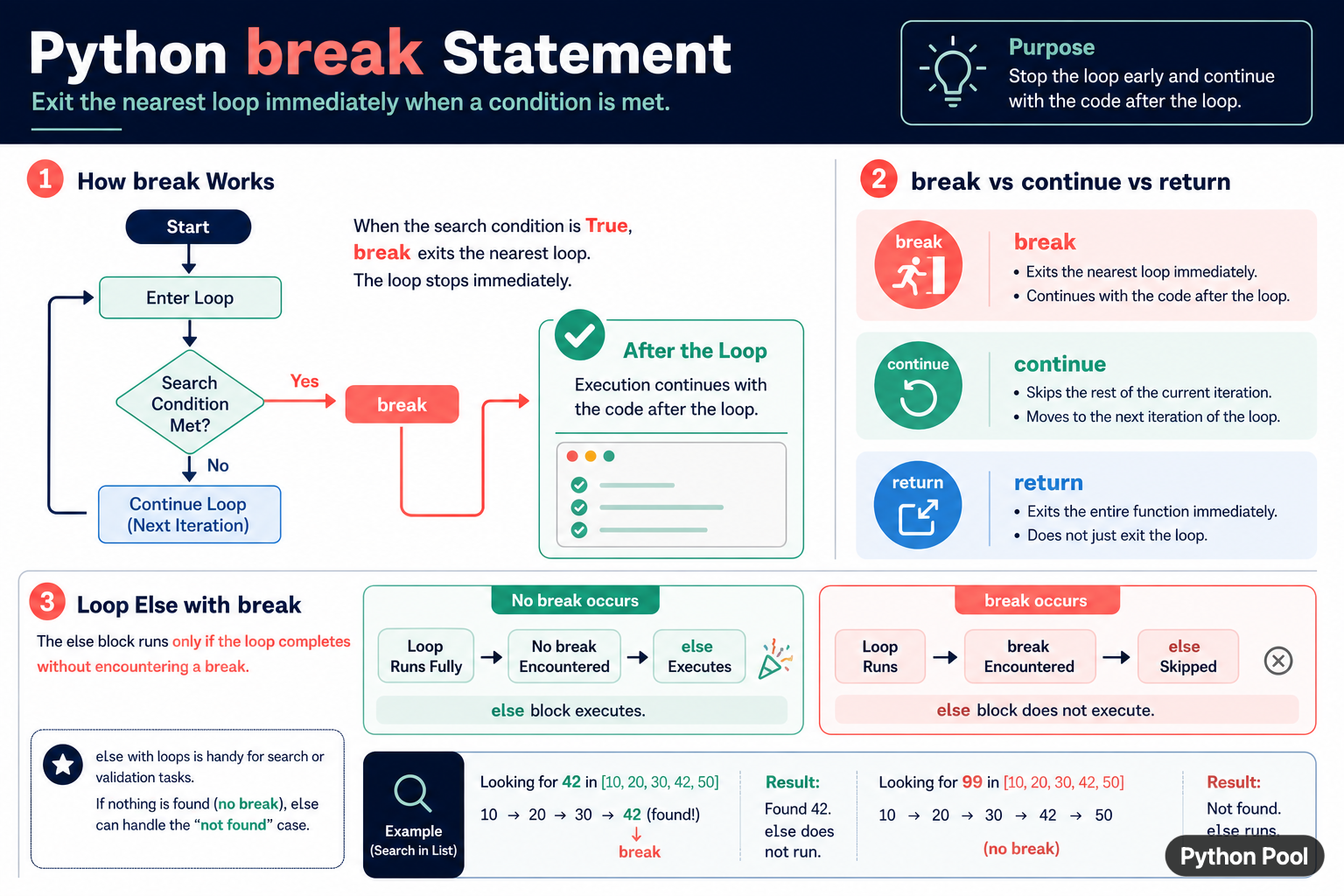
Python's break statement exits the nearest enclosing for or while loop immediately. Execution then continues with the first statement after that loop. It is useful when a search finds its target, a validation failure makes further work unnecessary, or a loop reaches a deliberate stopping condition. It is different from continue, which skips only the current iteration, and return, which exits the entire function.
Quick answer
Put break inside a loop when the loop should stop. It exits only the closest loop, not an outer loop or the surrounding function. Use a flag or a return value to communicate why the loop stopped. A loop's else block runs only when the loop completes without encountering break.
The official Python control-flow tutorial documents break, continue, and loop else. The statement is small, but its nearest-loop rule matters in nested loops.
Stop a search when a value is found
A search is the clearest use of break. Once the target is found, processing the remaining items is unnecessary. Store the result before breaking so code after the loop can use it.
values = [10, 20, 42, 50]
target = 42
found = None

for value in values:
    if value == target:
        found = value
        break

print(found)
If the loop completes without a match, found remains None. An explicit sentinel is easier to review than relying on a variable that may not have been assigned on every path.
Use loop else for the not-found case
The else block attached to a loop runs only when the loop finishes normally. It is skipped when break executes. This creates a compact search pattern without a separate flag.
values = [10, 20, 42, 50]
target = 99

for value in values:
    if value == target:
        print("found", value)
        break
else:
    print("not found")
Indentation makes the relationship visible: the else belongs to the loop, not to the if. Use a comment when the pattern may be unfamiliar to the project's readers.
Compare break, continue, and return
break exits the nearest loop. continue skips the rest of the current iteration and begins the next one. return exits the entire function, so it can leave one or more loops at once.
def first_positive(values):
    for value in values:
        if value is None:
            continue
        if value > 0:
            return value
    return None

print(first_positive([-2, None, 0, 5]))
Use the statement that expresses the intended boundary. Replacing break with return can silently skip cleanup or later function logic, while replacing continue with break can stop a search too early.
Break out of the nearest nested loop
In nested loops, break exits only the loop containing it. If the outer loop must also stop, return from a helper, use a clearly named flag, or restructure the search. Avoid deeply nested flags that obscure which loop owns the stopping condition.
matrix = [[1, 2], [3, 42], [5, 6]]
location = None

for row_index, row in enumerate(matrix):
    for column_index, value in enumerate(row):
        if value == 42:
            location = (row_index, column_index)
            break
    if location is not None:
        break

print(location)
The second conditional break exits the outer loop after the inner loop finds the value. For reusable logic, a helper function with return can be clearer because it packages the two-loop exit into one operation.
Stop a while loop safely
A while loop can use break for a sentinel, a maximum attempt, or a cooperative stop event. Make sure the normal path also updates the state used by the condition, so the loop does not depend on break for every exit.
attempts = 0
limit = 3

while attempts < limit:
    attempts += 1
    success = attempts == 2
    if success:
        break

print("attempts:", attempts)
For retries, record the final reason and clean up resources after the loop. A break tells the loop to stop, but it does not automatically close files, release locks, or cancel external operations.
Use break with cleanup
If a loop opens resources or changes state, use try and finally around the work that must be cleaned up. The finally block runs whether the loop breaks or an exception occurs.
handle = None
try:
    handle = open("data.txt", encoding="utf-8")
    for line in handle:
        if line.strip() == "STOP":
            break
finally:
    if handle is not None:
        handle.close()
For ordinary files, a with statement is usually simpler. The example shows the control-flow rule: leaving a loop with break does not bypass Python's cleanup constructs.
Common mistakes
- Assuming
breakexits every nested loop. - Using
breakwhencontinueshould skip one item. - Expecting a loop
elseto run after a break. - Using
returnand accidentally skipping later function logic. - Forgetting cleanup or state reporting after an early exit.
The pragmatic rule is to name the boundary you want to leave: one iteration, one loop, or the entire function. Use break for the nearest loop, continue for the current iteration, and return for the function contract.
Report why the loop stopped
In a search or retry loop, the fact that a loop ended is not always enough. Record whether the target was found, the limit was reached, a stop signal arrived, or an error occurred. A small result object or explicit status can make the caller's next decision clearer than inspecting a partially filled variable.
Keep the stopping condition close to the work it controls. A distant break hidden behind several helper calls can make it difficult to know which resources were acquired and which cleanup paths are required. If the loop is complex, extract the search into a function and return a structured result.
Test both paths: a break that occurs early and a loop that completes normally. For loop else, include a test that confirms the block is skipped when break runs and executes when no match occurs.
Use a context manager for files, locks, and similar resources so an early break cannot bypass cleanup. The statement changes control flow, but well-designed resource ownership still guarantees release when the loop ends.
Prefer a clear condition over a break hidden in a long loop body. Early exits are valuable when they make the stopping rule easier to see, not when they make the normal path difficult to trace.
For loop control, compare list iteration with diagnosing a break used outside a loop. Read python iterate through list and break outside loop python for the related workflow.
Frequently Asked Questions
Frequently Asked Questions
What does break do in Python?
break exits the nearest enclosing for or while loop immediately and execution continues after that loop.
What is the difference between break and continue?
break stops the loop, while continue skips the rest of the current iteration and starts the next one.
When does loop else run with break?
The loop else block runs only when the loop completes without encountering break.
Does break exit nested loops?
It exits only the nearest loop. Use a helper return or an explicit outer-loop condition when both loops must stop.
