
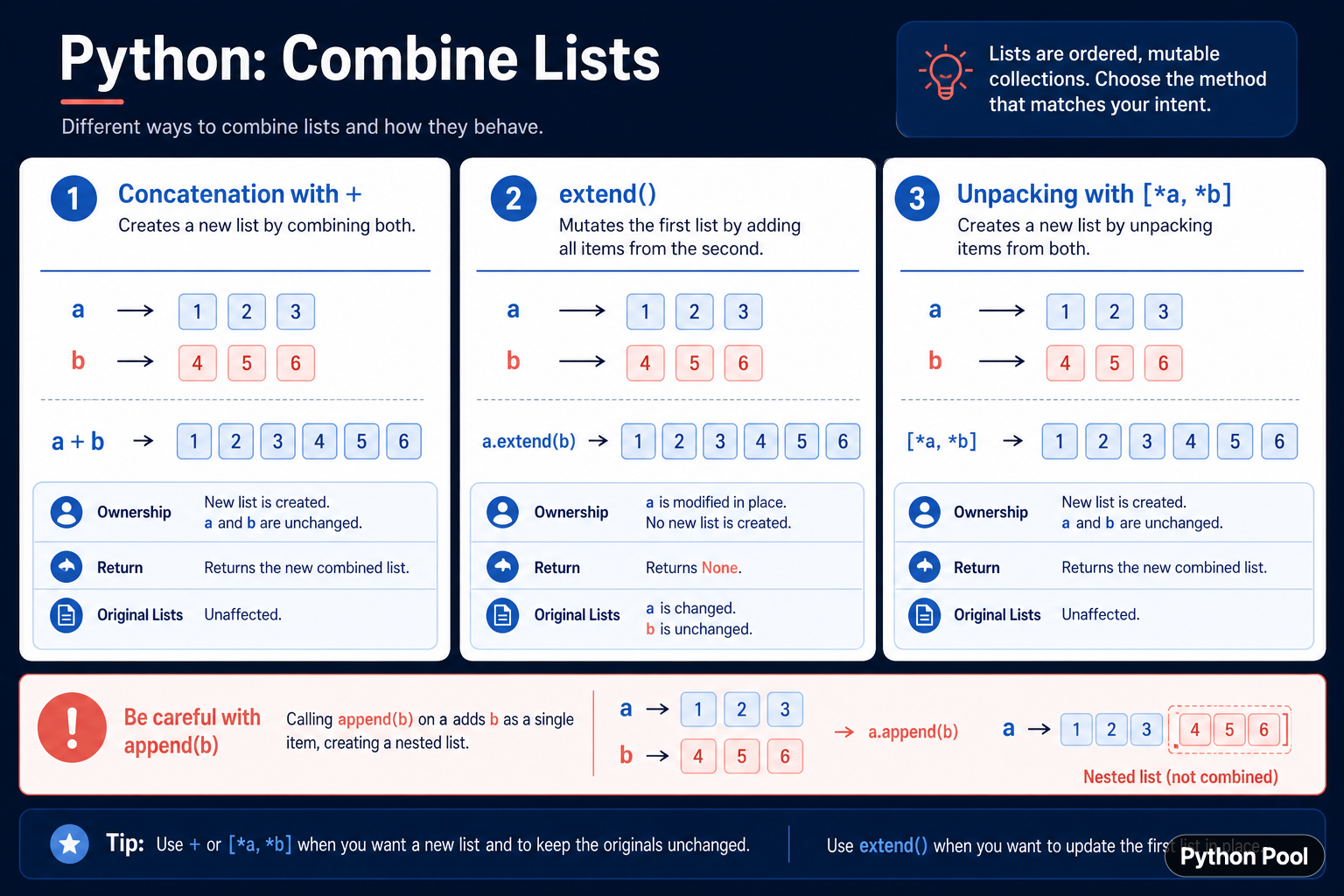
Python lists can be combined with concatenation, in-place extension, or iterable unpacking. The expressions a + b and [*a, *b] create a new list, while a.extend(b) mutates the first list and returns None. a.append(b) is different again: it adds the second list as one nested item rather than combining its elements.
Quick answer
Use a + b when you want a new list and both inputs should remain unchanged. Use a.extend(b) when you own the first list and want to add each element in place. Use [*a, *b] for a new list from multiple iterables. Use append(b) only when a nested list is intentional.
The official Python list documentation describes extend() as appending items from an iterable. The return and mutation behavior are part of the decision, not implementation details.
Concatenate with plus
The + operator creates a new list containing the elements from both operands. The original lists are unchanged. This is readable for a small number of lists and useful when the inputs should remain reusable.
first = [1, 2, 3]
second = [4, 5, 6]
combined = first + second

print(combined)
print(first)
print(second)
Repeatedly adding lists in a loop can allocate many intermediate lists. For many pieces, collect them and extend once or use unpacking, depending on the source and memory requirements.
Extend a list in place
extend() iterates over its argument and appends each item to the target list. It changes the target and returns None, so call it as a statement. Any other reference to the same target sees the new elements.
first = [1, 2, 3]
second = [4, 5, 6]
result = first.extend(second)

print(first)
print(result)
Because extend() accepts any iterable, passing a string adds its characters one at a time. Validate the input or choose append() when a string or list must remain one object.
Use iterable unpacking
Unpacking with [*first, *second] creates a new list and works naturally with several iterables. It communicates that the elements should be expanded into one list.
first = [1, 2]
second = (3, 4)
third = range(5, 7)
combined = [*first, *second, *third]

print(combined)
Unpacking is a shallow combination. Nested lists and objects inside the result remain the same objects unless copied separately. The list container is new, but ownership of its elements is not transferred.
Understand append versus extend
append() adds one item. If the item is another list, the result becomes nested. That is correct when the data is naturally a list of lists, but it is not a list combination.
first = [1, 2]
second = [3, 4]

nested = first.copy()
nested.append(second)

flat = first.copy()
flat.extend(second)

print(nested)
print(flat)
Use the shape of the desired data to choose the method. A nested structure can represent groups, batches, or rows; a flat list represents one sequence of items.
Combine many lists efficiently
When data arrives as an iterable of lists, a loop with extend() avoids repeated intermediate concatenation. It also lets the function validate each input before adding it.
groups = [[1, 2], [3], [4, 5]]
combined = []

for group in groups:
    combined.extend(group)

print(combined)
For a very large or streaming source, consider yielding items instead of building one list. A generator can preserve laziness when the consumer does not need random access.
Combine without mutating inputs
A helper that should not mutate caller data can use concatenation or unpacking. Document whether nested values are shared, and use a deeper copy only when independent nested objects are required.
def combine_lists(left, right):
    return [*left, *right]

original = [1, 2]
result = combine_lists(original, [3, 4])
result.append(5)

print(original)
print(result)
The function creates a new outer list. This is a safe default for general helpers because ownership of the caller's list container remains with the caller.
Common mistakes
- Assigning the result of
extend()and receivingNone. - Using
append()when a flat list is required. - Assuming list combination deep-copies nested objects.
- Repeatedly using
+in a large loop. - Extending with a string and accidentally adding individual characters.
The practical choice is to decide ownership and shape first: new flat list, in-place flat list, or nested list. Then use +, extend(), unpacking, or append() with the return contract that matches that decision.
Combine iterables without overbuilding
Not every source needs to become a list immediately. If a consumer can process one item at a time, use itertools.chain() to combine iterables lazily. This avoids allocating a large combined list and preserves the streaming nature of the source.
For a public helper, document whether it accepts any iterable or only lists. extend() consumes its input, while concatenation requires sequence operands. A clear type and ownership contract prevents a generator from being unexpectedly exhausted.
When combining nested data, decide whether the result should flatten one level or preserve groups. Flattening recursively is a separate operation and can destroy structure that downstream code needs to interpret rows, batches, or categories.
Use tests that assert both the values and the original inputs after a combination. Mutation bugs often pass a value-only assertion because the combined result looks correct even though a caller’s list was unexpectedly changed.
For large data streams, prefer a generator or itertools.chain when the consumer does not need random access. Building a list is useful when the result must be reused, indexed, or serialized, but it has a memory cost that should be intentional.
Make the return contract visible in a helper name or docstring. Callers should know whether they receive a new list, a mutated input, or a nested structure before they reuse the original values elsewhere.
When values are mutable, shallow sharing is often the intended behavior, but document it so callers do not expect independent nested objects.
For follow-up list transformations, compare list iteration and reversing the combined result. Read python iterate through list and python reverse list for the related workflow.
Frequently Asked Questions
Frequently Asked Questions
How do I combine two lists in Python?
Use first + second or [*first, *second] to create a new combined list, or first.extend(second) to mutate first.
What is the difference between append() and extend()?
append() adds one object, while extend() adds each item from an iterable to the target list.
Does extend() return a list?
No. extend() mutates the list in place and returns None, so call it as a statement.
Does combining lists deep-copy nested values?
No. The new outer list is shallow; nested objects remain shared unless copied separately.
