
Quick answer: Python map() returns a lazy iterator that applies one callable to each item. Convert it to a list only when you need materialized results, and use a comprehension when the transformation or filtering logic is easier to read inline.
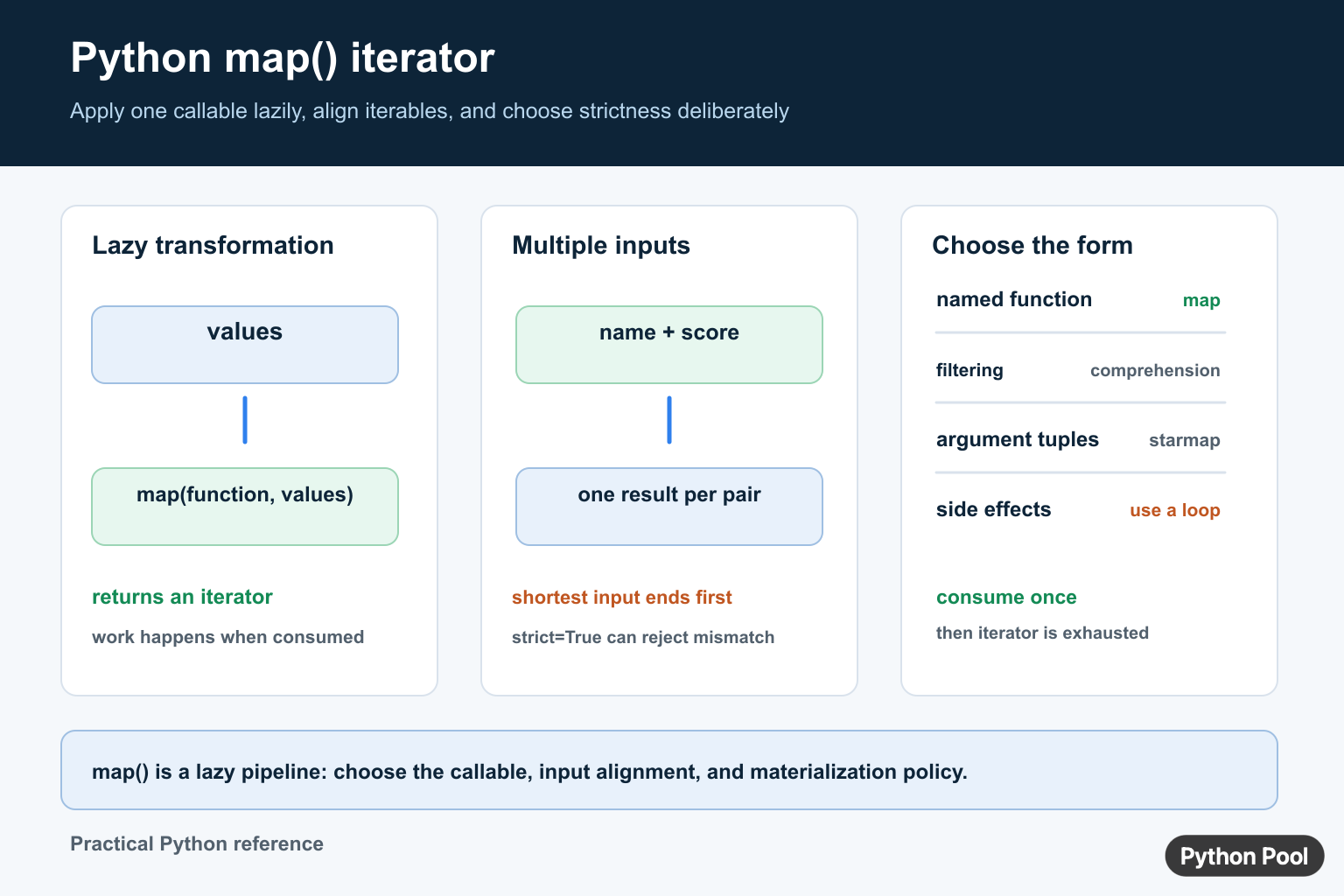
The Python map() function applies another function to every item from one or more iterables. It returns a lazy map object, so values are produced as they are requested instead of being stored in a list immediately.
The official Python map documentation defines the built-in function and its arguments. The itertools.starmap documentation covers a related tool for unpacked argument tuples.
Use map() when one transformation should run across each item in a sequence, generator, tuple, set, or other iterable. Common examples include converting strings to numbers, trimming text fields, normalizing case, calculating derived values, and preparing data for another function.
A list comprehension is often more readable for simple expressions. map() is still useful when you already have a named function, when a built-in function expresses the operation clearly, or when lazy output is helpful for a pipeline.
Basic map Usage
The first argument to map() is the function to apply. The second argument is the iterable that supplies input values.
def square(number):
    return number * number

numbers = [1, 2, 3, 4]
squares = map(square, numbers)

print(list(squares))
The call returns a map object. Converting it with list() is a convenient way to display all results in examples and tests.
The original list is not changed. The transformation happens as the map object is consumed, and each result is produced from the function you provided.
Convert Strings To Integers
Because functions such as int, float, and str are callable, they can be passed directly to map().
text_numbers = ["10", "20", "30"]
numbers = list(map(int, text_numbers))

print(numbers)
print(sum(numbers))
This pattern is common after splitting input text or reading simple fields from a file. If any item cannot be converted, int() raises ValueError, so validate or catch errors when input may be messy.
For data with missing values, mixed formats, or detailed error reporting, a normal loop may be clearer because it can handle each failure with more context.
Trim Text With map
String methods can be mapped too. Pass the unbound method, then supply strings through the iterable.
raw_names = [" Ada ", "\tGrace", "Linus\n"]
clean_names = list(map(str.strip, raw_names))

print(clean_names)
Here str.strip receives each string and returns a cleaned copy. This is compact and readable when the same method should run on every item.
The same idea works with str.lower, str.casefold, str.upper, and other methods that accept the string object as their first input.
Use map With Multiple Iterables
map() can read from more than one iterable. The function receives one item from each iterable at a time, and mapping stops when the shortest iterable ends.
def add_pair(left, right):
    return left + right

left_values = [1, 2, 3]
right_values = [10, 20, 30]

print(list(map(add_pair, left_values, right_values)))
This is useful when items already line up by position. If the data should be matched by key, build a dictionary or use a more explicit join step instead of relying on position.
When the function needs two or more inputs from a single tuple, consider itertools.starmap(). It unpacks each tuple into separate arguments.
Remember That map Is Lazy
A map object is an iterator. Once it has been consumed, it does not restart automatically.
items = [1, 2, 3]
doubled = map(lambda item: item * 2, items)

print(list(doubled))
print(list(doubled))
The second list is empty because the iterator has already produced all values. Create a new map object when the transformed results need to be read again, or store the results in a list once.
This lazy behavior can save memory in long pipelines, but it can surprise code that expects reusable containers. Decide whether an iterator or a list better fits the next step.
Map Records To Clean Output
A named helper keeps more detailed transformations readable. The helper can return any type, including dictionaries.
def summarize(row):
    name, score = row
    return {"name": name.strip().title(), "passed": score >= 70}

rows = [(" ada ", 91), ("grace", 68), (" linus ", 84)]

print(list(map(summarize, rows)))
This example trims and formats names while also calculating a pass flag. If the transformation grows much larger, a normal loop or a dedicated parser can be easier to debug.
The practical rule is simple: use map() when it makes a single transformation obvious. Convert the result to a list when you need storage, display, or repeated use. Prefer a comprehension or loop when the logic needs conditions, multiple steps, or custom error handling.
Read map(function, items) as “apply this function to each item.” That mental model helps you choose between map(), comprehensions, loops, and tools such as filter() or itertools.starmap().
For team code, choose the form that a reviewer can understand quickly. A short map() call with a named function is clear; a dense lambda with side effects usually is not.
Use multiple iterables deliberately
With multiple iterables, the callable receives one item from each iterable in parallel. Regular behavior stops when the shortest iterable is exhausted. On Python versions that support it, strict=True raises ValueError when lengths do not match, exposing alignment bugs early.
names = ["Ada", "Grace"]
scores = [10, 20]

rows = map(lambda name, score: f"{name}: {score}", names, scores)
print(list(rows))
Use strict=True only when the supported Python runtime includes it. For older versions, validate lengths before mapping. For argument tuples, consider itertools.starmap().
Keep side effects out of the mapper
A mapper is easiest to test when its callable transforms one item and returns one result. Do not rely on map() to execute logging or writes unless you consume the iterator. A normal loop communicates side effects more directly.
For a related one-item lazy selection pattern, see Python next(). Choose the shortest form that makes the data transformation obvious.
Frequently Asked Questions
What does map() do in Python?
map() applies a callable to items from one or more iterables and returns a lazy iterator of the results.
Is map() lazy in Python?
Yes. A map object produces values when it is consumed, so converting it to a list materializes the results.
What happens when map() receives different iterable lengths?
Mapping normally stops when the shortest iterable is exhausted; newer Python versions can use strict=True to raise on a length mismatch.
When should I use a comprehension instead of map()?
Use a comprehension when the expression includes filtering or conditional logic, or when the inline form is clearer than passing a callable.
