Search the Community
Showing results for tags 'plugin rust'.
Found 15 results
-
Version 1.3.0
1,894 downloads
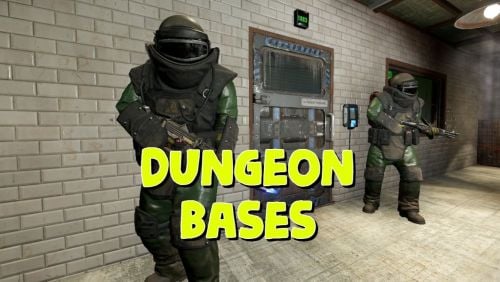
The plugin adds a dungeon event to your server. Dungeons are bases with puzzles, NPC defenders, turrets and more. You can create your own dungeons of varying difficulty You can build your own bases or modify existing ones: There are moving NPC guardians in the dungeons: There are puzzles with protective doors in the dungeons: In the dungeons there are secret notes with codes in boxes or on NPCs: Commands: dungbase_start - force start event dungbase_start <entrance name> <dungeon name> <X> <Y> <Z> - force an event to start using the specified entrance and dungeon at coordinates X Y Z (you can also specify the name of the entrance or dungeon <random>) example: dungbase_start entrance1 dungeon1 122.3 5.2 872 dungbase_start random dungeon3 dungbase_stop - force stop event dungbase_addblack <radius> - add a zone where dungeon spawning is not allowed Hooks: void DungeonBasesEventStarted() - // called when event starts void DungeonBasesEventEnded() - // called when event ends Configuration: { "Allow only the event owner (the one who entered the dungeon first) into the dungeon": true, "Allow owner's teammates to enter the dungeon": true, "Time before ownership is lost after leaving the server(in seconds)": 300, "Event marker on the map": true, "Event marker name": "Dungeon Base", "Event marker transparency(0-1)": 0.55, "Event marker radius": 0.5, "Event marker color.R(0-1)": 1.0, "Event marker color.G(0-1)": 0.0, "Event marker color.B(0-1)": 0.0, "Display event owner name on marker": true, "Display the time remaining until the end of the event on the marker": true, "Autostart event(disable if you want to trigger the event only manually)": true, "Calculate the time until the next event only after the previous one has finished": false, "Minimum time to event start(in seconds)": 3600, "Maximum time to event start(in seconds)": 7200, "Minimum event duration(in seconds)": 2000, "Maximum event duration(in seconds)": 3000, "Minimum number of online players to trigger an event": 1, "List of NPC names": [ "Dungeon NPC", "Dungeon Keeper", "Dungeon guard" ], "Dungeons list": [ "#dung#base1", "#dung#base2", "#dung#base3", "#dung#base4" ], "Entrances list": [ "#dung#entrance1", "#dung#entrance2", "#dung#entrance3", "#dung#entrance4" ], "Random order of choosing a dungeon from the list (if false, will be selected in turn)": true, "Random order of choosing the entrance to the dungeon from the list (if false, will be selected in turn)": true, "Change the time of day when entering the dungeon(from 0 to 23, if -1 - do not change the time)": 0.0, "How long before the end of the event does radiation start to affect players inside the dungeon": 180, "How long before the event ends will a warning message be displayed to players": 300, "How long after the event ends should the entrance be destroyed": 60, "Close the entrance and exit to the dungeon when the event time is over": true, "Will autoturrets attack NPCs": false, "Save event data (If true, the event will be saved and will continue even if you restart the server or plugin. Disable this if you get lag when saving)": true, "SteamID for chat message icon": 0 } Note: The plugin is guaranteed to work correctly with bases enabled. NPCs will not behave as standard, as they use different algorithms. Only one dungeon can spawn on the map at a time.$19.99 -
Version 1.0.3
80 downloads
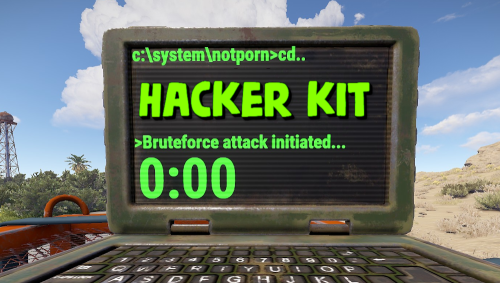
Adds hacker kit to the server. Just pick up a geiger counter and use it to hack. Just get close to the crate and hold the left mouse button. This plugin uses a geiger counter. Since this is not an item that players can usually get through loot, it is perfect for this purpose. Just use a plugin like BetterLoot to insert a geiger counter into your loot tables and then any geiger counter picked up by the player can be used as a hacker kit. Permissions: hackerkit.use - required to use hacker kit To assign a permission, use: oxide.grant <user or group> <name or steam id> hackerkit.use To remove a permission, use: oxide.revoke <user or group> <name or steam id> hackerkit.use (or just use the permission manager plugin) Config file: { "Hack speed": 10, "Prohibition message": "You don't have permission to use hackerkit", "SFX prefab": "assets/prefabs/gamemodes/objects/capturepoint/effects/capturepoint_progress_beep.prefab" }$5.99 -
Version 1.1.3
1,116 downloads
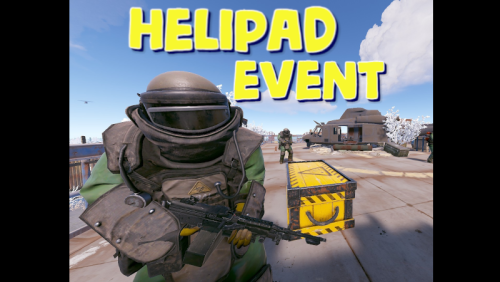
Adds an event for the Lunchsite monument to your server. A crate with valuable loot will spawn on the helipad. The crate is protected by NPC guards and a patrol helicopter. The event is completely ready for use immediately after installation, you can flexibly configure it at your discretion Features: Easy to set up. Excellent customization options in the config You can customize the contents of the box: in the config file, set up a list of items that will be inside also you can use kits (you need Kits plugin), just set the name of the kit in the config file, you can use the list of kits and choose them randomly also you can use loot tables (you need SimpleLootTable plugin) You can customize the NPCs: you can set the health of the npc you can set NPC damage multiplier on players you can give kits for NPCs (you need a Kits plugin) Commands(admin only): hpestart - force the event to start hpestop - force stop the event Hooks: void LaunchSiteHelipadEventStarted() // called when the event starts { } void LaunchSiteHelipadEventEnded() // called when the event has ended { } Config file: { "Triggering an event by timer (disable if you want to trigger the event only manually)": true, "Minimum time to event start(in seconds)": 900, "Maximum time to event start(in seconds)": 10800, "PVE mode (A dome will be created inside which everyone except the owner and his teammates will be poisoned by radiation)": false, "Ownership time (after how long will the owner be removed if he leaves the dome or server)": 300, "Radius of the dome": 100, "Dome offset": { "x": 0.0, "y": 0.0, "z": 0.0 }, "Effect of radiation on players inside the dome, except owners": 10, "Dome color(0 - default, 1 - blue, 2 - green, 3 - purple, 4 - red)": 0, "Dome entry message": "You have entered the helipad event zone on the launch site", "Dome exit message": "You have exited the helipad event zone at the launch site", "Message about player's entry if he is not the owner of the event": "Leave this area immediately, you are not the owner of the event!", "Message about player leaving dome if he is the owner of the event": "If you do not return to the dome within 5 minutes, then you will no longer be the owner of this event!", "Box lifetime(in seconds)": 1800, "Time the box is closed(in seconds)": 900, "Box skin": 0, "End the event immediately after someone loots a crate": false, "NPCs lifetime(in seconds)": 3600, "NPCs amount(maximum 20)": 2, "NPCs type, 0 - tunneldweller; 1 - underwaterdweller; 2 - excavator; 3 - full_any; 4 - lr300; 5 - mp5; 6 - pistol; 7 - shotgun; 8 - heavy; 9 - junkpile_pistol; 10 - oilrig; 11 - patrol; 12 - peacekeeper; 13 - roam; 14 - roamtethered; 15 - bandit_guard; 16 - cargo; 17 - cargo_turret_any; 18 - cargo_turret_lr300; 19 - ch47_gunner": 8, "NPCs health(0 - default)": 0, "NPCs damage multiplier": 1.0, "List of kits for each NPC(requires Kits plugin)": [ "kit1", "kit2", "kit3" ], "List of displayNames for each NPC(for SimpleKillFeed/DeathNotes plugin)": [ "LaunchSite NPC1", "LaunchSite NPC2", "LaunchSite NPC3" ], "Give NPC names randomly from the list (if false, names will be assigned according to the list one by one)": true, "Event start message(if empty, no message will be displayed)": "The helipad event has started! Find the crate located on the helicopter pad at the Launch Site", "Message when box is unlocked(if empty, no message will be displayed)": "The crate on the helicopter pad at the Launch Site is unlocked", "Message that someone has looted the crate(if empty, no message will be displayed)": "Someone found the box on the helipad at the launch site first", "Spawns a helicopter right on the launchsite(if false, then the helicopter will arrive from afar in a few seconds)": false, "Patrol helicopter spawn chance (0 - 100%)": 50, "Helicopter patrol range": 150, "How long the helicopter will patrol the launchsite (in minutes)": 5, "Helicopter damage multiplier": 1.0, "Helicopter health": 10000.0, "Helicopter main rotor health": 900.0, "Helicopter tail rotor health": 500.0, "The patrol helicopter will not patrol the helipad if it has found a target": false, "Make helicopter fly away after end of patrol time": false, "Event marker on the map(will spawn a marker immediately after the start of the event)": false, "Event marker name": "LaunchSite helipad event", "Event marker lifetime(in seconds)": 3600, "Event marker transparency(0-1)": 0.75, "Event marker radius": 0.5, "Event marker color.R(0-1)": 1.0, "Event marker color.G(0-1)": 0.0, "Event marker color.B(0-1)": 0.0, "Use box kit(need a plugin Kits)": false, "Messages list - messages that players will see, depending on how much time (in seconds) is left before the box is opened": [ { "message": "The crate on the helicopter pad at the Launch Site will open in 15 minutes", "time": 900 }, { "message": "The crate on the helicopter pad at the Launch Site will open in 10 minutes", "time": 600 }, { "message": "The crate on the helicopter pad at the Launch Site will open in 5 minutes", "time": 300 }, { "message": "The crate on the helicopter pad at the Launch Site will open in 3 minutes", "time": 180 }, { "message": "The crate on the helicopter pad at the Launch Site will open in 1 minute", "time": 60 } ], "List of items in the box": [ { "shortname": "ammo.rocket.basic", "minAmount": 1, "maxAmount": 3, "skinID": 0 }, { "shortname": "explosive.timed", "minAmount": 1, "maxAmount": 3, "skinID": 0 }, { "shortname": "explosive.satchel", "minAmount": 5, "maxAmount": 10, "skinID": 0 }, { "shortname": "explosives", "minAmount": 40, "maxAmount": 100, "skinID": 0 }, { "shortname": "ammo.rifle.explosive", "minAmount": 64, "maxAmount": 128, "skinID": 0 }, { "shortname": "rocket.launcher", "minAmount": 1, "maxAmount": 1, "skinID": 0 } ], "Kit list": [ "111111111", "222222222", "333333333" ], "Use random kit(if false, then the first Kit in the list is always used": false, "Box simple loot table name(plugin SimpleLootTable is required)": "", "Minimum number of items in the box(plugin SimpleLootTable is required)": 1, "Maximum number of items in the box(plugin SimpleLootTable is required)": 3, "SteamID for chat message icon": 0, "Use Notify plugin for messages": false, "Notify message type": 0 }$11.99 -
Version 1.2.5
544 downloads
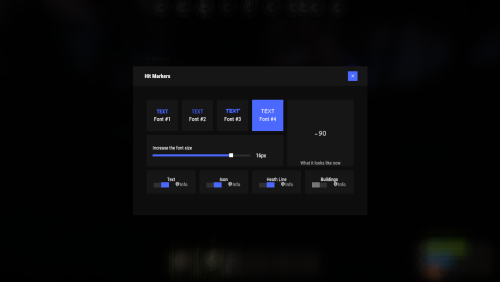
Each user can choose his own marker, which is convenient for him! Commands marker - open an UI Permissions You can set permission in config, for example: "Permission (ex: hitmarkers.use)": "hitmarkers.use", You can also set your own permission for each font and button. Config { "Commands": [ "marker", "hits" ], "Permission (ex: hitmarkers.use)": "", "Work with Notify?": true, "Fonts": { "0": { "Font": "robotocondensed-bold.ttf", "Permission (ex: hitmarkers.font)": "" }, "1": { "Font": "robotocondensed-regular.ttf", "Permission (ex: hitmarkers.font)": "" }, "2": { "Font": "permanentmarker.ttf", "Permission (ex: hitmarkers.font)": "" }, "3": { "Font": "droidsansmono.ttf", "Permission (ex: hitmarkers.font)": "" } }, "Min Font Size": 8, "Max Font Size": 18, "Buttons": [ { "Enabled": true, "Title": "Text", "Type": "Text", "Description": "<b>Damage numbers</b> will pop up in the center of the screen!", "Permission": "hitmarkers.text" }, { "Enabled": true, "Title": "Icon", "Type": "Icon", "Description": "The familiar hit icon changes color after a <b>headshot!</b>", "Permission": "hitmarkers.icon" }, { "Enabled": true, "Title": "Heath Line", "Type": "HealthLine", "Description": "A bar appears above the slots, showing the <b>remaining</b> health of the enemy", "Permission": "hitmarkers.line" }, { "Enabled": true, "Title": "Buildings", "Type": "Buildings", "Description": "Displaying damage by buildings", "Permission": "hitmarkers.buildings" } ], "Info Icon": "https://i.imgur.com/YIRjnIT.png", "Show damage to NPC": true, "Show damage to animals": false, "Marker removal time": 0.25, "Default Values": { "Font ID": 0, "Font Size": 14, "Text": true, "Icon": false, "Health Line": false, "Buildings": false } }$19.95 -
Version 1.1.9
801 downloads
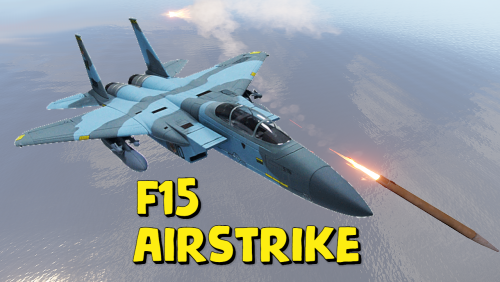
Adds the ability to call an airstrike, the player throws a supply signal in the place where he wants to call an airstrike. This plugin uses the default supply signal, but the item skin must be 2982472774. Please use only default stack size for supply signal. This is the only way the plugin will work properly. Since this is not an item that players can usually get through loot, you can use a plugin like BetterLoot to insert a supply signal with skin 2982472774 into your loot tables, and then that player-picked item can be used as a signal to call an airstrike. There is also support for the plug-in HomingMissiles Commands (admin only): /GiveF15AirStrikeSignal <Player or steamID> <number of items> - give the player a supply airstrike signal /GiveF15AirStrikeSignalToAll <number of items> - give to all players a supply airstrike signal /adminCallF15 - causes an airstrike to a point with the player's coordinates Developer API: (void) CallF15AirStrike(Vector3 pos, BasePlayer player) - launch an airstrike on a point with coordinates pos, player - airstrike initiator(null can be specified) This plugin uses the permission system Permissions: f15AirStrike.use - required to use airstrike f15AirStrike.vip - for VIP permissions, the "Cooldown time for VIP” setting is available To assign a permission, use: oxide.grant <user or group> <name or steam id> f15AirStrike.use To remove a permission, use: oxide.revoke <user or group> <name or steam id> f15AirStrike.use Config: { "F15 flight altitude": 250.0, "Rockets speed": 150, "Attack radius": 150, "Damage scale (1 = 100%)": 1.0, "Rate of fire(number of shots per second)": 2.5, "Time to trigger a signal grenade": 3.0, "Cooldown time": 1.0, "Cooldown time for VIP": 1.0, "Supply signal display name": "SUPPLY SIGNAL F15", "Grenade throw force scaling": 1.0, "Damage to buildings": false, "Always deal damage to Raidable Bases": false, "Attack the initiator": true, "Attack the players": true, "Attack NPCs": true, "Attack the place where the signal supply was thrown (attacks only in the area, not aiming at players and NPCs)": false, "F15 will only attack at right angles above the center of the impact area (only for area targeting)": false, "Attack accuracy (used only when attacking in an area)": 30, "Use homing missiles(need HomingMissiles plugin)": false }$11.99 -
Version 1.3.2
5,095 downloads
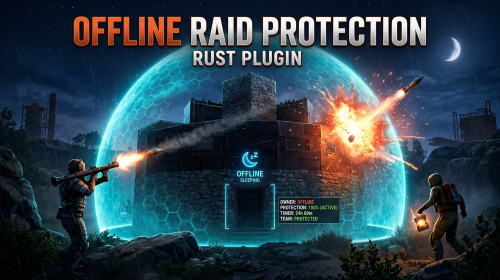
The Offline Raid Protection plugin is a comprehensive solution designed to protect players' structures and vehicles while they are offline. It offers a range of customisable protection levels based on real-time or the length of time a player has been offline, and integrates with the Clans plugin and the in-game teams feature to determine protection status based on the online status of all clan or team members and authorised players. Key Features Configurable Protection Levels: Set protection levels based on real time or the amount of time since a player went offline. For example, a building can have 100% protection one hour after a player goes offline, and 50% protection after two hours. This feature is highly configurable. Clan/Team Integration: The plugin integrates with the Clans plugin and the in-game teams feature. The protection status of a structure or vehicle is determined by the online status of all clan or team members and authorised players. Penalty System: An optional penalty system is implemented to prevent abuse of the protection feature. For example, if a player leaves a clan or team, a penalty can be applied to all members and protection can be disabled for a configurable period of time. Game Tip Messages: The plugin displays game tip messages to players when they hit a protected structure or vehicle. The message includes the percentage of protection and is colour coded according to the level of protection. It supports all the languages available in Rust. Commands: Players with permission can use commands to check the protection status of other players, change the offline time of other players, and change the penalty status. Cache System: The plugin uses a caching system to optimise performance and keep the impact on the server to a bare minimum. Configuration: The plugin includes a configuration file that allows you to customise the behaviour of the plugin. Modular Boat and Tugboat protection: These can optionally be protected just like player bases. Commands All commands can be configured. /orp or /ao <steam id or full name> — Check a player's offline protection status. You can type the command without a name when looking at a player's structure. /raidprot — Display offline raid protection information. /orp.fill.onlinetimes — Fill all players offline times. (Chat & Console command) /orp.test.offline <steam id or full name> <hours> — Change a player's offline time. /orp.test.online <steam id or full name> — Change a player's offline time to the current time. /orp.test.penalty <steam id or full name> <hours> — Change the duration of a player's penalty. A negative value or zero would disable the penalty. /orp.update.permission — Update the permissions status (offlineraidprotection.protect) for all players. orp.update.prefabs <true> - Updates the 'Prefabs to protect' list in the configuration. Overwrites the list with the 'true' argument. (Console command) orp.dump.prefabs - Clears the 'Prefabs to protect' list in the configuration. (Console command) Permissions All permissions can be configured. offlineraidprotection.protect — Allows a player to be protected from raids. offlineraidprotection.check — Allows a player to check the offline protection status of other players. offlineraidprotection.admin — Allows a player to use all admin commands of the plugin. To grant a permission, use carbon/oxide.grant <user or group> <steamname or ID> <permission>. To revoke a permission, use carbon/oxide.revoke <user or group> <steamname or ID> <permission>. Configuration The configuration is to a large extent self-explanatory. Raid Protection Options Only mitigate damage caused by players: Choose whether or not to only mitigate damage caused directly by players. Enable this to prevent players from causing base damage by baiting patrol helicopters, etc. Protect players that are online: Choose whether or not to protect the bases of the players who are online. Works when "Scale of damage depending on the current hour of the real day" is configured. Scale of damage depending on the current hour of the real day: Defines the protection levels based on the current hour of the real day. The key is the hour of the day (0-23), and the value is the protection scale (0 — 340282300000000000000000000000000000000). Example: "0": 0.0, "1": 0.0, "2": 0.0, "3": 0.0 This means that the protection level is 100% from midnight to 3am. Scale of damage depending on the offline time in hours: Defines the protection levels based on the time since the player went offline. The key is the number of hours since the player went offline, and the value is the protection scale (0 — 340282300000000000000000000000000000000). The value of the hours can also be a decimal number. Example: "12": 0.25, "24": 0.5, "48": 1.0, "96": 2.0 This means that 12 hours after the player goes offline, the protection level will be 75%. After 24 hours it will be 50% and after 48 hours it will be 0%. After 96 hours, the damage is increased by 200%. Cooldown in minutes: During this time, damage levels will remain vanilla. Raids are possible. Set this to a positive value to discourage defenders from interrupting raids by logging off. Scale of damage between the cooldown and the first configured time: During this time, the level of damage between the cooldown and the first configured time can be set to a specific value, such as 0.0 Online time to qualify for offline raid protection in minutes: Time to qualify for offline raid protection after a player connects Set this to a positive value to discourage players from quickly logging on and back off solely to reset protection. Protect all prefabs: Choose whether to protect all prefabs or only specific ones. This will protect anything in the TC range. Protect AI (animals, NPCs, Bradley and attack helicopters etc.) if 'Protect all Prefabs' is enabled: Choose whether or not to protect AI entities if "Protect all Prefabs" is enabled. Set to false to reduce hook times, and to avoid protecting wild animals that wander by offline bases. Protect modular and tug boats: Choose whether to protect modular boats and tugboats and their deployables. Checks wheel authorisation list, plus optionally lock authorisation lists. Protect vehicles: Choose whether to protect vehicles or not. Vehicle lock authorisation always has priority. If you want to exclude certain vehicles from protection, add them to the blacklist. Tugboats and modular boats are separate from this. Protect twigs: Choose whether to protect twigs or not. Protect decaying buildings: Choose whether to protect buildings that are either decaying, or have at least 50% of building blocks below 90% health. Ignore decay if due solely to twig: Choose whether to ignore decay state caused solely due to the presence of twig building blocks combined with a lack of wood in the TC. Set to true to ensure raiders cannot disable protection by building twig onto an offline base. Prefabs to protect: List of prefabs that will be protected. Make sure you remove the prefabs you don't want to protect, some of them are pointless. Prefabs blacklist: List of prefabs that will not be protected. Prefabs in the blacklist will always have priority to be unprotected. Timezone Options The fallback timezone is UTC if you leave it blank in the configuration, or if your configured timezone doesn't exist. The timezone identifiers are different for Windows and Linux. You can check the appendices to find your preferred timezone. Conclusion: The Offline Raid Protection plugin provides a comprehensive solution for protecting players' structures and vehicles. This plugin is essential for any Rust server owner who wants to provide a fair and enjoyable gaming experience for their players. Acknowledgments Special thanks to @Kulltero for his valuable feedback and suggestions during the development of this plugin. Windows_Timezones.txt Linux_Timezones.txt Prefabs.txtFree -
Version 1.1.2
254 downloads
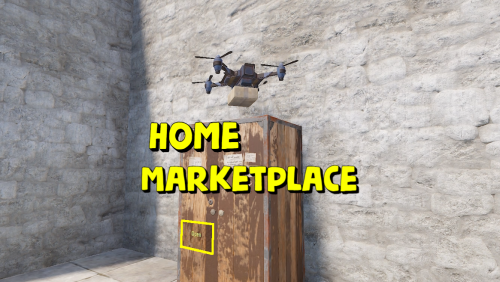
Adds a marketplace terminal to each tool cupboard. This way, players can buy items without leaving home. The plugin is easy to install on your server; no additional settings are needed. You can also change the delivery fee (but the player must still have an additional 20 scrap in their inventory) This plugin uses the permission system Permissions: homeMarketplace.use - required to be able to use the marketplace To assign a permission, use: oxide.grant <user or group> <name or steam id> homeMarketplace.use To remove a permission, use: oxide.revoke <user or group> <name or steam id> homeMarketplace.use Config: { "Terminal offset": { "x": 0.42, "y": 0.68, "z": 0.3 }, "Delivery fee": 20 }$9.99 -

Version 1.1.1
113 downloads
Introducing the Walkie-Talkie Plugin: Seamlessly integrate real-time communication into your gaming experience! Stay connected with your teammates, strategize on-the-go, and coordinate your moves effortlessly with this immersive in-game communication tool. Whether you're navigating treacherous terrains or planning tactical maneuvers, the Walkie-Talkie keeps you in sync, enhancing teamwork and elevating your gaming adventure to a whole new level! Features: Gives players the ability to commiserate with each other, come up with strategies, and ambush each other. It is possible to create different variations of walkie-talkies for different distances. By default, 5 variations of walkie-talkies are given ready-made. Walkie-talkies can be both automatic and manual (in manual mode it is necessary to press LMB to hold the walkie-talkie, in automatic mode it is not required). Installation: Before installing the plugin, make sure you have the CustomItemDefinitions library installed. It is necessary for the plugin to work. Download it here. Put this plugin in the plugins folder How does a walkie-talkie work? Several players must have a walkie-talkie tuned to the same frequency in their inventory. To start talking into the walkie-talkie you need to take it in your hand, then press LMB (in case of manual walkie-talkie, for automatic walkie-talkie it is not required) and then press V button (if the microphone mode is enabled), that's it, now you can start talking. How do I get a walkie-talkie? Since each walkie-talkie has its own unique shortname and ItemId you can receive it like any other item. That is, you can give it out via the give or giveto command, or add it to the loot table or other ways via plugins.$10.00- 6 comments
- 2 reviews
-
- 3
-

-

-
- #custom item
- #walkie
- (and 4 more)
-

Version 1.1.4
152 downloads
PlayerPings is a convenient plugin that enhances communication and tactical gameplay for your players in Rust. It features a user-friendly interface and dynamic object type detection—whether it's ore, a building, or loot objects, each will have a unique marker. Players can choose their own marker color and toggle automatic object type detection on/off. The plugin has an adaptive interface and supports localization in multiple languages. Markers can be set through several options: Binding via console command - playerping.set Aiming + key use (E) Clicking mouse wheel To open the settings menu, use: /pingmenu To access usage, the playerpings.use permission needs to be granted. You can grant it via console command: oxide.grant <user or group> <name or steam id> playerpings.use Config Example { "Basic setup": { "Color(0-yellow,1-blue,2-green,3-red,4-purple,5-blue)": 3, "Maximum number of pings per player": 5, "Maximum distance": 300.0, "Ping display time": 3.0, "Enable ping metod Aiming + key use (E)": true, "Enable ping metod Center mouse wheel": true, "Delay between pings (seconds): 0.2 seconds as standard": 0.2, "Command to set ping": "playerping.set", "Menu Open Command": "pingmenu" }, }$9.99 -

Version 1.0.6
75 downloads
Allows you to place explosives inside the drone, this makes it a kamikaze drone. Just put a regular drone on the ground, you will see a small stash attached to it. Put explosives inside the small stash. Control it like a regular drone using a computer station and attack your enemies. Almost all types of explosives are supported, the plugin is ready to work right away. The plugin is also easy to configure. Config: { "Explosive list(short names of explosive items that can be placed in a drone)": [ "ammo.grenadelauncher.he", "ammo.grenadelauncher.smoke", "supply.signal", "ammo.rocket.mlrs", "explosive.timed", "ammo.rocket.basic", "ammo.rocket.hv", "ammo.rocket.fire", "grenade.smoke", "grenade.beancan", "explosive.satchel", "grenade.f1", "grenade.flashbang", "grenade.molotov", "surveycharge", "ammo.rocket.sam" ], "Sensitivity(if the drone is damaged by this amount, detonation will occur)": 5, "Prohibitory message": "You can't put this item here" }$9.99- 4 comments
-
- 1
-
-
- #oxide
- #oxiderust
- (and 15 more)
-

Version 1.2.1
1,071 downloads
Adds drones to your server. Drones can attack with grenades and shoot at players, you can destroy drones, they have loot. Drones spawn near monuments, also you can add custom spawn points. Features: Easy to set up. Excellent customization options in the config. You can customize the monuments where the drones will spawn. You can customize the contents of the drone in the config file: you can set up a list of items that will be inside you can choose drop chance (1 - 100%) you can choose skins for items You can also customize the health and respawn time of the drones. Commands(admin only): dreshowpoints - displays all spawn points on the map dreshowdrones - displays all drones on the map dreshowzone - displays nearby areas with drones drerespawndrones - respawn all drones on the map forcibly dreremovedrones - removes all drones from the map dre_removepoint - removes custom spawn point (you need to be close to it) dre_addpoint - adds a custom spawn point (at the place where you are). You can also enter the command with arguments: /dre_addpoint "name" "flightRadius" "use" Developer API: (void) DroneCustomSpawn(Vector3 position, int aggressiveness, int radius, int attackRange, int health, float speed, bool grenade, float grenDmg, bool light, string turWpn, float turDmg) Spawns a drone at the coordinates "position" aggressiveness - drone aggressiveness from 0 to 100 radius - flight radius attackRange - attack range health - drone health speed - drone speed (0.5 - 1 recommended) grenade - if "true", then the drone will attack with grenades grenDmg - grenade damage scale (0-1) light - if "true", then a spotlight will be added to the drone turWpn - short name of the weapon for the turret, if empty, the turret will not be added to the drone turDmg - turret damage scale (0-1) Hooks: void DroneEventDroneKill(BasePlayer player) - called when a drone is destroyed. BasePlayer player- is the last one to deal damage to the drone Config file: { "Minimum respawn time(in minutes)": 15, "Maximum respawn time(in minutes)": 30, "Drone health (hits amount)": 2, "Drone speed(0.5 - 1 recommended)": 0.7, "Grenade damage scale": 1.0, "Attack range": 40, "Drone aggressiveness, from 0 to 100 (the more, the more often the drone attacks)": 10, "Adds a searchlight for drones": false, "Adds a turret for drones": false, "Turret damage scale": 1.0, "Turret weapon short name": "pistol.revolver", "The drone will throw grenades at players": true, "Do not calculate collisions while the drone is just flying (set to true if you have problems with your server performance)": false, "Monument settings": [ { "name": "gas_station", "flightRadius": 15, "offset": { "x": 17.0, "y": 30.0, "z": 0.0 }, "use": true }, { "name": "supermarket", "flightRadius": 15, "offset": { "x": 0.0, "y": 15.0, "z": 0.0 }, "use": true }, { "name": "warehouse", "flightRadius": 15, "offset": { "x": -5.0, "y": 15.0, "z": 0.0 }, "use": true }, { "name": "water_treatment", "flightRadius": 15, "offset": { "x": -60.0, "y": 20.0, "z": 0.0 }, "use": true }, { "name": "junkyard", "flightRadius": 15, "offset": { "x": 0.0, "y": 15.0, "z": 0.0 }, "use": true }, { "name": "lighthouse", "flightRadius": 15, "offset": { "x": 0.0, "y": 35.0, "z": 40.0 }, "use": true }, { "name": "sphere_tank", "flightRadius": 15, "offset": { "x": 60.0, "y": 30.0, "z": 40.0 }, "use": true }, { "name": "harbor_1", "flightRadius": 15, "offset": { "x": 20.0, "y": 15.0, "z": 90.0 }, "use": true }, { "name": "harbor_2", "flightRadius": 15, "offset": { "x": -100.0, "y": 20.0, "z": -20.0 }, "use": true }, { "name": "desert_military_base", "flightRadius": 15, "offset": { "x": -15.0, "y": 20.0, "z": -5.0 }, "use": true }, { "name": "excavator", "flightRadius": 15, "offset": { "x": 65.0, "y": 20.0, "z": -10.0 }, "use": true }, { "name": "swamp", "flightRadius": 15, "offset": { "x": -10.0, "y": 30.0, "z": -15.0 }, "use": false }, { "name": "radtown_small", "flightRadius": 15, "offset": { "x": -5.0, "y": 30.0, "z": -5.0 }, "use": true }, { "name": "water_well", "flightRadius": 15, "offset": { "x": 0.0, "y": 30.0, "z": 0.0 }, "use": true }, { "name": "mining_quarry", "flightRadius": 15, "offset": { "x": 0.0, "y": 25.0, "z": 0.0 }, "use": false }, { "name": "satellite_dish", "flightRadius": 15, "offset": { "x": -40.0, "y": 25.0, "z": -20.0 }, "use": false }, { "name": "cave_small", "flightRadius": 15, "offset": { "x": 0.0, "y": 30.0, "z": 0.0 }, "use": false }, { "name": "cave_medium", "flightRadius": 15, "offset": { "x": 0.0, "y": 30.0, "z": 0.0 }, "use": false }, { "name": "cave_large", "flightRadius": 30, "offset": { "x": 0.0, "y": 35.0, "z": 0.0 }, "use": false }, { "name": "airfield", "flightRadius": 25, "offset": { "x": -75.0, "y": 20.0, "z": 0.0 }, "use": false }, { "name": "launch_site", "flightRadius": 15, "offset": { "x": 0.0, "y": 20.0, "z": 130.0 }, "use": false }, { "name": "powerplant", "flightRadius": 25, "offset": { "x": -75.0, "y": 20.0, "z": -40.0 }, "use": false }, { "name": "trainyard", "flightRadius": 15, "offset": { "x": -70.0, "y": 20.0, "z": 0.0 }, "use": false }, { "name": "arctic_research_base", "flightRadius": 25, "offset": { "x": 10.0, "y": 15.0, "z": -25.0 }, "use": true }, { "name": "ice_lake", "flightRadius": 15, "offset": { "x": 0.0, "y": 20.0, "z": 0.0 }, "use": false }, { "name": "military_tunnel", "flightRadius": 15, "offset": { "x": 20.0, "y": 25.0, "z": -15.0 }, "use": false }, { "name": "power_sub_big", "flightRadius": 10, "offset": { "x": 0.0, "y": 20.0, "z": 0.0 }, "use": false } ], "Custom spawn points settings": [ { "name": "point1", "flightRadius": 15, "position": { "x": 0.0, "y": 100.0, "z": 0.0 }, "use": false }, { "name": "point2", "flightRadius": 15, "position": { "x": 0.0, "y": 200.0, "z": 0.0 }, "use": false } ], "Drop items list": [ { "name": "metal.fragments", "dropChance": 100, "minAmount": 50.0, "maxAmount": 300, "skinID": 0 }, { "name": "metal.refined", "dropChance": 100, "minAmount": 5.0, "maxAmount": 10, "skinID": 0 }, { "name": "scrap", "dropChance": 100, "minAmount": 10.0, "maxAmount": 20, "skinID": 0 }, { "name": "techparts", "dropChance": 50, "minAmount": 1.0, "maxAmount": 2, "skinID": 0 } ] }$14.99 -
Version 1.0.0
15 downloads
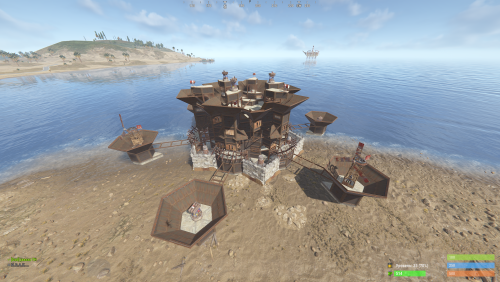
New Plugin: Custom Raidable Bases (Raidable Bases Extension) Hello Rust Community! I'm JaaaaaThomas I'm excited to introduce my first plugin: an exclusive collection of custom raid bases designed to enhance your server's PVE/PVP experience! 37 bases This is just the beginning, but we are ready to bring a fresh breath of air to how players interact with the Raidable Bases plugin. What You Get with This Package This package is not a standalone plugin, but a Content Extension that adds a selection of unique, handcrafted, and optimized Raid Bases directly to your server. Key Features: New Bases, New Challenges: I've included an entirely new difficulty category (ClanBase), featuring smart layouts designed to test even the most experienced raiders. Custom Loot: The bases come with a revised loot scheme, specifically balanced for a clan-level experience. Optimization & Configuration: All bases are designed to work seamlessly with popular difficulty settings. Attention: Required Dependencies For this base pack to function, your server MUST have the following two plugins installed and working: [Oxide/uMod Plugin] Raidable Bases (The main event plugin). [Oxide/uMod Plugin] Copy Paste (Required to correctly import the base structures). Without these two plugins, the base pack will NOT work. Future Vision This is only the first step! In the future, we plan to expand the package by: Adding new difficulty categories (Solo, Duo, Mega-Base). Introducing unique puzzles and traps within the structures. Providing constant updates with new bases for every major wipe. Thank you so much for your support! I hope you enjoy the new bases. I wish you all a good game and successful raids! — Sincerely, JaaaaaThomas.$15.00 -
.thumb.gif.0a0e03110fefdaca9f27bc76e0aab407.gif)
Version 1.0.2
32 downloads
Hassle free setup. Takes less then 10 minutes to install. Removing countless hours of work instantly. Whats included? + BETTER CHAT - v2.2.78 + TRADE - v1.2.44 + BETTER LOOT - v3.5.8 + AUTO AUTHORIZATION - v1.3.3 + QUICK SMELT - v5.1.5 + GATHER MANAGER - v2.2.78 + NO ESCAPE - v2.1.35 + CLANS - v0.2.6 + STACK SIZE CONTROLLER - v4.1.2 + ALWAYS DAY - v1.0.1 + SPAWN MINI - v2.5.0 + RECYCLER SPEED - v2.0.2 + NTELEPORTATION - v1.7.8 + VANISH - v1.8.0 + REMOVER v4.3.41 + MORE! Server Feautures: - 2X Gather Rates. - All loot tables are perfectly balanced. - Players can teleport with a simple command if they are not combat or raid blocked. - Users with admin permissions will be able to vanish and moderate other players. - Time set to Always Day. Can change to your liking. - Clans, Recycler speed, & Remover tool. - And so many more features..... Not all plugins have to be used. You can modify all plugins to your exact liking if you wish. All of the items above are modified for 2x server.$5.00 -

Version 1.0.0
75 downloads
500+ SKINS (INSTANT) This package includes a config file with access to 500+ skins for the free plugin: https://umod.org/plugins/skins Save yourself 10's of hours of compiling rust skins manually. No "SkinBox" needed. How to install: 1. Install free "Skins" plugin from umod. 2. Load plugin on server. "O.reload Skins". 3. Go to Oxide>Config and delete current configuration file for skins. 4. Unzip the 500+ Skins file. Upload the file to config folder. 5. Once again, reload the plugin. "O.reload Skins". 6. All done, Use /Skins to view usable skins.$5.00 -
I need one like UKN.GG sandbox is a plug-in used by the construction server. The function of the plug-in is to display the material cost required by the player's construction and the maintenance cost of the TC on the right side of the screen like UKN.GG SANDBOX. If you can complete this function, please contact me.If you can do it, I will pay for it

.thumb.png.ccf8a947948c9eb1445ad21a7931247b.png)