Search the Community
Showing results for tags 'server'.
-

Version 1.0.0
2 downloads
Stop wasting weeks on configs and loot tables – get a pro server in minutes. This is a complete "Server-in-a-Box" designed for 3x Gather servers (with flexibility to switch to choose 2x,5x and 10x loot table Upon request). It includes my Premium Loottable and a perfectly balanced suite of 40+ plugin configurations. Everything can be easily adjusted to fit your specific needs. If you ever run into issues or want to tweak a setting, I am here to help! TOP FEATURES: Merged Outpost & Bandit: Optimized for performance and convenience. All Bandit Camp shops and airwolf are integrated into the Outpost. Perfect Balance: 3x Wood/Stone/Sulfur. No junk in loot crates. Monument Upgrades: Recyclers & Drones added to Fishing Village, Ranch, and Barns. Optimized Speed: Faster smelting, crafting, and recycling. Time Control: 55m Days / 5m Nights and much more (Add the files that you want to use). Possible to get helispawn on road, rhib boats at coast and 50% upkeep by request. BetterLoot V.4: Optimized for 3x: This setup is perfectly balanced for a 3x experience with 5 star reviews. Need a different rate? Check out my 2x and 5x Server setup! WHAT YOU GET: Config & Data Folders: 40+ tuned files (Loot, Files for plugins, Monuments, etc.). Language Files: Clean chat messages and prefixes. Plugin explanation: BetterLoot: Custom 3x loot tables (May 2026 update). GatherManager: Optimized 3x gather rates. QuickSmelt: Faster furnace smelting. StackSizeController: Increased stack limits. CraftingController: Adjusted crafting speeds. AutoAuth: Shared TC, Turret & Lock access. BuildingWorkbench: Extended workbench radius. RecyclerSpeed: Faster recycling. BetterChat/Mute: Chat formatting & muting. PermissionsManager: GUI for permissions. AdminRadar: Admin tracking tool. CopyPaste: Building copy/paste tool. TimeOfDay: Custom day/night cycles. SignArtist: Custom images on signs. ImageLibrary: UI icon support. UnburnableMeat: Prevents burnt meat. LootBouncer: Refreshes containers by spawning new loot if not fully emptied. Godmode: Admin invincibility & protection. InventoryViewer: Remote player inventory inspection. MonumentAddons: Adds custom features to monuments. MonumentFinder: Required for locating monuments. And more! No extra costs for plugins! Easy Setup:Very little Knowledge Required: Designed to be as easy as it gets—perfect for both new and experienced server owners. Step-by-step README included. Also plugin explanation, links to all the plugins to make it as easy as it gets to get the server up n runing. NOTE: This is a Configuration-only pack. Plugin files (.cs) are not included to ensure you always use the latest versions from uMod/Codefling.Simply download the plugins and drop them in!$19.98 -
Version 1.0.1
33 downloads
Stop wasting weeks on configs and loot tables – get a pro server in minutes. This is a complete "Server-in-a-Box" designed for 2x Gather servers (with flexibility to switch to choose 3x,5x and 10x loot table Upon request). It includes my Premium Loottable and a perfectly balanced suite of 40+ plugin configurations. Everything can be easily adjusted to fit your specific needs. If you ever run into issues or want to tweak a setting, I am here to help! TOP FEATURES: Merged Outpost & Bandit: Optimized for performance and convenience. All Bandit Camp shops and airwolf are integrated into the Outpost. Perfect Balance: 2x Wood/Stone, 1.5x Sulfur. No junk in loot crates. Monument Upgrades: Recyclers & Drones added to Fishing Village, Ranch, and Barns. Optimized Speed: Faster smelting, crafting, and recycling. Time Control: 55m Days / 5m Nights and much more (Add the files that you want to use). Possible to get helispawn on road, rhib boats at coast and 50% upkeep by request. BetterLoot V.4: Optimized for 2x: This setup is perfectly balanced for a 2x experience with 5 star reviews. Need a different rate? Check out my 3x and 5x Server setup! WHAT YOU GET: Config & Data Folders: 40+ tuned files (Loot, Files for plugins, Monuments, etc.). Language Files: Clean chat messages and prefixes. Plugin explanation: BetterLoot: Custom 2x loot tables (May 2026 update). GatherManager: Optimized 2x gather rates. QuickSmelt: Faster furnace smelting. StackSizeController: Increased stack limits. CraftingController: Adjusted crafting speeds. AutoAuth: Shared TC, Turret & Lock access. BuildingWorkbench: Extended workbench radius. RecyclerSpeed: Faster recycling. BetterChat/Mute: Chat formatting & muting. PermissionsManager: GUI for permissions. AdminRadar: Admin tracking tool. CopyPaste: Building copy/paste tool. TimeOfDay: Custom day/night cycles. SignArtist: Custom images on signs. ImageLibrary: UI icon support. UnburnableMeat: Prevents burnt meat. LootBouncer: Refreshes containers by spawning new loot if not fully emptied. Godmode: Admin invincibility & protection. InventoryViewer: Remote player inventory inspection. MonumentAddons: Adds custom features to monuments. MonumentFinder: Required for locating monuments. And more! No extra costs for plugins! Easy Setup: Very little Knowledge Required: Designed to be as easy as it gets—perfect for both new and experienced server owners. Step-by-step README included. Also plugin explanation, links to all the plugins to make it as easy as it gets to get the server up n runing. NOTE: This is a Configuration-only pack. Plugin files (.cs) are not included to ensure you always use the latest versions from uMod/Codefling.Simply download the plugins and drop them in!$19.98 -

Version 2.0.14
7,729 downloads
ServerPanel adds a player information menu to your server, where you can both share important and useful information with your players and integrate your plugins into it! Features User-Friendly Interface: Intuitive GUI for easy navigation and interaction. Economy Integration: Supports various economy plugins for seamless financial management. Dynamic Menu Categories: Organize functionalities into customizable categories for better user experience. Extensive Configuration Options: Almost every aspect of the plugin can be customized, including messages, colors, sizes, fonts, tion. Auto-Open Menu: Automatically displays the menu upon player connection, configurable per server settings. Block Settings: Control access to the menu during building, raiding, or combat situations to enhance gameplay balance. Multiple Economy Head Fields: Display various economic metrics such as balance, server rewards, and bank information. Permission Management: Fine-tune permissions for different user roles to control access to features. Localization Support: Easily translate and customize all messages for different languages. Performance Optimized: Designed to minimize server lag while providing rich functionality. Customizable Hooks: Integrate with existing economy systems using customizable hooks for adding, removing, and displaying balances. Editor Position Change: Admins can now change editor positions with a simple click, choosing between left, center, or right alignments. Command Enhancements: Commands are now processed with multiple arguments separated by "|", enabling bulk command processing. Commands /info – open menu /sp.install (or) /welcome.install – open installer menu sp.migrations – console command for updating plugin data structure when upgrading to new versions. Automatically creates backups before making changes. sp.migrations list – shows available migrations and whether they need to run sp.migrations run <version> – runs specific migration (e.g., "1.3.0") sp.migrations run <version> force – forces migration even if not detected as needed Permissions serverpanel.edit – allows players to edit the plugin settings and open the edit menu serverpanelinstaller.admin - required to access the plugin installation functions Video Showcase Templates Template V1 Template V2 Template V3 Template V5 Editor Installer TEST SERVER Join our test server to view and experience all our unique features yourself! Copy the IP Address below to start playing! connect 194.147.90.239:28015 Update Fields ServerPanel supports dynamic update fields that can be used in your templates to display real-time information. These fields are automatically updated and can be used in text components, headers, and other interface elements. Player Information {online_players} – Number of currently online players {sleeping_players} – Number of sleeping players {all_players} – Total number of players (online + sleeping) {max_players} – Maximum server capacity {player_kills} – Player's kill count (requires KillRecords, Statistics, or UltimateLeaderboard) {player_deaths} – Player's death count (requires KillRecords, Statistics, or UltimateLeaderboard) {player_username} – Player's display name {player_avatar} – Player's Steam ID for avatar display Economy {economy_economics} – Economics plugin balance {economy_server_rewards} – ServerRewards points {economy_bank_system} – BankSystem balance Note: Economy fields are fully customizable in "oxide/config/ServerPanel.json" under "Economy Header Fields". You can add support for any economy plugin by configuring the appropriate hooks (Add, Balance, Remove). Custom keys can be created and used in templates just like the default ones. Server Information {server_name} – Server hostname {server_description} – Server description {server_url} – Server website URL {server_headerimage} – Server header image URL {server_fps} – Current server FPS {server_entities} – Number of entities on server {seed} – World seed {worldsize} – World size {ip} – Server IP address {port} – Server port {server_time} – Current server time (YYYY-MM-DD HH:MM:SS) {tod_time} – Time of day (24-hour format) {realtime} – Server uptime in seconds {map_size} – Map size in meters {map_url} – Custom map URL {save_interval} – Auto-save interval {pve} – PvE mode status (true/false) Player Stats {player_health} – Current health {player_maxhealth} – Maximum health {player_calories} – Calorie level {player_hydration} – Hydration level {player_radiation} – Radiation poisoning level {player_comfort} – Comfort level {player_bleeding} – Bleeding amount {player_temperature} – Body temperature {player_wetness} – Wetness level {player_oxygen} – Oxygen level {player_poison} – Poison level {player_heartrate} – Heart rate Player Position {player_position_x} – X coordinate {player_position_y} – Y coordinate (height) {player_position_z} – Z coordinate {player_rotation} – Player rotation (degrees) Player Connection {player_ping} – Connection time in seconds {player_ip} – Player's IP address {player_auth_level} – Authorization level (0=Player, 1=Moderator, 2=Admin) {player_steam_id} – Steam ID {player_connected_time} – Connection start time {player_idle_time} – Idle time (HH:MM:SS) Player States {player_sleeping} – Is sleeping (true/false) {player_wounded} – Is wounded (true/false) {player_dead} – Is dead (true/false) {player_building_blocked} – Is building blocked (true/false) {player_safe_zone} – Is in safe zone (true/false) {player_swimming} – Is swimming (true/false) {player_on_ground} – Is on ground (true/false) {player_flying} – Is flying (true/false) {player_admin} – Is admin (true/false) {player_developer} – Is developer (true/false) Network & Performance {network_in} – Network input (currently shows 0) {network_out} – Network output (currently shows 0) {fps} – Server FPS {memory} – Memory allocations {collections} – Garbage collections count Usage Example: You can use these fields in any text component like: "Welcome {player_username}! Server has {online_players}/{max_players} players online." API Documentation for Developers ServerPanel provides an API for plugin developers to integrate their plugins into the menu system. Required Methods API_OpenPlugin(BasePlayer player) - Main integration method that returns CuiElementContainer OnServerPanelClosed(BasePlayer player) - Called when panel closes (cleanup) OnServerPanelCategoryPage(BasePlayer player, int category, int page) - Called when category changes (cleanup) OnReceiveCategoryInfo(int categoryID) - Receives your category ID Integration Example [PluginReference] private Plugin ServerPanel; private int _serverPanelCategoryID = -1; private void OnServerInitialized() { ServerPanel?.Call("API_OnServerPanelProcessCategory", Name); } private void OnReceiveCategoryInfo(int categoryID) { _serverPanelCategoryID = categoryID; } private void OnServerPanelCategoryPage(BasePlayer player, int category, int page) { // Cleanup when player switches categories } private CuiElementContainer API_OpenPlugin(BasePlayer player) { var container = new CuiElementContainer(); // Create base panels (required structure) container.Add(new CuiPanel() { RectTransform = {AnchorMin = "0 0", AnchorMax = "1 1"}, Image = {Color = "0 0 0 0"} }, "UI.Server.Panel.Content", "UI.Server.Panel.Content.Plugin", "UI.Server.Panel.Content.Plugin"); container.Add(new CuiPanel() { RectTransform = {AnchorMin = "0 0", AnchorMax = "1 1"}, Image = {Color = "0 0 0 0"} }, "UI.Server.Panel.Content.Plugin", "YourPlugin.Background", "YourPlugin.Background"); // Add your plugin's UI elements here container.Add(new CuiLabel { RectTransform = {AnchorMin = "0.1 0.8", AnchorMax = "0.9 0.9"}, Text = {Text = "Your Plugin Interface", FontSize = 16, Align = TextAnchor.MiddleCenter, Color = "1 1 1 1"} }, "YourPlugin.Background", "YourPlugin.Title"); // Add buttons, panels, etc. using "YourPlugin.Background" as parent return container; } private void OnServerPanelClosed(BasePlayer player) { // Cleanup when panel closes } Header Update Fields API_OnServerPanelAddHeaderUpdateField(Plugin plugin, string updateKey, Func<BasePlayer, string> updateFunction) - Registers a per-player string provider for a header placeholder. Returns true on success. API_OnServerPanelRemoveHeaderUpdateField(Plugin plugin, string updateKey = null) - Unregisters a specific updateKey for your plugin, or all keys for your plugin when updateKey is null. Returns true on success. Usage Example [PluginReference] private Plugin ServerPanel; private void OnServerInitialized() { // Register a dynamic header field for each player ServerPanel?.Call("API_OnServerPanelAddHeaderUpdateField", this, "{player_kdr}", (Func<BasePlayer, string>)(player => GetKdr(player))); } private string GetKdr(BasePlayer player) { // Compute and return the value to display in the header for this player return "1.23"; } Using in UI: Place your key (e.g., {player_kdr}) directly in Header Field texts. The value will be updated per player using your function. FAQ Q: Why can't I open the menu? A: Make sure that the plugin is installed and activated on your server. If the problem persists, contact the server administrator. Q: How do I enable Expert Mode? (disables automatic template updates) A: In the data file "Template.json", turn on the "Use an expert mod?" option: "Use an expert mod?": true, P.S. "Template.json” is located in the "oxide/data/ServerPanel" directory (if you use Oxide) or in the "carbon/data/ServerPanel" directory (if you use Carbon) Q: I see black images with Rust logo or get error 429 when loading images. What should I do? A: These issues occur when there are problems downloading images from the internet. To fix this, enable Offline Image Mode which will use local images instead: Enable the mode in config: Open "oxide/config/ServerPanel.json" (or "carbon/config/ServerPanel.json" for Carbon) Set "Enable Offline Image Mode": true Set up the images: Create folder "TheMevent" in "oxide/data" (or "carbon/data" for Carbon) Download PluginsStorage (click "CODE" → "Download ZIP") Extract the ZIP and copy all contents to the "TheMevent" folder Reload the plugin: Type o.reload ServerPanel (Oxide) or c.reload ServerPanel (Carbon) Note: If using a hosting service, you may need to use their file manager or FTP to upload the files. Q: Does ServerPanel work only with Mevent's plugins? A: Currently, ServerPanel integrates seamlessly with Mevent's plugins (Shop, Kits, Daily Rewards, etc.). However, other developers can use the provided API to integrate their plugins into the menu system. The plugin system is designed to be extensible for third-party integrations. Q: Why do integrated plugins (Shop, Kits) have different window sizes? A: Different plugins may use different templates for integration. Make sure all your integrated plugins use the same template version (V1, V2, etc.) that matches your ServerPanel template. Update the template in each plugin to ensure consistent sizing. Q: The panel displays differently for different players. How can I make it show the same on everyone's screen? A: This issue occurs when players have different UI scale settings. To fix this and ensure consistent display for all players: Open the "Template.json" file located in "oxide/data/ServerPanel" (or "carbon/data/ServerPanel" for Carbon) Find the "Parent (Overlay/Hud)" setting in the "Background" section Change the value from "Overlay" to "OverlayNonScaled" Save the file and restart your server or reload the plugin Q: How can I change the video displayed in the ServerPanel interface to my own custom video? A: Yes, you can replace the default video with your own! You need to find and modify the command: serverpanel_broadcastvideo [your_video_url] Replace [your_video_url] with the direct link to your video. For best compatibility, we recommend hosting your video on imgur.com. Q: My custom images are not loading or show as blank/question marks. What image hosting should I use? A: For custom images, we recommend using imgbb.com for image hosting. Avoid Imgur and services without direct access to the image. For the most reliable experience, use Offline Image Mode with local images instead. Q: How can I make plugin UIs open outside of the ServerPanel menu instead of inside categories? A: You can configure buttons to execute chat commands that open plugin UIs independently. To do this: In your button configuration, set "Chat Button": true Set the "Commands" field to "chat.say /command" (replace "command" with the actual plugin command) Example: To open the Cases plugin outside the menu: "Chat Button": true "Commands": "chat.say /cases" This will execute the command as if the player typed it in chat, opening the plugin's interface independently rather than within the ServerPanel menu. Q: Text in V4 template is shifting or sliding out of place. How can I fix this? A: This issue occurs when text width isn't properly configured. ServerPanel provides "TITLE LOCALIZATION" settings to control text width for categories and pages: Open the ServerPanel editor (click the "ADMIN MODE" button to open the edit menu) Select the category or page you want to edit (click to "EDIT CATEGORY" or "EDIT PAGE" button) In the editor, find the "TITLE LOCALIZATION" section For each language (en, ru, etc.), you'll see three columns: LANGUAGE - The language code TEXT - The localized text content WIDTH (px) - The width setting in pixels Adjust the "WIDTH (px)" value to match your text length. Longer text requires larger width values Save your changes and test in-game Tip: Start with a width value around 100-150 pixels for short text, and increase it for longer titles. You can adjust this value until the text displays correctly without shifting.$40.00- 153 comments
- 44 reviews
-
- 17
-

-

-

-
- #serverpanel
- #info
- (and 32 more)
-
![More information about "FileWatcher [OXIDE | CARBON]"](https://codefling.com/uploads/monthly_2026_05/FileWatcher_Icon.thumb.png.0d5136604efcaf154697fab21688c4d7.png)
Version 2.0.0
13 downloads
Description FileWatcher monitors your server’s config and lang JSON files and automatically reloads the affected plugin when changes are detected. This is aimed at faster iteration while developing or tuning plugins — edit JSON, save, and the plugin reloads itself. Features Config + Lang monitoring - Watches */config/*.json - Watches */lang/**.json (including subfolders) Safe reload behavior - Debounce (1s): prevents multiple reloads while a file is still being written - Reload cooldown (20s): prevents reload loops and spam - Ignore list: exclude specific plugins from being reloaded - Always ignores FileWatcher itself Stability - If the watcher throws errors, it auto-restarts itself after 5 seconds Debug mode - Optional debug output for watcher init, file changes, cooldown/debounce decisions, etc. Commands /fwstatus Shows watcher status (Config/Lang on/off) and ignored count. Admin only. Permissions No Oxide permission is used. Access is gated by player.IsAdmin. Config { "Watch config folder": true, "Watch lang folder": true, "Ignored plugins": [ "PermissionManager" // This is an example. ], "Debug mode": false } load, run, enjoy$3.55 -

Version 1.7.3
319 downloads
xSkillSystem xSkillSystem adds an RPG-style leveling experience to your gameplay. Whether you're chopping wood, mining for ores, or battling wildlife, every action earns you XP and helps you level up specialized skills. XP Table was testet properly and it should be fine. There are gather rates impact which are configurable and also a passive HP regen for skill "Vitality" depending on its level which is also configurable. Comes with an external config editor! » Discord « PLUG&PLAY PLUGIN, but configs are available to adjust it to your needs Built in image caching/reading (ImageLibrary is NOT needed) => Automatic skill icons download and placement. Skills: Each player starts at Level 1 in every skill and levels up through regular gameplay. Here's what you can master: Woodcutting – Chop trees. (Configurable Gather Rates depending on Level) Mining – Dig deep and extract valuable resources like stone, metal, and sulfur. (Configurable Gather Rates depending on Level) Gathering – Pick up natural items from the environment. (Configurable Gather Rates depending on Level) Slayer – Hunt animals, kill NPCs and fight players. (Configurable player speed boost 'Blood Rush' perk depending on Level) Skinning – Skin downed animals for XP. (Configurable Gather Rates depending on Level) Building - Gain XP by building, upgrading, deploying etc. Crafting – Gain XP as you build tools, weapons, and other items. (Configurable Craft Speed depening on Level) Vitality - Gain XP by using medical syringes & bandages (Configurable passive HP regen depending on Level) Looting - Gain XP by killing barrels or looting different type of crates. Cooking - Gain XP by cooking food. Custom Level Rewards Double XP Weekends Commands Plugin Preview ( *v1.2.7* ) > Clipchamp didn't allow me 60FPS export, sorry External Config Editor Config Permissions Language API$21.99- 12 comments
- 8 reviews
-
- 5
-
-
-
- #skill system
- #level system
- (and 27 more)
-

Version 1.1.0
40 downloads
xNpcFreeze xNpcFreeze is a Rust plugin that completely disables AI for NPCs by stripping their brain components as they spawn. Scientists, Tunnel Dwellers and animals still exist and can be interacted with, but they will no longer roam, think, or attack - Perfect for PvE building servers, cinematic setups, or performance-focused environments. > CH47 at oil rig etc. will work and fly/land normally Features Freeze NPCs (Animals, Scientists, Tunnel Dwellers) Option to disable radiochatter (sound) from scientists Config { "FreezeAnimals": false, "FreezeScientists": false, "FreezeTunnelDwellers": false, "MuteScientistRadioChatterSound": false } * Please note: If you change a setting from "true" to "false", only newly spawned NPCs will start moving again, since the BRAIN of the others were stripped and this is not revertable. * * Important: NPCs that are already frozen will stay frozen. To make them move again, you need to use a respawn command or restart the server. *$8.99 -
Version 1.3.2
162 downloads
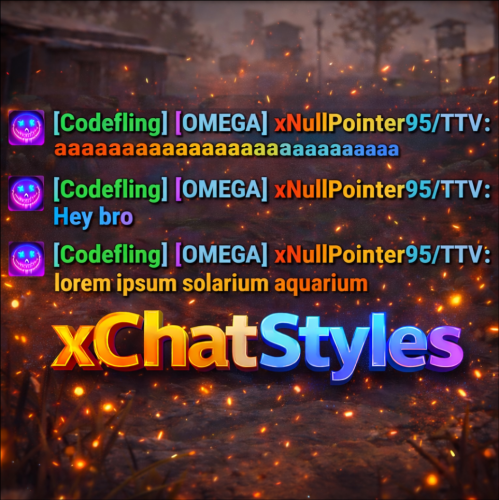
xChatStyles xChatStyles adds smooth gradient colors to player names, prefixes, and chat messages, giving your server a premium, modern look without clutter or spam. It’s clean, readable, and designed to enhance chat - not overpower it. It lets you customize how players appear in chat using animated-looking color gradients. Perfect for VIPs, staff, donators, or special roles. No flashy UI. No complicated setup. Just beautiful chat. Features Gradient Names & Messages Smooth color gradients instead of flat colors, but you can also use a solid color Player names Chat messages Prefixes (VIP, Admin, etc.) Looks great without hurting readability Styled Mentions (@PLAYERNAME) Multiple Prefix Support Players can have more than one prefix Each prefix can have its own color style Great for VIP & Donator Perks Instantly makes VIP ranks feel premium Visual reward without gameplay imbalance Easy to sell as a cosmetic perk Trade System for Prefixes (REQUIRES Economics if you want to use trade feature) Server Friendly No lag or spam Optimized to run smoothly on live servers Works quietly in the background Supports permission-based style, not just permanent chat style. xChatStyles Web Editor Plugin Preview Permissions (Custom Tab) xchatstyles.customtab - Ability to see the "Custom" Tab in /xcs xchatstyles.customprefix - Ability to see and select "Prefix" in "Custom" Tab xchatstyles.custommessagecolor - Ability to see and select "Message" in "Custom" Tab xchatstyles.customusernamecolor - Ability to see and select "Username" in "Custom" Tab Chat Commands (Player) /xcs - Opens the Ui /xcs <PLAYERNAME/STEMAID> - Opens the Ui with the view of the target player and you can remove owned styles from that user. Chat & Console Commands (Admin) /* Add chat styles without permission */ /addprefix <STEAMID> <PREFIXNAME> <#HEX> <#HEX> <#HEX>... /addmessagecolor <STEAMID> <#HEX> <#HEX> <#HEX>... /addusernamecolor <STEAMID> <#HEX> <#HEX> <#HEX>... /addall <STEAMID> <PREFIXNAME> <#HEX> <#HEX> <#HEX>... [This will add a prefix with provided color(s), message style with provided color(s) and username style with provided color(s) with just 1 command.] /* Add chat styles without permission */ /* Add chat styles WITH permission */ /addprefix <xchatstyles.PERMISSIONNAME> <PrefixName> <#HEX> <#HEX> <#HEX> ... /addall <xchatstyles.PERMISSIONNAME> <PrefixName> <#HEX> <#HEX> <#HEX> ... /addmessagecolor <xchatstyles.PERMISSIONNAME> <#HEX> <#HEX> <#HEX> ... /addusernamecolor <xchatstyles.PERMISSIONNAME> <#HEX> <#HEX> <#HEX> ... /* Add chat styles WITH permission */ ---> As long as the player has permission, they can select it with /xcs ---> Automatically removed when permission is revoked ---> Permission-Based ChatStyles has (Permission) indicator in /xcs ---> The permission must start with 'xchatstyles.*'. Example: /addall <xchatstyles.vip> VIP <#HEX> <#HEX> <#HEX> ... /*********************************************************************************************************/ /* Use 1 #HEX Color (Example: #fcba03) for a single color, use multiple #HEX Colors for a color gradient */ /* */ /* Example: /addprefix 76561198412496844 OMEGA #32a852 #71a67f */ /* */ /*********************************************************************************************************/ /removeprefix <steamid> <index|PrefixName> /removemessagecolor <steamid> <index> /removeusernamecolor <steamid> <index> Recommended Plugin for >TIMED< PERMISSION: Config { "MaxPrefixes": 3, "DefaultUsernameColor": "#55aaff", "DefaultMessageColor": "#ffffff", "DefaultSize": 15, "AllowSelectingDuplicatePrefixNames": true, "NotifyOnStyleReceived": true, "PrefixBrackets": "[]", "ShowPrefixBracketsWithSizeTag": true, "Trade": { "AllowTrading": false, "PlayerCanSellPermissionBasedPrefix": false, "UseCurrencySign": true, "CurrencySign": "$", "AnnounceNewPrefixSaleGlobally": true, "AnnouncePrefixPriceUpdateGlobally": true }, "PermissionStyles": {} }$24.99 -

Version 1.1.5
37 downloads
xStackSize xStackSize gives you full control over item stack sizes on your Rust server. Globally and permission-based. Fine-tune your economy, balance progression, or create VIP advantages with flexible and performance-friendly stack management. Whether you want larger stacksize for QoL, custom stacksizes for specific groups/permission, or complete control over your servers stacking system. INFO: xStackSize supports multiple permissions at the same time. If a player has more than one stack permission, the plugin automatically applies the highest stack size based on your configuration. The highest value always wins - whether it's global or permission-based. Example: If global is set to x3 and a permission gives x1, the player will use x3 since it’s higher. (If he has that permission) Features Global stack size control Permission-based StackSizes (VIP / ranks / groups) Custom StackSize per item Custom StackSize for CUSTOM ITEMS Force Split/Merge changed StackSize INSTANT instead of waiting for players to move items manually Blacklist items Easy to configure Performance friendly designed Additionally supports Quarries, Excavator, Furnaces and Conveyors Permission-based StackSizes: You can use any permission name in the config, as long as it starts with xstacksize. Examples: xstacksize.pro, xstacksize.vip, xstacksize.premium etc.. You can create multiple stack-size permissions. Simply copy and paste a new permission block in the config and give it a different permission name. Various Constellations (Examples, for better understanding) Console Command xstacksize.refresh (Useful if you have AutoApplyStackSizeChange set to 'false') Force-applies current stack rules to existing items immediately. It recalculates limits and retroactively normalizes/merges stacks in player inventories and storage containers without requiring item movement. Config (Use value '0' for UNLIMITED) { /* AutoApplyStackSizeChange force splits/merge items instantly instead of waiting for players to move items manually. */ "AutoApplyStackSizeChange": true, "StackSizeMultipliers": { "Weapon": 1.0, "Construction": 1.0, "Items": 1.0, "Resources": 1.0, "Attire": 1.0, "Tool": 1.0, "Medical": 1.0, "Food": 1.0, "Ammunition": 1.0, "Traps": 1.0, "Misc": 1.0, "Component": 1.0, "Electrical": 1.0, "Fun": 1.0, "CustomItems": 1.0 }, /* FixedItemStackSizes are fixed values, not multipliers (Example: 5000) */ "FixedItemStackSizes": { "wood": 0, "stones": 0 }, "PermissionStackSizeMultipliers": { "xstacksize.vip": { "Weapon": 1.0, "Construction": 1.0, "Items": 1.0, "Resources": 1.0, "Attire": 1.0, "Tool": 1.0, "Medical": 1.0, "Food": 1.0, "Ammunition": 1.0, "Traps": 1.0, "Misc": 1.0, "Component": 1.0, "Electrical": 1.0, "Fun": 1.0, "CustomItems": 1.0 } }, "BlacklistedItems": [ "pumpkin" ] }$15.99 -

Version 1.1.1
22 downloads
xAutoCodelock xAutoCodelock enhances the building experience by intelligently automating one of the most repetitive tasks in Rust - managing code locks. By automatically placing, configuring, and securing locks using each player’s personal PIN, the plugin removes friction without altering the core gameplay balance. Players can focus on building, defending, and progressing, while their base security is handled smoothly in the background. Features Automatic Code Lock Placement (Configurable) Automatically places a code lock when players build deployables with lock slots (Door etc.). Toggle if code lock item is required or not Personal Auto PIN System Players set a 4-digit PIN once - All future locks use it automatically. Auto Lock Newly Placed Locks (Configurable) Newly created locks are instantly locked for security. Tool Cupboard Requirement (Configurable) Can require building privilege before automation triggers. Team Access Control (Configurable) Option to allow or require team members to enter codes. Permission based usage (Configurable) Control who can use auto codelock via permissions. Admin Inspect Command Admins can check player PIN status and if player has permission to use xAutoCodelock. Persistent PIN Storage Player PINs saved across restarts. Optional Wipe Reset Automatically clears PIN data on map wipe if enabled. Plugin Preview Player Commands /xpin 1234 → Set your auto PIN /xpin remove → Remove saved PIN /xpin → Show current PIN Admin Command /xpin check <player name or steamid> Permissions xautocodelock.use - Required to use '/xpin' command xautocodelock.admin - Required for the '/xpin check' command Config { "CommandSetPin": "xpin", "RequirePermission": true, "PermissionUse": "xautocodelock.use", "PermissionAdminInspect": "xautocodelock.admin", "AutoLockNewCodeLocks": true, "AutoPlaceCodeLocks": true, "AutoGenerateCodeIfNotSet": true, "RequireCodelockItem": true, "RequireToolCupboard": true, "RequireCodeForTeamMembers": true, "ResetDataOnWipe": false } Language { "NoPermission": "You don't have permission to use this command.", "CommandUsage": "Usage: /{0} 1234 or /{0} remove\n» Current PIN: {1}", "PinNotSet": "NOT SET", "PinRemoved": "Auto PIN removed.\n» New code locks will no longer be configured automatically.", "NoSavedPin": "You don't have a saved auto PIN.", "NoSavedPinAutoGenerateDisabled": "You don't have a saved auto PIN.\n» Set one with /{0} 1234.", "InvalidPin": "PIN must be exactly 4 digits (0000 - 9999).", "PinSet": "Auto PIN set.\n» Newly placed code locks will be automatically locked with your PIN.", "PinAutoGenerated": "No auto PIN was set, so one was generated for you: {0}\n» Use /{1} <pin> to change it.", "InspectUsage": "Usage: /{0} check <player name or steamid>", "InspectPlayerNotFound": "Player not found: {0}", "InspectMultiplePlayers": "Multiple players matched: {0}. Use full name or SteamID.", "InspectSummary": "Inspect: {0} ({1})\nSaved PIN: {2}\nHasPermission: {3}" }$12.99 -

Version 1.0.0
3 downloads
xRespawnProtection gives players a short safe moment right after they got killed. They cannot be damaged by other players for a few seconds (depending on config) after coming back to life. The goal is to prevent instant spawn-kills and make respawning feel fairer. Permission xrespawnprotection.use - Players with this permission get the respawn protection timer. Config { "ProtectionSeconds": 5.0 }$5.00 -
Version 1.0.1
7 downloads
This is a complete pack with loot table, stacksizes, gathering, crafting time, smelt configs and data files. choose your own plugins and don’t bother setting up the basics! Save yourself the headache of manual balancing! Setting up a high-quality 2x server takes hours of fine-tuning. If the loot is too good, the wipe ends in a day. If the stacks are too small, players get frustrated. This bundle provides the perfect "Vanilla+" core for your Rust server, with everything synced to work together perfectly. This is a Plug & Play solution. No need to spend days editing JSON files – I’ve done the hard work for you. What’s included in this bundle? Custom BetterLoot v4 Config & Data: A completely overhauled loot table. No junk, balanced progression, and optimized for a 2x environment. Perfected Gather Rates: 2x resources for wood, stone, metal, and sulfur, including pickups (hemp, berries, etc.) and quarries. Synced Stack Sizes: Stack sizes are increased to match the 2x gather rate, ensuring a smooth inventory experience for your players. Optimized QuickSmelt: Smelting speeds are adjusted to keep up with the faster resource gain (including electric furnance which alot of servers have problem with). Half-Craft Configuration: 50% faster crafting times to maintain a great server tempo. Why choose this bundle? Time Saver: Skip days of configuration and testing. Balanced Progression: Not too fast, not too slow—just the right 2x feel. Performance Friendly: Clean configs that won't lag your server. Tried & Tested: This setup is currently running on live servers with great player feedback. This configuration is backed by consistent positive feedback and has been refined to ensure a stable, bug-free experience. Quality and reliability are my top priorities. Loot table video :$13.98 -
Version 2024.5.2.1658
321 downloads
SAVE 13% WHEN BUYING THE BUNDLE NOW SUPPORTING PROCGEN AND CUSTOM URL BASED MAPS ! This plugin will allow you to setup automatic server wipes without requiring external scripts. This plugin is very useful for any server owner but I'm positive that it will be really useful for those hosting providers running panel based game instances where you do not have full access to customize the server or the provided wipe tool is very limited. You should have a look at the suggested plugins for Oxidation's Scheduler which is a perfect fit for a fully in-game automatic wipe process. The plugin also allows you to set a list of seeds that will be used at server wipe to select the new map seed. You can define as many different wipe types as you'd like on the config file like so: This example is for a "forced" wipe. In order to execute the wipe type on the rcon console "wipe forced". "Forced": { "Restart": 120, "Message": "A server wipe is being executed, we'll be back shortly", "Game": { "Blueprints": true, "Logs": true, "Map": true, "PlayerDeaths": true, "PlayerIdentities": true, "PlayerStates": true, "PlayerTokens": true }, "Plugins": { "Convalence": true, "Data": true, "Groups": true, "Language": true, "Logs": true, "Users": true }, "Files": [ "my/custom/path/this_file_will_be_deleted.json" ], "Blacklist": [ "carbon/data/this_file_will_never_be_deleted.json" ] } This example is for a "weekly" wipe. In order to execute the wipe type on the rcon console "wipe weekly". "Weekly": { "Restart": 120, "Message": "A server wipe is being executed, we'll be back shortly", "Game": { "Blueprints": false, "Logs": true, "Map": true, "PlayerDeaths": true, "PlayerIdentities": false, "PlayerStates": true, "PlayerTokens": false }, "Plugins": { "Convalence": false, "Data": true, "Groups": false, "Language": true, "Logs": true, "Users": false }, "Files": [ "my/custom/path/this_file_will_be_deleted.json" ], "Blacklist": [ "carbon/data/this_file_will_never_be_deleted.json" ] } This is a standalone Harmony patch, Oxide installation is optional. Copy the Oxidation.Wiper.X.dll file into your HarmonyMods folder and restart your server. At the first server start after installing the patch a new configuration file Oxidation.Wiper.json will be created at the HarmonyMods folder. What is Harmony ? Harmony is a library for patching .NET code during runtime, it directly manipulates game code (CIL) without any additional abstraction layer such as Oxide. The direct patching of the game's byte code allows more performant modding as developers no longer need to rely on third party code, events or hooks to build custom functionality.$4.99 -

Version 1.1.0
93 downloads
xPermissionManager A modern, intuitive, and powerful permission management tool for Rust servers. xPermissionManager provides a complete visual interface for managing user and group permissions directly ingame. No more console commands, guesswork, or digging through permission lists. Everything is organized, accessible, and easy to control through an straight forward UI. Whether you're adjusting a single permission, overseeing full group structures, or assigning temporary access, xPermissionManager gives server owners a fast and efficient possibility to do so. Plugin Preview (Video) Full Permission Control Grant or revoke any permission from groups or individual players. Timed Permission System Assign temporary permissions that automatically expire (e.g., 30m, 1h, 1d, 1w, custom durations). Timed Group Memberships Add players to groups for a limited time - Perfect for kits, VIP, special events or whatever. Comprehensive UI A clean and intuitive interface for browsing permissions, switching groups, managing users, and applying timed access. User & Group Browsing View all available groups, check individual player permissions, and toggle them instantly. Clear Feedback Every change is acknowledged with clear messages to help admins avoid mistakes. Permission xpermissionmanager.use // Allows a player to open and use the xPermissionManager UI Chat Commands /xpm /xpmuser <name or steamID> /xpmtimed /xpmgroups /xpm [Opens the Permission Manager UI] PERMISSION OR ADMIN REQUIRED /xpmuser <name or steamID> [Opens the UI for managing a specific player’s permissions/groups] PERMISSION OR ADMIN REQUIRED /xpmtimed [Shows all active timed permissions for a player. Includes remaining duration and whether they came from a group] /xpmgroups [Shows all active timed group memberships for a player] Console Commands </> API$11.99- 1 review
-
- 3
-

-
-
- #permission
- #manager
- (and 20 more)
-
Version 2.1.9
262 downloads
The plugin adds the ability to install a mining farm on your server. Features There is a full drop setting. Set the minimum charge and the desired frequency(for more information, see the configuration) It is possible to connect any economy Command to get all components for the farm: /getfarm-available only to the administrator Added the givefarm console command(for issuing components via the store). Example: givefarm Name/steamid battery/light/broadcast. The plugin was tested on 2 servers, no problems were found. All bugs will be fixed as they are found. I will also be happy to hear your suggestions for improving the plugin.$15.00 -

Version 2.0.1
1,413 downloads
Introducing Total Control – The Ultimate Rust Server Admin Tool Total Control is a powerful full GUI admin plugin for Rust servers. Whether you run hardcore PvP or relaxed PvE, Total Control gives you complete live control over every major system directly in-game, with zero config files or reloading after changes. Dynamic Schedule System: •Plan your entire wipe and let the plugin do the work for you. •Create up to 5 scheduled sets (plus the default) Automatically change gather rates, stack sizes, smelting, rewards, PvE/PvP mode, raid protection, and more at exact dates and times. •Use real-world time or server time. •Enable only the pages you want for each set everything else stays on your default settings. •Run your server exactly how you want. Gather Rates & Stack Sizes: •Full control over every item (ore, plants, crates, quarries, excavator, etc.) Quick multiplier buttons or type exact values. •Category multipliers with individual item overrides. •Add or remove any item instantly with chat commands. Smelting & Cooking: •Adjust speed, charcoal output, fuel usage, and resource output for every furnace type. •Full control over the Mixing Table and Cooking Workbench. Rewards System: •Reward players for gathering, killing animals/NPCs/players, destroying barrels, emptying crates, Bradley/Heli loot, and playtime. •Support for Scrap, Economics, and ServerRewards (use any or all three) Optional UI Notify integration with custom message styles. Settings Page: •Auto or voted night skip. Time freeze, custom day/night lengths, and server date. •PvE/PvP mode switching (manual or timed). •Full raid protection (manual or timed). •Offline raid protection (with adjustable cooldown timer). •Option to disable shotgun traps, flame turrets, auto turrets, and SAM sites. Any admin with the correct permission can open the Total Control GUI with /tc and modify everything, without requiring data file access or plugin reload. Ideal for administrators worldwide. Permissions & Commands: Permission: TotalControl.OpenGui Chat Commands: /tc Open the GUI /addgather <shortname> /removegather <shortname> Add/Remove items to GatherRates page. /addstack <shortname> /removestack <shortname> Add/Remove items to StackSize page. /addreward <shortname or prefab> /removereward <shortname or prefab> Add/Remove items to Rewards page. (Shortnames list: https://www.corrosionhour.com/rust-item-list) Join the Community Stay up to date, get support, make suggestions, report bugs, or promote your server. https://discord.gg/AkwHUs8Qma$29.99 -
.thumb.gif.931694ee6af9534dc6d23b0aec6390f5.gif)
Version 2.2.2
328 downloads
Auto Ban / Report Ban – Premium Edition AutoBan Enhanced is the ultimate plugin for Rust server administrators who want to keep their community safe, fair, and fun. This premium edition builds on the original AutoBan system with new advanced moderation tools, smarter automation, and seamless integrations with Discord. Key Features Automatic Weighted Banning Players are automatically banned once they reach a configurable number of weighted reports. Trusted players, moderators, or admins can have higher report weights for faster action. Playtime Requirement (NEW) Players must have a minimum amount of playtime (configurable, default 2h) before submitting reports, preventing abuse from fresh accounts. Mass Reporting Protection Includes cooldowns, per-hour limits, and unique report tracking to prevent abuse of the reporting system. Full F7 Integration Captures and processes in-game reports (F7), with optional keyword scanning for valid reasons. Player-Friendly Reporting System Players can submit reports via chat commands or a guided reason menu for consistency. Customizable Ban Durations Supports human-readable ban times like 30m, 4h, 7d, or permanent. Ban History & Report Logs New commands to view report history and a structured audit log of admin actions. Progressive Punishments (optional) Configure warnings, mutes, or bans at different thresholds. Discord Integration with Embeds Sends clean, embedded messages for reports and bans, including player info, reasons, timestamps, and expiration. Ignored Players & Permissions Protect admins and whitelisted users from automated bans. Export & Data Storage Export reports to JSON for external review or backups. Granular Permissions Fine-grained control over who can report, view, ban, unban, reset, or audit. Usage: Chat Commands /report <username> – start a report (shows menu if no reason given). /report <username> <reason> – report with reason directly. /reportreason <number> – pick a reason from the menu. /AB.viewreports – view all current reports (requires permission). /AB.history <userid> – view detailed history of a player’s reports. /AB.auditlog [N] – view last N admin/audit actions. /AB.showbans – view all bans. /AB.unban <userid> – unban a player. /AB.resetreports <userid> – reset reports for a player. /AB.exportreports – export reports to a JSON datastore. 🛠 Console Commands AB.getreports – list all reports in console. AB.getbans – list all bans in console. AB.resetreportsConsole <userid> – reset reports via console. AB.ban <userid> <reason> – manually ban a player. AB.unban <userid> – manually unban a player. Oxide / Carbon Permissions AutoBan.report – allow reporting via F7. AutoBan.chatreport – allow reporting via chat. AutoBan.viewreports – view all reports. AutoBan.ignore – player immune to auto-bans. AutoBan.ban – manually ban players. AutoBan.unban – manually unban players. AutoBan.viewbans – view all bans. AutoBan.resetreports – reset player reports. AutoBan.trusted – weighted reporter (e.g., counts x2). AutoBan.mod – stronger weighted reporter (e.g., counts x3). Example Config { "Max reports till user gets banned (weighted)": 5, "Reason given to banned user": "You have been reported too many times and have been banned for precautionary measures. An admin will review this suspension soon.", "Valid reasons": ["cheating", "aimbot", "hacking", "esp", "teaming", "racism", "griefing", "walling", "doorcamping", "spawn killing"], "Valid report types": ["cheat", "abusive", "name", "spam"], "Scan type of F7 reports": true, "Broadcast ban to chat": true, "Ignored Players": { "76561198000000000": "Admin" }, "Timer for broadcasting bans to admins and console": 820, "Send bans to users with the AutoBan.viewbans permission": false, "Send reports to URL": false, "URL to send reports to": "http://example.com", "Send reports to Discord": true, "Send bans to Discord": true, "Discord Reports Webhook URL": "http://example.com/reports", "Discord Bans Webhook URL": "http://example.com/bans", "Ban Duration": "72h", "Max reports a player can submit per hour": 3, "Max reports a player can receive per hour": 5, "Cooldown between reports from the same player in minutes": 10, "Weighted report permissions": { "AutoBan.trusted": 2,"AutoBan.mod": 3 }, "Use Discord embeds for webhooks": true, "Max lines per chat response to avoid spam": 8, "Minimum playtime (in minutes) required to file a report": 120 } With AutoBan Enhanced, you get automated moderation, better transparency, and flexible punishment systems, freeing up admins to focus on building community instead of fighting cheaters.$25.00 -

Version 1.0.0
7 downloads
Plugin Config Tested and used for several years on our Servers! Working flawlessly! WHAT THIS CONFIG DOES: A fully optimized TruePVE setup that removes player damage, protects bases, and delivers a clean, balanced PvE experience. FEATURES: • Pure PvE System No player damage — fully enforced PvE • Smart NPC & Heli Damage NPCs & events still deal damage for real gameplay • Anti-Raid Codelock Protection Only authorized players can access bases & loot • Entity-Based Rule System Fine-tuned control over vehicles, traps, NPCs & more • Anti-Grief Protection Blocks unwanted damage, hostile flags, and exploits • Optimized & Ready Clean, tested, plug-and-play setup WHY USE THIS? Most configs are messy or abusable. This is: BALANCED OPTIMIZED READY FOR LIVE SERVERS PLUG & PLAY. ZERO SETUP. MAX PERFORMANCE.$4.99 -
Version 4.3.6
15,915 downloads
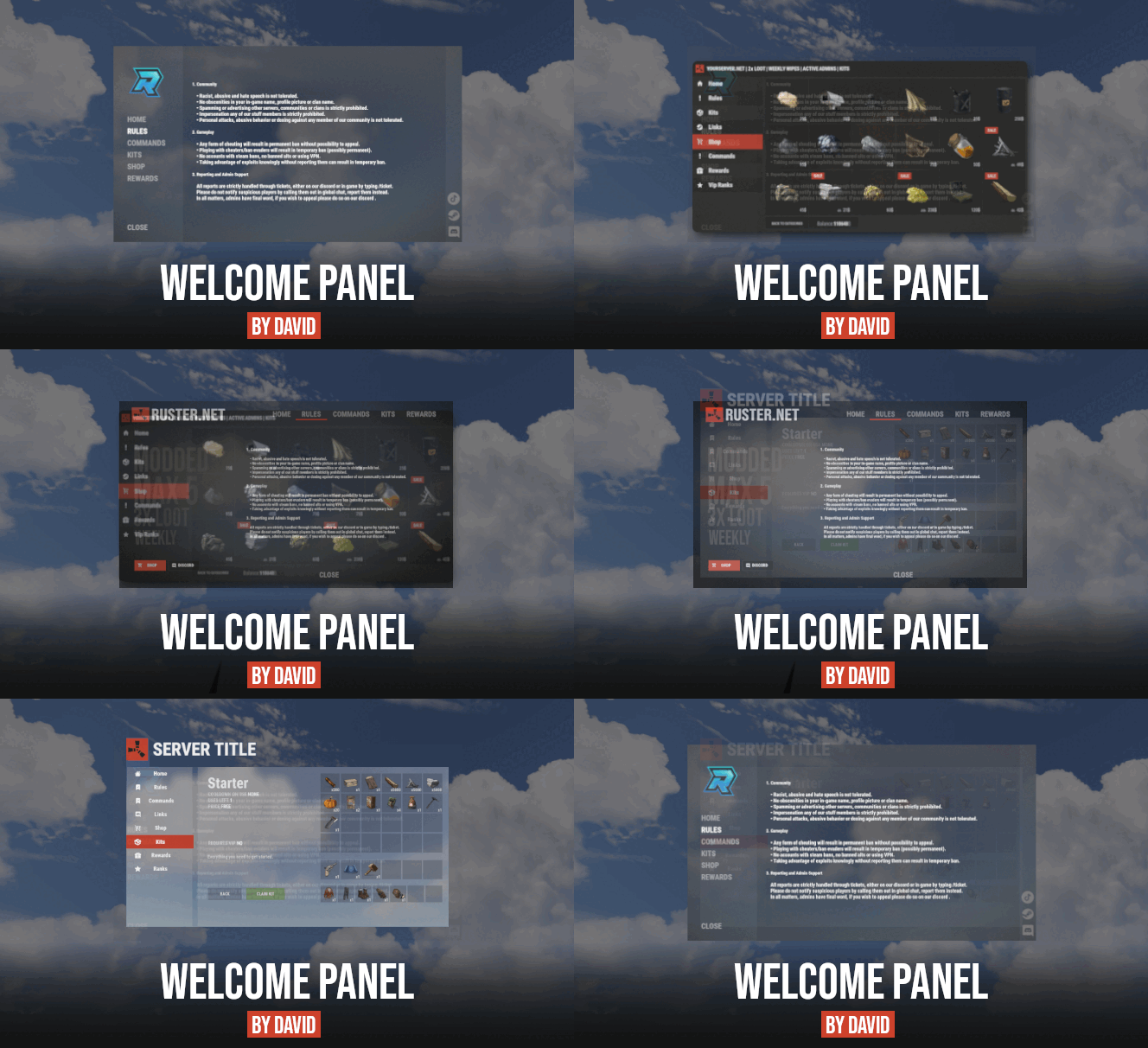
Site In case you having issues with plugin feel free to open support ticket on site here. I will usually respond within 24 hours not including weekends. Discord I'm also available at my discord server where I provide support for my customers. You can also find small community here and get answers for your questions. Invite link here. Documentation To find out what can be customized within config file please refer to full plugin documentation here. Any questions prior to purchasing forward into DM here or into ticket at my discord. Default configs available as template with plugin. Screenshots bellow showcasing configurations created by customers. These are not available with the plugin but I decided to post them here since it's good demonstration of how customizable this plugin is. BOOBLEJ Tide Neighigh Paul Leunal17 BOOBLEJ How to start using plugin? Simply drop WelcomePanelLite.cs file into your plugin folder. After successfully loading plugin you can use default command /info in game. Configuration is handled in config file (oxide/config/WelcomePanelLite.json). How hard is to get this plugin all set up? It's fairly simple. Plugin comes with default configuration which showcases everything you need to know regarding text, styling and changing images. How hard it is to customize your own layout? When it comes to changing color or images it's simple, any inexperienced user can do it however if you want to customize positions of UI or add extra tab buttons, it requires understanding of "ui anchors". Anchors are not that complicated but it takes hour or two to fully understand it. For more info check documentation. Can I add multiple pages into WelcomePanel? Yes, you can add unlimited amount of pages. Can I add images into WelcomePanel? Yes, you can add image to any panel and you can set background for each tab What image sizes I should use? This is different for each panel across different templates. Basically images parented to any panel are stretched to its size. Best approach is to take screenshot of the panel and try to fit image size into that prior to uploading it. How to add addons? Each text tab has addon option at bottom, just type in plugin name. List of available addons can be found at the top of the plugin description, listed as "Works with".$16.99 -

Version 1.0.0
1 download
xWipeRaidProtection Protect your players hard work with this simple and reliable raid protection plugin. This plugin is designed to prevent players from losing everything during wipe periods or unfair raid situations. It helps create a more balanced and enjoyable experience by giving players peace of mind that their bases and items are safer. With easy setup and automatic protection features, server owners dont need to worry about complicated configurations. Once installed, the plugin works quietly in the background to reduce frustration, encourage fair gameplay, and keep your community happy. No datafile - Countdown Time is depending on creation time of new save file (after wipe). Config { "ProtectionHours": 1.0, "AllowLadderPlacement": false, "ProtectionOverMessage": "<color=#55ff88>Global Raid protection is over, happy raiding!</color>", "BlockedDamageMessage": "<color=#ff6b6b>Global Raid protection is active\n</color>» You must wait <color=#ffd166>{0}</color> before damaging bases.", "BlockedLadderMessage": "<color=#ff6b6b>Global Raid protection is active\n</color>» You must wait <color=#ffd166>{0}</color> before placing ladders." }$15.99 -
.thumb.png.45dcc24e7014d186d7d1a360402feebf.png)
Version 1.0.3
368 downloads
About 2x Server Setup (Full & Complete 2x Server) This 2x Server allows you to get your rust server up and running quickly and easily without the hassle. Hassle free setup: Installing can take as little as 5 minutes. Eliminating the countless frustrating days it takes to setup a server. Balanced setup: All loot tables are perfectly balanced to enhance gameplay for all players on your server. Teleportation: Players can teleport to anyone with a simple command as long as they are not combat or raid blocked. Blocked Teleportation: Players who are combat / raid blocked will not be able to teleport or trade for a set period of time. Rust Skins: Players will get access to all rust skins when using the /s command. (If you do not own skinbox you can uses skins from UMOD for free!) Admin Tools: Users with admin permissions will be able to vanish and moderate other players. And so much more features below! What's included? - Better chat config -Trading - Better Loot config - Automated events - Automatic Authorization - Fancy Drop config - Furnace Splitter - 2x Quick Smelt - 2x Gather Manager - Image Library - No escape config - NTeleportation config - Custom Recycler Speeds - Stack Size modifications - Always in stock vending machines. - Welcome Panel + UI Addons (CONFIG) - Skin Box (CONFIG) - Clans Reborn (CONFIG) Not all plugins have to be used. You can also modify all of the plugins to your exact liking if you wish to change anything. All of the items above are already modified for a 3x server.$5.19- 16 comments
- 3 reviews
-
- 1
-
-
- #2x
- #easysetup
- (and 6 more)
-
Version 1.1.0
413 downloads
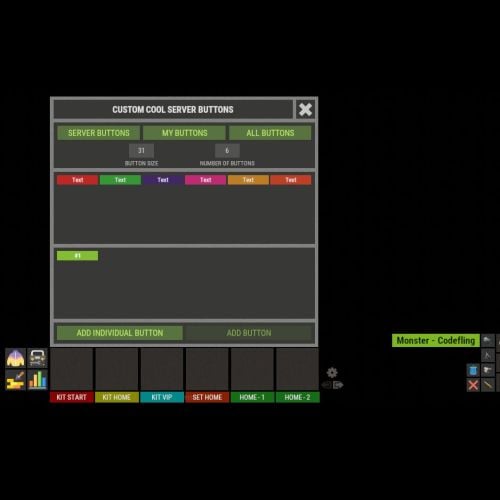
XFastButtons - custom buttons for your server. - Optimization of the interface for different monitor resolutions. - Storing player data in - oxide/data/XDataSystem/XFastButtons - There is a lang ru/en/uk/es. - Sound effects when interacting with the menu. - Various settings for buttons. [ Font, Text, Command, Image, Color, Size, Coordinates, Parent Layer ] - A handy list of buttons under the slots. - Easy and fast selection of coordinates. [ AnchorMin, AnchorMax, OffsetMin, OffsetMax ] - Customize the list of server images. [ For server logo, etc. ]. - Customize the image list. [ For button creation by the player. ]. - Customize the list of button colors. [ For button creation by the player. ]. - The player can hide server/my buttons using the settings menu. - The player can create his own buttons and place them on the screen as he wishes. - Ability to limit the number of buttons created by a player. - Ability to create buttons with commands (chat and console) that have multiple arguments. [ /kit vip, /home 1, /sethome 1 - etc. ] - Ability to edit already created buttons. - Ability to delete created buttons. - Ability to undo changes. [ Convenient preview while editing/creating a button. ]. - Ability to create any number of server(admin) buttons by permissions. - Ability to hide/show buttons when the player interacts with containers or mounted prefabs(chair, transport, etc.) [ Configure in config. ]. - A button can execute multiple commands in sequence. Use the "|" separator. [ chat.say /kit|chat.say /report ] - Placeholders for commands: %ID% --> Player SteamID. %POS% --> Player coordinates. - By default, the plugin has a few customized buttons, a list of images, and a list of colors. Permissions xfastbuttons.settings - access to basic settings. xfastbuttons.use - access to create/edit/delete buttons. [ Regular players cannot create/edit/delete server(admin) buttons in any way! ] Config { "General setting": { "Maximum number of buttons a player can create": 6, "Maximum number of individual buttons a player can create": 5, "List of containers - buttons will react to open/close container. [ Leave the list empty to extend this to all containers. Or set null to disable this feature. ]": null, "List of mountable prefabs (chair, transport, etc) - buttons will react to interaction with the prefab. [ Leave the list empty to apply this to all prefabs. Or set null to disable this feature. ]": [ ......... ], "List of server buttons - [ You can only configure parameters - Text, Command, Color, Font ]": [ ......... ], "List of server buttons by permissions - [ You can only configure parameters - Text, Command, Color, Font ]": { ......... }, "List of individual server buttons - [ You can configure all parameters ]": [ ......... ], "List of individual server buttons by permissions - [ You can configure all parameters ]": { ......... } }, "GUI setting": { "Color_background_1": "0.517 0.521 0.509 1", "Color_background_2": "0.217 0.221 0.209 1", "Close button (icon) color": "1 1 1 0.75", "Server image list - [ These images are not available to players ]": { ......... }, "Image list - [ These images are available for players to select ]": { ......... }, "List of button colors": [ ......... ] } }$18.99 -

Version 2.4.2
179 downloads
Extra Fishing V2 Transform vanilla fishing into a rich, progression-based gameplay pillar with 300+ custom fish species, drifting school-of-fish encounters, aquaculture breeding, fish finders, economy integration, a beautiful animated fish encyclopedia, and fully fish traps. ExtraFishing turns one of Rust's most ignored activities into a deep, rewarding system your players will actually want to engage with. Every catch matters: size, weight, rarity, biome, time of day, water depth, rod tier, school proximity, and aquaculture breeding all influence what ends up on the line. DEPENDENCIES Required: ImageLibrary — For all custom fish icons and UI background images. ExtraFishing will not display images without it. Optional: Economics — Enables Economics as a currency backend in the sell UI. ServerRewards — Enables ServerRewards as a currency backend. Zone Manager — This is required when using a floating UI. If you use only Scrap or a Custom item as currency, no optional plugins are needed. Added 300+ Fish • You'll be able to catch 300 different types of fish. The types of fish you can catch will vary depending on the biome. • Fully configurable fish catalog with custom names, skin IDs, growth formulas, min/max sizes, rarities (Star 1 to Star 5), biome restrictions, descriptions, and processed-item yields. • Each species uses a real weight formula: Weight (kg) = Growth_A * Size^Growth_B / 1000 so bigger fish really do weigh proportionally more. This is what drives the per-species weight rankings. • Fish are linked to vanilla bait items (anchovy, sardine, catfish, herring, salmon, orangeroughy, smallshark, troutsmall, yellowperch) for seamless compatibility with vanilla fishing mechanics. School of Fish System • Dynamic, drifting schools spawn and migrate across the ocean in real time. • Schools provide massive bonuses while players fish inside them: - Fish size multiplier (default 2.0x) - Rarity bonus (default +100) - Hook speed bonus (default 70% faster catch time) • Visual burst effects trigger in bursts when players hook a fish inside a school — great immersive feedback. • Peak time schools spawn in shallower water (1–5m) to reward morning/evening fishing. Off-peak schools stay in deeper water (30–50m). • Per-school catch limit forces the school to migrate elsewhere after X catches, keeping players exploring and preventing AFK camping. • Fully configurable: max schools, radius range, drift speed, direction change intervals, catch limit, update rate, effect tick settings. Fish Finder Device • Custom Geiger-counter-based handheld detector with a live radar-style UI showing distance and bearing to the nearest active school. • Configurable: - Max detection range (default 100m) - Beep interval, UI update interval, UI size - Durability drain per interval - Background image and overlay image stack - Require specific skinned item vs. allow any Geiger counter Tiered Fishing Rods • Define any number of rod tiers keyed by SkinId. Each rod tier configures: - ChanceBonus: adds to catch chance for rarer fish - FishSizeMultiplier: multiplier applied to caught fish size • Default tiers included: Low / Mid / High Quality Rod. • Players progress by upgrading their rod — directly tied to bigger, rarer fish and higher-value catches. Tiered Fish Traps • Define any number of fish trap tiers keyed by SkinId, each with: - ChanceBonus for rarer fish - FishSizeMultiplier - CatchMinnowEnabled toggle + Min/Max minnow per catch - StorageSlots (override vanilla slot count) - MaxHealth (override trap durability) • Default tiers included: Low / Mid / High Quality Fish Trap. Aquaculture / Fish Breeding • Deployable custom fish cages (Large Fish Cage, Small Fish Cage) that breed fish over time when fed bait. • Each cage type configures: - Breeding interval min/max (in minutes) - Box slot count (storage size) - Fish size multiplier for bred fish • Built-in breeding progress UI with feed reminders, empty state, box-full warning, and an in-game guide overlay. • Custom raft-based platforms for building floating fish farms: - Square Raft 3x3 / 5x5 / 10x10 - Hexagonal Raft 1 / 3 / 5 • Configurable aquaculture settings: replacement/box health, effect duration, effect tick interval, rarity multiplier for bred fish. Depth-Based Fishing • Fish size scales with water depth across 4 configurable tiers. Default: - Tier 1 (0.0 – 4.9m): 1.0x - Tier 2 (5.0 – 39.9m): 1.1x - Tier 3 (40.0 – 49.8m): 1.2x - Tier 4 (49.9 – 999.9m):1.3x • Encourages boat exploration and offshore deep-sea fishing. • Fully toggleable via config. Peak Time System • Morning (default 4:00 – 7:00) and Evening (default 18:00 – 21:00) peak windows apply a global chance bonus (default +50) for rarer fish. • During peak time, additional fish schools spawn in shallow water so players can easily reach them. • All four values are configurable: MorningStart, MorningEnd, EveningStart, EveningEnd, PeakTimeChanceBonus. Fish Records & Server Rankings • Every player's personal best Size and Weight per fish species is tracked automatically and persisted across wipes (unless you wipe the data file). • Comprehensive in-game fish encyclopedia UI (/fish command): - Search bar with live filtering - Rarity filter (All / Star 1 – Star 5) - Biome filter (All / Arid / Temperate / Tundra / Arctic / Jungle) - "Caught" mark displayed on species the player has already landed - Per-fish detail page with description, your personal record, and **Server Top 3 by Size** + **Server Top 3 by Weight** leaderboards • Optional Hide-Uncaught-Fish mode (HideUncaughtFish config toggle): - Uncaught species are shown as "?????" with blacked-out icons - Detail page is blocked both client-side (no clickable button) and server-side (command rejected) — no way to sneak past the lock - Search bar is spoiler-safe: real fish names do NOT match uncaught species when the search filter is used, so players cannot reveal hidden fish by typing guesses Fish Sell UI & Economy Integration • Built-in fish selling interface with live balance display. • Supports four currency backends: - Scrap (vanilla item, no dependencies) - Economics (optional plugin) - ServerRewards (optional plugin) - Custom: any shortname + skin + display name as your server's currency item • Per-rarity price multipliers (Star 1 through Star 5) + global base price multiplier for easy tuning. • Sell individual fish stacks or use Sell All for bulk liquidation. • Fish exchange via vending machines can be blocked to prevent trivial economy exploits. • Prices scale with fish rarity, base stack value, and base price multiplier — everything is in the config. Processed Fish Items (Custom Food / Resources / Buffs) • When cooked or processed, fish yield custom items with configurable skin IDs and display names. Example default items: Sulfur Fish yields sulfur, Wood Fish yields wood, Metal Fish yields metal fragments, Stones Fish yields stones, Bone Fish yields bone fragments, Crude Oil Fish yields crude oil, and many more. • Per-processed-item effects when consumed: - Instant Health - Health over Time - Calories - Hydration - Poison reduction - Bleeding reduction - Radiation reduction • **Full tea-buff system** — every vanilla tea modifier can be applied per processed fish with custom value and duration: Wood Yield, Ore Yield, Scrap Yield, Max Health, Move Speed, Harvesting, Fishing Boost, Farming (Better Genes), Comfort, Clotting, Warming, Cooling, Hunter Vision, Metabolism, Crafting Quality, Radiation Resistance, Horse Gallop Speed. • Turn fishing into a viable alternative to vanilla farming and gathering. Other QOL Features • Floating UI — Implemented a floating UI that displays status without accessing fish cages or fish traps as a new technology feature test. ZoneManager is required to use this feature. It may also cause performance degradation. • Tension-break calorie penalty — failed casts cost extra calories (configurable via CaloriesPerTensionBreak). • Normal fishing calorie cost per cast (CaloriesPerFishing). • Added a setting to obtain (pickup) worms and grubs when gathering resources. • Fish stack limit toggle: - Enabled: each unique fish (size+weight) is its own item with the full name tag - Disabled: fish stack vanilla-style with a base-value table per vanilla shortname • Biome check toggle — restrict fish species to specific biomes or open them up everywhere. extrafishing.records Required to use the /fish encyclopedia and records UI. Grant to all players who should be able to see the fish catalog, filters, personal records, and server rankings. extrafishing.sell Required to use the in-game fish selling UI. Grant to players who should be able to sell fish for your chosen currency (Scrap / Economics / ServerRewards / Custom item). All admin-only commands (/extrafishing, /givefish, /efgive, /chkbiome, /chkdepth, /chktpo, /chkschool, /fishbuff, clearfishdata) require the vanilla Admin or Developer flag — no permission needed. ◆ Player Command /fish Opens the main fish encyclopedia and records UI. Shows all fish species with filters (search, rarity, biome), caught marks, and per-species detail pages including personal and server records. Requires the extrafishing.records permission. ◆ ADMIN ONLY COMMAND /extrafishing Gives you one of every configured item in a single command: - Every fishing rod tier (by SkinId from config) - Every fish trap tier (by SkinId from config) - Both fish cages (Large + Small) - Every raft platform (Square 3x3/5x5/10x10, Hex 1/3/5) - Fish Finder - 10 of every processed fish item with effects configured Perfect for quick testing or outfitting admin accounts. /givefish "Fish Name" Spawns one fish of the specified species by its display Name (case insensitive, quoted if it contains spaces). The item is tagged with a random size/weight from the fish's config range. Example: /givefish "Sulfur Fish" /efgive <SteamID|Name> <Item> Gives a specific named item to any player. See the full item list below. /fishbuff <player> <percent> <minutes> Grants a fishing luck buff to the specified player for the specified duration. Increases chance of rarer fish. ◆ Console Commands (Server Console / RCON) clearfishdata Wipes all player fishing records from memory and disk. Admin only. Use with caution — this cannot be undone. fishbuff <steamid> <percent> <minutes> RCON-friendly version of the chat fishbuff command. efgive <SteamID|Name> <Item> RCON-friendly version of the /efgive chat command. See item list below. ◆ Command : efgive ITEM LIST — ALL PATTERNS Usage: /efgive <SteamID or Name> <Item> efgive <SteamID or Name> <Item> (console / RCON) The <Item> argument is matched case-insensitively. Names with spaces do NOT need quotes — the command joins all remaining arguments as the item name. These items can also be added to the shop. Please see below.(Please set a custom name, item abbreviation, and skin ID.) All 15 patterns: FISHING RODS (3 tiers) Low Quality Rod Item Short Name: fishingrod.handmade SkinId: 3683450483 The entry-level tier. Small ChanceBonus and a modest FishSizeMultiplier (defaults 0.5x). Players start with this. Mid Quality Rod Item Short Name: fishingrod.handmade SkinId: 3683450683 Mid-tier rod. Better ChanceBonus and FishSizeMultiplier than Low Quality. Default multiplier 0.6x. High Quality Rod Item Short Name: fishingrod.handmade SkinId: 3683450793 Top-tier rod. Highest ChanceBonus and FishSizeMultiplier (default 0.8x). Meant as an endgame / shop reward. FISH TRAPS (3 tiers) Low Quality Fish Trap Item Short Name: fishtrap.small SkinId: 3683441661 Basic automated fish trap. Unlike vanilla traps, ExtraFishing traps work offline and without a nearby player. Low ChanceBonus, small storage, low MaxHealth. Mid Quality Fish Trap Item Short Name: fishtrap.small SkinId: 3683441772 Upgraded trap. Better chance bonus, larger storage, more durability. High Quality Fish Trap Item Short Name: fishtrap.small SkinId: 3683441864 Top-tier trap with the highest ChanceBonus, largest storage slot count, and highest MaxHealth. SQUARE RAFT PLATFORMS (3 sizes) Square Raft 3x3 Item Short Name: boatbuildingstation SkinId: 3691488275 The smallest square raft platform. Used as a base for building small floating fish farms and bases on water. Square Raft 5x5 Item Short Name: boatbuildingstation SkinId: 3691488429 Medium square raft. Plenty of room for fish cages plus storage / crafting. Square Raft 10x10 Item Short Name: boatbuildingstation SkinId: 3691488598 Large square raft. Flagship fishing base platform — fit multiple cages, workbenches, sleeping area, and defenses. HEXAGONAL RAFT PLATFORMS (3 sizes) Hexagonal Raft 1 Item Short Name: boatbuildingstation SkinId: 3691577294 Small single-hex raft platform. Compact, efficient footprint. Hexagonal Raft 3 Item Short Name: boatbuildingstation SkinId: 3691577405 Medium hex raft built from 3 hexagonal cells. Aesthetic alternative to square rafts. Hexagonal Raft 5 Item Short Name: boatbuildingstation SkinId: 3691577502 Large hex raft built from 5 hexagonal cells. Comparable in area to a Square Raft 5x5 but with honeycomb geometry. FISH CAGES (2 tiers) Large Fish Cage Item Short Name: boatbuildingstation SkinId: 3691368539 The large aquaculture cage. Default 30 box slots, 2.0x fish size multiplier for bred fish, faster breeding interval (3–5 min). Deploy on a raft platform and feed it bait to breed rare fish. Small Fish Cage Item Short Name: boatbuildingstation SkinId: 3691368364 Compact cage. Default 18 box slots, 1.5x fish size multiplier, slightly slower breeding interval (4–6 min). Cheaper, earlier-tier option. FISH FINDER Fish Finder Item Short Name: geiger.counter SkinId: 3696334992 Handheld radar-style fish finder. Shows distance and direction to the nearest active fish school on a live UI overlay. Drains durability over time and beeps periodically. Configurable max detection range (default 100m), durability drain rate, UI size, and visual assets. Quick Copy/Paste Reference (all 15 valid <Item> strings) Low Quality Rod Mid Quality Rod High Quality Rod Low Quality Fish Trap Mid Quality Fish Trap High Quality Fish Trap Square Raft 3x3 Square Raft 5x5 Square Raft 10x10 Hexagonal Raft 1 Hexagonal Raft 3 Hexagonal Raft 5 Large Fish Cage Small Fish Cage Fish Finder Examples /efgive 76561198000000000 High Quality Rod /efgive PlayerName Large Fish Cage /efgive 76561198000000000 Square Raft 10x10 efgive PlayerName Fish Finder (from RCON / server console) If the player isn't found, you'll get "Player not found: <input>". If the item name isn't recognized, you'll get "Unknown item: <name>" followed by the full list of available items. { "EnableUIDisplay": true, /// Show the popup Result UI every time a player catches a fish. "EnableSoundEffects": true, /// Play a catch sound effect (vanilla mission accept prefab) when a fish is landed. "ShowMessages": false, /// Send chat messages on fish catch and tension break events. "ShowMessagesGlobal": false, /// Send chat messages on fish catch and tension break events.(Global) "HideUncaughtFish": false, /// Hide uncaught fish in the /fish encyclopedia as "?????" with blacked-out icons. Also blocks detail pages AND spoiler-proofs the search bar (real fish names do not match uncaught species). Default: false. "EnableBiomeCheck": true, /// Enforce biome restrictions from the Fish list (Biome field). Disable to allow all fish in every biome. "EnableUIAnimation": true, /// Enable slide-in/fade-out animations for the Result, Record, and Sell UIs. "CaloriesPerFishing": 1, /// Calories consumed per cast. "CaloriesPerTensionBreak": 3, /// Extra calories lost when the fishing line tension-breaks. "SizeInterval": 20.0, /// Grouping interval in cm used for size display/rounding. "EnableFishStackLimit": true, /// true = each fish is a unique item with [Size/Weight] tag (no stacking). false = vanilla-style stacking using FishBaseValuesForDisableFishStackLimit. Corrected the specifications of EnableFishStackLimit. When set to False, the amount of items obtained when processing fish will be "Rarity x ProcessedItemAmount". "MinnowStackSize": 1000, /// Max stack size for minnow bait items. "UI": { "DisplayDuration": 8.0, /// How long the catch-result popup stays visible (seconds). "Result": { /// Settings for the popup shown when a fish is caught. "AnchorMin": "0.35 0.75", /// UI bottom-left anchor on screen (x y, 0.0–1.0 range). "AnchorMax": "0.65 0.9", /// UI top-right anchor on screen. "BackgroundColor": "0.1 0.1 0.1 0.9", /// Background color in "R G B A" format (0.0–1.0 range, last value is alpha). "TitleColor": "0.678 0.643 0.616 1.0",/// Title text color. "TitleFontSize": 18, /// Title font size. "FishNameColor": "0.678 0.643 0.616 1.0", /// Fish name text color. "FishNameFontSize": 16, /// Fish name font size. "DetailsColor": "0.447 0.427 0.404 1.0", /// Details text color (size/weight info). "DetailsFontSize": 14, /// Details font size. "BackgroundImage": "https://i.imgur.com/C30zzZ5.png", /// Background image URL loaded via ImageLibrary. "UseBackgroundImage": true /// true = use the image above, false = solid color only. }, "Record": { /// Settings for the /fish encyclopedia UI. "AnchorMin": "0.15 0.15", /// Encyclopedia bottom-left anchor. "AnchorMax": "0.85 0.85", /// Encyclopedia top-right anchor. "BackgroundColor": "0.086 0.086 0.086 1.0", /// Background color. "TitleColor": "0.678 0.643 0.616 1.0",/// Title text color. "TitleFontSize": 20, /// Title font size. "FishButtonColor": "0.086 0.086 0.086 1.0", /// Background color for each fish entry button in the grid. "FishNameColor": "0.678 0.643 0.616 1.0", /// Fish name color in the list. "FishNameFontSize": 14, /// Fish name font size in the list. "FishDetailColor": "0.678 0.643 0.616 1.0", /// Body text color on the per-fish detail page. "FishDetailFontSize": 16, /// Body text size on the detail page. "SectionTitleColor": "0.678 0.643 0.616 1.0", /// Section heading color (e.g. "Your Record", "Server Top 3"). "SectionTitleFontSize": 18, /// Section heading font size. "DetailsColor": "0.447 0.427 0.404 1.0", /// Generic detail text color. "DetailsFontSize": 14, /// Generic detail text size. "HighlightColor": "0.447 0.427 0.404 1.0", /// Highlight accent color. "NavButtonColor": "0.090 0.263 0.400 1.0", /// Pagination button background color. "NavTextColor": "0.259 0.620 0.875 1.0", /// Pagination button text color. "NavFontSize": 14, /// Pagination button font size. "CloseButtonColor": "0.722 0.227 0.149 1.0", /// Close-button background color. "CloseTextColor": "0.792 0.643 0.608 1.0", /// Close-button text color. "CloseFontSize": 18, /// Close-button font size. "DescriptionColor": "0.447 0.427 0.404 1.0", /// Fish description text color. "DescriptionFontSize": 14, /// Fish description font size. "BackgroundImage": "https://i.imgur.com/IhEjX5Q.png", /// Encyclopedia background image URL. "UseBackgroundImage": true, /// Toggle for the background image above. "SearchBarAnchorMin": "0.02 0.92", /// Search bar bottom-left anchor. "SearchBarAnchorMax": "0.26 0.98", /// Search bar top-right anchor. "SearchBarBackgroundImage": "https://i.imgur.com/RaLTTp7.png", /// Search bar background image URL. "SearchBarTextColor": "0.678 0.643 0.616 1.0", /// Search bar text color. "SearchBarFontSize": 14, /// Search bar font size. "CaughtMarkImage": "https://i.imgur.com/0lfBSNR.png" /// Image shown in the top-right of fish the player has already caught. }, "Sell": { /// Settings for the fish sell UI. "AnchorMin": "0.15 0.15", /// Sell UI bottom-left anchor. "AnchorMax": "0.85 0.85", /// Sell UI top-right anchor. "BackgroundColor": "0.086 0.086 0.086 1.0", /// Background color. "TitleColor": "0.678 0.643 0.616 1.0",/// Title text color. "TitleFontSize": 20, /// Title font size. "FishButtonColor": "0.086 0.086 0.086 1.0", /// Background color for each fish row in the sell list. "FishNameColor": "0.678 0.643 0.616 1.0", /// Fish name color. "FishNameFontSize": 14, /// Fish name font size. "DetailColor": "0.447 0.427 0.404 1.0", /// Detail info text color (size/weight). "DetailFontSize": 12, /// Detail info font size. "PriceColor": "0.259 0.620 0.875 1.0",/// Price display color. "PriceFontSize": 13, /// Price display font size. "BalanceTextColor": "0.678 0.643 0.616 1.0", /// Currency balance text color. "BalanceFontSize": 14, /// Currency balance font size. "SellButtonColor": "0.3 0.6 0.3 1", /// Individual "Sell" button background color. "NavButtonColor": "0.090 0.263 0.400 1.0", /// Pagination button background color. "NavTextColor": "0.259 0.620 0.875 1.0", /// Pagination button text color. "NavFontSize": 14, /// Pagination font size. "CloseButtonColor": "0.722 0.227 0.149 1.0", /// Close-button background color. "CloseTextColor": "0.792 0.643 0.608 1.0", /// Close-button text color. "CloseFontSize": 18, /// Close-button font size. "SellAllButtonColor": "0.314 0.380 0.200 1.0", /// "Sell All" button background color. "SellAllTextColor": "0.569 0.765 0.231 1.0", /// "Sell All" text color. "SellAllFontSize": 14, /// "Sell All" font size. "BackgroundImage": "https://i.imgur.com/IhEjX5Q.png", /// Sell UI background image URL. "UseBackgroundImage": true /// Toggle for the background image above. }, "FloatingStatusUI": { "Enabled": false, // Master toggle for the entire floating UI system (requires ZoneManager plugin when true). "UpdateRate": 0.03, // UI refresh interval in seconds; lower = smoother but heavier CPU/bandwidth. "MaxDistance": 12.0, // Maximum distance (meters) at which the panel is shown; also defines the ZoneManager zone radius. "MinDistance": 0.0, // Minimum distance (meters); panels closer than this are hidden. "FadeStart": 11.0, // Distance (meters) where alpha fade-out begins. "FadeEnd": 12.0, // Distance (meters) where alpha reaches 0. "TrapHeightOffset": 2.3, // Vertical offset (meters) above the trap where the panel anchors. "CageHeightOffset": 12.5, // Vertical offset (meters) above the cage where the panel anchors. "TrapMaxScale": 1.0, // Trap panel scale when the player is close (at MinDistance). "TrapMinScale": 0.4, // Trap panel scale when the player is far (at MaxDistance). "CageMaxScale": 1.5, // Cage panel scale when the player is close (at MinDistance). "CageMinScale": 0.5, // Cage panel scale when the player is far (at MaxDistance). "BackgroundURL": "https://i.imgur.com/WMefGKk.jpeg", // URL of the panel background image (loaded once via ImageLibrary). "BackgroundOpacity": 0.97 // Background opacity multiplier (0.0–1.0) applied on top of the distance fade. } }, "RarityChances": { /// Base weights for rarity rolls. Final weight[R] = base × (1 + totalBonus × (R-1) / 100). Weights do not need to sum to 100. "1": 80, /// Base weight for ★1 (common) fish. "2": 15, /// Base weight for ★2 fish. "3": 5, /// Base weight for ★3 fish. "4": 2, /// Base weight for ★4 fish. "5": 1 /// Base weight for ★5 (legendary) fish. ~1% at base, ~5% at max bonus. }, "Economy": { /// Currency backend and price multiplier settings for the fish sell UI. "PreferredEconomy (Scrap / Custom / Economics / ServerRewards)": "Scrap", /// Currency backend: "Scrap", "Custom" (uses CustomItem below), "Economics" (plugin required), or "ServerRewards" (plugin required). "RarityMultipliers": { /// Per-rarity price multipliers (applied on top of the base price). "1": 1.0, /// ★1 fish price multiplier. "2": 1.1, /// ★2 fish price multiplier. "3": 1.2, /// ★3 fish price multiplier. "4": 1.3, /// ★4 fish price multiplier. "5": 1.5 /// ★5 fish price multiplier. }, "BasePriceMultiplier": 1.0, /// Global price multiplier applied to every fish sale. "CustomItem": { /// Settings used when PreferredEconomy is set to "Custom". "ItemShortName": "sulfur", /// Shortname of the item used as currency. "ItemSkinId": 0, /// Skin ID of the custom currency item (0 = vanilla, no skin). "DisplayName": null /// Display name for the currency item (null = use the item's default name). } }, "FishBaseValuesForDisableFishStackLimit": { /// Fallback per-fish base prices used ONLY when EnableFishStackLimit = false (since size/weight data is lost under vanilla stacking). "fish.anchovy": 2, /// Base value per anchovy. "fish.catfish": 32, /// Base value per catfish. "fish.herring": 4, /// Base value per herring. "fish.orangeroughy": 37, /// Base value per orange roughy. "fish.salmon": 27, /// Base value per salmon. "fish.sardine": 2, /// Base value per sardine. "fish.smallshark": 45, /// Base value per small shark. "fish.troutsmall": 6, /// Base value per small trout. "fish.yellowperch": 10 /// Base value per yellow perch. }, "ChanceTime": { /// Peak-time window settings. During these hours, rarity chance bonus is added and fish schools spawn in shallow water. "MorningStart": 4.0, /// Morning peak-time start (24h in-game clock). "MorningEnd": 7.0, /// Morning peak-time end. "EveningStart": 18.0, /// Evening peak-time start. "EveningEnd": 21.0, /// Evening peak-time end. "PeakTimeChanceBonus": 50 /// Rarity bonus value added to totalBonus during peak-time windows. }, "DepthMultiplier": { /// Water-depth size multiplier tiers. Evaluated top-down; the first tier whose MaxDepth is >= current depth is used. "Enabled": true, /// Enable the depth multiplier system. "Tier1": { /// Shallowest tier. "MaxDepth": 4.9, /// Max depth for Tier1 (meters). "SizeMultiplier": 1.0 /// Fish size multiplier for this tier. Additive formula: (value - 1.0) is added as bonus. }, "Tier2": { "MaxDepth": 39.9, /// Max depth for Tier2 (meters). "SizeMultiplier": 1.1 /// +10% size bonus in this depth range. }, "Tier3": { "MaxDepth": 49.8, /// Max depth for Tier3 (meters). "SizeMultiplier": 1.2 /// +20% size bonus in this depth range. }, "Tier4": { "MaxDepth": 999.9, /// Max depth for Tier4 (effectively unlimited). "SizeMultiplier": 1.3 /// +30% size bonus in the deepest waters. } }, "FishingRods": { /// Fishing rod tier definitions. Keyed by internal name; SkinIds are mapped in code. "Default Rod": { /// Vanilla rod (no skin). Baseline performance. "ChanceBonus": 0, /// Rarity bonus value added to totalBonus when using this rod. "FishSizeMultiplier": 1.0 /// Size multiplier. Additive formula: (value - 1.0) is added as bonus. }, "Low Quality Rod": { /// Entry-tier custom rod. "ChanceBonus": 10, /// +10 rarity bonus. "FishSizeMultiplier": 1.05 /// +5% size bonus. }, "Mid Quality Rod": { /// Mid-tier custom rod. "ChanceBonus": 20, /// +20 rarity bonus. "FishSizeMultiplier": 1.1 /// +10% size bonus. }, "High Quality Rod": { /// Top-tier custom rod. "ChanceBonus": 30, /// +30 rarity bonus. "FishSizeMultiplier": 1.2 /// +20% size bonus. } }, "FishTraps": { /// Fish trap tier definitions. Trap-caught fish are NOT affected by depth multiplier or school bonus. "Default Fish Trap": { /// Vanilla trap (no skin). Baseline performance. "ChanceBonus": 0, /// Rarity bonus added to totalBonus for trap catches. "FishSizeMultiplier": 0.5, /// Size multiplier for fish caught by this trap. "CatchFishEnabled": true, /// Is it possible to catch fish other than minnows? "CatchMinnowEnabled": true, /// Whether this trap automatically catches minnow bait items. "MinnowMinAmount": 1, /// Minimum minnows caught per cycle. "MinnowMaxAmount": 3, /// Maximum minnows caught per cycle. "StorageSlots": 6, /// Inventory slot count of the trap (overrides vanilla). "MaxHealth": 100.0 /// Max HP/durability of the trap entity. }, "Low Quality Fish Trap": { /* ChanceBonus 5, FishSizeMultiplier 0.6, StorageSlots 12, MaxHealth 300, rest same structure, omitted */ }, "Mid Quality Fish Trap": { /* ChanceBonus 10, FishSizeMultiplier 0.8, StorageSlots 18, MaxHealth 500, rest same structure, omitted */ }, "High Quality Fish Trap": { /* ChanceBonus 15, FishSizeMultiplier 1.0, StorageSlots 24, MaxHealth 750, rest same structure, omitted */ } }, "GetBaitFromPickupResource": { /// This setting determines whether you obtain worms and grubs by picking up resources and plants. "Enabled": true, /// Enable setting "MinAmount": 1, /// MinAmount "MaxAmount": 3 /// MaxAmount }, "SchoolOfFish": { /// Drifting fish school system settings. "Enabled": true, /// Enable the school-of-fish system. "MaxSchoolOfFish": 30, /// Maximum number of schools that can exist simultaneously on the map. "MaxCatchesPerSchool": 5, /// Number of catches before a school is forced to migrate (respawn elsewhere). "MinSchoolOfFishRadius": 10.0, /// Minimum school radius in meters. Players inside this area get bonuses. "MaxSchoolOfFishRadius": 50.0, /// Maximum school radius in meters. "SchoolOfFishRadiusChangeMinMinutes": 0.1, /// Min time until a school's radius randomly changes (minutes). "SchoolOfFishRadiusChangeMaxMinutes": 1.0, /// Max time until a school's radius randomly changes (minutes). "MinDriftSpeed": 0.0, /// Minimum drift speed of a school (m/s). "MaxDriftSpeed": 3.0, /// Maximum drift speed of a school (m/s). "DirectionChangeMinMinutes": 0.5, /// Min time until a school changes direction (minutes). "DirectionChangeMaxMinutes": 3.0, /// Max time until a school changes direction (minutes). "SizeMultiplierBonus": 1.5, /// Fish size multiplier when fishing inside a school. Additive: (value - 1.0) is added as bonus (+50% by default). "HookSpeedBonus": 0.7, /// Catch-time reduction ratio inside a school (0.7 = 70% faster catch). "RarityBonus": 100, /// Rarity bonus added to totalBonus when fishing inside a school. "MinOceanDepth": 30.0, /// Minimum water depth (m) where schools spawn during normal time. "MaxOceanDepth": 50.0, /// Maximum water depth (m) where schools spawn during normal time. "PeakTimeMinOceanDepth": 1.0, /// Minimum depth for schools that spawn during peak time (shallow water). "PeakTimeMaxOceanDepth": 5.0, /// Maximum depth for schools that spawn during peak time. "DriftUpdateInterval": 1.0, /// School position update interval (seconds). "Effect": { /// Visual burst effect settings for schools. "Enabled": true, /// Enable burst effects. "TickInterval": 0.01, /// Internal tick interval while an effect plays (seconds). "DelayMin": 0.0, /// Minimum startup delay before an effect fires (seconds). "DelayMax": 1.5, /// Maximum startup delay before an effect fires (seconds). "BurstDurationMin": 2.0, /// Minimum duration of one burst (seconds). "BurstDurationMax": 10.0, /// Maximum duration of one burst (seconds). "BurstIntervalMinMinutes": 0.1, /// Minimum wait between bursts (minutes). "BurstIntervalMaxMinutes": 3.0 /// Maximum wait between bursts (minutes). }, "FishFinder": { /// Fish finder device settings. "Enabled": true, /// Enable the fish finder feature. "UIUpdateInterval": 0.1, /// Radar UI update interval (seconds). "BeepInterval": 0.5, /// Beep sound interval while pointing toward a school (seconds). "BackgroundImage": "https://i.imgur.com/5K50I7S.png", /// Radar background image URL. "OverlayImages": [ /// List of decorative overlay images layered on top of the radar. "https://i.imgur.com/6L4TG7R.png", /// First overlay image URL. (Additional overlays use the same format.) "https://i.imgur.com/UilagDt.png", /// Subsequent overlays omitted explanation — same format as above. "https://i.imgur.com/Dh5uXPs.png", "https://i.imgur.com/6rSarf6.png", "https://i.imgur.com/yyBuEB9.png" ], "UISize": 0.12, /// Radar UI size as a fraction of screen size. "MaxDetectRange": 100.0, /// Maximum detection range in meters. "DurabilityDrainInterval": 30.0, /// Interval between durability drains (seconds). "DurabilityDrainAmount": 1.0, /// Durability removed per drain tick. "RequireItem": true /// true = only a geiger counter with the configured skin works. false = any geiger counter works. } }, "Aquaculture": { /// Aquaculture / fish breeding system settings. "Enabled": true, /// Enable the aquaculture system. "ReplacementMaxHealth": 5000.0, /// Max HP of the fish cage replacement entity. "BoxMaxHealth": 5000.0, /// Max HP of the aquaculture storage box entity. "EffectDuration": 5.0, /// Duration of aquaculture-related effects (seconds). "EffectTickInterval": 0.03, /// Aquaculture effect tick interval (seconds). "RarityMultiplier": 3, /// Rarity bonus multiplier applied to bred fish. "LargeFishCage": { /// Large fish cage configuration. "DisplayName": "Large Fish Cage", /// Display name of the large cage item. "BreedingIntervalMinutesMin": 3.0, /// Minimum breeding interval (minutes). "BreedingIntervalMinutesMax": 5.0, /// Maximum breeding interval (minutes). "BoxSlots": 30, /// Inventory slot count inside the cage. "FishSizeMultiplier": 2.0, /// Size multiplier for fish bred in this cage. "EnableMaxPerPlayer": false, /// A setting that limits the number of fish cages that can be placed. "MaxPerPlayer": 2 /// Fish cage place limit }, "SmallFishCage": { /* ... same structure as LargeFishCage, omitted ... */ } }, "Fish": [ /// Master fish catalog. 300+ species defined by default. { "ItemShortName": "fish.sardine", /// Base vanilla fish shortname this custom fish is built on. Valid values: fish.anchovy, fish.catfish, fish.herring, fish.orangeroughy, fish.salmon, fish.sardine, fish.smallshark, fish.troutsmall, fish.yellowperch. "SkinId": 3683947483, /// Workshop skin ID that uniquely identifies this custom fish. Same shortname + different skin = different species. "Name": "Sulfur Fish", /// Display name shown in UIs and chat. "MaxSize": 100.0, /// Maximum size of this fish in cm. "MinSize": 20.0, /// Minimum size of this fish in cm. "Growth_A": 0.0188, /// Growth formula coefficient A. Weight(kg) = A × Size^B / 1000. "Growth_B": 3.04, /// Growth formula exponent B. Weight(kg) = A × Size^B / 1000. "Biome": "All", /// Biome restriction: "All", "Arid", "Temperate", "Tundra", "Arctic", or "Jungle". Ignored if EnableBiomeCheck = false. "Rarity": 2, /// Rarity tier 1–5 (★1 to ★5). Used for rarity weight calculation. "ProcessedItemShortName": "sulfur", /// Shortname of the item produced when this fish is cooked/processed. "ProcessedItemSkinId": 0, /// Skin ID of the processed item. Links to the corresponding ProcessedItemEffects entry. "DisplayName": null, /// Display name of the processed item (null = use default name). "ProcessedItemAmount": 50, /// Base amount of processed item given. Scales with the caught fish size. "Description": "A mysterious fish that can be found anywhere and can explode when provoked." /// Description text shown in the fish encyclopedia. } /* ... 300+ additional fish entries follow with the same structure, omitted ... */ ], "ProcessedItemEffects": { /// Per-processed-item effects applied when a player consumes the item. Key = Skin ID matching Fish.ProcessedItemSkinId. "3687258712": { /// Example entry. Each key is a unique skin ID linking to a processed fish item. "DisplayName": "Raw white fish", /// Display name of this processed item. "InstantHealth": 5.0, /// Instant health restored on consumption. "HealthOverTime": 5.0, /// Health restored over time (HoT). "Calories": 80.0, /// Calories restored. "Hydration": 15.0, /// Hydration restored. "PoisonReduce": 50.0, /// Poison meter reduction. "BleedingReduce": 0.0, /// Bleeding meter reduction. "RadiationReduce": 0.0, /// Radiation meter reduction. "Buff": { /// Tea-style buffs applied on consumption. Any buff with Value = 0 or DurationMinutes = 0 is skipped. "Wood": { /// Wood yield tea buff. "Value": 0.0, /// Buff strength in percent (e.g. 100 = +100% wood yield). "DurationMinutes": 0.0 /// Buff duration in minutes. 0 disables this buff. }, "Ore": { "Value": 100.0, "DurationMinutes": 15.0 }, /// Ore yield tea buff (+100% for 15min). "Scrap": { /* ... same {Value, DurationMinutes} structure ... */ }, /// Scrap yield tea buff. "MaxHealth": { /* ... */ }, /// Max health tea buff. "MoveSpeed": { /* ... */ }, /// Move speed tea buff. "Harvesting": { /* ... */ }, /// Harvesting tea buff. "Fishing": { /* Value 100, Duration 30 */ }, /// Fishing boost (increases rare-fish chance). Default Value 100 across all processed fish. "Farming": { /* ... */ }, /// Farming (better genes) tea buff. "ComfortBuff": { /* ... */ }, /// Comfort tea buff. "Clotting": { /* ... */ }, /// Clotting (bleed resistance) tea buff. "Warming": { /* ... */ }, /// Warming tea buff. "Cooling": { /* ... */ }, /// Cooling tea buff. "HunterVision":{ /* ... */ }, /// Hunter vision tea buff. "Metabolism": { /* ... */ }, /// Metabolism booster tea buff. "Crafting": { /* ... */ }, /// Crafting quality tea buff. "RadResist": { /* ... */ }, /// Radiation resistance tea buff. "HorseSpeed": { /* ... */ } /// Horse gallop speed tea buff. } } /* ... additional ProcessedItemEffects entries follow with the same structure, omitted ... */ } } Q. Can you translate information about fish species? A. Yes. This product includes translation data. This data includes Chinese, Russian, Ukrainian, and Japanese. You will need to select one and manually replace the existing text. VOID / NINJA WORKS DISCORD : https://discord.gg/U8uxePjSyA MADE IN JAPAN$30.00 -

Version 1.2.0
580 downloads
*CROSSED OUT TEXT IS FOR PREMIUM VERSION* Auto Ban / Report Ban – Free Edition AutoBan Enhanced is the ultimate plugin for Rust server administrators who want to keep their community safe, fair, and fun. This premium edition builds on the original AutoBan system with new advanced moderation tools, smarter automation, and seamless integrations with Discord. Key Features Automatic Weighted Banning Players are automatically banned once they reach a configurable number of weighted reports. Trusted players, moderators, or admins can have higher report weights for faster action. Mass Reporting Protection Includes cooldowns, per-hour limits, and unique report tracking to prevent abuse of the reporting system. Full F7 Integration Captures and processes in-game reports (F7), with optional keyword scanning for valid reasons. Player-Friendly Reporting System Players can submit reports via chat commands or a guided reason menu for consistency. Customizable Ban Durations Supports human-readable ban times like 30m, 4h, 7d, or permanent. Ban History & Report Logs New commands to view report history and a structured audit log of admin actions. Progressive Punishments (optional) Configure warnings, mutes, or bans at different thresholds. Discord Integration with Embeds Sends clean, embedded messages for reports and bans, including player info, reasons, timestamps, and expiration. Ignored Players & Permissions Protect admins and whitelisted users from automated bans. Export & Data Storage Export reports to JSON for external review or backups. Granular Permissions Fine-grained control over who can report, view, ban, unban, reset, or audit. Usage: Chat Commands /report <username> – start a report (shows menu if no reason given). /report <username> <reason> – report with reason directly. /reportreason <number> – pick a reason from the menu. /AB.viewreports – view all current reports (requires permission). /AB.history <userid> – view detailed history of a player’s reports. /AB.auditlog [N] – view last N admin/audit actions. /AB.showbans – view all bans. /AB.unban <userid> – unban a player. /AB.resetreports <userid> – reset reports for a player. /AB.exportreports – export reports to a JSON datastore. 🛠 Console Commands AB.getreports – list all reports in console. AB.getbans – list all bans in console. AB.resetreportsConsole <userid> – reset reports via console. AB.ban <userid> <reason> – manually ban a player. AB.unban <userid> – manually unban a player. Oxide / Carbon Permissions AutoBan.report – allow reporting via F7. AutoBan.chatreport – allow reporting via chat. AutoBan.viewreports – view all reports. AutoBan.ignore – player immune to auto-bans. AutoBan.ban – manually ban players. AutoBan.unban – manually unban players. AutoBan.viewbans – view all bans. AutoBan.resetreports – reset player reports. AutoBan.trusted – weighted reporter (e.g., counts x2). AutoBan.mod – stronger weighted reporter (e.g., counts x3). Example Config { "Max reports till user gets banned (weighted)": 5, "Reason given to banned user": "You have been reported too many times and have been banned for precautionary measures. An admin will review this suspension soon.", "Valid reasons": ["cheating", "aimbot", "hacking", "esp", "teaming", "racism", "griefing", "walling", "doorcamping", "spawn killing"], "Valid report types": ["cheat", "abusive", "name", "spam"], "Scan type of F7 reports": true, "Broadcast ban to chat": true, "Ignored Players": { "76561198000000000": "Admin" }, "Timer for broadcasting bans to admins and console": 820, "Send bans to users with the AutoBan.viewbans permission": false, "Send reports to URL": false, "URL to send reports to": "http://example.com", "Send reports to Discord": true, "Send bans to Discord": true, "Discord Reports Webhook URL": "http://example.com/reports", "Discord Bans Webhook URL": "http://example.com/bans", "Ban Duration": "72h", "Max reports a player can submit per hour": 3, "Max reports a player can receive per hour": 5, "Cooldown between reports from the same player in minutes": 10, "Weighted report permissions": { "AutoBan.trusted": 2,"AutoBan.mod": 3 }, "Use Discord embeds for webhooks": true, "Max lines per chat response to avoid spam": 8 } With AutoBan Enhanced, you get automated moderation, better transparency, and flexible punishment systems, freeing up admins to focus on building community instead of fighting cheaters.Free -
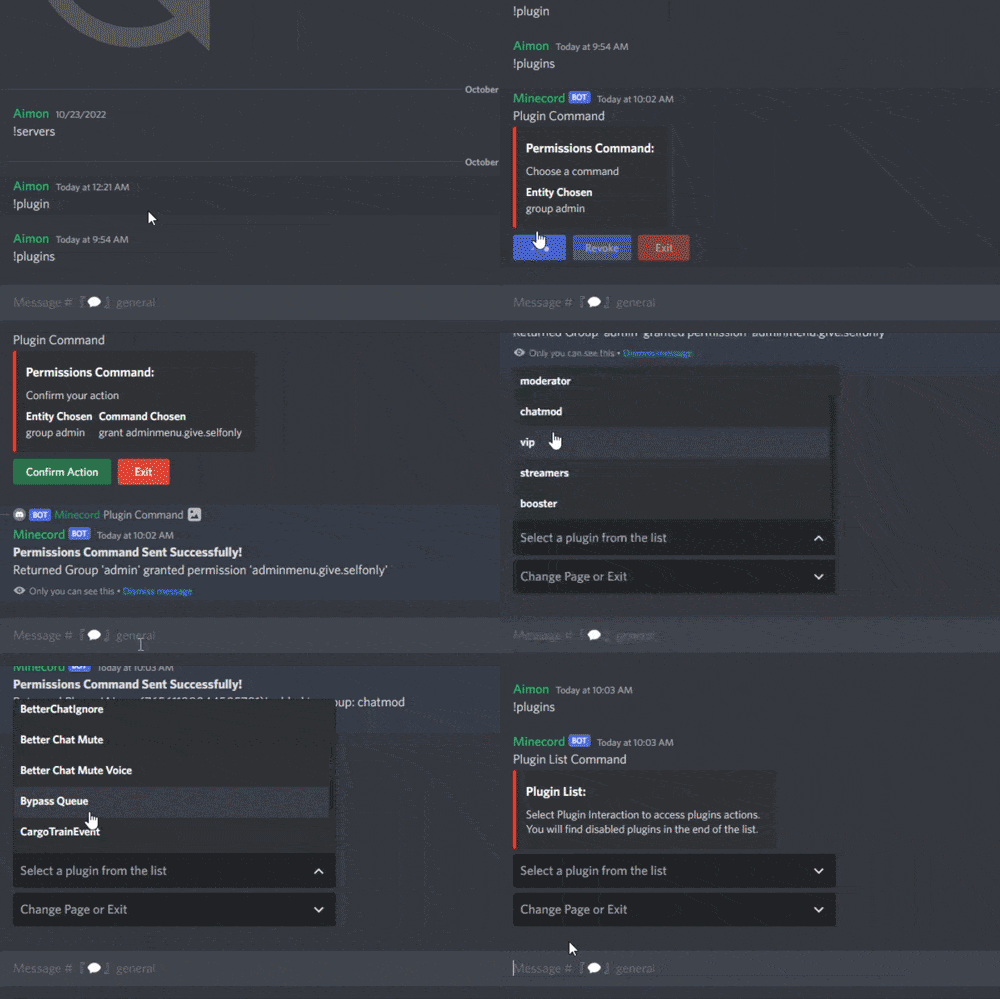
Version 2.0.0
210 downloads
This plugin adds server related commands usable in a specific discord channel with a specific discord role, that gives access to a server panel to do specific commands on the server. Features : Gives access to a permission manager on discord Gives access to a plugin manager on discord Gives access to a restart panel on discord Able to make custom commands from config Gives access to a wipe panel on discord (Only works with DSPWipe or WipeServer loaded) Discord Commands: /server : Shows a list of usable commands for the server /plugins : Gives a plugin list on discord to manage plugins Discord Interactions: When using /server, a list of server commands to manage your server as interactive buttons. Once you use one of the buttons, It will give you more interactive buttons to use different commands and manage your server. Permissions Command shows entity then the command then the permission/group to use the command on after clicking on it : Restart Command shows delay of restart and reasons to use the command after clicking on it : Plugins Command shows the list of plugins you can interact with then shows the command that you can use on it : Custom Command shows the list of commands in the configuration : Console command sends console command to the server: Configuration : { "LogFileName": "DiscordServerPanel", "Bot token": "", "Ignore Roles": false, "Discord Channel ID where the command can be used": [ "1234567891234567890" ], "Embed's color": "#ff0000", "Show Server FPS (Server command)": true, "Show Gamemode (Server command)": true, "Show Plugins Loaded (Server command)": true, "Custom": { "Use Custom (true/false)": false, "Use Confirmation (true/false)": false, "Custom Commands ('command name' 'command to send on console')": { "Restart": "restart 300 Maintenance", "SkipNight": "env.time 12" }, "Discord Role ID (Can be left empty to use the first role id)": [] }, "Console": { "Use Console (true/false)": false, "Use Confirmation (true/false)": true, "Discord Role ID (Can be left empty to use the first role id)": [] }, "MapVoter": { "Use MapVoter (true/false)": false, "Use Confirmation (true/false)": true, "Discord Role ID (Can be left empty to use the first role id)": [] }, "Restart": { "Use Restart (true/false)": true, "Use Modal For Reasons (true/false)": true, "Restart Reasons (One Word)": [ "Maintenance", "Update", "Wipe", "None" ], "Time for command (Use 'h' for hours, 'm' for minutes)": [ "5m", "10m", "30m", "1h" ], "Discord Role ID (Can be left empty to use the first role id)": [] }, "Plugins": { "Use Plugins (true/false)": true, "Use Confirmation (true/false)": true, "Discord Role ID (Can be left empty to use the first role id)": [] }, "Permissions": { "Use Permissions (true/false)": true, "Discord Role ID (Can be left empty to use the first role id)": [] }, "Wipe": { "Use Wipe (true/false)": false, "Generate Random Seeds (How many options to choose from)": 4, "Map Size": 3500, "Backup Map Files (Backup in identity folder)": true, "Time for command (Use 'h' for hours, 'm' for minutes)": [ "5m", "10m", "30m", "1h" ], "Discord Role ID (Can be left empty to use the first role id)": [] }, "logs": { "Log to console (true/false)": true, "Log to discord (true/false)": false, "Discord Extension Log Level (Verbose/Debug/Info/Warning/Error/Exception/Off)": "Info", "Delete message after command": true, "Delete message after interaction": true, "Log Discord Channel ID": "" }, "Discord Guild ID (optional if the bot is in one guild)": "", "Discord Role ID": [ "1234567891234567890" ] } Configure : Set Bot Token, ChannelID and RoleID in config. Reload Plugin. (Optional) To use the wipe functionality : Load DSPWipe. Enable Wipe function in DiscordServerPanel config. You can suggest new functionalities or plugin ideas on discord : aimon_ .$10.99- 9 comments
- 1 review
-
- 1
-
-
- #discord
- #discordbot
- (and 3 more)
-

Version 0.1.2
549 downloads
Allows toggling silent item giving(chat notifications and ownership) via Harmony patching. P.S. By default, silent item giving is enabled. The ability to disable item ownership assignment; The ability to disable item give messages via the 'give' command; The ability to disable item give messages via the 'giveid' command; The ability to disable item give messages via the 'givearm' command; The ability to disable item give messages via the 'giveequip' command; The ability to disable item give messages via the 'giveto' command; The ability to disable item give messages via the 'giveall' command; The ability to disable item blueprint give messages via the 'giveBp' command; The ability to disable messages about copying player inventory via the 'copyTo' command. silentitemsgive.admin - Grants access to the command silentgive.toggle silentgive.toggle *boolValue*(optional) - Toggle silent item giving. To access this command, you must be an administrator or have the silentitemsgive.admin permission. Example: silentgive.toggle silentgive.toggle trueFree


.thumb.png.f676fcb4237b0d630285499251bcf88e.png)