Search the Community
Showing results for tags 'simple'.
-

Version 2.2.1
1,363 downloads
Overview SimplePatrolSignal turns the vanilla supply signal into a button that calls a real Patrol Helicopter to your location. The heli arrives, fights you for the configured duration, drops crates when you kill it, and cleans up after itself. Multiple players can have their own active patrols at the same time. Tiers, custom skins, loot integration, PvE protection, NPC reinforcements, leaderboards, Discord notifications, the whole package. Features Summon patrol helicopters by throwing or dropping a special supply signal Up to 3 concurrent patrols by default, fully configurable Tier system: each signal skin maps to its own helicopter profile (health, rotor health, crate count, rocket timing, bullet damage, gun range, duration, loot table) 3 ready-to-use tiers shipped on Steam Workshop: Silver Elite, Arctic Frost, Inferno Boss Optional signal drops in vanilla world crates (per-tier drop chances, disabled by default) Tier selection by short alias on /helisignal and /givehelisignal Full integration with AlphaLoot, CustomLoot, Loottable PvE protection via PveMode, SimplePVE, or SimplePVESphere Optional PvP zone via ZoneManager NPC reinforcements via NpcSpawn or BetterNpc Persistent leaderboard with /patroltop and /patrolstats Discord webhook notifications (called, killed, expired) with embeds and grid coordinates VIP perks: cooldown bypass and optional tier override Debug log line per spawn so admins can verify a tier's overrides are applied Tier system Each entry in Patrol Helicopter Settings → Patrol Tiers maps a supply-signal skin ID to a helicopter profile. Any field set to null inherits the base value from Patrol Helicopter Settings. Set only what you want to override. Each tier also accepts a short Code alias used by the commands. Workshop tiers shipped with the plugin Tier Code Skin ID Workshop Silver Elite silver 3708182660 Subscribe Arctic Frost arctic 3708182822 Subscribe Inferno Boss inferno 3708182743 Subscribe To activate a tier, add its skin ID to Supply Signal Settings → Skin IDs so the plugin recognizes it when thrown. The matching tier entry under Patrol Tiers is already populated with sensible defaults on fresh installs (existing v2.1.0 installs get them auto-migrated on next plugin load). Example: enable all three tiers + base "Supply Signal Settings": { "Skin ID (used when Skin IDs list is empty)": 3702876293, "Skin IDs (random pick - overrides Skin ID when non-empty)": [ 3702876293, 3708182660, 3708182822, 3708182743 ] }, "Patrol Helicopter Settings": { "Patrol Tiers (skin id -> per-tier overrides)": { "3708182660": { "Display Name": "Silver Elite", "Code (short alias for commands, empty = not selectable by code)": "silver", "Helicopter Health (null = inherit)": 15000.0, "Number of Crates (null = inherit)": 5, "Time Before Rockets (null = inherit)": 4.0, "Bullet Damage (null = inherit)": 15.0 }, "3708182822": { "Display Name": "Arctic Frost", "Code (short alias for commands, empty = not selectable by code)": "arctic", "Helicopter Health (null = inherit)": 25000.0, "Main Rotor Health (null = inherit)": 900.0, "Tail Rotor Health (null = inherit)": 450.0, "Number of Crates (null = inherit)": 8, "Time Before Rockets (null = inherit)": 3.0, "Bullet Damage (null = inherit)": 20.0, "Gun Max Target Range (null = inherit)": 250.0 }, "3708182743": { "Display Name": "Inferno Boss", "Code (short alias for commands, empty = not selectable by code)": "inferno", "Patrol Duration (seconds, null = inherit)": 900.0, "Helicopter Health (null = inherit)": 40000.0, "Main Rotor Health (null = inherit)": 1200.0, "Tail Rotor Health (null = inherit)": 600.0, "Number of Crates (null = inherit)": 12, "Time Before Rockets (null = inherit)": 2.0, "Bullet Damage (null = inherit)": 28.0, "Gun Max Target Range (null = inherit)": 300.0 } } } Calling a specific tier /helisignal silver /helisignal arctic /helisignal inferno /helisignal // base signal (no tier specified) /givehelisignal Bob 1 inferno /givehelisignal Bob 5 // 5 base signals (no tier = base) Direct skin IDs work too: /helisignal 3708182660. Signals as crate loot Disabled by default. When enabled, each spawn of an allowlisted vanilla world crate rolls each tier's drop chance independently and inserts up to Max Signals Per Crate signals on top of the existing loot. Patrol-owned crates are skipped, so this only seeds world loot, not the heli's own drops. Default config "Crate Loot Drops": { "Enabled": false, "Crate Prefabs To Seed": [ "crate_elite", "crate_normal", "crate_normal_2", "heli_crate", "bradley_crate" ], "Max Signals Per Crate": 1, "Tier Drop Chances (skin id -> percent 0-100)": { "3702876293": 5.0, "3708182660": 2.0, "3708182822": 1.0, "3708182743": 0.25 } } The drop only succeeds if the skin is recognized as a patrol signal, so it must be the base Skin ID or appear in Skin IDs. If you add a new tier here but forget to allowlist its skin, the drop will silently no-op. Chat commands Command Permission Description /helisignal [tier] simplepatrolsignal.give Get a heli signal. No tier = base. With a tier code (silver, arctic, inferno) you get that specific tier. /helisignal despawn simplepatrolsignal.despawn Remove your own active patrol. /helisignal despawn <steamid> simplepatrolsignal.admin Remove another player's active patrol. /givehelisignal <player> [amount] [tier] simplepatrolsignal.give Give signals to another player. Optional amount (default 1) and tier code. /patroltop [kills|damage|crates] none Show the server leaderboard. /patrolstats [player] none Show patrol stats for yourself or another player. Console commands Command Permission Description helisignal [tier] simplepatrolsignal.give F1 console, gives yourself a signal of the requested tier (or base). helisignal despawn [steamid] simplepatrolsignal.despawn / .admin Despawn your own patrol, or another player's with the steamid arg. givehelisignal <player> [amount] [tier] simplepatrolsignal.give RCON-friendly version of the chat command. patrol.leaderboard.reset simplepatrolsignal.admin Wipe persistent leaderboard data (season reset). Permissions Permission Grants simplepatrolsignal.give Use /helisignal and /givehelisignal (any tier). simplepatrolsignal.despawn Despawn your own active patrol. simplepatrolsignal.admin Despawn other players' patrols, reset the leaderboard. simplepatrolsignal.vip Bypass cooldown plus optional tier override (configured under VIP Settings). simplepatrolsignal.nocooldown Bypass cooldown only. Throwing a signal has no permission check. Anyone holding a signal item (looted, traded, gifted, gambled, dropped from a crate) can throw it. The gate is on acquisition, not on use. Configuration overview Top-level config sections, with the most useful settings highlighted: Supply Signal Settings, the base skin ID, the interception allowlist (Skin IDs), warmup duration, drop marker, approach effect. Patrol Helicopter Settings, base health (10000), patrol duration (600s), bullet damage (20), interest zone radius (250m), max concurrent patrols (3), per-player cooldown, NPC reinforcements, aggressive mode targeting, debug mode, and the Patrol Tiers dictionary. Crate Loot Drops, optional signal drops in vanilla world crates (disabled by default). Loot Settings, container drop chances and quantities for each crate prefab the heli spawns. Loot Override Settings, AlphaLoot / CustomLoot / Loottable preset names, plus the prefab list those overrides apply to. VIP Settings, cooldown bypass and optional tier override for VIPs. PvE Mode Settings, register the patrol with PveMode, SimplePVE, or SimplePVESphere. PvP Zone Settings, optional ZoneManager integration so the patrol's interest zone is a PvP zone. Leaderboard Settings, persistent stats with configurable top-N display. Discord Settings, webhook URL, embed colors, thumbnails, role mention on call. Crate Scatter Settings, clamp dropped crates inside the patrol zone. Debug mode Set Patrol Helicopter Settings → Debug Mode to true and every patrol spawn logs a [spawn-tier] line showing the resolved health, rotor health, crate count, time-before-rocket, bullet damage, gun max range, duration, and loot profile names actually being used. Useful to confirm a tier's overrides are being applied without grepping the code path. Workshop signal skins Default base skin: 3702876293 Tier skins: Silver Elite, 3708182660 Arctic Frost, 3708182822 Inferno Boss, 3708182743 Compatibility Oxide and Carbon NoEscape (optional, blocks signal use during raid/combat block) AlphaLoot / CustomLoot / Loottable (optional, for crate loot) PveMode / SimplePVE / SimplePVESphere (optional, for PvE protection) ZoneManager (optional, for PvP zone) NpcSpawn / BetterNpc (optional, for ground reinforcements) None are required. The plugin no-ops gracefully when an integration is missing.Free- 15 comments
- 2 reviews
-
- 4
-

-
- #patrol
- #helicopter
- (and 3 more)
-

Version 1.0.2
377 downloads
The plugin allows players to summon supplies to one point and collect items from them inside after the unlock time has passed. Manage your supplies conveniently and efficiently! Default Config: { "Supply capacity (1-42)": 42, "Range": 15.0, "Time to unlock supply item": 150.0 } Demo:Free -
.thumb.png.45dcc24e7014d186d7d1a360402feebf.png)
Version 1.0.3
368 downloads
About 2x Server Setup (Full & Complete 2x Server) This 2x Server allows you to get your rust server up and running quickly and easily without the hassle. Hassle free setup: Installing can take as little as 5 minutes. Eliminating the countless frustrating days it takes to setup a server. Balanced setup: All loot tables are perfectly balanced to enhance gameplay for all players on your server. Teleportation: Players can teleport to anyone with a simple command as long as they are not combat or raid blocked. Blocked Teleportation: Players who are combat / raid blocked will not be able to teleport or trade for a set period of time. Rust Skins: Players will get access to all rust skins when using the /s command. (If you do not own skinbox you can uses skins from UMOD for free!) Admin Tools: Users with admin permissions will be able to vanish and moderate other players. And so much more features below! What's included? - Better chat config -Trading - Better Loot config - Automated events - Automatic Authorization - Fancy Drop config - Furnace Splitter - 2x Quick Smelt - 2x Gather Manager - Image Library - No escape config - NTeleportation config - Custom Recycler Speeds - Stack Size modifications - Always in stock vending machines. - Welcome Panel + UI Addons (CONFIG) - Skin Box (CONFIG) - Clans Reborn (CONFIG) Not all plugins have to be used. You can also modify all of the plugins to your exact liking if you wish to change anything. All of the items above are already modified for a 3x server.$5.19- 16 comments
- 3 reviews
-
- 1
-

-
- #2x
- #easysetup
- (and 6 more)
-

Version 1.2.0
754 downloads
A simple plugin to allow users to toggle creative mode for themselves based on permissions. As of now, this plugin is considered complete, however if you have suggestions please feel free to reach out. Commands: /creative - Toggle Creative mode for the user who issued the command /creativefreerepair - Toggles the creative.freeRepair Convar /creativefreebuild - Toggles the creative.freeBuild Convar /creativefreeplacement - Toggles the creative.freePlacement Convar /creativeunlimitedio - Toggles the creative.unlimitedIo Convar Config Options: { ConsoleLoggingEnabled = true, ChatMessageEnabled = true, IconEnabled = true, IconAnchorMin = "0.345 0.11", IconAnchorMax = "0.375 0.16", IconImageURL = "https://i.postimg.cc/nVvW4Smw/Creative-Mode.png", IconColor = "1 1 1 0.3", CreativePermission = "creativetoggle.use", ConVarPermission = "creativetoggle.convars" } This plugin still relies on the built-in Rust convars. See the quote below for more information about those. Important! creative.allusers must be turned OFF for this plugin to work! Please read the following section carefullly! Permissions: creativetoggle.use - Allows the user to toggle creative mode for themselves. creativetoggle.convars - Allows the user to toggle the state of the convars related to creative mode. Resources used: Visual Studio Code Visual Studio 2022 Github Copilot VS Code Extension HandyS11's RustPluginTemplateFree -

Version 1.2.1
972 downloads
Effortlessly create symmetrical base designs with support for Vanilla servers and Creative ones, All features can be done with or without the UI. Key Features: Magical symmetrical building supporting, Foundation Squares and Triangles 2 Sided, 3 Sided, 4 Sided, 6 Sided, and Mirrored 2 and 4 sided for The Most Inclusive Experience! Optional UI for streamlined control. Simple commands to toggle, configure, and customize symmetry. Multiple Symmetry Types Permission: Players must have SimpleSymmetry.use to use this. Commands: /sym ui – Toggle UI on or off /sym toggle – Enable or disable symmetry /sym show – Display the current Symmetry Center /sym set – Define the Symmetry Center /sym delete – Remove the Symmetry Center /sym {type} – Select the Symmetry Type (options listed below) Symmetry Types: N2S - Normal 2-Sided N3S - Normal 3-Sided N4S - Normal 4-Sided N6S - Normal 6-Sided M2S - Mirrored 2-Sided M4S - Mirrored 4-Sided NOTE: Demo Video Discord: Shady14u$39.99 -
Version 0.1.0
18 downloads
What is it? Zone Command Blocker is a tool which prevents using specific commands (in data folder) in specific zones Permissions: zonecommandblocker.bypass - None of your command will be blocked in any zone zonecommandblocker.clear - Access for the /zcb.clear command Commands: /zcb.clear - Clears/wipes the data folder which contains zones with saved permissions etc.. Features: Zone Command Blocker will make your life easy and will on load take all zones and add them into it's data file where you can just add blocked commands Multiple blocked commands - Supports multiple blocked commands for specific zone Data file: Data of all reports and staff's statistics are being saved into a data file. Path: Your_Server\oxide\data\ZoneCommandBlocker\ZoneCommandBlocker.json Localization: { "CommandBlocked": "This command cannot be used in zones!", "DataFileClear": "Cleared data folder" }$4.99 -
Version 1.0.0
28 downloads
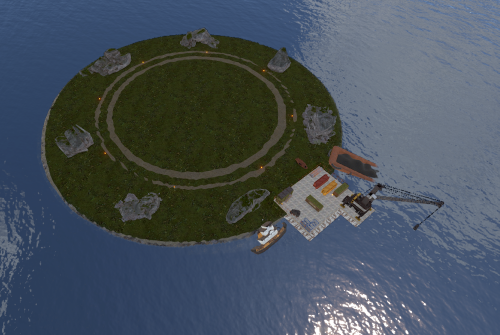
Clean & Simple Raid Islands (2 Pack) Need more space for high-action events on your Rust server? This pack gives you two low-entity-count islands that offer a clean, simple, and isolated space perfect for spawning your raidable bases. Optimized Performance: Low entity count ensures minimal impact on your server's performance. Easy Building: Provides a flat, uncluttered area for players to construct their raidable bases. Seamless Addition: A simple, drop-in addition to expand the build space on your map. A perfect and simple addition to your server, giving your players more room to build and raid! sFor any help or support, please contact me on Discord @ https://discord.gg/THf6dGN8eW$4.99- 1 review
-
- 3
-
-
-
- #raid
- #raid islands
- (and 9 more)
-

Version 2.0.2
608 downloads
NOTE: Version 2.0.0 is not backwards compatible with 1.x - please backup your config file! About Kill Heli Vote This plugin allows your players to kill all Patrol Helicopters that have spawned, by simply voting in chat! Snaplatack Note: I originally made this plugin for my servers, but haven't seen anything similar that was already published. So I figured I would release it here HunterZ Note: Version 2.x is my own rewrite of another rewrite started by Snaplatack, which adds new features and addresses some issues I encountered in my own use. Optional Dependencies Heli Signals Loot Defender Features Kill all eligible Patrol Helicopters via a vote system Kill all eligible Patrol Helicopters via an Admin command Ignore Patrol Helicopters called by Heli Signals and/or while protected by Loot Defender Ban players from voting or resetting votes Reset votes on damage to Patrol Helicopters from a non-banned player Customize commands, permissions, and messages Permissions killhelivote.use - controls whether voting command can be used by a player/group killhelivote.admin - controls whether kill command can be used by a player/group killhelivote.banned - controls whether voting command and damage reset features should be locked out for a player/group Notes: The names of these can be overridden via the config file The plugin will react to permission changes without a reload Commands /voteheli - record vote towards killing all eligible active helis /killhelis - kills all eligible helis on the map, bypassing any votes Notes: These are the default command names, which can be overridden via the config file Configuration Plugin Settings Frequency of vote announcements [in seconds] - how often voting message/toast should be shown Percentage of votes required [0 - 100] - percentage of votes by eligible voters required to kill helis Ignore helis spawned by Heli Signals - whether helis called by Heli Signals should be ignored by this plugin Ignore helis locked by Loot Defender - whether helis should be ignored by this plugin while protected by Loot Defender Reset vote when a heli takes damage - whether to reset votes when any kill-eligible heli is attacked by a player who is not banned from voting Commands & Permissions This section allows you to customize command and permission names used by the plugin. Messages Steam ID to use for the image for messages [0 = default] - set this to the SteamID of an account whose profile picture you want to use for chat messages produced by this plugin Use chat messages - whether to show a given message via in-game chat Use native toast messages - whether to show a given message via toasts (popup banners) Toast type - style of toast to use (0 => Blue Normal, 1 => Red Normal, 2 => Blue Long, 3 => Blue Short, 4 => Server Event, 5 => Error) Notes: Chat and toast messages can be enabled at the same time if desired Credits snaplatack - original author nivex - (2.x) Loot Defender coordination zeeuss - (1.x) finding objects more efficiently on reload mr01sam - (1.x) helping with some Init procedures ViolationHandler - (1.x) code cleanup and improved code efficiencyFree -
Version 1.0.0
3 downloads
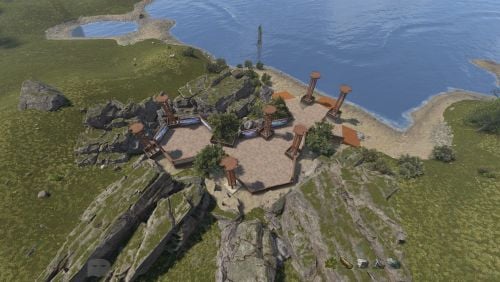
Nexus Lobby V1.0 This is a simple lobby designed to be used as a spawn area to your custom map, without damaging frame rates or overall performance. The signs on this lobby are blank upon purchase, the screenshots are from our own branded server to show what can be done with them. The lobby consists of two hexagon areas surrounded by multiple signs that you can apply your brand or advertisements onto, each sign is encased in glass to avoid other players from editing them. Both of these lead down to a 3 separate ramps in different directions. The lobby is also surrounded by some rock formations, small trees and some light towers for illumination. I am always open to feedback and suggestions on how best to improve this lobby, as well as ideas for future projects! Please feel free to contact me below if you have any questions: Discord: _RJ96 You can see the lobby for yourself in-game first: This lobby is already active on my own communities Creative Build Server if you wish to check it out for yourself, our version has all the signs fully branded. Our community website: https://www.nexusrust.co.uk Server IP: 83.147.29.229:28035 Our build server has had over 1000+ players join within the last 5 days with zero issues.$2.99 -
Version 2.0.0
48 downloads
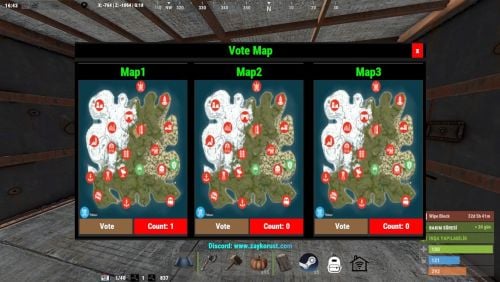
This plugin can help to player seelct new Map for next Wipe? /votemap -> open vote menu Example Config: { "Plugin Icon Id": 76561198286834661, "Gui Button Enabled": true, "ColumnCount": 3, "RowCount": 1, "Gui Maps List": { "0": { "Name": "Map1", "Url": "https://content.rustmaps.com/maps/247/ac81fbe38a2d4ca2805e8385353b83aa/thumbnail.png" }, "1": { "Name": "Map2", "Url": "https://content.rustmaps.com/maps/247/ac81fbe38a2d4ca2805e8385353b83aa/thumbnail.png" }, "2": { "Name": "Map3", "Url": "https://content.rustmaps.com/maps/247/ac81fbe38a2d4ca2805e8385353b83aa/thumbnail.png" } } } Discord: If you find any bugs, need assistance, or have suggestions related to the plugin, you can reach out on Discord. Discord pisagor0104 https://discord.gg/JnQftZeSXD$4.99 -

Version 1.4.3
559 downloads
An advanced, performance-optimized plugin for Rust, designed to enhance server administration and gameplay experience. This plugin provides real-time information about players, stashes, and tool cupboards, making it an essential tool for admins. Key Features Enhanced Player Tracking: Displays players' names, distances, and health status, along with a unique team color indicator for easy differentiation. Stash and Tool Cupboard ESP: Identify the locations and distances of stashes and tool cupboards effortlessly. Voice Transmission Indicator: A new feature that signals when players are transmitting voice, adding a strategic layer to gameplay. Player Vision Arrows: Visual arrows show the direction in which players are looking, offering tactical insights for admins. Configurable Settings: Tailor the radar with adjustable refresh rates, visibility distance, and more through an easy-to-use configuration file. Efficient and Performant: Built with performance in mind, ensuring smooth gameplay even on busy servers. Commands and Permission /radar - Activates radar for players with a default 1-second refresh rate and 250m range. /radar <refresh rate> - Sets a custom refresh rate for player radar. /radar <refresh rate> <distance> - Customizes both refresh rate and distance for the radar. /radar <refresh rate> <distance> <players/stashes/all> - Extends radar functionality to include players, stashes, or all entities. You must give your admins this permission to use radar: simpleradar.use Config { "Make players with moderatorid not see players with ownerid": true, "Enable player vision arrows": false, "Add a voice indicator for players who are tansmitting voice": true, "Show voice indicator for x seconds after speaking": 2.0, "Minimum allowed radar refresh rate": 1.0, "Maximum radar distance": 250.0 } Support and More Checkout my discord server here. Showcase Video (old)$9.99 -

Version 1.0.0
103 downloads
Just a very very simple plugin that warns players not to take a power nap when they enter a safezone.Free -

Version 2.1.3
135 downloads
Effortlessly manage plugin updates across all your Rust Servers with a single command. Upload files to a Discord thread and watch them instantly sync across your servers, with full support for Oxide and Carbon, and any OS. Also allowing any trusted Staff Members to use FEATURES Effortlessly check for required updates across all your Rust servers via RCON, with minimal server overhead. Fully Compatible with Oxide and Carbon, and works seamlessly on both Windows and Linux. Optional Automatic Update Checks on a timer schedule that fits your needs. Easy-to-use Buttons that quickly direct you to the plugins needing an update. A Dedicated Upload Thread to send plugins directly to the server(s). Smart Server Separation: Upload all plugins in a single thread, with automatic delivery, to the servers that need the update. File Validation to ensure only plugin files from the update list are uploaded and sent. Easily add as many servers as you want - just configure them in the "SERVERS" folder. Supports a wide range of plugin sites: uMod, Codefling, Lone.Design, Chaos Code, RustWorkshop, ModPulse, RustPlugins, ImperialPlugins, MyVector, SkyPlugins, Game4Freak. Simple one button press updates for plugins hosted on uMod.org and codefling! MAIN CONFIGURATION { "BOT_ID": "DiscordBotClientID", "DISCORD_TOKEN": "https://discord.com/developers/applications", "CODEFLING_API_KEY": "https://codefling.com/settings/apps/", "GUILDS": ["DiscordServerID"], "AUTO_UPDATE_CHECK": true, "COMMANDS_ROLES": ["RoleID"], "UPDATE_CHANNEL": "ChannelID", "UPDATE_CHECK_FREQUENCY": 60, "EMBED_HEX": "0099FF", "GLOBAL_EXCLUDED_PLUGINS": [ "" ] } SERVER(S) CONFIGURATION { "ENABLED": true, "TYPE": "Oxide", "NAME": "", "IP": "", "RCON_PORT": 28016, "RCON_PASS": "", "EXCLUDED_PLUGINS": [ "" ] } APPRECIATION Thank you @Pho3niX90 for making the Server Armour API which supports this bot. Thank you @shady14u for his help making the Magic Updater plugin which does the automatic plugin updating. Thank you @KevinX8 for his help making the Bot.$14.99 -
Version 1.0.0
9 downloads
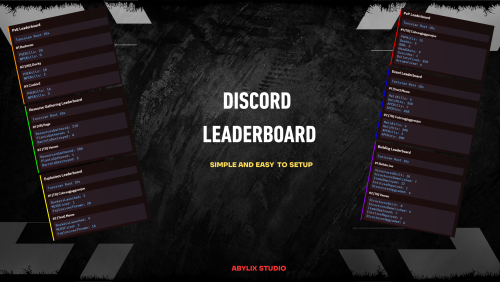
DiscordLeaderBoard is a powerful Rust plugin that automatically sends beautiful Discord leaderboards using data from the Player Ranks plugin. It features customizable categories, real-time updates, and seamless integration with your existing MySQL database and Player Ranks statistics. Core Features : Multiple Leaderboard Categories : PvP Leaderboard — Kills, deaths, KDR, headshots, suicides PvE Leaderboard — PvE kills and NPC eliminations Resource Gathering — Resources gathered, plants collected, and barrels destroyed Explosives — Rockets launched, MLRS fired, and explosives thrown Events — Helicopter and APC kills/hits Building — Structures built, demolished, upgraded, and items deployed Server Statistics — Comprehensive server-wide statistics and online player count Automated Updates : Configurable intervals for automatic leaderboard updates (default: 5 minutes) Real-time data pulled from your existing Player Ranks MySQL database Smart message management — Updates existing Discord messages instead of spamming Rich Discord Integration : Beautiful embeds with category-specific colors and formatting Custom images support for each leaderboard category Server information display with name and connection details Top 5 players ranking system with detailed statistics Flexible Configuration : Enable/disable categories — Turn on only the leaderboards you want Custom field selection — Choose which Player Ranks statistics to display Individual webhooks — Separate Discord channels for each category Custom ordering — Set how players are ranked in each category Image support — Add custom images to your leaderboards Dependencies : Player Ranks Plugin — Required for statistics data MySQL Database — Same database used by Player Ranks Discord Webhooks — For sending leaderboards to Discord channels config File : { "SendInterval": 300, "ServerName": "my rust server", "ShowServerName": true, "ShowServerIP": true, "ServerIP": "connect [your server ip here]", "MySQL": { "sql_host": "localhost", "sql_port": 3306, "sql_db": "db name", "sql_user": "db username", "sql_pass": "db pass", "tablename": "db table name" }, "Categories": { "pvp": { "enabled": true, "webhook": "", "fields": [ "PVPKills", "Deaths", "KDR", "HeadShots", "Suicides", "BulletsFired", "ArrowsFired" ], "orderBy": "PVPKills", "showImage": false, "imageURL": "" }, "pve": { "enabled": true, "webhook": "", "fields": [ "PVEKills", "NPCKills" ], "orderBy": "PVEKills", "showImage": false, "imageURL": "" }, "resources": { "enabled": true, "webhook": "", "fields": [ "ResourcesGathered", "PlantsGathered", "BarrelsDestroyed" ], "orderBy": "ResourcesGathered", "showImage": false, "imageURL": "" }, "explosives": { "enabled": true, "webhook": "", "fields": [ "RocketsLaunched", "MLRSFired", "ExplosivesThrown" ], "orderBy": "(RocketsLaunched + ExplosivesThrown)", "showImage": false, "imageURL": "" }, "events": { "enabled": true, "webhook": "", "fields": [ "HeliKills", "HeliHits", "APCKills", "APCHits" ], "orderBy": "(HeliKills + APCKills)", "showImage": false, "imageURL": "" }, "build": { "enabled": true, "webhook": "", "fields": [ "StructuresBuilt", "StructuresDemolished", "ItemsDeployed", "EntitiesRepaired", "StructuresUpgraded" ], "orderBy": "StructuresBuilt", "showImage": false, "imageURL": "" }, "server": { "enabled": true, "webhook": "", "fields": [], "orderBy": "", "showImage": false, "imageURL": "" } } }$12.99 -
Version 1.6.5
131 downloads
For beginners and certified amateurs alike, setting up a Rust server can quickly become time-consuming. This is why we offer you our all-in-one server setup. This includes files already pre-configured for your plugins. (Not all plugins in the list have a pre-configured file, as some do not need one). With this, your server will be ready in 10 minutes. Documentation detailing the installation process is provided. It also includes explanations of the plugins as well as the steps to take if you wish to make changes. Perfect for your first Rust server. The icons and designs used are also provided (in .jpg and .psd format) Server Features: 3x Gather Rates 3x (Better) Loot Table 2x Recycler & Smelt Speed 2x Speed Craft on basic items 5 Preconfigured Kits Automatic Authorization Custom WelcomePanel Custom Outpost (More recycler, vending machine, fourniture) Custom VendingMachine Permission Groups (default, VIP, & Admin) SkinBox & BuildingSkin BGrade WorkBench extended to the base BluePrint Share NTeleportation No-Escape Shop w/ economics Kill Rewards + More! Plugins are not provided with this pack. You need to download them yourself. A document containing the main links is provided. However, you don't have to use all the plugins if you don't want to. For more information, visit our website.$5.50 -

Version 1.0.0
220 downloads
Allows users with permission to teleport to newly placed map markers. Permission teleportmarker.use - Allows users to teleport to map markers. Commands /tpm - Toggles teleporting to map markersFree -

Version 1.0.0
200 downloads
Simple Whitelist provides multiple ways to whitelist your players, either by permissions or by Steam ID! Permission SimpleWhitelist.Allow - Permit user to join your server! Example ConfigFree-
- 1
-
-
- #simple
- #whitelist
- (and 2 more)
-
Version 1.1.8
276 downloads
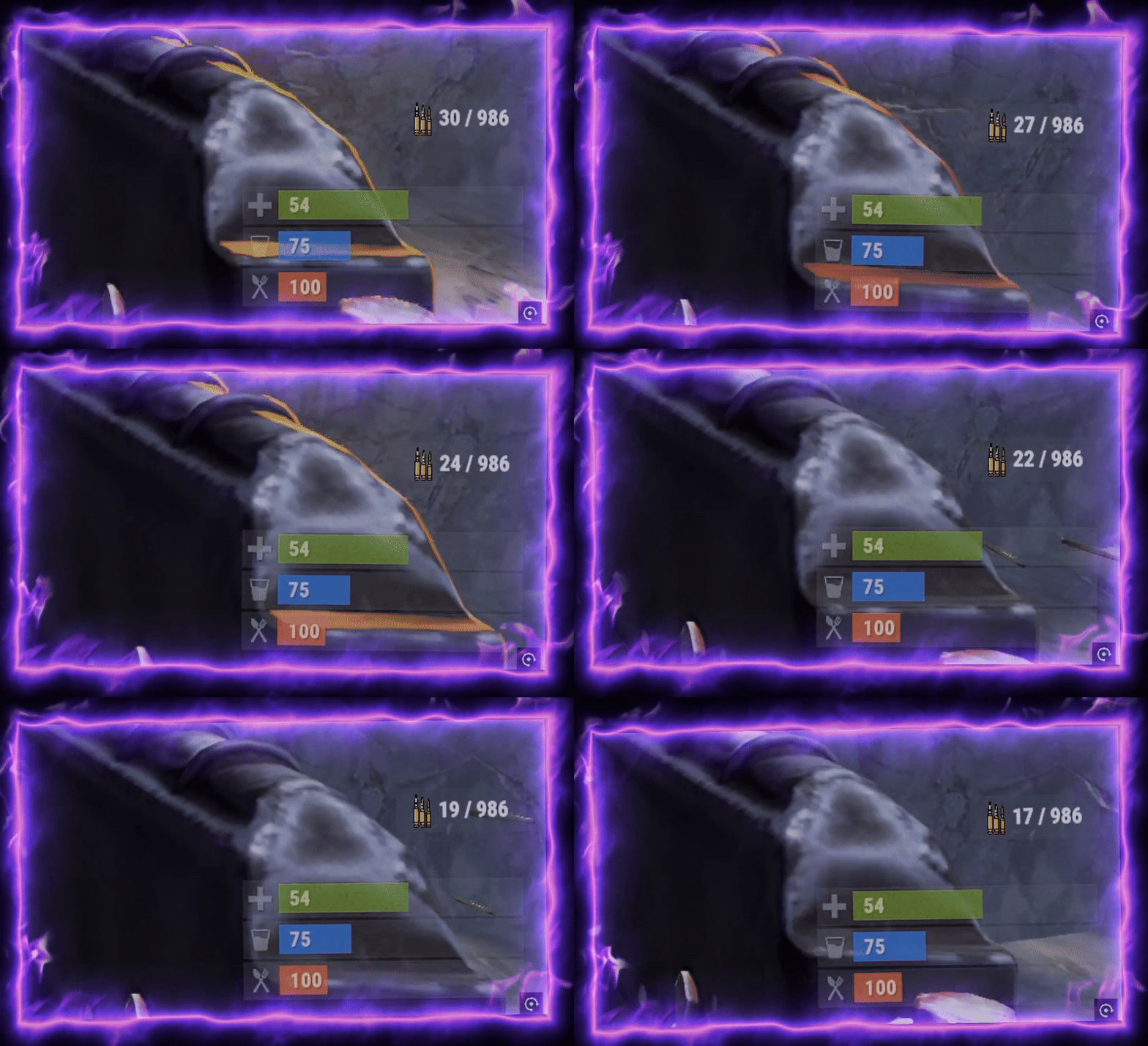
Shows your current ammo type on the HUD Tracks ammo in inventory and belt Permissions: ammohud.use - grants permission to use HUD Commands: /ammo - turns hud on and off Configuration: { "Panel Color (RGBA)": "0.4 0.4 0.4 0.5", "Panel Position Min": "0.92 0.18", "Panel Position Max": "0.989 0.22", "Ammo Text Font Size": 15, "Ammo Image URL": "https://static.wikia.nocookie.net/play-rust/images/4/49/5.56_Rifle_Ammo_icon.png/revision/latest?cb=20150405103333", "Ammo Image Position Min": "0.05 0.1", "Ammo Image Position Max": "0.30 0.9", "Ammo Text Position Min": "0.30 0", "Ammo Text Position Max": "1 1" } Backpack support coming soon Lightweight, clean, and easy to use.Free -

Version 1.2.5
1,105 downloads
SimpleKillMessages displays death and kill information in the chat upon death, with some additional features. The plugin has a config file where the prefix, chat icon, and other settings can be modified. It also includes the option to prevent NPC interactions from being processed/counted and to keep a player's held item in their hotbar upon death. Additionally, the plugin has the option to reward kills with points from the "Economics" plugin, with the number of points per kill being adjustable in the config file. The plugin also includes default messages for various death scenarios, such as death by wounds, suicide, burning, melee, and more. Configuration The SimpleKillMessages plugin has a config file where the following options can be modified: Prefix: This is a string that will be displayed before each death/kill message in chat. By default, it is set to "<color=#42f566>SERVER:</color> ". Chat Icon: This is an ID that corresponds to a Steam account. By default this option is set to 0. Prevent NPC: This is a boolean value (true or false) that determines whether NPC interactions should be processed/counted. If set to false, NPCs kills will show in chat and give economy points. By default, this option is set to true. Prevent Drop On Death: This is a boolean value (true or false) that determines whether a player's held item should be kept in their hotbar upon death. If set to true, the player's held item will not be dropped upon death. By default, this option is set to true. Economics Rewards Enabled: This is a boolean value (true or false) that determines whether kills should be rewarded with points from the "Economics" plugin. If set to true, kills will be rewarded with points. By default, this option is set to false. Economics Points Reward: This is a double (decimal) value that determines the number of points to be rewarded for each kill when Economics Rewards Enabled is set to true. By default, this option is set to 2. Show Messages Global?: This is a boolean value (true or false) that determines whether kills should be announced globally to other players aside from those involved. By default, this option is set to false. Global Radius/Distance?: This is a float value (number) that determines how the radius/distance you have to be within of the player who died to receive their death message. By default this is 0 so everyone on the server will see it. Use Radius?: This is a boolean (true or false) that determines if you use a radius to determine who gets the messages. If false you will use the distance between a player rather than a radius of the player who died to calculate who we should send the message to. The only difference here can be performance Features Display death/kill information in chat upon death: Upon death, a message will be displayed in chat with information about the player's death or the player they killed. The message will include the prefix and chat icon set in the config file. Keeping held item in hotbar upon death: When the Prevent Drop On Death option is set to true, a player's held item will not be dropped upon death. This can be useful for servers where the admins want to prevent players from losing valuable items upon death. Reward kills with points: When the Economics Rewards Enabled option is set to true, players will be rewarded with points for each kill they make. The number of points rewarded can be set with the Economics Points Reward option. This feature requires the "Economics" plugin to be installed on the server. Default messages for various death scenarios: The SimpleKillMessages plugin includes default messages for various death scenarios, such as death by wounds, suicide, burning, melee, and more. These messages can be customized in the plugin's code if desired. Display death messages globally or within a radius of the player who died.Free -
-min.thumb.png.dd9e716dad866fa3156b606ea988bfab.png)
Version 1.0.1
142 downloads
Subsation with a one fuse simple puzzle. Less then 15m diameter. 100 prefabs. To open the door just do : Fuse box -> Timer -> Button (see video below) Features : May be used near spawn locations, starting biomes etc. Players can climb on the electric pole (to scout environment or quit the monument). Can be linked to electric poles and ziplines. Prevent players from jumping into the monument from a horse. Installation and contact : Inside the ZIP. Loot Info : Outside : 1 blue barrel 1 food crate 1 destroyable roadsign Inside : 1 blue barrel 1 food crate 1 normal crate 1 fuel crate 1 yellow box crate E&O excluded, the video is a representation of the prefab when first released and can be updated, improved and changed. EnjoyFree- 1 comment
-
- 4
-
-
-
- #substation
- #prefab
- (and 11 more)
-

Version 1.0.9
130 downloads
The Simple Build plugin for Rust enhances the building experience by providing players with advanced building options and UI elements. It allows players to easily manage building configurations, such as wall stacking, custom gaps, and floor stacking, directly from an intuitive UI. This plugin is designed to streamline the building process, making it more efficient and user-friendly. Integrates seamlessly into Simple Symmetry, but can be used as a stand alone building tool FEATURES: • Advanced Building Options: Supports various build types including Wide Gap, Wall Stack, Custom Gap, Custom Floor Stack, Floor Stack Up, and Floor Stack Down. • User Interface: Provides an in-game UI for players to easily toggle and configure building options. • Wall Stacking: Automatically stack walls to a specified height with configurable spacing. • Custom Gaps and Offsets: Allows players to set custom gaps and offsets for precise building placement. • Symmetry Integration: Automatically shows or hides the build options UI based on the visibility of the symmetry UI. • Resource Management: Automatically deducts resources from the player’s inventory when building stacked walls. USAGE: 1. Grant the simplebuild.use permission 2. Activate UI: Equip a planner, hammer, or toolgun to automatically display the build options UI. 3. Configure Options: Use the UI buttons to configure your building options as needed. 4. Build: Start building with the configured options, and the plugin will handle the rest. This plugin is ideal for players who want more control and efficiency in their building process, making it easier to create complex structures with minimal effort. COMMANDS: /sbb – Toggle the simple build UI /wg – Toggle Wide Gap on / off /ws – Toggle Wall Gap on / off /gap {value} – Set the custom gap spacing (100 = full block) /fs {value} – set the custom gap height (100 – full block height) /entkill – Kill entity player is looking at (requires simplebuild.entkill permission) PERMISSIONS: simplebuild.use – Allows players to use simple build simplebuild.entkill – Allows players to use entkill command (admins only) DEMO VIDEO Note: Does not include "Simple Symmetry”, Images shown with Symmetry include both plugins for demonstration.$12.99 -

Version 1.0.0
11 downloads
SimpleRCON is a Discord bot designed to manage RCON commands and mute/unmute players on game servers directly from Discord. It allows authorized users to run server commands and perform player moderation actions like muting players, while enforcing role-based permission controls. This bot allows you to select a server and then run commands or perform actions like muting a player, all through intuitive slash commands. Features - RCON Command Execution: Run any allowed RCON commands on a selected server. - Player Mute/Unmute: Mute or unmute a player on a specific server with customizable duration and reason. - Role-Based Access Control: Restrict command access based on Discord roles. - Whitelisted Commands: Only commands listed in the `whitelisted_commands` configuration can be run (unless the user has a bypass role). - Ephemeral Feedback: All responses are sent as ephemeral messages for better privacy and less clutter. - Logging: Tracks who used the bot and logs command usage. Prerequisites Before running the bot, ensure you have the following: - A valid Discord Bot Token. - A valid Battlemetrics API Key (for interacting with game servers). - The required configuration files (`config.json` and `embed_config.json`). - A Rust server linked to battlemetrics. You can add multiple servers to the config, and they will automatically show up on the embed. For questions or problems, please reach out to dubsrust on discord or send me a message on codefling.$5.00 -

Version 0.1.4
483 downloads
What is it? A utility that gives you ability to view sent or received emails and of course gives you ability to send EMAILS with simple GUI! Usage Just use the command and click on a category depending if you want to view something or send a new email. Permissions zmail.use -- Gives player ability to use the command zmail.send -- Gives player ability to send new emails zmail.view -- Gives player ability to view sent and received emails Chat Command /zmail -- Opens the GUI Localization { "NoPerms": "You don't have permission to use this!", "noPlayerFound": "No player found!", "foundPlayerToSend": "Recipient {0}", "newEmailButton": "NEW Email", "receivedEmailsButton": "Received", "sentEmailsButton": "Sent", "clearAllButton": "Clear All", "succussfullySend": "Message succussfully sent!", "selectedFieldID": "ID:", "selectedFieldFrom": "From:", "selectedFieldTo": "Sent to:", "selectedFieldMessage": "Message:", "defaultInputUser": ".....Set player username or id.....", "defaultInputMessage": "Type your message here.....", "noEmails": "You have not received any emails yet!", "noSentEmails": "You have not sent any emails yet!", "receivedEmails": "You have received {0} emails({1} Unread emails)", "sentEmails": "You have sent {0} emails", "pageOfMaxPages": "Page: {0} / {1}", "previous": "Previous", "next": "Next", "findOnline": "Find Online Players", "receivedNew": "[<color=#13ad0f>Z</color>Mail]\nYou have just received new mail from <color=#05ba00>{0}</color>\nYou have total amount of <color=#a10800>{1}</color> unread emails", "conMails": "[<color=#13ad0f>Z</color>Mail]\nYou have total amount of <color=#a10800>{0}</color> unread emails" } Configuration { "Get message on connection?": true, "Real time notification?": true }Free -

Version 1.0.0
15 downloads
This bot allows you to create embeds for your server info channel. /embed create → create an embed To add a server to an embed run /embed edit → select embed → add server /embed delete → delete an embed /embed edit → edit an embed /embed resend → resend an embed (e.g. it got deleted) Create an embed Questions: - title - description - thumbnail url (optional) - color - channel id Thumbnail url Has to be an url You can upload your desired thumbnail to any upload services e.g. https://gls.cx/ Edit an embed After selecting the embed you want to edit you can choose your desired option Edit options: - title - description - thumbnail url - channel - add server - remove server Adding server Questions: - name - description Setup 1. install python -> https://www.python.org/downloads/ version 3.10 or higher 2. install discord.py -> pip install discord.py version 2.3.2 or higher 3. fill out the config.json -> bot token and staff role id Example Config { "botToken": "FAKIFIFIAWFIOKFKIFFWF.fafAA2fFAFAa", "staffRoleId": 1252523552, "embeds": [ ] }$3.99-
- 1
-
-
- #discordbot
- #easy
- (and 5 more)
-
.thumb.png.c5a354f9c37b4e05a7e4e03eae8f8675.png)
Version 1.0.3
232 downloads
This 5x Server allows you to get your rust server up and running quickly and easily without the hassle. Hassle free setup: Installing can take as little as 5 minutes. Eliminating the countless frustrating days it takes to setup a server. Balanced setup: All loot tables are perfectly balanced to enhance gameplay for all players on your server. Teleportation: Players can teleport to anyone with a simple command as long as they are not combat or raid blocked. Blocked Teleportation: Players who are combat / raid blocked will not be able to teleport or trade for a set period of time. Rust Skins: Players will get access to all rust skins when using the /s command. (If you do not own skinbox you can uses skins from UMOD for free!) Admin Tools: Users with admin permissions will be able to vanish and moderate other players. And so much more features below! What's included? - Better chat config -Trading - Better Loot config - Automated events - Automatic Authorization - Fancy Drop config - Furnace Splitter - 5x Quick Smelt - 5x Gather Manager - Image Library - No escape config - NTeleportation config - Custom Recycler Speeds - Stack Size modifications - Always in stock vending machines. - Welcome Panel + UI Addons (CONFIG) - Skin Box (CONFIG) - Clans Reborn (CONFIG) Not all plugins have to be used. You can also modify all of the plugins to your exact liking if you wish to change anything. All of the items above are already modified for a 5x server.$5.19
.thumb.png.ccf8a947948c9eb1445ad21a7931247b.png)