Search the Community
Showing results for tags 'manager'.
Found 19 results
-

Version 1.0.18
3,378 downloads
This plugin can be used by developers to manage their arena games etc. Developers can use this to handle the entry/exit of players into their games. The plugin will be primarily used by my HungerGames, ScubaArena and Skirmish game (soon to be released). It features: Registration calls to create and register the event with the plugin. Automatic running of the events in order, so you can have multiple event plugins running 1 after the other (configurable). Strip and save the players current inventory, and restore it after they leave the game. Store and restore the players metabolism stats when they join/leave the game. Register a destination for players to teleport to when joining the game. Command black listing. Build in hook management for popular plugins such as Backpacks and kits. API void EMCreateEvent(string eventName, bool automatic_start, bool stripItems, bool leaves_event_on_death, bool full_health_on_join, bool give_items_back_on_respawn, bool full_metabolism_on_join, Vector3 teleport_destination) Creates the event and allows the developer to specify the settings: eventName: the name of the event. this.Name is recommended. automatic_start: enrolls the event to be scheduled and ran by EventHelper. stripItems: strips the players items and stores them in the data file. Items will be returned upon leaving the event, or when they respawn after they have left the event unless give_items_back_on_respawn is set to false. leaves_event_on_death: Kicks the player from the event when they die. full_health_on_join: Stores the players health into the data file and sets their health to max. give_items_back_on_join: Gives the players items back when they leave the event, or when they respawn after leaving the event. If set to false, they will need to use the /recoveritems command to get their items back.This is useful if a server is running plugins such as kits, which wipes the players inventory to give the player a kit. full_metabolism_on_join: Saves and restores the players metabolism before and after a game. teleport_destination: The location that a player will teleport to when joining the game. Set to Vector3.new if you do not want them to teleport. void EMExternalPluginSettings(string eventName, bool canDropBackpack = false, bool canEraseBackpack = false, bool canOpenBackpack = false, bool canBackpackAcceptItem = false, bool canRedeemKit = false, bool CanLoseXP= false) Sets up the external plugin settings for the event. eventName: The registered name of the event. canDropBackpack: Backpack plugin. canEraseBackpack: Backpack plugin. canOpenBackpack: Backpack plugin. canBackpackAcceptItem: Backpack plugin. canRedeemKit: Can the player redeem kits. CanLoseXP: Can the player lose xp when dying in the game. void EMBlackListCommands(string eventName, string[] commands) Use to submit a list of commands that cannot be run while at the event. void EMRemoveEvent(string eventName) Removes the event from EventHelper. This will automatically trigger the EMPlayerLeaveEvent hook for each player if the event is active. void EMManuallyStarted(string eventName) Flags the event as manually started, preventing it from being run automatically if opting in for automatic_start. void EMUpdateLobby(string eventName, Vector3 pos) Allows you to update the lobby destination after an event has been created. void EMStartEvent(string eventName) Triggers an event to start. Marks the event as running so it can be used with the EMEndEvent hook. Call this when you want the game to start. void EMEndEvent(string eventName) Triggers the event to end. Goes through each participant and calls EMPlayerLeaveEvent on them before clearing the participants. Also resets manually_started to false and triggers the EMEndGame hook. bool EMEnrollPlayer(BasePlayer player, string eventName) Enrolls a player into the event. Follows the instructions of the EMCreateEvent settings by stripping items, setting health and metabolisms, as well as teleporting the player to the arena. Also checks for crafting queues, black listed items and escape blocks. Returns true if the player was enrolled successfully. void EMPlayerLeaveEvent(BasePlayer player, string eventName = null) Removes the player from the event. Strips the items that they have received from the event, then optionally restores their previous items, teleports them to the location that they were at prior to joining, sets their health and their metabolism etc, or will tell them that they need to use the command in order to get their inventory back. bool EMIsParticipating(BasePlayer player, string eventName) Returns true if a player is participating in an event (using the participants list associated with the event itself). bool EMAtEvent(ulong id) Returns true if a player is at an event (using the playerdata records). bool AddBan(BasePlayer player, string event_name) Bans the player from the specified event. bool RemoveBan(BasePlayer player, string event_name) Unbans the player from the specified event. Hooks void EMEndGame(string eventName) Is called when the game ends. Chat commands ehban <target name/id> - bans the player from all events globally. ehunban <target name/id> - unbans the player from all events globally.Free -
Version 4.1.1
5,477 downloads
Meet EventsManager: the unified command center for your Rust server. Seamlessly orchestrate both official Facepunch events and custom plugin activities through a single, pixel-perfect in-game interface. Ditch the clunky, scattered timers—build dynamic event rotations and fine-tune your wipe schedules with a fluid, human-centric design that keeps your players consistently engaged. Features of Events Manager Multi-Event Support: Seamlessly manage multiple events, each with customizable settings. Customizable Display: Assign distinct names, commands, and colors for UI buttons to each event. Scheduling Flexibility: Schedule events to run on specific days and at designated hours. Administrative Control: Utilize commands to launch events, providing server admins with ultimate flexibility. Enhanced Player Experience: Introduce regular events to boost player engagement within the Rust environment. Random Event Start: Introduce surprise elements by allowing the plugin to randomly select events from a pool. Integration of Facepunch Events: Enjoy a dynamic gameplay experience with popular Facepunch events now included in the plugin. Commands /em: Set up events, including start time and day. eventmanager.convert.v2: Migrates V2 data to V3 (console only) Permissions eventsmanager.use: This permission allows users to access the event management features and open the menu. Video Overview FAQ Q: Where can I see an example of a config? A: Config Q: Do I need to configure anything special for events? A: Yes, it's important to disable autostart in your events when using EventsManager. The plugin handles the scheduling and starting of events, so having autostart enabled could cause conflicts or unexpected behavior.$21.95- 340 comments
- 24 reviews
-
- 15
-

-

-
- #eventmanager
- #manager
- (and 5 more)
-

Version 1.1.0
93 downloads
xPermissionManager A modern, intuitive, and powerful permission management tool for Rust servers. xPermissionManager provides a complete visual interface for managing user and group permissions directly ingame. No more console commands, guesswork, or digging through permission lists. Everything is organized, accessible, and easy to control through an straight forward UI. Whether you're adjusting a single permission, overseeing full group structures, or assigning temporary access, xPermissionManager gives server owners a fast and efficient possibility to do so. Plugin Preview (Video) Full Permission Control Grant or revoke any permission from groups or individual players. Timed Permission System Assign temporary permissions that automatically expire (e.g., 30m, 1h, 1d, 1w, custom durations). Timed Group Memberships Add players to groups for a limited time - Perfect for kits, VIP, special events or whatever. Comprehensive UI A clean and intuitive interface for browsing permissions, switching groups, managing users, and applying timed access. User & Group Browsing View all available groups, check individual player permissions, and toggle them instantly. Clear Feedback Every change is acknowledged with clear messages to help admins avoid mistakes. Permission xpermissionmanager.use // Allows a player to open and use the xPermissionManager UI Chat Commands /xpm /xpmuser <name or steamID> /xpmtimed /xpmgroups /xpm [Opens the Permission Manager UI] PERMISSION OR ADMIN REQUIRED /xpmuser <name or steamID> [Opens the UI for managing a specific player’s permissions/groups] PERMISSION OR ADMIN REQUIRED /xpmtimed [Shows all active timed permissions for a player. Includes remaining duration and whether they came from a group] /xpmgroups [Shows all active timed group memberships for a player] Console Commands </> API$11.99- 1 review
-
- 3
-

-
-
- #permission
- #manager
- (and 20 more)
-

Version 0.1.1
61 downloads
This addon for RoamingNPCs allows you to dynamically control RNPCs spawn based on hours after wipe and current amount of players online, helping to create a balanced experience. Population Control • Setup specific bots presets as the wipe progresses — customize which RNPCs appear after 6h, 12h, 24h, and beyond. • You can make early wipes feel balanced and late wipes stay challenging with various RNPCs presets. • Integrates with your existing RoamingNPC presets. Adaptive Limits • Limit the max number of active RNPCs based on how many players are online at the moment. • Keep a balance between players and bots. • Keep the server performance smooth during peak hours. Map Markers • Optionally show live markers for all RNPCs on map. • Display RNPC's base locations on map (requires RNPCs Buildings Addon). • Customize colors, names, radius, refresh rate, and visibility duration. Requirements • RoamingNPCs Plugin Video Demo of Map Markers: Configuration: { "Available bots by wipe hours (key - hours after wipe, value - list of bot's setup names from main config)": { "6": [ "bob_resources_farmer", "john_looter" ], "12": [ "alfred_hunter", "austin_fighter" ], "24": [ "alfred_hunter", "austin_fighter", "bob_resources_farmer", "john_looter" ] }, "Limits based on amount of players online": { "Limit amount of active bots based on amount of players online?": false, "Limits (key - min amount of players, value - max amount of bots)": { "0": 5, "5": 4, "10": 3, "15": 2, "20": 1, "25": 0 } }, "Markers to show all RoamingNPCs on map": { "Enable these markers?": true, "Display name": "NPC {name}", "Refresh rate in seconds": 1.0, "Duration": 0, "Radius": 0.2, "Color 1": "#313647", "Color 2": "#435663", "Alpha": 0.75 }, "Markers to show all RoamingNPC's bases on map (RNPCs Buildings Addon)": { "Enable these markers?": false, "Display name": "Base of NPC {name}", "Refresh rate in seconds": 0.0, "Duration": 0, "Radius": 0.2, "Color 1": "#313647", "Color 2": "#435663", "Alpha": 0.75 } }$4.90 -

Version 1.2.2
269 downloads
No more blueprints ! Great for those crazy, heavy modded servers. You can control to which users the blueprints will be unlocked by granting the permission blueprintunlocker.tierX.unlock. If you'd like to unlock to all your players just grant the permission to the default group on the console like so: oxide.grant group default blueprintunlocker.tier0.unlock oxide.grant group default blueprintunlocker.tier1.unlock oxide.grant group default blueprintunlocker.tier2.unlock oxide.grant group default blueprintunlocker.tier3.unlock [NEW] Automatic unlock/reset based on permission: when a tier permission is assigned to a user all the bps will be unlocked when a tier permission is revoked from a user all the bps will be reset$2.99- 18 comments
- 2 reviews
-
- 2
-
-

-
- #blueprints
- #manager
- (and 5 more)
-

Version 0.1.8
1,245 downloads
Useful plugin for managing temporary permissions, temporary groups and temporary permissions for groups. This is done through chat commands, built-in Oxide commands, and API methods. Note: The dates is in UTC format. The ability to grant players temporary permissions by specifying either the number of seconds, an exact expiration date or until the wipe occurs; The ability to add players to temporary groups by specifying either the number of seconds, an exact expiration date or until the wipe occurs; The ability to grant groups temporary permissions by specifying either the number of seconds, an exact expiration date or until the wipe occurs; The ability to revoke temporary permissions from players and groups prematurely; The ability to remove players from groups prematurely; The ability to perform all the above actions using existing and familiar console commands(e.g., o.grant), simply by adding the number of seconds, the expiration date or the word "wipe" at the end; The ability to perform all the above actions using a chat command (by default /tperm); The ability to perform all the above actions using API methods; The ability to remove all temporary permissions and groups upon wipe detection. temporarypermissions.admin - Grants access to the admin command(by default /tperm). { "Chat command": "myperm", "Chat admin command": "tperm", "Is it worth enabling GameTips for messages?": true, "List of language keys for creating language files": [ "en" ], "Is it worth saving logs to a file?": true, "Is it worth using console logging?": true, "Interval in seconds for expiration check": 1.0, "Interval in seconds for checking the presence of temporary permissions and temporary groups. A value of 0 disables the check": 600.0, "Is it worth restoring removed temporary permissions and temporary groups if the timer hasn't expired? There are cases where removal cannot be tracked in the usual way": true, "Is it worth revoking temporary permissions and temporary groups when unloading the plugin, without removing them from the data file?": true, "Is it worth revoking temporary permissions and temporary groups that haven't expired yet upon detecting a wipe?": false, "Custom wipe date(detected only during initialization). Only required if you're experiencing issues with the Wipe ID. Leave empty to use the Wipe ID. Example: 2025-06-25 13:00": "", "Wipe ID": null, "Version": { "Major": 0, "Minor": 1, "Patch": 8 } } EN: { "CmdAdmin": "Available admin commands:\n\n<color=#D1CBCB>/tperm</color> <color=#D1AB9A>grant user *nameOrId* realpve.vip wipe</color> - Grants or extends the specified permission for the specified player until the end of the current wipe\n<color=#D1CBCB>/tperm</color> <color=#D1AB9A>grant user *nameOrId* realpve.vip *intValue* *boolValue*(optional)</color> - Grants or extends the specified permission for the specified player for the given number of seconds\n<color=#D1CBCB>/tperm</color> <color=#D1AB9A>grant user *nameOrId* realpve.vip *expirationDate* *assignmentDate*(optional)</color> - Grants or extends the specified permission for the specified player until the given date\n<color=#D1CBCB>/tperm</color> <color=#D1AB9A>grant group *groupName* realpve.vip wipe</color> - Grants or extends the specified permission for the specified group until the end of the current wipe\n<color=#D1CBCB>/tperm</color> <color=#D1AB9A>grant group *groupName* realpve.vip *intValue* *boolValue*(optional)</color> - Grants or extends the specified permission for the specified group for the given number of seconds\n<color=#D1CBCB>/tperm</color> <color=#D1AB9A>grant group *groupName* realpve.vip *expirationDate* *assignmentDate*(optional)</color> - Grants or extends the specified permission for the specified group until the given date\n<color=#D1CBCB>/tperm</color> <color=#D1AB9A>revoke user *nameOrId* realpve.vip</color> - Revokes the specified permission from the specified player\n<color=#D1CBCB>/tperm</color> <color=#D1AB9A>revoke group *groupName* realpve.vip</color> - Revokes the specified permission from the specified group\n<color=#D1CBCB>/tperm</color> <color=#D1AB9A>add *nameOrId* *groupName* wipe</color> - Adds or extends the specified player's membership in the specified group until the end of the current wipe\n<color=#D1CBCB>/tperm</color> <color=#D1AB9A>add *nameOrId* *groupName* *intValue* *boolValue*(optional)</color> - Adds or extends the specified player's membership in the specified group for the given number of seconds\n<color=#D1CBCB>/tperm</color> <color=#D1AB9A>add *nameOrId* *groupName* *expirationDate* *assignmentDate*(optional)</color> - Adds or extends the specified player's membership in the specified group until the given date\n<color=#D1CBCB>/tperm</color> <color=#D1AB9A>remove *nameOrId* *groupName*</color> - Removes the specified player from the specified group\n<color=#D1CBCB>/tperm</color> <color=#D1AB9A>wipe *wipeDate*</color> - Set a custom wipe date. Used in case of issues with the Wipe ID. Format: yyyy-MM-dd HH:mm\n<color=#D1CBCB>/tperm</color> <color=#D1AB9A>wipe reset</color> - Reset the custom wipe date\n\n<color=#D1CBCB>Optional values:</color>\n*boolValue* - If false(default) and an existing permission or group membership has not expired, the specified time will be added to the existing time. Otherwise, including when true, the specified time will be counted from the current time\n*assignmentDate* - If the assignment date is not specified and there is no existing permission or group membership, the assignment date will be set to the current time. If the assignment date is specified, it will be applied regardless of existing permissions or group memberships\n\n--------------------------------------------------", "CmdPermissionNotFound": "Permission '{0}' not found!", "CmdPlayerNotFound": "Player '{0}' not found! You must provide the player's name or ID.", "CmdMultiplePlayers": "Multiple players found for '{0}': {1}", "CmdGroupNotFound": "Group '{0}' not found!", "CmdGrantWrongFormat": "Incorrect command format! Example: /tperm grant user/group *nameOrId* realpve.vip *secondsOrDateTime*", "CmdRevokeWrongFormat": "Incorrect command format! Example: /tperm revoke user/group *nameOrId* realpve.vip", "CmdUserGroupWrongFormat": "Incorrect command format! Example: /tperm group add/remove *nameOrId* *groupName*", "CmdUserGranted": "Permission '{0}' granted to player '{1}'.", "CmdGroupGranted": "Permission '{0}' granted to group '{1}'.", "CmdUserGroupAdded": "Player '{0}' has been added to group '{1}'.", "CmdUserRevoked": "Permission '{0}' has been revoked for player '{1}'.", "CmdGroupRevoked": "Permission '{0}' has been revoked for group '{1}'.", "CmdUserGroupRemoved": "Player '{0}' has been removed from group '{1}'.", "CmdWipeNew": "New wipe date successfully set to '{0}'. The wipe will take effect only after the plugin is loaded following this date.", "CmdWipeReset": "The custom wipe date has been reset. The wipe is now determined by the Wipe ID.", "CmdWipeFailed": "The specified date '{0}' has an invalid format(yyyy-MM-dd HH:mm) or has already passed. Example: '{1}'.", "CmdCheckNoActive": "You have no active temporary permissions or temporary groups!", "CmdCheckTargetNoActive": "Player '{0}' has no active temporary permissions or temporary groups!", "CmdCheckPermissions": "<color=#D1AB9A>You have {0} temporary permissions(time in UTC):</color>\n{1}", "CmdCheckGroups": "<color=#D1AB9A>You have {0} temporary groups(time in UTC):</color>\n{1}", "CmdCheckTargetPermissions": "<color=#D1AB9A>Player '{2}' has {0} temporary permissions(time in UTC):</color>\n{1}", "CmdCheckTargetGroups": "<color=#D1AB9A>Player '{2}' has {0} temporary groups(time in UTC):</color>\n{1}", "CmdCheckFormatPermissions": "'{0}' - {1}({2})", "CmdCheckFormatGroups": "'{0}' - {1}({2})", "CmdUntilWipe": "Until Wipe" } RU: { "CmdAdmin": "Доступные админ команды:\n\n<color=#D1CBCB>/tperm</color> <color=#D1AB9A>grant user *имяИлиАйди* realpve.vip wipe</color> - Выдать или продлить указанный пермишен указанному игроку до конца текущего вайпа\n<color=#D1CBCB>/tperm</color> <color=#D1AB9A>grant user *имяИлиАйди* realpve.vip *числовоеЗначение* *булевоеЗначение*(опционально)</color> - Выдать или продлить указанный пермишен указанному игроку на указанное количество секунд\n<color=#D1CBCB>/tperm</color> <color=#D1AB9A>grant user *имяИлиАйди* realpve.vip *датаИстечения* *датаНазначения*(опционально)</color> - Выдать или продлить указанный пермишен указанному игроку до указанной даты\n<color=#D1CBCB>/tperm</color> <color=#D1AB9A>grant group *имяГруппы* realpve.vip wipe</color> - Выдать или продлить указанный пермишен указанной группе до конца текущего вайпа\n<color=#D1CBCB>/tperm</color> <color=#D1AB9A>grant group *имяГруппы* realpve.vip *числовоеЗначение* *булевоеЗначение*(опционально)</color> - Выдать или продлить указанный пермишен указанной группе на указанное количество секунд\n<color=#D1CBCB>/tperm</color> <color=#D1AB9A>grant group *имяГруппы* realpve.vip *датаИстечения* *датаНазначения*(опционально)</color> - Выдать или продлить указанный пермишен указанной группе до указанной даты\n<color=#D1CBCB>/tperm</color> <color=#D1AB9A>revoke user *имяИлиАйди* realpve.vip</color> - Снять указанный пермишен у указанного игрока\n<color=#D1CBCB>/tperm</color> <color=#D1AB9A>revoke group *имяГруппы* realpve.vip</color> - Снять указанный пермишен у указанной группы\n<color=#D1CBCB>/tperm</color> <color=#D1AB9A>add *имяИлиАйди* *имяГруппы* wipe</color> - Добавить или продлить пребывание в указанной группе указанному игроку до конца текущего вайпа\n<color=#D1CBCB>/tperm</color> <color=#D1AB9A>add *имяИлиАйди* *имяГруппы* *числовоеЗначение* *булевоеЗначение*(опционально)</color> - Добавить или продлить пребывание в указанной группе указанному игроку на указанное количество секунд\n<color=#D1CBCB>/tperm</color> <color=#D1AB9A>add *имяИлиАйди* *имяГруппы* *датаИстечения* *датаНазначения*(опционально)</color> - Добавить или продлить пребывание в указанной группе указанному игроку до указанной даты\n<color=#D1CBCB>/tperm</color> <color=#D1AB9A>remove *имяИлиАйди* *имяГруппы*</color> - Отменить пребывание в указанной группе указанному игроку\n<color=#D1CBCB>/tperm</color> <color=#D1AB9A>wipe *датаВайпа*</color> - Установка кастомной даты вайпа. Используется при проблемах с Wipe ID. Формат: yyyy-MM-dd HH:mm\n<color=#D1CBCB>/tperm</color> <color=#D1AB9A>wipe reset</color> - Сброс кастомной даты вайпа\n\n<color=#D1CBCB>Опциональные значения:</color>\n*булевоеЗначение* - Если false(по умолчанию) и существующий пермишен или группа не истекли, указанное время будет добавлено к существующему времени. В противном случае, в т.ч. при true, указанное время будет отсчитываться от текущего времени\n*датаНазначения* - Если дата назначения не указана и нет существующего пермишена или группы, дата назначения будет равна текущей. Если дата назначения указана, то вне зависимости от существования пермишенов или групп, присвоится указанная дата\n\n--------------------------------------------------", "CmdPermissionNotFound": "Пермишен '{0}' не найден!", "CmdPlayerNotFound": "Игрок '{0}' не найден! Вы должны указать имя или ID игрока.", "CmdMultiplePlayers": "По значению '{0}' найдено несколько игроков: {1}", "CmdGroupNotFound": "Группа '{0}' не найдена!", "CmdGrantWrongFormat": "Не верный формат команды! Пример: /tperm grant user/group *имяИлиАйди* realpve.vip *секундыИлиДата*", "CmdRevokeWrongFormat": "Не верный формат команды! Пример: /tperm revoke user/group *имяИлиАйди* realpve.vip", "CmdUserGroupWrongFormat": "Не верный формат команды! Пример: /tperm group add/remove *имяИлиАйди* *имяГруппы*", "CmdUserGranted": "Пермишен '{0}' выдан игроку '{1}'.", "CmdGroupGranted": "Пермишен '{0}' выдан группе '{1}'.", "CmdUserGroupAdded": "Игрок '{0}' был добавлен в группу '{1}'.", "CmdUserRevoked": "Пермишен '{0}' был удален для игрока '{1}'.", "CmdGroupRevoked": "Пермишен '{0}' был удален для группы '{1}'.", "CmdUserGroupRemoved": "Игрок '{0}' был удален из группы '{1}'.", "CmdWipeNew": "Новая дата вайпа успешно установлена на '{0}'. Вайп вступит в силу только при загрузке плагина после этой даты.", "CmdWipeReset": "Кастомная дата вайпа была сброшена. Вайп снова определяется по Wipe ID.", "CmdWipeFailed": "Указанная дата '{0}' имеет неверный формат(yyyy-MM-dd HH:mm) или уже прошла. Пример: '{1}'.", "CmdCheckFormatGroups": "'{0}' - {1}({2})", "CmdCheckNoActive": "У вас нет активных временных пермишенов или временных групп!", "CmdCheckTargetNoActive": "У игрока '{0}' нет активных временных пермишенов или временных групп!", "CmdCheckPermissions": "<color=#D1AB9A>У вас есть {0} временных пермишенов(время по UTC):</color>\n{1}", "CmdCheckGroups": "<color=#D1AB9A>У вас есть {0} временных групп(время по UTC):</color>\n{1}", "CmdCheckTargetPermissions": "<color=#D1AB9A>У игрока '{2}' есть {0} временных пермишенов(время по UTC):</color>\n{1}", "CmdCheckTargetGroups": "<color=#D1AB9A>У игрока '{2}' есть {0} временных групп(время по UTC):</color>\n{1}", "CmdCheckFormatPermissions": "'{0}' - {1}({2})", "CmdUntilWipe": "До вайпа" } /myperm - Displays a list of all your temporary permissions and temporary groups; /myperm *NameOrId* - Displays a list of all temporary permissions and temporary groups of the specified player. Permission "temporarypermissions.admin" required. Admin commands(/tperm). Permission "temporarypermissions.admin" required: grant - Grants a temporary permission to a player or group. user *NameOrId* realpve.vip wipe - Grants a temporary permission to a player until the next wipe by specifying the player's name or Id, the permission name and the word "wipe"; *NameOrId* realpve.vip 3600 true/false - Grants a temporary permission to a player by specifying the player's name or Id, the permission name, the number of seconds and true/false(optional). If false(default) and an existing permission has not expired, the specified time will be added to the existing time. Otherwise, including when true, the specified time will be counted from the current time; *NameOrId* realpve.vip "2024-08-19 17:57" "2024-08-19 16:57" - Grants a temporary permission to a player by specifying the player's name or Id, the permission name, the expiration date and the assigned date(optional). If the assignment date is not specified and there is no existing permission, the assignment date will be set to the current time. If the assignment date is specified, it will be applied regardless of existing permissions. group *GroupName* realpve.vip wipe - Grants a temporary permission to a group until the next wipe by specifying the group's name, the permission name and the word "wipe"; *GroupName* realpve.vip 3600 true/false - Grants a temporary permission to a group by specifying the group's name, the permission name, the number of seconds, and true/false(optional). If false(default) and an existing group membership has not expired, the specified time will be added to the existing time. Otherwise, including when true, the specified time will be counted from the current time; *GroupName* realpve.vip "2024-08-19 17:57" "2024-08-19 16:57" - Grants a temporary permission to a group by specifying the group's name, the permission name, the expiration date and the assigned date(optional). If the assignment date is not specified and there is no existing group membership, the assignment date will be set to the current time. If the assignment date is specified, it will be applied regardless of existing group memberships. revoke - Revokes a temporary permission from a player or group. user *NameOrId* realpve.vip - Revokes a temporary permission from a player by specifying the player's name or Id and the permission name; group *GroupName* realpve.vip - Revokes a temporary permission from a group by specifying the group's name and the permission name. add - Temporary addition of a player to a group. *NameOrId* *GroupName* wipe - Temporary addition of a player to a group until the next wipe by specifying the player's name or Id, the group name and the word "wipe"; *NameOrId* *GroupName* 3600 true/false - Temporary addition of a player to a group by specifying the player's name or Id, the group name, the number of seconds, and true/false(optional). If true, the specified seconds will count from the current moment, otherwise(default), they will be added to the existing time; *NameOrId* *GroupName* "2024-08-19 17:57" "2024-08-19 16:57" - Temporary addition of a player to a group by specifying the player's name or Id, the group name, the expiration date and the assigned date(optional). If not specified, the assigned date will default to the current date, otherwise, it will be set to the provided date. remove *NameOrId* *GroupName* - Removal of a player from a temporary group by specifying the player's name or Id and the group name. wipe - Setting a custom wipe date. Used if you're experiencing issues with using the Wipe ID. *wipeDate* - Set a custom wipe date(yyyy-MM-dd HH:mm). Used in case of issues with the Wipe ID; reset - Reset the custom wipe date. Example: /tperm grant user iiiaka realpve.vip wipe /tperm grant user iiiaka realpve.vip 3600 true /tperm grant user iiiaka realpve.vip "2024-08-19 17:57" "2024-08-19 16:57" /tperm wipe "2025-06-25 13:00" Note: To access the commands, the player must be an admin(console or owner) or have the temporarypermissions.admin permission. P.S. Templates for the commands above can also be used with existing console commands. For example: o.grant user iiiaka realpve.vip 3600 true All developer documentation can be found in the Docs section.Free -

Version 1.1.0
12 downloads
Staff Discord Manager Bot Staff Discord Manager Bot - Use Discord to manage your staff team, set their ingame permissions, create inactivity notices, and track their statistics with leaderboards. As used at Repulsion Features: Add staff to the system via a "/add-staff" command. Remove staff from the system via a "/remove-staff" command. Give a staff member permissions on your servers via a "/perms add" command. Remove a staff member permissions on your servers via a "/perms remove" command. View all online staff on your servers with a "/online" command. View a entire staff list with a "/staff-list" command Create staff inactivity notices with a inactivity-notice command, and allow managers to review these notices and approve/deny them. Set your staff information ( battlemetrics email/username, and rustadmin details (optional) ) via a "/info set" command. Allow managers to view their staffs information with a "/staff view" command Check your own statistics (bans, messages, in-game hours & pet pictures sent) via a "/stats" command. Managers can view anyone's stats with "/stats (user)" Weekly & Monthly leaderboards automatically posted showing the top 3 users for that time period for each statistic Allow managers to use the "/leaderboard" command to manually make a embed showing a leaderboard for a selected time period. See a leaderboard for each specific statistic with "/leaderboard stat (bans etc)" and will show each staff member and how many they have in a selected time period (weekly, monthly or lifetime). Staff Join/leave servers logs Inactivity notices for staff who have 0 hours, 0 discord messages or 0 bans in the past 7 days. Ability to see which staff are actually active, or just not doing anything. Requirements: NodeJS Battlemetrics Subscription Setup Guide / Support: This bot requires a small amount of knowledge on how to edit configs. To setup, simply edit the .env file and also the /src/config/permsCommands.js file. And for further support please reach out: PotatoAnimation on discord. Type /inactivity-setup where you want the inactivity notice embed to be created. Upload the bot as is, /src should be a directory in the root of the bot. Then run the bot with /src/index.js Future Plans: More statistics to track. More features (DM me if you have any suggestions).$19.99 -
Version 0.1.0
18 downloads
What is it? Zone Command Blocker is a tool which prevents using specific commands (in data folder) in specific zones Permissions: zonecommandblocker.bypass - None of your command will be blocked in any zone zonecommandblocker.clear - Access for the /zcb.clear command Commands: /zcb.clear - Clears/wipes the data folder which contains zones with saved permissions etc.. Features: Zone Command Blocker will make your life easy and will on load take all zones and add them into it's data file where you can just add blocked commands Multiple blocked commands - Supports multiple blocked commands for specific zone Data file: Data of all reports and staff's statistics are being saved into a data file. Path: Your_Server\oxide\data\ZoneCommandBlocker\ZoneCommandBlocker.json Localization: { "CommandBlocked": "This command cannot be used in zones!", "DataFileClear": "Cleared data folder" }$4.99 -
Version 2.5.0
59 downloads
Description: Custom Event Manager is a lightweight Rust plugin that automatically manages and rotates through server events. Instead of manually starting events, this plugin will periodically trigger them for you, picking randomly from multiple event lists and ensuring they don't repeat until all events have been cycled through. Disable timer starts in your plugins, and use the start command in the config, to avoid having multiple events run at the same time. This keeps gameplay fresh and dynamic for your players without requiring constant admin attention, and now includes Discord webhook integration to notify your community when events start! NEW in v2.3.0: Take full control of Rust's vanilla events! Disable automatic spawns of patrol helicopters, cargo planes, cargo ships, CH47s, Bradley APCs, and supply drops. Then optionally schedule them manually through the plugin's rotation system for complete server event control. Features Multiple event lists with independent rotation schedules Configurable delays between different event lists to prevent overlap Automatic event rotation at configurable intervals Smart rotation logic ensures no event repeats until all have been used Discord webhook integration with customizable notifications Vanilla event control - Enable/disable individual vanilla Rust events Manual vanilla event scheduling - Schedule vanilla events through the rotation system when disabled Admin commands to start, stop, and check the rotation status Simple JSON configuration for adding your own events Full permission system support Configuration Configuration The config file will be generated at: oxide/config/CustomEventManager.json Example: { "EnableOnServerStart": true, "PreventDuplicateEvents": true, "MaxRerollAttempts": 5, "EventCooldownSeconds": 60, "DiscordWebhookUrl": "https://discord.com/api/webhooks/YOUR_WEBHOOK_URL", "DiscordSettings": { "EnableNotifications": true, "BotName": "Event Manager", "BotAvatarUrl": "", "EmbedColor": 3447003, "NotifyOnEventStart": true, "NotifyOnRotationStart": true, "NotifyOnRotationStop": true, "NotifyOnCycleComplete": true }, "VanillaEventSettings": { "EnablePatrolHelicopter": true, "EnableCargoPlane": true, "EnableCargoShip": true, "EnableCH47": true, "EnableBradleyAPC": true, "EnableSupplyDrop": true }, "EventLists": [ { "Name": "MainEvents", "IntervalMinutes": 30, "RandomizeOrder": true, "DelayAfterMainEvent (minutes)": 0, "Enabled": true, "Events": [ { "Name": "extraevents", "Command": "extraevents start", "Enabled": true }, { "Name": "guardedcrate", "Command": "gcrate start", "Enabled": true }, { "Name": "guessthenumber", "Command": "gtn start", "Enabled": true } ] }, { "Name": "SecondaryEvents", "IntervalMinutes": 45, "RandomizeOrder": true, "DelayAfterMainEvent (minutes)": 5, "Enabled": true, "Events": [ { "Name": "roamtasks", "Command": "RoamTask start", "Enabled": true }, { "Name": "skilltreexpevents", "Command": "startxpevent", "Enabled": true }, { "Name": "convoy", "Command": "convoystart", "Enabled": true } ] }, { "Name": "VanillaEvents", "IntervalMinutes": 60, "RandomizeOrder": true, "DelayAfterMainEvent (minutes)": 0, "Enabled": false, "Events": [ { "Name": "PatrolHelicopter", "Command": "spawnheli", "Enabled": true }, { "Name": "CargoPlane", "Command": "spawnplane", "Enabled": true }, { "Name": "CargoShip", "Command": "spawncargoship", "Enabled": true }, { "Name": "CH47", "Command": "spawnch47", "Enabled": true } ] } ] } Options General Settings EnableOnServerStart → Automatically start event rotation when the server starts. Default: true PreventDuplicateEvents → Prevents the same event from running across different event lists simultaneously. Default: true MaxRerollAttempts → Number of attempts to find a non-duplicate event before giving up. Default: 5 EventCooldownSeconds → Time (in seconds) before an event is removed from the global active list. Default: 60 DiscordWebhookUrl → Your Discord webhook URL for notifications. Leave empty to disable Discord integration. Discord Settings EnableNotifications → Master switch for all Discord notifications. Default: true BotName → The name displayed for the webhook bot. Default: "Event Manager" BotAvatarUrl → URL to an avatar image for the bot (optional) EmbedColor → Decimal color code for Discord embeds. Default: 3447003 (blue) NotifyOnEventStart → Send notification when an event starts. Default: true NotifyOnRotationStart → Send notification when rotation starts. Default: true NotifyOnRotationStop → Send notification when rotation stops. Default: true NotifyOnCycleComplete → Send notification when all events in a list complete. Default: true Vanilla Event Settings Control whether vanilla Rust events spawn automatically: EnablePatrolHelicopter → Allow automatic patrol helicopter spawns. Default: true EnableCargoPlane → Allow automatic cargo plane spawns. Default: true EnableCargoShip → Allow automatic cargo ship spawns. Default: true EnableCH47 → Allow automatic CH47 spawns. Default: true EnableBradleyAPC → Allow automatic Bradley APC spawns. Default: true EnableSupplyDrop → Allow automatic supply drop spawns. Default: true Important: When you disable a vanilla event (set to false), the plugin will block its automatic spawns. To schedule these events manually, enable the "VanillaEvents" list in your EventLists configuration and customize the interval and events as needed. Event List Settings Each event list supports: Name → Friendly name for the event list IntervalMinutes → Time (in minutes) between each event in this list. Default: 30 RandomizeOrder → Whether to randomize event selection. Default: true DelayAfterMainEvent (minutes) → Additional delay before starting this list's events (useful for preventing overlap). Default: 0 Enabled → Whether this event list is active. Default: true Events → Array of event definitions: Name → Friendly name for the event (used in status tracking and Discord notifications) Command → The console command to trigger the event Enabled → Whether this specific event is active. Default: true Permissions customeventmanager.admin Required to use the admin commands. Commands /cem start - Starts the event rotation /cem stop - Stops the event rotation /cem status - Shows current status, how many events have run, and when the next one is scheduled /cem reload - Reloads the configuration and restarts rotation /cem list - Lists all configured event lists and their events /cem active - Shows currently active events globally /cem vanilla - shows the status of vanilla event settings Console Commands All chat commands can also be used from the F1 console by replacing /cem with cem: cem start cem stop cem status cem reload cem list cem active cem vanilla How it works Multiple Event Lists: You can configure multiple independent event lists (e.g., "MainEvents" and "SecondaryEvents") that run on their own schedules Smart Scheduling: Each list tracks its interval and optional delay to prevent events from overlapping No Repeats: Events won't repeat until all events in that list have been triggered Discord Integration: Get real-time notifications in your Discord server when events start, cycles complete, or rotation status changes Duplicate Prevention: Prevents the same event from running simultaneously across different lists Vanilla Event Control: Block automatic vanilla event spawns and optionally schedule them through the plugin's rotation system Vanilla Event Scheduliing To take full control of vanilla Rust events: Disable automatic spawns by setting the vanilla events to false in VanillaEventSettings: "VanillaEventSettings": { "EnablePatrolHelicopter": false, "EnableCargoPlane": false, "EnableCargoShip": false, "EnableCH47": false, "EnableBradleyAPC": false, "EnableSupplyDrop": false } 2. Enable manual scheduling by setting the VanillaEvents list to true { "Name": "VanillaEvents", "IntervalMinutes": 60, "RandomizeOrder": true, "DelayAfterMainEvent (minutes)": 0, "Enabled": true, "Events": [...] } 3. Customize the schedule by adjusting IntervalMinutes, adding/removing events, or changing the order This gives you complete control over when and how often vanilla events occur on your server! Tips Disable built-in timers in your event plugins to prevent conflicts Use the DelayAfterMainEvent setting to stagger different event lists Set RandomizeOrder to false if you want events to run in a specific sequence Customize Discord notifications to match your server's style with the EmbedColor and BotAvatarUrl settings Use PreventDuplicateEvents to avoid the same event running twice at once across different lists Disable vanilla events and use the VanillaEvents list for complete control over server events Use /cem vanilla to quickly check which vanilla events are enabled or disabled$16.99 -

Version 1.3.3
114 downloads
Manage your server's whitelist effortlessly with a user-friendly interface, command-based management, and RCON support. Whether adding, removing, or importing Steam IDs, Whitelist Manager simplifies administration for server owners. Features: Manage your whitelist directly from a convenient UI, no manual file editing needed. Admin Commands: Supports adding and removing players via chat and RCON commands. Bulk whitelisting: Import Steam IDs from a JSON file for bulk whitelisting. Feedback System: Receive messages confirming successful or failed operations with detailed information. Auto-Whitelist Support: Automatically whitelist admins or players from a specific group. Search & Filter Whitelist: Search players in the whitelist via UI. Schedule automatic backups with customizable intervals Specify the number of backups to save Create custom backups Restore backups effortlessly Choose whether to use the Steam API to fetch player names when bulk-adding to the whitelist (players name are usually displayed after they join the server) Fully Customizable Messages: Modify the "Not Whitelisted" messages and commands configurations. Discord webhook integration, recieve messages when: A player is added/removed from the whitelist A backup is created or restored A bulk whitelist import is performed Supported Commands: In-game Commands: /whitelist - Opens the Whitelist Manager UI /whitelist backup "name" - Create a named backup /whitelist restore "name" - Restore a backup /whitelist export "format" - Export the whitelist in CSV or JSON RCON Commands: wl.add <steamid> - Add a player to the whitelist. wl.remove <steamid> - Remove a player from the whitelist. wl.import - Import Steam IDs from a JSON file (`whitelist_import.json`). wl.backup "name" - Create a named backup wl.restore "name" - Restore a backup wl.export "format" - Export the whitelist in CSV or JSON Configuration Options: Auto-Whitelist: Auto-whitelist admins with permission. Support for custom player groups. Editable "Not Whitelisted" message. Chat Commands: Customize in-game commands. Backups: Schedule automatic backups with customizable intervals Specify the number of backups to save Steam API: Choose whether to use the Steam API to fetch player names when bulk-adding to the whitelist (players name are usually displayed after they join the server) { "Auto Whitelist Admins": true, "Auto Whitelist Group": false, "Auto Whitelisted Group Name": "whitelisted", "Not Whitelisted Message": "You are not whitelisted on this server", "Use Steam API": false, "Steam API Key": "", "Discord Integration": { "Use Discord Integration": true, "Discord Webhook URL": "", "Notify Automatic Backups": false }, "Chat Commands": { "whitelist": "Opens whitelist UI", "/whitelist backup": "Create a named backup", "/whitelist restore": "Restore a backup" }, "RCON Commands": { "wl.add": "Add player to whitelist", "wl.remove": "Remove player from whitelist", "wl.import": "Import steamIDs from file", "wl.backup": "Create a named backup", "wl.restore": "Restore a backup" }, "Enable Whitelist Backup": true, "Backup Interval (Seconds)": 60, "Maximum Backup Files": 5, "Backup Directory": "whitelist_backups" } Additional Features: Admin Access: Whitelisted permissions managed via `whitelistmanager.use` and `whitelistmanager.whitelisted`. Data Persistence: Automatically saves whitelisted players to a secure data file. UI Management: Easily close or refresh the interface dynamically. This plugin is perfect for server administrators looking for efficient and flexible whitelist management. Support: For any support request: [email protected] Future updates plans (no ETA¬ in order): Temporary whitelist: Automatically removes players after a specified period. Notifications: Alerts when a whitelist is about to expire. Log System: Operation Logging: Logs all operations (add/remove/import). - Change Tracking: Who made the changes and when they were made. - Export Logs: Export logs in CSV/JSON format. Automations: Playtime-Based Whitelisting: Automatically whitelist players based on how hours they have in the game. Custom-Based Whitelisting: Whitelist players based on profile settings (private, with ban) etc.$1.99 -
Version 1.0.1
32 downloads
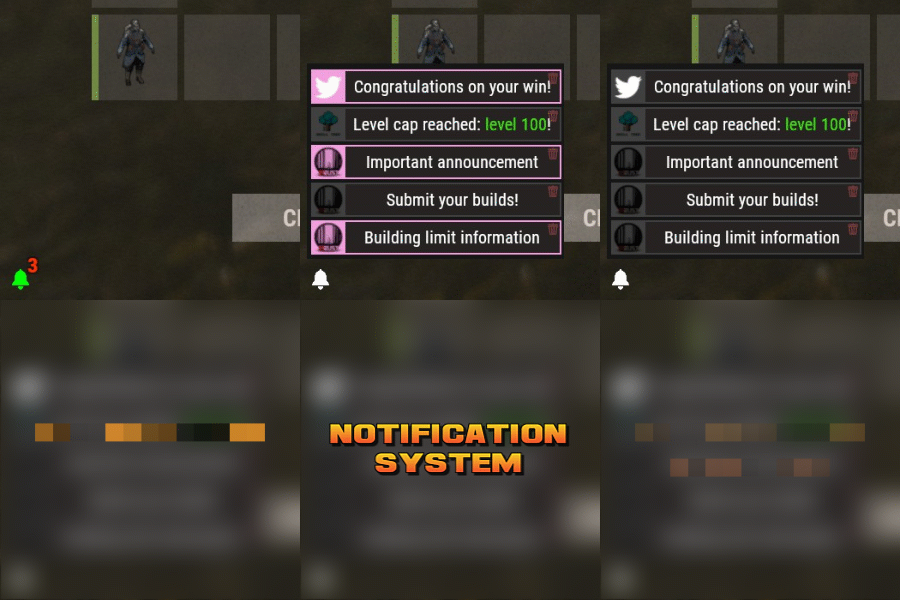
Notification Systems is a versatile plugin designed to deliver messages directly to players on your server — even when they’re offline. Seamlessly integrate it into other plugins, such as Skill Tree, or trigger notifications manually through commands for complete flexibility. Each notification can include a custom title, message, and an optional redemption button, giving you the power to reward players with items, currency, points, or trigger client-side commands — all tailored to your server’s needs. The idea behind the plugin is to allow server owners to send critical information to players, with the option to run commands that target said players. For example, you can send a notification to all players that have joined your server (regardless of their online status), with a redemption button that will give each of them 500 scrap. The following commands can be run in your server console, or player console (with the notificationsystem.admin permission). The commands are broken up in 3 sections: Title, body, redemptions, each of which is differentiated using "[]". Parameters: Userid: target player's Steam64 id. Message icon id: the skin id that you want to appear on the notification list. Setting to 0 will default to the message item id icon. Message item id: the item image you want to appear on the notification list (-769647921 = skull.trophy). Setting to 0 will default o the config icon. Title: Must be formatted with square brackets and surrounded by quotation marks like so: "[Title here]" Body: Must be formatted the same way as the title, with square brackets and quotation marks, like so: "[description here]" Redemptions: Must also have the square brackets and quotation marks, but also allow for an optional parameter of running it as a server command or client command. Here is the formatting for running a server command: "[(inventory.giveto {id} scrap 500, true)]" Here is the formatting for running a client command: "[(chat.say "/sprize", false)]" Here is the formatting for running both: "[(inventory.giveto {id} scrap 500, true),(chat.say "/sprize", false)]" Command: notification.add <userid> <message icon id> <message item id> "[Title]" "[Description]" "[(command1,bool:isServer)(command2,bool:isServer)]" Command: notification.all <message icon id> <message item id> "[Title]" "[Description]" "[(command1,bool:isServer)(command2,bool:isServer)]" Example of a full command: notification.add 123445667878213 "[Title goes here]" "[Here is my message, there are many others like it, but this is mine]" "[(inventory.giveto {id} scrap 500. true)]" notification.all "[Title goes here]" "[Here is my message, there are many others like it, but this is mine]" "[(inventory.giveto {id} scrap 500. true)]" void AddAll(string title, string body, int itemID, ulong picID = 0, string sprite = null, List<(string, bool)> commands = null) void Add(ulong id, string title, string body, int itemID, ulong picID = 0, string sprite = null, List<(string, bool)> commands = null)$11.99- 3 comments
-
- 1
-
-
- #notify
- #notification
- (and 7 more)
-

Version 1.0.2
49 downloads
Create epic player vs. player battles with this original arena. Arena Dome is fully compatible with Zone Manager and Event Manager. Arena Dome contains NPCs, loot, walls for players to cover their backs, and several towers for players to shoot from above.$7.66 -

Version 1.3.5
157 downloads
Advanced graphical plugin manager to easily manage plugins. Features Load/Unload plugins Unloaded plugins are unloaded permanently (not reloading after restarts) Convenient error lookup for not loading plugins Intuitive and super responsive UI (no lag for small UI changes and no mouse reset) Search/Filter function Back button for quick navigation No plugin dependencies Commands (Chat and Console) gplugins - Opens/Closes the UI gplugins.load <pluginname> - Loads the given plugin and removes it from the disabled plugins list gplugins.unload <pluginname> - Unloads the given plugin and adds it to the disabled plugins list Permissions Administrators don't need any permission Players can be given access with the permission 'gplugins.use' (for UI and commands) Hints Clicking the exclamation mark icon will show the error message at the bottom The disablement of plugins after restarts will not work if gplugins is not loaded Loading a plugin in any way other then gplugins when it is disabled in gplugins will not work Configuration uicolor.primary (rgba) - The primary accent color uicolor.disabled (rgba) - The disabled buttons color$11.99 -

Version 1.0.1
24 downloads
Legendary battlefield, Arena-Monument inspired by the Legendary game Mortal Kombat. Dive into the abyss of doom, a combat Arena forged in the shadows of nightmares inspired by the legendary Mortal Kombat. Wage a brutal battle where your soul is the price. Face hordes of ruthless zombies and relentless warriors. Fire consumes, you traps lurks and towers rise like twisted giants won tower lies ruined under a blanket of rubble. A reminder of the relentless doom reclaim your destiny, spill blood in the arena to achieve glory, prepare to plunge into the darkness in this battlefield, a descent into the depths of terror where only the darkest warriors will find immortality. - INCLUDES • Parkour • Traps • Ziplines • NPCs • Zombies • Towers • Loots • Hackable crates • Flags • Catapults • Siege Towers • Battering Ram • Ballistas • Mortal Kombat logotype - TIPS • You can also use this Arena as a monument for your server. • Use this image for the flags:$14.90- 5 comments
- 1 review
-
- 6
-
-
-
- #mortalkombat
- #mortal kombat
- (and 70 more)
-

Version 1.1.7
159 downloads
Open UI - /zm FEATURES: Create and setup zone with GUI Can damage other player in Zone Can Damage other player structures Can damage NPC Can damage Helicopter P.s - (My Discord - tofurahie#4144) Config: { "Show Notification": true, "Show None zone type": true, "Notification message when enter in zone(%ZONENAME% - Zone name, %ZONETYPE% - Zone type)": "You have entered the zone %ZONENAME%\nZone type: %ZONETYPE%", "Notification message when leave from zone": "You have left the Zone, now you are in the open world", "Zones": [ { "ZoneID(Uniq)": 1633968236, "Zone Name": "ZONE NAME", "Zone Type": "ZONE TYPE", "Zone Type Color(HEX FORMAT)": "white", "Zone Position": { "x": 189.8238, "y": 4.038739, "z": 606.1398 }, "Zone Radius": 10.0, "Visible sphere?": false, "Can damage other players in Zone": false, "Can damage other player structures": false, "Can damage NPC": false, "Can damage Helicopter": false } ] }$4.99 -
Version 1.1.0
14 downloads
Dynamic Warps - Teleportation Plugin for Rust | Plugin de teletransportacion para Rust ENGLISH Version: 1.0.0 Author: TSG_ERIC Description Dynamic Warps is a simple and efficient plugin for Rust servers that allows administrators with auth level 2 to manage teleportation points (warps). Players can easily access these warps, enhancing the overall server experience. Features Warp Management: Create, update, and remove teleportation points. Custom Delays: Set a waiting time before teleporting. Visual Effects: Optional animations when teleporting. Accessible Commands: Players can list and use warps effortlessly. ================================================================================ Main Commands Administrators (auth level 2): /warp create [name] → Create a warp at your current position. /warp set [name] → Update an existing warp's position. /warp remove [name] → Delete a warp. /warp time [name] [seconds] → Set a teleport delay for a warp. ================================================================================ Players: /warp list → Show the list of available warps. /[name] → Teleport to the selected warp. ================================================================================ Dynamic Warps is the perfect tool to enhance your Rust server gameplay, offering a balanced and easy-to-use teleportation system. Dynamic Warps - Plugin de Teletransporte para Rust ================================================================================================================================================================ ESPAß‘OL Versión: 1.0.0 Autor: TSG_ERIC Descripción Dynamic Warps es un plugin sencillo y eficiente para servidores de Rust que permite a los administradores con auth level 2 gestionar puntos de teletransporte (warps). Los jugadores pueden acceder fácilmente a estos warps, mejorando la experiencia del servidor. ================================================================================ Características Gestión de warps: Crea, actualiza y elimina puntos de teletransporte. Retraso personalizable: Configura un tiempo de espera antes de teletransportarse. Efectos visuales: Animaciones opcionales al teletransportarse. Comandos accesibles: Los jugadores pueden listar y usar los warps fácilmente. ================================================================================ Comandos Principales Administradores (auth level 2): /warp create [nombre] → Crea un warp en tu posición actual. /warp set [nombre] → Actualiza la posición de un warp existente. /warp remove [nombre] → Elimina un warp. /warp time [nombre] [segundos] → Configura el retraso del warp en segundos. ================================================================================ Jugadores: /warp list → Muestra la lista de warps disponibles. /[nombre] → Teletranspórtate al warp seleccionado. ================================================================================ Dynamic Warps es la herramienta perfecta para mejorar la jugabilidad de tu servidor Rust, ofreciendo un sistema de teletransporte balanceado y fácil de usar. ================================================================================ YOUTUBE VIDEO ================================================================================ EXAMPLE OF CONFIGURATION FILE | EJEMPLO DE ARCHIVO DE CONFIGURACIß"N { "WarpList": { "example": { "x": -757.5041, "y": 2.30591822, "z": -184.441864 } }, "TeleportDelays": { "example": 5.0 }, "EnableTeleportAnimation": true } ================================================================================$2.99 -
Version 1.1.2
394 downloads
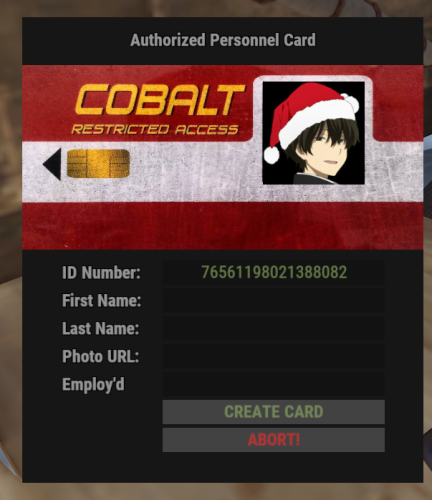
Image Manager is a sleek and powerful tool for developers, offering a lightweight alternative to ImageLibrary. Its unique handling and plugin-specific callbacks make it exceptionally easy to use. Console Command: imagemanager.reset // can only be ran from server console/terminal I don't allow use client side. Features: Error Handling: Outputs special debug info for devs when something fails. It's able to self repair when the server sv.files have been deleted but a wipe hasn't occurred or vice versa. Stores images with unique identifiers to ensure reliable retrieval/removal. If unity request fails retries with www instead. Optimized Request Management: Utilizes batch processing to handle image caching requests efficiently. Auto Remove Data that isn't used past x Days: Default = 30, 0 = disabled. Sets batch limits on Images: Default = 30 & Avatars can do 100 at a time per request using steam API key. Keeps Previous Wipe Data thus reducing the need to redo everything each wipe. Groups requests into batches to optimize resource use and reduce overhead. Manages large volumes of connections without sacrificing performance. Handles high volumes of image caching requests during server wipes or mass player reconnections. Processes and caches avatar images quickly with coroutine-based execution. Manages concurrent requests from multiple plugins simultaneously without conflicts or slowdowns. Maintains responsiveness and efficiency in dynamic server environments. Plugin Communication: In addition to its core functionality, the system includes special logic to facilitate communication between plugins. Each plugin calling the image caching system is notified when its batch of requests is ready or finished, allowing it to proceed with its logic without waiting for all requests to complete. This feature enhances the flexibility and usability of the system, ensuring smooth integration with various plugins and workflows. Plugin Communication Example For Images: // Plugin Calls!? Whaaa.. :P This works with all Adding hook calls in this plugin. // Example plugin: GUIShop [PluginReference] private Plugin ImageManager; private List<string> _pluginImages = new List<string>(); private Dictionary<string, string> _guishopImages = new Dictionary<string, string>(); private void OnServerInitialized() { // This will add the images to the filesystem list for the callback if (ImageManager != null && ImageManager.IsLoaded) ImageManager?.Call("AddImages", _pluginImages, FileStorage.Type.jpg, "GUIShop"); } // why do we need this!? OnPluginLoaded for reload situations, or when plugin wasn't loaded yet. private void OnPluginLoaded(Plugin name) { if (ImageManager != null && name.Name == ImageManager.Name & ImageManager.IsLoaded) { Puts("ImageManager has been detected and GUIShop Images are now being Processed"); // This will add the images to the filesystem list for the callback ImageManager?.Call("AddImages", _pluginImages, FileStorage.Type.jpg, "GUIShop"); } } // this would be your custom call-back ( Why use this!? Because it can actually be faster so you can continue your code logic quicker ) void ImageManagerGUIShop(Dictionary<string, string> images) { _guishopImages = images; // this returns the sent URL as the KEY with the image as the value. } // now down in your GUI / UI you can do this ( same for avatars except the key is ulong ) public void Pic(ref CuiElementContainer container, string parent, string name, string anchorMin, string anchorMax, string url) { CuiRawImageComponent rawImage = new CuiRawImageComponent(); rawImage.Png = _guishopImages[url]; container.Add(new CuiElement { Parent = parent, Name = name, Components = { rawImage, new CuiRectTransformComponent { AnchorMin = anchorMin, AnchorMax = anchorMax } } }); } Plugin Communication Example for Avatars / Image Combo: private HashSet<string> _storeImages = new HashSet<string>(); private Dictionary<string, string> _storedImages = new Dictionary<string, string>(); private Dictionary<string, string> _storedAvatars = new Dictionary<string, string>(); private void OnServerInitialized() { ImageManager?.Call("AddImages", _storeImages.ToList(), FileStorage.Type.jpg, "GUIShop"); } private void OnPluginLoaded(Plugin name) { if (ImageManager != null && name.Name == ImageManager.Name) { Puts("ImageManager has been detected and Images are now being Processed"); ImageManager?.Call("AddImages", _storeImages.ToList(), FileStorage.Type.jpg, "GUIShop"); // plugin name "GUIShop" } } // your special made hook to listen for on your image request. private void ImageManagerRustID(Dictionary<string, string> received) { // you can filter which ones you want when you get the list back. example. foreach (var image in received) { if (_storeImages.Contains(image.Key)) { _storedImages[image.Key] = image.Value; _storeImages.Remove(image.Key); if (_storeImages.Count == 0) break; } } } // called when new avatars get cached so you can update as needed. void ImageManagerPlayerConnected(Dictionary<string, string> avatars) => _storedAvatars = avatars; // use for your gui example CuiRawImageComponent rawImage = new CuiRawImageComponent(); rawImage.Png = _storedAvatars[id]; //or call each time if you prefer.. (string)ImageManager?.Call("GetAvatar", id); // or image rawImage.Png = _storedImages[key] container.Add(new CuiElement { Parent = parent, Name = name, Components = { rawImage, new CuiRectTransformComponent { AnchorMin = anchorMin, AnchorMax = anchorMax } } }); API Hooks: // Avatars // Called when the plugin has initially loaded / compiled & finished/ready for use. void ImageManagerLoadedAvatars(Dictionary<string, string> avatars) // Triggered when new players connect with no stored pic yet. ( Is only called once finished storing in the event of multiple or mass player connections their Queued ) void ImageManagerPlayerConnected(Dictionary<string, string> avatars) // Triggered by 3rd party plugins doing stuff + PlayerConnected. void ImageManagerAdded(Dictionary<string, string> avatars) // called when avatars have been removed & returns the new full avatar list available. void ImageManagerRemoved(Dictionary<string, string> avatars) // Images // Called when the plugin has initially loaded / compiled & finished/ready for use. void ImageManagerLoadedImages(Dictionary<string, string> images) // Triggered by 3rd party plugins doing stuff. void ImageManagerAdded(Dictionary<string, string> images) // called when avatars have been removed & returns the new full avatar list available. void ImageManagerRemoved(Dictionary<string, string> images) API Calls: These are API CALLS which means you call them.. ImageManager?.Call("AddImages", _pluginImages, FileStorage.Type.jpg, "GUIShop"); // Example // new hook use this to specify individual image storage types. AddImages(Dictionary<string, FileStorage.Type> images, string plugin) // hook changed. AddImages(List<string> images, FileStorage.Type format, string plugin) // hook changed. Use this to specify 1 storage type for all images to save as. AddImage(string image, FileStorage.Type format, string plugin) GetImage(string image) // returns string GetImages(List<string> images) // returns Dictionary<string, string> RemoveImage(string image) RemoveImages(List<string> images) AddAvatar(ulong player, string url, string plugin) // url is optional if you want to provide custom image for player. AddAvatar(string player, string url, string plugin) // url is optional if you want to provide custom image for player. AddAvatars(Dictionary<string, string> players, string plugin) // url is optional if you want to provide custom image for player. GetAvatar(string player) // returns string GetAvatars(List<string> players) // returns Dictionary<string, string> RemoveAvatar(string player) RemoveAvatars(List<string> players) TODO: Add MYSQL Support to have 1 database available instead of each server instance. Add Discord support for Error Responses.Free -

Version 1.3.0
129 downloads
Advanced graphical permissions manager to easily manage player and group permissions. Features Assign/Revoke player permissions Assign/Revoke player groups Assign/Revoke group permissions Create, rename, clear and delete groups Convenient overview of given permissions per plugin Hierarchical wildcard permissions Back button for quick navigation Search/Filter function Intuitive UI No plugin dependencies Commands (Chat and Console) gperms - Opens/Closes the UI Permissions Administrators don't need any permission Players can be given access with the provided permissions: 'gperms.use' - Open the GUI (readonly, but needed for any action in GPerms) 'gperms.players' - Grant/Revoke player permissions 'gperms.playergroups' - Assign/Remove players from groups 'gperms.groups' - Grant/Revoke group permissions 'gperms.modifygroups' - Create, edit and delete groups Hints Directly granted permissions will be checked as green Inherited group permissions will be checked as blue To revoke all permissions of a plugin click the 1 level wildcard permission twice (grant all -> revoke all) Configuration perms.hidepluginprefix (true/false) - if set to false, the full permission names will be shown plugins.showwithoutpermissions (true/false) - If set to false, plugins without permissions wil be hidden players.showoriginalnames (true/false) - If set to true, the original playername will also be shown uicolor.primary (rgba) - The primary accent color uicolor.disabled (rgba) - The disabled buttons color uicolor.activetab (rgba) - The active tab color$11.99- 2 comments
- 3 reviews
-
- 7
-
-
-
-
- #permissions
- #admin
- (and 15 more)
-

Version 2.0.3
1,048 downloads
Issues: Autospawn (static) quarries do not work. You can fix this by deleting that quarry and spawning a new quarry (sulfur, stone, metal, etc...). If this does not work you can use Uber Tool to place it and reload the plugin to initialize the zone and it should work as intended. Manage a certain quarry that has been placed down Chat Commands /qm h or help - Shows other commands and help text /qm t or team - Enables/Disabled quarry team share /qm a or add - Adds a certain player to the quarry share list /qm r or remove - Removes a certain player from the quarry share list /qm ra or removeall - Removes all players from the share list /qm l or list - Lists all players in the share list Permmisions quarrymanager.use - Permission to use the commands /qm or /qm help quarrymanager.teamshare - Permission to use the commands /qm team quarrymanager.playershare - Permission to use the commands /qm add, /qm remove, /qm removeall, /qm list quarrymanager.allowbypass - Permission to be able to bypass the static quarry dome for whoever is using it. quarrymanager.admin - Permissions for admins Configuration { "General Settings": { "Wipe Data on new save": true }, "Commands": { "Quarry Manager Command": "qm" }, "Chat Settings": { "Chat prefix": "QuarryLocker >>", "Chat prefix colour": "#FF6A13", "Chat icon": 0, "Quarry Share Messages": { "Print a message if team share is enabled": true, "Print a message if team share is disabled": true, "Print a message if a player is added to the share list": true, "Print a message if a player is removed to the share list": true, "Print a message if a player has activated a static quarry": true }, "RCON/Server Console Messages": { "Message the console if someone enables team share": false, "Message the console if someone disables team share": false, "Message the console if someone is added to the share list": false, "Message the console if a player is removed to the share list": false, "Message the console on static quarry lock activated": false } }, "Share Settings": { "Players can toggle other players quarries": false, "Lock quarry containers": false, "Team Sharing": { "Allow team to toggle the quarry": true, "Allow team to open the quarries containers": true }, "Individual Player Sharing": { "Allow added players to toggle the quarry": true, "Allow added players to open the quarries containers": true }, "Static Quarry Sharing": { "Enable static quarry lock": false, "Static Quarry Sharing": { "If the player leaves the dome unlock the static quarry": false } } } } Language { "Info.Help": "\n /qm h | help - Provides the following commands: \n /qm t | team - Enable/Disable quarry team share. \n /qm a | add - Adds a certain player that can access your quarry \n /qm r | remove - Removes a certain added player that can access your quarry \n /qm ra | removeall - Removes all added players that can access your quarry \n /qm l | list - Lists all added players that can access your quarry", "Info.TeamSharingEnabled": "Your team can now access your quarry", "Info.TeamSharingDisabled": "Your team can no longer access your quarry", "Info.AddedPlayer": "{0} Can now access your quarries", "Info.RemovedPlayer": "{0} Can no longer access your quarries", "Info.RemovedAllPlayers": "No one can access your quarries that you have added", "Info.NoAddedPlayers": "There are no players to list since you have not added any yet", "Info.ListCurrentPlayers": "Players that are added that can access your quarries:\n{0}", "Info.StaticQuarryActivated": "No one can access this quarry unless you leave the dome or the quarries fuel runs out", "Info.MessageRconOnTeamShareEnabled": "{0}, enabled team share!", "Info.MessageRconOnTeamShareDisabled": "{0}, disabled team share!", "Info.MessageRconOnPlayerAdded": "{0}, added {1}", "Info.MessageRconOnPlayerRemoved": "{0}, removed {1}", "Info.MessageRconOnStaticQuarryActivated": "The static quarry has been activated at: {0} by {1}", "Warning.NoPermission": "You don't have the required permissions to use this command", "Warning.UnableToFindPlayer": "Unable to find the player!", "Warning.UnableToAddSelf": "You cannot add yourself", "Warning.UnableToAccessContainer": "You cannot access this quarry, since you are not authorized on it", "Warning.UnableToToggleEngine": "You are unable able to toggle {0}'s quarry", "Warning.NoTeamFound": "You cannot use this command since you don't have a team" } Credits Thank you to Bsdinis for the help with V1 and so on.Free- 28 comments
-
- 1
-
-
- #quarry
- #quarry manager
- (and 3 more)


.thumb.png.f676fcb4237b0d630285499251bcf88e.png)