Search the Community
Showing results for tags 'modifier'.
Found 19 results
-

Version 1.0.32
2,661 downloads
Item Perks is a plugin that enhances everyday weapons, tools and armour with over 50 different types of perks. Items with perks can be obtained a variety of ways, including: Finding them randomly in crates or barrels during your morning scrap farm. Randomly crafting an enhanced version of your equipment while you roof camp noobs from your base. Recycling enhanced equipment and finding enhancement kits stuck in the teeth of the recycler. Using a console or chat command that can be ran through seedy plugin traders like GUIShop. The plugin gives a large amount of control to server owners when it comes to implementation. You can: Enable/disable perks, or modify the minimum and maximum values that they roll when applied to gear. Blacklist or whitelist items to each perk, so they will be exclusively excluded or included (based on the list you choose). Adjust the weight of each perk, so it is more or less likely to be seen on gear., or adjust the chances amount of perks that items can potentially have. Fully adjust or disable the chance for item drops to be found, or enable the enhancement kit system so players can recycle gear. So much more (watch the configuration section of the video below to see the full extent). There are over 50 perks included with the plugin. The following list will describe briefly what each perk does. Name: Prospector Description: This perk increases your mining yield when mining stone, metal and sulfur nodes. Name: Lumberjack Description: This perk increases your woodcutting yield when chopping living or dead trees. Name: Butcher Description: This perk increases the resources gained from skinning humans and animals. Name: Horticulture Description: This perk increases the amount of resources gained when harvesting grown plants. Name: Forager Description: This perk increases the amount of resources gained when picking up map generated collectibles. Name: Angler Description: This perk increases the amount of fish you receive upon a successful catch. Name: BeastBane Description: This perk increases the damage dealt to animals. Name: ScientistBane Description: This perk increases the damage dealt to scientists. Name: FlakJacket Description: This perk reduces the damage received from explosions. Name: Elemental Description: This perk reduces damage from received from cold and heat sources. Name: Scavenger Description: This perk provides you with a chance to find additional scrap from crates and barrels. Name: Manufacture Description: This perk increases the speed of your crafting. Name: Durable Description: This peark reduces the durability damage of all equipped items. Name: BeastWard Description: This perk reduces the damage received from animals. Name: ScientistWard Description: This perk reduces the damage received from scientists. Name: Builder Description: This perk provides you with a chance for your building upgrades to be free. Name: Thrifty Description: This perk provides you with a chance for your crafting components to be refunded upon a successful craft. Name: Fabricate Description: This perk provides you with a chance to duplicate an item upon a successful craft. Name: Pharmaceutical Description: This perk increases the amount of healing received from all sources. Name: MeleeWard Description: This perk reduces the damage received from melee weapons. Name: Academic Description: This perk provides you with a chance to receive a scrap refund when researching an item at the research bench. Name: FallDamage Description: This perk reduces the impact damage received from falling. Name: Lead Description: This perk reduces the damage from radiation. Name: Smasher Description: This perk will provide you with a chance to instantly destroy barrels with any amount of damage. Name: Environmentalist Description: This perk will increase the speed of recyclers that you activate. Name: Smelter Description: This perk will increase the smelting speed of furnaces you activate. Name: Paramedic Description: This perk provides players that you revive with additional health. Name: Prepper Description: This perk provides you with a chance to not consume food when eating. Name: Regeneration Description: This perk will passively regenerate you. Name: SharkWard Description: This perk will reduce the amount of damage received from sharks. Name: SharkBane Description: This perk will increase the amount of damage dealt to sharks. Name: Deforest Description: This perk provides you with a chance to cut down nearby trees when successfully cutting a tree down. Name: BlastMine Description: This perk provides you with a chance to mine out nearby nodes when successfully mining out a node. Name: Tanner Description: This perk provides you with a chance to skin nearby corpses when successfully skinning out a corpse. Name: Vampiric Description: This perk will heal you for a percentage of the damage dealt to certain enemies. Name: Reinforced Description: This perk will reduce the the amount of damage that your vehicles receive when mounted. Name: ComponentLuck Description: This perk will provide you with a chance to receive additional components when looting barrels and crates. Name: ElectronicsLuck Description: This perk will provide you with a chance to receive additional electronics when looting barrels and crates. Name: UncannyDodge Description: This perk provides you with a chance to dodge incoming damage, reducing it to 0. Name: LineStrength Description: This perk increases the tensile strength of your fishing line. Name: HealShare Description: This perk will share healing effects with nearby players. Name: Attractive Description: This perk will provide you with a chance to automatically pick up components when destroying barrels. Name: WoodcuttingLuck Description: This perk provides you with a chance to find a random item when you cut down a tree. Name: MiningLuck Description: This perk provides you with a chance to find a random item when you mine out a node. Name: SkinningLuck Description: This perk provides you with a chance to find a random item when you skin out a corpse. Name: FishingLuck Description: This perk provides you with a chance to find a random item when you catch a fish. Name: Sated Description: This perk will increase the amount of calories and hydration you receive from food and water sources. Name: IronStomach Description: This perk provides you with a chance to negate negative effects when consuming food. Name: TreePlanter Description: This perk will provide a chance for a tree to instantly regrow when cut down. Name: RockCycler Description: This perk will provide a chance for a node to instantly respawn when mined out. Name: BradleyDamage Description: This perk increases the damage dealt to Bradley Tanks. Name: HeliDamage Description: This perk increases the damage dealt to Patrol Helicopters. Name: Thorns Description: This perk reflects a % of the damage done back to the attacker Command: ipgive Type: console/chat Parameters: <target ID/Name> <optional: shortname> <optional: perks> Description: Gives the target player an enhanced item. If shortname is specified, it will base the enhancement off of that item. If perks are specified, it will add only those perks to the item. Command: ipgivekit Type: console/chat Parameters: <target ID/Name> <perk> Description: Gives an enhancement kit to the target. itemperks.use - Required to receive any benefit from enhanced items. itemperks.loot - Required to loot enhanced items from crates and barrels. itemperks.craft - Required for a chance to received enhanced versions of crafted gear. itemperks.admin - Required to use admin commands. itemperks.enhance - Required to add enhancement kits to items via the workbench. itemperks.recycle - Required to receive enhancement kits from recycling enhanced items. IPAPI_CreateItem - creates and returns an enhanced item using the details fed into the method. If shortname is left blank, it will pick a random valid item. If api_perks is null it will pick random perk(s) and add them. Returns Item [HookMethod("IPAPI_CreateItem")] public object IPAPI_CreateItem(string shortname = null, ulong skin = 0, Dictionary<string, float> api_perks = null) { List<KeyValuePair<Perk, float>> perks = Pool.GetList<KeyValuePair<Perk, float>>(); foreach (var perk in api_perks) { Perk _perk; if (parsedEnums.TryGetValue(perk.Key, out _perk)) perks.Add(new KeyValuePair<Perk, float>(_perk, perk.Value)); } var result = CreateItem(shortname, skin, perks); Pool.FreeList(ref perks); // Returns an Item class return result; } Example usage: [ChatCommand("testipapi")] void TestIPAPI(BasePlayer player) { Dictionary<string, float> perks = new Dictionary<string, float>() { ["Prospector"] = 1f, ["Lumberjack"] = 1f, ["Butcher"] = 1f, ["Horticulture"] = 0.5f }; var item = (Item)ItemPerks.Call("IPAPI_CreateItem", "hammer.salvaged", (ulong)2830083288, perks); if (item == null) { Puts("Failed"); return; } item.name = "tool of the trade"; player.GiveItem(item); }$24.99- 209 comments
- 3 reviews
-
- 8
-

-

-
- #items
- #enhancement
- (and 6 more)
-

Version 1.1.5
37 downloads
xStackSize xStackSize gives you full control over item stack sizes on your Rust server. Globally and permission-based. Fine-tune your economy, balance progression, or create VIP advantages with flexible and performance-friendly stack management. Whether you want larger stacksize for QoL, custom stacksizes for specific groups/permission, or complete control over your servers stacking system. INFO: xStackSize supports multiple permissions at the same time. If a player has more than one stack permission, the plugin automatically applies the highest stack size based on your configuration. The highest value always wins - whether it's global or permission-based. Example: If global is set to x3 and a permission gives x1, the player will use x3 since it’s higher. (If he has that permission) Features Global stack size control Permission-based StackSizes (VIP / ranks / groups) Custom StackSize per item Custom StackSize for CUSTOM ITEMS Force Split/Merge changed StackSize INSTANT instead of waiting for players to move items manually Blacklist items Easy to configure Performance friendly designed Additionally supports Quarries, Excavator, Furnaces and Conveyors Permission-based StackSizes: You can use any permission name in the config, as long as it starts with xstacksize. Examples: xstacksize.pro, xstacksize.vip, xstacksize.premium etc.. You can create multiple stack-size permissions. Simply copy and paste a new permission block in the config and give it a different permission name. Various Constellations (Examples, for better understanding) Console Command xstacksize.refresh (Useful if you have AutoApplyStackSizeChange set to 'false') Force-applies current stack rules to existing items immediately. It recalculates limits and retroactively normalizes/merges stacks in player inventories and storage containers without requiring item movement. Config (Use value '0' for UNLIMITED) { /* AutoApplyStackSizeChange force splits/merge items instantly instead of waiting for players to move items manually. */ "AutoApplyStackSizeChange": true, "StackSizeMultipliers": { "Weapon": 1.0, "Construction": 1.0, "Items": 1.0, "Resources": 1.0, "Attire": 1.0, "Tool": 1.0, "Medical": 1.0, "Food": 1.0, "Ammunition": 1.0, "Traps": 1.0, "Misc": 1.0, "Component": 1.0, "Electrical": 1.0, "Fun": 1.0, "CustomItems": 1.0 }, /* FixedItemStackSizes are fixed values, not multipliers (Example: 5000) */ "FixedItemStackSizes": { "wood": 0, "stones": 0 }, "PermissionStackSizeMultipliers": { "xstacksize.vip": { "Weapon": 1.0, "Construction": 1.0, "Items": 1.0, "Resources": 1.0, "Attire": 1.0, "Tool": 1.0, "Medical": 1.0, "Food": 1.0, "Ammunition": 1.0, "Traps": 1.0, "Misc": 1.0, "Component": 1.0, "Electrical": 1.0, "Fun": 1.0, "CustomItems": 1.0 } }, "BlacklistedItems": [ "pumpkin" ] }$15.99 -

Version 1.3.13
115 downloads
This plugin is simple, the config file self populates with all food items, and includes a range of metabolism effects that players can gain. When the config first creates, it includes default values for every food type. does not include liquids. Perms: foodeditor.bypass - bypass the custom values. this will ignore the entire config for any players who have it granted. The config allows various changes to the metabolism effects related to food. Includes random chance for bad effect when eating pickles. It also includes a no cooldown on eat, if set to true in config, for everyone. Below is what the config looks like on initial load, any changes made will require a reload of the plugin to take effect when eating the food type. Set to negative to reduce the effect instead of increase. Config: { "Toggle for food spoiling (this toggles ConVar server.foodspoiling)": false, "Eating cooldown": 1.0, "Remove eating cooldown (players can spam eat the following food with this setting)": true, "Food Items and their metabolism effects": { "apple": { "calories": 30.0, "hydration": 15.0, "health": 2.0, "poison": 0.0, "bleeding": 0.0, "radiation_poison": 0.0, "pending_health": 0.0 }, "apple.spoiled": { "calories": 15.0, "hydration": 2.0, "health": 2.0, "poison": 0.0, "bleeding": 0.0, "radiation_poison": 0.0, "pending_health": 0.0 }, "black.raspberries": { "calories": 25.0, "hydration": 12.0, "health": 10.0, "poison": -5.0, "bleeding": 0.0, "radiation_poison": 0.0, "pending_health": 0.0 }, "blueberries": { "calories": 50.0, "hydration": 25.0, "health": 5.0, "poison": -5.0, "bleeding": 0.0, "radiation_poison": 0.0, "pending_health": 0.0 }, "grub": { "calories": 3.0, "hydration": -15.0, "health": 0.0, "poison": 0.0, "bleeding": 0.0, "radiation_poison": 0.0, "pending_health": 0.0 }, "worm": { "calories": 1.0, "hydration": -10.0, "health": 0.0, "poison": 0.0, "bleeding": 0.0, "radiation_poison": 0.0, "pending_health": 0.0 }, "cactusflesh": { "calories": 5.0, "hydration": 20.0, "health": 0.0, "poison": 0.0, "bleeding": 0.0, "radiation_poison": 0.0, "pending_health": 3.0 }, "can.beans": { "calories": 100.0, "hydration": 25.0, "health": 0.0, "poison": 0.0, "bleeding": 0.0, "radiation_poison": 0.0, "pending_health": 4.0 }, "can.tuna": { "calories": 50.0, "hydration": 15.0, "health": 0.0, "poison": 0.0, "bleeding": 0.0, "radiation_poison": 0.0, "pending_health": 2.0 }, "chocolate": { "calories": 100.0, "hydration": 1.0, "health": 0.0, "poison": 0.0, "bleeding": 0.0, "radiation_poison": 0.0, "pending_health": 2.0 }, "fish.cooked": { "calories": 60.0, "hydration": 15.0, "health": 0.0, "poison": 0.0, "bleeding": 0.0, "radiation_poison": 0.0, "pending_health": 5.0 }, "fish.raw": { "calories": 5.0, "hydration": 1.0, "health": 0.0, "poison": 0.0, "bleeding": 0.0, "radiation_poison": 0.0, "pending_health": 0.0 }, "fish.minnows": { "calories": 10.0, "hydration": 1.0, "health": 0.0, "poison": 0.0, "bleeding": 0.0, "radiation_poison": 0.0, "pending_health": 1.0 }, "granolabar": { "calories": 60.0, "hydration": 0.0, "health": 0.0, "poison": 0.0, "bleeding": 0.0, "radiation_poison": 0.0, "pending_health": 5.0 }, "chicken.burned": { "calories": 10.0, "hydration": 0.0, "health": 0.0, "poison": 0.0, "bleeding": 0.0, "radiation_poison": 0.0, "pending_health": 2.0 }, "chicken.cooked": { "calories": 40.0, "hydration": 3.0, "health": 0.0, "poison": 0.0, "bleeding": 0.0, "radiation_poison": 0.0, "pending_health": 10.0 }, "chicken.raw": { "calories": 20.0, "hydration": 0.0, "health": 0.0, "poison": 10.0, "bleeding": 0.0, "radiation_poison": 0.0, "pending_health": 0.0 }, "chicken.spoiled": { "calories": 10.0, "hydration": 2.0, "health": 0.0, "poison": 10.0, "bleeding": 0.0, "radiation_poison": 0.0, "pending_health": 0.0 }, "deermeat.burned": { "calories": 10.0, "hydration": 0.0, "health": 0.0, "poison": 0.0, "bleeding": 0.0, "radiation_poison": 0.0, "pending_health": 2.0 }, "deermeat.cooked": { "calories": 40.0, "hydration": 3.0, "health": 0.0, "poison": 0.0, "bleeding": 0.0, "radiation_poison": 0.0, "pending_health": 10.0 }, "deermeat.raw": { "calories": 20.0, "hydration": 0.0, "health": 0.0, "poison": 10.0, "bleeding": 0.0, "radiation_poison": 0.0, "pending_health": 0.0 }, "horsemeat.burned": { "calories": 10.0, "hydration": 0.0, "health": 0.0, "poison": 0.0, "bleeding": 0.0, "radiation_poison": 0.0, "pending_health": 2.0 }, "horsemeat.cooked": { "calories": 45.0, "hydration": 3.0, "health": 0.0, "poison": 0.0, "bleeding": 0.0, "radiation_poison": 0.0, "pending_health": 8.0 }, "horsemeat.raw": { "calories": 20.0, "hydration": 0.0, "health": 0.0, "poison": 10.0, "bleeding": 0.0, "radiation_poison": 0.0, "pending_health": 0.0 }, "humanmeat.burned": { "calories": 6.0, "hydration": -30.0, "health": 0.0, "poison": 0.0, "bleeding": 0.0, "radiation_poison": 0.0, "pending_health": 0.0 }, "humanmeat.cooked": { "calories": 30.0, "hydration": -30.0, "health": 0.0, "poison": 0.0, "bleeding": 0.0, "radiation_poison": 0.0, "pending_health": 2.0 }, "humanmeat.raw": { "calories": 5.0, "hydration": -3.0, "health": 0.0, "poison": 10.0, "bleeding": 0.0, "radiation_poison": 0.0, "pending_health": 0.0 }, "humanmeat.spoiled": { "calories": 10.0, "hydration": 2.0, "health": 0.0, "poison": 10.0, "bleeding": 0.0, "radiation_poison": 0.0, "pending_health": 0.0 }, "bearmeat.burned": { "calories": 25.0, "hydration": 0.0, "health": 0.0, "poison": 0.0, "bleeding": 0.0, "radiation_poison": 0.0, "pending_health": 1.0 }, "bearmeat.cooked": { "calories": 100.0, "hydration": 1.0, "health": 0.0, "poison": 0.0, "bleeding": 0.0, "radiation_poison": 0.0, "pending_health": 5.0 }, "bearmeat": { "calories": 10.0, "hydration": 3.0, "health": 0.0, "poison": 5.0, "bleeding": 0.0, "radiation_poison": 0.0, "pending_health": 0.0 }, "wolfmeat.burned": { "calories": 15.0, "hydration": 0.0, "health": 0.0, "poison": 0.0, "bleeding": 0.0, "radiation_poison": 0.0, "pending_health": 1.0 }, "wolfmeat.cooked": { "calories": 60.0, "hydration": 1.0, "health": 0.0, "poison": 0.0, "bleeding": 0.0, "radiation_poison": 0.0, "pending_health": 5.0 }, "wolfmeat.raw": { "calories": 20.0, "hydration": 0.0, "health": 0.0, "poison": 10.0, "bleeding": 0.0, "radiation_poison": 0.0, "pending_health": 0.0 }, "wolfmeat.spoiled": { "calories": 10.0, "hydration": 2.0, "health": 0.0, "poison": 10.0, "bleeding": 0.0, "radiation_poison": 0.0, "pending_health": 0.0 }, "meat.pork.burned": { "calories": 15.0, "hydration": 0.0, "health": 0.0, "poison": 0.0, "bleeding": 0.0, "radiation_poison": 0.0, "pending_health": 1.0 }, "meat.pork.cooked": { "calories": 60.0, "hydration": 1.0, "health": 0.0, "poison": 0.0, "bleeding": 0.0, "radiation_poison": 0.0, "pending_health": 5.0 }, "meat.boar": { "calories": 60.0, "hydration": 0.0, "health": 0.0, "poison": 5.0, "bleeding": 0.0, "radiation_poison": 0.0, "pending_health": 0.0 }, "mushroom": { "calories": 15.0, "hydration": 5.0, "health": 3.0, "poison": 0.0, "bleeding": 0.0, "radiation_poison": 0.0, "pending_health": 0.0 }, "jar.pickle": { "calories": 50.0, "hydration": 20.0, "health": 0.0, "poison": 0.0, "bleeding": 0.0, "radiation_poison": 0.0, "pending_health": 5.0 }, "halloween.candy": { "calories": 25.0, "hydration": 0.0, "health": 0.0, "poison": 0.0, "bleeding": 0.0, "radiation_poison": 0.0, "pending_health": 1.0 }, "candycaneclub": { "calories": 300.0, "hydration": 100.0, "health": 0.0, "poison": 0.0, "bleeding": 0.0, "radiation_poison": 0.0, "pending_health": 16.0 }, "black.berry": { "calories": 5.0, "hydration": 2.0, "health": 0.0, "poison": 0.0, "bleeding": 0.0, "radiation_poison": 0.0, "pending_health": 0.0 }, "blue.berry": { "calories": 5.0, "hydration": 2.0, "health": 0.0, "poison": 0.0, "bleeding": 0.0, "radiation_poison": 0.0, "pending_health": 0.0 }, "green.berry": { "calories": 5.0, "hydration": 2.0, "health": 0.0, "poison": 0.0, "bleeding": 0.0, "radiation_poison": 0.0, "pending_health": 0.0 }, "red.berry": { "calories": 5.0, "hydration": 2.0, "health": 0.0, "poison": 0.0, "bleeding": 0.0, "radiation_poison": 0.0, "pending_health": 0.0 }, "white.berry": { "calories": 5.0, "hydration": 2.0, "health": 0.0, "poison": 0.0, "bleeding": 0.0, "radiation_poison": 0.0, "pending_health": 0.0 }, "yellow.berry": { "calories": 5.0, "hydration": 2.0, "health": 0.0, "poison": 0.0, "bleeding": 0.0, "radiation_poison": 0.0, "pending_health": 0.0 }, "corn": { "calories": 75.0, "hydration": 10.0, "health": 0.0, "poison": 0.0, "bleeding": 0.0, "radiation_poison": 0.0, "pending_health": 6.0 }, "potato": { "calories": 125.0, "hydration": 5.0, "health": 0.0, "poison": 0.0, "bleeding": 0.0, "radiation_poison": 0.0, "pending_health": 6.0 }, "pumpkin": { "calories": 100.0, "hydration": 30.0, "health": 0.0, "poison": 0.0, "bleeding": 0.0, "radiation_poison": 0.0, "pending_health": 10.0 }, "cakefiveyear": { "calories": 100.0, "hydration": 1.0, "health": 0.0, "poison": 0.0, "bleeding": 0.0, "radiation_poison": 0.0, "pending_health": 10.0 }, "bread.loaf": { "calories": 150.0, "hydration": 10.0, "health": 0.0, "poison": 0.0, "bleeding": 0.0, "radiation_poison": 0.0, "pending_health": 8.0 }, "egg": { "calories": 40.0, "hydration": 15.0, "health": 0.0, "poison": 0.0, "bleeding": 0.0, "radiation_poison": 0.0, "pending_health": 2.0 }, "honey": { "calories": 50.0, "hydration": 0.0, "health": 0.0, "poison": 0.0, "bleeding": 0.0, "radiation_poison": -15.0, "pending_health": 3.0 }, "bearmeat.spoiled": { "calories": 10.0, "hydration": 2.0, "health": 0.0, "poison": 10.0, "bleeding": 0.0, "radiation_poison": 0.0, "pending_health": 0.0 }, "bigcatmeat.cooked": { "calories": 120.0, "hydration": 1.0, "health": 0.0, "poison": 0.0, "bleeding": 0.0, "radiation_poison": 0.0, "pending_health": 7.0 }, "bigcatmeat": { "calories": 10.0, "hydration": 3.0, "health": 0.0, "poison": 5.0, "bleeding": 0.0, "radiation_poison": 0.0, "pending_health": 0.0 }, "bigcatmeat.spoiled": { "calories": 10.0, "hydration": 2.0, "health": 0.0, "poison": 10.0, "bleeding": 0.0, "radiation_poison": 0.0, "pending_health": 0.0 }, "crocodilemeat.cooked": { "calories": 100.0, "hydration": 1.0, "health": 0.0, "poison": 0.0, "bleeding": 0.0, "radiation_poison": 0.0, "pending_health": 5.0 }, "crocodilemeat": { "calories": 10.0, "hydration": 3.0, "health": 0.0, "poison": 5.0, "bleeding": 0.0, "radiation_poison": 0.0, "pending_health": 0.0 }, "crocodilemeat.spoiled": { "calories": 10.0, "hydration": 2.0, "health": 0.0, "poison": 10.0, "bleeding": 0.0, "radiation_poison": 0.0, "pending_health": 0.0 }, "deermeat.spoiled": { "calories": 10.0, "hydration": 2.0, "health": 0.0, "poison": 10.0, "bleeding": 0.0, "radiation_poison": 0.0, "pending_health": 0.0 }, "fish.spoiled": { "calories": 10.0, "hydration": 2.0, "health": 0.0, "poison": 10.0, "bleeding": 0.0, "radiation_poison": 0.0, "pending_health": 0.0 }, "horsemeat.spoiled": { "calories": 10.0, "hydration": 2.0, "health": 0.0, "poison": 10.0, "bleeding": 0.0, "radiation_poison": 0.0, "pending_health": 0.0 }, "porkmeat.spoiled": { "calories": 10.0, "hydration": 2.0, "health": 0.0, "poison": 10.0, "bleeding": 0.0, "radiation_poison": 0.0, "pending_health": 0.0 }, "snakemeat.cooked": { "calories": 100.0, "hydration": 1.0, "health": 0.0, "poison": 0.0, "bleeding": 0.0, "radiation_poison": 0.0, "pending_health": 5.0 }, "snakemeat": { "calories": 10.0, "hydration": 3.0, "health": 0.0, "poison": 5.0, "bleeding": 0.0, "radiation_poison": 0.0, "pending_health": 0.0 }, "snakemeat.spoiled": { "calories": 10.0, "hydration": 2.0, "health": 0.0, "poison": 10.0, "bleeding": 0.0, "radiation_poison": 0.0, "pending_health": 0.0 }, "spoiled.produce": { "calories": -50.0, "hydration": -50.0, "health": 0.0, "poison": 10.0, "bleeding": 0.0, "radiation_poison": 0.0, "pending_health": 0.0 }, "wheat": { "calories": 75.0, "hydration": 10.0, "health": 0.0, "poison": 0.0, "bleeding": 0.0, "radiation_poison": 0.0, "pending_health": 6.0 }, "honeycomb": { "calories": 5.0, "hydration": 0.0, "health": 0.0, "poison": 0.0, "bleeding": 0.0, "radiation_poison": 0.0, "pending_health": 0.0 } } }$4.00 -
Version 2.9.95
17,035 downloads
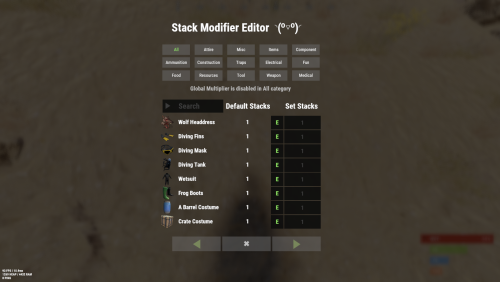
Stack Modifier is a performance-focused plugin that enhances and refines item stacking behavior in Rust. Includes a built in GUI Editor for quick and easy setup of stack sizes! This plugin uses harmony for the best performance! Features Includes GUI Editor - Blocks Player movements while using GUI Editor Including Keybinds! Adds NEW Stacking Support for the following. STACKING TAG support, crafted, spawned, picked-up, etc. Repair Bench, broken item stacks, spam repair! Melee Weapon throwing! Item Condition Merging! Stacks of Items not breaking one 1 in the stack breaks. liquids ( like bota bags etc ) Stacking of Fuel Containers (hats, tools, etc.) Stacking of Guns Weapon Attachments Stacking of Skins Works with SkinBox plugins Supports stacking armor slot armors Supports Genetic Stacking Supports Food Spoil stacking Stacking of Custom Items Stacking of Custom Items with Custom Display Names Stacking of Key Cards without losing the stack when swiping Stacking Candy Cane Club without losing the stack while lick Support for modified presents for unwrapping Limits wearable clothing items to stack sizes of 1! ( on the player wear container only ) Limits weapon attachments to stack sizes of 1! ( On the weapon its self! so you can have bigger stacks! ) The largest possible value in C# is 2,147,483,647 Which means anything over this stack-size will break the plugin Patches All Industrial Conveyor stack issues! ( Yes custom items no problems! ) -- THIS IS NOW IT"S OWN PLUGIN AS AN ADDON. 4-2-2025 Patches Stacks being lost when stacked items break! Like mining! Etc Patches Stacks being lost when Melee weapons are thrown! Like spear! Etc STACK MODIFIER INDUSTRIAL ADDON: Known Conflicts RoadBradley & HeliSignals Are doing item creations wrong and setting the item.name field as vanilla item display names thus breaking stack support. ( don't set a vanilla display name only set them if its custom names as the fix ) Conveyor Stacks Not needed & conflicts, stack-modifier already does this & has config settings for it. Davids Shop UI ( recently changed how his default data files are createdfor items ) ( you need to generate a new Items.json file and re-do custom items / pricing inside it to fix stack bugs with old data files ) Magic Coin uses some of the same hooks set up config in it correctly to not conflict Custom Skin Stack Fix not needed this handles it properly Stack Size Controller cannot have 2 of the same plugins basically Extra Loot causes a stacking bug when a reboot occurs with skinned items preventing old skinned items from stacking with new skinned items IndustrialCustomSkinsFix not needed stack-modifier has the same patch in it. IQAlcoholFarm by BadMandarin/Mercury is not supported & will cause stack bugs / problems ( could be supported with an author update, but current version is not supported ) ItemPerks by imthenewguy Causes stack bugs/problems just by having this plugin on your server due to harmony patching done inside it + repair logic is bugged. Item creation is also not handled properly resulting in duplication issues with Conveyor movements nothing can be done about that. ( plugin requires a full rewrite for proper support & repairs. ) Custom Item Definitions causes stack bugs/problems and I am not going to support a plugin that heavily modifies vanilla game items in that way its simply far too much work to try and support. I'd have to import almost half of that plugins code just for mine to accurately handle stack logic for it & for plugins that use that plugin. Plugins that do not handle Item Creation Correctly: ( Which break stacks ) Custom Item Drops by Machine ( Always sets the vanilla display name when its supposed to be null for vanilla items ) XP System by fastburst ( Always sets the vanilla display name when its supposed to be null for vanilla items ) Copy Paste ( Items created by copy paste its self will not stack since item creation is not handled properly ) This list will be constantly updated as devs fix their code accordingly & new ones are discovered to be flawed. Getting Started - Click Either Link to play video Video One Video Two Permissions stackmodifier.admin - Allows players access to the UI Editor. Chat Commands /stackmodifier -- Opens Editor UI, Must enable config option "Enable UI Editor": true /stackmodifier.reset ( is also console cmd ) -- Requires stackmodifier.admin perm ( resets stack-sizes ) /resetvenders -- Requires being an admin, only resets facepunches messed-up vendors, not all /stackmodifiercolor <inputpanel|inputtext|text|transparent> <color> <alpha|ex, 0.98> Example /stackmodifiercolor inputpanel #207086 0.25 UI Editor Commands set 8 -- Inside a categories Search Bar, type set and a value and it will apply it to the whole category, reset -- Inside a categories Search Bar type reset hit the enter key or click out of the field and it resets it. multiply -- Inside a categorie use the Search Bar & type multiply and a value and it will apply it to the whole category. if you reset or set, re-click the Category Tab to refresh it before making more changes! Otherwise you will have to do your first edit twice for it to start working again UI Editor Without Images? * At the top of the config you will see the following setting set to true save and reload. "Disable Images for UI Editor": false, < Disables images and allows full use Having Problems? * Warning this plugin is not compatible with custom-skins-stacks-fix plugin since this already handles everything. * If you already have a plugin that modifies the rust stack sizes you will first need to remove that plugin. * Then you simply load Stack Modifier onto your server open the config and start editing the Modified values to your new stack-size amounts! * When you are done simply save and reload the plugin! ( oxide. reload StackModifier ) * Alternatively you can utilize the built-in UI Editor and not ever need to touch the config! * Admins - Auth level 2 will always be ignored. * This plugin is not compatible with BetterVanish, I only support Vanish from umod. How to revert to vanilla? * Run the reset command while having the stackmodifier.admin perm or Unload Stack Modifier, delete the config, and restart your server. * It will reset the config back to vanilla settings allowing you to start over. API Hooks Interface.CallHook("OnStackSizeUpdated"); //called after the plugin updates the stack sizes on server reboots & when reloading the plugin. //It's also still called right after the UI editor is closed from modifying. //Inside the oxide hook I use called OnItemAddedToContainer theirs a hook of mine, if called mine will not touch it or fix the stacks. if (Interface.CallHook("OnIgnoreStackSize", player, item) != null) return; ## Configuration { "Disable Industrial Conveyor Patch (true = disabled)": false, "Industrial Conveyor Max Stack Size Per Move Default = 60": 130, "Industrial Conveyor Move Frequency Default = 5 (Lower = faster moving)": 3, "Disable Weapon Attachment stack fix (Unsubscribes from both OnWeaponModChange & CanMoveItem)": false, "Disable Wearable Clothes fix (Unsubscribes from OnItemAddedToContainer)": false, "Disable Ammo/Fuel duplication fix (Recommended false)": false, "Disable Candy Cane Club Lick fix & unwrap fix (Unsubscribes from OnItemAction)": false, "Disable OnCardSwipe fix (Unsubscribes from OnCardSwipe)": false, "Enable VendingMachine Ammo Fix (Recommended)": true, "Enable UI Editor": true, "Disable Images / Toggles off Images for UI Editor": false, "Sets editor command": "stackmodifier", "Sets reset command for both console & chat": "stackmodifier.reset", "Sets editor color command": "stackmodifiercolor", "Sets Default Category to open": "All", "Stack Modifier UI Title": "Stack Modifier Editor ◝(⁰■¿⁰)◞", "UI - Stack Size Label": "Default Stacks", "UI - Set Stack Label": "Set Stacks", "UI - Search Bar Label": "Search", "UI - Back Button Text": "◀", "UI - Forward Button Text": "▶", "UI - Close Label": "✖", "Colors": { "InputPanel": { "Hex": "#0E0E10", "Rgb": "0.0549019607843137 0.0549019607843137 0.0627450980392157 0.98" }, "InputText": { "Hex": "#FFE24B", "Rgb": "1 0.886274509803922 0.294117647058824 0.15" }, "TextColor": { "Hex": "#FFFFFF", "Rgb": "1 1 1 1" }, "Transparency": { "Hex": "#", "Rgb": "0 0 0 0.95" } }, "Category Stack Multipliers": { "Attire": 1, "Misc": 1, "Items": 1, "Ammunition": 1, "Construction": 1, "Component": 1, "Traps": 1, "Electrical": 1, "Fun": 1, "Food": 1, "Resources": 1, "Tool": 1, "Weapon": 1, "Medical": 1 }, "Stack Categories": { "Attire": { "hat.wolf": { "DisplayName": "Wolf Headdress", "Modified": 10 }, "horse.shoes.basic": { "DisplayName": "Basic Horse Shoes", "Modified": 10 } }, "Misc": { "fogmachine": { "DisplayName": "Fogger-3000", "Modified": 10 }, "sickle": { "DisplayName": "Sickle", "Modified": 10 } }, "Items": { "kayak": { "DisplayName": "Kayak", "Modified": 10 }, "map": { "DisplayName": "Paper Map", "Modified": 10 } }, "Ammunition": { "ammo.grenadelauncher.buckshot": { "DisplayName": "40mm Shotgun Round", "Modified": 20 }, "ammo.rocket.sam": { "DisplayName": "SAM Ammo", "Modified": 10 } }, "Construction": { "door.double.hinged.metal": { "DisplayName": "Sheet Metal Double Door", "Modified": 10 }, "building.planner": { "DisplayName": "Building Plan", "Modified": 10 } }, "Component": { "bleach": { "DisplayName": "Bleach", "Modified": 2 }, "vehicle.module": { "DisplayName": "Generic vehicle module", "Modified": 10 } }, "Traps": { "trap.bear": { "DisplayName": "Snap Trap", "Modified": 30 }, "samsite": { "DisplayName": "SAM Site", "Modified": 10 } }, "Electrical": { "ceilinglight": { "DisplayName": "Ceiling Light", "Modified": 10 }, "wiretool": { "DisplayName": "Wire Tool", "Modified": 100 } }, "Fun": { "firework.boomer.blue": { "DisplayName": "Blue Boomer", "Modified": 200 }, "telephone": { "DisplayName": "Telephone", "Modified": 10 } }, "Food": { "apple": { "DisplayName": "Apple", "Modified": 100 }, "woodtea.pure": { "DisplayName": "Pure Wood Tea", "Modified": 100 } }, "Resources": { "skull.human": { "DisplayName": "Human Skull", "Modified": 10 }, "wood": { "DisplayName": "Wood", "Modified": 10 } }, "Tool": { "tool.instant_camera": { "DisplayName": "Instant Camera", "Modified": 10 }, "bucket.water": { "DisplayName": "Water Bucket", "Modified": 10 } }, "Weapon": { "gun.water": { "DisplayName": "Water Gun", "Modified": 10 }, "spear.wooden": { "DisplayName": "Wooden Spear", "Modified": 10 } }, "Medical": { "blood": { "DisplayName": "Blood", "Modified": 100 }, "bandage": { "DisplayName": "Bandage", "Modified": 30 } } } }$24.99- 202 comments
- 23 reviews
-
- 24
-
-

-
-

-
- #stacks
- #rust stacks
- (and 22 more)
-
Version 1.4.14
286 downloads
Still using those old Restore Upon Death & Metabolism plugins? Well with death modifier you won't need those! For a price $ players can auto revive right where they left off inventory an all! Included with unlimited permissions, blacklist system, container limits, currency support & more! NOTES: 1. This plugin as of 1.2.0 now supports carbon. 2. Does not work while in vanish. 3. Does not work with the plugin on umod called Corpse Location 4. Toggling god mode on while at death screen will break the plugin for you. Features * Black List & Black list chat command for ban / unban of items. * Permission support ( requires a perm to use ). * Specified Containers via perms. * Charge Economics & Economics debt or Server-Rewards RP. * Respawns player at same location they died at. * Ability to control Metabolism on respawn. * Ability to allow players to set there own bed/bag spawn points. * If you don't have a permission it doesn't apply to you. * Currency response msg to player if it fails. * Help/info command. * If multiple permissions assigned it will default to first one in the config list they have. * You can create as many permissions as you want simply copy / paste the examples in the config to make more & edit. * Toggle on/off modes for players. * Capable of saving everything, including backpacks etc. Commands Note: Running these commands bans & unbans everything in your whole inventory ( wear, belt, main ) /bl ban perm perm2 etc ( Specify which perms are allowed to bypass the item ban ) Admin Perm Needed. ( deathmodifier.admin ) /bl unban ( Removes all banned items in your inventory ) Admin Perm Needed. ( deathmodifier.admin ) /di ( Shows the players what their current permission settings are in chat ) /dt ( allows players to toggle off or on the auto revive system ) Note: This will reset to being on when you re-connect back to the server or reload the plugin or do a reboot. Config { "Sets black-list command": [ "dmbl", "bl" ], "Sets help-info command": [ "deathinfo", "di" ], "Sets toggle command": [ "deathtoggle", "dt" ], "Kill Corpse when player uses a Death Modifier Respawn Option": true, "Sets how long until player's corpse De-Spawns, Default 300f (5-min), this affects how long they can AFK at death screen to use there respawn options.": 300.0, "Permissions": { "vip": { "Respawn Settings": { "Random Respawn or Spawn at Death Location, true = random": false, "Seconds for how long after respawn until you can take damage, 0 = disabled": 0, "Sets Respawn with death modifier cooldown in seconds, 0 = disabled": 0 }, "Sets allowed containers, Main = 0 | Belt = 1 | Wear = 2 | All = 3": [ 3 ], "Currency Settings": { "Sets default currency, 0 = disabled, 1 = Economics, 2 = ServerRewards": 0, "Sets price": 15.0, "Sets Increment penalty to apply only when they purchase a revive instead of adding for each death.": false, "Sets Increment penalty for quick repeated use, 0 = disabled": 5.0, "Resets Cost Increment after x seconds, 0 = disabled": 1800 }, "Sets Respawned Metabolism Level's": { "Enable Metabolism Modifications": true, "Sets Current Health: 0 = Random Health Level": 0.0, "Sets Max Health Level": 100.0, "Sets Current Water Hydration Level": 250.0, "Sets Max Water Hydration Level": 250.0, "Sets Current Hunger Level": 500.0, "Sets Max Hunger Level": 500.0 }, "Sets Allowed Respawn Options": { "SleepingBag": true, "Bed": false, "BeachTowel": false, "Camper": true }, "No Respawn Cool Downs": { "SleepingBag": true, "Bed": false, "BeachTowel": false, "Camper": false } }, "basic": { "Respawn Settings": { "Random Respawn or Spawn at Death Location, true = random": false, "Seconds for how long after respawn until you can take damage, 0 = disabled": 0, "Sets Respawn with death modifier cooldown in seconds, 0 = disabled": 0 }, "Sets allowed containers, Main = 0 | Belt = 1 | Wear = 2 | All = 3": [ 0, 2 ], "Currency Settings": { "Sets default currency, 0 = disabled, 1 = Economics, 2 = ServerRewards": 0, "Sets price": 15.0, "Sets Increment penalty to apply only when they purchase a revive instead of adding for each death.": false, "Sets Increment penalty for quick repeated use, 0 = disabled": 5.0, "Resets Cost Increment after x seconds, 0 = disabled": 1800 }, "Sets Respawned Metabolism Level's": { "Enable Metabolism Modifications": true, "Sets Current Health: 0 = Random Health Level": 0.0, "Sets Max Health Level": 100.0, "Sets Current Water Hydration Level": 250.0, "Sets Max Water Hydration Level": 250.0, "Sets Current Hunger Level": 500.0, "Sets Max Hunger Level": 500.0 }, "Sets Allowed Respawn Options": { "SleepingBag": false, "Bed": false, "BeachTowel": false, "Camper": false }, "No Respawn Cool Downs": { "SleepingBag": false, "Bed": false, "BeachTowel": false, "Camper": false } } }, "Black Listed Items with Skins and Permission bypass, use Commands to setup & update": {} }$24.99 -
Version 1.1.0
44 downloads
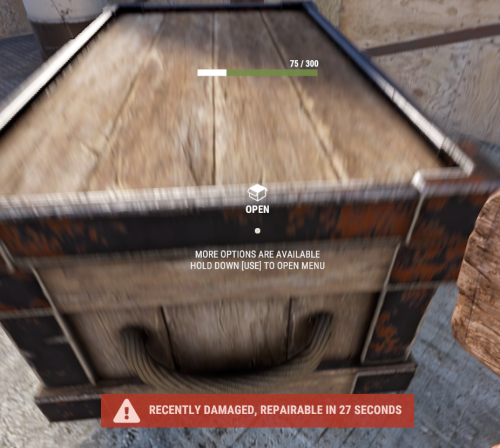
With just one tap, you can fully repair your base blocks and base items—no more having to tap repeatedly! Includes permission support and is optimized for top performance, with rotation & demolition support! Features * One Tap Repairs - Supports Base Blocks & Base Items & Vehicles, etc * Rotation - Re-Enables Base Blocks for easy native rotation again! * Demolition - Re-Enables Base Blocks for easy native demolition again! Permissions betterhammer.use ( required to do full 1 tap hit repairs with hammer & to use any features/functions )$5.00 -
Version 1.1.0
953 downloads
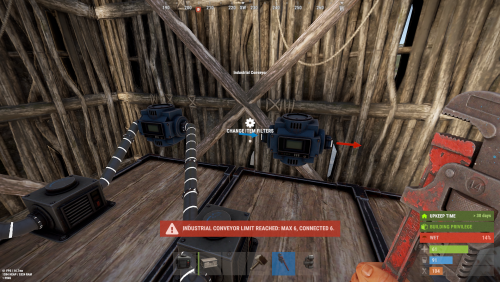
StackModifier: Industrial is an expansion designed to address all industrial-related stacking, splitting bugs, exploits, and issues. It patches the Industrial Conveyor and Industrial Crafter, providing much-needed fixes and improvements. Additionally, it introduces customizable limits that you can set and control to enhance the industrial gameplay experience. It also has blacklist support for the industrial crafter. This plugin will not affect plugins that auto-generate Industrial piping or placing. This plugin only targets players. NOTE: IF a plugin auto generates a farm past 5 daisy chained boxes it will start affecting server performance and cause hook time warnings. Server Defaults: Recommend sticking below vanilla defaults due to performance issues. # Industrial Component | Default | Custom | |-----------------------------|---------|---------| | Industrial Crafter | 6 | 6 | | Industrial Storage Adaptor | 34 | 20 | | Industrial Hopper | 6 | 6 | | Industrial Combiner | 17 | 9 | | Industrial Splitter | 17 | 9 | | Industrial Conveyor | 28 | 14 | |-----------------------------|---------|---------| Configuration File: { "Allow Industrial Crafter to craft random armor slots like normal crafting.": false, "Industrial Conveyor Max Stack Size Per Move Default: 128": 128, "Industrial Conveyor Move Frequency Default: 5, Lower = faster moving": 5, "Maximum difference in seconds that two items with Spoil Timers can have and still be stackable: 3600f < Default = 1-Hour difference": 3600.0, "Limit Industrial linking to improve server performance, adjust as needed.": { "Industrial Crafter": 6, "Industrial Storage Adaptor": 20, "Industrial Hopper": 6, "Industrial Conveyor": 14 }, "Industrial Crafter Black List: Item-Shortnames": [ "spear.wooden", ] } Why Limits Are Needed: Due to heavy server performance issues caused by the Industrial Conveyors being daisy-chained, I've introduced limits to help reduce the strain on server resources. When large industrial systems are built, especially with Auto-Crafters and Auto Bases, the sheer number of items and operations involved can cause significant performance degradation. Here’s an example of how an industrial system affects server performance: Industrial Crafter > Industrial Crafter > Industrial Crafter > Lg Furnace > Elec Furnace > DropBox > DropBox > DropBox > Combiner > Combiner > Combiner > - Combiner > - Splitter > - x3 Splitter > x3 Splitter > x3 Splitter > x3 Splitter > 27x Conveyor > Box Box Box Box Box Box Box Box Box Box Box Box Box Box Box Box Box Box Box Box Box Box Box Box Box Box Box 3x Combiner > 3x Combiner > 3x Combiner > - 3x Combiner > - Combiner > - Splitter > - 3x Splitter > Auto Crafter > Ore to Lg Furnace > Ore to Elec Furnace > Build Summary: 4x Industrial Crafters 34x Storage Adaptors 17x Combiners 17x Splitters 27x Conveyors Each box has 48 slots, and the CanStackItem hook is called for each slot that is used. With 27 boxes, that’s 1,296 calls before the process stops, assuming all boxes are full. This leads to high hook times, warnings, and server lag. The Solution: Limits To mitigate this issue, I’ve implemented a system of limits for these large industrial builds. The new default limit for Conveyors is now 14 (down from the vanilla limit of 28), drastically reducing the number of CanStackItem calls to 672. This helps to reduce the server load and improve performance. These limits are adjustable and can be configured inside the plugin’s settings, allowing you to fine-tune the system to best suit your server's needs. Lang File: { "Title": "<size=14><color=#00CED1>Connection Limits</color></size>\n", "Message": "<color=#FFD700>0</color>\n<color=#FF6347>Max Limit:</color> <color=#FFA07A>1x</color> | <color=#ADFF2F>Detected:</color> <color=#7CFC00>2x</color>", "Blocked": "Connection Blocked: View Chat or F1-Console-Menu for Details.", "Crafter": "Industrial Crafters", "Adaptor": "Industrial Storage Adaptors", "Hopper": "Industrial Hoppers", "Conveyor": "Industrial Conveyors", "Blacklist": "Blacklisted Item 0" }$9.99- 5 comments
- 3 reviews
-
- 2
-
-
-
- #stack modifier
- #industrial
- (and 5 more)
-
Version 1.0.3
38 downloads
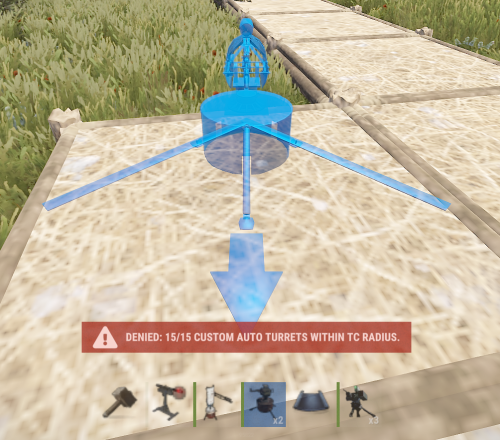
Written with the best performance in mind turret modifier brings the ability for players to have different custom sentry, auto turrets & flame turrets each with different permissions as well as a global default one. It supports tc limits, auto auths, custom toggle on/of commands and restock command of turret ammo. You can make as many perms as you wish for different turret variants. Ideal for shop plugins, vending machines and more. With more features in the works / development. Features: * Multiple Ammo Types per turret * Ability to place turrets on any building surface. * Turret Limits * Auto Authorization support for Teams & TC * Turret Customization Support * Individual trap limits * commands to toggle turrets on / off * commands to refill the turrets with ammo on the player * More to come, look at config below for full feature list F1 / Console Commands tm.flame name or steamID perm or global amount spin<optional, Example: tm.flame give khan global 3 | tm.flame give khan global 3 spin tm.turret name or steamID perm or global amount spin<optional, Example: tm.turret give khan global 3 | tm.turret give khan global 3 spin tm.sentry name or steamID perm or global amount spin<optional, Example: tm.sentry give khan global 3 | tm.sentry give khan global 3 spin tm.clear ( removes all server instances of player placed sentry turrets ) Chat Commands /toggle <on> | <off> ( toggles all auto turrets with power on or off ) NOTE: restock command requires the player to have the ammo on them to work. /restock red 500 ( restocks all turrets within that TC area with the specified ammo type & ammount per turret ) /restock <default> | <black> | <blue> | <red> | <sam> Configuration { "Enables use of permission based settings": true, "Toggle Command for Turrets: Toggles on / off (set empty string to disable)": "toggle", "ReStock Command for Turrets: Specify Ammo & ReStock Inventory (set empty string to disable)": "restock", "Give Command Flame Turret": "tm.flame", "Give Command Auto Turret": "tm.turret", "Give Command Sentry": "tm.sentry", "Clear Sentry Command": "tm.clear", "SteamIDs that are excluded from build Limits": [], "Can Be Targeted Settings": { "SteamIDs that are excluded from being targeted": [] }, "Global Auto Turret": { "Authorize Team": true, "Authorize tc users": true, "Allow placement on Walls / Ceiling using spinners": true, "Max Tool Cupboard Limit, 0 = no limit": 10, "Bullet Speed, vanilla = 200f": 200.0, "Turret Range, vanilla = 30": 30.0, "Turret Placement Health, vanilla = 1000": 1000.0, "Aim cone, vanilla = 5": 5.0, "Inventory Capacity, Available Ammo Slots, Max = 6": 6, "Skin": 0, "Display Name": "Custom Auto Turret", "Player Auto Turret Permissions": { "toptier": { "Authorize Team": true, "Authorize tc users": true, "Allow placement on Walls / Ceiling using spinners": true, "Max Tool Cupboard Limit, 0 = no limit": 15, "Bullet Speed, vanilla = 200f": 200.0, "Turret Range, vanilla = 30": 100.0, "Turret Placement Health, vanilla = 1000": 1500.0, "Aim cone, vanilla = 5": 2.0, "Inventory Capacity, Available Ammo Slots, Max = 6": 6, "Skin": 0, "Display Name": "Custom Auto Turret" }, "midtier": { "Authorize Team": true, "Authorize tc users": true, "Allow placement on Walls / Ceiling using spinners": true, "Max Tool Cupboard Limit, 0 = no limit": 13, "Bullet Speed, vanilla = 200f": 200.0, "Turret Range, vanilla = 30": 70.0, "Turret Placement Health, vanilla = 1000": 1300.0, "Aim cone, vanilla = 5": 2.0, "Inventory Capacity, Available Ammo Slots, Max = 6": 6, "Skin": 0, "Display Name": "Custom Auto Turret" }, "lowtier": { "Authorize Team": true, "Authorize tc users": true, "Allow placement on Walls / Ceiling using spinners": true, "Max Tool Cupboard Limit, 0 = no limit": 10, "Bullet Speed, vanilla = 200f": 200.0, "Turret Range, vanilla = 30": 50.0, "Turret Placement Health, vanilla = 1000": 1150.0, "Aim cone, vanilla = 5": 2.0, "Inventory Capacity, Available Ammo Slots, Max = 6": 6, "Skin": 0, "Display Name": "Custom Auto Turret" } } }, "Global Sentry Turret": { "Authorize Team": true, "Authorize tc users": true, "Allow placement on Walls / Ceiling using spinners": true, "Can take damage": true, "Give turret back on ground missing check": true, "Max Tool Cupboard Limit, 0 = no limit": 10, "Power Requirement, 0 = no power": 10, "Amount of ammo for one spray, 0 = no-ammo mode": 3, "Turret Range, vanilla = 30": 30.0, "Turret Placement Health, vanilla = 1000": 1000.0, "Aim cone, vanilla = 4": 4.0, "Inventory Capacity, Available Ammo Slots, Max = 36": 12, "Skin": 1587601905, "Display Name": "Sentry Turret", "Set Ammo Types, Rifle = 0 | Explosive = 1 | HV = 2 | Incendiary = 3 | SAM = 4 | All = 7": [ 0 ], "Player Sentry Turret Permissions": { "toptier": { "Authorize Team": true, "Authorize tc users": true, "Allow placement on Walls / Ceiling using spinners": true, "Can take damage": true, "Give turret back on ground missing check": true, "Max Tool Cupboard Limit, 0 = no limit": 15, "Power Requirement, 0 = no power": 0, "Amount of ammo for one spray, 0 = no-ammo mode": 3, "Turret Range, vanilla = 30": 100.0, "Turret Placement Health, vanilla = 1000": 1500.0, "Aim cone, vanilla = 4": 2.0, "Inventory Capacity, Available Ammo Slots, Max = 36": 12, "Skin": 1587601905, "Display Name": "Sentry Turret", "Set Ammo Types, Rifle = 0 | Explosive = 1 | HV = 2 | Incendiary = 3 | SAM = 4 | All = 7": [ 7 ] }, "midtier": { "Authorize Team": true, "Authorize tc users": true, "Allow placement on Walls / Ceiling using spinners": true, "Can take damage": true, "Give turret back on ground missing check": true, "Max Tool Cupboard Limit, 0 = no limit": 13, "Power Requirement, 0 = no power": 3, "Amount of ammo for one spray, 0 = no-ammo mode": 3, "Turret Range, vanilla = 30": 70.0, "Turret Placement Health, vanilla = 1000": 1300.0, "Aim cone, vanilla = 4": 2.0, "Inventory Capacity, Available Ammo Slots, Max = 36": 12, "Skin": 1587601905, "Display Name": "Sentry Turret", "Set Ammo Types, Rifle = 0 | Explosive = 1 | HV = 2 | Incendiary = 3 | SAM = 4 | All = 7": [ 0, 3, 2, 1 ] }, "lowtier": { "Authorize Team": true, "Authorize tc users": true, "Allow placement on Walls / Ceiling using spinners": true, "Can take damage": true, "Give turret back on ground missing check": true, "Max Tool Cupboard Limit, 0 = no limit": 10, "Power Requirement, 0 = no power": 6, "Amount of ammo for one spray, 0 = no-ammo mode": 3, "Turret Range, vanilla = 30": 50.0, "Turret Placement Health, vanilla = 1000": 1150.0, "Aim cone, vanilla = 4": 2.0, "Inventory Capacity, Available Ammo Slots, Max = 36": 12, "Skin": 1587601905, "Display Name": "Sentry Turret", "Set Ammo Types, Rifle = 0 | Explosive = 1 | HV = 2 | Incendiary = 3 | SAM = 4 | All = 7": [ 0, 3, 2 ] } } }, "Global Flame Turret": { "Allow placement on Walls / Ceiling using spinners": true, "Max Tool Cupboard Limit, 0 = no limit": 10, "Turret Flame Arc, vanilla = 45": 45.0, "Turret Trigger Duration, vanilla = 5": 5.0, "Turret Flame Range, vanilla = 7": 7.0, "Turret Flame Radius, vanilla = 4": 4.0, "Turret Fuel Per Sec, vanilla = 1": 1.0, "Turret Placement Health, vanilla = 1000": 1000.0, "Inventory Capacity, Available Fuel Slots, Max = 6": 6, "Skin": 0, "Display Name": "Custom Flame Turret", "Player Flame Turret Permissions": { "toptier": { "Allow placement on Walls / Ceiling using spinners": true, "Max Tool Cupboard Limit, 0 = no limit": 15, "Turret Flame Arc, vanilla = 45": 45.0, "Turret Trigger Duration, vanilla = 5": 5.0, "Turret Flame Range, vanilla = 7": 100.0, "Turret Flame Radius, vanilla = 4": 4.0, "Turret Fuel Per Sec, vanilla = 1": 1.0, "Turret Placement Health, vanilla = 1000": 1500.0, "Inventory Capacity, Available Fuel Slots, Max = 6": 6, "Skin": 0, "Display Name": "Custom Flame Turret" }, "midtier": { "Allow placement on Walls / Ceiling using spinners": true, "Max Tool Cupboard Limit, 0 = no limit": 13, "Turret Flame Arc, vanilla = 45": 45.0, "Turret Trigger Duration, vanilla = 5": 5.0, "Turret Flame Range, vanilla = 7": 70.0, "Turret Flame Radius, vanilla = 4": 4.0, "Turret Fuel Per Sec, vanilla = 1": 1.0, "Turret Placement Health, vanilla = 1000": 1300.0, "Inventory Capacity, Available Fuel Slots, Max = 6": 6, "Skin": 0, "Display Name": "Custom Flame Turret" }, "lowtier": { "Allow placement on Walls / Ceiling using spinners": true, "Max Tool Cupboard Limit, 0 = no limit": 10, "Turret Flame Arc, vanilla = 45": 45.0, "Turret Trigger Duration, vanilla = 5": 5.0, "Turret Flame Range, vanilla = 7": 50.0, "Turret Flame Radius, vanilla = 4": 4.0, "Turret Fuel Per Sec, vanilla = 1": 1.0, "Turret Placement Health, vanilla = 1000": 1150.0, "Inventory Capacity, Available Fuel Slots, Max = 6": 6, "Skin": 0, "Display Name": "Custom Flame Turret" } } } }$24.99 -
Version 1.0.11
80 downloads
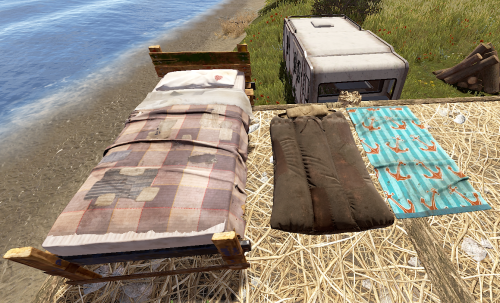
Allows complete individual settings of Beds, Towels, Bags & Campers using Permissions or Global setters with radius, limits Unlock Time, Respawn Cooldown! Improves server/client performance by auto-managing players bag limits & radius! You can assign a bed to a friend on your friends list in game & when they join it will give them the invite to join your team to get the bed/bag/towel/etc! Notes: Better Vanish ( the paid version ) has known bugs with chat commands not working while in vanish. To resolve the problem leave vanish mode. Permissions You can add or remove as many permissions as you'd like in the config! Player Chat Commands /bag <Shows just the limits & how many of what you have placed.> /bag bags | towels | beds | campers <Selects & shows how many of the specific bag you have placed down.> /bag towels clear | rename | limits /bag towels clear <Clears all of the selected bag type from the player that ran the command> /bag towels rename dingus <Renames all of the selected bag type to the new name> Configuration { "Toggle Offline Team Invite System through bag gifting. Default: Off": false, "# of players that can place a spawn point in a zone radius": 16, "Player Respawn Zone Radius Check": 35, "Sets Global Defaults": { "True Only Owner can set name | False Allows team members": false, "Sets Total Max Limit within a radius": 12, "Sets Limit radius": 35, "Sleeping Bags": { "DefaultTextName": "Unnamed Bag", "SecondsBetweenReuses": 300.0, "UnlockTime": 30.0 }, "Towel Bags": { "DefaultTextName": "Unnamed Towel", "SecondsBetweenReuses": 300.0, "UnlockTime": 30.0 }, "Beds": { "DefaultTextName": "Bed", "SecondsBetweenReuses": 120.0, "UnlockTime": 30.0 }, "Camper Bags": { "DefaultTextName": "Unnamed Camper Seat", "SecondsBetweenReuses": 120.0, "UnlockTime": 30.0 } }, "Player Permissions": { "vip1": { "True Only Owner can set name | False Allows team members": false, "Sets Total Max Limit within a radius": 12, "Sets Limit radius": 35, "Sleeping Bags": { "DefaultTextName": "Unnamed Bag", "SecondsBetweenReuses": 150.0, "UnlockTime": 20.0 }, "Towel Bags": { "DefaultTextName": "Unnamed Towel", "SecondsBetweenReuses": 150.0, "UnlockTime": 20.0 }, "Beds": { "DefaultTextName": "Bed", "SecondsBetweenReuses": 60.0, "UnlockTime": 20.0 }, "Camper Bags": { "DefaultTextName": "Unnamed Camper Seat", "SecondsBetweenReuses": 150.0, "UnlockTime": 20.0 } }, "vip2": { "True Only Owner can set name | False Allows team members": false, "Sets Total Max Limit within a radius": 12, "Sets Limit radius": 35, "Sleeping Bags": { "DefaultTextName": "Unnamed Bag", "SecondsBetweenReuses": 75.0, "UnlockTime": 15.0 }, "Towel Bags": { "DefaultTextName": "Unnamed Towel", "SecondsBetweenReuses": 75.0, "UnlockTime": 15.0 }, "Beds": { "DefaultTextName": "Bed", "SecondsBetweenReuses": 30.0, "UnlockTime": 15.0 }, "Camper Bags": { "DefaultTextName": "Unnamed Camper Seat", "SecondsBetweenReuses": 75.0, "UnlockTime": 15.0 } } } }$9.99 -

Version 1.0.0
13 downloads
xFuelGenerator xFuelGenerator lets server owners easily customize Fuel Generator (Small Generator) behavior by adjusting its power output, fuel consumption, fuel tick rate, and whether generators should automatically turn on when they receive fuel - all via a simple config. Settings can be applied automatically to newly spawned generators and, optionally, to all existing generators. Features Customize generator power output Adjust fuel consumption amount Change fuel consumption tick rate Option to run generators without fuel Auto-turn on generators when fuel is added Automatically apply settings to newly spawned generators Optionally update all existing generators on the map Reload command to reapply settings instantly Console Command xfuelgenerator.reload - Reload config and update generators Config { "ApplyToExistingGenerators": true, "AutoTurnOnGenerator": false, "UseFuel": true, "FuelConsumption": 1.0, "FuelTickRateSeconds": 3.0, "OutputEnergy": 35 } ApplyToExistingGenerators - Apply settings to generators that already exist on the map. AutoTurnOnGenerator - Generator turns on automatically when fuel is added. UseFuel - If false, generators run without consuming fuel. (If false the config 'FuelConsumption' gets ignored) FuelConsumption - How much fuel is used per tick. FuelTickRateSeconds - How often fuel is consumed. OutputEnergy - How much power the generator produces.$8.99 -

Version 1.0.0
36 downloads
Modifies the containers acceptance rules optionally for players with permissions. Permissions containerrules.use - Use the plugin. Configuration { "Global Settings": { "Notify Player when container rules are applied": true, "Use Tip Notifications instead of Chat Messages": true }, "Chat Settings": { "Chat Prefix": "<color=#00EDED>[ContainerRules]</color>: ", "Icon SteamID": 0 }, "Container Rules": { "cupboard.tool.deployed": { "Enabled": true, "Allowed Categories (Names - Empty = Accept All)": [ "Resources" ], "Blocked Categories (Names)": [], "Allowed Shortnames (Empty = Accept All)": [], "Blocked Shortnames": [], "Requires Permission": true }, "cupboard.tool.retro.deployed": { "Enabled": true, "Allowed Categories (Names - Empty = Accept All)": [ "Resources" ], "Blocked Categories (Names)": [], "Allowed Shortnames (Empty = Accept All)": [], "Blocked Shortnames": [], "Requires Permission": true }, "cupboard.tool.shockbyte.deployed": { "Enabled": true, "Allowed Categories (Names - Empty = Accept All)": [ "Resources" ], "Blocked Categories (Names)": [], "Allowed Shortnames (Empty = Accept All)": [], "Blocked Shortnames": [], "Requires Permission": true }, "fridge.deployed": { "Enabled": true, "Allowed Categories (Names - Empty = Accept All)": [ "Food" ], "Blocked Categories (Names)": [], "Allowed Shortnames (Empty = Accept All)": [], "Blocked Shortnames": [], "Requires Permission": true } } }Free -

Version 1.0.7
340 downloads
This harmony mod alters the procedural map generation allowing you to have better maps without having to make or generate a custom map all the time. Features Change minimum world size for: Road Rings Train tracks Remove: Car Wrecks Rivers Road Powerlines Large Powerlines Monuments, swamps, water wells, etc. Any prefab (can be useful to remove electrical boxes, rock formations, small bushes, ice bergs, bus stops, rad towns, etc.) Usage Copy the downloaded DLL file into server/HarmonyMods folder After loading the plugin it will create a directory in the server's root directory called HarmonyConfig, where you will be able to change the config options. Tips You can find the auto spawned prefabs that you might want to block on this website by searching for autospawn. You can preview prefabs by using the tool called RustEdit. Support If you need help or If you have any issues or suggestions you can contact me by joining my discord server: https://discord.gg/efVKDG6z6F or by adding me on discord: Farkas#6006$15.00 -

Version 1.0.0
9 downloads
The xSolarPanel plugin modifies Rust’s solar panel behavior so that once a panel has generated power from sunlight, it will continue producing power indefinitely, regardless of day/night cycles or if the solar panels are are fully sealed in a dark spot. This plugin is designed for servers that want to simplify power management or create unique gameplay experiences involving permanent energy sources. Media Console Commands Configuration$7.99 -

Version 2.1.2
216 downloads
Supports: Wind Mills | Solar Panels | Fuel & Test Generators | Small-Medium-Large Batteries | Tesla Coils | Heaters Both Globally & with permission-based settings allowing you to create as many different levels as you wish! Written for the best performance possible! Defaults to first permission assigned in the config if you give out multiple. Wind Mill Note: Max height Needed for Max output is floor 18 Battery Options Explained MaxOutput: Maximum Power Out Put Efficiency: How Efficient Battery is When Charging ( this How Fast it Charges ) MaxCapacitySeconds: How Much Energy We Can Request From Power Sources For Charging is this value * our maxOutput Batteries will not show new Max Out-Puts Batteries will show New Power Usage! ( Pic is below, this is because its hardcoded on client side ) Fuel Generator Options Explained StackSize: Sets Inventory Stack Size for Fuel Inside The Fuel Generator OutputEnergy: Sets Power OutPut FuelPerSec: Sets How Much Fuel to Use Per Second Electrical Heater Options Explained GLOBAL SETTER ONLY > "Sets the Max Temperature Range for Electric Heaters Only (Default is 4.0)": 4.0, FadeDuration: Sets How Long Before Heat Dissipates ( when powered off ) HeatAmount: Sets Heat Amount ( when powered on ) Solar Panel Explained To get max Output you Need 1 floor up else it will only ever be half! + Panel must Face Direct Sun-light! Tesla Coil Options Explained A TeslaCoils Power consumption amount Is Calculated By ( MaxDamageOutput Divided / By PowerToDamageRatio ) A TeslaCoils DamageAmount is Calculated By Its (currentEnergy input * powerToDamageRatio) * dischargeTickRate A TeslaCoils SelfHarmAmount is Calculated By Its ( dischargeTickRate Divided / By maxDischargeSelfDamageSeconds * SetHealth ) SetHealth: Sets Item Condition Level MaxDamageOutput: Sets the Maximum Damage it Can OutPut Like Ever PowerForHeavyShorting: Sets Electrical Input Amount Needed for Strong-Zap Zap else = Weak-Zap Zap DischargeTickRate: Sets How Fast A TeslaCoil Discharges its Zap Zap MaxDischargeSelfDamageSeconds: Configuration { "Enables use of permission based settings": true, "Reset all modifications on unload (recommended true if uninstalling)": false, "Global Battery Small": { "MaxOutput": 9000, "Efficiency": 4.0, "MaxCapacitySeconds": 1, "Permissions": { "toptier": { "MaxOutput": 30, "Efficiency": 2.0, "MaxCapacitySeconds": 18000 }, "midtier": { "MaxOutput": 20, "Efficiency": 1.4, "MaxCapacitySeconds": 13500 }, "lowtier": { "MaxOutput": 14, "Efficiency": 1.0, "MaxCapacitySeconds": 11250 } } }, "Global Battery Medium": { "MaxOutput": 50, "Efficiency": 0.8, "MaxCapacitySeconds": 540000, "Permissions": { "toptier": { "MaxOutput": 100, "Efficiency": 2.0, "MaxCapacitySeconds": 1080000 }, "midtier": { "MaxOutput": 75, "Efficiency": 1.5, "MaxCapacitySeconds": 810000 }, "lowtier": { "MaxOutput": 60, "Efficiency": 1.0, "MaxCapacitySeconds": 675000 } } }, "Global Battery Large": { "MaxOutput": 100, "Efficiency": 0.8, "MaxCapacitySeconds": 1440000, "Permissions": { "toptier": { "MaxOutput": 200, "Efficiency": 3.0, "MaxCapacitySeconds": 2880000 }, "midtier": { "MaxOutput": 150, "Efficiency": 2.0, "MaxCapacitySeconds": 2160000 }, "lowtier": { "MaxOutput": 125, "Efficiency": 1.0, "MaxCapacitySeconds": 1800000 } } }, "Global Electric Generator": { "MaxOutputTestGen": 8, "Permissions": { "toptier": { "MaxOutputTestGen": 30 }, "midtier": { "MaxOutputTestGen": 20 }, "lowtier": { "MaxOutputTestGen": 12 } } }, "Global Fuel Generator": { "StackSize": 1000, "OutputEnergy": 35, "FuelPerSec": 1.0, "Permissions": { "toptier": { "StackSize": 2000, "OutputEnergy": 70, "FuelPerSec": 1.2 }, "midtier": { "StackSize": 1500, "OutputEnergy": 60, "FuelPerSec": 1.1 }, "lowtier": { "StackSize": 1250, "OutputEnergy": 45, "FuelPerSec": 1.0 } } }, "Global Solar Panel": { "MaxOutputSolar": 20, "Permissions": { "toptier": { "MaxOutputSolar": 30 }, "midtier": { "MaxOutputSolar": 20 }, "lowtier": { "MaxOutputSolar": 13 } } }, "Global Electric Wind Turbine": { "MaxOutput": 100, "TargetSpeed": 0.0, "Permissions": { "toptier": { "MaxOutput": 250, "TargetSpeed": 3.0 }, "midtier": { "MaxOutput": 200, "TargetSpeed": 2.0 }, "lowtier": { "MaxOutput": 140, "TargetSpeed": 1.0 } } }, "Global Electric Heater": { "FadeDuration": 1.0, "HeatAmount": 5.0, "HeaterTemperatureGrowableRange": 4.0, "Permissions": { "toptier": { "FadeDuration": 9.0, "HeatAmount": 16.0, "HeaterTemperatureGrowableRange": 14.0 }, "midtier": { "FadeDuration": 6.0, "HeatAmount": 12.0, "HeaterTemperatureGrowableRange": 10.0 }, "lowtier": { "FadeDuration": 3.0, "HeatAmount": 8.0, "HeaterTemperatureGrowableRange": 6.0 } } }, "Global Tesla Coil": { "SetHealth": 250.0, "PowerToDamageRatio": 2.0, "DischargeTickRate": 0.25, "MaxDischargeSelfDamageSeconds": 120.0, "MaxDamageOutput": 35.0, "PowerForHeavyShorting": 10, "Permissions": { "toptier": { "SetHealth": 350.0, "PowerToDamageRatio": 2.0, "DischargeTickRate": 0.25, "MaxDischargeSelfDamageSeconds": 120.0, "MaxDamageOutput": 50.0, "PowerForHeavyShorting": 10 }, "midtier": { "SetHealth": 325.0, "PowerToDamageRatio": 2.0, "DischargeTickRate": 0.25, "MaxDischargeSelfDamageSeconds": 120.0, "MaxDamageOutput": 45.0, "PowerForHeavyShorting": 10 }, "lowtier": { "SetHealth": 300.0, "PowerToDamageRatio": 2.0, "DischargeTickRate": 0.25, "MaxDischargeSelfDamageSeconds": 120.0, "MaxDamageOutput": 40.0, "PowerForHeavyShorting": 10 } } } }$19.99 -

Version 4.2.1
158 downloads
Skin Perks allows you to modify and give certain stats to a skinned item Commands: Usage: Editor: Permission: skinperks.use Available Perks: Gather (Gathering of nodes/trees/crops) Durability (Durability of the items) DamageOut (Damage dealt) DamageIn (Protection) Dodge (Dodge Chance %) Upgrade (Upgrade structure resource multiplier, ask for more/less items when upgrading) Build (Build structure resource multiplier, ask for more/less items when building) Repair (Repairing items/structures resource multiplier, ask for more/less items when repairing) Magazine (Modifies weapon's magazine capacity)$14.00 -
Version 1.0.1
115 downloads
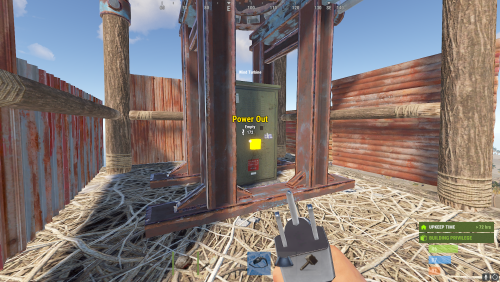
Allows adjusting of Wind Mills Globally & with different permissions based settings you can create as many different permission levels as you wish! Max height Needed for Max output is floor 18 Note Default is 100 Configuration { "Sets Global Wind Mills": { "Sets the Max Generation OutPut for Wind Mills (Default is 100)": 150, "Overrides target speed (Default is 0)": 0.0, "Reset all Wind Mills on unload (recommended true if uninstalling)": false }, "Enables use of permissions based setting": true, "Player Permissions": { "windmillmodifier.vip": { "Sets the Max Generation OutPut for Wind Mills (Default is 100)": 250, "Overrides target speed (Default is 0)": 0.0 }, "windmillmodifier.vip2": { "Sets the Max Generation OutPut for Wind Mills (Default is 100)": 300, "Overrides target speed (Default is 0)": 0.0 } } }$4.99- 2 comments
- 1 review
-
- 1
-
-
- #windmill
- #windturbine
- (and 10 more)
-
Welcome to the FAQ and Support Guide for the Death Modifier plugin. This document is here to help you troubleshoot common issues, understand proper setup practices, and get support or suggest new features. Common Issues & Troubleshooting Permissions Bug - If a player is granted more than one permission, the plugin will not work correctly for them. Fix: - Only grant one permission per player. This ensures the plugin functions as intended. - Granting multiple permissions will cause conflicts and unexpected behavior. Example: oxide.grant user player1 deathmodifier.vip # Do NOT also grant: oxide.grant user player1 deathmodifier.vip2 We are aware of this bug and are working on a solution for a future release. Getting Support If you are experiencing issues with the plugin or have a question not covered in this guide: - Navigate to the Support section of the plugin page. - Open a support ticket. - Please include the following in your ticket: - A clear description of the issue - Any errors shown in the console - Plugin version - Steps to reproduce (if possible) This will help us assist you faster and more effectively. Feature Requests & Discussions If you have an idea for a new feature, improvement, or change you'd like to see: - Use the Discussion section of the plugin page. - Be descriptive in your suggestion, including the use-case or motivation. We welcome your ideas and will review them for possible inclusion in future updates! Best Practices Summary - Only assign one permission per player. - Use the Support tab for help with issues. - Use the Discussion tab for feature requests and general feedback. Thank you for using Death Modifier! Your feedback helps make this plugin even better. — Khan
-

Version 1.0.0
4 downloads
ChestModifier is a plugin that adds customization options for various crates in the game, as well as their contents. - Enhance player gameplay diversity with new crates! You can customize banned items and categories, distributing crates accordingly! - Players can easily know what their crate contains - the plugin features a UI that informs the player about prohibited storage items! - Configure drops of modified items from corpses/crates. Permissions: chestmodifier.give - permission to give crates chestmodifier.helpmenu - permission to view the plugin UI Commands: [CHAT/CONSOLE] /cm.give 'key' 'player (leave blank to give to yourself)' - give a crate ChestModifier - Make the gaming experience on your server unique with new loot distribution options! { "Chests": { "test": { "Shortname": "box.wooden.large", "Skin id": 5, "Item name": "Large test box", "Capacity": 3, "Blacklisted items": [ { "Shortname": "rifle.ak", "Skin id": 0 }, { "Shortname": "sulfur.ore", "Skin id": 0 } ], "Allowed categories (still empty if allowed all)": [ "Attire", "Misc", "Items", "Component", "Ammunition", "Construction", "Traps", "Electrical", "Fun", "Food", "Weapon", "Resources", "Tool", "Medical" ], "Spawn chances": { "assets/bundled/prefabs/radtown/crate_basic.prefab": 5.0, "assets/bundled/prefabs/radtown/crate_elite.prefab": 100.0, "assets/prefabs/npc/scientist/scientist_corpse.prefab": 100.0 } }, "test1": { "Shortname": "box.wooden", "Skin id": 6, "Item name": "Small test box", "Capacity": 35, "Blacklisted items": [ { "Shortname": "rifle.lr300", "Skin id": 0 }, { "Shortname": "metal.ore", "Skin id": 0 } ], "Allowed categories (still empty if allowed all)": [ "Attire", "Misc", "Items", "Component", "Ammunition", "Construction", "Traps", "Weapon", "Resources", "Tool", "Medical" ], "Spawn chances": { "assets/bundled/prefabs/radtown/crate_basic.prefab": 100.0, "assets/bundled/prefabs/radtown/crate_elite.prefab": 5.0, "assets/prefabs/npc/scientist/scientist_corpse.prefab": 50.0 } } } }$12.99

.thumb.png.f676fcb4237b0d630285499251bcf88e.png)