Search the Community
Showing results for tags 'ad'.
Found 4 results
-

Version 1.0.0
6 downloads
This plugin gives ability to your players to post in better way than just on default chat. With that plugin players can post whatever they want as anonymous and with share location option that sends grid in their ad. For you as a server owner there are many configuration & monetization options. You can set rank-specific ad color, cooldown, time on screen, cost, max characters! Plugin is fully written by me- this is plugin is made with heart of rust player and server owner that knows what can cause lag, and what is important for server owners. Plugin is also very good optimised and using only 7 imports from other libraries without heavy ones - systems from heavy libraries has been replaced by my own to avoid using them. playersads.use - gives player ability to show ad form Other permissions are made rank specific, and you can create your own perms by rank name - you can see how it is set in default config /ad - opens an advertisement creation form (click to see)$4.99 -
Version 1.0.3
252 downloads
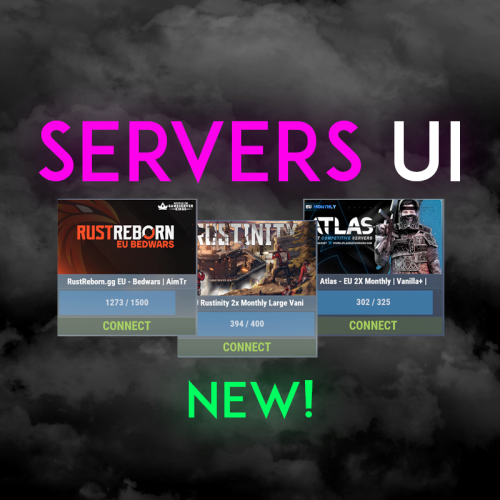
Easily display all your servers within a very clean a simple UI. Even put a quick connect button for people to instantly connect to the server! FEATURES - Simple setup - Very clean UI - Auto receives server info to display to your players - Instant connect buttons - Little to no performance impact - Easy integration with Welcome Controller To get your battlemetrics server ID, all you need to do is view your server on Battlemetrics, and it's the little number at the end of the URL. https://www.battlemetrics.com/servers/rust/6803740 Support? Questions? Comments? Concerns? Message me in my Discord! https://discord.gg/RVePam7pd7 { "Servers Commands": [ "servers", "sv" ], "Servers": [ { "Server ID's (BattleMetrics Id's)": "6803740", "PlaceholderBanner": "https://i.ibb.co/c6Y58gQ/Placeholder-Banner.png" }, { "Server ID's (BattleMetrics Id's)": "12747928", "PlaceholderBanner": "https://i.ibb.co/c6Y58gQ/Placeholder-Banner.png" }, { "Server ID's (BattleMetrics Id's)": "7482472", "PlaceholderBanner": "https://i.ibb.co/c6Y58gQ/Placeholder-Banner.png" }, { "Server ID's (BattleMetrics Id's)": "10519728", "PlaceholderBanner": "https://i.ibb.co/c6Y58gQ/Placeholder-Banner.png" }, { "Server ID's (BattleMetrics Id's)": "16741517", "PlaceholderBanner": "https://i.ibb.co/c6Y58gQ/Placeholder-Banner.png" }, { "Server ID's (BattleMetrics Id's)": "15532055", "PlaceholderBanner": "https://i.ibb.co/c6Y58gQ/Placeholder-Banner.png" }, { "Server ID's (BattleMetrics Id's)": "8113880", "PlaceholderBanner": "https://i.ibb.co/c6Y58gQ/Placeholder-Banner.png" }, { "Server ID's (BattleMetrics Id's)": "9929204", "PlaceholderBanner": "https://i.ibb.co/c6Y58gQ/Placeholder-Banner.png" } ], "UI Colors": { "BlurBackgroundColor": "0 0 0 .4", "MainUIColor": "0 0 0 .4", "MultiMainPanelColor": "0 0 0 .5", "MultiServerTitlePanelColor": "0 0 0 .4", "MultiServerTitleTextColor": "1 1 1 1", "MultiPlayerPanelColor": "0 0 0 .5", "MultiPlayerPanelFillColor": "0.17 0.68 1 .5", "MultiPlayerPanelTextColor": "1 1 1 .6", "MultiPlayerConnectPanelColor": ".25 .31 .16 .8", "MultiPlayerConnectTextColor": ".66 .86 .30 .8", "SingleMainBlurColor": "0 0 0 .4", "SingleMainPanelColor": ".17 .17 .17 1", "SingleServerTitlePanelColor": "1 1 1 .1", "SingleServerTitleTextColor": "1 1 1 1", "SinglePlayerPanelColor": "1 1 1 .1", "SinglePlayerPanelFillColor": "0.17 0.68 1 .7", "SinglePlayerPanelTextColor": "1 1 1 .7", "SinglePlayerConfirmPanelColor": ".25 .31 .16 1", "SinglePlayerConfirmTextColor": ".66 .86 .30 1", "SinglePlayerCancelPanelColor": "0.76 0.14 0.14 .4", "SinglePlayerCancelTextColor": "0.93 0.18 0.18 .75", "SingleDescPanelColor": "1 1 1 .1", "SingleDescTextColor": "1 1 1 .7" } }$14.99 -
Version 1.0.0
217 downloads
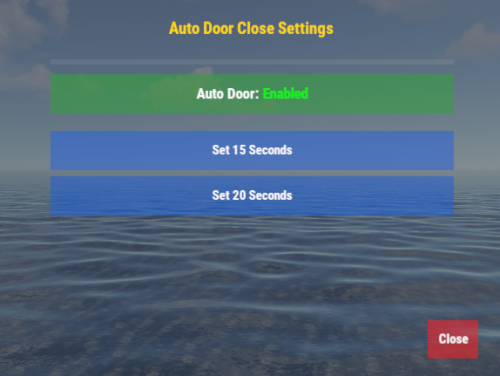
The AutoDoorClose plugin automatically closes doors on your Rust server after a specified delay. Players can customize the delay via an easy-to-use GUI and toggle the feature on or off. The plugin also supports a VIP permission system, allowing privileged users to access additional delay settings. Features Automatic Door Closing: Ensures doors close automatically after a specified delay. Configurable Delay: Players can choose from preset delay times (5, 10, 15, or 20 seconds). Default users: Limited to 15 and 20 seconds. VIP users: Full access to 5, 10, 15, and 20 seconds. GUI Management: Players can manage settings via a clean and responsive GUI. Toggle Feature: Enable or disable auto door closing as needed. Permission System: Grant VIP users access to additional functionality with ease. Permissions autodoorclose.vip : Allows access to all delay options (VIP). How to Use Default Players Type /ad in the chat to open the GUI. Use the GUI to: Toggle auto door closing on/off. Choose a delay time (options: 15 and 20 seconds). VIP Players Type /ad in the chat to open the GUI. Use the GUI to: Toggle auto door closing on/off. Choose a delay time (options: 5, 10, 15, and 20 seconds). Notes The default delay for all players is 10 seconds. The maximum allowed delay is 20 seconds. The feature works only for players who have enabled it in their settings.$5.00 -
Version 1.0.0
853 downloads
Reward players for advertising your server! Players with a key of your choosing in their name will be given reoccurring rewards. Player names can have the key anywhere as long as it's continuous, examples: Key: RR RR-Username RR username useRRname usernameRR Offers full integration with ServerRewards and Economy plugins to allow for rewards such as shop points and money. Examples for each are included with the default config that are generated on the plugin's initial load. Examples for rust items are also included, using the short-name as the key to allow for readable configs. Short names can be found here: CorrosionHour I offer full support through comments and pm's, as well as feature requests.$2.00