Search the Community
Showing results for tags 'donate'.
Found 6 results
-
Version 1.5.1
4,122 downloads
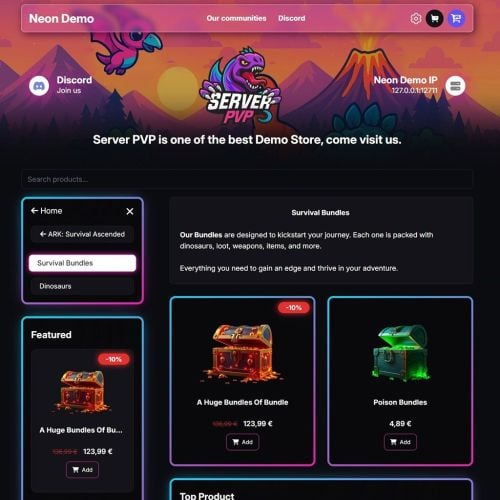
Monetize Your Rust Server Tip4Serv is a complete Rust Webstore, Donation Store and Server Monetization platform built for Rust communities. Create your own professional Rust server store in minutes and sell VIP ranks, kits, permissions, queue priority, items, virtual currency, subscriptions and donation packages with automatic in-game delivery. Looking for a Tebex alternative for Rust? Tip4Serv provides a customizable storefront, automatic Rust command execution, RCON and plugin integration, Discord integration, subscriptions, multi-currency checkout and 25+ payment methods worldwide. Create your store: https://tip4serv.com Built for Rust Server Monetization Turn your Rust community into a sustainable project by selling: VIP Memberships & Ranks Queue Priority Kits Item Bundles Oxide / Carbon Groups Permissions Economics Money Server Rewards Points Virtual Currency Subscriptions Battle Passes Donation Packages Cosmetics Supporter Packages Monthly Memberships Custom Products After a successful payment, Tip4Serv can automatically execute commands on your Rust server to deliver the purchased product. No manual delivery required. Automatic Rust Delivery Connect your Rust server using either: Tip4Serv Rust Plugin RCON Once connected, purchases can automatically trigger Rust console commands. Tip4Serv can work with standard Rust commands as well as commands provided by other Oxide or Carbon plugins. This means you can integrate your store with plugins such as: Economics Server Rewards Kits Permission systems VIP systems Custom plugins and virtually any other plugin exposing console commands. 25+ Payment Methods Give your players a fast checkout experience with payment methods available around the world, including: Credit & Debit Cards PayPal Apple Pay Google Pay Venmo Amazon Pay Revolut Pay CashApp Klarna Link iDEAL Bancontact EPS BACS BECS SEPA Multibanco Przelewy24 Boleto OXXO MobilePay and more Available payment methods are automatically adapted to the customer's country and payment configuration. Multi-Currency Rust Store Sell to players around the world without maintaining separate stores. Tip4Serv supports multi-currency checkout, allowing international customers to purchase your Rust packages using supported currencies while your products remain centrally managed. This is especially useful for Rust communities operating servers across Europe, North America, Australia and other regions. Payments, Fraud Protection & Chargebacks Tip4Serv provides features designed to help protect your Rust server revenue: Secure online payments 3D Secure support Anti-fraud protection Chargeback Protection tools Automatic dispute evidence assistance Transaction history Detailed sales statistics Tax & VAT tools Spend less time managing payments and more time running your Rust community. Build Your Own Rust Store Create a professional storefront without building a website yourself. Features include: Custom Store Branding Multiple Store Themes Dark & Light Mode Custom Domain Name Free SSL Certificate DDoS Protection Product Images, GIFs & Videos Product Categories Related Products Product Search Top Customers Custom CSS Advanced Theme Editor Customer Avatars Steam Account Linking Discord Account Linking Mobile-Friendly Checkout Your Rust store can be customized to match the branding of your server or network. Starter – Start for Free €0/month – 5% platform fee Includes: Unlimited Products & Categories Unlimited Rust Servers & Commands Automatic Rust Delivery Subscription Products Discord Roles & Webhooks Multi-Currency 25+ Payment Methods Managers & Staff Access Sales Statistics Coupons & Discounts Loyalty Points Custom Domain Name Resend Orders Tax & VAT Tools Chargeback Protection Free SSL Certificate DDoS Protection No Advertisements No credit card is required to get started. PRO – 21-Day Free Trial €11.99/month + 3.8% platform fee Includes all Starter features plus: Reduced Platform Fee: 3.8% instead of 5% Gift Cards Multiple Dynamic Themes Custom Fields & Command Integration Product Galleries Video & GIF Support Top Customers Related Products Built-In Product Search Advanced UI Theme Editor Custom CSS Editor Additional Store Customization Features Available in 15 Languages Tip4Serv stores can serve international Rust communities in: English, Danish, Dutch, French, German, Hungarian, Italian, Norwegian, Polish, Portuguese, Romanian, Russian, Spanish, Swedish and Turkish. Rust Plugin Installation 1. Create your Tip4Serv store Create a free account: https://tip4serv.com/ Create your store and add your Rust server from the Tip4Serv dashboard. 2. Install the plugin Place: Tip4Serv.cs inside your Rust server's: oxide/plugins/ directory. The plugin is compatible with Oxide/uMod and Carbon. 3. Reload Tip4Serv Run: oxide.reload Tip4Serv from your Rust server console. 4. Configure your API key Add your Tip4Serv API key to: Tip4Serv.json 5. Reload the plugin Run again: oxide.reload Tip4Serv Your console should confirm that the server has been successfully connected. Installation via RCON You can also connect your Rust server without using the plugin. Create your account at https://tip4serv.com Create your Rust store Add your Rust server Enter your server IP Enter your RCON port Enter your RCON password Connect the server Once connected, Tip4Serv can execute your configured commands automatically after purchases. Setting up commands on Tip4Serv Before setting up your commands on Tip4serv.com, you should know that command work in your server's console (not ingame as an admin). Here are some sample commands you can use in the products configuration: MY PRODUCTS. But you can use any plugin commands you want. Give a group or permission Add a player to a group previously created with oxide.group add [group-name]: oxide.usergroup add {steam_id} group-name Remove a player from a group: oxide.usergroup remove {steam_id} group-name Give a permission to a player: oxide.grant user {steam_id} permission-name Remove a permission from a player: oxide.revoke user {steam_id} permission-name Give an item to a player inventory with steam_id (advised) IMPORTANT: Please select the option [Player must be online] in your product editor inventory.giveto {steam_id} item-short-name quantity Example: inventory.giveto {steam_id} scientist 5 Give an item to a player inventory with Give plugin IMPORTANT: Please select the option [Player must be online] in your product editor giveto {steam_id} item-short-name quantity Example: giveto {steam_id} fun.guitar 1 Give a kit to a player with Give plugin: givekitto {steam_id} kit-name Give money Give money to a player with Economics plugin: deposit {steam_id} amount Give points Give points to a player with Server Rewards plugin: sr add {rust_username} amount Quantity multiplier You can also multiply the quantity choosen by the customer like this: {quantity*50} Note: You must first activate the **Allow quantity choice** option in your product. Use this command on Tip4serv if you want to sell bundles of $200 with economics plugin: deposit {steam_id} {quantity*200} This will run in your server console after a purchase if the player buys product 4 times: deposit 76561198181797231 800 Built for Growing Rust Communities Tip4Serv is designed for both small Rust servers and established multi-server networks. Manage your products, servers, customers, subscriptions, payments and automatic delivery from one platform. Tip4Serv has processed more than $10 million in sales and 640,000+ payments across gaming communities. Looking for a Tebex Alternative for Rust? If you're searching for: Rust Tebex Alternative Rust Donation Store Rust Webstore Rust Server Store Rust VIP Store Rust Monetization Plugin Rust Shop Plugin Rust Payment Plugin Rust Server Donations Sell Rust Kits Sell Rust VIP Sell Rust Ranks Tip4Serv provides an all-in-one solution with automatic Rust delivery, subscriptions, Discord integration, international payments and customizable storefronts. Rust Store Demo See what a Tip4Serv store can look like: https://rust.tip4serv.com/ More store examples: https://tip4serv.com/demos Documentation & Support Tip4Serv Documentation: https://docs.tip4serv.com Create Your Store: https://tip4serv.com Contact Support: https://tip4serv.com/contact Create your Rust donation store, connect your server and start selling VIP ranks, kits, permissions and other packages in minutes.Free -

Version 1.1.0
1,668 downloads
Your players have a great opportunity to spend time completing different missions to get rewards! The list of possibilities is incredible: In-game Events. Fights with players. Farming, Raidings, Crafting or taking action in Custom Events(The list of supported plugins will be below), and much more! Description: Welcome to a world of unforgettable adventures that BattlePass can provide your users! This plugin has 30 levels that will entertain players in different ways. Let us plunge you deeper into the great atmosphere we have prepared for you! How does it work? You will get XP for accomplishing different goals, such as destroying the helicopter, raiding, and killing players, bots, or animals. Leveling up is also possible in a more peaceful way, too. For example, you can craft items, open boxes, and farm barrels and collect farm resources. Also, don’t forget that you can easily change parameters in the config file. Feel free to change the amount of XP awarded for missions. What is the specialty of our BattlePass? Support for custom events. The plugin interface looks like it was made by the game developers. Better performance. Detailed configuration of all actions in the config. The plugin has a system of permissions that will allow your server to receive additional earnings. You can configure players' access to rewards. You can also add different multipliers of getting EXP for different privileges. The reward system supports custom items and teams. Level 1 can have multiple rewards. You can change all the texts in the Lang file. Dependencies (optional, not required) Arctic Base Event Satellite Dish Event Junkyard Event Plant Event Air Event Harbor Event Water Event Boss Monster Plugin Config en - example of plugin configuration in English ru - example of plugin configuration in Russian My Discord: CASHR#6906 Join the Mad Mappers Discord here! Check out more of my work here!$33.00 -
Version 1.0.7
39 downloads
XFarmRoom - farm room of ores for your server. Good donate for players. - Optimization of the interface for different monitor resolutions. - Storing player data in - oxide/data/XDataSystem/XFarmRoom - There is a lang ru/en/uk/es. - Sound effects when interacting with the menu. - In the room is forbidden: pick up prefabs that are in the room, install anything in the room, damage the room, use console/chat commands ( customizing commands in the config ). - Teleport from a room to the place you teleported from. [ Teleportation from the room works correctly when: leaving the room, death, disconnecting from the server, unloading the plugin, restarting the server ] - A player is automatically teleported out of the farm room if his permission to access the farm room is revoken away. - Setting the CD to teleport into a room. [ Permission can be granted to disable the CD.] - Automatically clear data after a wipe. [ Configure in config ] - Ability to display room spawn points on the map. [ Administrator only ] - Ability to set a limit of simultaneously active(occupied rooms) for optimization. - Ability to customize how many items a player can take into a room. - The player chooses his own ores from the available ones to mine. [ For example: the player has all ores available, but in the UI menu he selects a stone and mines only it ] - Ores can be given out individually, any number on command. [ For example: for sale in the store ] - The ability to make the ores unlimited for the player. [ Permissions and number of ores are configurable in the config. Ores can be updated once every N seconds or once per wipe ] - Room prefabs are spawn without third party plugins. - Notifications to chat when grant and revoke permission/group with permission to access farm room functionality. Permissions xfarmroom.use - access to the room/commands. xfarmroom.nocdtp - allow teleporting into a room without a CD. Commands /roomtp - to join the room. /roomleave - to leave the room. /roomspawns - display spawn points of farming rooms. [ Administrator only ] xfarmroom_give_ore <SteamID> <ore - [ sulfur-ore | metal-ore | stone-ore ]> <amount - [ 10 | -10 ]> - give ores to the player. xfarmroom_clear_ore <SteamID> - reset the player available ores to zero. API bool API_PlayerInRoom(ulong userID) - return TRUE/FALSE if the player is in the room. Config { "General settings": { "Button placement. [ True - 1 | False - 2 ]": true, "Option to update available ores. ( only with permission to update ). [ True - once per wipe | False - once every N seconds ]": false, "Clear the data after a wipe": true, "Limit the number of items that can be taken into a room": true, "Use UI button to leave the room": true, "Every how many sec. update the number of available ores. ( it is checked only when the player tries to/falls into the room )": 3600, "How many maximum simultaneously active rooms can there be. ( for optimization )": 10, "How many maximum items can be taken into a room": 6, "Room teleportation break sec.": 90, "Chat prefix": "<size=12><color=#FFFFFF50>[</color> <color=#00FF0050>XFarmRoom</color> <color=#FFFFFF50>]</color></size>\n", "Notify the player when he has been granted or revoked away access to the farm room functionality": false, "SteamID profile for custom avatar": 0, "List of allowed console commands in farm room": [ "global.farm_ore" ], "List of allowed chat commands in farm room": [ "roomtp", "roomleave" ] }, "Permission - number of ores. [ Only the value and permission can be changed ]": { "xfarmroom.300": { "sulfur-ore": 300, "metal-ore": 300, "stone-ore": 300 }, "xfarmroom.100": { "sulfur-ore": 100, "metal-ore": 100, "stone-ore": 100 } } }$18.99 -

Version 1.0.6
57 downloads
Introducing the SupportFireworks plugin – a unique way to show gratitude for supporting your server! Now, every time a player buys a donation service in your store, the SupportFireworks plugin automatically launches spectacular fireworks at the player’s location, and a custom message about server support is sent to the global chat! Why SupportFireworks? Custom message: you can change the text of the chat notification at any time, adding the necessary details about the support; Random fireworks: each firework launched as a sign of gratitude has a random color, which creates a sense of unpredictability and uniqueness; Reliable operation: fireworks are guaranteed to go off in any place, regardless of where the player is; Multi-language support: the plugin is immediately translated into several languages, which allows players to receive messages in their native language automatically; Minimal load on the server: the simplicity of the plugin does not affect the server, but has a huge impact on player engagement. This is the perfect tool to increase motivation to support your project! SupportFireworks not only brings pleasure from spectacular effects, but also motivates players to support the server, creating a bright and memorable moment for all participants! The plugin is flexible for use, because it can be connected to any service in your store. This can be either buying an item, getting VIP status, or any other type of purchase. The plugin is activated by a single console command, so there will be no difficulties with its installation. Try SupportFireworks and make supporting your server even more memorable! Console command: support.project [STEAM ID]$3.70 -

Version 1.0.0
56 downloads
With this template you can create your own unique icons in a couple of minutes. All effects are automatically applied in the template. You just need to change the text, font and colors. To change the template you need Photoshop CS 6 or higher! All necessary elements are in the archive. To change you need Adobe Photoshop program When purchasing you receive endless support from the author Also, upon purchase, you are given a promotional code for a discount when ordering a design in our studio. Look for it inside the work and use it$9.00-
- 1
-

-
- #design
- #designcrew
- (and 6 more)
-

Version 2.1.0
14 downloads
About QIWI Integration for Ember This is an Ember module for Ember websites to accept payments via the QIWI payment system. This is created for the owners of the Ember system so that you can accept payments (donate) through the Russian payment system. THIS METHOD OF ACCEPTING PAYMENTS IS SUITABLE ONLY FOR CITIZENS OF THE RUSSIAN FEDERATION DUE TO THE REGISTRATION OF PASSPORT DATA! Dependencies Ember (Required) - https://www.gmodstore.com/market/view/5620 (The functionality of this module has been fully tested on the current version of Ember - 2.8.3) QIWI activated account with confirmed passport data (Required) - https://p2p.qiwi.com How to Install? - Copy the qiwi-integration folder in site.ru/modules - Log in to the payment system's website - https://p2p.qiwi.com, then go to the "API" tab. - Scroll to the "Authentication Data" section and click on the "Configure" button. There you need to specify any name for this setting and check the box "Use this key pair for server notifications about changes in account statuses". - In the "Server URL for notifications" field, specify for example: https://your-site.ru/store/qiwi/accept - Then copy and paste the public and private key into the Ember QIWI settings. - You have the right to edit files if you need to have settings in English (by default, almost all the phrases of the settings are written in Russian). After edit/install, clear cache for Ember. {!} Please, before creating a ticket, read the rules for creating an account on the QIWI system and setting up the payment API. I won't be able to help you if you can't get a full registration (have a verified account) in the system to activate all the functions. FOR RUSSIAN CITIZENS: if payment is not available to you, then write to me about it in Private messages. We will agree on another payment method.$10.00