Search the Community
Showing results for tags 'head'.
Found 3 results
-

Version 0.1.12
274 downloads
Useful multifunctional plugin related to trophy harvesting. The ability to automatically add a player's skull to their inventory without the need to harvest it; The ability to replace a player's skull upon harvesting; The ability to set the chance of harvesting a player's heart; The ability to harvest head bags without a special knife; The ability to customize head bags by type and separately for players; The ability to set icons for head bags; The ability to customize the name of head bags by type; The ability to add custom head bags for entities that don't have them by default; The ability to prevent harvesting one's own head bag if the corresponding permission is present. skulltrophy.vip - Allows players to save their clothing or copy someone else's saved clothing for display on a hunting trophy. skulltrophy.ignore - A player with this permission is protected from custom drop of skull and heart. skulltrophy.admin - Grants the same privileges as skulltrophy.vip. Additionally, it allows saving, modifying, and resetting saves for anyone, including by types. { "Chat command": "strophy", "Is it worth enabling GameTips for messages?": true, "List of language keys for creating language files": [ "en" ], "Is it worth ignoring Facepunch's rules regarding skins and DLCs?": false, "Is it worth creating a player's skull in their inventory upon suicide?": false, "Is it worth creating skulls for NPCs(Disabled, EnabledForAll, EnabledForSkinnedOnly)?": "EnabledForSkinnedOnly", "List of NPC skinIDs for skull creation": [ 14922524, 8675309 ], "Is it worth allowing the Head Bag to be harvested without a special knife?": true, "Text format when harvesting the Head Bag": "<color=#FFFFFF>{0}</color>", "List of skin IDs for Head Bag icons": { "Chicken": 3075281761, "Ewe": 3810836404, "Ram": 3810837267, "Cow": 3810837443, "Bull": 3810837706, "Horse": 3074392217, "Snake": 3470214843, "Boar": 3074393967, "Stag": 3074394545, "Wolf": 3074393525, "Panther": 3470215653, "Tiger": 3470216364, "Bear": 3074392575, "Polarbear": 3470216633, "Crocodile": 3470217480, "SimpleShark": 3252067977, "BasePlayer": 3074297551, "ScientistNPC": 3075282198, "ScientistNPC2": 3676211119, "UnderwaterDweller": 3075283082, "TunnelDweller": 3075283387, "BanditGuard": 3075283702, "ScientistHeavy": 3075283936, "ScientistPeacekeeper": 3075284145, "ScientistNVG": 3075284355, "ScientistOutbreak": 3470232890, "NPCShopKeeper": 3534310675, "ScarecrowNPC": 3075284618, "GingerbreadNPC": 3075284816 }, "List of displayed names by type for the Head Bag": { "Chicken": "Chicken", "Ewe": "Ewe", "Ram": "Ram", "Cow": "Cow", "Bull": "Bull", "Horse": "Horse", "Snake": "Snake", "Boar": "Boar", "Stag": "Stag", "Wolf": "Wolf", "Panther": "Panther", "Tiger": "Tiger", "Bear": "Bear", "Polarbear": "Polar Bear", "Crocodile": "Crocodile", "SimpleShark": "Shark", "ScientistNPC": "Scientist", "ScientistNPC2": "Scientist", "UnderwaterDweller": "Underwater Dweller", "TunnelDweller": "Tunnel Dweller", "BanditGuard": "Bandit Guard", "ScientistHeavy": "Scientist Heavy", "ScientistPeacekeeper": "Peacekeeper", "ScientistNVG": "Scientist NVG", "ScientistOutbreak": "Scientist Outbreak", "NPCShopKeeper": "Shop Keeper", "ScarecrowNPC": "Scarecrow", "GingerbreadNPC": "Gingerbread" }, "Chance of harvesting the Heart(0-100)": 50, "Shortname of the source item for the Heart": "chicken.cooked", "Skin ID of the icon for the Heart": 3075285011, "Name of the effect when eating the Heart. An empty string disables the effect": "assets/prefabs/misc/xmas/snowball/effects/strike_screenshake.prefab", "Temperature applied when eating the Heart. A negative value adds cold, a positive value adds heat": 30.0, "Text format when harvesting the Heart": "<color=#FFFFFF>{0}</color>", "Is it worth replacing the Skull(vanilla) when it's harvested?": true, "The shortname of the item that replaces the Skull when it's harvested. An empty string removes the item": "skull.trophy", "Text format when harvesting Trophies": "<color=#FFFFFF>{0}</color>", "List of random shortname Trophies upon harvesting": [ "trophy", "skull.trophy", "skull.trophy.table", "skull.trophy.jar", "skull.trophy.jar2", "huntingtrophylarge", "huntingtrophysmall", "fishtrophy" ], "Version": { "Major": 0, "Minor": 1, "Patch": 12 } } EN: { "CmdMainAdmin": "Available admin commands:\n\n<color=#D1CBCB>/strophy</color> <color=#D1AB9A>clear</color> <color=#D1CBCB>all/types/players/*nameOrId*</color>(optional) - Clear saved data for the hunting trophy\n<color=#D1CBCB>/strophy</color> <color=#D1AB9A>save</color> <color=#D1CBCB>*type*/*nameOrId*</color>(optional) - Save outfit for the hunting trophy\n<color=#D1CBCB>/strophy</color> <color=#D1AB9A>copy</color> <color=#D1CBCB>*nameOrId*</color> - Copy outfit for the hunting trophy from the specified player\n<color=#D1CBCB>/strophy</color> <color=#D1AB9A>add</color> <color=#D1CBCB>*type*</color> - Add an entity type for the hunting trophy\n<color=#D1CBCB>/strophy</color> <color=#D1AB9A>remove</color> <color=#D1CBCB>*type*</color> - Remove an entity type from the hunting trophy\n\n--------------------------------------------------", "CmdMain": "Available commands:\n\n<color=#D1CBCB>/strophy</color> <color=#D1AB9A>clear</color> - Clear saved data for the hunting trophy\n<color=#D1CBCB>/strophy</color> <color=#D1AB9A>save</color> - Save outfit for the hunting trophy\n<color=#D1CBCB>/strophy</color> <color=#D1AB9A>copy</color> <color=#D1CBCB>*nameOrId*</color> - Copy outfit for the hunting trophy from the specified player\n\n--------------------------------------------------", "CmdNotAllowed": "You do not have permissions to use this command!", "CmdPlayerNotFound": "Player '{0}' not found! You must provide the player's name or ID.", "CmdMultiplePlayers": "Multiple players found for '{0}': {1}", "CmdClearAll": "The saved clothing of all players and NPCs has been reset!", "CmdClearAllTypes": "The saved clothing by types has been reset!", "CmdClearAllPlayers": "The saved clothing of all players has been reset!", "CmdClearPlayer": "{0}'s saved clothing has been reset!", "CmdClearMyself": "Your saved clothing has been reset!", "CmdWearSavedForType": "Clothing for type '{0}' has been saved!", "CmdWearSavedFor": "Clothing for player '{0}' has been saved!", "CmdWearSaved": "Your clothing has been saved!", "CmdWearCopied": "{0}'s clothing has been successfully copied!", "CmdPlayerNoSavedWear": "The player did not save their clothing!", "CmdTypeAdded": "A new type of '{0}' has been created! It used your clothing.", "CmdTypeRemoved": "Type '{0}' has been successfully deleted!" } RU: { "CmdMainAdmin": "Доступные админ команды:\n\n<color=#D1CBCB>/strophy</color> <color=#D1AB9A>clear</color> <color=#D1CBCB>all/types/players/*имяИлиАйди*</color>(опционально) - Очистка сохранённых данных для трофейного панно\n<color=#D1CBCB>/strophy</color> <color=#D1AB9A>save</color> <color=#D1CBCB>*тип*/*имяИлиАйди*</color>(опционально) - Сохранение одежды для трофейного панно\n<color=#D1CBCB>/strophy</color> <color=#D1AB9A>copy</color> <color=#D1CBCB>*имяИлиАйди*</color> - Копирование одежды для трофейного панно с указанного игрока\n<color=#D1CBCB>/strophy</color> <color=#D1AB9A>add</color> <color=#D1CBCB>*тип*</color> - Добавить тип сущности для трофейного панно\n<color=#D1CBCB>/strophy</color> <color=#D1AB9A>remove</color> <color=#D1CBCB>*тип*</color> - Удалить тип сущности для трофейного панно\n\n--------------------------------------------------", "CmdMain": "Доступные команды:\n\n<color=#D1CBCB>/strophy</color> <color=#D1AB9A>clear</color> - Очистка сохранённых данных для трофейного панно\n<color=#D1CBCB>/strophy</color> <color=#D1AB9A>save</color> - Сохранение одежды для трофейного панно\n<color=#D1CBCB>/strophy</color> <color=#D1AB9A>copy</color> <color=#D1CBCB>*имяИлиАйди*</color> - Копирование одежды для трофейного панно с указанного игрока\n\n--------------------------------------------------", "CmdNotAllowed": "У вас недостаточно прав для использования этой команды!", "CmdPlayerNotFound": "Игрок '{0}' не найден! Вы должны указать имя или ID игрока.", "CmdMultiplePlayers": "По значению '{0}' найдено несколько игроков: {1}", "CmdClearAll": "Сохраненная одежда всех игроков и NPC была обнулена!", "CmdClearAllTypes": "Сохраненная одежда по типам была обнулена!", "CmdClearAllPlayers": "Сохраненная одежда всех игроков была обнулена!", "CmdClearPlayer": "Сохраненная одежда игрока '{0}' была обнулена!", "CmdClearMyself": "Ваша сохраненная одежда была обнулена!", "CmdWearSavedForType": "Одежда для типа '{0}' была сохранена!", "CmdWearSavedFor": "Одежда для игрока '{0}' была сохранена!", "CmdWearSaved": "Ваша одежда была сохранена!", "CmdWearCopied": "Одежда игрока '{0}' была успешно скопирована!", "CmdPlayerNoSavedWear": "Игрок не сохранял свою одежду!", "CmdTypeAdded": "Новый тип '{0}' был создан! Использовалась ваша одежда.", "CmdTypeRemoved": "Тип '{0}' был успешно удален!" } Admin commands: clear all/types/players/*nameOrId*(optional) - Clear saved data for the hunting trophy; save *type*/*nameOrId*(optional) - Save outfit for the hunting trophy; copy *nameOrId* - Copy outfit for the hunting trophy from the specified player; add *type* - Add an entity type for the hunting trophy; remove *type* - Remove an entity type from the hunting trophy. Players commands: clear - Clear saved data for the hunting trophy; save - Save outfit for the hunting trophy; copy *nameOrId* - Copy outfit for the hunting trophy from the specified player. Example: /strophy clear all /strophy copy iiiaka$4.99 -
Version 1.0.0
4 downloads
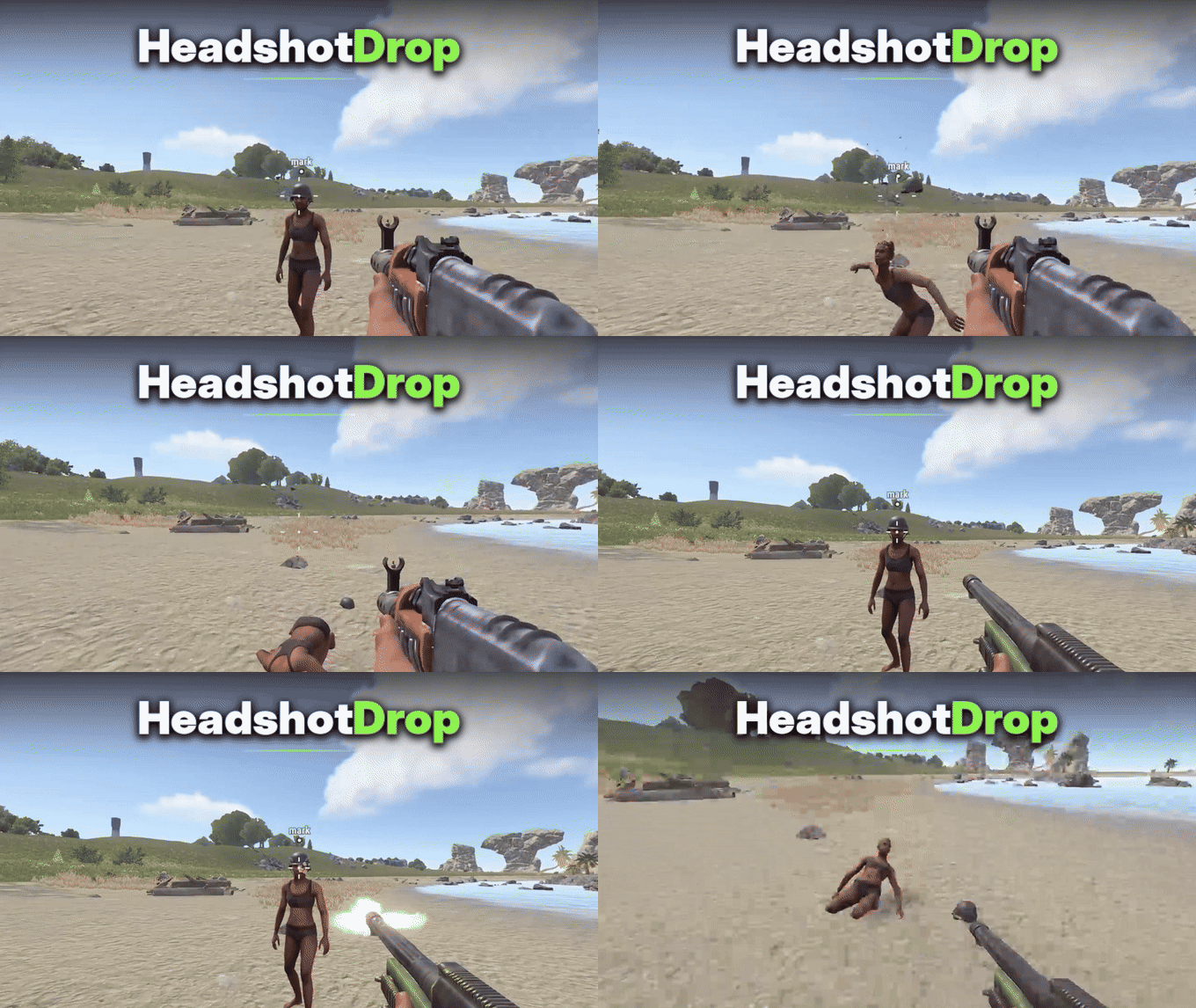
Make headshots more satisfying with realistic helmet drops in Rust. Getting a headshot should do more than just damage or kill another player. Seeing their helmet fly off adds an extra detail to combat. HeadshotDrop automatically removes and drops a player's equipped helmet or other supported head armor when they receive a qualifying headshot. Server owners can choose whether helmets drop on fatal headshots, one-hit kills, or headshots that deal a configurable amount of damage. Perfect for PvP, Vanilla+, modded, hardcore, and custom combat Rust servers. Features Automatically drops equipped helmets and supported head armor when the configured headshot conditions are met. Three configurable drop modes: Fatal Headshot, One-Hit Fatal Headshot, and Headshot Damage. Fatal Headshot mode drops head armor when a player dies from a headshot. One-Hit Fatal Headshot mode only triggers when a headshot kills a player who was at full health and was not wounded before the hit. Headshot Damage mode allows helmets to drop from qualifying headshots even when the player survives. Configurable minimum headshot damage requirement for Headshot Damage mode. Exclude specific headwear items from dropping using their Rust item shortnames. Supports dropping multiple eligible pieces of equipped head armor. Dropped head armor is physically tossed upward from the player's position. Permission-based bypass allows selected players to keep their head armor. Respects Rust items that are marked as non-droppable. Ignores NPCs and only processes real players. Works automatically without requiring players to use commands. Drop Modes HeadshotDrop includes three different modes to control when equipped head armor should drop. Mode Description 1 - Fatal Headshot Drops head armor when a player dies from a headshot. 2 - One-Hit Fatal Headshot Drops head armor when a headshot kills a player who was at full health and not wounded before the hit. 3 - Headshot Damage Drops head armor when a headshot meets the configured minimum damage requirement, even if the player survives. Tip Example: Set the drop mode to 3 and the minimum headshot damage to 75 to make helmets drop when a qualifying headshot deals at least 75 damage. Permissions headshotdrop.bypass - Prevents the player's equipped head armor from being dropped by HeadshotDrop. Example Configuration { "Drop mode (1 = FatalHeadshot, 2 = OneHitFatalHeadshot, 3 = HeadshotDamage)": 1, "Minimum headshot damage": 75.0, "Blocked items (shortnames)": [ "hat.boonie", "hat.cap" ], "Config Version": { "Major": 1, "Minor": 0, "Patch": 0 } } Note Configuration Notes Drop mode: Choose 1, 2, or 3 to control when head armor drops. Minimum headshot damage: Sets the required damage for Headshot Damage mode. Blocked items: Add Rust item shortnames to prevent specific headwear from dropping. Why Choose HeadshotDrop? HeadshotDrop adds another satisfying detail to Rust combat by making helmets and supported head armor fly off when players land qualifying headshots. With three different drop modes, customizable damage requirements, excluded items, and bypass permissions, server owners can easily adjust the behavior to suit their server without complicated mechanics or player commands$5.99 -
Version 1.0.2
20 downloads
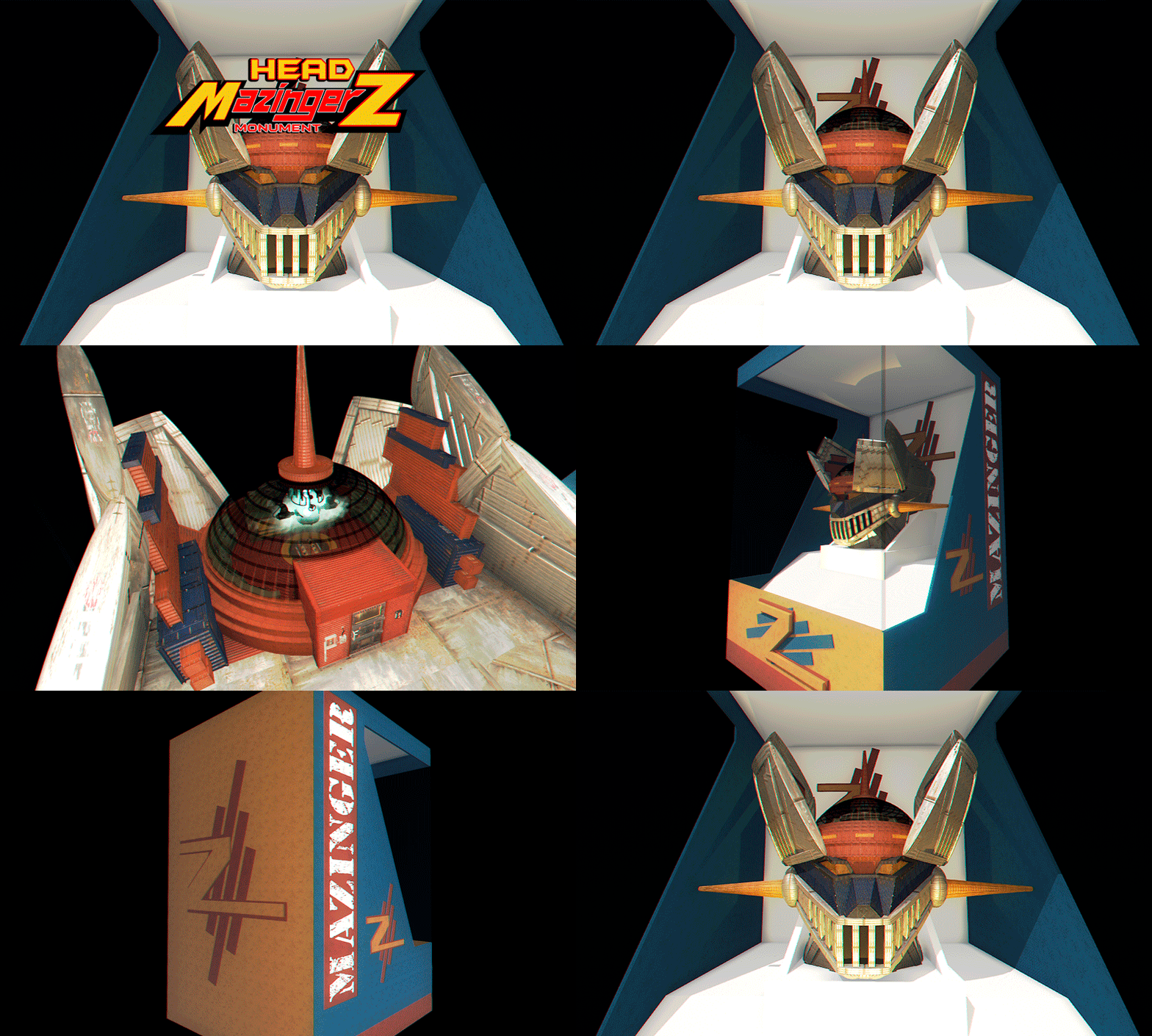
Mazinger Z (Head), the robot that made a generation of children dream now available for Rust. Mazinger Z's head is wrapped in a collector's box. "Do you dare to discover its interior?" - CONTAINS: Maze Parkour Puzzle Loot Room NPCs - TIPS: Measure your steps with caution or you will meet your death. Have fun$14.90- 1 review
-
- 3
-

-
- #mazingerz
- #z
- (and 44 more)