Search the Community
Showing results for tags 'ultimate'.
Found 3 results
-

Version 1.0.0
5 downloads
yNkes's Ultimate 3X Full Server Setup Carbon-only, BetterLoot v4 I built this pack as a clean starting point for an English 3X server: the rates work together, the everyday player features are already configured, and the files are ready to copy into a fresh Carbon installation. Install the required plugins, copy the pack to your server root, add your own branding and credentials, grant the included permissions, then woila! Please note: This is a configuration pack, not a copy of a running server; RustDedicated, Carbon, SteamCMD, plugin source files, maps, and third-party licenses are not included. What's Already Set Up - 3X gathering: Carbon GatherManager applies 3X rates to nodes, ground pickups, quarries, and Excavator output. - Practical stack sizes: Carbon StackManager uses 3X ammunition, components, and electrical stacks, 5X medical stacks, and 10X resource stacks while keeping sensitive consumable containers protected. - Custom BetterLoot: BetterLoot v4 data covers supported barrels, roadside loot, monuments, underwater labs, supply drops, Bradley, Patrol Helicopter, and other containers with 3X scrap, duplicate protection, blueprint conversion, balanced probabilities, and a cleaned item blacklist. - 3X smelting: CarbonAuto handles both normal and blacklist-classified ovens at 3X speed, so the pack does not need QuickSmelt. - Instant crafting: Crafting Controller removes normal craft times without enabling random skins, full-inventory crafting, shutdown completion, or extra crafting notices. - Early blueprints: Blueprint Manager gives default players Tier 0 and Tier 1 blueprint access through the supplied permissions. - Team blueprint sharing: Blueprint Share passes researched and Tech Tree blueprints to current and newly joined native Rust teammates without requiring Friends or Clans. - Team AutoAuth: Automatic Authorization shares cupboards, turrets, key locks, code locks, doors, boxes, and other supported locked entities with native teammates. - Barrel pickup: Auto Pickup Barrel collects barrel loot automatically for permitted players within three meters. - Cleaner furnace use: Furnace Splitter handles standard and large furnaces with vanilla fuel use and does not include anyone's saved preferences. - Short building correction time: Hammer Time gives the building owner 60 seconds to rotate or demolish placed pieces without restart or relationship bypasses. - Useful starter kit: Kits provides a free English Starter Kit every 12 hours with two sleeping bags, a large box, sheet-metal door, hammer, building plan, code lock, cupboard, furnace, bandage, resources, food, and cloth. - Clean kit setup: There are no autokits, NPC examples, player claim records, purchase costs, hidden VIP tiers, or external skin-plugin requirements. - Branded loading screen: Loading Messages cycles editable English connection text every five seconds and introduces the server rates, team limit, and rules. - Raid and Combat block: No Escape applies a three-minute combat block and five-minute raid block to teleporting, trading, kits, recycling, crafting, building, repairing, upgrading, and other configured escape actions. - Homes and teleporting: NTeleportation includes two homes, team-only TPR, TPB, and automatically detected Outpost and Bandit destinations with 15-second countdowns, 10-minute cooldowns, five daily uses, building checks, unsafe-state interruption, and No Escape support. - Faster recyclers: Recycle Manager speeds up recyclers without increasing output or changing vanilla efficiency. - Real population monitor: Server Pop reports actual online, sleeping, joining, and queued players through a private game tip with a 60-second cooldown. - Short Nights: Time Of Day runs approximately 55 minutes of daylight and five minutes of night without freezing or skipping the night. - Trade System: uMod Trade provides 30-slot remote exchanges through /trade and /trade accept with a five-minute cooldown, a 25-second request window, building, movement, radiation, vehicle, and No Escape checks. - Ready server profile: The supplied server.cfg uses a four-player team limit, a recommended 3500 Procedural Map, a Thursday 18:00 UTC weekly wipe template, and clearly marked fields for your own name, description, website, Discord, and header image. - Neutral starting point: Teleport costs, Economics, Server Rewards, VIP profiles, webhooks, fake players, fake wipe dates, player impersonation, and custom-map or monument claims are deliberately left out. What You Get The archive contains 16 cleaned plugin configs, the Carbon GatherManager, StackManager, and CarbonAuto settings, BetterLoot v4 data, a clean Starter Kit, English language files, and the complete ynkes_3x server identity template. Also includes: - A step-by-step README. - The required plugin names, baseline notes, and exact player permissions. - Safe example startup arguments with placeholders for the seed, ports, player limit, and RCON password. Requirements and Setup You need a current RustDedicated server, the production version of Carbon, access to the server files and console, and the plugins listed in PLUGIN-LIST.txt. The package targets uMod Trade 1.2.48 with the small Carbon compatibility fix used by the original server; the current official download still contains the unsupported OnlinePlayers attribute, so the unmodified file will not compile on Carbon. 1. Install or update RustDedicated through SteamCMD. 2. Install production Carbon and start the server once. 3. Download the plugins named in PLUGIN-LIST.txt from their official pages and place them in carbon/plugins. 4. Copy this package into the Rust server root and use ynkes_3x as the server identity. 5. Replace every CHANGE_ME value and enter your own branding, seed, ports, player limit, and unique RCON password. 6. Check the PERMISSIONS.txt and complete the README.txt test checklist before opening the server publicly. With Rust, Carbon, and the plugins ready, the initial setup should take around 15–30 minutes. Before You Buy Version 1.0.0 Server startup complete on RustDedicated build 2633.288.1 and Carbon 2.0.259.0 test on 12 September 2026. If you want a tidy 3X base with sensible rates, curated loot, the common quality-of-life features players expect, and clear documentation for everything the owner needs to do, this pack is ready for your server.$20.00 -
Version 1.0.11
99 downloads
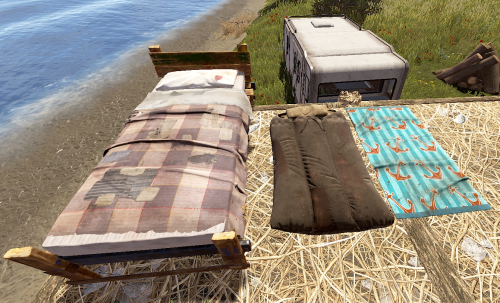
Allows complete individual settings of Beds, Towels, Bags & Campers using Permissions or Global setters with radius, limits Unlock Time, Respawn Cooldown! Improves server/client performance by auto-managing players bag limits & radius! You can assign a bed to a friend on your friends list in game & when they join it will give them the invite to join your team to get the bed/bag/towel/etc! Notes: Better Vanish ( the paid version ) has known bugs with chat commands not working while in vanish. To resolve the problem leave vanish mode. Permissions You can add or remove as many permissions as you'd like in the config! Player Chat Commands /bag <Shows just the limits & how many of what you have placed.> /bag bags | towels | beds | campers <Selects & shows how many of the specific bag you have placed down.> /bag towels clear | rename | limits /bag towels clear <Clears all of the selected bag type from the player that ran the command> /bag towels rename dingus <Renames all of the selected bag type to the new name> Configuration { "Toggle Offline Team Invite System through bag gifting. Default: Off": false, "# of players that can place a spawn point in a zone radius": 16, "Player Respawn Zone Radius Check": 35, "Sets Global Defaults": { "True Only Owner can set name | False Allows team members": false, "Sets Total Max Limit within a radius": 12, "Sets Limit radius": 35, "Sleeping Bags": { "DefaultTextName": "Unnamed Bag", "SecondsBetweenReuses": 300.0, "UnlockTime": 30.0 }, "Towel Bags": { "DefaultTextName": "Unnamed Towel", "SecondsBetweenReuses": 300.0, "UnlockTime": 30.0 }, "Beds": { "DefaultTextName": "Bed", "SecondsBetweenReuses": 120.0, "UnlockTime": 30.0 }, "Camper Bags": { "DefaultTextName": "Unnamed Camper Seat", "SecondsBetweenReuses": 120.0, "UnlockTime": 30.0 } }, "Player Permissions": { "vip1": { "True Only Owner can set name | False Allows team members": false, "Sets Total Max Limit within a radius": 12, "Sets Limit radius": 35, "Sleeping Bags": { "DefaultTextName": "Unnamed Bag", "SecondsBetweenReuses": 150.0, "UnlockTime": 20.0 }, "Towel Bags": { "DefaultTextName": "Unnamed Towel", "SecondsBetweenReuses": 150.0, "UnlockTime": 20.0 }, "Beds": { "DefaultTextName": "Bed", "SecondsBetweenReuses": 60.0, "UnlockTime": 20.0 }, "Camper Bags": { "DefaultTextName": "Unnamed Camper Seat", "SecondsBetweenReuses": 150.0, "UnlockTime": 20.0 } }, "vip2": { "True Only Owner can set name | False Allows team members": false, "Sets Total Max Limit within a radius": 12, "Sets Limit radius": 35, "Sleeping Bags": { "DefaultTextName": "Unnamed Bag", "SecondsBetweenReuses": 75.0, "UnlockTime": 15.0 }, "Towel Bags": { "DefaultTextName": "Unnamed Towel", "SecondsBetweenReuses": 75.0, "UnlockTime": 15.0 }, "Beds": { "DefaultTextName": "Bed", "SecondsBetweenReuses": 30.0, "UnlockTime": 15.0 }, "Camper Bags": { "DefaultTextName": "Unnamed Camper Seat", "SecondsBetweenReuses": 75.0, "UnlockTime": 15.0 } } } }$9.99 -
Version 1.0.0
14 downloads
Introducing the Ultimate Azuriom Rust Plugin Bundle, an all-in-one package designed to elevate your Azuriom platform with unparalleled features and seamless integration. This comprehensive bundle includes five powerful plugins that will enhance your Rust gaming community's experience, offering everything from dynamic themes to detailed player statistics and ban management. Explore each plugin's unique features and discover how this bundle can transform your Azuriom site into a vibrant, user-friendly hub for your Rust players. Save $25 When You Buy the Bundle for Only $79! 1. Azuriom Rust Theme Transform your Azuriom platform with the Rust Theme, inspired by the rugged, immersive world of Rust. This theme offers a unique, visually appealing user interface that will captivate your gaming community. Features: Stylish Design: Rustic yet modern aesthetics for an engaging user experience. Easy Installation: Simple setup with a step-by-step guide. Customizable Configuration: Personalize with homepage selection, background settings, and custom header images for up to 8 servers. One-Click Server Connection: Effortless connection with a single click. Ongoing Enhancements: Regular updates to keep your theme current. Optimized User-Friendliness: Balances visual appeal with usability. 2. Azuriom Player Ranks Integration Showcase your players' prowess with the Player Ranks Integration plugin, which displays detailed statistics for PVE, PVP, Farming, and Raiding on your website. Features: Real-time Leaderboard: Highlights player achievements. Multilingual Support: Available in English and German. Seamless Integration: Quick and easy setup. Theme Compatibility: Blends perfectly with all Azuriom themes. Online-Offline Display: Shows player status when logged in. Personal Statistics: Visible only to logged-in players with sufficient playtime. Live Search Function: Instant player search capability. Customizable Pagination: Adjust leaderboard rows as needed. 3. Azuriom BattleMetrics Bans Plugin Keep your community informed about player bans with the BattleMetrics Bans Plugin, integrating ban lists directly onto your Azuriom site. Features: User-Triggered Updates: Automatic updates of the last 50 ban entries with a 10-minute buffer. Download ALL Bans: Admins can download and save all ban entries. SQL Database: Stores ban information securely. Multilingual Support: Available in both English and German. Easy Integration: Seamless setup and integration. Customizable Title: Changeable ban page title via the dashboard. Required: API Token and Banlist ID from BattleMetrics. 4. Azuriom RaidableBases Integration Showcase your Rust players' RaidableBases achievements with the RaidableBases Integration plugin, providing a sleek leaderboard for raid statistics. Features: Highlighting the Elite: Top 3 performers prominently displayed. Real-time Leaderboard: Live ranking updates. Multilingual Support: English and German supported. Seamless Integration: Easy to set up and blends perfectly with Azuriom themes. Web Dashboard Integration: Quick access to player stats via the Azuriom dashboard. Future-Proof: Continuous updates and new features. 5. RaidableBases DataBase SQL An essential addition to the RaidableBases plugin, this tool efficiently tracks and updates player statistics, storing them in an SQL database. Features: Automatic Updates: Stores player statistics after each raid. Manual Updates: Use "rb.update" command with SteamID for targeted updates. Effortless Management: Simplifies tracking of player progress. Why Choose the Ultimate Azuriom Rust Plugin Bundle? This bundle is designed to provide a comprehensive solution for managing your Azuriom platform, enhancing user engagement, and streamlining administrative tasks. With seamless integration, real-time updates, and extensive customization options, the Ultimate Azuriom Rust Plugin Bundle is the perfect choice for any Rust gaming community looking to elevate their platform to new heights. Get it now and transform your Azuriom site into the ultimate Rust hub! Special Bundle Price: $79 (Save $25!)$79.00