Search the Community
Showing results for tags 'better'.
Found 23 results
-
Version 1.1.1
70 downloads
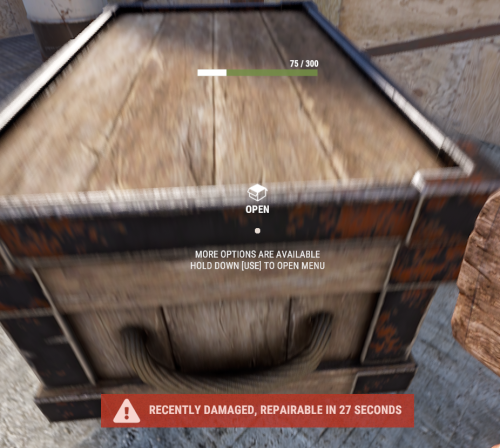
With just one tap, you can fully repair your base blocks and base items—no more having to tap repeatedly! Includes permission support and is optimized for top performance, with rotation & demolition support! Features * One Tap Repairs - Supports Base Blocks & Base Items & Vehicles, etc * Rotation - Re-Enables Base Blocks for easy native rotation again! * Demolition - Re-Enables Base Blocks for easy native demolition again! Permissions betterhammer.use ( required to do full 1 tap hit repairs with hammer & to use any features/functions )$5.00 -

Version 2.1.3
440 downloads
Supports: Wind Mills | Solar Panels | Fuel & Test Generators | Small-Medium-Large Batteries | Tesla Coils | Heaters Both Globally & with permission-based settings allowing you to create as many different levels as you wish! Written for the best performance possible! Defaults to first permission assigned in the config if you give out multiple. Wind Mill Note: Max height Needed for Max output is floor 18 Battery Options Explained MaxOutput: Maximum Power Out Put Efficiency: How Efficient Battery is When Charging ( this How Fast it Charges ) MaxCapacitySeconds: How Much Energy We Can Request From Power Sources For Charging is this value * our maxOutput Batteries will not show new Max Out-Puts Batteries will show New Power Usage! ( Pic is below, this is because its hardcoded on client side ) Fuel Generator Options Explained StackSize: Sets Inventory Stack Size for Fuel Inside The Fuel Generator OutputEnergy: Sets Power OutPut FuelPerSec: Sets How Much Fuel to Use Per Second Electrical Heater Options Explained GLOBAL SETTER ONLY > "Sets the Max Temperature Range for Electric Heaters Only (Default is 4.0)": 4.0, FadeDuration: Sets How Long Before Heat Dissipates ( when powered off ) HeatAmount: Sets Heat Amount ( when powered on ) Solar Panel Explained To get max Output you Need 1 floor up else it will only ever be half! + Panel must Face Direct Sun-light! Tesla Coil Options Explained A TeslaCoils Power consumption amount Is Calculated By ( MaxDamageOutput Divided / By PowerToDamageRatio ) A TeslaCoils DamageAmount is Calculated By Its (currentEnergy input * powerToDamageRatio) * dischargeTickRate A TeslaCoils SelfHarmAmount is Calculated By Its ( dischargeTickRate Divided / By maxDischargeSelfDamageSeconds * SetHealth ) SetHealth: Sets Item Condition Level MaxDamageOutput: Sets the Maximum Damage it Can OutPut Like Ever PowerForHeavyShorting: Sets Electrical Input Amount Needed for Strong-Zap Zap else = Weak-Zap Zap DischargeTickRate: Sets How Fast A TeslaCoil Discharges its Zap Zap MaxDischargeSelfDamageSeconds: Configuration { "Enables use of permission based settings": true, "Reset all modifications on unload (recommended true if uninstalling)": false, "Global Battery Small": { "MaxOutput": 9000, "Efficiency": 4.0, "MaxCapacitySeconds": 1, "Permissions": { "toptier": { "MaxOutput": 30, "Efficiency": 2.0, "MaxCapacitySeconds": 18000 }, "midtier": { "MaxOutput": 20, "Efficiency": 1.4, "MaxCapacitySeconds": 13500 }, "lowtier": { "MaxOutput": 14, "Efficiency": 1.0, "MaxCapacitySeconds": 11250 } } }, "Global Battery Medium": { "MaxOutput": 50, "Efficiency": 0.8, "MaxCapacitySeconds": 540000, "Permissions": { "toptier": { "MaxOutput": 100, "Efficiency": 2.0, "MaxCapacitySeconds": 1080000 }, "midtier": { "MaxOutput": 75, "Efficiency": 1.5, "MaxCapacitySeconds": 810000 }, "lowtier": { "MaxOutput": 60, "Efficiency": 1.0, "MaxCapacitySeconds": 675000 } } }, "Global Battery Large": { "MaxOutput": 100, "Efficiency": 0.8, "MaxCapacitySeconds": 1440000, "Permissions": { "toptier": { "MaxOutput": 200, "Efficiency": 3.0, "MaxCapacitySeconds": 2880000 }, "midtier": { "MaxOutput": 150, "Efficiency": 2.0, "MaxCapacitySeconds": 2160000 }, "lowtier": { "MaxOutput": 125, "Efficiency": 1.0, "MaxCapacitySeconds": 1800000 } } }, "Global Electric Generator": { "MaxOutputTestGen": 8, "Permissions": { "toptier": { "MaxOutputTestGen": 30 }, "midtier": { "MaxOutputTestGen": 20 }, "lowtier": { "MaxOutputTestGen": 12 } } }, "Global Fuel Generator": { "StackSize": 1000, "OutputEnergy": 35, "FuelPerSec": 1.0, "Permissions": { "toptier": { "StackSize": 2000, "OutputEnergy": 70, "FuelPerSec": 1.2 }, "midtier": { "StackSize": 1500, "OutputEnergy": 60, "FuelPerSec": 1.1 }, "lowtier": { "StackSize": 1250, "OutputEnergy": 45, "FuelPerSec": 1.0 } } }, "Global Solar Panel": { "MaxOutputSolar": 20, "Permissions": { "toptier": { "MaxOutputSolar": 30 }, "midtier": { "MaxOutputSolar": 20 }, "lowtier": { "MaxOutputSolar": 13 } } }, "Global Electric Wind Turbine": { "MaxOutput": 100, "TargetSpeed": 0.0, "Permissions": { "toptier": { "MaxOutput": 250, "TargetSpeed": 3.0 }, "midtier": { "MaxOutput": 200, "TargetSpeed": 2.0 }, "lowtier": { "MaxOutput": 140, "TargetSpeed": 1.0 } } }, "Global Electric Heater": { "FadeDuration": 1.0, "HeatAmount": 5.0, "HeaterTemperatureGrowableRange": 4.0, "Permissions": { "toptier": { "FadeDuration": 9.0, "HeatAmount": 16.0, "HeaterTemperatureGrowableRange": 14.0 }, "midtier": { "FadeDuration": 6.0, "HeatAmount": 12.0, "HeaterTemperatureGrowableRange": 10.0 }, "lowtier": { "FadeDuration": 3.0, "HeatAmount": 8.0, "HeaterTemperatureGrowableRange": 6.0 } } }, "Global Tesla Coil": { "SetHealth": 250.0, "PowerToDamageRatio": 2.0, "DischargeTickRate": 0.25, "MaxDischargeSelfDamageSeconds": 120.0, "MaxDamageOutput": 35.0, "PowerForHeavyShorting": 10, "Permissions": { "toptier": { "SetHealth": 350.0, "PowerToDamageRatio": 2.0, "DischargeTickRate": 0.25, "MaxDischargeSelfDamageSeconds": 120.0, "MaxDamageOutput": 50.0, "PowerForHeavyShorting": 10 }, "midtier": { "SetHealth": 325.0, "PowerToDamageRatio": 2.0, "DischargeTickRate": 0.25, "MaxDischargeSelfDamageSeconds": 120.0, "MaxDamageOutput": 45.0, "PowerForHeavyShorting": 10 }, "lowtier": { "SetHealth": 300.0, "PowerToDamageRatio": 2.0, "DischargeTickRate": 0.25, "MaxDischargeSelfDamageSeconds": 120.0, "MaxDamageOutput": 40.0, "PowerForHeavyShorting": 10 } } } }$19.99 -

Version 1.0.6
126 downloads
3x BetterLoot Loottable The 3x BetterLoot config offers the perfect balance between vanilla progression and boosted excitement, and fight for loot. Key Features 3x Boosted Loot All key containers (crates, barrels, airdrops) slightly scaled for quicker progression. Cleaner Loot Tables, junk removed, so every find feels rewarding. Perfect for Community Servers Great for semi-vanilla or lightly modded servers that want smoother pacing. Modern Items Supported Includes Minigun, Military Flamethrower, and Backpack with balanced drop rates. Balanced Gameplay Keeps Rust’s survival feel intact while speeding up early and mid-game gearing. Note: Made specifically for the BetterLoot plugin. - Setup: All you do is replace the 2 .json files (Loot table and loot groups), after that reload BetterLoot and it works:) Access Our Other Loottables With These Links: 5x - 2x - 10x ```json { "crate": "locked_crate", "items": { "rifle.ak": { "Min": 1, "Max": 1 }, "rocket.launcher": { "Min": 1, "Max": 1 }, "explosive.timed": { "Min": 2, "Max": 3 }, "explosives": { "Min": 4, "Max": 10 }, "metal.refined": { "Min": 45, "Max": 75 }, "techparts": { "Min": 7, "Max": 12 }, "autoturret": { "Min": 1, "Max": 1 }, "electric.battery.rechargable.large": { "Min": 1, "Max": 1 } } } ```$5.98 -

Version 1.0.5
97 downloads
5x BetterLoot Loottable The 5x BetterLoot config offers the perfect balance between vanilla progression and boosted excitement, and fight for loot. Key Features 5x Scaled Loot Resources, components, and gear are multiplied to match a 5x environment. No Trash Items Containers are cleaned up for more valuable drops and less clutter. Balanced Variety You’ll find everything from mid-tier weapons to endgame gear without making everything instant. New Items Included Supports Minigun, Military Flamethrower, and Backpack with moderate drop rates. Balanced Gameplay Keeps Rust’s survival feel intact while speeding up early and mid-game gearing. Note: Made specifically for the BetterLoot plugin. - Setup: All you do is replace the 2 .json files (Loot table and loot groups), after that reload BetterLoot and it works:) Access Our Other Loottables With These Links: 3x - 2x - 10x ```json { "crate": "locked_crate", "items": { "rifle.ak": { "Min": 1, "Max": 1 }, "rocket.launcher": { "Min": 1, "Max": 1 }, "explosive.timed": { "Min": 2, "Max": 5 }, "explosives": { "Min": 20, "Max": 50 }, "metal.refined": { "Min": 75, "Max": 125 }, "techparts": { "Min": 10, "Max": 30 }, "autoturret": { "Min": 5, "Max": 5 }, "electric.battery.rechargable.large": { "Min": 5, "Max": 5 } } } ```$5.98 -

Version 1.0.5
126 downloads
2x BetterLoot Loottable The 2x BetterLoot config offers the perfect balance between vanilla progression and boosted excitement, and fight for loot. Key Features Balanced Boost Roughly 2x the normal loot, perfect for servers that want faster progression without going full high-rate. Cleaner Tables Low-value “trash” items are removed, ensuring every container has useful gear. Flexible Gameplay Ideal for weekend raids, small-group PvP, or lightly boosted community servers. Modern Items Supported Includes Minigun, Military Flamethrower, and Backpack with balanced drop rates. Balanced Gameplay Keeps Rust’s survival feel intact while speeding up early and mid-game gearing. Note: Made specifically for the BetterLoot plugin. - Setup: All you do is replace the 2 .json files (Loot table and loot groups), after that reload BetterLoot and it works:) Access Our Other Loottables With These Links: 5x - 3x - 10x { "crate": "locked_crate", "items": { "rifle.ak": { "Min": 1, "Max": 1 }, "rocket.launcher": { "Min": 1, "Max": 1 }, "explosive.timed": { "Min": 1, "Max": 1 }, "explosives": { "Min": 3, "Max": 3 }, "metal.refined": { "Min": 45, "Max": 95 }, "techparts": { "Min": 6, "Max": 12 }, "autoturret": { "Min": 3, "Max": 3 }, "electric.battery.rechargable.large": { "Min": 1, "Max": 1 } } }$5.94 -

Version 1.0.5
36 downloads
10x BetterLoot Loottable The 10x BetterLoot config offers the perfect balance between vanilla progression and boosted excitement, and fight for loot. Key Features 10x Scaled Loot Resources, components, and gear are multiplied to match a 5x environment. No Trash Items Containers are cleaned up for more valuable drops and less clutter. Balanced Variety You’ll find everything from mid-tier weapons to endgame gear without making everything instant. New Items Included Supports Minigun, Military Flamethrower, and Backpack with moderate drop rates. Balanced Gameplay Keeps Rust’s survival feel intact while speeding up early and mid-game gearing. Note: Made specifically for the BetterLoot plugin. - Setup: All you do is replace the 2 .json files (Loot table and loot groups), after that reload BetterLoot and it works:) Access Our Other Loottables With These Links: 3x - 2x - 5x ```json { "crate": "locked_crate", "items": { "rifle.ak": { "Min": 1, "Max": 1 }, "rocket.launcher": { "Min": 1, "Max": 1 }, "explosive.timed": { "Min": 2, "Max": 5 }, "explosives": { "Min": 20, "Max": 50 }, "metal.refined": { "Min": 75, "Max": 125 }, "techparts": { "Min": 10, "Max": 30 }, "autoturret": { "Min": 5, "Max": 5 }, "electric.battery.rechargable.large": { "Min": 5, "Max": 5 } } } ```$5.97 -

Version 1.0.0
5 downloads
yNkes's Ultimate 3X Full Server Setup Carbon-only, BetterLoot v4 I built this pack as a clean starting point for an English 3X server: the rates work together, the everyday player features are already configured, and the files are ready to copy into a fresh Carbon installation. Install the required plugins, copy the pack to your server root, add your own branding and credentials, grant the included permissions, then woila! Please note: This is a configuration pack, not a copy of a running server; RustDedicated, Carbon, SteamCMD, plugin source files, maps, and third-party licenses are not included. What's Already Set Up - 3X gathering: Carbon GatherManager applies 3X rates to nodes, ground pickups, quarries, and Excavator output. - Practical stack sizes: Carbon StackManager uses 3X ammunition, components, and electrical stacks, 5X medical stacks, and 10X resource stacks while keeping sensitive consumable containers protected. - Custom BetterLoot: BetterLoot v4 data covers supported barrels, roadside loot, monuments, underwater labs, supply drops, Bradley, Patrol Helicopter, and other containers with 3X scrap, duplicate protection, blueprint conversion, balanced probabilities, and a cleaned item blacklist. - 3X smelting: CarbonAuto handles both normal and blacklist-classified ovens at 3X speed, so the pack does not need QuickSmelt. - Instant crafting: Crafting Controller removes normal craft times without enabling random skins, full-inventory crafting, shutdown completion, or extra crafting notices. - Early blueprints: Blueprint Manager gives default players Tier 0 and Tier 1 blueprint access through the supplied permissions. - Team blueprint sharing: Blueprint Share passes researched and Tech Tree blueprints to current and newly joined native Rust teammates without requiring Friends or Clans. - Team AutoAuth: Automatic Authorization shares cupboards, turrets, key locks, code locks, doors, boxes, and other supported locked entities with native teammates. - Barrel pickup: Auto Pickup Barrel collects barrel loot automatically for permitted players within three meters. - Cleaner furnace use: Furnace Splitter handles standard and large furnaces with vanilla fuel use and does not include anyone's saved preferences. - Short building correction time: Hammer Time gives the building owner 60 seconds to rotate or demolish placed pieces without restart or relationship bypasses. - Useful starter kit: Kits provides a free English Starter Kit every 12 hours with two sleeping bags, a large box, sheet-metal door, hammer, building plan, code lock, cupboard, furnace, bandage, resources, food, and cloth. - Clean kit setup: There are no autokits, NPC examples, player claim records, purchase costs, hidden VIP tiers, or external skin-plugin requirements. - Branded loading screen: Loading Messages cycles editable English connection text every five seconds and introduces the server rates, team limit, and rules. - Raid and Combat block: No Escape applies a three-minute combat block and five-minute raid block to teleporting, trading, kits, recycling, crafting, building, repairing, upgrading, and other configured escape actions. - Homes and teleporting: NTeleportation includes two homes, team-only TPR, TPB, and automatically detected Outpost and Bandit destinations with 15-second countdowns, 10-minute cooldowns, five daily uses, building checks, unsafe-state interruption, and No Escape support. - Faster recyclers: Recycle Manager speeds up recyclers without increasing output or changing vanilla efficiency. - Real population monitor: Server Pop reports actual online, sleeping, joining, and queued players through a private game tip with a 60-second cooldown. - Short Nights: Time Of Day runs approximately 55 minutes of daylight and five minutes of night without freezing or skipping the night. - Trade System: uMod Trade provides 30-slot remote exchanges through /trade and /trade accept with a five-minute cooldown, a 25-second request window, building, movement, radiation, vehicle, and No Escape checks. - Ready server profile: The supplied server.cfg uses a four-player team limit, a recommended 3500 Procedural Map, a Thursday 18:00 UTC weekly wipe template, and clearly marked fields for your own name, description, website, Discord, and header image. - Neutral starting point: Teleport costs, Economics, Server Rewards, VIP profiles, webhooks, fake players, fake wipe dates, player impersonation, and custom-map or monument claims are deliberately left out. What You Get The archive contains 16 cleaned plugin configs, the Carbon GatherManager, StackManager, and CarbonAuto settings, BetterLoot v4 data, a clean Starter Kit, English language files, and the complete ynkes_3x server identity template. Also includes: - A step-by-step README. - The required plugin names, baseline notes, and exact player permissions. - Safe example startup arguments with placeholders for the seed, ports, player limit, and RCON password. Requirements and Setup You need a current RustDedicated server, the production version of Carbon, access to the server files and console, and the plugins listed in PLUGIN-LIST.txt. The package targets uMod Trade 1.2.48 with the small Carbon compatibility fix used by the original server; the current official download still contains the unsupported OnlinePlayers attribute, so the unmodified file will not compile on Carbon. 1. Install or update RustDedicated through SteamCMD. 2. Install production Carbon and start the server once. 3. Download the plugins named in PLUGIN-LIST.txt from their official pages and place them in carbon/plugins. 4. Copy this package into the Rust server root and use ynkes_3x as the server identity. 5. Replace every CHANGE_ME value and enter your own branding, seed, ports, player limit, and unique RCON password. 6. Check the PERMISSIONS.txt and complete the README.txt test checklist before opening the server publicly. With Rust, Carbon, and the plugins ready, the initial setup should take around 15–30 minutes. Before You Buy Version 1.0.0 Server startup complete on RustDedicated build 2633.288.1 and Carbon 2.0.259.0 test on 12 September 2026. If you want a tidy 3X base with sensible rates, curated loot, the common quality-of-life features players expect, and clear documentation for everything the owner needs to do, this pack is ready for your server.$20.00 -

Version 1.0.13
239 downloads
Water Wheel Upgrades adds a part based upgrade system to the new electrical waterwheels, allowing it's performance to be improved. Each part type has 3 tiers. Players can open an upgrade interface by right clicking on the wheel while holding a hammer, install custom parts by dragging them into specific slots, and improve both in-water and manual wheel performance through a simple interface. Each upgrade part affects the wheel’s stats, allowing you to tune in water output, manual output, efficiency, movement behavior, and metabolism costs. Parts are matched to their proper module slots, upgrades are saved per wheel, and all changes are applied directly to the entity in a lightweight, persistent system. The plugin also includes optional loot crate support, letting you control whether upgrade parts can appear in loot containers and set per container drop chances for each tier. Alternatively the parts can be added to any of your existing systems such as shops or crafting plugins. The upgrade parts are all configured in the config, with unique icons and stats, allowing you to quickly deploy this functionality to yourt server. As with most of my content, localization is possible with a default English lang file being included. The part shortname and skins are all pre-configured but can be modified, or replaced with items from my Custom Item Manager Permissions: waterwheelupgrades.use - Allows players to open and use the waterwheel upgrade interface. waterwheelupgrades.admin - Allows access to the admin part giving command. Commands: /wwpart - Admin chat command to give yourself all of the available parts for testing or adding to shops. Optionally can specify amount if you need more than one of each. Pre-Configured Parts: Paddles Bearings Grease Coil Controller Gearbox Default Config:$17.99 -
Version 4.0.10
1,049 downloads
BetterLoot Loot Table Config Our professionally balanced BetterLoot loot table is designed to deliver a clean, optimized loot experience that fits most server types — from lightly modded PvP to high-rate servers. Junk items have been heavily filtered out to ensure quality and consistency in all loot containers. This setup includes newly added items such as the Minigun, Minigun Backpack, and Military Flamethrower — ensuring your loot stays up-to-date with the latest Rust content. All loot tiers have been carefully balanced to provide a smooth progression and competitive gameplay feel without relying on random chance. Please note that this is a standalone loot table for the BetterLoot plugin. It does not include AlphaLoot-style drop percentages or random chance mechanics. If you're looking for a more advanced, dynamic setup, check out our AlphaLoot configs on our profile. Installation is very simple — a step-by-step guide is included inside the downloaded ZIP file.$10.99 -
Version 4.0.10
485 downloads
BetterLoot Loot Table Config Our professionally balanced BetterLoot loot table is designed to deliver a clean, optimized loot experience that fits most server types — from lightly modded PvP to high-rate servers. Junk items have been heavily filtered out to ensure quality and consistency in all loot containers. This setup includes newly added items such as the Minigun, Minigun Backpack, and Military Flamethrower — ensuring your loot stays up-to-date with the latest Rust content. All loot tiers have been carefully balanced to provide a smooth progression and competitive gameplay feel without relying on random chance. Please note that this is a standalone loot table for the BetterLoot plugin. It does not include AlphaLoot-style drop percentages or random chance mechanics. If you're looking for a more advanced, dynamic setup, check out our AlphaLoot configs on our profile. Installation is very simple — a step-by-step guide is included inside the downloaded ZIP file.$10.99 -

Version 4.0.10
537 downloads
BetterLoot Loot Table Config Our professionally balanced BetterLoot loot table is designed to deliver a clean, optimized loot experience that fits most server types — from lightly modded PvP to high-rate servers. Junk items have been heavily filtered out to ensure quality and consistency in all loot containers. This setup includes newly added items such as the Minigun, Minigun Backpack, and Military Flamethrower — ensuring your loot stays up-to-date with the latest Rust content. All loot tiers have been carefully balanced to provide a smooth progression and competitive gameplay feel without relying on random chance. Please note that this is a standalone loot table for the BetterLoot plugin. It does not include AlphaLoot-style drop percentages or random chance mechanics. If you're looking for a more advanced, dynamic setup, check out our AlphaLoot configs on our profile. Installation is very simple — a step-by-step guide is included inside the downloaded ZIP file.$10.99 -

Version 4.0.10
392 downloads
BetterLoot Loot Table Config Our professionally balanced BetterLoot loot table is designed to deliver a clean, optimized loot experience that fits most server types — from lightly modded PvP to high-rate servers. Junk items have been heavily filtered out to ensure quality and consistency in all loot containers. This setup includes newly added items such as the Minigun, Minigun Backpack, and Military Flamethrower — ensuring your loot stays up-to-date with the latest Rust content. All loot tiers have been carefully balanced to provide a smooth progression and competitive gameplay feel without relying on random chance. Please note that this is a standalone loot table for the BetterLoot plugin. It does not include AlphaLoot-style drop percentages or random chance mechanics. If you're looking for a more advanced, dynamic setup, check out our AlphaLoot configs on our profile. Installation is very simple — a step-by-step guide is included inside the downloaded ZIP file.$10.99 -
Version 4.0.10
136 downloads
BetterLoot Loot Table Config Our professionally balanced BetterLoot loot table is designed to deliver a clean, optimized loot experience that fits most server types — from lightly modded PvP to high-rate servers. Junk items have been heavily filtered out to ensure quality and consistency in all loot containers. This setup includes newly added items such as the Minigun, Minigun Backpack, and Military Flamethrower — ensuring your loot stays up-to-date with the latest Rust content. All loot tiers have been carefully balanced to provide a smooth progression and competitive gameplay feel without relying on random chance. Please note that this is a standalone loot table for the BetterLoot plugin. It does not include AlphaLoot-style drop percentages or random chance mechanics. If you're looking for a more advanced, dynamic setup, check out our AlphaLoot configs on our profile. Installation is very simple — a step-by-step guide is included inside the downloaded ZIP file.$10.99 -
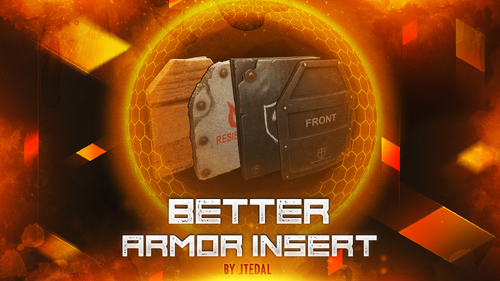
Version 1.0.8
309 downloads
This plugin allows you to add and customize custom Armor Inserts to clothing items. Each such insert has its own parameters that give an additional percentage of protection from different types of damage to the standard indicators of the plate, and can also be configured to fall out of different boxes with a given probability. The plugin is easily managed through the configuration file, where you can set the damage and chance of failure for each insert. The main features of the plugin: You can create an unlimited number of custom armor insert variations. For each custom item, you can set the percentage of protection for absolutely any damage (more on this below) You can customize the dropout of each custom item in the crates or add them to the preset of the custom interface for crafting items that cannot be done through the standard menu. How does it work? The values specified in the configuration file DO NOT REPLACE the standard percentage of damage protection, but only add their own value to it. That is, if the armor insert indicates that it provides 2% protection against bullets, and in the config you have, for example, the entry "Bullet": 2.0, this means that this armor insert will have 4% protection. Everything is very easy, the standard percentage of protection + the one that you specify in the config Plugin Config config How to configure the plugin correctly To set up a custom item correctly, you must specify the type of damage and the percentage of protection against it in the "Damage type and scale (0-100) for it". Keep in mind that you should not focus on the description that we see in the game, because you can see one line of the record, and in fact it means the percentage of protection for several types of damage at once. Therefore, I strongly recommend that you use the plaque that I will provide below with all the damage types that you could customize. Types of damage and their description: "Hunger" : "Hunger damage" "Thirst" : "Water shortage damage" "Cold" : "Cold damage" "Drowned" : "Suffocation damage" "Heat" : "Heat damage" "Bleeding" : "Bleeding damage" "Poison" : "Poison damage" "Bullet" : "Bullet damage" "Slash" : "Melee weapon damage" "Blunt" : "Melee weapon damage" "Fall" : "Fall damage" "Radiation" : "Radiation damage" "Bite" : "Animal bite damage" "Stab" : "Melee damage from NPCs" "Explosion" : "Explosion damage" "RadiationExposure" : "Radiation exposure damage" "ColdExposure" : "" "ElectricShock" : "Electric shock damage" "Arrow" : "Arrow damage" "AntiVehicle" : "Transport damage" "BeeSting" : "Bee damage" Console Command (RCON only) giveinsert <StemID|Player name> (wooden|asbestos|lead|metal) <SkinID> <Amount> - gives the player a custom armor insert For each custom item in the config, there is a table in the format [Damage type] = [Additional percentage of protection] Check out more of my work here JTedal's library. Come see our whole teams work Mad Mapper Library. Come by the Mad Mapper Discord for support, feedback, or suggestions!$11.99- 10 comments
- 2 reviews
-
- 2
-

-
- #jtedal
- #mad mappers
- (and 11 more)
-

Version 1.3.8
1,366 downloads
Team HUD · Rust · Oxide Rust tells you who your teammates are, and nothing about what is happening to them BetterTeams puts a live panel on screen with every mate's health, state, held weapon and grid square. It adds a team-only voice channel that ignores distance, a map ping on one key, and automatic authorization on every cupboard, lock, turret and SAM site your team builds. Every part is a config switch, and every player decides what they use. See it What it looks like on the server How it goes From dropping the file in to the night the server dies MINUTE ONE Nothing to set up The panel is already there Drop the file in and anyone who is in a team sees their mates on screen. Where it sits, how large it is and how many rows before it starts a second column are config values. Everything else is each player's own choice. Health as a bar, not a number. It slides toward red as they lose health, and it redraws the moment their health actually changes rather than on a timer. State takes over when it matters. WOUNDED, DEAD and OFFLINE replace the bar on that row, so a mate who is down is unmistakable without reading anything. What they are holding. The active item's icon, with its skin, sits at the end of every row and follows each weapon swap. Grid square, on your own refresh rate. Five seconds by default. A player who would rather not broadcast theirs switches it off for themselves. The leader keeps a star. One glance tells you who can change the team's settings, and offline mates stay listed instead of vanishing. IN A FIGHT Nobody types grids Talk across the map, ping what you are looking at Team voice replaces the vanilla proximity channel for the players who switch it on. Distance stops mattering, nobody outside the team hears it, and a speaker icon lights up on the row of whoever is talking. bind h ftmark Voice at any range, team only. Off per player until they enable it, so nobody has their voice chat changed without asking for it. One key, no binoculars. Bind the command once and the ping lands wherever you are aiming, up to fifty metres by default. The ping knows what it hit. An enemy player, an ore node, a storage box and a dropped gun each get their own marker icon and colour. Anything else drops a plain point. On a cooldown you set. Ten seconds by default, and the time left comes back as a game tip instead of the key doing nothing. SOMEONE JOINS One shared list Authorized everywhere, in one pass The moment an invite is accepted that player is added to every cupboard, code lock, turret and SAM site the rest of the team owns, and everyone else is added to theirs. Leaving or being kicked takes all of it back in the same pass. Five places, five switches. Tool cupboards, code locks, key locks, auto turrets and SAM sites, each turned on or off for the whole server. Key locks without the key. A teammate opens a key-locked door because they are on the team, not because you handed them anything. SAM sites check who is aboard. A teammate's SAM holds fire on a helicopter with an authorized member in a seat, instead of shooting down your own minicopter. Bases that already exist are picked up on boot. Everything placed before the install is registered when the plugin loads, so this works on a server mid-wipe and not only on what gets built next. THE LEADER Decided in game The random you just invited is not automatically trusted Taking a stranger into the team is where convenience turns into risk, so the whole authorization list is editable per ally from the menu. No config file, no restart. Revoke without breaking the rest. A blocked ally loses access everywhere except the locks and cupboards they placed themselves, and the team keeps access to those. Kick from the same screen. Pick the ally, kick, and every authorization they were given through the team is pulled as they go. Friendly fire off with one toggle. Only the leader can flip it; everyone else sees it locked and is told why rather than wondering if it is broken. A team skin per item type. The leader picks it, and anything a mate picks up gets it automatically. Thirty-five item types ship in the config with their own skin lists, and both are yours to cut or extend. AFTER A CRASH Teams survive it A bad shutdown should not disband half the server Rust loses teams when a server goes down badly, and the tickets land on you. This one writes the roster and the leader to disk and puts them back on start. Rosters restored on boot. Members and leader are recreated, including the players who are offline at the time, so nobody logs in teamless. Optional leader hand-off. If the leader disconnects the next online member is promoted, and the original takes it back when they return. Off by default, because not every server wants it. A wipe clears it properly. A new wipe id drops the saved teams and skin choices rather than dragging last wipe's data onto a fresh map. While you are not looking Built to be left alone The parts you will never notice unless they are missing. ✓ ImageLibrary is the only dependency, and Clans is used if you have it ✓ A missing dependency is named in console and the plugin unloads, instead of half-running ✓ Switching a feature off unsubscribes its hooks rather than leaving them running ✓ Panel updates are batched into one message per team per tick, not one per player ✓ Grid squares only redraw for the players who actually changed square ✓ A burst of joins and kicks collapses into a single data file write ✓ Every player choice is stored by Steam ID and survives restarts and reloads ✓ Clan tags are stripped from names in the panel when the Clans plugin is loaded Reference One command in chat, one to bind Each permission is only enforced if you switch its requirement on. All four are off by default, which means the feature is simply available to everyone. Chat /bt Open the menu: info, allies, skins, settings. The command name is a config value. Console ftmark Drop a team ping where you are looking. Meant to be bound to a key. Permission betterteams.hud The on-screen panel Permission betterteams.voice Team voice chat Permission betterteams.skins Choosing the team skin. One player in the team holding it is enough for the whole team. Permission betterteams.marker Easy team markers Straight answers The questions people ask before buying Do my players have to install anything? No. It runs entirely on the server and the panel is drawn through the normal game UI. The only install is ImageLibrary, on the server, once. Does team voice take over normal voice chat? Only for a player who turns it on themselves, and it is off by default. Everyone else keeps vanilla proximity voice untouched. Can a random I invite loot everything I own? Only if you leave them authorized. The leader can revoke any of the five places for one specific ally from the menu, and they keep access to nothing but what they placed themselves. Will the panel sit on top of my other UI? Its offset from the top and left, its scale and how many rows it stacks before starting a new column are all config values, so it can be moved out of the way. What if I do not want half of these features? Panel, voice, skins, markers, friendly-fire toggle, grid positions, team restore and each of the five authorization places are separate switches. Turning one off also stops the hooks behind it. What happens if ImageLibrary is missing? It waits and retries a few times in case load order put it second, then prints the download link in server console and unloads itself rather than throwing errors on every hook. 5 authorization places covered 35 item types with team skins 50m default ping range, configurable 1 dependency, ImageLibrary$14.99 -
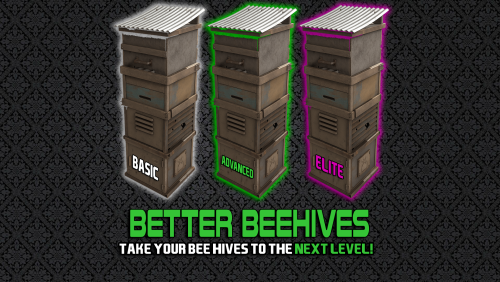
Version 1.0.4
77 downloads
Introducing BetterBeehive, the comprehensive beehive plugin! Features Tiered Beehive System Three Distinct Tiers: Basic, Advanced, and Elite beehives, each with unique skins and progressively better capabilities Customizable Progression: Server admins can fully configure each tier's properties Enhanced Production Increased Production Rates: Up to 4x faster honey production with higher-tier beehives Configurable Output: Set minimum and maximum honeycomb production for each tier Boosted XP: Higher XP gains for bee nucleus with each tier Quality of Life Improvements Indoor Functionality: Elite beehives can function inside bases, eliminating the need for outdoor placement Environmental Adaptability: Higher tiers can ignore temperature and humidity constraints Bee Sting Protection: Advanced and Elite beehives eliminate bee damage to nearby players Permission-Based System Tiered Permissions: Control access to each beehive tier through permissions Simple Upgrading: Players can upgrade regular beehives to custom tiers with a simple chat command Customization Options Fully Configurable: Admins can adjust production rates, indoor functionality, and environmental constraints Production Parameters: Fine-tune minimum/maximum honeycomb production and XP gains Update Intervals: Customize how frequently beehives update and produce resources Commands /bees [tier] - Converts a regular beehive in your inventory to the specified tier (or highest tier you have permission for) Permissions betterbeehive.use - Allows use of the plugin's commands betterbeehive.tier1 - Access to Basic tier beehives betterbeehive.tier2 - Access to Advanced tier beehives betterbeehive.tier3 - Access to Elite tier beehives$10.00 -
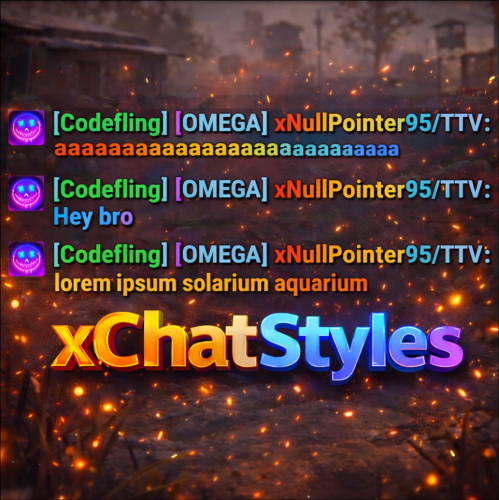
Version 1.3.4
239 downloads
xChatStyles xChatStyles adds smooth gradient colors to player names, prefixes, and chat messages, giving your server a premium, modern look without clutter or spam. It’s clean, readable, and designed to enhance chat - not overpower it. It lets you customize how players appear in chat using animated-looking color gradients. Perfect for VIPs, staff, donators, or special roles. No flashy UI. No complicated setup. Just beautiful chat. Features Gradient Names & Messages Smooth color gradients instead of flat colors, but you can also use a solid color Player names Chat messages Prefixes (VIP, Admin, etc.) Looks great without hurting readability Styled Mentions (@PLAYERNAME) Multiple Prefix Support Players can have more than one prefix Each prefix can have its own color style Great for VIP & Donator Perks Instantly makes VIP ranks feel premium Visual reward without gameplay imbalance Easy to sell as a cosmetic perk Trade System for Prefixes (REQUIRES Economics if you want to use trade feature) Server Friendly No lag or spam Optimized to run smoothly on live servers Works quietly in the background Supports permission-based style, not just permanent chat style. xChatStyles Web Editor Plugin Preview Permissions (Custom Tab) xchatstyles.customtab - Ability to see the "Custom" Tab in /xcs xchatstyles.customprefix - Ability to see and select "Prefix" in "Custom" Tab xchatstyles.custommessagecolor - Ability to see and select "Message" in "Custom" Tab xchatstyles.customusernamecolor - Ability to see and select "Username" in "Custom" Tab Chat Commands (Player) /xcs - Opens the Ui /xcs <PLAYERNAME/STEMAID> - Opens the Ui with the view of the target player and you can remove owned styles from that user. Chat & Console Commands (Admin) /* Add chat styles without permission */ /addprefix <STEAMID> <PREFIXNAME> <#HEX> <#HEX> <#HEX>... /addmessagecolor <STEAMID> <#HEX> <#HEX> <#HEX>... /addusernamecolor <STEAMID> <#HEX> <#HEX> <#HEX>... /addall <STEAMID> <PREFIXNAME> <#HEX> <#HEX> <#HEX>... [This will add a prefix with provided color(s), message style with provided color(s) and username style with provided color(s) with just 1 command.] /* Add chat styles without permission */ /* Add chat styles WITH permission */ /addprefix <xchatstyles.PERMISSIONNAME> <PrefixName> <#HEX> <#HEX> <#HEX> ... /addall <xchatstyles.PERMISSIONNAME> <PrefixName> <#HEX> <#HEX> <#HEX> ... /addmessagecolor <xchatstyles.PERMISSIONNAME> <#HEX> <#HEX> <#HEX> ... /addusernamecolor <xchatstyles.PERMISSIONNAME> <#HEX> <#HEX> <#HEX> ... /* Add chat styles WITH permission */ ---> As long as the player has permission, they can select it with /xcs ---> Automatically removed when permission is revoked ---> Permission-Based ChatStyles has (Permission) indicator in /xcs ---> The permission must start with 'xchatstyles.*'. Example: /addall <xchatstyles.vip> VIP <#HEX> <#HEX> <#HEX> ... /*********************************************************************************************************/ /* Use 1 #HEX Color (Example: #fcba03) for a single color, use multiple #HEX Colors for a color gradient */ /* */ /* Example: /addprefix 76561198412496844 OMEGA #32a852 #71a67f */ /* */ /*********************************************************************************************************/ /removeprefix <steamid> <index|PrefixName> /removemessagecolor <steamid> <index> /removeusernamecolor <steamid> <index> Recommended Plugin for >TIMED< PERMISSION: Config { "MaxPrefixes": 3, "DefaultUsernameColor": "#55aaff", "DefaultMessageColor": "#ffffff", "DefaultSize": 15, "AllowSelectingDuplicatePrefixNames": true, "NotifyOnStyleReceived": true, "PrefixBrackets": "[]", "ShowPrefixBracketsWithSizeTag": true, "Trade": { "AllowTrading": false, "PlayerCanSellPermissionBasedPrefix": false, "UseCurrencySign": true, "CurrencySign": "$", "AnnounceNewPrefixSaleGlobally": true, "AnnouncePrefixPriceUpdateGlobally": true }, "PermissionStyles": {} }$24.99 -

Version 1.0.4
205 downloads
Better Body Bags optimizes server and client side performance of ragdolls and body bags. This is done by custom handeling of physics and streamlining native methods to assist with server performance and reduce the heavy networking impacts to clients, causing client side lag. Stop client side lag in high deathtoll zones Stabalize fps dips caused by ragdolls and bodybags Hookless - This plugin uses harmony for the best performance Configurable - Customize despawn times per item, dropping of weapons & burying of items Performance will vary depending on the number of players, client hardware and server hardware. If you have a high pop server, low end client hardware or low end server hardware then this plugin is for you. { "Corpse Removal Time": 10.0, "Block Active Item Drop": true, "Bury Leftover Items": true, "Despawn Time Tier 0 (seconds)": 30.0, "Despawn Time Tier 1 (seconds)": 300.0, "Despawn Time Tier 2 (seconds)": 600.0, "Despawn Time Tier 3 (seconds)": 1800.0, "Ground Watch - Updates bag position if ground is missing": true, "Advance mode (reload on first true)": false, "CustomTimes": {} }$14.99- 4 comments
- 1 review
-
- 1
-
-
- #betterbodybags
- #better body bags
- (and 9 more)
-

Version 1.0.0
14 downloads
Better Fishing Villages enhances all fishing villages by adding helipads and recyclers to Tier A, B, and C locations.$3.99 -
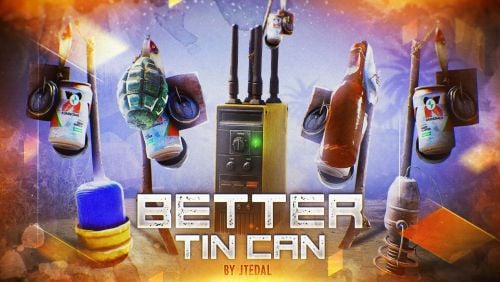
Version 1.1.0
131 downloads
This plugin will add 5 new types of traps to your server based on Tin Can Alarm. Make the players be careful about the clinking sticks with cans. There are also some parameters in the config that you can adjust, and most importantly, you can set the rules for whom the trap should work and who should not. Trap Types Tin Can Alarm Boom - This trap is complemented by a regular grenade, which falls at the moment when the player passes through it. Tin Can Alarm Flame - This trap is complemented by the usual Molotov cocktail, which falls at the moment when the player passes through it. Tin Can Alarm Tesla - This trap is based on a Tesla coil that shocks players. Tin Can Alarm Electrical - This trap is based on a flasher that can sell N amounts of energy to other electrical appliances that the player will connect Tin Can Alarm Broadcaster - this trap will send a signal to the pager or Rf Receiver when someone passes through it. Video Console Command (RCON only) givetincan <type trap> {amount} {SteamID64} - give a custom trap to a given player. Example: givetincan Boom 1 76561198334533025 Types: Boom (SkinID: 3299661003) Flame (SkinID: 3299661403) Tesla (SkinID: 3299661633) Electrical (SkinID: 3299661847) Broadcaster (SkinID: 3299662188) Plugin Config config Check out more of my work here JTedal's library. Come see our whole teams work Mad Mapper Library. Come by the Mad Mapper Discord for support, feedback, or suggestions!$11.99- 2 comments
- 2 reviews
-
- 4
-

-
-
- #jtedal
- #mad mappers
- (and 10 more)
-
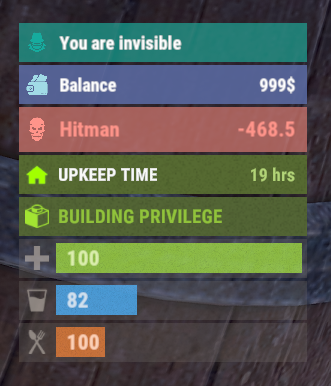
Version 0.1.8
692 downloads
The plugin displays an invisibility indication in the status bar. Depends on AdvancedStatus plugin. The ability to set a sound effect for disappearance and appearance; The ability to automatically generate language files for different languages(filled in English); The ability to individually toggle the display of status bars; The ability to specify the order of the bar; The ability to change the height of the bar; The abillity to customize the color and transparency of the background; The ability to set a material for the background; The ability to switch between CuiRawImageComponent and CuiImageComponent for the image; The ability to get images from the local folder(*SERVER*\oxide\data\AdvancedStatus\Images); The abillity to set own image and customize the color and transparency of the image; The abillity to set sprite instead of the image; The ability to customize the color, size, font and outline of the text. { "Sound effect played upon disappearance, leave empty to disable": "assets/prefabs/npc/patrol helicopter/effects/rocket_fire.prefab", "Sound effect played upon appearance, leave empty to disable": "assets/prefabs/npc/patrol helicopter/effects/rocket_fire.prefab", "List of language keys for creating language files": [ "en" ], "The height of the bar": 26, "The display order of the bar": 10, "The background color of the bar(HEX or RGBA)": "#15AC9D", "The background transparency of the bar": 0.7, "The background material of the bar, leave empty to disable": "", "The URL of the bar image": "https://i.ibb.co/LzdbT8wT/Vanish-Status-Default.png", "The local image of the bar, leave empty to use URL": "VanishStatus_Default", "The sprite image of the bar, leave empty to use local or URL": "", "Is it worth using a raw image for the bar?": false, "The color of the bar image(HEX or RGBA)": "#15AC9D", "The transparency of the bar image": 1.0, "The outline color of the bar image(HEX or RGBA)": "0.1 0.3 0.8 0.9", "The outline transparency of the bar image": 1.0, "The outline distance of the bar image, leave empty to disable. Example '0.75 0.75'": "", "The size of the bar text": 12, "The color of the bar text(HEX or RGBA)": "#FFFFFF", "The transparency of the bar text": 1.0, "The font of the bar text(https://umod.org/guides/rust/basic-concepts-of-gui#fonts)": "RobotoCondensed-Bold.ttf", "The horizontal offset of the bar text": 0, "The outline color of the bar text(HEX or RGBA)": "#000000", "The outline transparency of the bar text": 1.0, "The outline distance of the bar text, leave empty to disable": "", "The size of the bar subtext": 12, "The color of the bar subtext(HEX or RGBA)": "#FFFFFF", "The transparency of the bar subtext": 1.0, "The font of the bar subtext": "RobotoCondensed-Bold.ttf", "The outline color of the bar subtext(HEX or RGBA)": "0.5 0.6 0.7 0.5", "The outline transparency of the bar subtext": 1.0, "The outline distance of the bar subtext, leave empty to disable": "", "Version": { "Major": 0, "Minor": 1, "Patch": 8 } } EN: { "BarVanish": "You are invisible" } RU: { "BarVanish": "Вы невидимы" }$3.99 -
Version 1.0.3
343 downloads
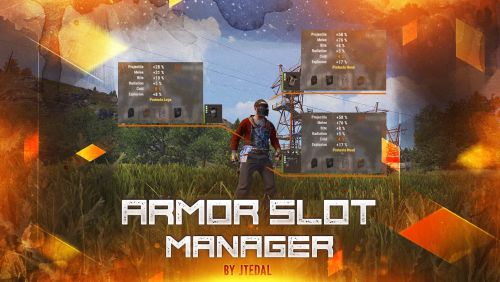
This plugin allows you to manage additional armor slots on clothing. It provides the ability to customize the chances of slots appearing when items are spawned, as well as when they are created (crafting), with the ability to customize privileges for different groups of players. The main features of the plugin: Setting the chance of slots appearing when crafting or spawning an item Adds the possibility of 4 slots for armor Allows you to adjust the chance of each slot appearing Allows you to adjust the odds for different groups/users Plugin Config config As of March 10, the standard configuration already includes all items that can have slots configured. If you are a user of the plugin for instant craft, then you may need minor improvements that will allow you to track the fact that the player has created an item. Check out more of my work here JTedal's library. Come see our whole teams work Mad Mapper Library. Come by the Mad Mapper Discord for support, feedback, or suggestions!$11.99- 11 comments
- 1 review
-
- 4
-

-
-
- #jtedal
- #mad mappers
- (and 12 more)