Search the Community
Showing results for tags 'title'.
Found 8 results
-

Version 1.0.1
16 downloads
Title Perks - Automatic Buff System for Title Selector by romzar.games - Requires Title Selector Overview TitlePerks is a companion plugin for Title Selector that brings your title system to life. Instead of titles being purely cosmetic, each title can grant configurable gameplay perks that activate instantly when equipped and deactivate when removed. Players earn titles through gameplay achievements (raids, heli kills, boss kills, etc.) and those titles now carry real mechanical weight — creating a meaningful progression loop where effort translates into tangible power. Key Features Automatic Activation & Deactivation Perks activate instantly when a title is selected in Title Selector Perks deactivate instantly when a title is removed, hidden, or cleared Full integration with Title Selector's Hide All, Show All, Clear, and Preset systems Perks auto-restore on player reconnect and server restart 15+ Perk Types Category Perk Type Description Damage damage_structure Bonus damage to building blocks (walls, floors, etc.) Damage damage_deployable Bonus damage to deployables (doors, turrets, boxes, etc.) Damage damage_heli Bonus damage to Patrol Helicopter Damage damage_bradley Bonus damage to Bradley APC Damage damage_boss Bonus damage to bosses (CH47, custom bosses) Damage damage_npc Bonus damage to all human NPCs (scientists, murderers, etc.) Damage damage_animal Bonus damage to animals Damage damage_pvp Bonus damage in PvP (against real players) Damage damage_pve Bonus damage in PvE (against everything except players) Damage damage_global Bonus damage to everything (stacks with specific types) Gather gather_ore Bonus ore yield when mining Gather gather_wood Bonus wood yield when chopping Gather gather_animal Bonus yield when harvesting animals Gather gather_plant Bonus yield when harvesting plants and growables Fishing fishing_rate Bonus fish quantity when catching fish Fishing xp_fishing Bonus fishing XP (permission group-based) Cooldown cooldown_event Reduces event cooldowns (PveMode integration) Cooldown buyable_cooldown_event Buyable event cooldown reduction (PveMode integration) Special legendary_bonus_xp Grants access to bonus XP group (permission-based) Perk Stacking Players can equip multiple titles simultaneously, and their perks stack additively. For example: Title "RaidHard" grants +15% structure damage Title "RaidExpert" grants +20% structure damage Combined: +35% structure damage Smart Entity Detection The damage system correctly identifies and categorizes all entity types: Structures: BuildingBlock (walls, foundations, floors, etc.) Deployables: Doors, storage containers, turrets, barricades, traps, sleeping bags, SAM sites, search lights, ovens NPCs: Scientists, murderers, scarecrows, tunnel dwellers, underwater dwellers, zombies, HumanNPC Vehicles: Patrol Helicopter, Bradley APC, CH47 Chinook Animals: All BaseAnimalNPC entities Players: Real Steam-authenticated players (for PvP perk) External Integrations PveMode: Automatically sets/removes player cooldown modifiers via API_SetPlayerCooldownModifier / API_RemovePlayerCooldownModifier Permission Groups: Configurable perk-to-group mapping — when a player activates a perk, they're added to a permission group; when deactivated, they're removed How It Works Player selects title in Title Selector | v TitlePerks checks config for matching perks | v Perks activated | v Game apply bonuses in real-time Lifecycle Events Event Action Player selects a title Perks activate, player notified Player removes a title Perks deactivate, player notified Player uses "Hide All" All perks deactivate Player uses "Clear" All perks deactivate Player switches preset Old perks deactivate, new perks activate Player disconnects External perks cleaned up, cache freed Player reconnects Perks restored from Title Selector's current selection Server restarts All online players' perks restored (staggered) Plugin reloads All perks recalculated from scratch Default Configuration { "TitlePerks": { "raideasy": [{ "Type": "damage_structure", "Value": 0.05 }, { "Type": "damage_deployable", "Value": 0.05 }], "raidmedium": [{ "Type": "damage_structure", "Value": 0.10 }, { "Type": "damage_deployable", "Value": 0.10 }], "raidhard": [{ "Type": "damage_structure", "Value": 0.15 }, { "Type": "damage_deployable", "Value": 0.15 }], "raidexpert": [{ "Type": "damage_structure", "Value": 0.20 }, { "Type": "damage_deployable", "Value": 0.20 }], "raidnightmare": [{ "Type": "damage_structure", "Value": 0.25 }, { "Type": "damage_deployable", "Value": 0.25 }], "helieasy": [{ "Type": "damage_heli", "Value": 0.05 }], "helimedium": [{ "Type": "damage_heli", "Value": 0.10 }], "helihard": [{ "Type": "damage_heli", "Value": 0.15 }], "heliexpert": [{ "Type": "damage_heli", "Value": 0.20 }], "helielite": [{ "Type": "damage_heli", "Value": 0.25 }], "helinightmare": [{ "Type": "damage_heli", "Value": 0.30 }], "bradleyeasy": [{ "Type": "damage_bradley", "Value": 0.05 }], "bradleymedium": [{ "Type": "damage_bradley", "Value": 0.10 }], "bradleyhard": [{ "Type": "damage_bradley", "Value": 0.15 }], "bradleyexpert": [{ "Type": "damage_bradley", "Value": 0.20 }], "bradleynightmare": [{ "Type": "damage_bradley", "Value": 0.25 }], "bosskiller": [{ "Type": "damage_boss", "Value": 0.15 }], "npcslayer": [{ "Type": "damage_npc", "Value": 0.15 }], "wildhunter": [{ "Type": "damage_animal", "Value": 0.15 }, { "Type": "gather_animal", "Value": 0.20 }], "rareminer": [{ "Type": "gather_ore", "Value": 0.20 }], "fisherman": [{ "Type": "xp_fishing", "Value": 0.25 }, { "Type": "fishing_rate", "Value": 0.15 }], "farmer": [{ "Type": "gather_plant", "Value": 0.25 }], "explorer": [{ "Type": "cooldown_event", "Value": -0.20 }, { "Type": "legendary_bonus_xp", "Value": 0.25 }], "tryhard": [{ "Type": "damage_pve", "Value": 0.10 }, { "Type": "damage_pvp", "Value": 0.05 }] }, "Show perk activation messages": true, "Show perk deactivation messages": true, "Group Perks (perk type -> permission group)": { "legendary_bonus_xp": "legendarybonus" }, "Debug mode": false } Configuration Options Setting Type Default Description TitlePerks Dictionary (see above) Maps title names (lowercase) to lists of perk definitions Show perk activation messages bool true Notify players when perks activate Show perk deactivation messages bool true Notify players when perks deactivate Group Perks Dictionary legendary_bonus_xp -> legendarybonus Maps perk types to permission groups. When a perk is active, the player is added to the group; when removed, they're taken out Debug mode bool false Verbose logging for troubleshooting Adding Custom Perks Simply add new entries to the TitlePerks dictionary. Title names must be lowercase and match the title names configured in Title Selector. "pvpchampion": [ { "Type": "damage_pvp", "Value": 0.15 }, { "Type": "damage_global", "Value": 0.05 } ], "lumberjack": [ { "Type": "gather_wood", "Value": 0.30 } ] Each title supports multiple perks — combine damage, gather, and special bonuses in a single title. Commands Command Type Permission Description /perks Chat None Shows the player's currently active perks and titles titleperks.reload Console titleperks.admin Reloads config and restores all player perks titleperks.debug Console titleperks.admin Toggles debug mode on/off /perks Output Example ======== Your Active Perks ======== Damage Bonuses: - Structure Damage: +15% - Deployable Damage: +15% - Helicopter Damage: +10% Gather Bonuses: - Ore Gather: +20% Active Titles: - raidhard - helimedium - rareminer Permissions Permission Description titleperks.admin Required for titleperks.reload and titleperks.debug console commands Title Selector Integration TitlePerks is designed as a seamless extension of Title Selector. The integration is fully automatic through Oxide/Carbon hooks: Hooks Listened Hook Fired By Action OnTitleSelected(BasePlayer, string) Title Selector Activates perks for the selected title OnTitleDeselected(BasePlayer, string) Title Selector Deactivates perks for the deselected title OnTitlesCleared(BasePlayer, List<string>) Title Selector Deactivates all perks from cleared titles Developer API TitlePerks exposes a complete API for other plugins to query perk data: // Get all active perks for a player (type -> total value) Dictionary<string, float> perks = TitlePerks.Call<Dictionary<string, float>>("API_GetActivePerks", (ulong)player.userID); // Get a specific perk value (returns 0f if not active) float heliDmg = TitlePerks.Call<float>("API_GetPerkValue", (ulong)player.userID, "damage_heli"); // Check if player has a specific perk active bool hasPerk = TitlePerks.Call<bool>("API_HasPerk", (ulong)player.userID, "damage_bradley"); // Get list of active title names for a player List<string> titles = TitlePerks.Call<List<string>>("API_GetActiveTitles", (ulong)player.userID); // Get perk definitions for a title (config lookup) var perks = TitlePerks.Call<List<Dictionary<string, object>>>("API_GetTitlePerks", "raidhard"); // Get formatted perk display string for a title (for UI integration) string display = TitlePerks.Call<string>("API_GetTitlePerksDisplay", "raidhard"); // Returns: "Struct+15% Deploy+15%" Use Cases 1. Raid Progression Rewards Players who complete raid milestones (easy through nightmare) receive scaling damage bonuses to structures and deployables, making them more effective raiders. 2. PvE Combat Specialization Titles like "BossKiller", "NPCSlayer", and "WildHunter" reward players who focus on PvE content with relevant damage bonuses, encouraging engagement with PvE systems. 3. Resource Gathering Bonuses "RareMiner", "Farmer", and "WildHunter" titles provide gathering multipliers, creating an alternative progression path for players who prefer resource-focused gameplay. 4. Event Cooldown Reduction The "Explorer" title reduces event cooldowns by 20% via PveMode integration, rewarding active event participants with faster re-entry. 5. Permission-Based Rewards Through the Group Perks system, titles can grant access to permission groups — enabling integration with any permission-based plugin. Example: "Explorer" title adds players to the "legendarybonus" group for bonus XP. 6. PvP vs PvE Balancing The "Tryhard" title demonstrates dual-category bonuses: +10% PvE damage and +5% PvP damage, allowing fine-tuned balance between gameplay modes. 7. Multi-Title Stacking Strategy Since perks stack, players must strategize which titles to equip based on their planned activities — raiding, farming, fishing, or mixed gameplay. Localization Built-in support for 3 languages out of the box: Language Code English en (default) Portuguese (Brazil) pt-br Spanish es-ES All perk names, categories, activation/deactivation messages, and UI labels are fully translatable through the standard lang system. Requirements Dependency Required Description Title Selector Yes Core dependency — provides the title selection UI and hooks PveMode No (optional) Enables cooldown_event perk type for event cooldown reduction Installation Place TitlePerks.cs in your carbon/plugins/ folder Ensure Title Selector is installed and running Restart or load the plugin Edit carbon/configs/TitlePerks.json to match your title names Run titleperks.reload in console to apply changes Data Storage Player perk data is stored in carbon/data/TitlePerks.json: { "Players": { "76561198000000000": { "active_titles": ["raidhard", "helimedium", "rareminer"], "last_update": "2026-03-03T12:00:00.0000000Z" } } } Data is used for restoration on reconnect and cleaned automatically after 30 days of inactivity.$14.99 -

Version 2.5.4
162 downloads
TITLE SELECTOR Customize Chat Titles Without Losing Permission Groups by romzar.games Description TitleSelector provides an intuitive UI for players to select, hide, or show their chat titles from BetterChat. It also integrates seamlessly with SkillTree, giving players independent control over their Level and Prestige indicators. Players can customize which titles appear in chat without losing their permission groups. Key Features Visual Title Selection — Clean modal UI with green/gray/orange/locked states Title Presets — 5 slots, quick-switch via buttons or keybinds Collectible Display — Shows locked titles players can work towards SkillTree Integration — Independent toggle for Level/Prestige indicators Hide All Option — One-click hide all titles, keep SkillTree/Clan visible Clan Tag Preservation — Clan tags always visible, even with Hide All Emoji Toggle — Hide emoji-only titles or strip emojis from mixed titles Permission-Based Title Limits — Different max titles per group/VIP tier Title Exclusion System — Prevent conflicting titles simultaneously Pagination — Handles large title collections with configurable pages Multi-language Support — Fully translatable via Oxide lang system Persistent Data — Auto-saved per-player, survives restarts/reloads BetterChatGradients Support — Native gradient color support Installation Upload TitleSelector.cs to oxide/plugins/ or carbon/plugins/ Ensure BetterChat is installed and configured Grant permission: o.grant group default titleselector.use Reload the plugin if needed: o.reload TitleSelector (Optional) Customize the config and lang files Dependencies Required: BetterChat — hooks into BetterChat to modify title display Optional: SkillTree — toggle Level/Prestige visibility Clans (Reborn) — clan tags forced visible BetterChatGradients — gradient colors render natively Permissions titleselector.use — Access to the title selector UI titleselector.default — Grants "default" max title limit (default: 3) titleselector.vip1 — Grants "vip1" max title limit (default: 4) titleselector.vip2 — Grants "vip2" max title limit (default: 5) Permission names match keys in "Max titles per permission" config. Player gets the HIGHEST limit from all matching permissions. Permission Examples: # Grant to all players o.grant group default titleselector.use o.grant group default titleselector.default # Grant VIP tiers o.grant group vip titleselector.vip1 o.grant group vip+ titleselector.vip2 # Grant to specific player o.grant user PlayerName titleselector.use o.grant user 76561198000000000 titleselector.use Commands /title — Opens the Title Selector UI (main command) /titulo — Alternative command (configurable) /titulos — Alternative command (configurable) /titlepreset <1-5> — Switch to a specific preset titleselector.preset <1-5> — Console/bind command for preset switching Configuration File: oxide/config/TitleSelector.json or carbon/configs/TitleSelector.json { "Allow hide all titles": true, "Allow toggle SkillTree (level + prestige)": true, "Allow toggle emoji titles": true, "Force show clan tags (Clans)": false, "Emoji patterns (regex)": [ "\\s*:\\w+:\\s*" ], "Extra patterns (regex) - applied with emoji toggle": [ "\\s*\\[#[\\w,\\s#]+\\]\\[\\+\\d+\\]\\s*:\\w+:\\s*\\[/\\+\\]\\[/#\\]\\s*", "\\s*\\[#[\\w,\\s#]+\\]\\s*:\\w+:\\s*\\[/#\\]\\s*", "\\s*<color=[^>]*>:\\w+:</color>\\s*" ], "Max titles per permission": { "default": 3, "master1": 4, "master2": 4, "master3": 5, "fullmaster": 5 }, "Default max titles (no permission)": 2, "Main command": "title", "Alternative commands": [ "titulo", "titulos" ], "Ignored groups (hidden from UI)": [ "default", "player", "guest" ], "Permanent groups (always shown)": [ "admin" ], "Title exclusion groups (mutual exclusion)": [ [ "master1", "master2", "master3", "master4", "master5" ], [ "bradleymaster1", "bradleymaster2" ], [ "helimaster1", "helimaster2" ] ], "Items per page": 8, "UI - Background color": "0.1 0.1 0.1 0.95", "UI - Header color": "0.15 0.15 0.15 1", "UI - Available item color": "0.2 0.2 0.2 0.9", "UI - Locked item color": "0.12 0.12 0.12 0.7", "UI - Selected item color": "0.1 0.4 0.1 0.9", "UI - Close button color": "0.8 0.2 0.2 1", "UI - Active checkbox color": "0.3 0.8 0.3 1", "UI - Restricted item color": "0.35 0.25 0.1 0.9", "UI - Inactive checkbox color": "0.3 0.3 0.3 1", "UI - Edit mode button color": "0.4 0.35 0.15 1", "UI - Edit mode active color": "0.6 0.5 0.1 1", "Max preset name length": 16, "PlayerRanks integration": { "Enable PlayerRanks titles (requires AddTitleHoldersToGroup=true in PlayerRanks)": false, "Title color (hex)": "#FFD700", "Title size": 15, "Title prefix": "", "Title suffix": "", "Priority (lower = higher in list)": 500, "Suppress PlayerRanks third-party title in chat (recommended: also set MaxDisplayedTitles=0 in PlayerRanks)": true, "Refresh interval (seconds)": 60.0 }, "UltimateLeaderboard integration": { "Enable UltimateLeaderboard titles (requires 'Custom Titles' enabled in UltimateLeaderboard)": true, "Title color (hex)": "#7FFFD4", "Title size": 15, "Title prefix": "", "Title suffix": "", "Base priority (lower = higher in list; each title adds its own UltimateLeaderboard priority)": 600, "Suppress UltimateLeaderboard third-party title in chat (recommended: keeps only the titles the player selected)": true, "Refresh interval (seconds)": 60.0 }, "Title categories (filter dropdown) - group: [titles]": { "VIP": [ "vip1", "vip2", "vip3", "vip_diamond" ], "Mestres": [ "master1", "master2", "master3", "master4", "master5", "fullmaster" ], "Bradley": [ "bradleyeasy", "bradleymedium", "bradleyhard", "bradleyexpert", "bradleyelite", "bradleynightmare", "bradleyinferno", "bradleyarmageddon", "bradleyapocalipse", "bradleyromzar", "bradleymaster1", "bradleymaster2" ], "Heli": [ "helieasy", "helimedium", "helihard", "heliexpert", "helielite", "helinightmare", "heliinferno", "heliarmageddon", "heliultimato", "heliapocalipse", "helimaster1", "helimaster2" ], "Raid": [ "raideasy", "raidmedium", "raidhard", "raidexpert", "raidnightmare" ], "Conquistas": [ "bosskiller", "npcslayer", "dgmaster2", "semigod", "explorer", "tryhard" ], "Profissoes": [ "farmer", "wildhunter", "rareminer", "fisherman" ], "Ranking": [ "king", "prince", "noble", "admin" ], "Comunidade": [ "discord", "legacy", "mentorado" ], "Temporadas": [ "season012026", "season022026", "season032026", "season042026", "season052026" ] } } Configuration Options: Allow hide all titles — Enable/disable the "Hide All" button Allow toggle SkillTree — Enable/disable SkillTree toggle Allow toggle emoji titles — Enable/disable Emoji toggle Force show clan tags — Keep clan tags visible when hiding Emoji/Extra patterns — Regex patterns for emoji detection Max titles per permission — Named permission entries with limits Default max titles — Fallback when no permission matches Main/Alternative commands — Chat commands to open UI Ignored groups — BetterChat groups hidden from UI Permanent groups — Always-displayed groups Title exclusion groups — Mutually exclusive title lists Items per page — Titles per page in UI UI colors — Customize interface appearance Title Exclusion System Prevents conflicting titles from being active simultaneously. { "Title exclusion groups (mutual exclusion)": [ ["vip", "mvp", "elite"], ["admin", "moderator"] ] } A player cannot have "vip" and "mvp" active simultaneously Selecting "mvp" when "vip" is active auto-deselects "vip" Player receives a chat notification about the conflict Restricted titles show in orange in the UI Title Presets Players can save up to 5 different title configurations: Each preset stores: selected titles, hide all, emoji toggle, skilltree toggle Switch via numbered buttons (1-5) in the UI header Active preset highlighted in green Chat: /titlepreset 3 Keybind: bind f5 titleselector.preset 1 Hook events fire for changed titles when switching How It Works Player with titleselector.use permission types /title UI opens showing all available titles Titles organized by status: Active (green) | Available (gray) | Restricted (orange) | Locked Click titles to enable/disable them Use preset buttons (1-5) to save/switch configurations When no titles selected, BetterChat displays by priority Preferences saved automatically Title States Available — Player owns it, interactive checkbox, click to toggle Selected — Green checkbox, displays in chat Restricted — Orange indicator, conflicts with selected title Locked — Collectible/goal, locked icon, cannot select SkillTree Integration Toggle button in the Filters row of the UI Controls Level [Lv.X] and Prestige [Pr.X] visibility Uses skilltree.notitles permission internally Emoji Toggle Controls emoji-only titles (:coffeecan:, , etc.) Strips emojis from mixed titles (e.g., "Admin :star:" becomes "Admin") Works with selected titles and Hide All mode Extra patterns applied when emoji toggle is OFF Gradient Collors Support Gradient colors render correctly when selecting titles Supports hex colors: #ff0000, #00ff00, #0000ff Supports named colors: red, green, blue, yellow, orange, purple, pink, cyan, white, black, gray, gold, silver Multi-color gradients: red,orange,yellow,green No additional configuration required Clan Tag Preservation Clan tags remain visible even with "Hide All" Don't count towards max title limit Prevents hiding clan identity on solo/trio servers Requires Clans Reborn plugin Hide All Feature One-click hide all BetterChat titles Respects SkillTree and Emoji toggle settings Clan tags preserved when configured "Show All" button reverses the action Player Workflow Type /title to open the UI Browse titles using pagination Click checkboxes to select titles (up to max limit) Toggle SkillTree/Emoji visibility Use "Hide All" for quick hiding Save configurations using presets (1-5) Close UI — preferences saved automatically Admin Workflow Install plugin with BetterChat dependency Configure ignored groups Set up permission-based max titles Configure exclusion groups if needed Set permanent groups Customize UI colors Grant permissions to groups Translate lang file if needed API Methods API_GetSelectedTitles(string odId) — Returns List<string> of selected titles API_IsHidingTitles(string odId) — Returns bool hide status API_SetSelectedTitles(string odId, List<string> titles) — Set titles programmatically API_RefreshTitles() — Refresh title cache after config changes Developer Hooks OnTitleSelected(BasePlayer player, string groupName) — Fires on select and preset switch OnTitleDeselected(BasePlayer player, string groupName) — Fires on deselect, exclusion, and preset switch OnTitlesCleared(BasePlayer player, List<string> previousTitles) — Fires on Clear button API Usage Example [PluginReference] private Plugin TitleSelector; void Example(BasePlayer player) { var titles = TitleSelector?.Call<List<string>>( "API_GetSelectedTitles", player.UserIDString); var isHiding = TitleSelector?.Call<bool>( "API_IsHidingTitles", player.UserIDString) ?? false; TitleSelector?.Call("API_SetSelectedTitles", player.UserIDString, new List<string> { "vip", "donator" }); TitleSelector?.Call("API_RefreshTitles"); } Localization File: oxide/lang/en/TitleSelector.json or carbon/lang/en/TitleSelector.json { "NoPermission": "<color=#ff5555>You do not have permission.</color>", "BetterChatNotLoaded": "<color=#ff5555>BetterChat is not loaded!</color>", "TitleLocked": "<color=#ff5555>You do not own this title!</color>", "MaxTitlesReached": "<color=#ff5555>Maximum of {max} titles reached!</color>", "UITitle": "TITLE SELECTOR", "UIStatusHidden": "All titles are hidden", "UIStatusDefault": "Showing default titles (by priority)", "UIStatusSelected": "{count}/{max} titles selected", "UILocked": "Locked", "UISelected": "Active", "UIAvailable": "Available", "UIRestricted": "Restricted", "UIClear": "Clear", "UIHideAll": "Hide All", "UIShowAll": "Show All", "UIClose": "Close", "PresetSwitched": "<color=#55ff55>Preset {num} activated!</color>", "TitleExclusionRemoved": "<color=#ffaa55>Title removed (conflicts).</color>" } Troubleshooting UI not opening? — Check titleselector.use permission Titles not showing in chat? — Ensure BetterChat is loaded SkillTree toggles missing? — Install SkillTree + enable in config Titles missing from UI? — Check "Ignored groups" config Can't select more titles? — Max limit reached, check permissions Changes not saving? — Check data folder permissions Emoji toggle not working? — Enable in config Gradients broken? — Ensure hex colors are right Title shows "Restricted"? — Conflicts with selected title (exclusion groups) Preset not switching? — Needs titleselector.use permission Performance Lightweight and optimized Per-player data files with lazy loading UI rendered on-demand only Safe for high-population servers Compatibility Requires BetterChat (mandatory) Optional: SkillTree, Clans Works with Oxide and Carbon No conflicts with other chat plugins Use Cases VIP Customization — Let VIP players customize chat appearance VIP Tiers — Different limits per donation level Roleplay Servers — Choose titles that fit character Clean Chat — Minimalist players hide all titles Quick Switching — Presets for instant config swaps Exclusive Ranks — Exclusion groups prevent conflicts Clan Identity — Force clan tags for accountability Gradient Titles — Beautiful color gradients Collectibles — Motivate players to unlock titles UltimateLeaderboard Integration Leaderboard titles ([Hunter], [Killer], ...) become selectable entries in the title menu, so players choose which one to display instead of having them all forced into chat. ## Setup **1. UltimateLeaderboard config** (`UltimateLeaderboard.json`) ```json "Custom Titles": { "Enabled": true, "Working with BetterChat?": true, "Max Titles": 5 } 2. TitleSelector config (TitleSelector.json) "UltimateLeaderboard integration": { "Enable UltimateLeaderboard titles ...": true } Reload both plugins. Titles are read straight from UltimateLeaderboard's config — nothing to duplicate. Set Max Titles to the number of titles you have This is the one setting that decides whether the integration is worth anything. Max Titles limits how many titles a player owns, not how many are shown. Left at the default 1, a player only ever owns the highest-priority title — every other title stays locked, and there is nothing to choose from. Set it to the number of titles in your list. Players then own everything they earned, and TitleSelector controls what actually appears in chat (using its own titleselector.max.* permissions). Expect a delay Titles are only recalculated when UltimateLeaderboard finishes a leaderboard cache cycle. With the default Leaderboard Cache Interval of 600, a player who takes first place waits up to 10 minutes. Do not drop that interval to a very low value to compensate — each cycle aborts the one still running, so on a populated server the cycle never completes and titles stop being assigned entirely. 300–600 is a safe range. Grouping them in the filter Leaderboard titles work with the category dropdown like any other title: "Title categories (filter dropdown) - group: [titles]": { "Leaderboard": [ "ul_Hunter", "ul_Builder", "ul_Gatherer", "ul_Killer" ], "Ranks": [ "vip", "vip2" ] } © 2025-2026 romzar.games — All rights reserved. Thank you for using Title Selector! Give your players control over their chat identity!$14.99- 24 comments
- 6 reviews
-
- 1
-

-
- #title
- #betterchat
- (and 16 more)
-
Version 1.3.4
239 downloads
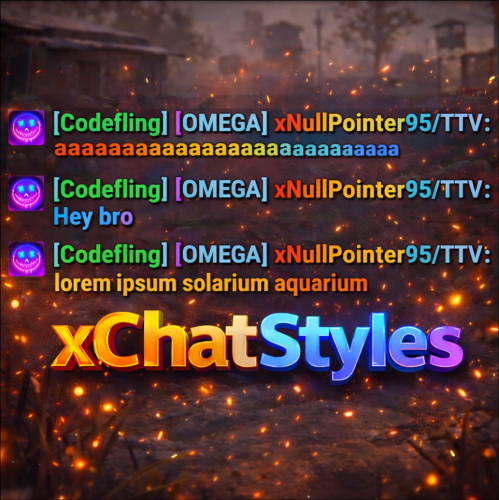
xChatStyles xChatStyles adds smooth gradient colors to player names, prefixes, and chat messages, giving your server a premium, modern look without clutter or spam. It’s clean, readable, and designed to enhance chat - not overpower it. It lets you customize how players appear in chat using animated-looking color gradients. Perfect for VIPs, staff, donators, or special roles. No flashy UI. No complicated setup. Just beautiful chat. Features Gradient Names & Messages Smooth color gradients instead of flat colors, but you can also use a solid color Player names Chat messages Prefixes (VIP, Admin, etc.) Looks great without hurting readability Styled Mentions (@PLAYERNAME) Multiple Prefix Support Players can have more than one prefix Each prefix can have its own color style Great for VIP & Donator Perks Instantly makes VIP ranks feel premium Visual reward without gameplay imbalance Easy to sell as a cosmetic perk Trade System for Prefixes (REQUIRES Economics if you want to use trade feature) Server Friendly No lag or spam Optimized to run smoothly on live servers Works quietly in the background Supports permission-based style, not just permanent chat style. xChatStyles Web Editor Plugin Preview Permissions (Custom Tab) xchatstyles.customtab - Ability to see the "Custom" Tab in /xcs xchatstyles.customprefix - Ability to see and select "Prefix" in "Custom" Tab xchatstyles.custommessagecolor - Ability to see and select "Message" in "Custom" Tab xchatstyles.customusernamecolor - Ability to see and select "Username" in "Custom" Tab Chat Commands (Player) /xcs - Opens the Ui /xcs <PLAYERNAME/STEMAID> - Opens the Ui with the view of the target player and you can remove owned styles from that user. Chat & Console Commands (Admin) /* Add chat styles without permission */ /addprefix <STEAMID> <PREFIXNAME> <#HEX> <#HEX> <#HEX>... /addmessagecolor <STEAMID> <#HEX> <#HEX> <#HEX>... /addusernamecolor <STEAMID> <#HEX> <#HEX> <#HEX>... /addall <STEAMID> <PREFIXNAME> <#HEX> <#HEX> <#HEX>... [This will add a prefix with provided color(s), message style with provided color(s) and username style with provided color(s) with just 1 command.] /* Add chat styles without permission */ /* Add chat styles WITH permission */ /addprefix <xchatstyles.PERMISSIONNAME> <PrefixName> <#HEX> <#HEX> <#HEX> ... /addall <xchatstyles.PERMISSIONNAME> <PrefixName> <#HEX> <#HEX> <#HEX> ... /addmessagecolor <xchatstyles.PERMISSIONNAME> <#HEX> <#HEX> <#HEX> ... /addusernamecolor <xchatstyles.PERMISSIONNAME> <#HEX> <#HEX> <#HEX> ... /* Add chat styles WITH permission */ ---> As long as the player has permission, they can select it with /xcs ---> Automatically removed when permission is revoked ---> Permission-Based ChatStyles has (Permission) indicator in /xcs ---> The permission must start with 'xchatstyles.*'. Example: /addall <xchatstyles.vip> VIP <#HEX> <#HEX> <#HEX> ... /*********************************************************************************************************/ /* Use 1 #HEX Color (Example: #fcba03) for a single color, use multiple #HEX Colors for a color gradient */ /* */ /* Example: /addprefix 76561198412496844 OMEGA #32a852 #71a67f */ /* */ /*********************************************************************************************************/ /removeprefix <steamid> <index|PrefixName> /removemessagecolor <steamid> <index> /removeusernamecolor <steamid> <index> Recommended Plugin for >TIMED< PERMISSION: Config { "MaxPrefixes": 3, "DefaultUsernameColor": "#55aaff", "DefaultMessageColor": "#ffffff", "DefaultSize": 15, "AllowSelectingDuplicatePrefixNames": true, "NotifyOnStyleReceived": true, "PrefixBrackets": "[]", "ShowPrefixBracketsWithSizeTag": true, "Trade": { "AllowTrading": false, "PlayerCanSellPermissionBasedPrefix": false, "UseCurrencySign": true, "CurrencySign": "$", "AnnounceNewPrefixSaleGlobally": true, "AnnouncePrefixPriceUpdateGlobally": true }, "PermissionStyles": {} }$24.99 -

Version v01
28 downloads
Includes 3 variants. Red Orange [RO] Blue Purple [BP] Grey Grey [GG] All letters have been exported as individual prefabs with sockets on all sides so they can easily be snapped together when used. Prefabs can also be broken apart and the colors altered with the replace tool within Rust Edit. For any issues please Reach out to me on Discord: potato_sheep$5.00 -
Version 1.4.16
337 downloads
SAVE 13% WHEN BUYING THE BUNDLE This is a server management plugin. It allows you to have consistency and visibility over all the information related with your server, including it's basic configuration. You may find this valuable no matter if you manage ONE or TEN servers, it works great with automation tools, docker and alike. It has four main features: Wipe schedule calculator (support weekly, biweekly and monthly) Manages server information (Title, description, tags, logo, banner, etc) Manages the basic server configuration (cvars) Manages Oxide's groups, permissions and user membership. Loading messages when a player is joining and/or waiting in queue. Timed messages (adverts) Public chat command "!wipe" that will inform: Last wipe date Next wipe date The current time in UTC Support the new Nuclear Missile Silo computer countdown Support dynamic slots (increase total slots according to connected players) 1. Wipe schedule calculator The plugin provides four "tokens" that you can use within the server's title or description to inform your users when was the last wipe and when it will be the next wipe. You can customize the date format and wipe schedule on the config file and the wipe schedule calculator will have into account the Thursday forced wipe. // You can format the date as you'd like "Date": { "Short": "dd/MM", "Long": "dd/MM/yyyy" }, "Wipe": { "DoW": 4, "Hour": 19, "Timezone": "Europe/London", "Frequency": "BiWeekly" }, 2. Manages server information This one is pretty self-explanatory, it allows you to define all the metadata about your server. "Server": { "Name": "DEVELOPMENT SERVER | %LASTWIPE%", "Description": [ "Map size is %WORLDSIZE% using seed %WORLDSEED%.", "Last wipe was at %LASTWIPE_LONG%, Next wipe is at %NEXTWIPE_LONG%", "Server has %UPTIME% seconds uptime, running at %FPS% fps with %ONLINE%/%MAXSLOTS% players online." ], "Banner image": "https://assets.example.com/banner.jpg", "Logo image": "https://assets.example.com/logo.png", "Tags": [ "weekly", "vanilla" ], "Website": "https://example.com/", "Custom map name": "kasvoton was here", "Wipe schedule": 7 }, Notice the special feature "Custom map name" which allows you to customize the map name that is displayed on the server list (Procedural Map). This shows in not only at Rust's in-game server browser, but also all on all the other sites that show off your server, i.e. Battlemetrics. WE DO NOT REQUIRE OXIDE'S SANDBOX MODE TO BE TURNED OFF AS OTHER PLUGINS DO. 3. Manages the basic server configuration (cvars) It allows you to have a clear view of what cvars are applied, very helpful if you run automation tools such as docker or github to manage server configurations. "CVars": { "fps.limit": "32", "server.tickrate": "10", "server.censorplayerlist": "true", "server.maxplayers": "8", "env.time": "12", "env.progresstime": "false" }, 4. Manages Oxide's groups, permissions and user membership. When you define a group inside the plugin's config file it means that the plugin will make sure that the group is created, that the permissions are assigned and that the listed members are part of the group. You can (and should) assign users to your groups using the oxide's tools or any other third party plugin as usual, the only difference is that the members listed on this config file will always be added back to the groups even when manually removed. "Permissions": { "Delay": 60.0, "Groups": [ { "Name": "admin", "Title": "Administrators", "Parent": "developer", "Rank": 0, "Default": false, "Permissions": [], "Members": [] }, { "Name": "default", "Title": "Default", "Parent": null, "Rank": 0, "Default": true, "Permissions": [], "Members": [ "*" ] }, { "Name": "developer", "Title": "Developer", "Parent": "administrator", "Rank": 800, "Default": false, "Permissions": [ "plugin.e", "plugin.f" ], "Members": [ "123456789123456789" ] }, { "Name": "administrator", "Title": "Administrator", "Parent": "moderator", "Rank": 80, "Default": false, "Permissions": [ "plugin.b", "plugin.c", "plugin.d" ], "Members": [ "123456789123456789", "123456789123456789" ] }, { "Name": "moderator", "Title": "Moderator", "Parent": "default", "Rank": 60, "Default": false, "Permissions": [ "plugin.a" ], "Members": [ "123456789123456789", "123456789123456789", "123456789123456789" ] } ] } Note the important config parameter "Delay", when the server starts we have no way to tell in which order the plugins will get loaded by Oxide, which means that when OxidationMetadata loads it's probable that we will not be the last one getting loaded. If we try to assign a permission to a group but the third party plugin has not yet loaded then the permission is not found and we'll get an error. The "Delay" creates a waiting period for OxidationMetadata to wait for all other plugins to load and only then it tries to assign the permissions, the value of the delay is really dependent of your own server. List of supported string format "tokens": %FPS% Average FPS value on the server %MAXSLOTS% Max number of players on the server %ONLINE% Total number of online players %UPTIME% Server uptime in seconds %WORLDSEED% Seed used to generate the world %WORLDSIZE% World size i.e. 3500 %LASTWIPE% Last wipe date formatted in short form %LASTWIPE_LONG% Last wipe date formatted in long form %NEXTWIPE% Next wipe date formatted in short form %NEXTWIPE_LONG% Next wipe date formatted in long form$4.99 -

Version 1.0.6
21 downloads
Travel Tag Pack - Make Your Server's Explorers Stand Out! Ever wondered who's the most dedicated explorer on your server? This plugin expansion for PlayerStatTags tracks how far your players travel by different means and rewards them with sweet custom chat tags. Whether they're soaring through the skies, cruising in cars, galloping on horseback, or just hoofing it across the map, Travel Tag Pack recognizes your server's most dedicated travelers! What This Plugin Does: Tracks travel distances for 8 different modes of transport (foot, swimming, vehicles, etc.) Gives top travelers eye-catching colored chat tags like [Ace], [Sailor], and [Hiker] Smart enough to ignore teleports so stats stay accurate Works with PlayerStatTags hardcore mode - die and your travel stats reset too! Won't track admins in vanish mode (they're not really there anyway, right?) Key Admin Commands: /traveltags stats [player] - Show travel stats for yourself or another player /traveltags sync - Force sync travel data with PlayerStatTags /traveltags fix - Fix any issues with travel tags not appearing Yes, Tags Are Fully Customizable! All travel tags can be freely modified just like any other tag. Change colors, text, and priorities however you want - your customizations will stick even when the plugin updates! Tags look awesome in chat and give players something extra to compete for. Who's going to be your server's ultimate Explorer? Requires PlayerStatTags plugin. Vanish plugin support included but optional.$5.00 -

Version V01
3 downloads
Includes 3 variants - Green - Black - Brown All letters have been exported as individual prefabs with sockets on all sides so they can easily be snapped together when used. Prefabs can also be broken apart and the colors altered with the replace tool within Rust Edit. For any issues please Reach out to me on Discord: potato_sheep$5.00 -

Version V01
11 downloads
Includes 3 variants - White - Black - Brown All letters have been exported as individual prefabs with sockets on all sides so they can easily be snapped together when used. Prefabs can also be broken apart and the colors altered with the replace tool within Rust Edit. For any issues please Reach out to me on Discord: potato_sheep$5.00