Search the Community
Showing results for tags 'team'.
-

Version 1.4.8
68 downloads
IQTeamLimitter is a plugin that enforces limitations on joining teams during a single wipe. Its primary goal is to prevent rule violations and restrict frequent player transitions between teams throughout a wipe cycle. What is the Mission of the Plugin? The team system ("greenery") is an essential element of the game. Exceeded the limit? You won’t be able to join or invite others to your team! If a player frequently changes teams and violates the rules, they will face several inconveniences: Turrets Won’t Work: Without a team, the player won't be able to use turrets effectively. Inactive Features: Map markers, friend highlighting, damage disable via /ff, friend teleports, and many other features from plugins interacting with the team system will be unavailable. Although it is impossible to eliminate violations completely, IQTeamLimitter minimizes the issue by creating additional inconveniences for offenders and maintaining order in the game. This plugin is not connected to other plugins; it works directly with teams in the game. Key Features: Set Limits: You can define how many times a player can change teams during a single wipe. Cooldown Between Transitions: When a player leaves a team, they will incur a penalty time before they can join a new team or invite other players! Example Usage: If a player leaves a team, they receive a restriction for 60 minutes and will only be able to join a new team after this time has elapsed. Support for Disbanding Teams: The plugin automatically disbands all teams after the end of a wipe. Logging All Actions: Complete logging of player actions is supported. All team movements, invitation attempts, and other actions are recorded in a file and can be sent to a Discord channel for convenient monitoring. Configuration : { "Limit on adding to the team during the wipe (if the limit is exhausted, the player will not be able to join teams)": 3, "Cooldown time for joining a new team or inviting players after being removed from a team or leaving it (in minutes)": 60, "Disband all teams after the wipe (true - yes/false - no)": true, "Logging settings for team actions": { "Log data to file": false, "Log data to Discord": { "Webhooks: Log all actions with teams to the Discord channel": "", "Webhooks: Name for the webhook": "[IQTeamLimitter]", "Webhooks: Avatar for the webhook (direct link)": "" } }, "Configuration of supported plugins": { "IQChat: Chat notification settings": { "IQChat: Custom prefix in chat": "<color=#1F6BA0>[IQTeamLimitter]\n</color>", "IQChat: Custom avatar in chat (if required)": "0" } } } Language File : { "INFO_ALERT": "Limit on joining and inviting to the team: <color=#738D45>{0}</color>", "INFO_ALERT_PLUS_COOLDOWN": "Limit on joining and inviting to the team: <color=#738D45>{0}</color>\nCooldown before the next joining: <color=#CD412B>{1}</color>", "ALERT_ACCEPT_KICK_PLAYER_COOLDOWN": "<color=#1F6BA0>{0}</color> kicked you from the team.\n\nRemaining available joining limits: <color=#738D45>{1}</color>\nCooldown before the next joining: <color=#CD412B>{2}</color>", "ALERT_ACCEPT_KICK_PLAYER": "<color=#1F6BA0>{0}</color> kicked you from the team.\n\nRemaining available joining limits: <color=#738D45>{1}</color>", "ALERT_ACCEPT_KICK_LEADER": "You have successfully removed a player from the team.\n\nRemaining available invitation limits: <color=#738D45>{0}</color>\nCooldown before the next invitation: <color=#CD412B>{1}</color>", "ALERT_ACCEPT_TEAM_INVITER": "The player has successfully joined your team.\n\nRemaining available invitation limits: <color=#738D45>{0}</color>\n\nNote: if you remove the player or leave the team, you will receive a temporary invitation ban and lose one limit point.", "ALERT_ACCEPT_TEAM": "You have successfully joined the team.\n\nRemaining available joining limits for another team: <color=#738D45>{0}</color>\n\nNote: if you leave the team or are removed, you will receive a temporary joining ban and lose one limit point.", "ALERT_LEAVE_TEAM": "You have left the team. You will be able to join a new one in <color=#CD412B>{0}</color>.\n\nRemaining available joining limits for another team: <color=#738D45>{1}</color>", "ALERT_COOLDOWN_TARGET_TEAM_INVITE": "Cannot invite player to the team: they cannot accept invitations for another <color=#CD412B>{0}</color>.", "ALERT_COOLDOWN_TEAM_INVITE": "You cannot invite players to the team.\n\nPlease wait another <color=#CD412B>{0}</color>.", "ALERT_LIMITED_TEAM": "Your limit for joining teams is exhausted.\n\n<color=#CD412B>You are prohibited from joining and inviting players until the next wipe.</color>", "ALERT_LIMITED_TEAM_PLAYER": "<color=#1F6BA0>{0}</color> has exhausted their limit for joining teams.\n\n<color=#CD412B>They are prohibited from joining and inviting players until the next wipe.</color>" }$9.49- 3 comments
-
- 2
-

-
- #teams
- #teamlimits
- (and 4 more)
-
Version 1.1.2
183 downloads
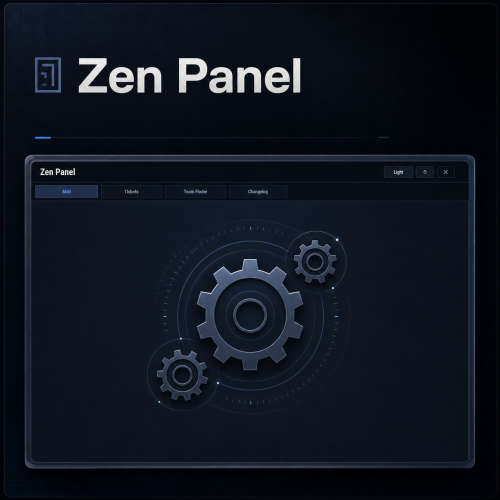
Zen Panel is my modular UI framework/API, designed to power an ecosystem of UI plugins through one shared panel and common functions. It provides the main interface, centralized theme and layout handling, notification support, image utilities, and a clean integration surface for my utility plugins like Zen Mail, Zen Tickets, Zen Team Finder, and more. This plugin servers as a dependency and has no real function on it's own. Carbon Aliases by thepitereq is required only if your server uses the Oxide modding framework (Carbon users do not need to install Carbon Aliases) Zen Panel comes with it's own configuration where you can specify which Zen plugin tabs to display and their order. You can also modify the themes to your liking and configure the timestamp if you wish to offset it (in minutes) from your server time. You can configure the position and size of the HUD notification bell using a chat command (opens a basic repositioning tool) Permissions: zenpanel.admin - Lets you use the /notif_iconpos command to resize/reposition the HUD notification bell Chat commands: /notif_iconpos - Opens and uses the HUD bell position/size editor Default Config: { "UI - Tabs In Order (omit to hide)": [ "mail", "tickets", "teamfinder", "changelog" ], "Notification Icon Image URL (HUD bell)": "https://i.ibb.co/FkBKbkVc/bell.png", "UI - Default Theme (Dark/Light)": "Dark", "UI - Dark Theme": { "Overlay": "0.03 0.04 0.06 0.78", "Window": "0.05 0.08 0.12 0.985", "Header": "0.06 0.09 0.14 1.00", "Panel": "0.07 0.10 0.16 1.00", "PanelAlt": "0.08 0.11 0.17 1.00", "Card": "0.11 0.15 0.22 1.00", "CardAlt": "0.09 0.13 0.20 1.00", "Border": "0.16 0.21 0.31 1.00", "BorderStrong": "0.26 0.34 0.48 1.00", "Text": "0.92 0.95 0.98 1.00", "TextMuted": "0.60 0.67 0.76 1.00", "Accent": "0.45 0.66 1.00 1.00", "AccentSoft": "0.18 0.25 0.39 1.00", "AccentText": "1.00 1.00 1.00 1.00", "Success": "0.29 0.77 0.48 1.00", "SuccessSoft": "0.12 0.24 0.17 1.00", "Warning": "0.92 0.72 0.33 1.00", "WarningSoft": "0.28 0.19 0.06 1.00", "Danger": "0.92 0.42 0.42 1.00", "DangerSoft": "0.28 0.11 0.11 1.00", "Offline": "0.54 0.61 0.70 1.00", "OfflineSoft": "0.16 0.19 0.25 1.00", "Input": "0.09 0.13 0.20 1.00", "AvatarFill": "0.08 0.11 0.18 1.00" }, "UI - Light Theme": { "Overlay": "0.10 0.14 0.20 0.12", "Window": "0.87 0.90 0.94 0.985", "Header": "0.84 0.88 0.93 1.00", "Panel": "0.86 0.89 0.93 1.00", "PanelAlt": "0.83 0.87 0.92 1.00", "Card": "0.92 0.94 0.97 1.00", "CardAlt": "0.89 0.92 0.96 1.00", "Border": "0.69 0.76 0.85 1.00", "BorderStrong": "0.56 0.66 0.82 1.00", "Text": "0.16 0.20 0.25 1.00", "TextMuted": "0.41 0.48 0.58 1.00", "Accent": "0.30 0.51 0.92 1.00", "AccentSoft": "0.80 0.87 0.98 1.00", "AccentText": "1.00 1.00 1.00 1.00", "Success": "0.24 0.62 0.36 1.00", "SuccessSoft": "0.83 0.93 0.86 1.00", "Warning": "0.79 0.58 0.18 1.00", "WarningSoft": "0.94 0.90 0.80 1.00", "Danger": "0.79 0.34 0.34 1.00", "DangerSoft": "0.95 0.86 0.86 1.00", "Offline": "0.55 0.62 0.70 1.00", "OfflineSoft": "0.86 0.90 0.95 1.00", "Input": "0.96 0.97 0.99 1.00", "AvatarFill": "0.86 0.90 0.96 1.00" }, "UI - HUD Anchor Min": "0.5 0.00", "UI - HUD Anchor Max": "0.5 0.00", "UI - HUD Offset Min (px)": "-326 4", "UI - HUD Offset Max (px)": "-294 36", "UI - HUD Unread Counter Font Size": 15, "UI - HUD Unread Counter Text Color": "0.98 0.99 1.00 1.00", "UI - HUD Unread Counter Shadow Color": "0.04 0.05 0.07 0.98", "Timestamp Offset (minutes)": 0, "Notification Icon UI Layer (Overlay/Hud/Hud.Menu)": "Overlay" } Sample image from plugins using Zen Panel: Notification bell layer (v1.1.0): Overlay keeps the previous behavior. Set "Notification Icon UI Layer (Overlay/Hud/Hud.Menu)" to "Hud" to show the bell below overlay menus, or "Hud.Menu" if preferred. Oxide users should also update Carbon Aliases to the latest version.Free -
Version 1.2.11
792 downloads
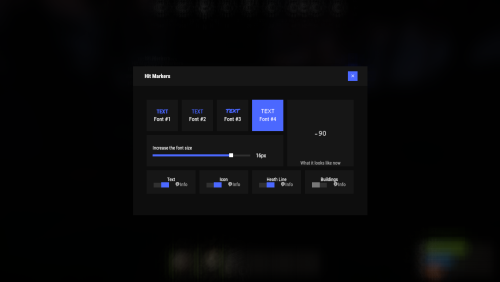
Each player picks the hit marker that suits them. Commands marker - open the UI Permissions You can set permission in config, for example: "Permission (ex: hitmarkers.use)": "hitmarkers.use", You can also set your own permission for each font and button. Config { "Commands": [ "marker", "hits" ], "Permission (ex: hitmarkers.use)": "", "Work with Notify?": true, "Fonts": { "0": { "Font": "robotocondensed-bold.ttf", "Permission (ex: hitmarkers.font)": "" }, "1": { "Font": "robotocondensed-regular.ttf", "Permission (ex: hitmarkers.font)": "" }, "2": { "Font": "permanentmarker.ttf", "Permission (ex: hitmarkers.font)": "" }, "3": { "Font": "droidsansmono.ttf", "Permission (ex: hitmarkers.font)": "" } }, "Min Font Size": 8, "Max Font Size": 18, "Buttons": [ { "Enabled": true, "Title": "Text", "Type": "Text", "Description": "<b>Damage numbers</b> will pop up in the center of the screen!", "Permission (ex: hitmarkers.text)": "hitmarkers.text" }, { "Enabled": true, "Title": "Icon", "Type": "Icon", "Description": "The familiar hit icon changes color after a <b>headshot!</b>", "Permission (ex: hitmarkers.text)": "hitmarkers.icon" }, { "Enabled": true, "Title": "Heath Line", "Type": "HealthLine", "Description": "A bar appears above the slots, showing the <b>remaining</b> health of the enemy", "Permission (ex: hitmarkers.text)": "hitmarkers.line" }, { "Enabled": true, "Title": "Buildings", "Type": "Buildings", "Description": "Displaying damage by buildings", "Permission (ex: hitmarkers.text)": "hitmarkers.buildings" } ], "Info Icon": "https://i.imgur.com/YIRjnIT.png", "Show damage to NPC": true, "Show damage to animals": false, "Marker removal time": 0.25, "Default Values": { "Font ID": 0, "Font Size": 14, "Text": true, "Icon": false, "Health Line": false, "Buildings": false } } Web Config Editor Manage the HitMarkers settings in our web config editor. You change the config in a browser form instead of editing files on the server by hand. P.S. The web config editor is open to members of the "HitMarkers" group in our Discord server. Join at https://discord.gg/mevent and ask for the group.$19.95 -
Version 1.3.6
721 downloads
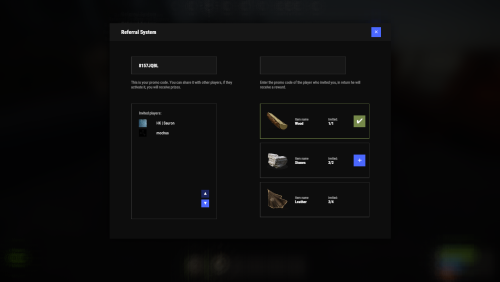
Adds a referral system to the game. Players can invite other players and receive rewards for this. Commands referal - open interface promo [promocode] - activate promo code Permissions You can set permission in config, for example: "Permission (example: referrals.use)": "referrals.use", Hooks private void OnPromoCodeActivated(BasePlayer player, string promocode) API private string GetPromoCode(BasePlayer member) private string GetPromoCode(string member) private string GetPromoCode(ulong member) Web Config Editor Manage the Referrals settings in our web config editor. You change the config in a browser form instead of editing files on the server by hand. P.S. The web config editor is open to members of the "Referrals" group in our Discord server. Join at https://discord.gg/mevent and ask for the group. Config { "Commands": [ "ref", "referal" ], "Commands to activate the promo code": [ "promo", "code" ], "Permission (example: referrals.use)": "", "Work with Notify?": true, "Use auto-wipe?": false, "Promo Code Chars": "ABCDEFGHIJKLMNOPQRSTUVWXYZ0123456789", "Promo Code Length": 8, "Awards": [ { "Invites Amount": 1, "Type": "Item", "ID": 1, "Image": "", "Title": "", "Command (%steamid%)": "", "Plugin": { "Hook": null, "Plugin name": null, "Amount": 0 }, "Display Name (empty - default)": "", "ShortName": "wood", "Skin": 0, "Amount": 20000, "Chance": 70.0 }, { "Invites Amount": 2, "Type": "Item", "ID": 2, "Image": "", "Title": "", "Command (%steamid%)": "", "Plugin": { "Hook": null, "Plugin name": null, "Amount": 0 }, "Display Name (empty - default)": "", "ShortName": "stones", "Skin": 0, "Amount": 15000, "Chance": 70.0 }, { "Invites Amount": 5, "Type": "Item", "ID": 3, "Image": "", "Title": "", "Command (%steamid%)": "", "Plugin": { "Hook": null, "Plugin name": null, "Amount": 0 }, "Display Name (empty - default)": "", "ShortName": "leather", "Skin": 0, "Amount": 2400, "Chance": 55.0 }, { "Invites Amount": 7, "Type": "Item", "ID": 4, "Image": "", "Title": "", "Command (%steamid%)": "", "Plugin": { "Hook": null, "Plugin name": null, "Amount": 0 }, "Display Name (empty - default)": "", "ShortName": "cloth", "Skin": 0, "Amount": 2300, "Chance": 55.0 }, { "Invites Amount": 10, "Type": "Item", "ID": 5, "Image": "", "Title": "", "Command (%steamid%)": "", "Plugin": { "Hook": null, "Plugin name": null, "Amount": 0 }, "Display Name (empty - default)": "", "ShortName": "lowgradefuel", "Skin": 0, "Amount": 1500, "Chance": 50.0 } ] } FAQ Item as kit$19.95 -

Version 1.2.1
106 downloads
Allows you to restrict certain commands and actions for admins, monitor their activities, and prevent admin abuse. Features Command Blocking: Prevents specified commands from being executed by certain admins. Action Blocking: Disables interactions like looting, building, or interacting with vehicles, cupboards, and more. Team Management: Manage the admins team and their permissions. Anti-Abuse: Detects abusive behavior with configurable actions such as kick or ban. Action Logging: Logs movements and interactions. Permissions adminrestrictions.limitactions - limit the admin actions. adminrestrictions.ignore - ignores a specific admin. Configuration Note: Anti-Abuse will disable damage and teleport the player back to his previous location upon detection.$19.99- 6 comments
-
- 2
-
-
- #admin
- #restrictions
- (and 14 more)
-
Version 2.0.1
76 downloads
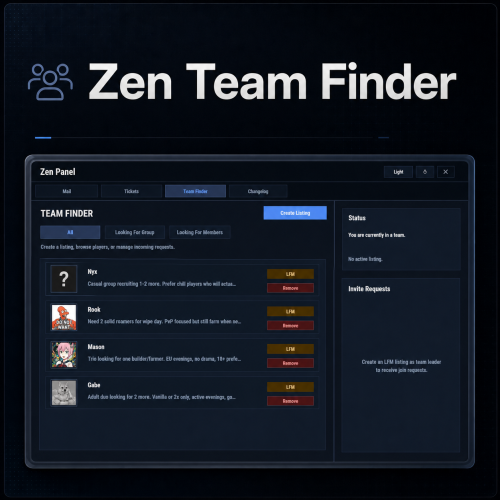
Zen Team Finder adds a clean, in-game Looking For Group / Looking For Members system to your Rust server. Players can post LFG listings when they’re solo, and team leaders can post LFM listings to recruit. Everything runs through an intuitive UI: browse listings, open player request details, invite, request to join, and manage incoming requests, all without needing repetitive lfg chat spam. Zen Team Finder run on the free dependency Zen Panel Key Features LFG + LFM Listings LFG (Looking for Group): solo players post a listing with a description. These listings are public and team leaders can easily invite players. LFM (Looking for Members): team leaders post a listing tied to their current team. Solo players can submit an invite request along with a short description. Simple UI Workflow Full UI with a main listings panel + side panel for invite request management. Filters: All / LFG / LFM Click a listing to view: Player name + avatar Listing type tag (LFG/LFM) Full description Invite & Request System LFG listings: team leaders can directly send a team invite. LFM listings: solo players can request an invite to join that team. Optional request note (short message) included with join requests. Built-In Safety Rules / Cleanups Players can’t request invites if they’re already in a team. Players can’t be invited/request if they already have a pending Rust team invite. If a player joins a team, their other pending join requests are cleaned up automatically Invalid LFM listings (disbanded teams) are auto-removed when detected. When team leader changes, the listing ownership is moved to new leader. Reminders & Notifications Audible invites reminders for: Players with pending team invites Leaders with pending join requests Configurable reminder interval. Chat message when a LFG/LFM request is posted. Editable UI customize theme via the ZenPanel config. Localization All UI content neatly arranged in the lang file, allowing for easy translation. ________________________________________________________________ Permissions zenteamfinder.admin - Required to run clear commands and remove other player's listings. Chat Commands /lfg - Opens the Party Finder. This command can be changed, and multiple commands added within the config file. /lfg.clear - Admin command to clear ALL LFG listings /lfm.clear - Admin command to clear ALL LFMlistings ________________________________________________________________ Default config is created and should meet the needs of most servers.$12.99 -
Version 1.0.4
32 downloads
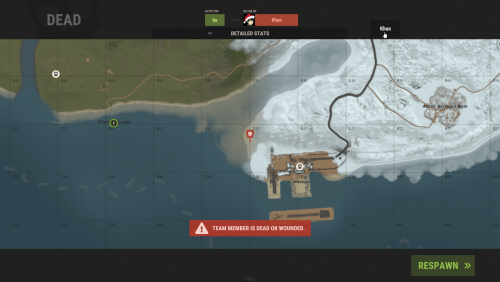
Team Spawner makes regrouping with your team fast, simple, and player-friendly. Its clean, auto-generated UI lets players quickly select teammates directly from the death screen—no manual commands or reliance on beds and sleeping bags required. Perfect for fast-paced, action-packed team PvP. Features powerful restriction controls: Monument Blocking – Prevent team spawning near key monuments. Player State Blocking – Restrict spawning when swimming, sleeping, mounted, inside elevators, or on the cargo ship. Condition Blocking – Prevent usage while raid-blocked, combat-blocked, building-blocked, or on cooldown. Whether you’re running a casual or competitive server, Team Spawner gives server owners full flexibility while providing players with a seamless team experience. You can also create various permission based cool-down restrictions inside the config and simply grant players there permission based cool-down restriction. Notes: Requires Monument Finder from umod for monument blocking to work. ( Simply add the plugin ) Permissions teamspawner.use - needed to use the plugin. config cool down permissions will look like this: teamspawner.cooldown.vip Config { "GUI Settings": { "Main Panel Default: #000000, 0f": { "A": 0.0, "Hex": "#000000" }, "Content Panel Default: #000000, 0f": { "A": 0.0, "Hex": "#000000" }, "Buttons Default: #000000, 0.4f": { "A": 0.4, "Hex": "#000000" }, "Text Default: #FFFFFF, 0.7f": { "A": 0.7, "Hex": "#FFFFFF" } }, "Block Types": { "swimming": true, "sleeping": true, "mounted": true, "monument": true, "cargo ship": true, "elevator": true, "raid blocked": true, "combat blocked": true, "building blocked": true, "cooldown blocked": true }, "Permission Based CoolDown times in seconds": { "vip": 150, "default": 300 }, "Blocked Monuments": { "airfield_1": false, "arctic_research_base_a": false, "bandit_town": false, "cave_large_hard": false, "cave_large_medium": false, "cave_large_sewers_hard": false, "cave_medium_easy": false, "cave_medium_hard": false, "cave_medium_medium": false, "cave_small_easy": false, "cave_small_hard": false, "cave_small_medium": false, "compound": false, "desert_military_base_a": false, "desert_military_base_b": false, "desert_military_base_c": false, "desert_military_base_d": false, "excavator_1": false, "ferry_terminal_1": false, "fishing_village_a": false, "fishing_village_b": false, "fishing_village_c": false, "gas_station_1": false, "harbor_1": false, "harbor_2": false, "ice_lake_1": false, "ice_lake_2": false, "ice_lake_3": false, "ice_lake_4": false, "junkyard_1": false, "launch_site_1": false, "lighthouse": false, "military_tunnel_1": false, "mining_quarry_a": false, "mining_quarry_b": false, "mining_quarry_c": false, "nuclear_missile_silo": false, "oilrig_1": false, "oilrig_2": false, "powerplant_1": false, "radtown_small_3": false, "satellite_dish": false, "sphere_tank": false, "stables_a": false, "stables_b": false, "supermarket_1": false, "swamp_a": false, "swamp_b": false, "swamp_c": false, "trainyard_1": false, "underwater_lab_a": false, "underwater_lab_b": false, "underwater_lab_c": false, "underwater_lab_d": false, "warehouse": false, "water_treatment_plant_1": false, "water_well_a": false, "water_well_b": false, "water_well_c": false, "water_well_d": false, "water_well_e": false } } Supports the ability to add more Languages using oxides multi language file system: { "Unavailable": "team member is dead or wounded.", "Sleeping": "team member is sleeping.", "Swimming": "team member is swimming.", "Mounted": "team member is mounted.", "Cargo": "team member is aboard cargo.", "Elevator": "team member is using an elevator.", "BuildingBlocked": "team member is building blocked.", "RaidBlocked": "team member is raid blocked.", "CombatBlocked": "team member is combat blocked.", "MonumentBlocked": "team member is monument blocked.", "CoolDownBlocked": "cooldown blocked: {0}" }$14.99 -

Version 1.3.8
1,366 downloads
Team HUD · Rust · Oxide Rust tells you who your teammates are, and nothing about what is happening to them BetterTeams puts a live panel on screen with every mate's health, state, held weapon and grid square. It adds a team-only voice channel that ignores distance, a map ping on one key, and automatic authorization on every cupboard, lock, turret and SAM site your team builds. Every part is a config switch, and every player decides what they use. See it What it looks like on the server How it goes From dropping the file in to the night the server dies MINUTE ONE Nothing to set up The panel is already there Drop the file in and anyone who is in a team sees their mates on screen. Where it sits, how large it is and how many rows before it starts a second column are config values. Everything else is each player's own choice. Health as a bar, not a number. It slides toward red as they lose health, and it redraws the moment their health actually changes rather than on a timer. State takes over when it matters. WOUNDED, DEAD and OFFLINE replace the bar on that row, so a mate who is down is unmistakable without reading anything. What they are holding. The active item's icon, with its skin, sits at the end of every row and follows each weapon swap. Grid square, on your own refresh rate. Five seconds by default. A player who would rather not broadcast theirs switches it off for themselves. The leader keeps a star. One glance tells you who can change the team's settings, and offline mates stay listed instead of vanishing. IN A FIGHT Nobody types grids Talk across the map, ping what you are looking at Team voice replaces the vanilla proximity channel for the players who switch it on. Distance stops mattering, nobody outside the team hears it, and a speaker icon lights up on the row of whoever is talking. bind h ftmark Voice at any range, team only. Off per player until they enable it, so nobody has their voice chat changed without asking for it. One key, no binoculars. Bind the command once and the ping lands wherever you are aiming, up to fifty metres by default. The ping knows what it hit. An enemy player, an ore node, a storage box and a dropped gun each get their own marker icon and colour. Anything else drops a plain point. On a cooldown you set. Ten seconds by default, and the time left comes back as a game tip instead of the key doing nothing. SOMEONE JOINS One shared list Authorized everywhere, in one pass The moment an invite is accepted that player is added to every cupboard, code lock, turret and SAM site the rest of the team owns, and everyone else is added to theirs. Leaving or being kicked takes all of it back in the same pass. Five places, five switches. Tool cupboards, code locks, key locks, auto turrets and SAM sites, each turned on or off for the whole server. Key locks without the key. A teammate opens a key-locked door because they are on the team, not because you handed them anything. SAM sites check who is aboard. A teammate's SAM holds fire on a helicopter with an authorized member in a seat, instead of shooting down your own minicopter. Bases that already exist are picked up on boot. Everything placed before the install is registered when the plugin loads, so this works on a server mid-wipe and not only on what gets built next. THE LEADER Decided in game The random you just invited is not automatically trusted Taking a stranger into the team is where convenience turns into risk, so the whole authorization list is editable per ally from the menu. No config file, no restart. Revoke without breaking the rest. A blocked ally loses access everywhere except the locks and cupboards they placed themselves, and the team keeps access to those. Kick from the same screen. Pick the ally, kick, and every authorization they were given through the team is pulled as they go. Friendly fire off with one toggle. Only the leader can flip it; everyone else sees it locked and is told why rather than wondering if it is broken. A team skin per item type. The leader picks it, and anything a mate picks up gets it automatically. Thirty-five item types ship in the config with their own skin lists, and both are yours to cut or extend. AFTER A CRASH Teams survive it A bad shutdown should not disband half the server Rust loses teams when a server goes down badly, and the tickets land on you. This one writes the roster and the leader to disk and puts them back on start. Rosters restored on boot. Members and leader are recreated, including the players who are offline at the time, so nobody logs in teamless. Optional leader hand-off. If the leader disconnects the next online member is promoted, and the original takes it back when they return. Off by default, because not every server wants it. A wipe clears it properly. A new wipe id drops the saved teams and skin choices rather than dragging last wipe's data onto a fresh map. While you are not looking Built to be left alone The parts you will never notice unless they are missing. ✓ ImageLibrary is the only dependency, and Clans is used if you have it ✓ A missing dependency is named in console and the plugin unloads, instead of half-running ✓ Switching a feature off unsubscribes its hooks rather than leaving them running ✓ Panel updates are batched into one message per team per tick, not one per player ✓ Grid squares only redraw for the players who actually changed square ✓ A burst of joins and kicks collapses into a single data file write ✓ Every player choice is stored by Steam ID and survives restarts and reloads ✓ Clan tags are stripped from names in the panel when the Clans plugin is loaded Reference One command in chat, one to bind Each permission is only enforced if you switch its requirement on. All four are off by default, which means the feature is simply available to everyone. Chat /bt Open the menu: info, allies, skins, settings. The command name is a config value. Console ftmark Drop a team ping where you are looking. Meant to be bound to a key. Permission betterteams.hud The on-screen panel Permission betterteams.voice Team voice chat Permission betterteams.skins Choosing the team skin. One player in the team holding it is enough for the whole team. Permission betterteams.marker Easy team markers Straight answers The questions people ask before buying Do my players have to install anything? No. It runs entirely on the server and the panel is drawn through the normal game UI. The only install is ImageLibrary, on the server, once. Does team voice take over normal voice chat? Only for a player who turns it on themselves, and it is off by default. Everyone else keeps vanilla proximity voice untouched. Can a random I invite loot everything I own? Only if you leave them authorized. The leader can revoke any of the five places for one specific ally from the menu, and they keep access to nothing but what they placed themselves. Will the panel sit on top of my other UI? Its offset from the top and left, its scale and how many rows it stacks before starting a new column are all config values, so it can be moved out of the way. What if I do not want half of these features? Panel, voice, skins, markers, friendly-fire toggle, grid positions, team restore and each of the five authorization places are separate switches. Turning one off also stops the hooks behind it. What happens if ImageLibrary is missing? It waits and retries a few times in case load order put it second, then prints the download link in server console and unloads itself rather than throwing errors on every hook. 5 authorization places covered 35 item types with team skins 50m default ping range, configurable 1 dependency, ImageLibrary$14.99 -
Version 1.0.6
34 downloads
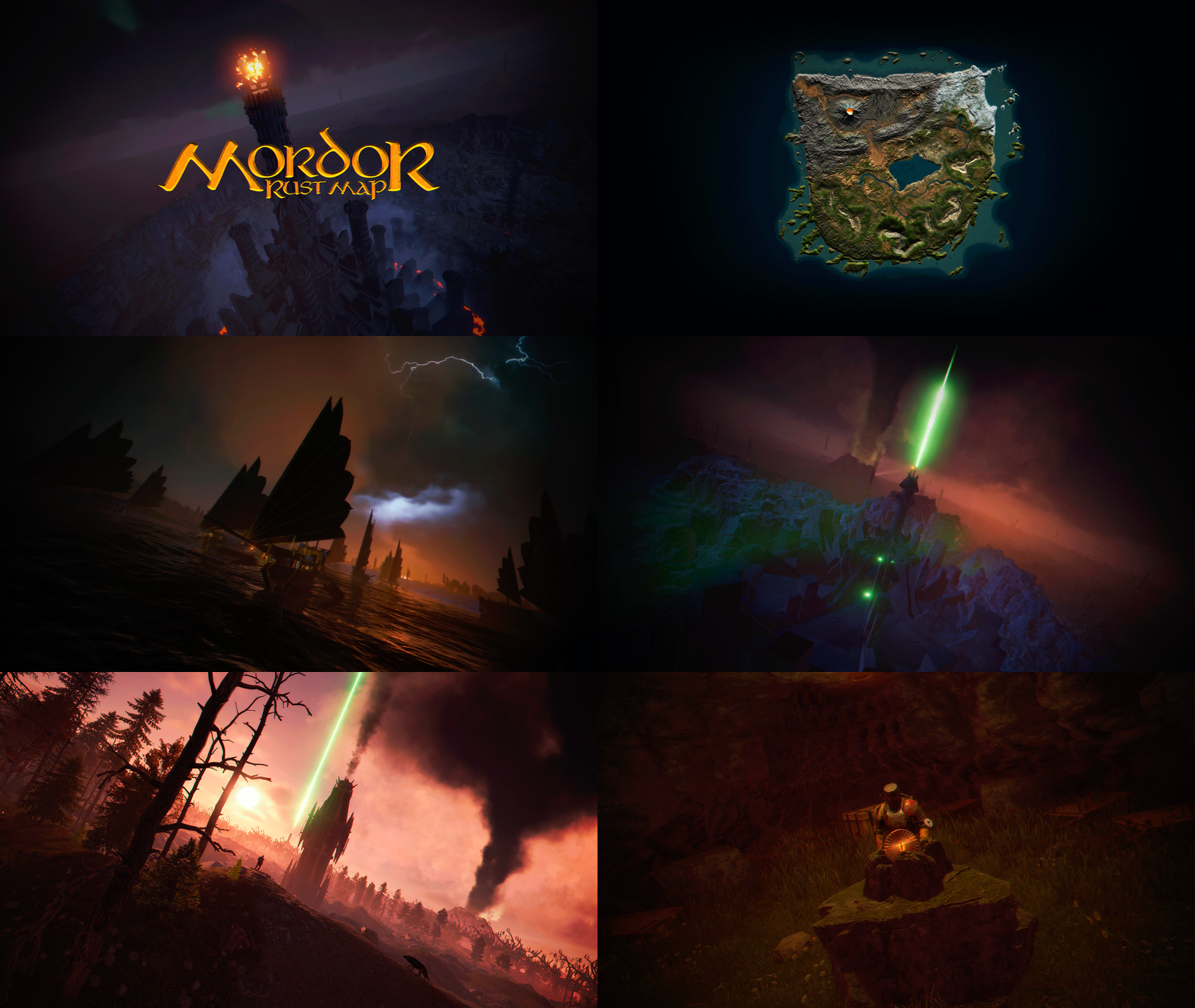
MORDOR is a medieval world designed and based on The Lord of the Rings saga. It features rocky and volcanic terrain, as well as flat areas for building. The Mordor map contains large custom-built construction zones, including a massive fortress with a vast flat area. This fortress is situated atop a cliff, which is guarded and surrounded by multiple flat construction zones for players. Two enormous flat areas have been provided for the Raidable Bases plugin; construction in these areas is blocked for players. FEATURES Size: 4000. Objects: 106378. Map protection plugin included. The map can be edited: Yes. PLAYER RESPAWN Players spawn in towers; these towers are scattered throughout the map and contain custom recyclers, workbenches, furnaces, a refinery, and a chimney. If you want players to spawn in the classic beach areas, you can edit the Mordor map using Rustedit by removing the “Spawn Point” volume. THE LOOT On the Mordor map, we’ve decided to set up the loot system a bit differently. We have created four loot tables: The first is based on all the primitive and medieval items provided by Rust. The second table contains Resources and Weapons. The third table contains Basic Blueprint Fragments. The fourth table contains Advanced Blueprint Fragments. These chests feature a wooden design, and we’ve also included the classic medicine and food chests. The Loot table files have been provided so you can edit them to suit your needs. ELECTRICITY AND PUZZLES Mordor is a map for players seeking a medieval style; there is no electricity on this map, nor does it include any puzzles involving electricity or security cards (Green Card, Blue Card, Red Card). This map contains location-based puzzles and parkour-style puzzles with traps and drops into the void. In Mordor, there are no markers for monument locations; Mordor is designed so that players explore and discover on their own places that will remind them of The Lord of the Rings saga. THE NPCS The NPC spawning system consists of two free plugins. One plugin spawns the NPCs, while the other plugin provides them with clothing, loot, and weapons. You can edit or modify the appearance or content of the NPCs to suit your needs. THE MONUMENTS Players must explore the map to find each Monument; Monuments are located both on the surface and beneath the map. List of Monuments: Towers. Dock. Black Ships. Lumberjack Huts. Orc Fortresses. Allied Fortress with a construction zone. Multiple construction zones. Orc Camps. Orc Villages. Caves. Caves with construction zones. Maze. Giant Arena Zone: This zone is designed for two events: “Death Match” and “Last Man Standing”. It is fully configured and ready for use; the Mordor map contains the configuration files for all necessary plugins. Torrech Ungol, the lair of the spider Shelob. Morgul Mines, stronghold of the Witch-King. The Black Gate. Barad-dûr, the great tower of the Eye of Sauron. Orodruin, Mount Doom, the volcano where Sauron’s Ring was destroyed. Secret locations. OFFICIAL MONUMENTS - Does not contain any Official Monuments. IMAGES FOR FLAGS • Flags of Gondor and Mordor included. TIPS • Set your server to Primitive mode. • Use a plugin to control the weather and create a spooky atmosphere with clouds, thunder, and a dark sky. • Have fun SUPPORT: https://discord.badgyver.com$49.90 -

Version 1.0.3
228 downloads
You receive more resources when you're farming close to a team member Permissions teamgatherbonus.use: Is required to get first config setting. teamgatherbonus.vip: Is required to get vip config setting. Configuration { "Distance between a team member (in feet)": 32.0, "Bonus percentage Default": 10, "Bonus percentage Vip": 50, "Enable Fish Trap": true, "Enable Fishing Pole": true, "Enable On Collectible Pickup": true, "Enable On Dispenser Gather": true } Localization Supports 10 Languages out of the box! English French Swedish Dutch Korean Catalan Simplified Chinese Portuguese Brazil German Russian$5.00 -

Version 1.1.7
519 downloads
Multi permission based entity limit system Limit number of entities per player/group/team/clan UI config setup options Auto updating player permissions Chat Commands: /limits: Opens the user interface (UI) for managing entity limits Console Commands: ael.createnew <advancedentitylimit.NAME> <optional: copy from advancedentitylimit.NAME>: Adds new permissions for entities. Optionally, you can copy permissions from an existing entity limit. Player Permissions: advancedentitylimit.ui: Allows players to seethe UI. advancedentitylimit.default: Applies the default entity limits advancedentitylimit.vip: Applies the vip entity limits You can create custom permission groups to have various limits per group. Admin Permissions: advancedentitylimit.setlimit: Grants permission to set limits for entities. advancedentitylimit.createperm: Allows the creation of new permissions for entities. advancedentitylimit.admin: Provides full access. { "Auto-fill missing entities?": true, "Chat prefix": "<color=red>[Limits]</color>: ", "A message when the player reaches the maximum limit of objects": "You have <color=red>reached</color> the limit of this object ({0})", "Use teams for sum them constructions": false, "Use clans?": false, "Clans plugin for sum player constructions (Mevent, k1lly0u)": "Mevent" } Credit to @MuB-Studios the original author of this plugin$15.99- 81 comments
- 14 reviews
-
- 5
-
-

-
- #limit
- #advanceentitylimit
- (and 21 more)
-
Version 0.1.2
279 downloads
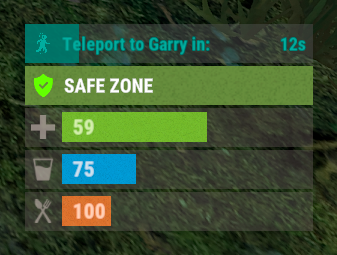
A useful plugin that displays the time until teleportation with the ability to automatically generate hooks. Depends on AdvancedStatus plugin. The ability to display status bars until teleportation; The ability to automatically generate code for teleport hooks; The ability to automatically generate language files for different languages(filled in English); The ability to customize the status bar for each teleport hook; The ability to choose between bar types(TimeCounter and TimeProgressCounter); The ability to specify the order of the bar; The ability to change the height of the bar; The abillity to customize the color and transparency of the background; The ability to set a material for the background; The ability to switch between CuiRawImageComponent and CuiImageComponent for the image; The ability to get images from the local folder(*SERVER*\oxide\data\AdvancedStatus\Images); The abillity to set own image and customize the color and transparency of the image; The abillity to set sprite instead of the image; The ability to customize the color, size, font and outline of the text. { "Is it worth generating teleport hooks? 0 - disabled, 1 - one-time activation, 2 - always enabled": 2, "List of language keys for creating language files": [ "en" ], "List of 'cancel' teleport commands": [ "tpc" ], "Limits the length of the displayed teleport name. A value of 0 disables the limitation": 10, "List of hooks for generation. Leave empty or null to recreate the default list": [ { "IsEnabled": true, "Hook method name": "OnTeleportAccepted", "Language key for the text": "BarTeleportToPlayer", "Specify the status bar Id used for this hook": "ToPlayer", "Is it worth sending the status bar for the target player?": true, "Language key for the text for the target player": "BarTeleportFromPlayer", "Specify the status bar Id used for the target player": "FromPlayer", "Specify all hook arguments(type and name) in order, separated by commas. Example: BasePlayer target, BasePlayer player, int countdown": "BasePlayer target, BasePlayer player, int countdown", "Indicates whether this hook represents a teleport cancelation event(e.g. OnTeleportInterrupted). Only InitiatorIndex is required": false, "Specify the index of the argument that contains the initiator": 1, "Specify the index of the argument that contains the target": 0, "Specify the argument index that contains the teleport countdown. Note: this index must not overlap with others, only int type is supported": 2 }, { "IsEnabled": true, "Hook method name": "OnHomeAccepted", "Language key for the text": "BarTeleportToHome", "Specify the status bar Id used for this hook": "Home", "Is it worth sending the status bar for the target player?": false, "Language key for the text for the target player": null, "Specify the status bar Id used for the target player": null, "Specify all hook arguments(type and name) in order, separated by commas. Example: BasePlayer target, BasePlayer player, int countdown": "BasePlayer player, string home, int countdown", "Indicates whether this hook represents a teleport cancelation event(e.g. OnTeleportInterrupted). Only InitiatorIndex is required": false, "Specify the index of the argument that contains the initiator": 0, "Specify the index of the argument that contains the target": 1, "Specify the argument index that contains the teleport countdown. Note: this index must not overlap with others, only int type is supported": 2 }, { "IsEnabled": true, "Hook method name": "OnHomeAccepted", "Language key for the text": "BarTeleportToHome", "Specify the status bar Id used for this hook": "Home", "Is it worth sending the status bar for the target player?": false, "Language key for the text for the target player": null, "Specify the status bar Id used for the target player": null, "Specify all hook arguments(type and name) in order, separated by commas. Example: BasePlayer target, BasePlayer player, int countdown": "BasePlayer player, string home, Vector3 pos, int countdown", "Indicates whether this hook represents a teleport cancelation event(e.g. OnTeleportInterrupted). Only InitiatorIndex is required": false, "Specify the index of the argument that contains the initiator": 0, "Specify the index of the argument that contains the target": 1, "Specify the argument index that contains the teleport countdown. Note: this index must not overlap with others, only int type is supported": 3 }, { "IsEnabled": true, "Hook method name": "OnTownAccepted", "Language key for the text": "BarTeleportToTown", "Specify the status bar Id used for this hook": "Town", "Is it worth sending the status bar for the target player?": false, "Language key for the text for the target player": null, "Specify the status bar Id used for the target player": null, "Specify all hook arguments(type and name) in order, separated by commas. Example: BasePlayer target, BasePlayer player, int countdown": "BasePlayer player, string name, int countdown", "Indicates whether this hook represents a teleport cancelation event(e.g. OnTeleportInterrupted). Only InitiatorIndex is required": false, "Specify the index of the argument that contains the initiator": 0, "Specify the index of the argument that contains the target": 1, "Specify the argument index that contains the teleport countdown. Note: this index must not overlap with others, only int type is supported": 2 }, { "IsEnabled": true, "Hook method name": "OnTeleportBackAccepted", "Language key for the text": "BarTeleportToBack", "Specify the status bar Id used for this hook": "Back", "Is it worth sending the status bar for the target player?": false, "Language key for the text for the target player": null, "Specify the status bar Id used for the target player": null, "Specify all hook arguments(type and name) in order, separated by commas. Example: BasePlayer target, BasePlayer player, int countdown": "BasePlayer player, Vector3 location, int countdown", "Indicates whether this hook represents a teleport cancelation event(e.g. OnTeleportInterrupted). Only InitiatorIndex is required": false, "Specify the index of the argument that contains the initiator": 0, "Specify the index of the argument that contains the target": 1, "Specify the argument index that contains the teleport countdown. Note: this index must not overlap with others, only int type is supported": 2 }, { "IsEnabled": true, "Hook method name": "OnWarpAccepted", "Language key for the text": "BarTeleportToWarp", "Specify the status bar Id used for this hook": "Warp", "Is it worth sending the status bar for the target player?": false, "Language key for the text for the target player": null, "Specify the status bar Id used for the target player": null, "Specify all hook arguments(type and name) in order, separated by commas. Example: BasePlayer target, BasePlayer player, int countdown": "BasePlayer player, Vector3 warpPosition, int countdown", "Indicates whether this hook represents a teleport cancelation event(e.g. OnTeleportInterrupted). Only InitiatorIndex is required": false, "Specify the index of the argument that contains the initiator": 0, "Specify the index of the argument that contains the target": 1, "Specify the argument index that contains the teleport countdown. Note: this index must not overlap with others, only int type is supported": 2 }, { "IsEnabled": true, "Hook method name": "OnTeleportInterrupted", "Language key for the text": "", "Specify the status bar Id used for this hook": "", "Is it worth sending the status bar for the target player?": false, "Language key for the text for the target player": null, "Specify the status bar Id used for the target player": null, "Specify all hook arguments(type and name) in order, separated by commas. Example: BasePlayer target, BasePlayer player, int countdown": "BasePlayer player", "Indicates whether this hook represents a teleport cancelation event(e.g. OnTeleportInterrupted). Only InitiatorIndex is required": true, "Specify the index of the argument that contains the initiator": 0, "Specify the index of the argument that contains the target": -1, "Specify the argument index that contains the teleport countdown. Note: this index must not overlap with others, only int type is supported": -1 } ], "List of status bar settings. The keys of these settings can be used for generated hooks. Leave empty or null to recreate the default list": { "ToPlayer": { "BarType(TimeProgressCounter or TimeCounter)": "TimeProgressCounter", "Order": 21, "Height": 26, "Main_Color(Hex or RGBA)": "#FFFFFF", "Main_Transparency": 0.15, "Main_Material(empty to disable)": "", "Image_Url": "https://i.imgur.com/NuAl6T5.png", "Image_Local(Leave empty to use Image_Url)": "TeleportStatus_Player", "Image_Sprite(Leave empty to use Image_Local or Image_Url)": "", "Image_IsRawImage": false, "Image_Color(Hex or RGBA)": "#15AC9D", "Image_Transparency": 1.0, "Is it worth enabling an outline for the image?": false, "Image_Outline_Color(Hex or RGBA)": "0.1 0.3 0.8 0.9", "Image_Outline_Transparency": 1.0, "Image_Outline_Distance": "0.75 0.75", "Text_Size": 12, "Text_Color(Hex or RGBA)": "#15AC9D", "Text_Font(https://umod.org/guides/rust/basic-concepts-of-gui#fonts)": "RobotoCondensed-Bold.ttf", "Text_Offset_Horizontal": 0, "Is it worth enabling an outline for the text?": false, "Text_Outline_Color(Hex or RGBA)": "#000000", "Text_Outline_Transparency": 1.0, "Text_Outline_Distance": "0.75 0.75", "SubText_Size": 12, "SubText_Color(Hex or RGBA)": "#15AC9D", "SubText_Font": "RobotoCondensed-Bold.ttf", "Is it worth enabling an outline for the sub text?": false, "SubText_Outline_Color(Hex or RGBA)": "0.5 0.6 0.7 0.5", "SubText_Outline_Transparency": 1.0, "SubText_Outline_Distance": "0.75 0.75", "Progress_Reverse": false, "Progress_Color(Hex or RGBA)": "#009688", "Progress_Transparency": 0.7, "Progress_OffsetMin": "0 0", "Progress_OffsetMax": "0 0" }, "FromPlayer": { "BarType(TimeProgressCounter or TimeCounter)": "TimeProgressCounter", "Order": 22, "Height": 26, "Main_Color(Hex or RGBA)": "#FFFFFF", "Main_Transparency": 0.15, "Main_Material(empty to disable)": "", "Image_Url": "https://i.imgur.com/G3TrHoc.png", "Image_Local(Leave empty to use Image_Url)": "TeleportStatus_FromPlayer", "Image_Sprite(Leave empty to use Image_Local or Image_Url)": "", "Image_IsRawImage": false, "Image_Color(Hex or RGBA)": "#E2DBD6", "Image_Transparency": 0.55, "Is it worth enabling an outline for the image?": false, "Image_Outline_Color(Hex or RGBA)": "0.1 0.3 0.8 0.9", "Image_Outline_Transparency": 1.0, "Image_Outline_Distance": "0.75 0.75", "Text_Size": 12, "Text_Color(Hex or RGBA)": "#15AC9D", "Text_Font(https://umod.org/guides/rust/basic-concepts-of-gui#fonts)": "RobotoCondensed-Bold.ttf", "Text_Offset_Horizontal": 2, "Is it worth enabling an outline for the text?": false, "Text_Outline_Color(Hex or RGBA)": "#000000", "Text_Outline_Transparency": 1.0, "Text_Outline_Distance": "0.75 0.75", "SubText_Size": 12, "SubText_Color(Hex or RGBA)": "#15AC9D", "SubText_Font": "RobotoCondensed-Bold.ttf", "Is it worth enabling an outline for the sub text?": false, "SubText_Outline_Color(Hex or RGBA)": "0.5 0.6 0.7 0.5", "SubText_Outline_Transparency": 1.0, "SubText_Outline_Distance": "0.75 0.75", "Progress_Reverse": false, "Progress_Color(Hex or RGBA)": "#009688", "Progress_Transparency": 0.7, "Progress_OffsetMin": "25 0", "Progress_OffsetMax": "0 0" }, "Home": { "BarType(TimeProgressCounter or TimeCounter)": "TimeProgressCounter", "Order": 23, "Height": 26, "Main_Color(Hex or RGBA)": "#FFFFFF", "Main_Transparency": 0.15, "Main_Material(empty to disable)": "", "Image_Url": "https://i.imgur.com/3xQmCKv.png", "Image_Local(Leave empty to use Image_Url)": "TeleportStatus_Home", "Image_Sprite(Leave empty to use Image_Local or Image_Url)": "", "Image_IsRawImage": false, "Image_Color(Hex or RGBA)": "#E2DBD6", "Image_Transparency": 0.55, "Is it worth enabling an outline for the image?": false, "Image_Outline_Color(Hex or RGBA)": "0.1 0.3 0.8 0.9", "Image_Outline_Transparency": 1.0, "Image_Outline_Distance": "0.75 0.75", "Text_Size": 12, "Text_Color(Hex or RGBA)": "#E2DBD6", "Text_Font(https://umod.org/guides/rust/basic-concepts-of-gui#fonts)": "RobotoCondensed-Bold.ttf", "Text_Offset_Horizontal": 2, "Is it worth enabling an outline for the text?": false, "Text_Outline_Color(Hex or RGBA)": "#000000", "Text_Outline_Transparency": 1.0, "Text_Outline_Distance": "0.75 0.75", "SubText_Size": 12, "SubText_Color(Hex or RGBA)": "#E2DBD6", "SubText_Font": "RobotoCondensed-Bold.ttf", "Is it worth enabling an outline for the sub text?": false, "SubText_Outline_Color(Hex or RGBA)": "0.5 0.6 0.7 0.5", "SubText_Outline_Transparency": 1.0, "SubText_Outline_Distance": "0.75 0.75", "Progress_Reverse": false, "Progress_Color(Hex or RGBA)": "#009688", "Progress_Transparency": 0.7, "Progress_OffsetMin": "25 2.5", "Progress_OffsetMax": "-3.5 -3.5" }, "Town": { "BarType(TimeProgressCounter or TimeCounter)": "TimeProgressCounter", "Order": 24, "Height": 26, "Main_Color(Hex or RGBA)": "#FFFFFF", "Main_Transparency": 0.15, "Main_Material(empty to disable)": "", "Image_Url": "https://i.imgur.com/FswyqvJ.png", "Image_Local(Leave empty to use Image_Url)": "TeleportStatus_Town", "Image_Sprite(Leave empty to use Image_Local or Image_Url)": "", "Image_IsRawImage": false, "Image_Color(Hex or RGBA)": "#E2DBD6", "Image_Transparency": 0.55, "Is it worth enabling an outline for the image?": false, "Image_Outline_Color(Hex or RGBA)": "0.1 0.3 0.8 0.9", "Image_Outline_Transparency": 1.0, "Image_Outline_Distance": "0.75 0.75", "Text_Size": 12, "Text_Color(Hex or RGBA)": "#E2DBD6", "Text_Font(https://umod.org/guides/rust/basic-concepts-of-gui#fonts)": "RobotoCondensed-Bold.ttf", "Text_Offset_Horizontal": 0, "Is it worth enabling an outline for the text?": false, "Text_Outline_Color(Hex or RGBA)": "#000000", "Text_Outline_Transparency": 1.0, "Text_Outline_Distance": "0.75 0.75", "SubText_Size": 12, "SubText_Color(Hex or RGBA)": "#E2DBD6", "SubText_Font": "RobotoCondensed-Bold.ttf", "Is it worth enabling an outline for the sub text?": false, "SubText_Outline_Color(Hex or RGBA)": "0.5 0.6 0.7 0.5", "SubText_Outline_Transparency": 1.0, "SubText_Outline_Distance": "0.75 0.75", "Progress_Reverse": false, "Progress_Color(Hex or RGBA)": "#009688", "Progress_Transparency": 0.7, "Progress_OffsetMin": "0 0", "Progress_OffsetMax": "0 0" }, "Back": { "BarType(TimeProgressCounter or TimeCounter)": "TimeProgressCounter", "Order": 25, "Height": 26, "Main_Color(Hex or RGBA)": "#FFFFFF", "Main_Transparency": 0.15, "Main_Material(empty to disable)": "", "Image_Url": "https://i.imgur.com/I9B2joa.png", "Image_Local(Leave empty to use Image_Url)": "TeleportStatus_Back", "Image_Sprite(Leave empty to use Image_Local or Image_Url)": "", "Image_IsRawImage": false, "Image_Color(Hex or RGBA)": "#E2DBD6", "Image_Transparency": 0.55, "Is it worth enabling an outline for the image?": false, "Image_Outline_Color(Hex or RGBA)": "0.1 0.3 0.8 0.9", "Image_Outline_Transparency": 1.0, "Image_Outline_Distance": "0.75 0.75", "Text_Size": 12, "Text_Color(Hex or RGBA)": "#E2DBD6", "Text_Font(https://umod.org/guides/rust/basic-concepts-of-gui#fonts)": "RobotoCondensed-Bold.ttf", "Text_Offset_Horizontal": 2, "Is it worth enabling an outline for the text?": false, "Text_Outline_Color(Hex or RGBA)": "#000000", "Text_Outline_Transparency": 1.0, "Text_Outline_Distance": "0.75 0.75", "SubText_Size": 12, "SubText_Color(Hex or RGBA)": "#E2DBD6", "SubText_Font": "RobotoCondensed-Bold.ttf", "Is it worth enabling an outline for the sub text?": false, "SubText_Outline_Color(Hex or RGBA)": "0.5 0.6 0.7 0.5", "SubText_Outline_Transparency": 1.0, "SubText_Outline_Distance": "0.75 0.75", "Progress_Reverse": false, "Progress_Color(Hex or RGBA)": "#009688", "Progress_Transparency": 0.7, "Progress_OffsetMin": "25 0", "Progress_OffsetMax": "0 0" }, "Warp": { "BarType(TimeProgressCounter or TimeCounter)": "TimeProgressCounter", "Order": 26, "Height": 26, "Main_Color(Hex or RGBA)": "#FFFFFF", "Main_Transparency": 0.15, "Main_Material(empty to disable)": "", "Image_Url": "https://i.imgur.com/sczcAdC.png", "Image_Local(Leave empty to use Image_Url)": "TeleportStatus_Warp", "Image_Sprite(Leave empty to use Image_Local or Image_Url)": "", "Image_IsRawImage": false, "Image_Color(Hex or RGBA)": "#E2DBD6", "Image_Transparency": 0.55, "Is it worth enabling an outline for the image?": false, "Image_Outline_Color(Hex or RGBA)": "0.1 0.3 0.8 0.9", "Image_Outline_Transparency": 1.0, "Image_Outline_Distance": "0.75 0.75", "Text_Size": 12, "Text_Color(Hex or RGBA)": "#E2DBD6", "Text_Font(https://umod.org/guides/rust/basic-concepts-of-gui#fonts)": "RobotoCondensed-Bold.ttf", "Text_Offset_Horizontal": 0, "Is it worth enabling an outline for the text?": false, "Text_Outline_Color(Hex or RGBA)": "#000000", "Text_Outline_Transparency": 1.0, "Text_Outline_Distance": "0.75 0.75", "SubText_Size": 12, "SubText_Color(Hex or RGBA)": "#E2DBD6", "SubText_Font": "RobotoCondensed-Bold.ttf", "Is it worth enabling an outline for the sub text?": false, "SubText_Outline_Color(Hex or RGBA)": "0.5 0.6 0.7 0.5", "SubText_Outline_Transparency": 1.0, "SubText_Outline_Distance": "0.75 0.75", "Progress_Reverse": false, "Progress_Color(Hex or RGBA)": "#009688", "Progress_Transparency": 0.7, "Progress_OffsetMin": "0 0", "Progress_OffsetMax": "0 0" } }, "Version": { "Major": 0, "Minor": 1, "Patch": 2 } } EN: { "BarTeleportToPlayer": "Teleport to {0} in:", "BarTeleportFromPlayer": "{0} will be at you in:", "BarTeleportToHome": "Teleport to {0} in:", "BarTeleportToTown": "Teleport to {0} in:", "BarTeleportToBack": "Teleport to {0} in:", "BarTeleportToWarp": "Teleport to {0} in:" } RU: { "BarTeleportToPlayer": "Телепорт к {0} через:", "BarTeleportFromPlayer": "{0} будет у вас через:", "BarTeleportToHome": "Телепорт в {0} через:", "BarTeleportToTown": "Телепорт в {0} через:", "BarTeleportToBack": "Телепорт в {0} через:", "BarTeleportToWarp": "Телепорт в {0} через:" }$3.99 -

Version 2.0.7
784 downloads
Admin Tools is an all-in-one plugin designed to make your job as a server owner/admin easier. This plugin has a wide range of features and commands that allow you to control your server easily, both in-game and via Discord. It also adds custom quality of life features exclusive to this plugin! ★ Inventory Viewing System - View an NPC or player's inventory in Discord and in-game ★ Multi-Server Support - Allows you to manage multiple Rust servers from a single bot ★ Custom Combatlog System - View a player's combatlog in Discord and in-game ★ Backpack Viewing System - View a player's backpack (uMod plugin) in Discord ★ Custom ID System - Get the ID of players on your server quick and easy, copy directly from chat ★ Warn System - Inform players of their wrongdoings and keep track of them (Warn Visuals: UI, Chat, Chat + Toast/Gametip) ★ Watchlist System - Lets you put suspicious players on a list for you to monitor, logs in-game and to discord ★ Server Command System - Reload/load/unload plugins and other console commands in Discord and in-game ★ F7 Report Logging System - Log F7 reports to discord with their combat log attached (if enabled) ★ and more! (Rest of features below) Please note, the Permissions UI Shown on screen towards the start of this video is FROM CARBON, NOT THE PLUGIN Please note, the Permissions UI Shown on screen towards the start of this video is FROM CARBON, NOT THE PLUGIN (Changed/Exclusive): * Timestamps for video in video's description - Make sure to up video quality if watching from this site. * Timestamps for video in video's description - Make sure to up video quality if watching from this site. ★ Permission System - Grant/revoke permissions to groups and players from Discord and in-game ★ Minecraft Creative System - While enabled, hold middle click to get the item you're looking at ★ Rename System - Rename the players who think they are funny (toggle in config) ★ Tempban System - Tempban players with no database required ★ Unique ID System - Find players even when they have the same or similar names -- Thanks to nivex ★ Kill, Wound, Revive & Respawn System - Kill, wound (down), revive and respawn players from Discord and in-game ★ Team Viewing System - View a player's team members from Discord and in-game Q: Does this plugin have a GUI or do its commands use GUI? A: No. The only UI in-game for this plugin is the warning screens. Please do not purchase this plugin thinking it has GUI for its commands, they are ALL commands entered into chat, Discord, or RCON. There are however, 'modals' for Discord, but nothing GUI based for within the game other than the warning screens displayed when '/warn'ing a user (which can be configured by the user). Q: How do I set up the bot? A: Set Up Instructions - If you miss any permissions, can always add them to the Admin Tools role in discord after you invite the bot. Q: Does this plugin link players to Rust? A: No. You can use the free plugin DiscordCore by MJSU if you would like to link your players. Q: Does this plugin log kills/PMs/F1 Spawn/chat? A: No. Admin Tools only logs the following if enabled: F7 Reports, Bans, commands from this plugin, and players who are watchlisted. You can always view a player's combatlog from discord though. You can use the free logging plugins DiscordLogger by MONoH or DiscordChat by MJSU depending on your goal. However, personally, I recommend against using logging functionality that would be occurring very frequently due to Discord's rate limiting. Though, DIscordLogger is made in a way that combines messages if possible to prevent limiting. Q: Can this log to multiple Discord servers? A: YES. All you need to put for logging to multiple servers is the channel ID you want to log to in the list of channel IDs in the config. Q: Does this plugin ONLY work with Discord Extension 3.0.0+? A: YES. You need to download the 3.0.0+ version from GitHub, it is linked at the top (and right here) as a required dependency. Any version prior to 3.0.0 will not work with this plugin, but any version 3.0.0 and later will. Q: Will this work on a shared hosting server? A: Yes, BUT you will not be able to take advantage of the threading done within the plugin. It should still work fine, but when you're on a shared host, you may only have access to a single core/thread (not positive on which) and as a result the threading I am doing in the plugin will just be ran on the main thread. As a result some of the discord functionality (ie: image generation) may affect the server as its now running on the main thread (what the server uses to run the game on) instead of a separate thread which would normally not affect the server. The image generation stuff (backpack and inventory) is normally pretty quick depending on number of items and pictures being used/sent, and can be between 100-250ms to generate on my server, however that was while no players were on. Q: How do I fix this error Response Code: Forbidden Discord Error Code: 50001 Discord Error: Missing Access ? A: All you need to fix this issue is MFA/2FA on the account used to create the bot. This issue is caused by Discord requiring your account to have either MFA or 2FA due to the bot being in a Community Discord server. After you add 2FA/MFA this error will go away. Q: Renaming isn't working, how do I fix this? A: The issue is likely that you don't have it enabled in the config, make sure to enable it in the config, its above the warning options and the discord API options. Q: My commands aren't appearing, how do I fix this? A: You can do the following in an attempt to try and force the bot to update its commands: Discord > Server Settings > Integrations > Admin Tools Bot > Toggle one of the checkboxes it shows in either Roles & Members or Channels > Save > Undo toggle > Save again. Q: Does this work with Rustcord? A: Yes, however you need this version here by MJSU as it has been updated to work with DiscordExtension 3.0.0+ versions. Q: How do I set up Multi-Server Support? A: Do as follows: Enable the bool (true/false) config option for multi-server system. Fill and keep the list of servers order the same if possible between configs (not required, but recommended). Use the /server command in discord to swap to the server you want to start listening to/sending commands to. On first use of command, it will error in all but one server console (tries to reply to a message more than once), that is expected and doesn't do that after that first command. It is used to set it up. If you want the activity information to change when swapping servers, make sure to enable that functionality in the config. Special thanks to Nivex for both creating and allowing me to use the method used to generate unique IDs for players. For support, please make a support ticket or join the Cobalt Studios Discord.$29.99 -

Version 1.0.0
95 downloads
This plugin allows team leaders to name their Rust team, automatically syncing membership (joins, kicks, leaves) and displaying the clan tag in chat via BetterChat. Settings : - Team Tag colors WuyZar's Discord : https://discord.gg/NVwRcQwGwh Video : video.mp4Free -
Version 1.1.6
908 downloads
Team Tracker is your is the best admin tool for monitoring player associations and enforce team size rules. Whether you need to ban an entire team or track players abusing the system, Team Tracker has you covered. It offers live logging, team queries, and auto-banning—all in one customizable and performant package. Dynamic identification of player teams Live discord logging Query a player team at any time Automatic custom ban system Battlemetrics integration High Performance clearplayerdata - deletes a players team data/history teamcheck - Sends a discord embed with a report of group data, warnings and current team players to discord. Note: All chat commands are universal meaning they can be used via the console, rcon(for import commands) and can be customized via the configuration. teamtracker.whitelist - Whitelists a player from being included in any team alerts (Admins and Developers are automatically whitelisted) teamtracker.admin - allows the use of the checkteam and whitelist commands Proximity - configurable distance between players Sleeping bag placement - bags given or placed within building Codelock authorization - authorized players on a codelock Turret authorization - authorized players on a turret Toolcupboard authorization - authorized players on a toolcupboard Healing - healing and reviving of other players Vehicle mounting - mounting of the same vehicle at the same time Team-members - history of team members PVP - players breaking team limits when pvping/roaming Raiding - players raiding together Looting - looting other players together Alerts: All alert types can be customized via the plugin config. Options include: Enable - this toggles any usage of the alert type to enable or disable the alert type Log to discord - Enables discord logs Warn Players - Sends an ingame warning to a player up to 30 seconds after the offense Weighting - configures how important the alert type is. This contributes to the ban by association score value. Warnings: Warnings are logged as a type of violation. This provides discord logs and the optional in game warning display to the violator. Display Warnings to Players - option to disable in game warnings Length of time to display warning - optional length of time to display warnings Warning Text - customizable warning text Bans: Team-Tracker allows for customizable automatic bans of players, who go over the group limits. Enable Bans - allows toggeling of the ban system Ban text - text to display as the reason for a player ban Log Bans to Discord - optionally log bans to discord. Logging Only Mode: Set Enable Bans & Log Bans to Discord to true and set Local Bans and Battlemetrics Bans to False Enable Ban by Max Association - enables banning a player or a team by summing all association values to create a total weighting. Example: if the team limit is 5 players and the Max Association Weighting is 10, if a player has more than 5 players with an association weighting of more than 10 this will apply a ban. Max Association Weighting - set the max association weighting per player in a group Ban Duration - length of time to ban for Ban Team - ban all team members of a banned player Ban Associations - bans all players over Max Association Weighting in relation to a banned player Local Bans - apply bans locally An API token for your battlemetrics org is required to use the battlemetrics ban features. A token can be acquired by visiting: https://www.battlemetrics.com/developers Server ID - set the BM server ID Go to https://www.battlemetrics.com/rcon, click into the select server. Check the address bar in your browser, the address will be ending with the Server Id, for example: https://www.battlemetrics.com/rcon/servers/123456 means 123456 is the Server Id. Org ID - set an organisation ID Go to https://www.battlemetrics.com/rcon/orgs, click into the org. Check the address bar in your browser, the address will be ending with the Organization Id, for example: https://www.battlemetrics.com/rcon/orgs/edit/123456 means 123456 is the Organization Id. BanList ID - adds a ban to a specific ban list Go to https://www.battlemetrics.com/rcon/ban-lists, click "View Bans". Check the address bar in your browser, the address will be ending with the Banlist Id, for example: https://www.battlemetrics.com/rcon/bans/?filter[banList]=abcdef-123456-example-banlist-example91011 means abcdef-123456-example-banlist-example91011 is the Banlist Id. Org Wide Ban - true if the ban should be applied to all servers in your organization Auto Add - true if the ban should automatically ban new identifiers after kicking a matching player. Native Enabled - true if native bans should be issued for this ban$24.99- 22 comments
- 5 reviews
-
- 4
-

-
-
- #teamalerts
- #team
- (and 28 more)
-

Version 1.0.0
513 downloads
Description: You can find a player's teammates trough discord. You can ban cheater's teammates without having to log in. It shows the team leader with a crown emoji next to his name. Usage: !team <steamid> (the prefix can be changed in server/oxide/discord.config.json) Setup Guide: Add Oxide.Ext.Discord.dll to yourserver/RustDedicated_Data/Managed https://umod.org/extensions/discord Go to https://discord.com/developers/applications and create a new application. Choose your desired picture and name for the bot. Go to the bot section and click add bot. Copy the bot token and add it to the config file. Very important! Turn on the privileged gateway intents. Go to the OAuth2 tab and click on URL Generator. Select bot from the scopes then select Send Messages and Read Messages from the permissions. Invite the bot with the link that can be found at the bottom of the page Set the channel's id in the config file where the bot can be used. Reload the plugin. If you want to try the plugin before buying or you have some questions about this plugin feel free to join my discord server. I can also help you to set everything up or add a custom feature for you. https://discord.gg/7SwN28bnycFree -

Version 1.2.20
1,484 downloads
Displays data about the players in the team: Togglable UI Show Teammates Health Show Teammates Active Item Show Teammates Square Position Show if teammate is dead/wounded Not loading players icons Check your file ImageLibrary.json, you must enter your steam api key and set "Avatars - Store player avatars": true Try reload ImageLibrary How to make the plugin work for all players Use the command - o.grant group default teaminfo.use At what angle are offsets considered Offsets are counted from the left bottom angel Permission for use: teaminfo.use Commands: /teaminfo - open/close the TeamInfo UI. Config: { "Offset from left angle": 5, "Offset from bottom": 150, "Enable visible player position": true, "Name permission": "teaminfo.use" } ✵ In this plugin will appear: The player's ability to put a label in the world Displaying the compass value of a player in a team$5.99 -
Version 1.4.4
474 downloads
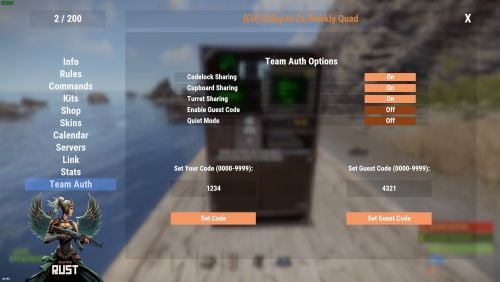
About Team Share Teamshare Allows automatic team auth on codelocks, turrets, and tool cupboards via the /share command, including guest code functionality Features toggles for every function so that the end user decides which feature is enabled or disabled. Toggle Codelock On or Off -- Enables or disables the sharing of Codelocks Toggle Cupboard On or Off -- Enables or disables the sharing of Cupboards (TC's) Toggle Turret On or Off -- Enables or disables the sharing of Turrets Enable Guest Code On or Off -- Enables or disables the automat input of guest code's Quiet Mode On or Off - Quiet mode stops all messages being posted in chat Supports WelcomeController V2 with full support for theme editor and panel support. Simply add a new addon panel and add TeamShare. Enable the setting in the config json "Using WelcomeController": true, AddonName for WelcomeController : TeamShare Animated buttons: true/false -- This turns on or off the animated buttons in the share panel Operating Mode (1 or 2) Mode 1: Auth happens only when something is placed, current team is authed on that one object (same as before). Mode 2 (backward auth): The plugin tracks every codelock, turret, and TC placed by players with teamshare.use. When someone joins the team, they are authed on all of those; when they leave or are kicked, they are removed from all of them. Permission teamshare.use teamshare.codelock teamshare.cupboard teamshare.turret teamshare.guest teamshare.blueprint Configuration { "Use Permissions": true, "Using WelcomeController": false, "Debug Mode": false, "Messages": { "NoPermission": "You don't have permission to use this command.", "InvalidCode": "Invalid code. Please enter a 4-digit numerical code.", "CodeSet": "Code set to: {0}", "GuestCodeSet": "Guest code set to: {0}", "NoCodeSet": "You have not set any code. Use the UI to set a code.", "CodeAutoLocked": "Code lock placed with code {0}.", "CodeAutoLockedWithGuest": "Code lock placed with code {0} and guest code {1}.", "CupboardAuthorized": "{0} authorized on the Tool Cupboard", "NoEscape.RaidBlocked": "Cannot set codes during raid block.", "NoEscape.CombatBlocked": "Cannot set codes during combat block.", "NoGuestCodeSet": "Please enter a guest code first.", "AuthedBackward": "Authed \"{0}\" to {1} codelocks, {2} turrets and {3} TC's", "BlueprintSharedSharer": "You shared \"{0}\" with {1} teammate(s).", "BlueprintReceivedReceiver": "{0} shared \"{1}\" with the team.", "BlueprintBulkReceived": "Team share: you received {0} blueprint(s) from {1}.", "BlueprintBulkFromYourLibrary": "Team share: {0} received {1} blueprint(s) from your library." }, "UI Settings": { "UIBackgroundColor": "0 0 0 0.6", "UIPrimaryColor": "1 0.4 0 0.5", "UIDangerButtonColor": "1 0 0 1", "UIToggleOnColor": "0.15 0.6 0.15 1", "UIToggleOffColor": "0.6 0.15 0.15 1", "Animated Buttons": true }, "Commands Settings": { "Open UI Command": "teamui", "Share Command": "share" }, "AddonName for WelcomeController": "TeamShare", "NoEscape Integration": { "Block During Raid Block": true, "Block During Combat Block": true }, "Operating Mode": 1, "Blueprint team sharing enabled": true, "Blueprint clan sharing enabled (Clans Reborn)": true, "Blueprint share from research items (study action)": true, "Blueprint share from tech tree unlocks": true, "Blueprint share blocked item short names": [], "Blueprint library resync delay seconds after learn": 3.0 }Free -

Version 1.1.2
170 downloads
Put in sale properties (house, building, etc) so that players can buy them, rented. Work with all doors that can include a lock code, Works with Economics Permissions propertybuying.manager.use - Gives access to the (creates, suprimed ) properties propertybuying.manager.admin - See all properties created and (creates , suprimed ) properties Commands /property - Accesses the property management ( added, removed ) How to add a property ? CopyPaste Decay Config Payment Time Model Lang$19.99 -
Version 0.1.9
106 downloads
GUI and sound announcements for online teammates. Announcements about teammates who have connected, disconnected, been wounded or killed while sleeping. Additionally, announcements from the team leader, in Team chat channel using "!" as a first char. { "Chat command": "teama", "Is it worth enabling GameTips for messages?": true, "Is it worth using Notify plugins for messages instead of the vanilla UI?": false, "Specify the regular message type for notify": 0, "Specify the warning message type for notify": 1, "Is it worth enabling sound announcements?": true, "Is it worth enabling leader's group announcements?": true, "Radius within which a wounded ally notification is received": 100.0, "Radius within which a sound effect is triggered when an ally is wounded": 50.0, "Sound effect triggered when an ally is wounded": "assets/bundled/prefabs/fx/player/beartrap_scream.prefab", "Notification settings for each type": { "Connected": { "Is it worth using Notify plugins for notifications?": false, "Specify the message type for notify": 0, "Language_Key": "UiConnected", "Duration": 6.0, "Main_Color": "#4F6133", "Main_Transparency": 0.8, "Main_Material": "", "Image_URL": "https://gitlab.com/IIIaKa/images/-/raw/main/TeamAnnounce/TeamAnnounce_Connected.png", "Image_Sprite": "", "Image_IsRawImage": false, "Image_Color": "#8CBA42", "Image_Transparency": 1.0, "Text_Size": 16, "Text_Color": "#8CBA42", "Text_Font": "RobotoCondensed-Bold.ttf", "Sound_Effect": "assets/prefabs/npc/scientist/sound/chatter.prefab" }, "Disconnected": { "Is it worth using Notify plugins for notifications?": false, "Specify the message type for notify": 1, "Language_Key": "UiDisconnected", "Duration": 6.0, "Main_Color": "#BF3B26", "Main_Transparency": 0.8, "Main_Material": "", "Image_URL": "https://gitlab.com/IIIaKa/images/-/raw/main/TeamAnnounce/TeamAnnounce_Connected.png", "Image_Sprite": "", "Image_IsRawImage": false, "Image_Color": "#FFD173", "Image_Transparency": 1.0, "Text_Size": 16, "Text_Color": "#FFD173", "Text_Font": "RobotoCondensed-Bold.ttf", "Sound_Effect": "assets/prefabs/npc/scientist/sound/chatter.prefab" }, "LeaderAnnounce": { "Is it worth using Notify plugins for notifications?": false, "Specify the message type for notify": 1, "Language_Key": "", "Duration": 6.0, "Main_Color": "#216699", "Main_Transparency": 0.8, "Main_Material": "", "Image_URL": "http://gitlab.com/IIIaKa/images/-/raw/main/TeamAnnounce/TeamAnnounce_LeaderAnnounce.png", "Image_Sprite": "", "Image_IsRawImage": false, "Image_Color": "#82C7F5", "Image_Transparency": 1.0, "Text_Size": 16, "Text_Color": "#82C7F5", "Text_Font": "RobotoCondensed-Bold.ttf", "Sound_Effect": "assets/prefabs/missions/effects/mission_victory.prefab" }, "WoundedDistance": { "Is it worth using Notify plugins for notifications?": false, "Specify the message type for notify": 1, "Language_Key": "UiWoundedDistance", "Duration": 6.0, "Main_Color": "#FFC21A", "Main_Transparency": 0.8, "Main_Material": "", "Image_URL": "http://gitlab.com/IIIaKa/images/-/raw/main/TeamAnnounce/TeamAnnounce_Wounded.png", "Image_Sprite": "", "Image_IsRawImage": false, "Image_Color": "#FFF54C", "Image_Transparency": 1.0, "Text_Size": 16, "Text_Color": "#FFF54C", "Text_Font": "RobotoCondensed-Bold.ttf", "Sound_Effect": "assets/prefabs/npc/scientist/sound/death.prefab" }, "WoundedGrid": { "Is it worth using Notify plugins for notifications?": false, "Specify the message type for notify": 1, "Language_Key": "UiWoundedGrid", "Duration": 6.0, "Main_Color": "#FFC21A", "Main_Transparency": 0.8, "Main_Material": "", "Image_URL": "http://gitlab.com/IIIaKa/images/-/raw/main/TeamAnnounce/TeamAnnounce_Wounded.png", "Image_Sprite": "", "Image_IsRawImage": false, "Image_Color": "#FFF54C", "Image_Transparency": 1.0, "Text_Size": 16, "Text_Color": "#FFF54C", "Text_Font": "RobotoCondensed-Bold.ttf", "Sound_Effect": "assets/prefabs/npc/scientist/sound/death.prefab" }, "DeadWhileSleeping": { "Is it worth using Notify plugins for notifications?": false, "Specify the message type for notify": 1, "Language_Key": "UiDeadWhileSleeping", "Duration": 6.0, "Main_Color": "#FFC21A", "Main_Transparency": 0.8, "Main_Material": "", "Image_URL": "http://gitlab.com/IIIaKa/images/-/raw/main/TeamAnnounce/TeamAnnounce_Dead.png", "Image_Sprite": "", "Image_IsRawImage": false, "Image_Color": "#FFF54C", "Image_Transparency": 1.0, "Text_Size": 16, "Text_Color": "#FFF54C", "Text_Font": "RobotoCondensed-Bold.ttf", "Sound_Effect": "assets/bundled/prefabs/fx/player/howl.prefab" }, "Banned": { "Is it worth using Notify plugins for notifications?": false, "Specify the message type for notify": 1, "Language_Key": "UiBanned", "Duration": 6.0, "Main_Color": "#BF3B26", "Main_Transparency": 0.8, "Main_Material": "", "Image_URL": "https://gitlab.com/IIIaKa/images/-/raw/main/TeamAnnounce/TeamAnnounce_Banned.png", "Image_Sprite": "", "Image_IsRawImage": false, "Image_Color": "#FFD173", "Image_Transparency": 1.0, "Text_Size": 16, "Text_Color": "#FFD173", "Text_Font": "RobotoCondensed-Bold.ttf", "Sound_Effect": "assets/prefabs/missions/effects/mission_failed.prefab" } }, "Version": { "Major": 0, "Minor": 1, "Patch": 9 } } EN: { "CmdAllEnabled": "All teammate notifications enabled!", "CmdAllDisabled": "All teammate notifications disabled!", "CmdSoundEnabled": "Teammate notification sounds enabled!", "CmdSoundDisabled": "Teammate notification sounds disabled!", "CmdConnectedEnabled": "Teammate connect notifications enabled!", "CmdConnectedDisabled": "Teammate connect notifications disabled!", "CmdDisconnectedEnabled": "Teammate disconnect notifications enabled!", "CmdDisconnectedDisabled": "Teammate disconnect notifications disabled!", "CmdWoundedEnabled": "Teammate wounded notifications enabled!", "CmdWoundedDisabled": "Teammate wounded notifications disabled!", "CmdDeathEnabled": "Teammate sleeping death notifications enabled!", "CmdDeathDisabled": "Teammate sleeping death notifications disabled!", "UiConnected": "Your teammate '{0}' has been connected!", "UiDisconnected": "Your teammate '{0}' has been disconnected!", "UiTeamEmpty": "There is only you in your team!", "UiNotTeamLeader": "Only the team leader can send announcements!", "UiTeamOffline": "All your teammates are offline!", "UiWoundedDistance": "Your teammate '{0}' was wounded by '{1}'!\nHe is {2} meters away from you.", "UiWoundedGrid": "Your teammate '{0}' was wounded by '{1}' at '{2}'!", "UiDeadWhileSleeping": "Your teammate '{0}' was killed by '{1}' while he was sleeping at '{2}'!", "UiBanned": "Your teammate '{0}' has been banned!\nReason: {1}.", "unknown": "Unknown", "chicken": "Chicken", "snake": "Snake", "boar": "Boar", "stag": "Stag", "horse": "Horse", "wolf": "Wolf", "panther": "Panther", "tiger": "Tiger", "bear": "Bear", "polarbear": "PolarBear", "crocodile": "Crocodile", "simpleshark": "Shark", "patrolhelicopter": "Patrol Heli", "bradleyapc": "Bradley APC", "scientistnpc_arena": "Scientist", "scientistnpc_bradley": "Bradley Scientist", "scientistnpc_bradley_heavy": "Bradley Heavy Scientist", "scientistnpc_cargo": "Cargo Scientist", "scientistnpc_cargo_turret_any": "Cargo Scientist", "scientistnpc_cargo_turret_lr300": "Cargo Scientist", "scientistnpc_ch47_gunner": "Chinook Scientist", "scientistnpc_excavator": "Excavator Scientist", "scientistnpc_full_any": "Scientist", "scientistnpc_full_lr300": "Scientist", "scientistnpc_full_mp5": "Scientist", "scientistnpc_full_pistol": "Scientist", "scientistnpc_full_shotgun": "Scientist", "scientistnpc_heavy": "Heavy Scientist", "scientistnpc_junkpile_pistol": "Road Scientist", "scientistnpc_oilrig": "Oilrig Scientist", "scientistnpc_outbreak": "Jungle Scientist", "scientistnpc_patrol": "Patrol Scientist", "scientistnpc_patrol_arctic": "Arctic Patrol Scientist", "scientistnpc_peacekeeper": "Peacekeeper Scientist", "scientistnpc_ptboat": "Marine Patrol Scientist", "scientistnpc_rhib": "Marine Patrol Scientist", "scientistnpc_roam": "Roam Scientist", "scientistnpc_roam_nvg_variant": "Roam NVG Scientist", "scientistnpc_roamtethered": "Roam Scientist", "scientist2": "Scientist", "scientist2.heavy": "Heavy Scientist", "scientist2.shotgun": "Scientist" } RU: { "CmdAllEnabled": "Все уведомления о тиммейтах включены!", "CmdAllDisabled": "Все уведомления о тиммейтах отключены!", "CmdSoundEnabled": "Звуковые уведомления о тиммейтах включены!", "CmdSoundDisabled": "Звуковые уведомления о тиммейтах отключены!", "CmdConnectedEnabled": "Уведомления о подключении тиммейтов включены!", "CmdConnectedDisabled": "Уведомления о подключении тиммейтов отключены!", "CmdDisconnectedEnabled": "Уведомления об отключении тиммейтов включены!", "CmdDisconnectedDisabled": "Уведомления об отключении тиммейтов отключены!", "CmdWoundedEnabled": "Уведомления о ранении тиммейтов включены!", "CmdWoundedDisabled": "Уведомления о ранении тиммейтов отключены!", "CmdDeathEnabled": "Уведомления о смерти спящего тиммейта включены!", "CmdDeathDisabled": "Уведомления о смерти спящего тиммейта отключены!", "UiConnected": "Ваш союзник '{0}' подключился!", "UiDisconnected": "Ваш союзник '{0}' отключился!", "UiTeamEmpty": "У вас нет союзников!", "UiNotTeamLeader": "Только лидер группы может отправлять объявления!", "UiTeamOffline": "Все ваши союзники не в сети!", "UiWoundedDistance": "Вашего союзника '{0}' серьезно ранил '{1}'!\nОн в {2} метрах от вас.", "UiWoundedGrid": "Вашего союзника '{0}' серьезно ранил '{1}' в '{2}'!", "UiDeadWhileSleeping": "Вашего союзника '{0}' убил '{1}', пока тот спал в '{2}'!", "UiBanned": "Ваш союзник '{0}' был заблокирован!\nПричина: {1}.", "unknown": "Неизвестный", "chicken": "Курица", "snake": "Змея", "boar": "Кабан", "stag": "Олень", "horse": "Лошадь", "wolf": "Волк", "panther": "Пантера", "tiger": "Тирг", "bear": "Медведь", "polarbear": "Полярный медведь", "crocodile": "Крокодил", "simpleshark": "Акула", "patrolhelicopter": "Патрульный вертолет", "bradleyapc": "Танк", "scientistnpc_arena": "Ученый", "scientistnpc_bradley": "Член экипажа танка", "scientistnpc_bradley_heavy": "Элитный член экипажа танка", "scientistnpc_cargo": "Защитник карго", "scientistnpc_cargo_turret_any": "Защитник карго", "scientistnpc_cargo_turret_lr300": "Защитник карго", "scientistnpc_ch47_gunner": "Защитник чинука", "scientistnpc_excavator": "Защитник экскаватора", "scientistnpc_full_any": "Ученый", "scientistnpc_full_lr300": "Ученый", "scientistnpc_full_mp5": "Ученый", "scientistnpc_full_pistol": "Ученый", "scientistnpc_full_shotgun": "Ученый", "scientistnpc_heavy": "Элитный ученый", "scientistnpc_junkpile_pistol": "Road Scientist", "scientistnpc_oilrig": "Защитник нефтевышки", "scientistnpc_outbreak": "Jungle Scientist", "scientistnpc_patrol": "Patrol Scientist", "scientistnpc_patrol_arctic": "Arctic Patrol Scientist", "scientistnpc_peacekeeper": "Peacekeeper Scientist", "scientistnpc_ptboat": "Marine Patrol Scientist", "scientistnpc_rhib": "Marine Patrol Scientist", "scientistnpc_roam": "Странствующий ученый", "scientistnpc_roam_nvg_variant": "Roam NVG Scientist", "scientistnpc_roamtethered": "Странствующий ученый", "scientist2": "Ученый", "scientist2.heavy": "Элитный ученый", "scientist2.shotgun": "Ученый" } con - Personal enabling/disabling connected announcement; dis - Personal enabling/disabling disconnected announcement; wound - Personal enabling/disabling wounded announcement; death - Personal enabling/disabling sleeper's death announcement; sound - Personal enabling/disabling sound effects; all - Personal enabling all announcements; clear - Personal disabling all announcements(except leader and ban announces). Example: /teama con$3.99 -

Version 4.0.0
2,446 downloads
Description The goal of this plugin to block the possibility to steal from other player planterboxes. It is ideal plugin for PVE servers to allow player to freely build anywhere without fear to lost the grown things. Only the owner (who put it down) of the planterbox have access to the grown vegetables/items, and the team members, Friends and Clan members. Permissions planterboxdefender.admin - to bypass the plugin restriction Dependencies Optional Clans (Clans or Rust:IO Clans) and Friends plugin dependency, in case of usage of them. Localization English language file generated by default, texts supported by the language files. Donation: Check my other plugins as well or if you feel you would like to support me with the Donate link on the right side.Free -

Version 4.2.10
125 downloads
A unique system of friends Here you can configure everything Turn on/Disable damage Turn on/Disable authorization in the turret Turn on/Disable authorization in the door Turn on/Disable authorization in the TC Turn on/Disable authorization in the turret Turn on/Disable authorization in SAM Beautiful interface You can disable all these settings in the interface The settings can be disabled uniquely for each friend Search for players in the interface. You can delete or add friends in the interface. Everything is very simple and convenien Setting on chat: Config { "Enable save during map save?": true, "Enable auto-authorization in single locks?": true, "Disable air defense attack on a copter without a pilot?": true, "Enable turret auto-authorization setting?": true, "Enable friendly damage setting?": true, "Enable auto authorization setting in doors?": true, "Enable auto authorization setting in air defense?": true, "Enable auto authorization setting in the TC?": true, "What is the maximum number of people you can be friends with?": 5, "Default friendly-fire setting": false, "Default turret-auth setting": true, "Default door-auth setting": true, "Default air defense setting": true, "Default TC auth": false, "Friend request response timeout (in seconds)": 10, "Enable air defense settings?": true } Lang { "SYNTAX": "/fmenu - Open friends menu\n/f(riend) add - Add friend\n/f(riend) remove - Remove friend\n/f(riend) list - Friend list\n/f(riend) team - Add all team to friends\n/f(riend) set - Set up friends individually\n/f(riend) setall - Setting up friends all at once", "NPLAYER": "Player not found!", "CANTADDME": "you cant add yourself!!", "ONFRIENDS": "The player is already your friend!", "MAXFRIENDSPLAYERS": "The player has a lot of friends!", "MAXFRIENDYOU": "You have the maximum number of friends!", "HAVEINVITE": "The player already has a friend request!", "SENDADD": "You sent a request, waiting for response!", "YOUHAVEINVITE": "You received a friend request write /f(riend) accept", "TIMELEFT": "You didn't answer the request!", "HETIMELEFT": "Your request has not been answered!", "DONTHAVE": "You have no requests!", "ADDFRIEND": "Successful addition as a friend!", "DENYADD": "Decline friend request!", "PLAYERDHAVE": "You do not have such a player in your friends!", "REMOVEFRIEND": "Successful unfriending!", "LIST": "The list is empty!", "LIST2": "Friend list", "SYNTAXSET": "/f(riend) set damage [Name] - Damage per person\n/f(riend) set door [NAME] - Damage per person\n/f(riend) set turret [NAME] - Authorization in turrets for a person\n/f(riend) set sam [NAME] - Authorization in air defense for a person", "SETOFF": "Setting disabled", "DAMAGEOFF": "Damage to player {0} disabled!", "DAMAGEON": "Damage to player {0} enabled!", "AUTHDOORON": "Authorization in the doors for {0} is enabled!", "AUTHDOOROFF": "Authorization in the doors for {0} is disabled!", "AUTHTURRETON": "Authorization in turrets for {0} is enabled!", "AUTHTURRETOFF": "Authorization in turrets for {0} is disabled!", "AUTHBUILDOFF": "Authorization in the closet for {0} is disabled!", "AUTHSAMON": "Air defense authorization for {0} enabled!", "AUTHSAMOFF": "Authorization in air defense for {0} is disabled!", "SYNTAXSETALL": "/f(riend) setall damage 0/1 - Damage on all friends\n/f(riend) setall door 0/1 - Authorization in the door for all friends\n/f(riend) setall turret 0/1 - Authorization in turrets for all friends\n/f(riend) setall sam 0/1 - Authorization in air defense for all friends", "DAMAGEOFFALL": "Damage to all friends is disabled!", "DAMAGEONALL": "Damage to all friends is enabled!", "AUTHDOORONALL": "Authorization in the door for all friends is enabled!", "AUTHDOOROFFALL": "Authorization in the door for all friends is disabled!", "AUTHBUILDONALL": "Locker authorization for all friends is enabled!", "AUTHBUILDOFFALL": "Authorization in the closet for all friends is disabled!", "AUTHTURRETONALL": "Authorization in the turrets for all friends is enabled!", "AUTHTURRETOFFALL": "Authorization in the turrets for all friends is disabled!", "AUTHSAMONALL": "Air defense authorization for all friends is enabled!", "AUTHSAMOFFALL": "Air defense authorization for all friends is disabled!", "SENDINVITETEAM": "Invitation sent: ", "SENDINVITE": "You received an invitation to the team from", "DAMAGE": "Can't attack {0} it's your friend!", "SYSTEMFRIENDS": "SYSTEM FRIENDS", "SENDACCEPTFRIENDS": "FRIEND REQUEST FROM {0}", "UIREMOVEFRIEND": "Remove from friends", "UISETTINGS": "SETTING", "UIDAMAGE": "Damage to players", "UIDOOR": "Access to door", "UIBUILD": "Access to cupboard", "UITURRET": "Access to turret", "UISAM": "Access to SAM", "FRIENDINFO": "Information about", "LISTFRIEND": "Friend list", "NOTFOUNS": "Not in base", "NOFRIEND": "No friends", "UIFIND": "Search", "UIINFOPLAYER": "WRITE NAME/STEAMID" }$19.99 -

Version 1.0.8
174 downloads
Team Marker plugin adds the ability to use the new ping system without having to use binoculars. Mark enemy's with the ping and have it be displayed to all your teammates! Just aim and click the USE key (default E) and the ping is sent. This plugin comes very configurable to allow the server owner to adjust how the pings should work. Console command: tping Config { "Setting pings": { "Color index(0-yellow,1-blue,2-green,3-red,4-purple,5-cyan)": 3, "Icon type(Hostile = 0,GoTo = 1,Dollar = 2,Loot = 3,Node = 4,Gun = 5)": 0, "Max distance ping": 250.0 }, "Setting sound": { "Enabled?": true, "Effect/sound prefab": "assets/bundled/prefabs/fx/invite_notice.prefab", "Send sound teammates?": true, "Only nearby teammates?": true, "Max distance": 150.0 } }$9.99 -
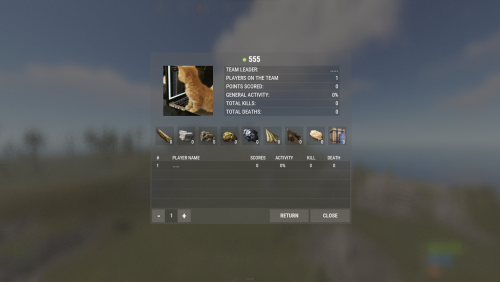
Version 1.4.1
46 downloads
FClan is a clan system with multiple functions Features Automatic authorization in cabinets, locks, turrets, pvo Support in-game friend system GameStores rewards are available Top clans Config : { "Main plugin command": [ "clan", "clans" ], "Use the clan tag in the player's name": true, "Create greens automatically ?": true, "Prohibit the creation of a green without a clan ?": true, "Change the builder to clan leader ?": true, "Customizing prizes for wipe": { "Use the issuance of awards ?": true, "Share the prize for the whole team or give the prize from the configuration ? (true - share prize | false - static prize)": false, "Store ID in the service": "", "Server ID in the service": "", "Secret key (do not distribute it)": "", "Minimum number of points to receive an award": 1000, "Minimum number of points to receive an award (Player's)": 100, "Place in the top and the balance given to the player": { "1": 350, "2": 200, "3": 150 } }, "Limit settings": { "Clan membership limit": 8, "Moderator limit": 2, "Maximum quantity for billing rate ( Resource - maximum quantity )": { "wood": 1000000, "stones": 1000000, "metal.ore": 1000000, "sulfur.ore": 1000000, "hq.metal.ore": 250000, "cloth": 100000, "leather": 100000, "fat.animal": 100000, "loot-barrel": 100000 } }, "Points Settings. [ShortName] - Number of points": { "wood": 2, "stones": 5, "metal.ore": 5, "hq.metal.ore": 5, "sulfur.ore": 5, "loot-barrel": 2, "PatrolHelicopter": 1500, "BradleyAPC": 750, "Death": 50, "Suicide": 50, "Kill": 50, "WallTier2": 3, "WallTier3": 5, "WallTier4": 7 }, "Clan tag settings": { "Banned clan tags": [ "Admin", "Aдмины" ], "Minimum number of characters of the clan tag": 2, "Maximum number of characters of a clan tag": 6 }, "Version": { "Major": 1, "Minor": 1, "Patch": 9 } }$30.00 -
Version 1.5.4
205 downloads
TL;DR: This plugin restores lost player teams after a server crash. In some cases, after an unsuccessful shutdown or a server crash, all player teams get disbanded and no one knows why. Facepunch knows about this issue for years but since it happens rarely and sporadically, it seems that they can't fix it. This leads to many annoying problems like - players can't open doors with locks that were placed by their (former) team mates and therefore will be trapped in the base until suicide (ingame) - players are beeing attacked by their "own" turrets and traps - players can't access the tool cupboard and chests since the building priviledge of the former team owner is not shared anymore. How does it work? This plugin is simple, has just four optional chat/console commands, one permissions and a very short configuration. It just saves all Rust teams to a data file on the following events/hooks: - OnServerSave - OnTeamCreated (removed, unnecessary) - OnTeamLeave (removed, unnecessary) - OnTeamAcceptInvite (removed, unnecessary) - OnTeamDisbanded (removed, unnecessary) - OnTeamKick (removed, unnecessary) - OnTeamPromote (removed, unnecessary) - OnServerShutdown - Unload Only this last two hooks tell the plugin that the shutdown was sucessful and planned by setting a flag. If the server (re)starts and this flag is NOT set, it knows that the server crashed or the process was killed. In this case the plugin restores all teams and you are good to go. Permissions: DisbandedTeamRestore.admin Player can list, disband and restore all teams Commands: /dtr.saveteams Saves the currently existing teams to the data file /dtr.restoreteams Disbands all currently existing teams and restores the teams from the data file /dtr.disbandteams Disbands all currently existing teams /dtr.listteams Lists all teams with ID, leader and members. Outputs to chat, if ran by a player via ingame chat, or to server console if run from - you guessed it - the server console. Config file: "Keep all backups, not only the last" set to "true" will create a backup data file for the teams on every call of the above mention events/hooks, instead of just one backup file. Don't worry, each file is only a few bytes in size, they won't bloat your hard drive. Debugging/Troubleshooting: By setting the variable "debug" to "true" (in the plugin file, not in the config file!) you can enable verbose logging into the server console. Roadmap: - Make it work with "Automatic authorization". Done. After the teams are restored, the players are automatically authorized on TCs, turrets and doors/locks if the plugin "Automatic authorization" is used - Add a config option to force restore all teams on server start (even if the server did not crash) Done - ... Feel free to DM me your suggestions!$4.99