Search the Community
Showing results for tags 'hit'.
Found 3 results
-
Version 1.0.1
213 downloads
nanoMarker - customizable hit markers for your players. Includes 3 customizable hit marker types, with options to adjust their size, color, and additional features. Works with nanoModalMenu, but can also be used WITHOUT it! Plugin and image installation guide: When you download the plugin, you will receive an archive with the following structure: oxide ├── plugins │ └── nanoMarker.cs // Main plugin file │ └── data └── nanoSystemModule └── nanoMarker └── Images ├── Markers │ └── *.png // Marker images for the "Icon" type └── *.png // Menu images and icons Make sure to upload the icons to the corresponding paths shown in the archive Important: Extract the archive on your computer first, and only then upload the images to your server! Features: Color theme support: *choosing a color theme is only available when both nanoModalMenu and nanoSettingModule are installed. Otherwise, only the Light theme will be available by default. White Included with Plugin Dark View Theme Purple View Theme Blue View Theme Three marker types: Icon Marker - displays an icon selected by the player from the available options. Health Indicator - displays a progress bar showing the target's health. Damage Text Indicator - displays the damage dealt to the target as text. Marker sizes: Players can choose the marker size from three available options: Small, Medium, and Large. Target filtering: Players can choose which targets trigger their markers: Players, NPCs, Animals, and Vehicles. Each target type can be enabled or disabled separately. Color: Players can choose the color of their marker from the available color options. Additional settings: Each marker type supports extra settings to enhance its functionality: - Icon Marker - can also display damage text and a player knockdown indicator. - Health Indicator - can also display damage text and a player knockdown indicator. - Damage Text Indicator - supports a player knockdown indicator. UI Demonstration in the Light Theme : Configuration : { "Header menu settings": { "Multilingual translation for the menu title": { "ru": "ХИТ-МАРКЕР", "en": "HIT-MARKER" }, "Multilingual translation for the menu description": { "ru": "Настрой хит-маркер под себя\nДетальная настройка для индикации", "en": "Customize your hit marker\nFine-tune the indicator settings" }, "List of items for menu decoration [Shortname] (no more than 9 items)": [ "weapon.mod.small.scope", "rifle.ak", "weapon.mod.holosight", "lmg.m249", "weapon.mod.lasersight", "smg.thompson", "weapon.mod.8x.scope", "compass", "flare" ] }, "Marker settings": { "Marker color list [UniqueKey] = Color": { "coral": "0.914 0.525 0.455 1", "red": "1 0.349 0.361 1", "fuchsia": "0.886 0.271 0.733 1", "mustard": "0.792 0.737 0.314 1", "mint_green": "0.4 0.729 0.525 1", "muted_red": "0.729 0.4 0.4 1", "white": "1 1 1 0.5" }, "List of marker icons available for selection from data/nanoMarker/Images/Markers [Without .png]": [ "HIT_VERTICAL", "HIT_TRIAD", "HIT_RING", "HIT_HORIZONTAL", "HIT_FRAME", "HIT_CROSS", "HIT_MULTI", "HIT_MULTI_LINE" ] }, "Default settings for all players": { "Color key": "white", "Marker size: 0 - Small, 1 - Medium, 2 - Large": 1, "Marker type: 0 - Health indicator, 1 - Text indicator, 2 - Icon indicator": 1, "Marker icon image name from data/nanoMarker/Images/Markers [Without .png]": "HIT_HORIZONTAL", "Display dealt damage [true - enabled/false - disabled]": false, "Display when a player is downed (wounded) [true - enabled/false - disabled]": false } }$14.99 -
Version 1.2.11
792 downloads
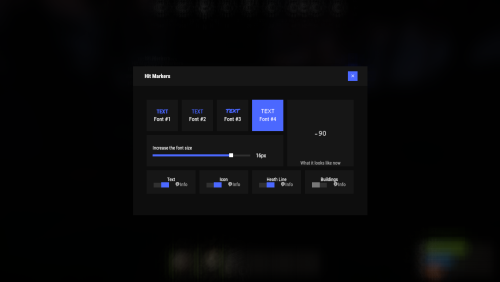
Each player picks the hit marker that suits them. Commands marker - open the UI Permissions You can set permission in config, for example: "Permission (ex: hitmarkers.use)": "hitmarkers.use", You can also set your own permission for each font and button. Config { "Commands": [ "marker", "hits" ], "Permission (ex: hitmarkers.use)": "", "Work with Notify?": true, "Fonts": { "0": { "Font": "robotocondensed-bold.ttf", "Permission (ex: hitmarkers.font)": "" }, "1": { "Font": "robotocondensed-regular.ttf", "Permission (ex: hitmarkers.font)": "" }, "2": { "Font": "permanentmarker.ttf", "Permission (ex: hitmarkers.font)": "" }, "3": { "Font": "droidsansmono.ttf", "Permission (ex: hitmarkers.font)": "" } }, "Min Font Size": 8, "Max Font Size": 18, "Buttons": [ { "Enabled": true, "Title": "Text", "Type": "Text", "Description": "<b>Damage numbers</b> will pop up in the center of the screen!", "Permission (ex: hitmarkers.text)": "hitmarkers.text" }, { "Enabled": true, "Title": "Icon", "Type": "Icon", "Description": "The familiar hit icon changes color after a <b>headshot!</b>", "Permission (ex: hitmarkers.text)": "hitmarkers.icon" }, { "Enabled": true, "Title": "Heath Line", "Type": "HealthLine", "Description": "A bar appears above the slots, showing the <b>remaining</b> health of the enemy", "Permission (ex: hitmarkers.text)": "hitmarkers.line" }, { "Enabled": true, "Title": "Buildings", "Type": "Buildings", "Description": "Displaying damage by buildings", "Permission (ex: hitmarkers.text)": "hitmarkers.buildings" } ], "Info Icon": "https://i.imgur.com/YIRjnIT.png", "Show damage to NPC": true, "Show damage to animals": false, "Marker removal time": 0.25, "Default Values": { "Font ID": 0, "Font Size": 14, "Text": true, "Icon": false, "Health Line": false, "Buildings": false } } Web Config Editor Manage the HitMarkers settings in our web config editor. You change the config in a browser form instead of editing files on the server by hand. P.S. The web config editor is open to members of the "HitMarkers" group in our Discord server. Join at https://discord.gg/mevent and ask for the group.$19.95 -

Version 0.0.5
46 downloads
FloatingHits – World-Space Hit Indicators. Now hits will be displayed in 3D space, rather than just on the screen. Configuration: { "Default hit": "<b> <size=25> <color=yellow> %DAMAGE% </color> </size> </b>", "Headshot": "<b> <size=25> <color=red> %DAMAGE% </color> </size> </b>", "Wounded": "<b> <size=25> <color=red> Fell! </color> </size> </b>", "Dead": "<b> <size=30> <color=red> Dead! </color> </size> </b>", "Maximum distance for drawing a hit (0 = endless)": 100, "Show hit if hitted npc": true, "Show hit if hitted animal": false }$5.00