
Quick answer: A Python 2D list is a list of row lists. Create independent rows with a list comprehension, such as [[0] * columns for _ in range(rows)]; avoid [[0] * columns] * rows because every row then refers to the same list.
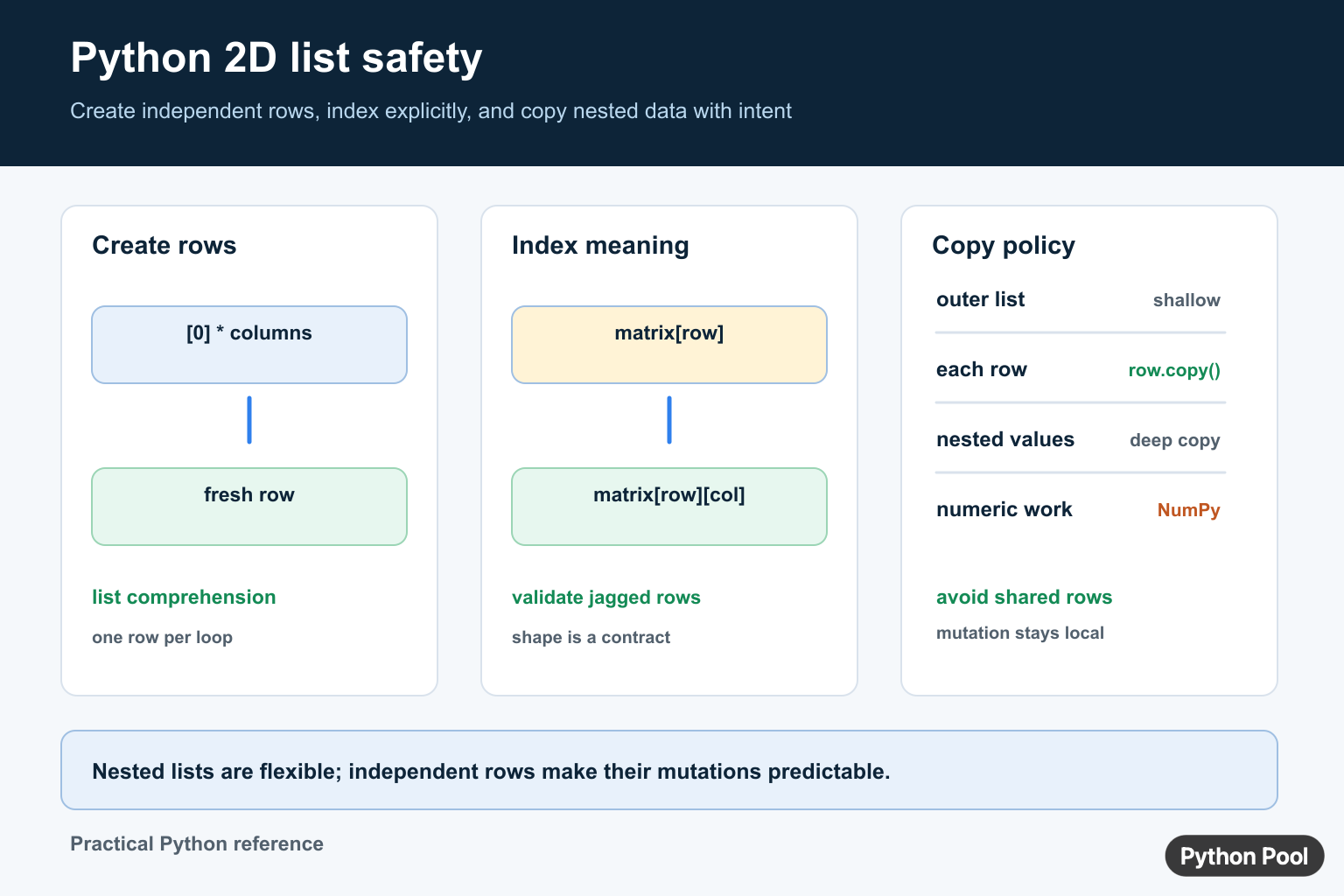
A two-dimensional list is a convenient built-in representation for a small table, grid, board, or matrix-like value. The first index selects a row and the second selects a value inside that row. Python lists are mutable, so updating a cell changes the structure in place.
The official Python data structures tutorial explains list operations. A 2D list is not a special array type; it is a nested collection, and rows may even have different lengths unless your program enforces a rectangular shape.
Create A 2D List Safely
rows = 3
columns = 4
grid = [[0] * columns for _ in range(rows)]

grid[1][2] = 7
print(grid)
The comprehension creates a fresh row for every iteration. This is the important part when each row will be mutated independently.
Avoid Shared Rows
bad_grid = [[0] * 4] * 3
bad_grid[0][0] = 9
print(bad_grid)
All rows in bad_grid refer to the same inner list, so changing one row changes all three. Check identity with bad_grid[0] is bad_grid[1]. The safe comprehension makes that expression false.
Access Rows, Columns, And Cells
Use two indexes for a cell. Use one index for a complete row.
matrix = [
    [10, 20, 30],
    [40, 50, 60],
]

print(matrix[0])
print(matrix[1][2])

column = [row[1] for row in matrix]
print(column)
Python has no built-in column operation for a nested list. A comprehension is clear when every row has the expected length. For a jagged list, validate the row before indexing or use a default policy.
Loop Through A 2D List
for row_number, row in enumerate(matrix):
    for column_number, value in enumerate(row):
        print(row_number, column_number, value)
When you need to update cells, use indexes or build a new list. Avoid changing the list structure while iterating over the same list unless the behavior is carefully defined.
Copy A 2D List Without Shared Rows
A shallow copy of the outer list still shares the row lists.
original = [[1, 2], [3, 4]]
outer_only = original.copy()
outer_only[0][0] = 99
print(original[0][0])
For a simple rectangular list, copy every row:
independent = [row.copy() for row in original]
independent[0][0] = 10
print(original)
For nested values or more complicated structures, review the copy module documentation and choose shallow or deep copying intentionally.
Flatten Or Transpose
matrix = [[1, 2], [3, 4], [5, 6]]

flat = [value for row in matrix for value in row]
transpose = [list(column) for column in zip(*matrix)]

print(flat)
print(transpose)
zip(*matrix) assumes rows can be aligned. By default, zip() stops at the shortest row, so validate rectangular input when dropping values would be a bug.
When To Use NumPy
Use a nested list for small, irregular, or dependency-free data. Use NumPy when you need numerical operations, broadcasting, matrix multiplication, slicing, or large homogeneous arrays. See NumPy reshape and NumPy dot products for array-oriented operations.
Do not call a Python 2D list a matrix without describing its shape and element contract. Clear invariants make indexing and validation much easier.
Create An Empty 2D List
When the number of rows will grow over time, start with an empty outer list and append a new row for each record.
table = []
table.append(["Ada", 36])
table.append(["Grace", 28])

for name, age in table:
    print(name, age)
Appending complete rows makes the shape contract visible. If rows are expected to have the same fields, validate their length or use dictionaries with named keys instead.
Sort Rows By A Column
rows = [["Ada", 91], ["Grace", 84], ["Linus", 97]]
ordered = sorted(rows, key=lambda row: row[1], reverse=True)
print(ordered)
sorted() returns a new outer list and does not reorder the original. Use rows.sort() when mutating the existing list is intended. Make sure the selected column contains comparable values and that every row is long enough.
Validate A Rectangular Shape
def shape_of(rows):
    width = len(rows[0]) if rows else 0
    if any(len(row) != width for row in rows):
        raise ValueError("expected rows with equal lengths")
    return len(rows), width

print(shape_of([[1, 2], [3, 4]]))
Shape validation is useful before transposing, exporting CSV, or converting to an array. Empty data needs a policy because it has no row from which to infer a width.
Choose A Data Structure
A nested list is appropriate when position is the main meaning and the data is small. A list of dictionaries is often clearer for records with named fields. NumPy is better for dense numerical operations. A database or table library is better when the data must be filtered, joined, persisted, or indexed at scale.
Rows do not have to be equal length in Python, which is useful for triangular data but dangerous when code assumes a rectangle. Decide whether empty rows, missing columns, and extra values are valid before writing indexing logic. Validation at the boundary is usually easier to maintain than repeated defensive checks throughout the program.
When a 2D list comes from user input, parse each row into the intended type before storing it. Keeping numeric strings mixed with integers can make sorting and arithmetic fail later. A small conversion function can report the row and column that caused an invalid value.
For serialization, choose a format that preserves the shape contract. CSV is naturally row-oriented and may require quoting; JSON preserves nested lists but does not enforce equal row lengths. The data structure and the file format should agree about what a row means.
That contract should also state whether rows are mutable, whether values may be missing, and whether an empty grid is valid.
Small grids are often easiest to inspect by printing one row per line rather than printing the whole nested object. For debugging, include the row index and length so a jagged row is immediately visible.
It also makes malformed input easier to reject before indexing.
Fail early and keep the error close to the input boundary. Always, now.
Frequently Asked Questions
How do I create a 2D list in Python?
Use [[0] * columns for _ in range(rows)] so each row is a separate list that can be mutated independently.
Why is [[0] * columns] * rows unsafe?
It repeats references to one inner list, so changing one row changes every row that shares that reference.
How do I access a value in a Python 2D list?
Use matrix[row][column], with both indexes zero-based, and validate row lengths when the list may be jagged.
When should I use NumPy instead of a 2D list?
Use NumPy for large homogeneous numerical arrays, matrix operations, broadcasting, and vectorized calculations; use nested lists for small or irregular dependency-free data.
