
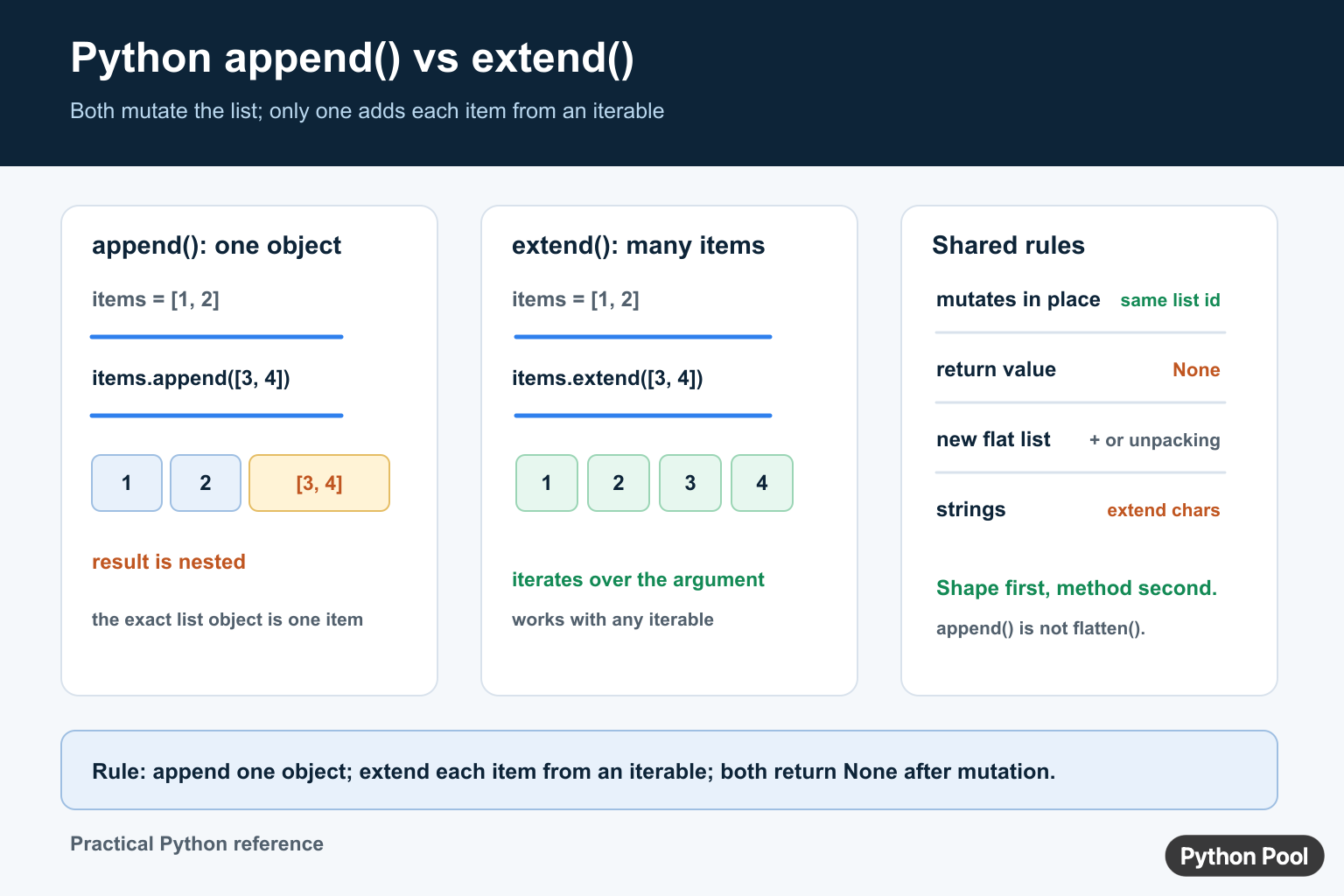
Python append() and extend() both modify a list in place, but they add data with different shapes. append(value) adds one object as one new element. extend(iterable) visits the iterable and adds each item to the list. Both methods return None, so they should be called as statements rather than assigned as if they created a new list.
Quick answer
Use append() when the argument should remain one element, including when that element is another list. Use extend() when each item from an iterable belongs in the target list. The Python data-structures tutorial documents both methods in its list operations section.
Use append() to add one object
append() takes one argument and stores that exact object at the end of the list. An integer adds one integer, and a list adds one nested list.
items = [1, 2]
items.append(3)

print(items)
The list object is mutated directly. Any other name that refers to the same list sees the new item. This is useful when the list represents a sequence that is intentionally built over time.
Appending a list creates nesting
Python does not flatten the argument passed to append(). This behavior is correct when a row, group, or child collection should remain one object.
items = [1, 2]
items.append([3, 4])

print(items)
print(items[-1][0])
The result is [1, 2, [3, 4]]. If the desired result is [1, 2, 3, 4], use extend() or create a new list with concatenation or unpacking.
Use extend() to add iterable items
extend() iterates over its argument and appends each value. It accepts lists, tuples, sets, generators, and other iterables.
items = [1, 2]
items.extend([3, 4])

print(items)
The target becomes flat relative to the supplied iterable, but “flat” does not mean recursive flattening. If the iterable contains nested lists, those nested lists are still individual items.
Strings are iterable too
Because strings are iterable, extending a list with a string adds one character at a time. That may be surprising if the intention was to add the complete string as one value.
letters = []
letters.extend("py")

word = []
word.append("py")
print(letters)
print(word)
Use append() for a complete string or wrap the string in a one-item iterable when extend() is required by a generic path.
Both methods return None
In-place list methods communicate mutation by returning None. The common mistake is writing items = items.extend(values), which replaces the list reference with None.
items = [1]
result = items.extend([2, 3])

print(items)
print(result)
Call the method on its own line. If a function should return a new list, use items + values or unpack both iterables into a new list.
Choose a new-list operation when ownership matters
Concatenation and unpacking leave the original outer lists unchanged, which is useful when callers share them or when a transformation should be side-effect-free.
left = [1, 2]
right = [3, 4]

combined = left + right
unpacked = [*left, *right]
print(combined, unpacked)
These are shallow operations: nested objects are still shared. Copy nested structures separately when the data contract requires independent ownership.
Performance and readability
Repeated extend() calls are appropriate when data arrives in batches. For a known collection of inputs, a single comprehension or concatenation may make the transformation easier to read. Choose the operation that communicates whether mutation, order, and nested shape are intentional.
For related list operations, see combining lists, list index boundaries, and loop control with break.
Preserve aliases deliberately
Because both methods mutate the target, a second reference to the same list observes the change. That is useful for a shared accumulator, but it can surprise code that expects a function to return a separate collection. Decide whether the function owns the list or whether it is borrowing a caller-owned object.
items = [1, 2]
alias = items
items.extend([3, 4])

print(alias)
print(alias is items)
If mutation is not part of the contract, return items + additions or [*items, *additions]. A shallow new list protects the outer container, but nested records remain shared.
Use generators for streaming batches
extend() accepts a generator and consumes it once. This lets a producer create values lazily, but errors can occur partway through the mutation. If a batch must be all-or-nothing, materialize and validate it first, then extend the target.
def positive_values(values):
    for value in values:
        if value < 0:
            raise ValueError("negative value")
        yield value

items = []
items.extend(positive_values([1, 2, 3]))
print(items)
Keep ordering explicit. extend() preserves the order produced by its iterable, while a set or other unordered source may not provide the stable sequence a user interface or test expects.
Do not confuse extension with flattening
Extending one level is not a recursive flattening algorithm. If an iterable contains rows, dictionaries, or nested collections, those objects remain items in the resulting list. Use a dedicated flattening rule when nested shape must change, and define how strings and mappings should be handled.
Test the resulting shape
Good tests assert the list contents, whether the original list changed, the return value, and the behavior for an empty iterable. Include a string and a nested list because they reveal whether the code intentionally adds one object or consumes an iterable.
Also test that a caller holding an alias sees exactly the mutation the function promises.
These tests make nested-list regressions visible before they reach a serializer or user interface.
When a list is used as a queue or accumulator across function calls, document who may mutate it and when ordering is guaranteed. That ownership rule is as important as the method name because append and extend both make side effects visible immediately.
Make the choice part of the function name or docstring when the shape is not obvious from the call.
Frequently Asked Questions
What is the difference between append() and extend()?
append() adds one object as one list element, while extend() adds each item from an iterable to the list.
Why does append() create a nested list?
append() stores the list argument as one object, so the argument remains a nested element instead of being flattened.
Does extend() return a new list?
No. extend() mutates the target list in place and returns None; use + or unpacking for a new outer list.
What happens when I extend a list with a string?
A string is iterable, so extend() adds its characters one at a time; use append() to add the complete string.
