
Quick Answer
In Python, ~x is the unary bitwise invert operator. For integers, ~x == -(x + 1), so ~5 is -6. It is not the logical not operator and it can also be customized by an object’s __invert__() method.
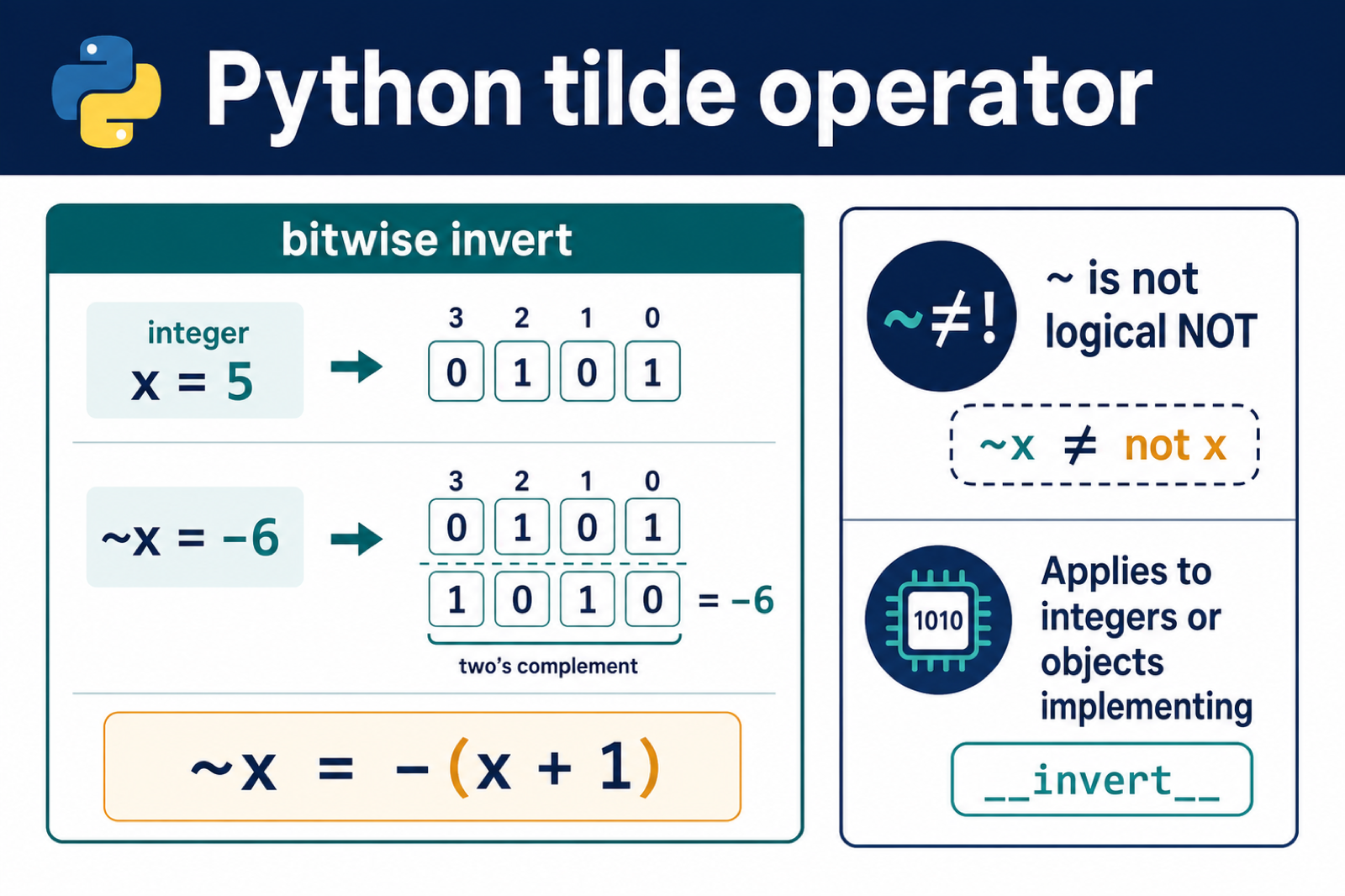
The Python tilde operator ~ performs bitwise NOT, also called bitwise inversion. For an integer x, Python defines the result as -(x + 1).
The main references are Python’s unary operator documentation, the integer bitwise-operation documentation, and NumPy’s invert documentation.
The tilde operator is not the same as the logical not operator. Use not for truth values. Use ~ when working with integer bits, masks, flags, or array masks that define bitwise inversion. Bitwise NOT flips every integer bit under Python’s signed representation; Python XOR Operator and Bitwise Logic adds the two-operand XOR truth table and set symmetric difference.
Python integers are not stored as a fixed number of visible bits at the language level. Conceptually, bitwise operations act as though signed integers have enough sign bits to represent the result.
This is why the tilde operator is most useful when you are already thinking in terms of bit masks. It is common in permissions, feature flags, protocol fields, packed integers, and low-level numeric code.
If you only want to flip a condition from true to false, do not reach for tilde. The logical operator not communicates that intent better and returns a Boolean result.
Basic Tilde Behavior
The easiest rule to remember is ~x == -(x + 1).
for number in [0, 1, 5, -1, -6]:
    inverted = ~number
    formula = -(number + 1)
    print(number, inverted, formula)
That is why ~0 is -1, ~1 is -2, and ~5 is -6.
The result can look surprising if you expect only a small fixed-width binary value. Python returns the signed integer result, not an unsigned byte display.
For example, ~5 is -6, not 2. The result follows the signed-integer rule, while a short binary display is just one way to view selected low bits.
Show Bits With A Width
Use a mask when you want to display the low bits as a fixed-width binary string.
def show_bits(number, width=8):
    mask = (1 << width) - 1
    return format(number & mask, f"0{width}b")

value = 0b00101010

print(show_bits(value))
print(show_bits(~value))
The mask keeps only the lowest width bits for display. It does not change what ~value means as a Python integer.
This pattern is useful when explaining bytes, protocols, file modes, or flags that are naturally shown with a fixed number of bits.
Choose the width based on the domain. Use 8 for a byte, 16 for a two-byte field, and so on. The display width is a formatting decision, not a different tilde operation.
Clear A Bit Flag
A common use of ~ is clearing one flag from a bit mask.
READ = 0b001
WRITE = 0b010
EXECUTE = 0b100

permissions = READ | WRITE | EXECUTE
without_write = permissions & ~WRITE

print(bin(permissions))
print(bin(without_write))
~WRITE inverts the write bit mask. The & operation then keeps every enabled bit except the write bit.
This is clearer than subtracting a flag because it expresses the exact bit operation: keep all bits except this one.
Subtraction can accidentally change more than one bit when the flag is not currently set. The permissions & ~WRITE pattern is safer because it clears that bit whether it was set or not.
The same idea works with any single-bit flag. Define each flag as a power of two, combine flags with |, test flags with &, and clear flags with & ~flag.
Do Not Use Tilde For Boolean Logic
Use not for a single Boolean value.
active = True

print(not active)
print(~active)
bool is a subclass of int, so ~True gives an integer result, not the Boolean opposite. For Boolean logic, not True is the correct expression.
This distinction is important in conditionals. if not active: is readable; if ~active: is a bug in normal Boolean code.
Invert NumPy Boolean Masks
NumPy arrays commonly use ~ to invert a Boolean mask element by element.
import numpy as np

values = np.array([1, 2, 3, 4, 5])
is_even = values % 2 == 0

print(values[is_even])
print(values[~is_even])
Here ~is_even flips every Boolean element in the array. That selects the values that were not even.
This is array-specific behavior provided by NumPy. Plain Python lists do not support this kind of element-by-element mask inversion.
In NumPy code, parentheses matter when masks combine comparisons. Write expressions such as ~(values == 0) or (values > 2) & (values < 5) so Python parses the comparison and bitwise operators in the intended order.
Customize The Operator
Classes can define __invert__() to customize what ~obj means.
class Switch:
    def __init__(self, enabled):
        self.enabled = enabled

    def __invert__(self):
        return Switch(not self.enabled)

    def __repr__(self):
        return f"Switch(enabled={self.enabled})"

switch = Switch(True)
print(~switch)
Only customize ~ when inversion is a natural operation for the class. For most application objects, a named method is easier to understand.
The practical rule is: ~ is bitwise inversion for integers, mask inversion for libraries that define it, and not a replacement for Boolean not.
When debugging tilde output, print both the integer result and a masked binary representation. Seeing both views makes it much easier to separate Python's signed result from the fixed-width display you may have expected.
Why ~5 Produces -6
Python integers use arbitrary precision, so the easiest exact rule is algebraic: ~x equals -(x + 1). The bit-level explanation uses two’s-complement-style inversion and an infinite sign extension for negative integers.
for value in [0, 1, 5, -1, -5]:
    print(value, ~value, -(value + 1))
Use ~ when your algorithm is genuinely bitwise, such as masks or integer flags. For a boolean condition, write not value; it communicates logical negation and follows different semantics.
Custom Objects Can Implement __invert__
Python calls __invert__() for ~object. Libraries that represent bit arrays, masks, or symbolic expressions can define the operation for their own types.
class Mask:
    def __init__(self, bits):
        self.bits = bits

    def __invert__(self):
        return Mask(~self.bits)

print((~Mask(5)).bits)
If the operand is a type that does not support inversion, Python raises TypeError. Check the operand type and the intended meaning before replacing not with ~.
Frequently Asked Questions
What does the tilde operator do in Python?
The tilde performs unary bitwise inversion. For an integer x, Python defines ~x as -(x + 1).
Why is ~5 equal to -6?
The integer rule is ~x == -(x + 1), so ~5 is -(5 + 1), which equals -6.
Is Python tilde the same as logical not?
No. ~ is bitwise inversion, while not is logical negation that produces a boolean truth value.
Can a Python class customize the tilde operator?
Yes. A class can implement __invert__() to define what ~instance returns for that type.

Good explanation