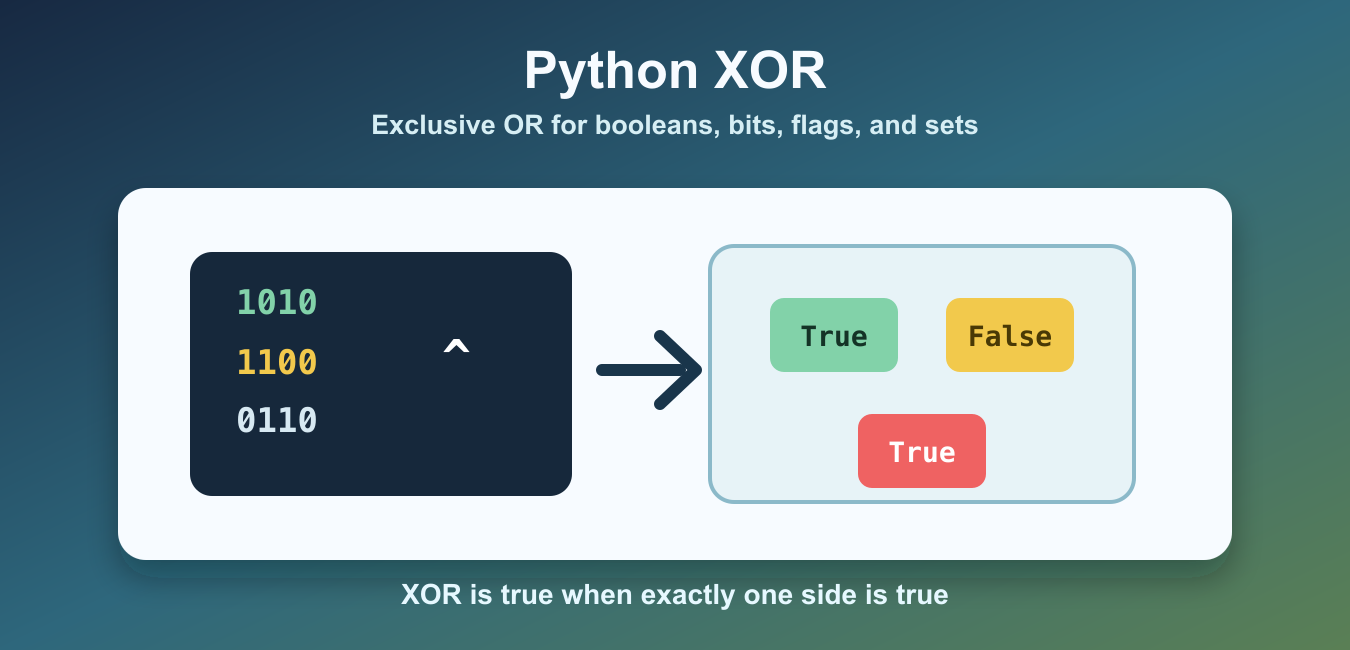
Quick answer: Use ^ for bitwise XOR on integers, where each bit is 1 when the corresponding input bits differ. For boolean conditions, use != or explicit boolean logic when that communicates the intent more clearly.

Python uses the ^ operator for XOR. XOR means exclusive OR: the result is true when exactly one side is true, and false when both sides are the same. With integers, Python applies XOR bit by bit.
XOR is useful for bit masks, flags, parity checks, toggles, and set symmetric difference. It is different from or, which is true when either side is true, including when both sides are true.
Python does not have a separate keyword named xor. The same ^ operator is used for boolean XOR, integer bitwise XOR, and set symmetric difference. The meaning depends on the operand types, so clear examples and meaningful names matter. XOR and the tilde operator are both bitwise tools, but Python Tilde Operator and Bitwise NOT shows the distinct NOT operation performed by ~.
The official Python bitwise operation reference explains ^ with other bitwise operators. For related boolean control flow, see the if not in Python guide. For set comparisons, see the Python set difference guide.
XOR With Booleans
When both operands are booleans, ^ returns True only when one operand is True and the other is False.
pairs = [
    (False, False),
    (False, True),
    (True, False),
    (True, True),
]

for left, right in pairs:
    print(left, right, left ^ right)
This is the truth table for exclusive OR. It is useful when two options should not be active at the same time and at least one option should be active.
Booleans in Python are closely related to integers, but boolean XOR should still be read as logic, not arithmetic. If a rule means “exactly one condition,” ^ can be expressive. If a rule means “at least one condition,” use or.
XOR With Integers
For integers, XOR compares each bit position. A result bit becomes 1 when the input bits differ, and 0 when they match.
left = 0b1010
right = 0b1100

result = left ^ right

print(bin(result))
print(f"{result:04b}")
Here, 1010 XOR 1100 gives 0110. Reading the binary form makes the operation easier to see than reading the decimal result alone.
Bitwise XOR has lower precedence than shifts but higher precedence than comparisons. When an expression mixes several operators, add parentheses around the intended XOR operation. Parentheses are cheap, and they prevent subtle mistakes in low-level code.

Toggle A Bit Flag
XOR is often used to toggle a bit. Applying the same mask once turns the selected bit on if it was off, or off if it was on. Applying the same mask again restores the original value.
READ = 0b001
WRITE = 0b010
EXECUTE = 0b100

permissions = READ | WRITE
permissions = permissions ^ WRITE
permissions = permissions ^ EXECUTE

print(f"{permissions:03b}")
print(bool(permissions & READ))
print(bool(permissions & WRITE))
print(bool(permissions & EXECUTE))
This pattern is common in compact flag systems. Use clear named masks so the code explains which bit is being toggled.
Check That Exactly One Condition Is True
For boolean conditions, XOR can express “exactly one” directly. It is readable when there are only two conditions.
has_email = True
has_phone = False

if has_email ^ has_phone:
    print("Exactly one contact method is present")
else:
    print("Provide one contact method, not zero or two")
For more than two conditions, count truthy values instead of chaining XOR. Counting is clearer and avoids surprises when more options are added later.
For example, sum(bool(item) for item in options) == 1 is clearer than chaining many XOR operations. It also scales when the number of options changes.
XOR On Sets Means Symmetric Difference
Python sets also support ^. For sets, it returns items that appear in exactly one of the sets. This is called symmetric difference.
left = {"red", "green", "blue"}
right = {"green", "yellow"}

unique_to_one_side = left ^ right

print(unique_to_one_side)
The result includes red, blue, and yellow, but not green, because green appears in both sets. Do not confuse this with normal set difference, which is one-sided.
Use XOR For A Simple Parity Check
XOR can combine many integer values into a compact parity-style result. This is useful in small checks, coding exercises, and low-level examples.
numbers = [7, 3, 7, 9, 3]
result = 0

for number in numbers:
    result ^= number

print(result)
Because a number XOR itself becomes zero, repeated pairs cancel out. In the example, 7 and 3 appear twice, so the remaining result is 9.

Common XOR Mistakes
The first mistake is treating ^ like exponentiation. Python uses ** for powers, so 2 ** 3 is eight, while 2 ^ 3 is a bitwise XOR result.
The second mistake is using XOR where or is intended. a or b is true when both sides are true. a ^ b is false when both sides are true. That difference is the point of XOR.
The third mistake is hiding complex logic behind chained XOR expressions. For two booleans, XOR can be clean. For larger rules, prefer named checks, counts, or explicit branching so future readers can audit the intent.
Use Python XOR when the problem is truly about different bits, toggled flags, exactly-one boolean checks, or symmetric difference between sets. For normal logical OR, use or; for powers, use **.
In application code, favor readability over cleverness. XOR is excellent when the domain is flags or exactly-one checks. For ordinary business rules, an explicit if statement or a named helper function is often easier to maintain.
Bitwise XOR With Integers
Python’s ^ operator compares the binary representation of two integers bit by bit. A result bit is set when exactly one input bit is set. This makes XOR useful for masks, toggling flags, parity-style operations, and low-level protocols, but it does not mean exponentiation; use ** for powers.
left = 0b1100
right = 0b1010

result = left ^ right
print(bin(result))  # 0b0110

flags = 0b0101
toggle = 0b0001
print(bin(flags ^ toggle))
Boolean XOR And Readability
Booleans behave like integers for many bitwise operations, so True ^ False produces True. For a condition that must be true for exactly one branch, left != right often states the boolean intent more directly. Use ^ when you are deliberately working with bit patterns or a documented boolean XOR convention.
Mask Only The Bits You Mean
XOR is reversible: applying the same mask twice restores the original integer. That property is useful for toggling a known flag, but it is not encryption and does not protect secrets. Document the width, signedness, and valid bit positions when values cross a file, network, or hardware boundary.
Check operator precedence when combining XOR with shifts, comparisons, or arithmetic. Parentheses make the intended bit-level transformation easier to review and test.
Frequently Asked Questions
What does ^ mean in Python?
For integers, ^ is the bitwise XOR operator; it sets each result bit when the corresponding input bits differ.
Is ^ the exponent operator in Python?
No. Use ** for exponentiation; ^ performs XOR on integer bit patterns.
How do I perform XOR on booleans?
True ^ False works, but != or explicit boolean logic may communicate exactly-one-true intent more clearly.
Can XOR toggle a bit?
Yes. XOR a value with a mask containing the bit to toggle, and applying the same mask again restores the original value.
