GoDaddy VPS Review 2026: How Good Are The Servers?


GoDaddy is one of the largest hosting companies in the world. Next to domains and web hosting, the provider also offers virtual servers. But do its VPS plans really deliver on their promises?
Setup, management, and performance: In our hands-on review, we show whether GoDaddy's offerings are suitable for everyday needs – and what their weaknesses are.


Its services include basic web hosting as well as VPS and managed WordPress hosting (dedicated servers are no longer available). The lineup also includes email, marketing, and website security services.
GoDaddy Server Review
Wide Range of Plans
GoDaddy offers eight VPS plans with Linux or Windows. Contract terms are flexible, ranging from 1 to 36 months.Fast Support
Customer service responds quickly via both chat and phone. Long wait times, which are common with many other hosts, are the exception.
Very High Prices
GoDaddy charges a premium for its VPS plans. The provider is among the most expensive in our comparison. After the initial term ends, costs often increase significantly.Weak Server Performance in Some Areas
GoDaddy scores below average in several important performance categories, especially CPU and RAM performance. In the multi-core test, the provider ranks third to last.Server Locations Limited
Location options are limited to the US, Europe, and Asia. You can't select a specific location within these regions.
Server Setup & Management
| Interface & Usability | Slow, but easy | 1/2 |
| Server Setup | Few options | 4/8 |
| Server Management | Basic features available | 6/8 |
| Other Features | None available | 0/2 |
With GoDaddy, you sign up directly during the checkout process. You'll enter your name, email address, mailing address, and preferred payment method.
Provisioning starts automatically as soon as your payment is processed. GoDaddy doesn't require ID documents or additional verification when you purchase a VPS. Only in rare cases, such as with certain domain extensions or add-on services, may additional identity verification be necessary.
The GoDaddy Dashboard
GoDaddy combines your account, products, and management tools into a single dashboard. The modern, well-organized interface looks clean and makes generous use of white space. A bit more color contrast would've made navigation easier, though. Many sections look quite similar, which makes the overall design feel monotonous.

The GoDaddy account homepage.
A brief look at the product section shows that GoDaddy’s main focus is domains. The large search field on the homepage is exclusively for domain searches, and the prominent button in the top-right corner takes you straight to website creation. Server management feels more like an afterthought.
That being said, the server management itself is pleasantly simple. There are only four menu items to manage your VPS. Even if you're using a VPS for the first time, you should find your way around quickly.
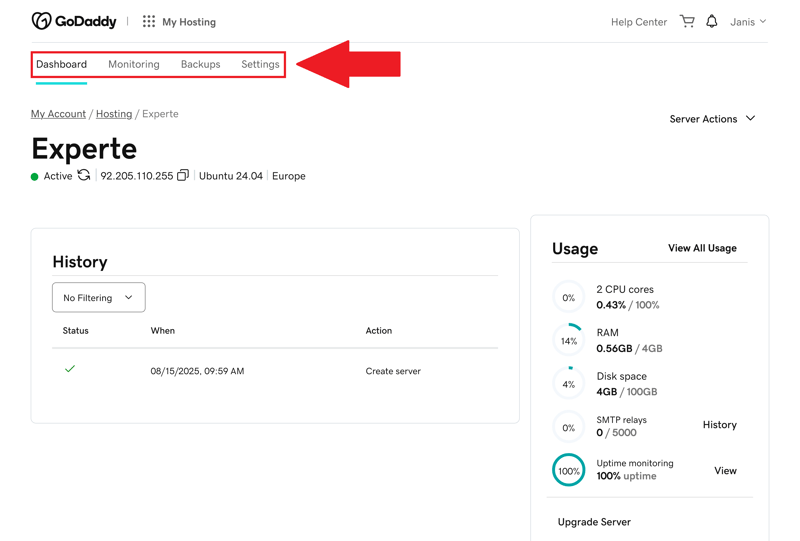
GoDaddy's straightforward VPS management menu.
Unfortunately, the dashboard's performance is rather sluggish. The product overview and account management areas sometimes have noticeable delays. In our review, some pages took up to five seconds to load. Individual elements also load slowly at times. Things are better in the actual server management section, where the interface responds faster and often without any delays.
You can change the language setting globally via the footer of the GoDaddy website. There's no dark mode, the interface is only available in a light theme.

The GoDaddy dashboard has a modern design, but it's clearly focused on domain management. Server management takes a back seat, yet it is well-organized and easy to use. Even beginners will find their way around quickly.
The performance is less impressive. During our review, the dashboard often felt sluggish. Pages loaded noticeably slowly, and individual elements were delayed. For a hosting company, this is simply unacceptable.
Server Setup at GoDaddy: Slower Than Promised
Setting up a VPS at GoDaddy is straightforward. During the ordering process, you select your preferred operating system (Linux, or Windows for an extra fee), the contract term, and optional add-on software such as cPanel/WHM or Plesk. You have plenty of contract-term options, ranging from one month to three years.
Pay close attention to the price and contract term: The low introductory prices only apply to the first billing period. After that, costs increase noticeably, especially with longer contract commitments.
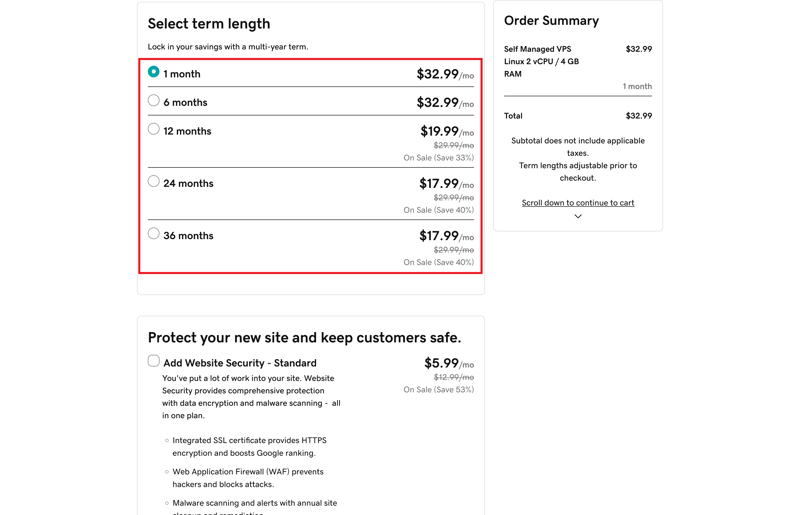
Plenty of options for contract terms.
GoDaddy limits location choices to three regions: Europe, the US, and Asia. You can't select a specific location within these regions. In our review, the server was automatically assigned to a French data center after picking Europe.
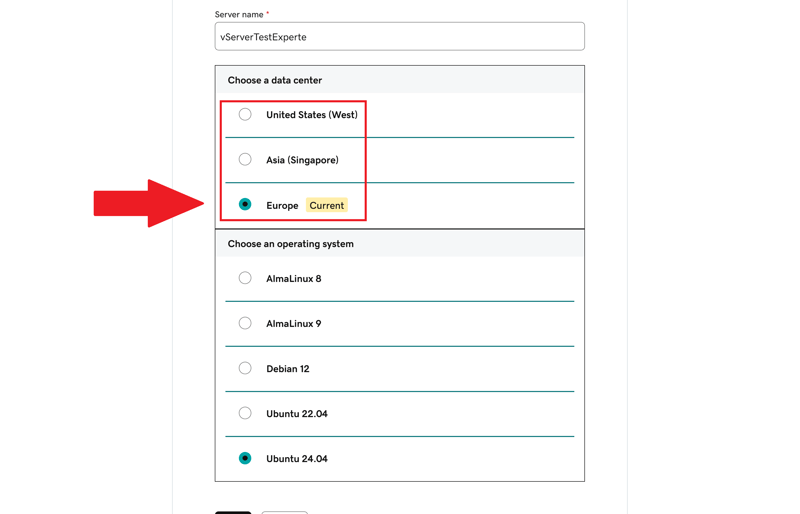
Location and OS selection during VPS setup.
For Linux plans, you can choose between the distributions AlmaLinux, Debian, and Ubuntu. GoDaddy doesn't allow custom images, and the host doesn't provide any additional software of its own. In our review, it then took another eight minutes before the server was fully ready. You'll receive an email notification when the setup is completed.
GoDaddy claims that new VPS servers are ready within just a few minutes. In our review, the process took significantly longer. The server wasn't marked as active in the dashboard until the next day, and we never received a notification about it.
Server Management: Easy, But Limited
Server management at GoDaddy is well-organized but fairly basic in terms of features. On the main page, you'll see the key details of your VPS, such as IP address, region, operating system, and current CPU, RAM, and storage usage. This gives you a quick overview.
The action button in the top-right corner lets you handle basic tasks directly. You can restart the server, stop it, put it in emergency mode, or completely reinstall it. A recovery console is also built in and covers most of the essential management features.

Server actions in the GoDaddy dashboard.
Automatic daily backups are included in every VPS plan. This is a nice bonus, as some providers charge extra for this feature.
You get seven backup points, which GoDaddy creates once per day in the late afternoon. According to customer support, GoDaddy stores backups in "a secure cloud".
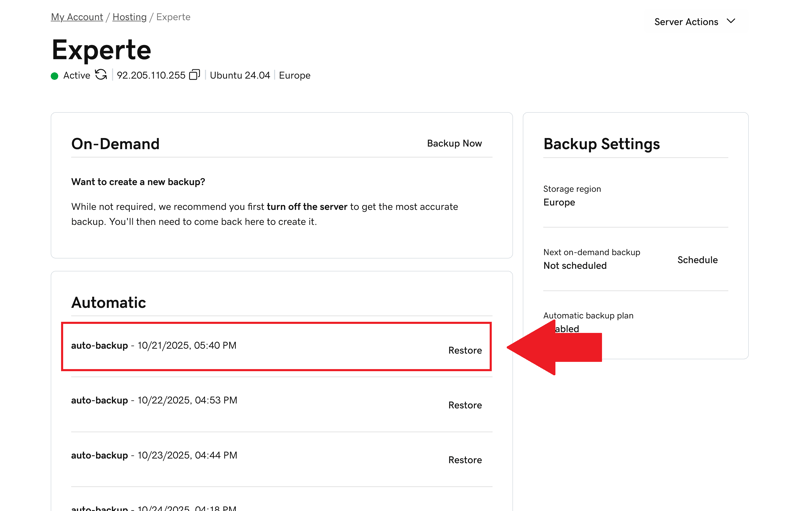
Seven daily backups are available.
You can also create manual backups or schedule automatic backups at specific times. This feature is useful if you want regular backups outside the automated cycle.
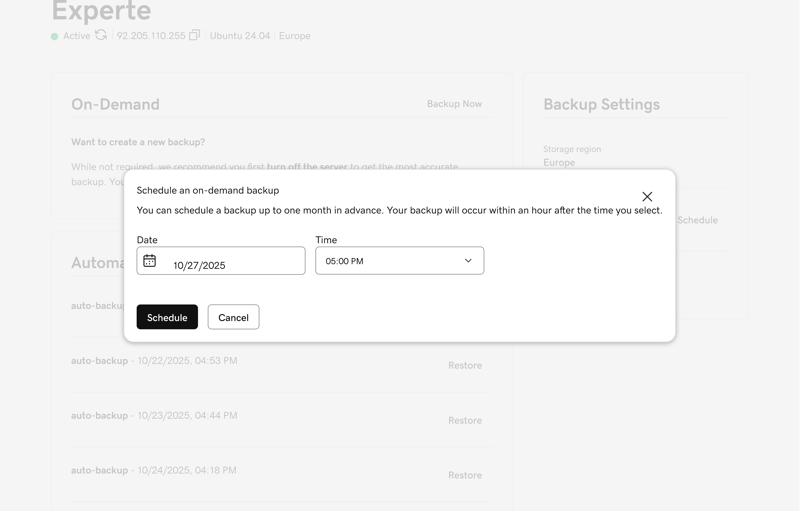
Create a backup at a time of your choosing.
The notification system offers plenty of options. You can enable email alerts that trigger when usage is high or storage space is running low. This is free and offers a good level of control.
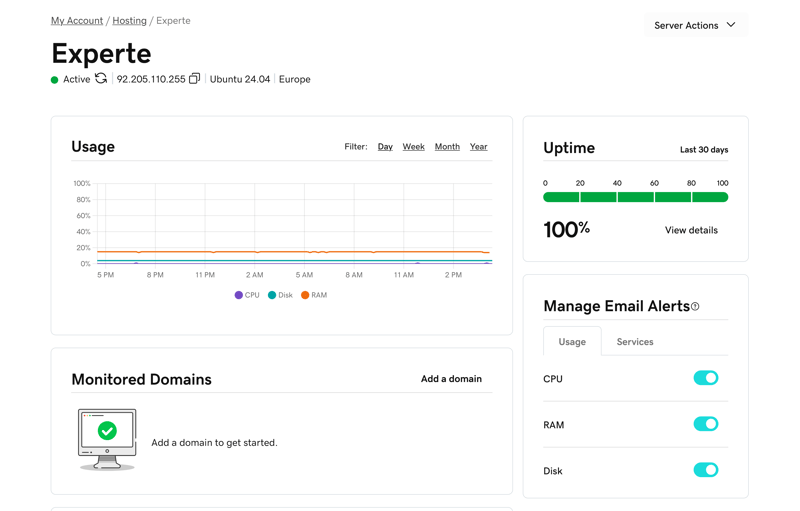
Monitoring your server at GoDaddy.
Limited Flexibility for Scaling and Configuration
Reinstalling the operating system is easy, but you're still limited to the same three Linux distributions offered at the start: AlmaLinux, Debian, and Ubuntu. Custom images still aren't allowed and there are no preconfigured apps available. GoDaddy has some catching up to do here.
The limited scalability offered can also turn out to be problematic. You can't adjust individual resources like RAM or CPU separately. The only way to upgrade is by switching to a higher plan. Downgrades aren't possible at all.
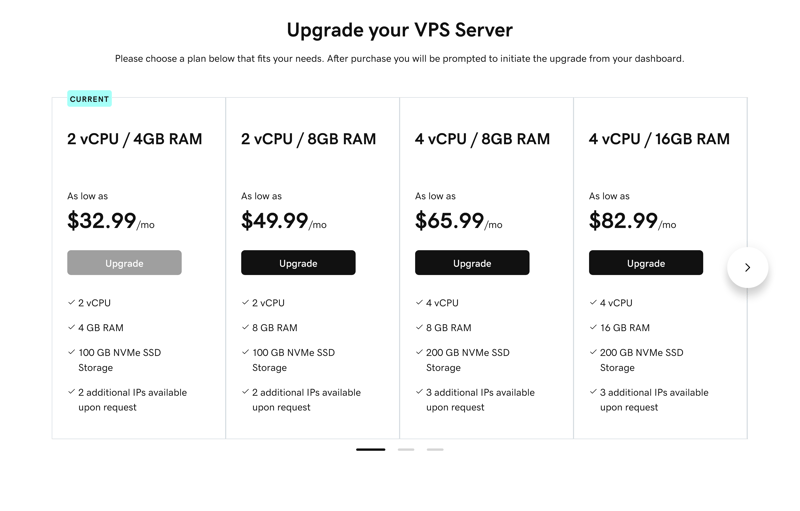
A VPS upgrade is quick and easy.
GoDaddy falls short of competitors when it comes to other features as well. There are no snapshots for extra security, no built-in firewall management, and very few options for customizing network settings.
Here's how GoDaddy's server features compare to other hosting providers:
 GoDaddy |  OVH |  Hostinger |  Hetzner |  DigitalOcean |  IONOS |  Contabo | |
|---|---|---|---|---|---|---|---|
| Rescue System | ✓ | ✓ | ✓ | ✓ | ✓ | ✗ | ✓ |
| Web Console | ✓ | ✓ | ✓ | ✓ | ✓ | ✓ | ✗ |
| Monitoring | ✓ | ✓ | ✓ | ✓ | ✓ | ✓ | ✗ |
| Backups | ✓ | ✓ | ✓ | ✓ | ✓ | ✓ | ✓ |
| Snapshots | ✗ | ✓ | ✓ | ✓ | ✓ | ✓ | ✓ |
| Scaling | ✓ | ✓ | ✓ | ✓ | ✓ | ✓ | ✓ |
| Firewall | ✗ | ✓ | ✓ | ✓ | ✓ | ✓ | ✗ |
| Total | 5 | 7 | 7 | 7 | 7 | 6 | 4 |
GoDaddy offers a stable, well-organized management interface for VPS that even beginners can use without any trouble. The controls are straightforward, key features are included, and backups run automatically in the background. For standard hosting tasks or smaller projects, this is more than enough.
When you need more customization for scaling, security, or advanced settings, you'll quickly hit a wall. GoDaddy provides a solid foundation, but ultimately offers too little flexibility for server management.
Performance
| CPU Benchmark | Single-Core: 1,071 Multi-Core: 1,987 | 2/15 |
| RAM Benchmark | 56,064 MiB/sec | 2/5 |
| Disk Benchmark | 52,500 IOPS | 1/5 |
| Network Benchmark | 6,220 MBit/s | 5/5 |
How well does a GoDaddy VPS actually perform in everyday use? To answer this objectively, we run standardized benchmark tests that cover different performance areas. We measure five key metrics:
- 1.
Single-core CPU performance, which measures the speed of a single CPU core.
- 2.
Multi-core performance, which shows how well multiple cores work together.
- 3.
RAM performance, which indicates how fast data is processed in memory.
- 4.
Disk performance (IOPS), which is critical for database and web access.
- 5.
Network connection, which determines how fast data can be sent and received.
All values come from standardized tests (benchmarks) that we run not only on GoDaddy but on many other similarly configured VPS. These results help you compare offerings and make the right decision. The higher the score, the better.
We explain our VPS benchmark methodology in detail here:

Weak Single-Core CPU Performance
In the single-core test, GoDaddy scores only 1,071 points, landing in eighth place out of eleven. Single-core CPU performance shows how quickly a server handles simpler tasks, like web applications that aren't heavily parallelized or many smaller PHP requests.
| Geekbench 6 (Single Core) | |
|---|---|
| 1,771 |
| 1,468 |
| 1,442 |
| 1,105 |
| 1,071 |
| 954 |
| 482 |
Weak Multi-Core Performance
The multi-core review results are even weaker. GoDaddy scores just 1,987 points here (for comparison: the median is 6,177). That's only good enough for ninth place.
If you run applications that use multiple cores at once, like complex calculations, video processing, or parallel server processes, GoDaddy might not be the right choice. The performance is fine for simple tasks, but it falls short for more demanding projects.
| Geekbench 6 (Multi Core) | |
|---|---|
| 7,945 |
| 7,159 |
| 6,177 |
| 5,476 |
| 1,987 |
| 1,978 |
| 1,652 |
Slow RAM
GoDaddy's RAM reaches 56,064 MiB/s in our review, landing in 7th place. The slower RAM speed is especially noticeable with data-heavy applications.
If you're caching large amounts of data or running memory-hungry processes, the RAM can quickly become a bottleneck. For simple websites or smaller applications, the performance should be enough.
| stream copy | |
|---|---|
| 117,934 MiB/sec |
| 105,374 MiB/sec |
| 86,477 MiB/sec |
| 56,064 MiB/sec |
| 47,490 MiB/sec |
| 36,342 MiB/sec |
| 18,921 MiB/sec |
Below-Average SSD Performance
GoDaddy's disk speed is also far from impressive. With 52,500 IOPS, the provider lands in seventh place again.
This means you may experience delays when reading and writing many small files, such as during database queries or when loading multiple website elements. For everyday use, the performance should be sufficient in many cases.
| fio (Total IOPS, Block Size 4k) | |
|---|---|
| 120,300 IOPS |
| 115,800 IOPS |
| 100,700 IOPS |
| 57,700 IOPS |
| 52,500 IOPS |
| 40,000 IOPS |
| 21,400 IOPS |
Strong Network Connection
The network is where GoDaddy really shines. With a measured speed of 6,220 Mbit/s, it's above the median. GoDaddy takes 4th place in this category.
This strong network performance benefits you if you frequently transfer large amounts of data or run services that need solid connections to external systems.
| iperf (Receive Speed, IPv4, London) | |
|---|---|
| 6,970 MBit/s |
| 6,220 MBit/s |
| 5,020 MBit/s |
| 4,810 MBit/s |
| 1,950 MBit/s |
| 986 MBit/s |
| 292 MBit/s |
The performance results are disappointing. Only the network connection impresses. In all other review categories, GoDaddy falls well behind the competition. Overall performance sits mostly in the lower mid-range. That's simply not enough, considering the hosting provider's costs.
GoDaddy can be an option if you need a server that reliably handles simple tasks and offers a strong network connection. For more demanding applications, we recommend looking for a more powerful solution overall.
Costs
| Price 8 vCPU | $64.99 | 0/7 |
| Price 16 GB RAM | $44.99 | 0/7 |
| Price 250 GB SSD | $64.99 | 0/7 |
| Price 50 TB Traffic | $16.99 | 0/4 |
| Backup costs | $0.00 | 3/3 |
| Billing | Higher price after the first contract term | 0/2 |
To objectively compare pricing across different VPS providers, we use a standardized scoring system. We evaluate costs in five typical scenarios:
- 1.
The cheapest VPS with at least 8 vCPUs
- 2.
The cheapest VPS with at least 16 GB RAM
- 3.
The cheapest VPS with at least 250 GB SSD storage
- 4.
The cost for 50 TB of monthly data transfer
- 5.
The price for automatic backups
We only consider permanent gross prices as listed on the providers' websites. Temporary discounts, new customer promotions, or special offers are not included.
Here's how GoDaddy's costs compare to other providers:
| 8 vCPU | 16 GB RAM | 250 GB SSD | 50 TB Traffic | Backup | |
|---|---|---|---|---|---|
| $9.00 | $9.00 | $9.00 | $2.00 | $7.00 |
| $12.75 | $12.75 | $22.08 | $4.20 | $0.00 |
| $14.09 | $19.59 | $19.59 | $7.59 | $5.62 |
| $19.99 | $9.99 | $19.99 | $7.99 | $0.00 |
| $20.80 | $12.00 | $3.96 | $4.95 | $7.34 |
| $64.99 | $44.99 | $64.99 | $16.99 | $0.00 |
| $96.00 | $96.00 | $96.00 | $6.00 | $4.80 |
GoDaddy VPS Plans
GoDaddy's VPS packages cover a wide performance range. Options go from compact entry-level servers to much more powerful configurations with up to 32 vCPUs and 128 GB RAM. Here are the key technical specifications at a glance:
vCPUs: Depending on the plan, GoDaddy provides between 1 and 32 virtual CPU cores.
Memory: VPS packages offer between 2 and 128 GB RAM. This supports everything from smaller web services to memory-intensive applications.
Storage: All plans use NVMe SSDs with capacities from 40 GB to 1.5 TB. That's plenty of space for web projects, databases, or backups.
Network & traffic: GoDaddy allows unlimited traffic. Connections run through data centers with DDoS protection.
IP addresses & features: Each VPS includes at least one IPv4 address. Up to three additional IPs can be added depending on the package. IPv6 is technically supported.
You can find an overview of GoDaddy's VPS plans below:
| 1 vCPU / 2GB RAM | 2 vCPU / 4GB RAM | 2 vCPU / 4GB RAM (Windows) | |
|---|---|---|---|
| Monthly Price | from $8.99 | from $17.99 | from $27.99 |
| Contract Period (Months) | 1 - 24 | 1 - 24 | 1 - 24 |
| Performance | |||
| Storage | 40 GB | 100 GB | 100 GB |
| RAM | 2 GB | 4 GB | 4 GB |
| CPU Cores | 1 | 2 | 2 |
| Dedicated Cores | ✗ | ✗ | ✗ |
| Features | |||
| Type | vServer | vServer | vServer |
| OS | Linux | Linux | Windows |
| Managed | ✗ | ✗ | ✗ |
| SSD Storage | ✓ | ✓ | ✓ |
Performance Range and Scaling
GoDaddy's VPS lineup covers an exceptionally wide performance range. The following overview shows typical use cases for each package.
GoDaddy doesn't use custom plan names. Instead, plans are labeled by their hardware specs, such as "2 vCPU / 4 GB RAM" or "16 vCPU / 64 GB RAM."
Category | Specs | Recommendation |
|---|---|---|
Entry-level plans | 1 vCore, 2 GB RAM, 40 GB NVMe SSD | For simple websites, test environments, or other lightweight services. |
2 vCores, 4 GB RAM, 100 GB NVMe SSD | For smaller CMS installations or hosting multiple sites. | |
Mid-range plans | 4 vCores, 8 GB RAM, 200 GB NVMe SSD | For standard web applications or database-driven portals. |
4 vCores, 16 GB RAM, 200 GB NVMe SSD | For small online stores or mid-sized business applications. | |
Business plans | 8 vCores, 16 GB RAM, 400 GB NVMe SSD | For CRM solutions or containerized environments. |
8 vCores, 32 GB RAM, 400 GB NVMe SSD | For media-heavy projects, high-traffic applications, or SaaS platforms. | |
Enterprise plans | 16 vCores, 64 GB RAM, 800 GB NVMe SSD | For machine learning, big data processing, or internal cloud services. |
32 vCores, 128 GB RAM, 1.5 TB NVMe SSD | For cluster systems, enterprise deployments, or virtualized environments. |
GoDaddy is one of the most expensive providers in our comparison. Even with limited-time discounts, entry-level costs are well above average. After the initial term ends, prices usually jump again. This makes the service especially costly eventually.
Given the mediocre performance, the value for money isn't convincing despite the impressive hardware specs on paper. Other providers deliver significantly better performance for significantly less money.
Reliability & Support
| Own documentation & FAQ | Few, partly auto-translated | 1/3 |
| Email support | Not available | 0/3 |
| Phone support | Perfect | 3/3 |
| Live chat | High quality | 3/3 |
| Customer feedback from the web | Positive | 6/8 |
GoDaddy's online documentation is limited for its VPS customers. The help desk features only 15 VPS articles, and many of them are rather short and superficial. Only a few articles include images or step-by-step instructions.

The documentation offers little for VPS customers.
GoDaddy also offers some video tutorials that run about ten minutes each. These are well-produced, but almost exclusively target domain and marketing customers. For VPS users, there are only three relevant videos. They cover beginner-friendly explanations of Plesk and cPanel, as well as basic server management.

VPS aren't well represented in the video tutorials.
Fast Responses via Chat and Phone
GoDaddy offers contact options via phone, live chat, and AI chat. However, there's no traditional ticket system or support email address—at least not for customers who manage their VPS themselves.
The support chat starts with a virtual assistant. During our review, it provided helpful answers and proactively offered to connect us with a human agent when problems arose. A support representative joined the chat in less than a minute and handled our request quickly. The communication was professional throughout.

The AI chat transitions to a human agent.
The hotline was even more impressive. During our review, there was virtually no wait time. A representative answered immediately. The customer support was friendly, knowledgeable, and focused on solving the issue.
The hotline is available on weekdays between 8 AM and 8 PM. On weekends, only the support chat (available 24/7) is an option.
Customers Praise Fast Support
Customer reviews give GoDaddy's support good marks overall. Many users praise the quick response times and the helpful, knowledgeable assistance via phone or live chat. Most issues are resolved promptly and reliably.
Some users feel the responses are too generic or rely too heavily on standardized scripts instead of addressing their specific situation.
GoDaddy's customer service is easy to reach, responds quickly, and provides friendly, reliable help—exactly as it should be. If you prefer talking to someone when problems arise rather than clicking through online guides, you're in good hands with this US-based provider.
However, the support is less suitable for those who prefer to learn independently or want to understand technical details. The documentation is too short, superficial, and only briefly touches on important VPS topics.
Conclusion
GoDaddy's VPS offering meets basic hosting needs without major hurdles. Setup is straightforward, the interface is clean, and network performance is solid. If you're looking for a stable server for typical web projects or CMS installations, you'll find a functional solution here.
From a technical standpoint, however, GoDaddy falls behind the competition in several areas. Configuration options are limited, performance is rather weak, and there's no real choice of server location. This indicates that the company, primarily known for its domain solutions, simply doesn't focus on VPS hosting.
Prices are relatively high. For what GoDaddy offers, the provider is simply too expensive. You pay significantly more than with comparable hosting providers—and get less performance and flexibility in return.

GoDaddy User Reviews
What do users think of GoDaddy? We looked at reviews on several online platforms and compiled the most common opinions:
All-in-one solution
Customers appreciate GoDaddy's broad range of services, from website builders to email and web hosting. Many features and services are bundled and ready to use right away.Easy to use
The user interface makes it easy for beginners to get started. According to many reports, setup and management are straightforward.Fast customer support
The speed of customer support is well-received. Users frequently report quick responses via chat and phone.
Inconsistent performance
Several customers complain about server performance not always being stable. Growing projects occasionally experience performance drops.Billing issues
Some users report problems with plan changes or cancellations. Invoices can be confusing, and the processes aren't always transparent.
Alternatives to GoDaddy
GoDaddy isn't the right provider for you? One of these alternatives might be a better fit:
OVH is cheaper than GoDaddy across all categories. The French provider also includes automatic backups at no extra cost.
Hetzner offers several more server features and options than GoDaddy, making it a lot more flexible.
IONOS delivers significantly better CPU and RAM performance. GoDaddy does, however, have the edge when it comes to network connection speed.