Best VPS Hosting 2026: 7 VPS Providers Reviewed


Finding the right VPS provider isn't easy. There are plenty of options out there, but not all of them live up to their promises. To help you make the best choice, we reviewed several VPS hosts in detail.
For our VPS comparison, we measured performance using benchmarks, compared prices, tested the server management interfaces, and evaluated support quality. The results show which providers stand out and what you should look for when making your decision.


VPS Review: These Are the Best Providers
We'll explain our rating criteria in detail below. First, let's introduce the hosting providers, listed in descending order of their overall score, starting with our top pick:
Hetzner VPS: Powerful Servers for Experienced Users
Hetzner* is a German hosting company that has been offering VPS and other hosting solutions with powerful hardware and high reliability for many years. Its platform is designed for technically proficient users who want to manage their servers themselves.
Hetzner stands out with an exceptionally wide range of plans and server options featuring shared or dedicated vCPUs, numerous Linux distributions, and an optional auto-backup system. Data centers are available in Germany, Finland, the USA, and Singapore.
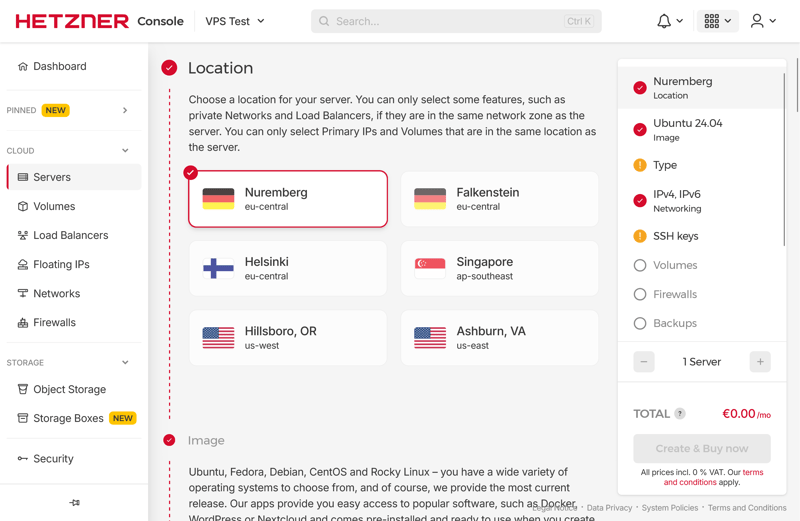
Numerous server location options.
The prices are fair, especially for configurations with lots of RAM. Server features like snapshots, automatic backups, and API access are all part of the extensive feature set. Getting started with Hetzner can, however, be a bit more challenging for VPS beginners compared to some other providers.
What Do We Like About Hetzner?
We especially like the fast provisioning: your server is usually ready to use just seconds after ordering. Hetzner's interface is also excellent. Server management is logically organized, and the interface responds quickly.
Another plus is the well-designed plan structure. The CX plans with shared vCPU offer excellent value for money, and you can easily upgrade to larger instances as your needs grow. Hetzner's VPS CPU and RAM performance scores are also above average.
What Are the Pros and Cons of Hetzner?
Wide Range of Plans
Options range from budget VPS plans for just a few dollars to powerful machines with 32 GB of RAM.Strong Performance Scores
Hetzner delivered high CPU performance and fast memory in our comparison. Resource-intensive projects benefit significantly from this combination.Highly Scalable Infrastructure
You can upgrade your hardware at any time without hassle. As your project grows, your server performance scales right along with it.
Limited Support for Beginners
There's little guidance when choosing plans and operating systems. If you're new to VPS, expect to spend some time learning the ropes.Average SSD Performance
In our benchmark, Hetzner's disk performance landed in the middle of the pack. Some providers in our comparison offer noticeably faster SSDs.
Hostinger VPS: Many Locations, Large Software Selection
The Lithuanian provider Hostinger* offers VPS with KVM virtualization and fast NVMe storage. You can choose from server locations in the US, Germany, France, and other countries. Hostinger automatically measures latency and recommends the best option based on the results:

Hostinger recommends a server location for you.
Setup takes just a few minutes. You can choose from eleven Linux distributions and over 70 ready-to-use applications. These range from popular CMS platforms to developer tools and monitoring solutions.
However, take a closer look at the pricing. After your initial term ends, costs can increase significantly. You also can't scale individual resources like CPU or RAM separately. The only way to get more power is by upgrading to a higher plan.
What Do We Like About Hostinger?
Hostinger's hPanel is easy to navigate. The interface responds quickly and guides you through all the important features.
We're also impressed by the many automation options. The public API lets you integrate VPS actions directly into your own workflows. If you manage multiple servers or frequently change settings, this can save you a lot of time.
The built-in AI chatbot is another highlight. Kodee answers technical questions, points you to relevant help articles, and saves you a lot of search time. It's often faster than the traditional documentation.
What Are the Pros and Cons of Hostinger?
Vast Software Selection
You can set up your server with one of over 70 applications or panels, usually at no extra cost. This is one of the largest software selections in our review.Best SSD and Single-Core Performance
Hostinger achieved the top score for SSD performance in our review. It also leads the pack in single-core performance.User-Friendly Control Panel
The hPanel runs smoothly, is well-organized, and is easy to use. You handle VPS tasks without any hassle.
Significant Price Increase After Initial Term
Costs can rise noticeably after your initial term ends. The low introductory prices only apply at the start.No Flexible Upgrades for Individual Resources
If you need more power, you have to switch to a higher plan. Upgrading just the CPU or RAM is not an option.No Phone Support
Support is only available via chat and email. If you have an urgent issue to solve, there's no number to call.
IONOS VPS: An Affordable VPS Entry Point
IONOS* is one of the most well-known hosting providers in Europe. The German company's VPS offerings are designed for anyone looking for a budget-friendly entry point with easy management. There are six plans to choose from, starting at just $2 per month.

VPS starting at $1 per month.
IONOS offers unlimited traffic for its VPS plans, and the Plesk Web Host Edition is free for customers. However, snapshots and backups come with additional costs. True scaling of individual resources isn't possible; you can only get more power by switching to a higher plan.
In our benchmark, IONOS shows mixed results. The provider achieves the second-best RAM performance in our comparison, and single-core performance is also strong. Multi-core performance, SSD speed, and network scores are average at best and sometimes fall below those of other providers.
What Do We Like About IONOS?
We are impressed by the value for money, especially with longer contract terms. If you want to keep costs low, IONOS is definitely worth considering.
Setup is also a breeze: the server is ready just minutes after ordering. The cloud panel has an intuitive layout, so even users without VPS experience can get started quickly.
The phone support is excellent and available around the clock. That's not something you can take for granted in this price range.
What Are the Pros and Cons of IONOS?
Strong RAM and Single-Core Performance
IONOS delivers one of the highest RAM bandwidths in our entire comparison. Performance per CPU core is also above average, resulting in fast response times.Easy Server Management
The cloud panel is clean and quick to use. You manage your plan-related settings, server monitoring, and backups all in one place.Great Price With Long-Term Contracts
The 24-month plans offer excellent value for money. Only the optional automatic backup is pricier than what many other providers charge.
Below-Average SSD and Network Performance
In our SSD benchmark, IONOS ranks third from last. Network connectivity also falls behind the competition.Live Chat Often Unavailable
The live chat was unavailable at various times during our review. The IONOS AI assistant sometimes provides incorrect information and makes up menu options that don't exist.
OVH VPS: Broad Selection With Strong Specs
OVH* is one of the largest European hosting providers. All VPS plans use KVM virtualization and are provisioned immediately after ordering.
In our benchmarks, OVH showed mixed results. The SSDs delivered above-average performance, and multi-core performance was impressive. However, the RAM was among the slower options in our review. Network connlagged lagged behind the competition.
The server management portal offers many features, but this can make it feel cluttered at first. Longer load times and occasional re-logins also slow down your workflow. Experienced users benefit from the extensive options, while beginners need some time to get oriented. The good documentation helps with that.
What Do We Like About OVH?
We like the flexibility. OVH covers a wide range of server configurations that work for almost any VPS use case. You'll quickly find a plan that fits your needs.
Easy scalability is another big plus. When needed, you can easily upgrade to higher tiers and get more resources without having to set up your server environment from scratch:
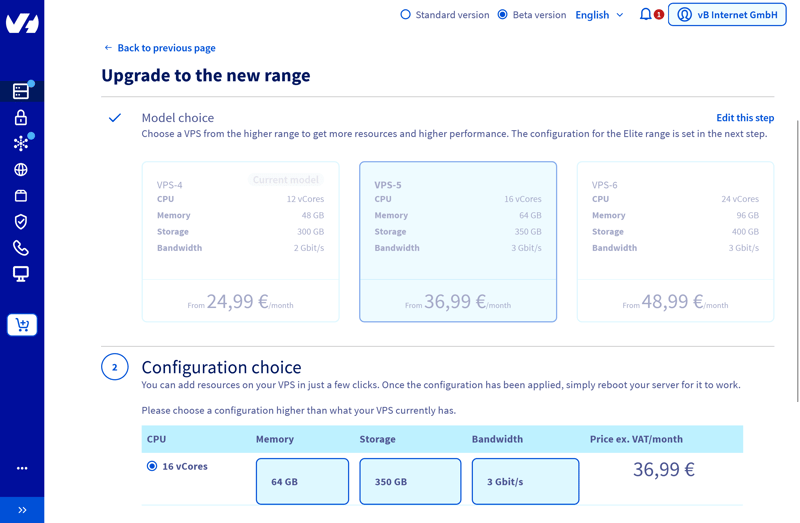
Extensive scaling options at OVH.
We also like the transparent pricing structure. All plans are billed monthly, and additional costs are clearly listed. Auto-backups are already included.
What Are the Pros and Cons of OVH?
Great Value for Money
The combination of powerful hardware and attractive prices makes OVH appealing for many projects. You get a lot of performance for relatively little money, especially in the higher-tier plans.Excellent SSD and Multi-Core Performance
OVH delivers top scores in SSD performance and multi-core workloads. This makes it a good fit for data-intensive or compute-heavy applications.Easy Scaling
If your project needs more power later on, you can easily upgrade to a larger plan.
Cluttered Management Portal
The interface is packed with options and can feel a bit chaotic at first. Beginners may quickly lose their way.Limited Support
Free support is minimal, and response times can be long. Fast help is only available through paid add-on packages.
DigitalOcean VPS: Many Options, Lots of Freedom
DigitalOcean*, a US-based provider, is designed primarily for experienced users who want precise control over their VPS configuration. You can manually select the location, CPU, RAM, and SSD setup. The range of options is broad.
Provisioning is among the fastest in our comparison. However, the interface can feel overwhelming at first due to the sheer number of options.
DigitalOcean's benchmark results are mixed. CPU and RAM scores fall well below average, while SSD performance and network connectivity deliver excellent results. In terms of pricing, this provider is one of the most expensive in our review.
What Do We Like About DigitalOcean?
The granular configuration options are one of the biggest advantages. DigitalOcean offers more customization than any other provider in our comparison. If you know exactly what resources your project needs, you'll find configurations that match your requirements down to the smallest detail.
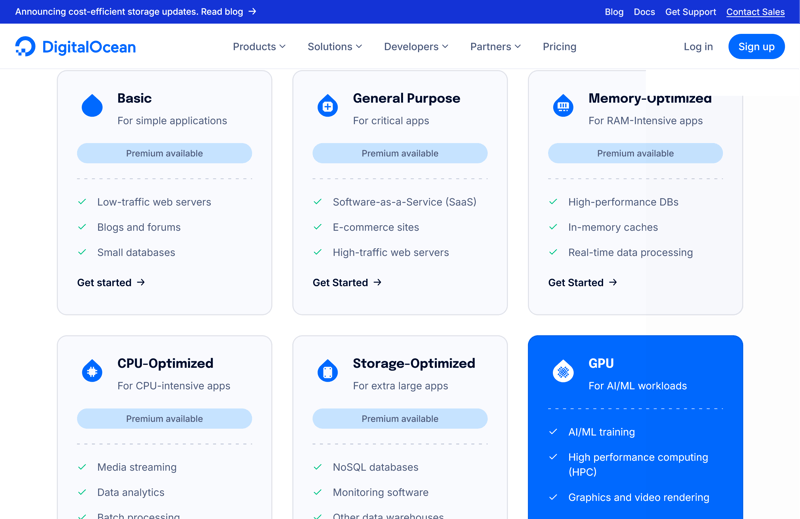
VPS type selection at DigitalOcean.
DigitalOcean also scores well on scalability. You quickly adjust your VPS performance through the interface based on your current needs. This flexibility pays off when your requirements change.
What Are the Pros and Cons of DigitalOcean?
Global Server Locations
DigitalOcean operates data centers in North America, Europe, and Asia. When creating your server, you choose the location that best fits your project.Flexible Billing Options
With hourly billing, you can use resources flexibly and keep tight control over costs. This is especially useful for short-term projects.Comprehensive Documentation
The knowledge base is extensive and includes detailed guides, examples, and API explanations.
No Personal Support
Without a paid support package, assistance is limited. You either reach the hosting provider via email or look for answers in the documentation yourself.
Overall Results
Below are all 11 VPS hosts we reviewed, sorted by their overall score. The table gives you a quick overview of which VPS providers performed best in our review:


Rating Criteria: Our Review Methodology
We reviewed each VPS provider in four categories, with a total of 100 points awarded. Here's how we weighted each area:
- 1.
Server setup & management (20%)
- 2.
Performance (30%)
- 3.
Reliability & support (20%)
- 4.
Costs (30%)
These points add up to a partial score for each category, resulting in a final overall rating for each provider.
We'll explain our criteria in detail below. First, here's the complete rating table:
 |  |  |  |  |  |  | |
|---|---|---|---|---|---|---|---|
| Server Setup & Management (20%) | |||||||
| Interface & Usability | 2/2 Easy-to-understand interface | 2/2 Clear and fast | 2/2 Clearly structured | 0.5/2 Slow and overloaded | 0/2 Confusing, slow | 1/2 Quick, but divided | 1/2 Slow, but easy |
| Server Setup | 8/8 Everything covered | 7/8 Many options | 6/8 Many options | 7/8 Many options | 8/8 Excellent | 6/8 Server setup takes time | 4/8 Few options |
| Server Management | 8/8 All important features are ready. | 8/8 Everything available | 7/8 No rescue system | 8/8 Everything available | 8/8 Everything available | 5/8 Important features missing | 6/8 Basic features available |
| Other Features | 1/2 Load balancer, floating IPs | 2/2 Malware scanner included | 0/2 None available | 2/2 Useful | 2/2 Many cloud tools | 0/2 Not available | 0/2 None available |
| Performance (30%) | |||||||
| CPU Benchmark | 10/15 Single-Core: 1,442
Multi-Core: 7,945 | 13/15 Single-Core: 1,771
Multi-Core: 5,476 | 9/15 Single-Core: 1,468
Multi-Core: 6,177 | 8/15 Single-Core: 1,105
Multi-Core: 7,159 | 2/15 Single-Core: 954
Multi-Core: 1,652 | 0/15 Single-Core: 482
Multi-Core: 1,978 | 2/15 Single-Core: 1,071
Multi-Core: 1,987 |
| RAM Benchmark | 5/5 105,374 MiB/sec | 4/5 86,477 MiB/sec | 5/5 117,934 MiB/sec | 2/5 47,490 MiB/sec | 0/5 18,921 MiB/sec | 1/5 36,342 MiB/sec | 2/5 56,064 MiB/sec |
| Disk Benchmark | 1/5 57,700 IOPS | 5/5 120,300 IOPS | 1/5 40,000 IOPS | 4/5 100,700 IOPS | 4/5 115,800 IOPS | 0/5 21,400 IOPS | 1/5 52,500 IOPS |
| Network Benchmark | 4/5 5,020 MBit/s | 0/5 986 MBit/s | 3/5 4,810 MBit/s | 0/5 1,950 MBit/s | 5/5 6,970 MBit/s | 0/5 292 MBit/s | 5/5 6,220 MBit/s |
| Costs (30%) | |||||||
| Price 8 vCPU | 7/7 $14.09 | 5/7 $19.99 | 7/7 $9.00 | 7/7 $12.75 | 0/7 $96.00 | 5/7 $20.80 | 0/7 $64.99 |
| Price 16 GB RAM | 5/7 $19.59 | 7/7 $9.99 | 7/7 $9.00 | 7/7 $12.75 | 0/7 $96.00 | 7/7 $12.00 | 0/7 $44.99 |
| Price 250 GB SSD | 5/7 $19.59 | 5/7 $19.99 | 7/7 $9.00 | 3/7 $22.08 | 0/7 $96.00 | 7/7 $3.96 | 0/7 $64.99 |
| Price 50 TB Traffic | 2/4 $7.59 | 2/4 $7.99 | 4/4 $2.00 | 4/4 $4.20 | 2/4 $6.00 | 2/4 $4.95 | 0/4 $16.99 |
| Backup costs | 1/3 $5.62 | 3/3 $0.00 | 1/3 $7.00 | 3/3 $0.00 | 1/3 $4.80 | 1/3 $7.34 | 3/3 $0.00 |
| Billing | 2/2 Hourly billing | 0/2 Higher price after the first contract term | 0/2 Higher price after the first contract term | 1/2 Monthly billing | 2/2 Hourly billing | 1/2 Monthly billing | 0/2 Higher price after the first contract term |
| Reliability & Support (20%) | |||||||
| Own documentation & FAQ | 2.5/3 Comprehensive | 2/3 Comprehensive, only in English | 2/3 Good layout | 2.5/3 Comprehensive | 3/3 Very comprehensive | 1/3 Not enough | 1/3 Few, partly auto-translated |
| Email support | 3/3 Quick responses | 2/3 Hidden, but works | 0/3 Not available | 0.5/3 Inadequate response | 3/3 Extremely fast | 2.5/3 Quick response | 0/3 Not available |
| Phone support | 3/3 Hardly any wait time | 0/3 Not available | 3/3 As it should be | 1.5/3 Longer wait time | 0/3 Not available | 0/3 Not available | 3/3 Perfect |
| Live chat | 1.5/3 Only AI chatbot | 3/3 Quick help | 0/3 Hardly available, incorrect AI responses | 0/3 Useless | 0/3 Paid | 3/3 Skilled and fast | 3/3 High quality |
| Customer feedback from the web | 7/8 Very positive | 6/8 Positive | 6/8 Positive | 2/8 Negative | 7/8 Very positive | 3/8 Rather negative | 6/8 Positive |
Server Setup & Management (20%)
In this category, we evaluate how easy it is to set up and use a server on a daily basis. This includes a well-designed interface, a clearly structured menu, and simple navigation.
Hosting providers score higher if they offer different data center locations, OS images, software, and panels during setup, and if they support both password and SSH access. Immediate availability after ordering also factors into the rating.
For ongoing operations, we check which management features are available. This includes web console access and options for backups and server scaling. Providers that offer snapshots, firewall management, and server monitoring receive higher scores.
OVH | Hostinger | Hetzner | DigitalOcean | IONOS | GoDaddy | Contabo | |
|---|---|---|---|---|---|---|---|
| Rescue System | ✓ | ✓ | ✓ | ✓ | ✗ | ✓ | ✓ |
| Web Console | ✓ | ✓ | ✓ | ✓ | ✓ | ✓ | ✗ |
| Monitoring | ✓ | ✓ | ✓ | ✓ | ✓ | ✓ | ✗ |
| Backups | ✓ | ✓ | ✓ | ✓ | ✓ | ✓ | ✓ |
| Snapshots | ✓ | ✓ | ✓ | ✓ | ✓ | ✗ | ✓ |
| Scaling | ✓ | ✓ | ✓ | ✓ | ✓ | ✓ | ✓ |
| Firewall | ✓ | ✓ | ✓ | ✓ | ✓ | ✗ | ✗ |
| Total | 7 | 7 | 7 | 7 | 6 | 5 | 4 |
Performance (30%)
To objectively assess VPS performance, we measure key metrics in a VPS benchmark. We look at five main indicators:
- 1.
Single core – the speed at which the server handles individual processes.
- 2.
Multi core – its ability to manage multiple tasks at once.
- 3.
RAM – the speed at which the memory processes and delivers data.
- 4.
SSD – the number of read and write operations per second possible (IOPS).
- 5.
Network connection – the speed at which the server can send and receive data.
We use the Yet-Another-Bench-Script (with Geekbench 6, FIO, and iPerf3) along with the STREAM benchmark.
Learn more about our methodology here:

Reliability & Support (20%)
In this category, we check the level of support the host offers at no extra cost. One important factor is the quality of documentation: Does the company offer clear FAQs, step-by-step guides, and well-explained technical resources?
We also rate the quality, availability, and response time of email and phone support. If available, live chat and AI chatbots are included in our rating as well, based on a check on actual response quality. We also consider customer feedback from external review platforms like Trustpilot.
Costs (30%)
In our cost comparison, we check how much performance you get for your money. Our comparison is based on the lowest price for a VPS with 8 vCPUs, 16 GB RAM, 250 GB SSD, or 50 TB outbound traffic on a 24-month contract.
We also factor in any extra costs for automatic backups. Flexible billing by the minute or hour is a plus as well.
| 8 vCPU | 16 GB RAM | 250 GB SSD | 50 TB Traffic | Backup | |
|---|---|---|---|---|---|
| $9.00 | $9.00 | $9.00 | $2.00 | $7.00 |
| $12.75 | $12.75 | $22.08 | $4.20 | $0.00 |
| $14.09 | $19.59 | $19.59 | $7.59 | $5.62 |
| $19.99 | $9.99 | $19.99 | $7.99 | $0.00 |
| $20.80 | $12.00 | $3.96 | $4.95 | $7.34 |
| $64.99 | $44.99 | $64.99 | $16.99 | $0.00 |
| $96.00 | $96.00 | $96.00 | $6.00 | $4.80 |