
IONOS VPS Review 2026: How Well Do the Servers Perform?


Powerful hardware, affordable prices, and easy management: IONOS promises an all-in-one solution for everyone with its VPS offerings. But does it actually deliver on that promise?
We put their offers to the test, from setup to performance to support, to find out whether IONOS really is a solid choice in the VPS space.


Their offerings range from basic email and hosting packages to comprehensive server and cloud solutions. This broad range attracts a diverse customer base: both individual users and businesses rely on services from this provider based in Germany.
IONOS Server Review
Very affordable VPS plans
IONOS is one of the most budget-friendly providers in our comparison. You can get a capable VPS for just a few dollars per month.Unlimited traffic
IONOS offers unlimited data transfer at no extra cost. This is especially attractive if you expect high visitor numbers or large data volumes.Plesk Web Host Edition included
A Plesk license is already included. No extra booking is required, you can start managing your server immediately with the full-featured control panel.User-friendly management interface
The dashboard is clean, modern, and easy to understand. Even beginners can quickly find their way around and manage their server without technical experience.
No easy scaling
You can't add more resources in a single click. Instead, you need to switch plans entirely, which limits flexibility during day-to-day operations.
Server Setup & Management
| Interface & Usability | Clearly structured | 2/2 |
| Server Setup | Many options | 6/8 |
| Server Management | No rescue system | 7/8 |
| Other Features | None available | 0/2 |
IONOS makes getting started refreshingly simple. Registration takes just a few steps, and in most cases all you need to do is confirm your email address. Only in rare cases does the provider request additional documents such as a government-issued ID or proof of business registration. According to IONOS, this is for fraud prevention.
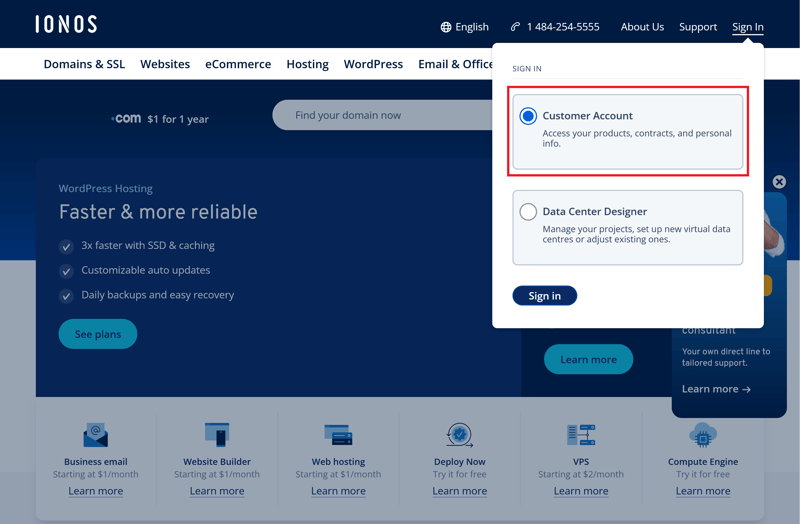
Customer login to "My IONOS."
The IONOS Dashboard: User-Friendly and Intuitive
The IONOS dashboard serves as the central hub for all your products and settings. The interface is well-organized and allows quick navigation to the most important areas. "Server & Cloud" brings you to the management section for virtual servers, dedicated machines, and cloud instances.
The product overview also includes additional categories like security solutions, the agency partner portal, and IONOS GPT, a free AI tool for creating text, images, and code.
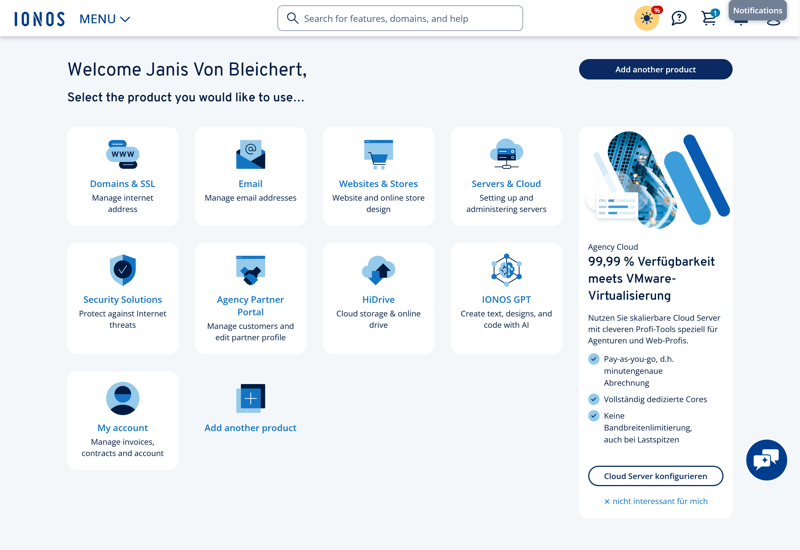
The product overview within the IONOS dashboard.
The "Add another product" button doesn't do what you'd expect. Instead of showing an overview of IONOS products or opening the web shop, it simply takes you to the domain registration option.
In the "My Account" section, the most important management features, such as contracts, invoices, and security settings, are grouped into separate tiles. Each section is self-explanatory, and the layout stays consistent throughout.
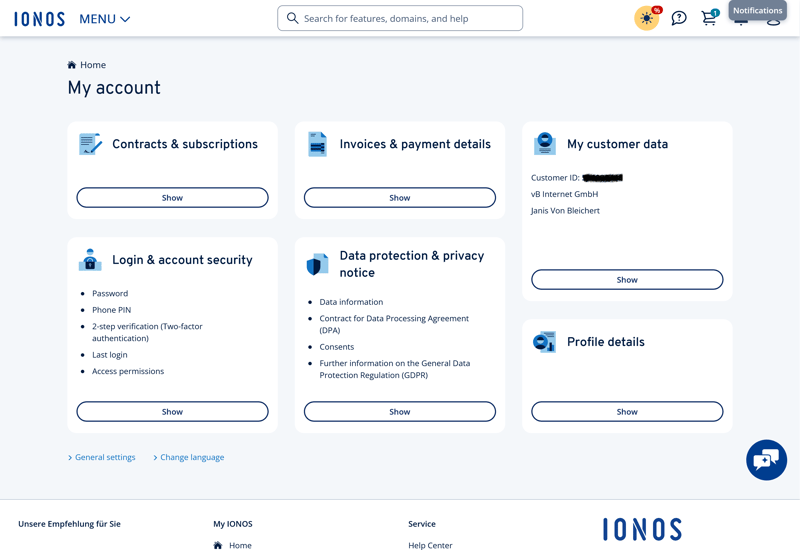
The "My Account" section.
You can change the language at any time by clicking your profile picture in the top right corner. In addition to English, the IONOS dashboard is also available in German, Spanish, French, and Italian.
However, emails, invoices, and system messages remain in the language in which your contract was originally set up. This feels a bit unpolished and inconsistent.
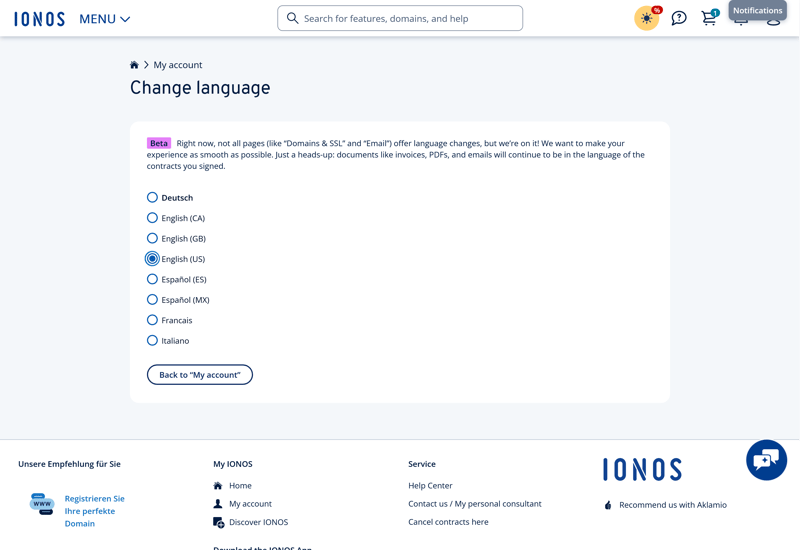
Five languages are available.
IONOS doesn't offer a dark mode dashboard. There are no other display or view settings available either.

Overall, the IONOS interface looks professional and user-friendly. The clear visual layout and self-explanatory tiles make it easy to get started, even without technical knowledge. Customers can expect a clean, easy-to-understand dashboard.
Server Setup at IONOS: Rent a VPS Quickly
IONOS offers six Linux VPS options with different specifications, ranging from "VPS XS" to "VPS XXL."
The main overview shows prices for a 24-month term. This matters because the monthly price increases significantly with shorter terms. The pricing is transparent during checkout, but the main overview doesn't always make this clear (more on plans later).
A setup fee applies for one-month contracts. However, IONOS always updates the total price for your current setup in real time.

IONOS offers six Linux VPS options.
Technical details like the number of vCPU cores, RAM, and storage (NVMe) are clearly listed. IONOS also highlights unlimited traffic and the free Plesk Web Host Edition.
During setup, you can choose the server location (the US, Germany, Spain, the United Kingdom, or a general EU region) and the operating system (Ubuntu, Debian, Rocky Linux, or AlmaLinux). Each Linux distribution can be installed either as a standard version or with the Plesk panel pre-installed. There's no extra charge.
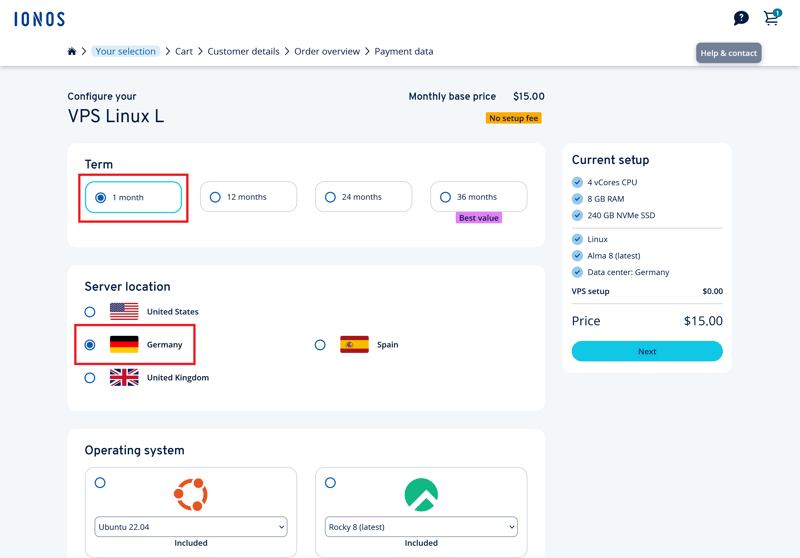
Adjusting the contract term and server location.
For data backup, there's a paid automatic backup option available. Plans range from 100 GB to 2 TB of storage, with prices based on capacity. A simple, free backup option is missing. Automatic backups are optional, you can also add them later in your customer account if needed.
After you enter your personal information, IONOS shows an order summary with "Contract Details" about the term and billing. You can pay by credit card, direct debit, PayPal, Google Pay, and other methods. Provisioning is fast. In our review, the VPS was ready to go in about three minutes.
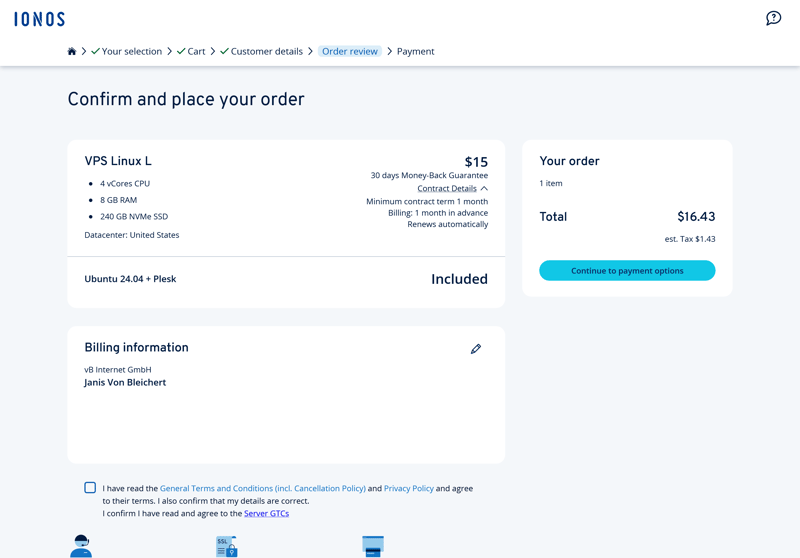
Order summary with contract details.
The ordering process is quite logical and easy to follow. You complete all steps without any technical knowledge. There is one downside, however: the plan overview looks cheaper than the actual prices, at least for short-term contracts. Adding a term selector directly on the main page would help avoid confusion.
Managing Your Server in the Cloud Panel
At IONOS, you manage your server through the Cloud Panel. This is a separate interface where you configure and monitor your VPS. You can access it via the "Server & Cloud" menu item in the IONOS dashboard.
Here you'll first see a product overview that lists all your active contracts, including your VPS. From there, you can open the Cloud Panel directly.
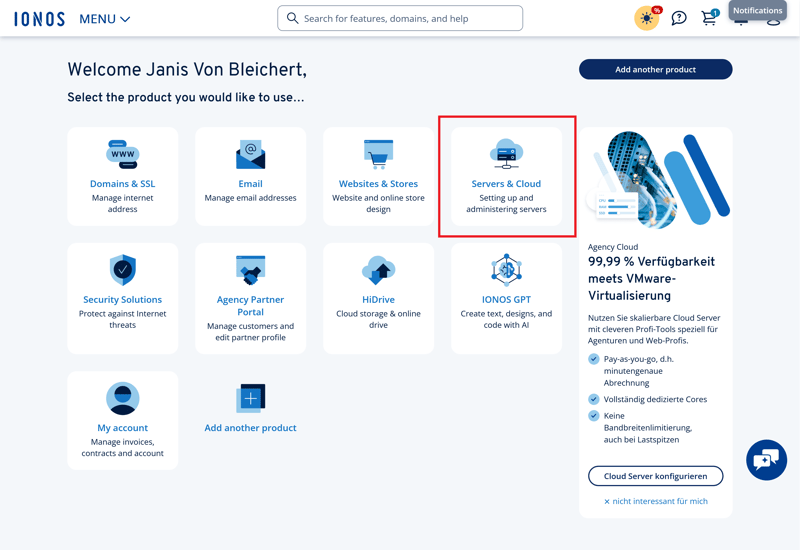
Product overview with "Server & Cloud" highlighted.
In the Cloud Panel, the sidebar on the left is organized into the main categories "Infrastructure," "Network," "Security," "Backup," and "Management."
The main area ("Server") displays the most important basic information: name, status, IP address, vCores, RAM, SSD storage, operating system, and data center location. The layout is clean, logically structured, and uses subtle colors.
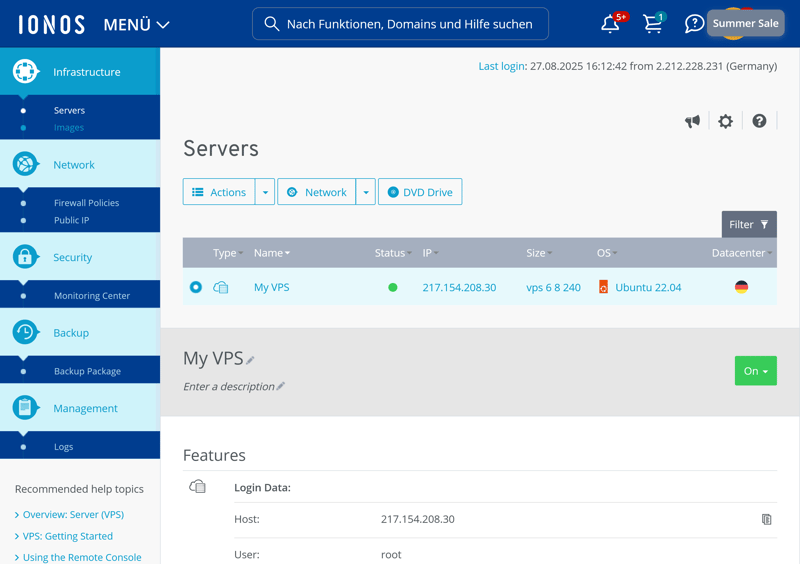
The IONOS Cloud Panel.
Use the "Actions" menu above the server list to perform basic server tasks. You restart your server, pause it, access it via a remote console, or reinstall the operating system.
The "Delete" command is grayed out when it doesn't apply. IONOS VPS servers don't offer a rescue mode that would let you access the system during serious errors.
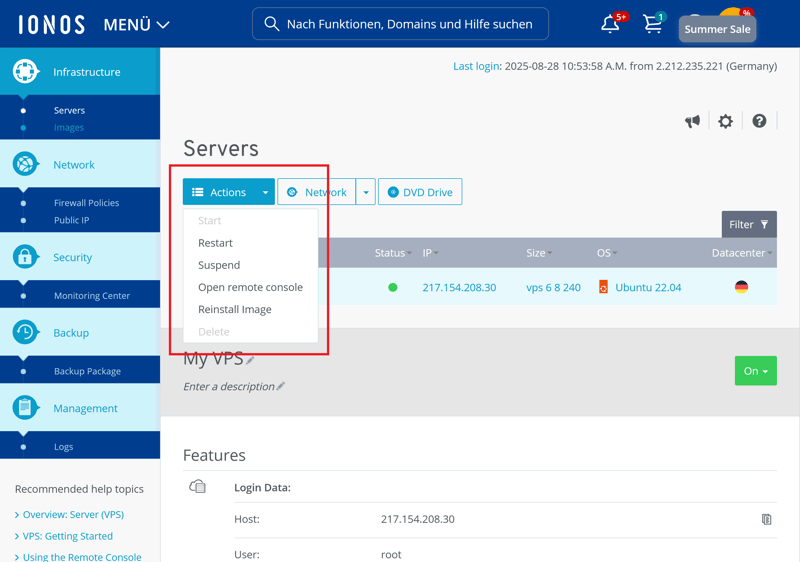
Available server actions.
Network & Security
Under "Network," you can assign a public IP address to your server. You choose between IPv4 and IPv6. IONOS charges a monthly fee for additional IPv4 addresses.
In the "Security" section, you configure the firewall. It's highly flexible yet easy to understand. You can open specific ports or protocols and create multiple rules at once without any extra steps.
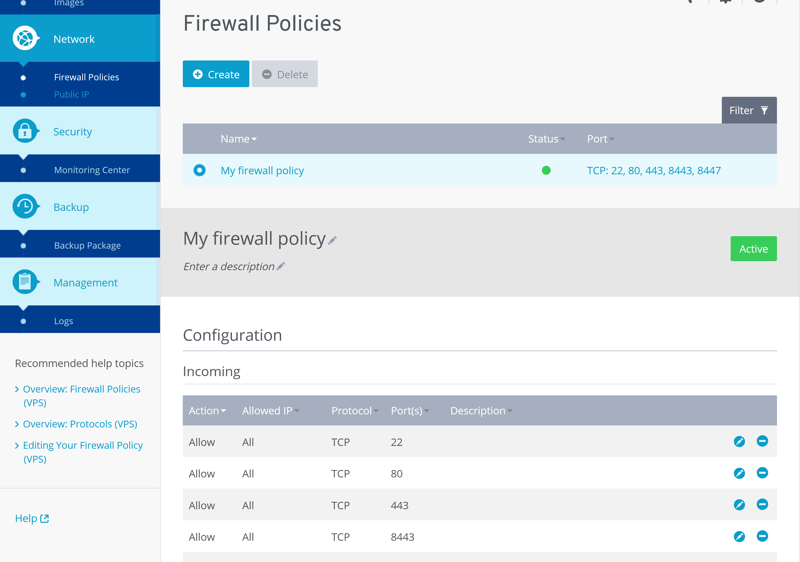
Configuring your VPS firewall.
Backup, Snapshots & Monitoring
IONOS offers a comprehensive backup feature. You choose a backup package with either a fixed capacity or a usage-based model.
The fixed option backs up to 100 GB across three devices (such as drives, volumes, individual files, or folders) in the smallest plan. The largest plan covers up to 2,000 GB. With the flex option, IONOS only backs up and charges for the actual gigabytes you need to store, regardless of the number of devices.
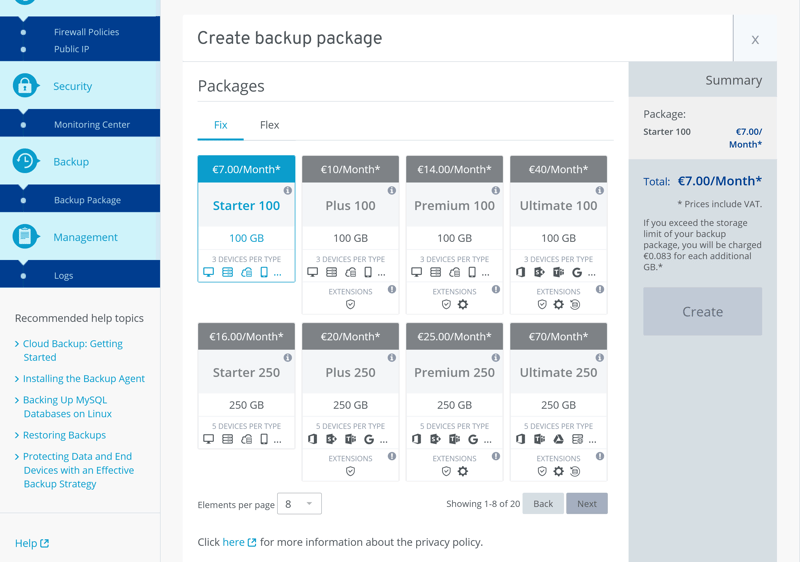
Backup packages at IONOS.
Server snapshots are called "Images" at IONOS. They let you save a copy of your running system, including the operating system, applications, and data. Creating them costs extra, and you pay a monthly fee based on the storage space used.
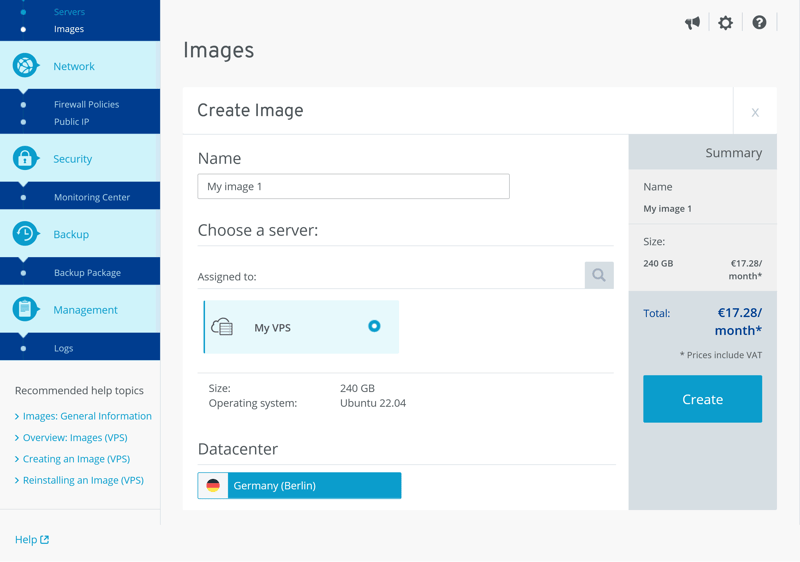
Paid server snapshots or "Images".
The Monitoring Center provides detailed insights into your server's performance. It shows metrics like bytes and packets transferred per second (incoming and outgoing), IOPS values, and network utilization.
You also get reports on CPU usage and memory activity. Views can be filtered for time periods ranging from 15 minutes to two weeks. Custom time ranges are available too. IONOS outperforms many competitors in this respect.
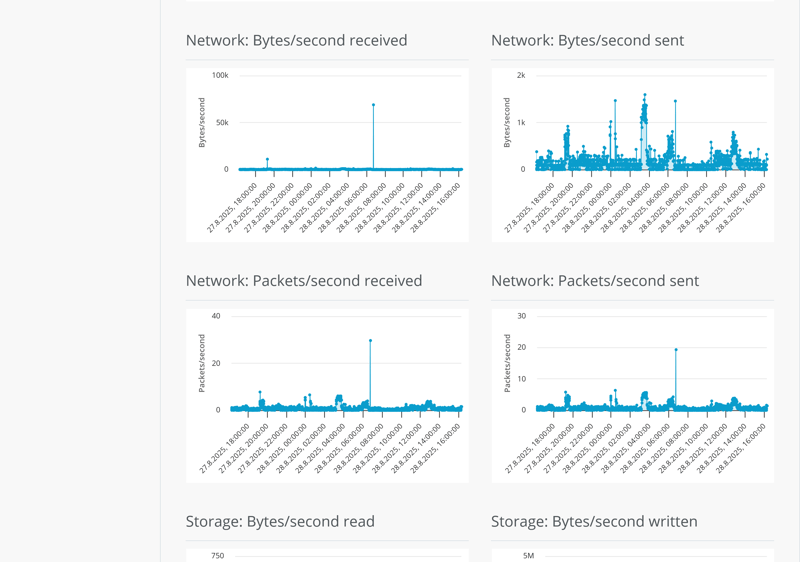
The Monitoring Center.
Reinstallation & Scaling
When reinstalling your server's operating system, you choose from four Linux distributions: Ubuntu, Debian, Rocky, or AlmaLinux, each available in two versions. Alternatively, you use a pre-configured ISO image from IONOS with Clonezilla or GParted.
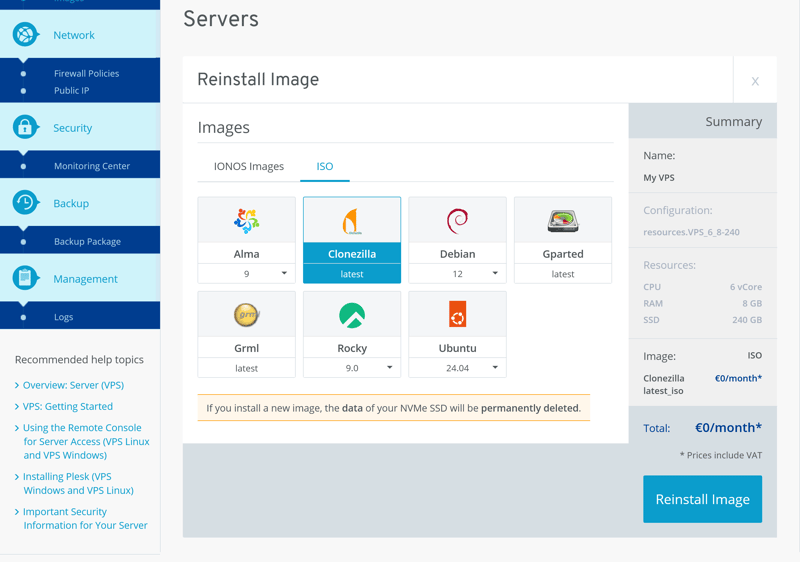
Reinstalling an operating system.
Scaling your VPS isn't done through the Cloud Panel. Instead, you'll find the option to do so in the contract management section of your customer account. IONOS shows you whether a plan change is possible and lists the available alternative plans. Unfortunately, flexible resource scaling isn't an option.

IONOS notifies customers about potential plan changes.
The scaling suggestions only include larger resource packages with more CPU cores, RAM, and SSD storage. According to IONOS, downgrading a VPS is not possible.
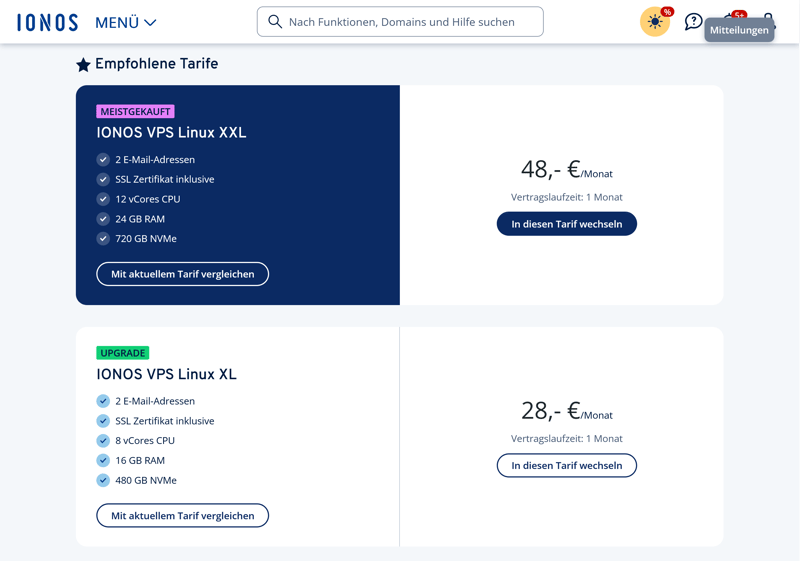
IONOS recommends larger plans only.
Changing plans doesn't require manual data migration or reconfiguration. According to a support representative, IONOS automatically transfers all data, including the operating system. This is also confirmed in the IONOS documentation.
During the transition, the server will be unavailable for a few minutes. Once the change is complete, IONOS will notify you by email.
Here's a comparison of IONOS's key server features with those of other providers:
 IONOS |  OVH |  Hostinger |  Hetzner |  DigitalOcean |  GoDaddy |  Contabo | |
|---|---|---|---|---|---|---|---|
| Rescue System | ✗ | ✓ | ✓ | ✓ | ✓ | ✓ | ✓ |
| Web Console | ✓ | ✓ | ✓ | ✓ | ✓ | ✓ | ✗ |
| Monitoring | ✓ | ✓ | ✓ | ✓ | ✓ | ✓ | ✗ |
| Backups | ✓ | ✓ | ✓ | ✓ | ✓ | ✓ | ✓ |
| Snapshots | ✓ | ✓ | ✓ | ✓ | ✓ | ✗ | ✓ |
| Scaling | ✓ | ✓ | ✓ | ✓ | ✓ | ✓ | ✓ |
| Firewall | ✓ | ✓ | ✓ | ✓ | ✓ | ✗ | ✗ |
| Total | 6 | 7 | 7 | 7 | 7 | 5 | 4 |
IONOS gets a lot right when it comes to server management. The Cloud Panel offers a clean, well-organized interface. That's precisely what both beginners and more tech-savvy users need.
However, one essential feature is missing: a rescue system, like many other providers offer. The scaling options could also be more flexible.
Performance
| CPU Benchmark | Single-Core: 1,468 Multi-Core: 6,177 | 9/15 |
| RAM Benchmark | 117,934 MiB/sec | 5/5 |
| Disk Benchmark | 40,000 IOPS | 1/5 |
| Network Benchmark | 4,810 MBit/s | 3/5 |
To compare providers' hardware, we run standardized, multi-category benchmarks, yielding a balanced picture of overall performance.
We focus on five key metrics:
- 1.
Single-core – the performance of a single CPU core
- 2.
Multi-core – the combined performance of all cores
- 3.
RAM – the speed of the system memory
- 4.
SSD (IOPS) – the speed of the SSD storage
- 5.
Network – the maximum data transfer rate of the server
Our measurements provide clear comparison values for each provider. The higher the value, the better the performance. We explain the benchmark criteria in detail here:

Solid Single-Core Performance
In the single-core test, which is especially important for traditional web applications and many everyday services, IONOS takes a strong third place. With 1,468 points, the provider ranks among the top performers. Applications with low parallelism run quickly on the VPS we tested.
| Geekbench 6 (Single Core) | |
|---|---|
| 1,771 |
| 1,468 |
| 1,442 |
| 1,105 |
| 1,071 |
| 954 |
| 482 |
Average Multi-Core Results
The results aren't quite as impressive when the workload is distributed across multiple cores. In the multi-core test, IONOS scores 6,177 points, landing in sixth place. This puts performance in the middle of the pack. For heavily parallelized applications like data analysis or rendering, there are both stronger and weaker alternatives available.
| Geekbench 6 (Multi Core) | |
|---|---|
| 7,945 |
| 7,159 |
| 6,177 |
| 5,476 |
| 1,987 |
| 1,978 |
| 1,652 |
Impressively Fast RAM
RAM performance is one of IONOS's biggest strengths. With a memory throughput of 117,934 MiB/s, the IONOS VPS takes second place in this category. This is especially noticeable in memory-intensive processes and indicates fast internal data handling.
| stream copy | |
|---|---|
| 117,934 MiB/sec |
| 105,374 MiB/sec |
| 86,477 MiB/sec |
| 56,064 MiB/sec |
| 47,490 MiB/sec |
| 36,342 MiB/sec |
| 18,921 MiB/sec |
Storage Has Weaknesses
SSD performance is less impressive. With only 40,000 IOPS, IONOS lands in eighth place. This relatively low performance can hurt database-heavy applications, such as e-commerce platforms or larger CMS installations.
| fio (Total IOPS, Block Size 4k) | |
|---|---|
| 120,300 IOPS |
| 115,800 IOPS |
| 100,700 IOPS |
| 57,700 IOPS |
| 52,500 IOPS |
| 40,000 IOPS |
| 21,400 IOPS |
Below-Average Network Speed
IONOS also falls in the lower middle range for network performance. 4,810 Mbit/s puts it in seventh place. That does not indicate a poor connection, but several other providers deliver noticeably better results.
The network speed is fine for simple web applications. However, it can become a real drawback for data-intensive projects or services with an international audience.
| iperf (Receive Speed, IPv4, London) | |
|---|---|
| 6,970 MBit/s |
| 6,220 MBit/s |
| 5,020 MBit/s |
| 4,810 MBit/s |
| 1,950 MBit/s |
| 986 MBit/s |
| 292 MBit/s |
Overall, IONOS delivers good performance in our benchmark tests. The high RAM performance and strong single-core CPU results stand out as clear positives. This makes the VPS a good fit for traditional web applications, smaller apps, or services that rely heavily on RAM.
For data-intensive applications or projects with high storage or network demands, there are better options. Multi-core performance is only average, and storage and network speeds fall below the competition. That said, if you understand the strengths of this offering and use them wisely, IONOS still delivers a competitive package.
Costs
| Price 8 vCPU | $9.00 | 7/7 |
| Price 16 GB RAM | $9.00 | 7/7 |
| Price 250 GB SSD | $9.00 | 7/7 |
| Price 50 TB Traffic | $2.00 | 4/4 |
| Backup costs | $7.00 | 1/3 |
| Billing | Higher price after the first contract term | 0/2 |
Every hosting provider has different pricing models. To compare VPS costs fairly, we look at prices for specific test configurations and evaluate all providers using the same criteria.
Here's what we look at:
- 1.
The cheapest VPS with at least 8 vCPUs
- 2.
The cheapest VPS with at least 16 GB RAM
- 3.
The cheapest VPS with at least 250 GB SSD storage
- 4.
The costs of 50 TB monthly data transfer
- 5.
The price of automatic backups
Each category is weighted and contributes to the overall score. Providers earn more points if they offer lower prices or more flexible billing options.
We base our ratings solely on regular list prices including VAT or sales tax where applicable. We don't factor in introductory discounts, promotions, or limited-time offers.
Here's how IONOS VPS costs compare to other providers:
| 8 vCPU | 16 GB RAM | 250 GB SSD | 50 TB Traffic | Backup | |
|---|---|---|---|---|---|
| $9.00 | $9.00 | $9.00 | $2.00 | $7.00 |
| $12.75 | $12.75 | $22.08 | $4.20 | $0.00 |
| $14.09 | $19.59 | $19.59 | $7.59 | $5.62 |
| $19.99 | $9.99 | $19.99 | $7.99 | $0.00 |
| $20.80 | $12.00 | $3.96 | $4.95 | $7.34 |
| $64.99 | $44.99 | $64.99 | $16.99 | $0.00 |
| $96.00 | $96.00 | $96.00 | $6.00 | $4.80 |
IONOS VPS Plans
IONOS VPS plans differ in computing power, storage capacity, and network connectivity. Resources increase with each tier:
vCPUs: All VPS plans use shared CPU cores. This means multiple virtual machines share the same physical resources. You can expect solid baseline performance, but you may notice slowdowns when other instances on the same host are under heavy load.
RAM: IONOS offers 1 GB of RAM in the smallest plan and up to 24 GB in the largest. This range covers many use cases, from simple development environments to database-driven applications with concurrent access.
Storage: Each instance uses fast NVMe SSD storage. Capacity ranges from 10 to 720 GB. Additional storage is available through backup solutions or separate storage packages.
Network & traffic: Depending on the plan, you get up to 1 Gbit/s connectivity with unlimited data transfer. This makes these servers a great fit for projects with high traffic or large data volumes.
IP addresses: Each VPS includes one public IPv4 address. You can add more for an extra fee. A full IPv6/80 address block is also included.
IONOS bills Linux VPS plans on a monthly basis at a minimum. You can choose between 1, 12, or 24-month terms for each plan. This lets you decide how much flexibility or price stability you want.
Here's a comparison of all IONOS VPS plans:
| VPS XS | VPS S | VPS M | |
|---|---|---|---|
| Monthly Price | $2.00 | from $3.00 | from $4.00 |
| Contract Period (Months) | 1 | 1 - 36 | 1 - 36 |
| Performance | |||
| Storage | 10 GB | 80 GB | 120 GB |
| RAM | 1 GB | 2 GB | 4 GB |
| CPU Cores | 1 | 2 | 4 |
| Dedicated Cores | ✗ | ✗ | ✗ |
| Features | |||
| Type | vServer | vServer | vServer |
| OS | Linux | Linux | Linux |
| Managed | ✗ | ✗ | ✗ |
| SSD Storage | ✓ | ✓ | ✓ |
Performance Range and Scaling
Not sure which plan fits your needs? The VPS packages fall into three categories. Here's a quick guide to help you choose:
Entry-level plans | Mid-range plans | High-end plans |
|---|---|---|
|
|
|
|
|
|
IONOS is one of the most affordable VPS hosts in our comparison. If you need a VPS with 8 or 16 GB RAM for your project, no other provider we reviewed is cheaper. The only downside is that backups cost extra.
The data transfer conditions are also impressive: even the smallest VPS plans include unlimited traffic. This is a clear advantage for projects with high data volumes or heavy visitor traffic.
Reliability & Support
| Own documentation & FAQ | Good layout | 2/3 |
| Email support | Not available | 0/3 |
| Phone support | As it should be | 3/3 |
| Live chat | Hardly available, incorrect AI responses | 0/3 |
| Customer feedback from the web | Positive | 6/8 |
IONOS provides extensive online documentation covering key topics like server management, security, networking, and applications. The content is well-organized, easy to understand, and includes useful step-by-step guides.
A helpful feature is the product label at the beginning of each article. It tells you which hosting type the guide applies to, such as VPS, dedicated server, or cloud environments.
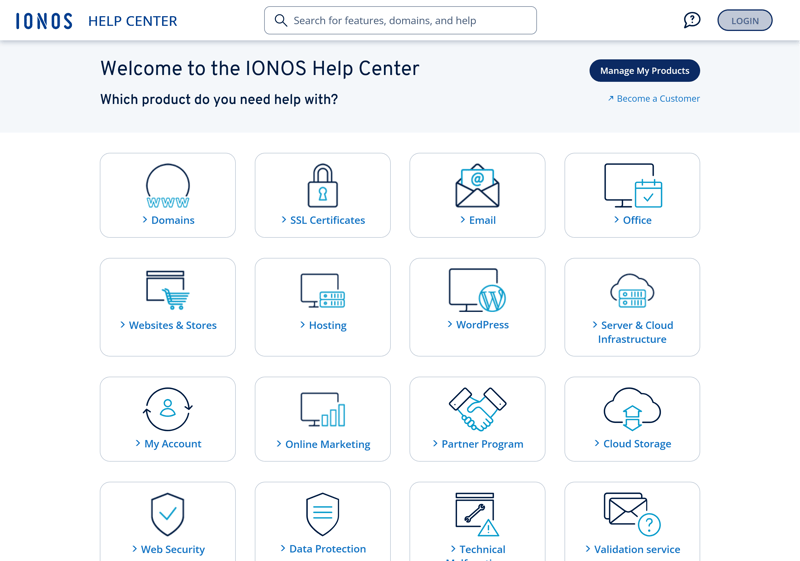
The IONOS online documentation.
However, there's no direct link between the documentation and support. You can't ask follow-up questions directly from an article. Some topics are only available in one language.
Strong Phone Support
IONOS really shines when it comes to phone support. In our review, we reached a representative in just under four minutes. They understood the issue right away and resolved it quickly.
The 24/7 phone support is included at no extra cost. That's not a given, as other providers charge a monthly fee for a similar level of service. IONOS clearly stands out when it comes to phone availability and helpfulness.
Email and Chat: Hard to Reach
IONOS lists email as a support channel on its website but doesn't actually provide email support. There's no ticket system and no support email address. You have to contact them by phone or through one of the two chat options.

IONOS does not offer email support.
There is a technical support chat, but we couldn't reach it at any time during our review. Whether it was morning, afternoon, or evening, the message always said the chat was "currently closed".
The product consultation chat was a different story. A real person responded to questions right away. The quality and clarity of the answers were excellent.

The support chat is always "currently closed."
AI Chat Makes Up Features
Logged-in users also have access to an AI chat powered by an OpenAI language model. Our experience with it wasn't great. During our review, the AI repeatedly provided incorrect information, including features and menu options that don't exist. When we pointed this out, it suggested contacting human support.
In its current state, the chat offers no reliable value and can't replace real technical support.
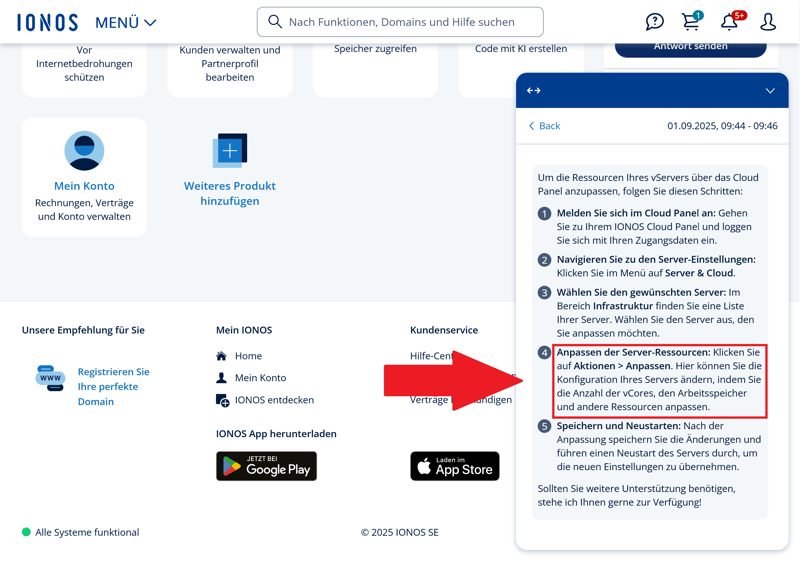
IONOS AI is wrong: This menu option doesn't exist.
Plenty of Criticism for IONOS Customer Service
A look at review sites shows a mixed picture. While many customers are happy with IONOS VPS offerings overall, its customer service receives a lot of criticism.
Some users complain about annoying sales calls. Others mention problems reaching the live chat. There are also reports of billing and cancellation issues that support couldn't resolve.
Phone support works reliably and without long wait times, which isn't common in the hosting industry. The call quality, staff expertise, and around-the-clock availability are clear strengths for IONOS.
The other support channels do have a lot of room for improvement. A proper ticket system or at least a working chat would be a welcome addition. The documentation is helpful, but it's no substitute for real conversation. The AI chat is basically useless.
Conclusion
IONOS may not break any records, but it gets many things right. The VPS options are affordable, easy to manage, and run reliably. Performance is solid, and the provider stands out when it comes to RAM and single-core performance.
The limited flexibility is less impressive. You can only expand resources by switching to a different plan. If you rely on modern DevOps approaches or need precise control over your infrastructure, you'll quickly hit a wall.
That said, IONOS is still a strong choice for traditional hosting projects and mid-sized web services.

IONOS User Experiences
A look at online reviews shows that most customers are happy with IONOS. Here's why:
Reliable performance
The servers run smoothly in everyday use and rarely show any issues. Users seldom report outages or unexpected interruptions.Easy setup
The Cloud Panel has a clean layout and is great for beginners. Help pages support you with initial setup and daily tasks.Strong feature set
Root access, snapshot backups, and configurable firewall rules are all included. The server features cover a wide range of use cases.
Criticism often focuses on organizational aspects:
Sales pressure
Some users find the follow-up contact from staff after placing an order too intense and pushy.Live chat availability
Unlike the phone hotline, the chat function is not available around the clock.
Alternatives to IONOS
Still not sure if IONOS is the right VPS fit for you? Depending on what you're looking for, these alternatives might be worth considering:
Hetzner scores high on flexibility, you can scale resources instantly when needed. It also offers a rescue system for emergencies, which IONOS lacks.
OVH offers affordable plans and delivers strong multi-core performance. It's worth a look if you need a lot of computing power at the lowest possible price.
DigitalOcean is clearly aimed at developers. It offers customizable resources, API access, and seamless integration with popular DevOps workflows.
Here are more alternatives to IONOS: