OVH VPS Review: How Do Their Virtual Servers Compare Against Competitors?


OVH's VPS plans are flexible and affordable—at least on paper. But how do they perform in the real world? We put them through a thorough review to find out.
We put OVH's VPS offerings to the test, covering everything from setup and performance to support. In this review, you'll find out where OVH performs best, where it disappoints, and if these VPS plans are right for you.


One standout feature of OVH is its fast scalability. You can upgrade your plan in seconds and expand your infrastructure as needed. This makes OVH appealing to businesses that want to scale flexibly.
OVH Server Review
Great value for money
OVH delivers strong server performance at a low price. The features and performance are very attractive.Easy scalability
Need more power? Just add resources. This saves time and lets you adapt quickly to growing demands.Fast provisioning
New VPS instances are available immediately after you place your order. You can get started right away.
Weak support
Customer service has weaknesses in almost every area. If you're in need of personal assistance, you'll have to pay for premium support first.Poor network connectivity
In our comparison, OVH ranked near the bottom for network performance. Depending on your project, connectivity could become a bottleneck. RAM also performed poorly in our benchmarks.
Server Setup & Management
| Interface & Usability | Slow and overloaded | 0.5/2 |
| Server Setup | Many options | 7/8 |
| Server Management | Everything available | 8/8 |
| Other Features | Useful | 2/2 |
Signing up with OVH is quick and easy. After entering your personal information, you'll receive a confirmation email, and your account is ready to go. You can also set up two-factor authentication right away if you prefer.
The OVH Dashboard: Too Much & Too Slow
The dashboard is your central management hub. It's where you manage your products, keep track of invoices and contracts, and contact support through the ticket system.
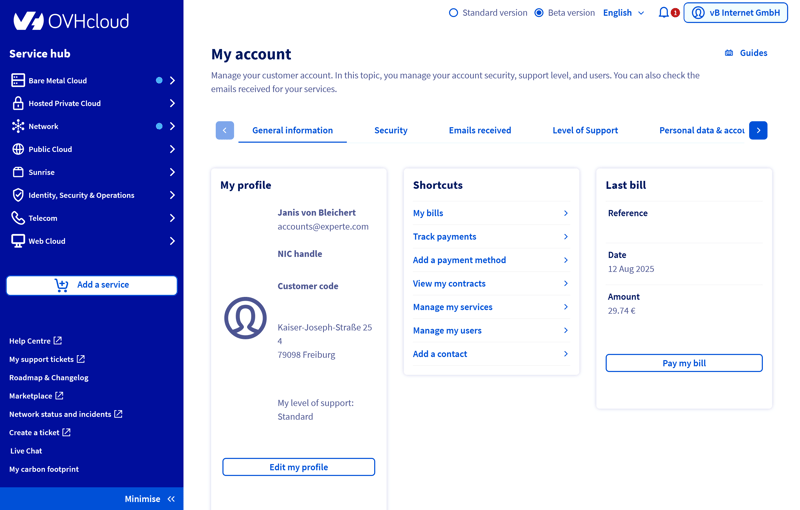
The OVH dashboard.
The dashboard is divided into three sections: the main area (center), the sidebar (left), and the header (top).
The main area displays your key account information:
My Profile shows your name, email address, customer ID, address, and support level. Click "Edit my profile" to update your information.
Shortcuts provide quick access to features like invoices, payments, contracts, services, and user management.
My last invoice displays the date, reference number, and amount of your most recent bill. Click "View invoice" to open the document.
The sidebar can be shown or hidden. It contains your products and services:
Bare Metal Cloud, Hosted Private Cloud, Network, Public Cloud, Sunrise, Telecom, Web Cloud: Here you'll find your active services.
Use Add a service to order new products from the OVH shop.
Additional links take you to the Help Center, support requests, existing tickets, live chat, and the marketplace. You can also check the current OVH network status from there.
In the header area of the dashboard, you'll find some general options and settings:
Dashboard version selection: You choose between the classic version and a new beta version. We didn't notice any major differences, aside from a slightly different header bar. All features are available in both versions.
Language selection: Besides English, the dashboard is available in German, French, Italian, Polish, and Portuguese.
Account menu: From the top right corner, you access additional settings. These are identical to the shortcuts in the main area.
Some links in the sidebar aren't immediately clear because tooltips or other brief descriptions are missing.
Terms like "Sunrise" or "HYCU" are also somewhat cryptic and cause confusion. Beginners in particular may not know what these menu items do or whether they're even relevant.

The OVH dashboard offers many features but feels cluttered. Important information isn't separated from less relevant items. Areas like "Telecommunications," which aren't useful for hosting product customers, make navigation unnecessarily complex.
The new beta version doesn't improve things either. It looks a bit more modern but is still difficult to navigate. Also, there are minor technical issues like frequent re-logins and a noticeably sluggish interface. Overall, the user experience falls short of expectations.
Server Setup at OVH: Simple and Flexible
Ordering a VPS at OVH is refreshingly simple. You select a plan, choose a location, pick an operating system, and add extras like backups or snapshots if needed. The ordering process is structured, and any additional costs are displayed transparently.
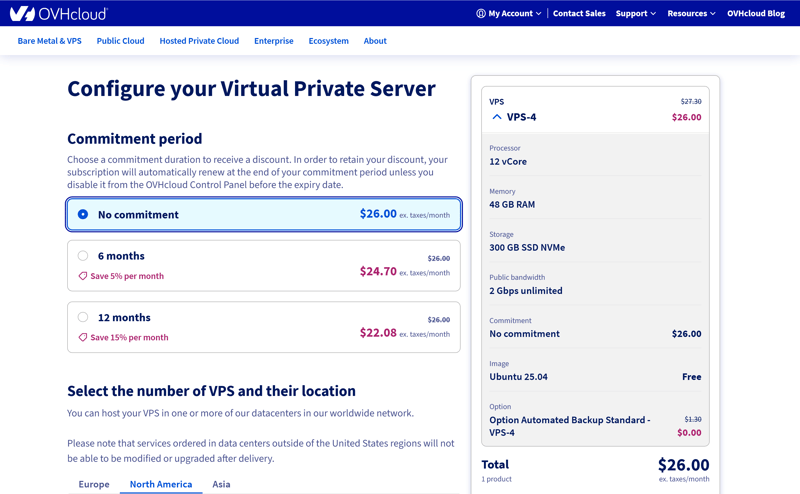
For contract terms, the longer you commit, the lower the price.
OVH operates data centers in multiple countries and continents.
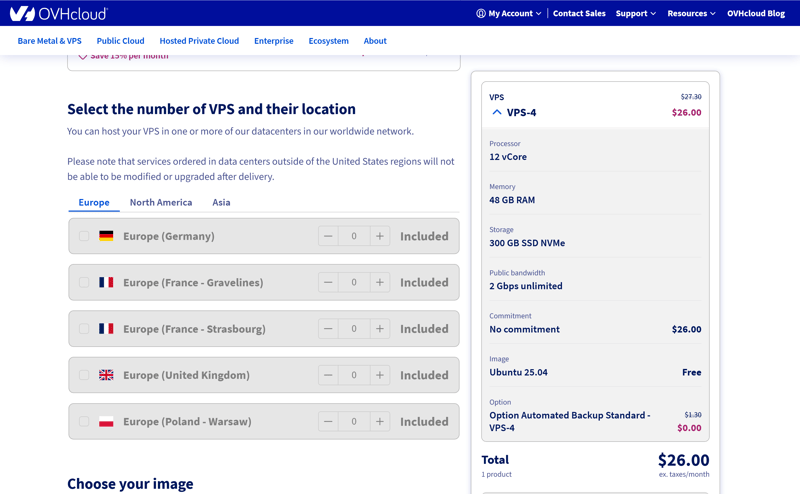
Server location selection at OVH.
For the operating system, you can choose from the Linux distributions Ubuntu, Debian, Fedora, AlmaLinux, Rocky Linux, CloudLinux, and FreeBSD. Windows Server comes with a significant surcharge.
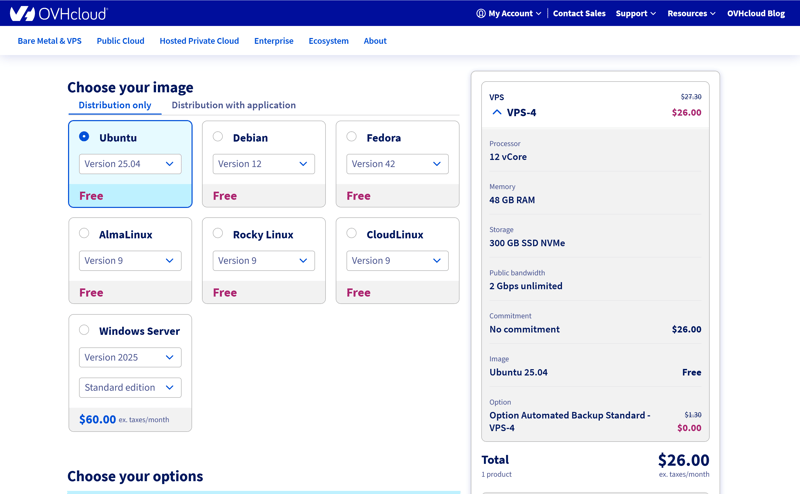
OVH supports popular Linux distributions and Windows Server.
Once the order is complete, the server appears in the dashboard almost immediately. Your login credentials arrive by email, you can get started right away.
This is precisely how a VPS ordering process should be: clear, simple, predictable, and without any pitfalls. You always know what's included in the price and which options cost extra.
The biggest advantage, though, is the speed. The fact that VPS servers are ready to use immediately after ordering is a strong argument for OVH. Many other hosting companies take noticeably longer.
OVH Server Management: Plenty of Options
You access server management through the two-part sidebar in the OVH dashboard. Just click on the displayed server name to switch to the detailed view.
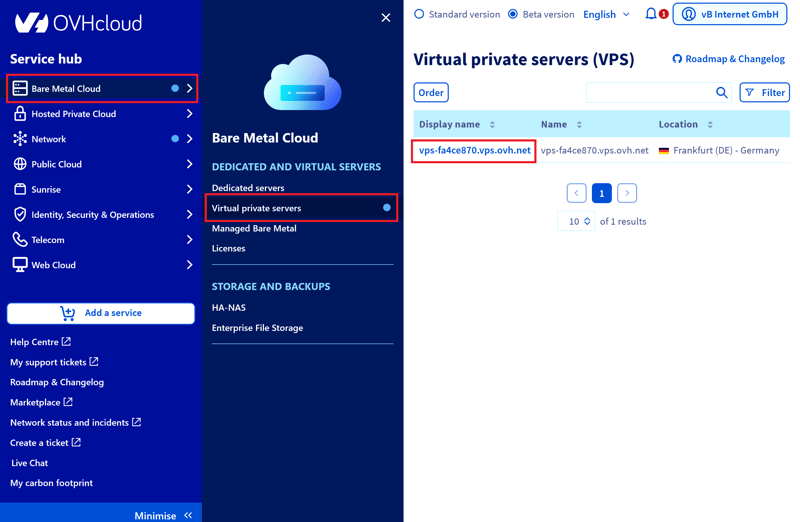
Your active VPS servers.
In this view, you'll find all the important information about your server: vCores, RAM, storage space, IP addresses, network status, and additional features accessible through three-dot menus.
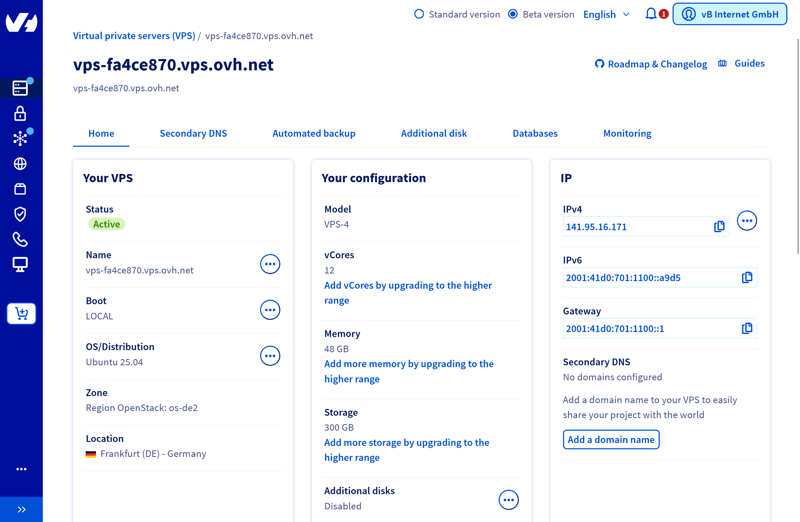
The detailed view of a VPS.
In the "Boot" section under the "Your VPS" tab, you can restart the server. If you check the box for rescue mode, the server will boot into an emergency environment. This is useful when the main system is unresponsive or needs repairs. In this environment, you have access to essential tools for troubleshooting and data recovery.
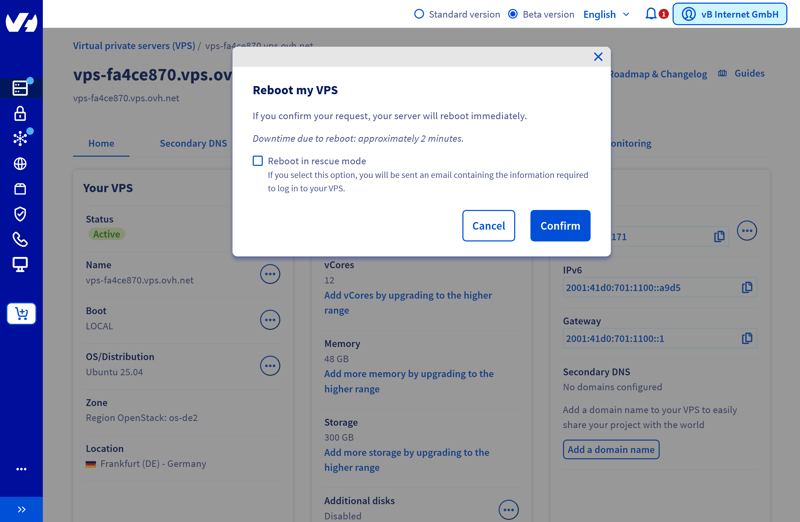
Restarting the VPS.
The KVM console is helpful when you need direct access to your server, regardless of network status. It simulates your server's screen and keyboard in the browser. This lets you log in even when SSH isn't available and make changes that would otherwise only be possible locally.
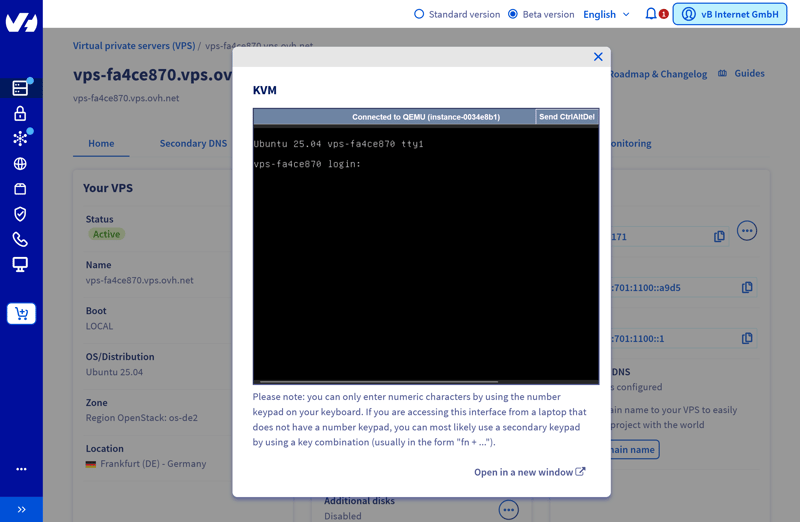
The VPS KVM console.
For a fresh installation, you can choose from Ubuntu, Debian, Fedora, AlmaLinux, Rocky Linux, CloudLinux, and FreeBSD. OVH clearly warns that this will delete all data and make the server unavailable during installation.
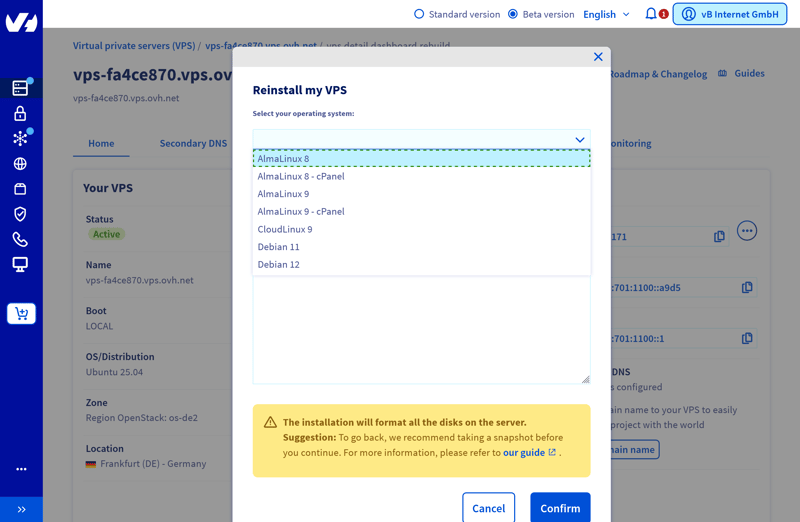
Reinstalling the operating system.
IP management is well organized. You can immediately see which public addresses belong to which server and edit reverse DNS entries directly. Additional IPv4 addresses cost extra, but IPv6 addresses are free.
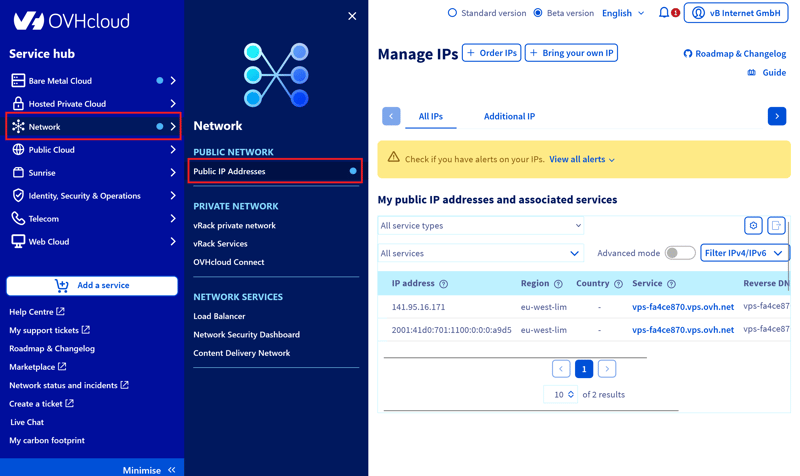
IP management at OVH.
Daily Automatic Backups Included
OVH creates an automatic backup every day by default, at a time of your choosing. You either restore the entire server or mount the backup as an additional drive.
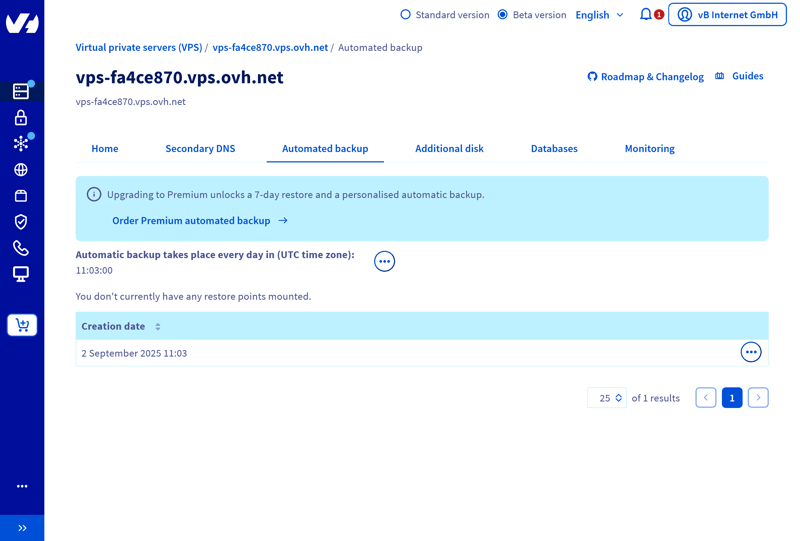
Automatic backups at OVH.
Premium backups offer more flexibility. They provide restore points from the last seven days. You activate them as a paid subscription in the dashboard.
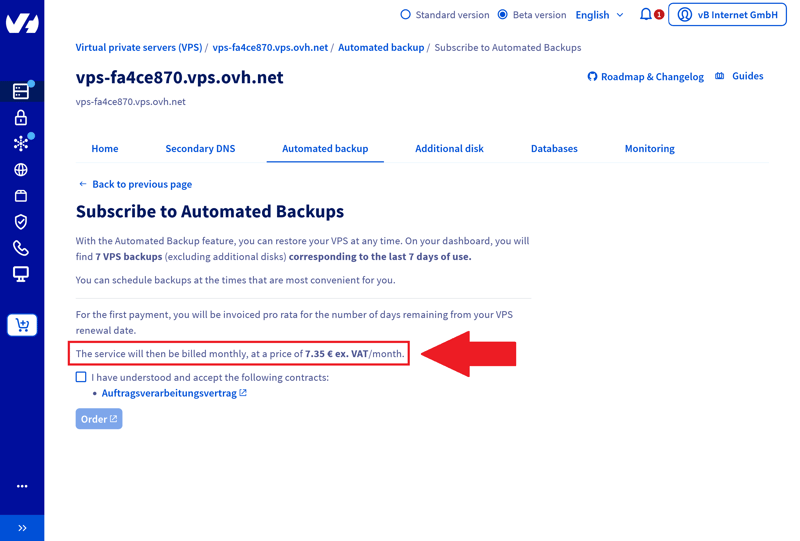
Paid premium backups.
Extra hard drives (50–500 GB) are available. The price depends on the storage size, billing is monthly. OVH doesn't automatically mount the new drive to your system. You're responsible for configuring and mounting it yourself.
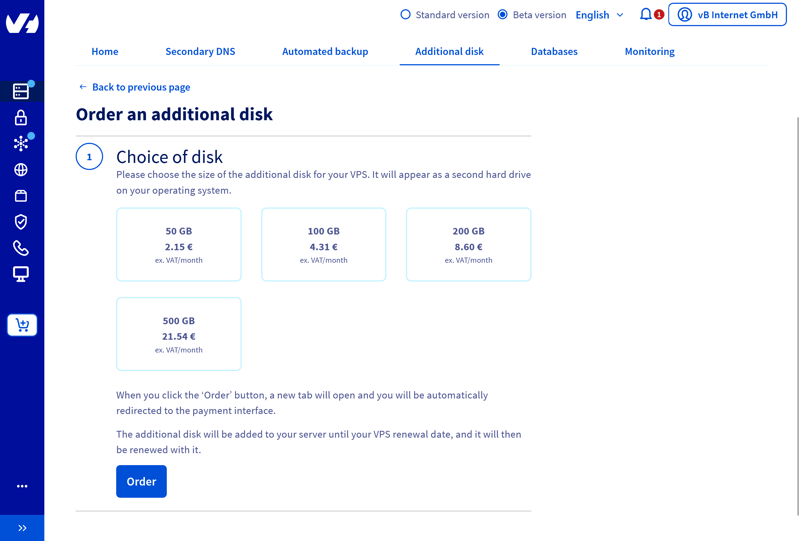
Adding hard drives.
Scaling: Easy Upgrades, Limited Flexibility
Scaling other server elements at OVH is straightforward but not as flexible as the company likes to claim. If you're in need of more power, you can switch to a higher server tier with just a few clicks. For example, you can move from VPS-4 to VPS-5 or VPS-6.
Simply select a larger plan and restart the server. The new configuration takes effect immediately, and billing changes from the moment you upgrade.
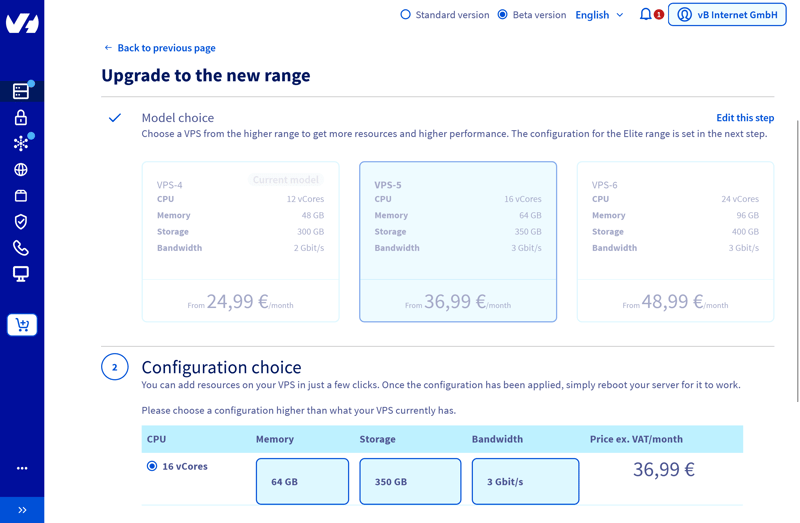
You quickly upgrade to a higher plan.
What's missing is fine-grained customization. You can't increase or decrease CPU and RAM individually.
Downgrades aren't officially supported either. To switch to a lower tier, you need to order a new server, manually migrate your data, and then cancel the old plan. OVH will help you if needed, but a downgrade takes much more effort than an upgrade.
Here's how OVH's server features compare to other hosting providers:
 OVH |  Hostinger |  Hetzner |  DigitalOcean |  IONOS |  GoDaddy |  Contabo | |
|---|---|---|---|---|---|---|---|
| Rescue System | ✓ | ✓ | ✓ | ✓ | ✗ | ✓ | ✓ |
| Web Console | ✓ | ✓ | ✓ | ✓ | ✓ | ✓ | ✗ |
| Monitoring | ✓ | ✓ | ✓ | ✓ | ✓ | ✓ | ✗ |
| Backups | ✓ | ✓ | ✓ | ✓ | ✓ | ✓ | ✓ |
| Snapshots | ✓ | ✓ | ✓ | ✓ | ✓ | ✗ | ✓ |
| Scaling | ✓ | ✓ | ✓ | ✓ | ✓ | ✓ | ✓ |
| Firewall | ✓ | ✓ | ✓ | ✓ | ✓ | ✗ | ✗ |
| Total | 7 | 7 | 7 | 7 | 6 | 5 | 4 |
OVH's server management is geared toward users who already know what they're looking for. If you can work independently, you'll get a solid server environment with useful tools.
Upgrades are straightforward as promised: one click, one restart, done. That said, OVH isn't quite as flexible as advertised. Downgrades are a hassle, and more granular control over CPU or RAM would be nice. For dynamic infrastructures with frequently changing requirements, the model is a bit too rigid.
Performance
| CPU Benchmark | Single-Core: 1,105 Multi-Core: 7,159 | 8/15 |
| RAM Benchmark | 47,490 MiB/sec | 2/5 |
| Disk Benchmark | 100,700 IOPS | 4/5 |
| Network Benchmark | 1,950 MBit/s | 0/5 |
To realistically evaluate and compare VPS performance in our review, we look at five areas that make the most significant difference in practice:
- 1.
Single-core CPU performance: How fast does a single processor core work?
- 2.
Multi-core CPU performance: How effectively does the server use multiple cores at once?
- 3.
RAM performance: How quickly can data be processed in memory?
- 4.
SSD speed (IOPS): How fast are many small read/write operations?
- 5.
Network connection: What is the actual transfer rate for uploads and downloads?
We compare each provider under the same conditions and rank the results based on objective measurements. The goal is to give you a realistic assessment of how each provider stacks up in the market and what use cases it is best suited for.
We explain our benchmark methodology in more detail here:

Single-Core Performance Below Average
In the single-core CPU test, the OVH VPS scores 1,105 points, which is slightly below average. For many everyday tasks, such as smaller websites or development environments, this level of performance is still sufficient.
| Geekbench 6 (Single Core) | |
|---|---|
| 1,771 |
| 1,468 |
| 1,442 |
| 1,105 |
| 1,071 |
| 954 |
| 482 |
Strong Multi-Core Performance
The multi-core test tells a much better story. With 7,159 points, OVH lands in 5th place, above the median. For workloads with many parallel processes, such as container systems, build servers, or more complex web applications, this is a solid foundation.
| Geekbench 6 (Multi Core) | |
|---|---|
| 7,945 |
| 7,159 |
| 6,177 |
| 5,476 |
| 1,987 |
| 1,978 |
| 1,652 |
RAM Throughput Slows Things Down
RAM performance is a clear weak spot for OVH. The measured value is 47,490 MiB per second, which only earns 8th place in our comparison. If you're using memory-intensive applications like in-memory databases, large data analytics, or virtual machines, this weakness can negatively impact performance.
| stream copy | |
|---|---|
| 117,934 MiB/sec |
| 105,374 MiB/sec |
| 86,477 MiB/sec |
| 56,064 MiB/sec |
| 47,490 MiB/sec |
| 36,342 MiB/sec |
| 18,921 MiB/sec |
Good SSD Performance
The SSD performance is better. In our tests with small 4k operations, OVH achieved 100,700 IOPS, which is 4th place in our comparison.
If you work with many small files or frequent database queries, you'll benefit from the fast access times. CMS-based websites or mail servers also run smoothly on this foundation.
| fio (Total IOPS, Block Size 4k) | |
|---|---|
| 120,300 IOPS |
| 115,800 IOPS |
| 100,700 IOPS |
| 57,700 IOPS |
| 52,500 IOPS |
| 40,000 IOPS |
| 21,400 IOPS |
Poor Network Connectivity
Network connectivity is one of the host's biggest weaknesses. With 1,950 Mbit/s, OVH ranks near the bottom of our review field.
If you transfer large amounts of data, create external backups, or use services with high bandwidth demands, this connection can quickly become a bottleneck. It's still adequate for simple applications, but not ideal for modern cloud-based work environments.
| iperf (Receive Speed, IPv4, London) | |
|---|---|
| 6,970 MBit/s |
| 6,220 MBit/s |
| 5,020 MBit/s |
| 4,810 MBit/s |
| 1,950 MBit/s |
| 986 MBit/s |
| 292 MBit/s |
If you're looking for an affordable VPS for everyday tasks or smaller projects, OVH can be a good fit. The multi-core performance is solid, and the SSD performance impressed us in our review.
At the same time, you should be aware of the weaknesses. RAM is noticeably slower than with many competitors, and the network connection can slow down large or heavily networked applications. For more demanding workloads, other providers might be the better choice.
Costs
| Price 8 vCPU | $12.75 | 7/7 |
| Price 16 GB RAM | $12.75 | 7/7 |
| Price 250 GB SSD | $22.08 | 3/7 |
| Price 50 TB Traffic | $4.20 | 4/4 |
| Backup costs | $0.00 | 3/3 |
| Billing | Monthly billing | 1/2 |
To compare prices fairly across different providers, we evaluate them based on typical VPS configurations. We look at five key cost factors:
- 1.
The price for the cheapest VPS with at least 8 vCPUs
- 2.
The price for the cheapest VPS with at least 16 GB RAM
- 3.
The price for the cheapest VPS with at least 250 GB SSD storage
- 4.
The costs of 50 TB of monthly data volume
- 5.
The price of automatic backups
We rate each of these categories using a fixed scoring system. The lower the costs or the more flexible the billing model, the higher the score.
We only consider regular list prices, including VAT or sales tax. Limited-time discounts are not considered, which creates an objective comparison that shows how OVH stacks up against other hosts.
This is how OVH's costs compare to others:
| 8 vCPU | 16 GB RAM | 250 GB SSD | 50 TB Traffic | Backup | |
|---|---|---|---|---|---|
| $9.00 | $9.00 | $9.00 | $2.00 | $7.00 |
| $12.75 | $12.75 | $22.08 | $4.20 | $0.00 |
| $14.09 | $19.59 | $19.59 | $7.59 | $5.62 |
| $19.99 | $9.99 | $19.99 | $7.99 | $0.00 |
| $20.80 | $12.00 | $3.96 | $4.95 | $7.34 |
| $64.99 | $44.99 | $64.99 | $16.99 | $0.00 |
| $96.00 | $96.00 | $96.00 | $6.00 | $4.80 |
Overview of OVH's Shared vCPU Plans
OVH offers six VPS plans, ranging from VPS-1 to VPS-6. On the overview page, you'll see the key technical specs like vCores, RAM, and storage. Prices are per month and include VAT.
Available resources increase with each plan tier:
vCPUs: The entry-level configuration starts with 4 vCores, while the top-tier model offers 24 vCores.
Memory: Depending on the plan, you get between 8 GB and 96 GB of RAM.
Storage: All instances come with NVMe SSDs. Capacity ranges from 75 GB to 400 GB.
Data volume & bandwidth: Traffic is unlimited on all plans. Guaranteed public bandwidth ranges from 400 Mbit/s to 3 Gbit/s, depending on the plan.
You have several options when it comes to contract length. You stay flexible with a month-to-month plan or commit to 6 or 12 months upfront. Longer commitments come with a discount, but you'll be locked in for that period.
Here's an overview of OVH's VPS plans:
| VPS-1 | VPS-2 | VPS-3 | |
|---|---|---|---|
| Monthly Price | from $4.20 | from $6.75 | from $12.75 |
| Contract Period (Months) | 1 - 12 | 1 - 12 | 1 - 12 |
| Performance | |||
| Storage | 75 GB | 100 GB | 200 GB |
| RAM | 8 GB | 12 GB | 24 GB |
| CPU Cores | 4 | 6 | 8 |
| Dedicated Cores | ✗ | ✗ | ✗ |
| Features | |||
| Type | vServer | vServer | vServer |
| OS | Linux | Linux | Linux |
| Managed | ✗ | ✗ | ✗ |
| SSD Storage | ✓ | ✓ | ✓ |
Performance Range and Use Cases
OVH's VPS plans cover a wide performance spectrum. Depending on your needs, you can choose from options suited to smaller projects all the way up to complex, resource-intensive environments:
Entry-level | Mid-range | High-end |
|---|---|---|
|
|
|
|
|
|
OVH is one of the more affordable providers on the market. In some areas, it's even among the cheapest. Combined with solid hardware, this makes for a well-balanced price-to-performance ratio.
Daily automatic backups are included at no extra cost. This isn't standard among competitors and has a positive impact on overall costs.
Reliability & Support
| Own documentation & FAQ | Comprehensive | 2.5/3 |
| Email support | Inadequate response | 0.5/3 |
| Phone support | Longer wait time | 1.5/3 |
| Live chat | Useless | 0/3 |
| Customer feedback from the web | Negative | 2/8 |
When it comes to customer support, OVH separates its free standard plan from several paid service tiers. At first glance, the available channels seem comprehensive. But a closer look reveals significant differences in usability, availability, and depth of assistance.
Standard Support: Basic Coverage, Nothing More
Free support is available Monday through Friday, 8 AM to 6 PM. OVH states a maximum response time of eight hours. You can reach them via ticket, phone, or live chat.
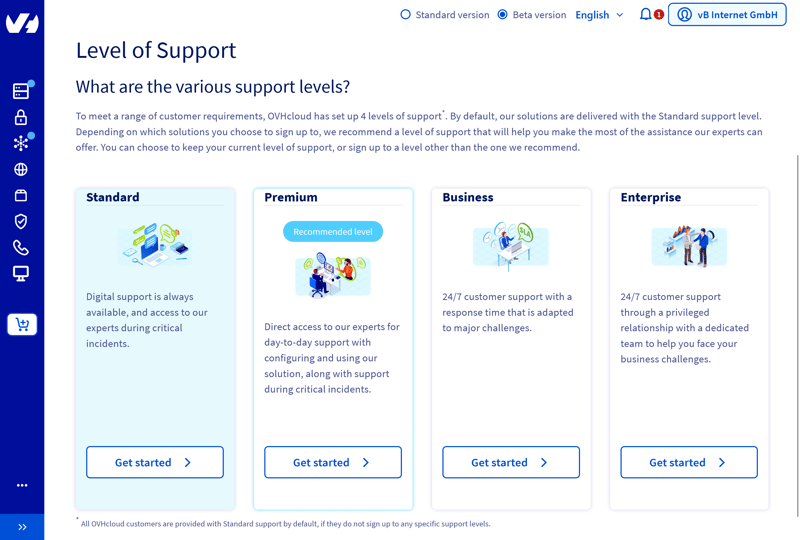
OVH's support levels.
Outside business hours, support only responds to system-wide outages. For day-to-day operations, this means the standard tier covers the basics but offers limited reliability.
Comprehensive but Technical Help Center
OVH's Help Center is extremely detailed. Hundreds of articles cover nearly every use case, from basic topics to highly specific configurations. The articles are usually well-organized and include step-by-step instructions along with helpful internal links.
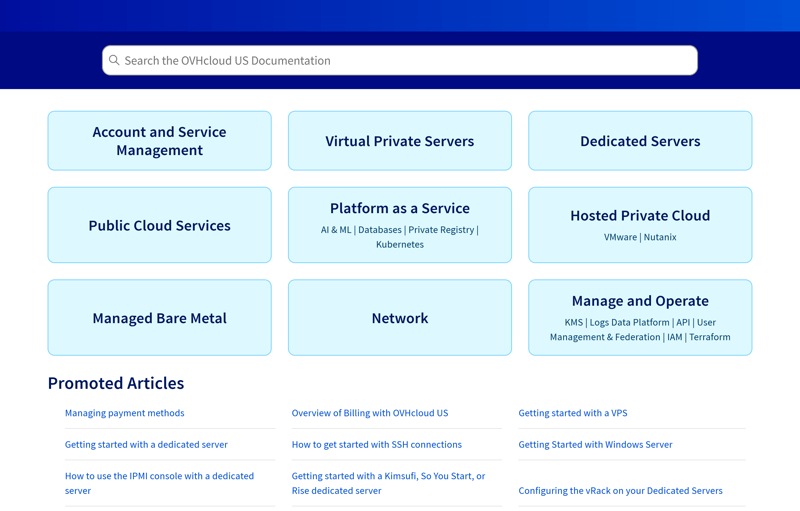
OVH's Help Center.
That said, the tone is clearly aimed at technically experienced users. If you're just getting started or unfamiliar with technical terms, you might feel overwhelmed. Some articles also show signs of machine translation, which OVH transparently labels.
Support via Phone, Ticket, and Chat
OVH offers three direct support channels: phone, ticket system, and chat.
The ticket system is the main way to communicate with support. In our review, however, it proved slow and unreliable: A simple question went unanswered for about 26 hours, and the response was only somewhat helpful. You can't set your own priority level, and the repeated references to FAQ articles aren't very useful.
The support hotline is available, but it's barely visible on the website. During our review (Friday morning, standard support plan), a clunky voice menu dragged out the call. After 17 minutes on hold, a knowledgeable representative answered and resolved the issue surprisingly fast.
The so-called live chat doesn't live up to its name. It only provides canned responses and directs you to Help Center guides or the ticket system.
As soon as you reply, OVH automatically ends the conversation. The chat only connects you to a real person if there's a system outage. In most cases, the chat isn't a useful support option.
Support Levels at a Glance
If standard support isn't enough, OVH offers three additional tiers: Premium, Business, and Enterprise. These differ mainly in response times, communication channels, and personalized assistance. Professional help comes at an extra cost.
Category | Standard | Premium | Business | Enterprise |
|---|---|---|---|---|
Availability | Mon–Fri, 8 AM–6 PM | Mon–Fri, 8 AM–6 PM, emergencies 24/7 | 24/7 | 24/7 |
Response time up to | 8 hours | 2 hours | 30 minutes | 15 minutes |
Contact via | Ticket, phone, live chat | Ticket, phone, live chat | Ticket, phone, live chat + dedicated phone number | Ticket, phone, live chat + dedicated team |
Price | free | paid | paid | paid |
All support levels include access to the Help Center and OVH community. True 24/7 support with fast response times is only available starting with the Business tier. The Enterprise tier is designed for larger organizations that need a dedicated contact person and priority handling.
Community Answers
OVH operates a large community platform. However, most posts come from other users, as OVH itself rarely participates. As a result, the quality of answers varies widely.
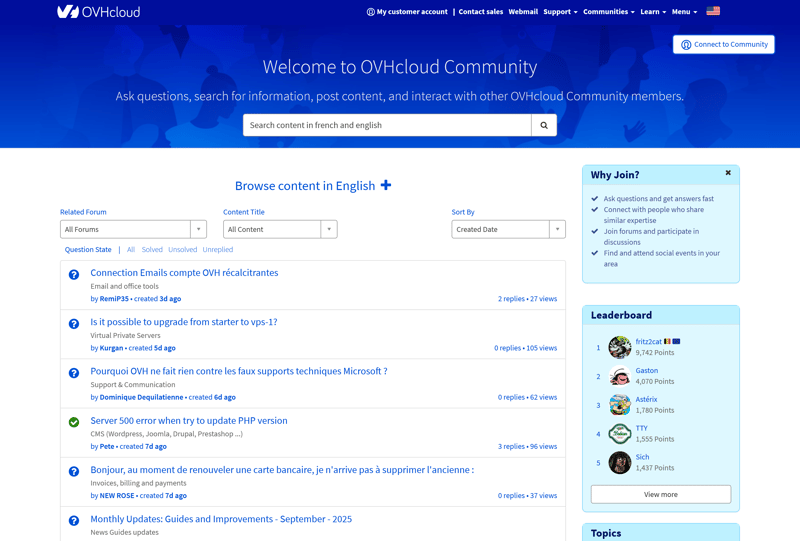
OVH's support community.
Plenty of Criticism From Existing Customers
On review sites, feedback about OVH support is mixed but often critical. While some users report friendly staff and quick help, mostly through the ticket system, negative experiences outweigh the positive ones.
Many customers with standard support complain about long wait times, poor phone support availability, and automated responses. According to user reports, goodwill gestures are rare. When serious issues like server outages occur, frustrated customers say support responses are vague or nonexistent.
If you need help fast, there's no way around paying for a higher-priced support tier at OVH. Only then will you get quick response times, priority handling, and personal assistance.
With standard support, expect long wait times and limited availability. For tech-savvy users who prefer solving problems themselves and can navigate the extensive Help Center, that might be enough. For everyone else, it's not.
Conclusion
OVH offers affordable VPS hosting with quick setup and solid basic features. If you're on a tight budget and need a simple setup for smaller projects or basic tasks, it can be an attractive option.
The low prices come with trade-offs. Performance is average at best, especially when it comes to RAM and network connectivity, where OVH clearly lags behind competitors. VPS management is also more complex than it needs to be. Support follows a "pay-to-play" model. Standard support covers the bare minimum only.
OVH is best suited for technically experienced users who can live with these limitations and are willing to troubleshoot on their own. For business-critical applications or customers without technical expertise, OVH without paid support is not the best choice.

OVH User Experiences
What do OVH customers think of the provider? We analyzed reviews from various rating platforms and summarized the most common feedback.
Affordable
OVH's VPS plans are cheaper than many competitors. Customers appreciate getting solid hardware at a low price.Traffic always included
Even with OVH's smallest VPS plans, customers don't face extra charges when traffic increases.Wide range of server locations
Customers like having the choice between numerous data centers.
Many support issues
Some customers find customer service slow, unfriendly, or unhelpful.Slow management panel
Customers find the management panel slow and not always intuitive.Difficulties with cancellations
Some customers report problems canceling their accounts and unexpected contract renewals. This has caused frustration in several cases.
Alternatives to OVH
If OVH isn't the right provider for you, one of these alternatives might be a better fit:
DigitalOcean is a great option for developers and teams who want to deploy modern infrastructure quickly. If you're looking to scale dynamically, the flexible scaling options make it a strong choice.
IONOS stands out with strong benchmark results and solid hardware. This makes it a good choice for resource-intensive projects. If performance is your top priority, you'll get plenty of power at fair prices here.
Hetzner is more affordable, reliable, and technically solid. It's suited for budget-conscious users.
Here are some more alternatives to OVH: