
Hostinger VPS Review 2026: How Fast Are The Servers?


Hostinger markets its VPS plans as a modern all-in-one solution: quick to set up, easy to manage, and powerful. But is that really true? And how does its VPS offering stack up against the competition?
We reviewed Hostinger's VPS to see how well the ordering process, server management, and performance actually work in practice.


Hostinger* is an international hosting provider headquartered in Lithuania. In addition to traditional web hosting, its portfolio includes VPS hosting, a website builder, and domains.
The platform caters to beginners, advanced users, developers, and businesses alike. Hostinger was an early adopter of AI-powered server administration, which is designed to simplify many tasks.
Hostinger Server Review
Fast Setup
New VPS instances are fully operational within minutes of ordering. You get started right away without any manual verification.Wide Software Selection
Hostinger offers eleven Linux distributions to choose from. On top of that, over 70 panels and apps are available for automatic installation.Free Automatic Backups
Weekly backups are included and stored on a separate server. Daily automatic backups are also available but come at an extra cost.Modern Interface
The Hostinger hPanel is fast, clean, and well-organized. You manage your entire VPS conveniently through a single login.
Higher Price After Initial Term
After the first contract period, the price increases noticeably. You can choose a term of 1, 12, or 24 months.
Server Setup & Management
| Interface & Usability | Clear and fast | 2/2 |
| Server Setup | Many options | 7/8 |
| Server Management | Everything available | 8/8 |
| Other Features | Malware scanner included | 2/2 |
At Hostinger, registration happens during the product selection process. You first choose a VPS plan and then create your customer account as part of the checkout.
You can register with an email and password or use an existing Google, Facebook, or GitHub account. As usual, your account is only fully activated after a quick email verification.
Hostinger typically doesn't require identity verification with an ID document. Only in rare cases, for example when you purchase certain Top-Level Domains, is such a proof required. Hostinger mentions this during registration and also sends an email notification.
The Hostinger Dashboard: Modern, Fast, and User-Friendly
Hostinger provides a central hub for all hosting and administration tasks: the hPanel. It has a modern look and is available in over 20 languages, including English, German, Arabic, and Hindi.
Hostinger gets a lot right here. The dashboard is clean, well-organized, and visually appealing. Navigation and page transitions are nearly instant.
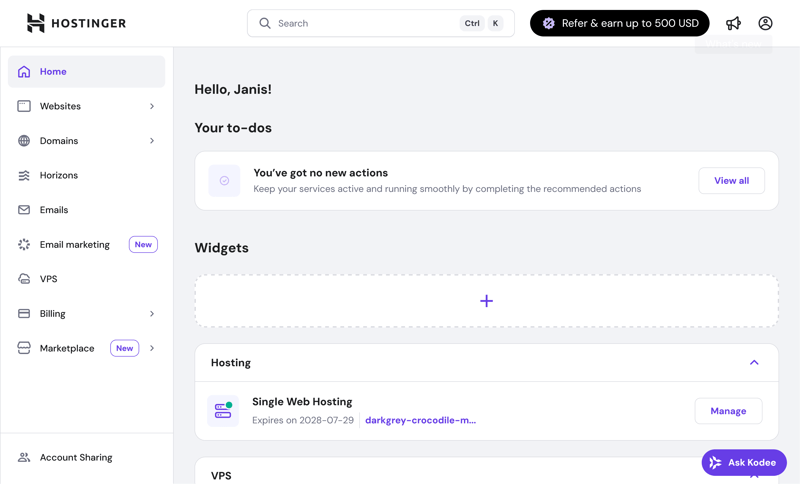
The empty start page of Hostinger's hPanel.
You can customize the start page with widgets, though the selection is still limited. Even without customization, your purchased products are displayed clearly, including IP address, status, and direct management links.
One downside is the advertising within the dashboard. For example, affiliate program promotions appear prominently in the top bar. Hostinger also advertises tools like Reach and the no-code AI assistant Horizons, which show up in the main menu even though they're paid add-ons.
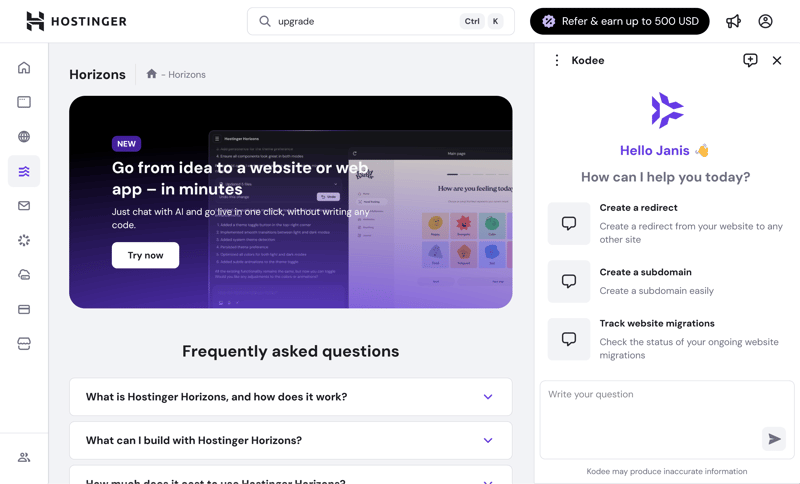
Hostinger aggressively advertises its products.
The AI chatbot Kodee is also a core part of hPanel. It answers questions about all Hostinger services (more on that later).
You'll find additional products in the Marketplace section. Some of these can be purchased directly through hPanel, which accelerates the ordering process. The integration is technically solid but clearly designed for upselling.
The search function is a handy feature that many other hosting dashboards lack. It quickly takes you to settings and management areas like payment information, domain details, or VPS features. Search terms like "billing" return specific results:
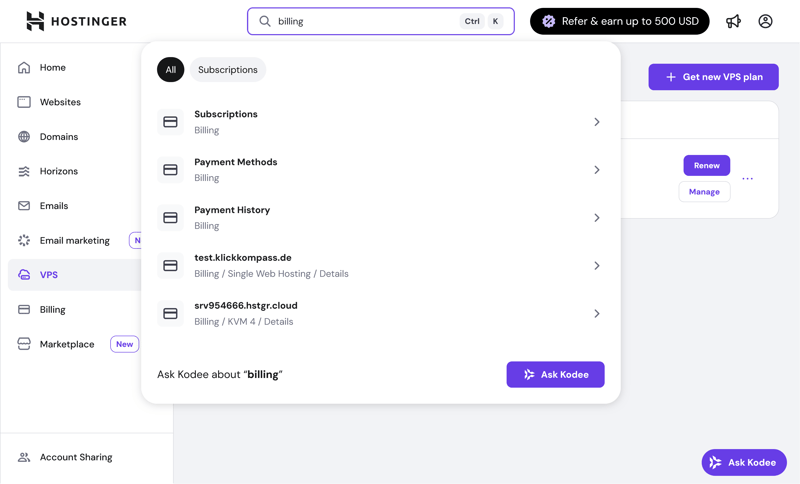
Useful search results in hPanel.
However, the search function doesn't pull up help articles or tutorials. If you enter technical terms like "SSH" or "Upgrade," you'll get results from the dashboard, but hPanel won't display any related documentation. This is a missed opportunity.

Hostinger's hPanel offers a modern, fast, and well-organized management interface. You can control your account, server, domains, and add-on services from a single login.
The design is appealing, the navigation is intuitive, and all sections are easy to reach with clear labels. This is exactly what modern administration should look like. The only real downside is the heavy amount of advertising in the interface.
Server Setup at Hostinger: Plenty of Options
Setting up a new VPS at Hostinger is quick and hassle-free. The entire process is clearly structured, and you have access to numerous options right from the start.
First, you choose one of four Linux-based plans, all running on KVM (Kernel-based Virtual Machine). There's no Windows option available.
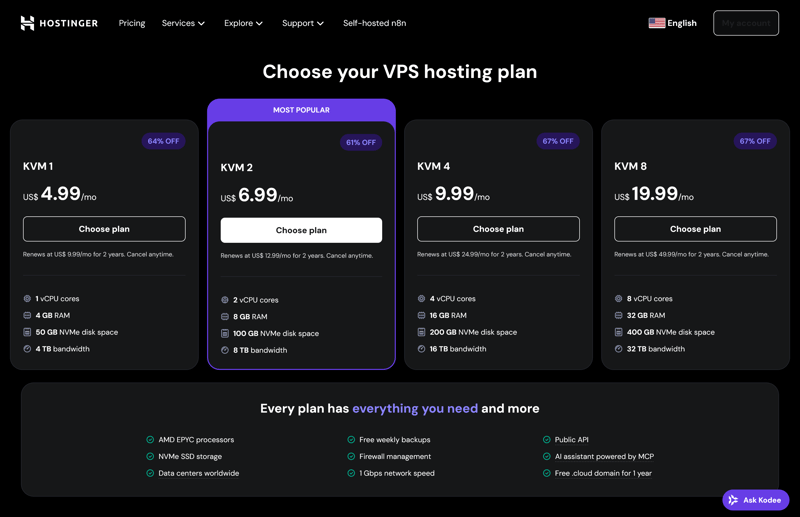
Four Linux-based plans are available.
During checkout, you select your contract length and preferred server location. Options include the US, Germany, France, the United Kingdom, Lithuania, Brazil, India, Malaysia, and Indonesia. VPS prices are the same across all locations.
During the ordering process, Hostinger automatically measures latency and suggests the best location based on the lowest delay. You can ignore this suggestion if you prefer.

Many server locations to choose from.
You can optionally add daily automatic backups for an extra fee. Weekly automatic backups are included free with all plans.
The selection of operating systems available for one-click installation is extensive: eleven Linux distributions are available. You choose from Debian, Ubuntu, AlmaLinux, Rocky Linux, Arch Linux, CentOS, Fedora, openSUSE, CloudLinux, Alpine Linux, and Kali Linux.
Beyond plain operating systems, Hostinger offers two additional categories: "OS with Panel," which includes a pre-installed admin interface, and "Application," which comes with a fully pre-configured web application. In total, over 70 options are available, including:
Control panels like cPanel, Plesk, HestiaCP, CloudPanel, and FastPanel
Business applications like Nextcloud, Odoo, Redmine, Akaunting, and MetaTrader
Developer tools like Docker, VS Code, GitLab, Supabase, and Node-RED
E-commerce systems like WooCommerce, Magento 2, PrestaShop, and OpenCart
Frameworks and stacks like LAMP Stack, Laravel, MERN Stack, and ASP.NET
Media and streaming solutions like Plex Media Server, Jellyfin, Jitsi, AzuraCast, and Immich
Monitoring and security apps like Uptime Kuma, Grafana, Zabbix, WireGuard, and OpenVPN
When you select a panel or application, the underlying operating system is predetermined. Some control panels also require a paid license; Hostinger clearly displays the license fee before installation.
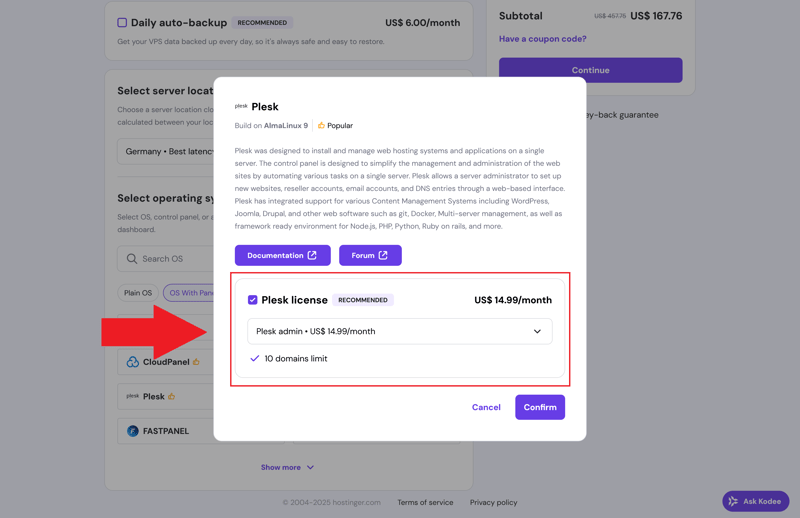
Some software, like Plesk, costs extra.
You can pay by credit card, PayPal, Google Pay, Klarna, or cryptocurrency via CoinGate. Keep in mind that crypto payments can take up to 24 hours to process.
Provisioning happens almost instantly. In our review, the VPS was fully set up and ready to use in about three minutes after completing the order. You'll receive a confirmation email and can access the server directly through hPanel.
Hostinger gets almost everything right here: setup is fast and self-explanatory. The wide selection of operating systems and additional software is a big plus, giving you more flexibility with your VPS right out of the box.
Server Management: Plenty of Options
Managing your VPS through hPanel meets expectations for a modern interface. The first menu level is intentionally streamlined. On the main dashboard, you'll find all the key information about resource usage, location, and operating system.
In the top right corner, you can start, stop, or upgrade your VPS or renew your contract. Quick access to the web console is also prominently placed there.
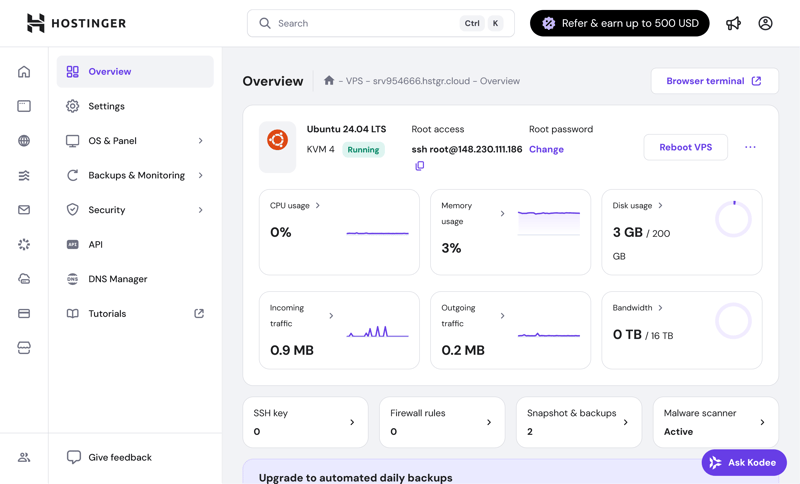
The VPS overview at Hostinger.
Hostinger creates automatic backups once a week around midday. You can't change the timing, and only the two most recent backups are available at any time.
On the plus side, Hostinger doesn't deduct backup storage from your VPS allocation. Instead, backups are stored separately on servers in Lithuania.
Unlike many other providers, Hostinger also shows the backup size and estimated restore time. If you prefer, you can disable automatic backups entirely.
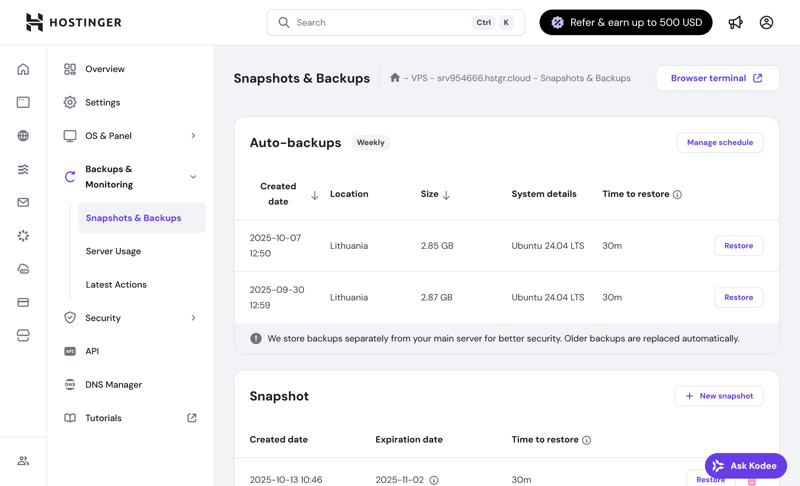
Hostinger creates free automatic backups weekly.
In addition to automatic backups, you can create manual snapshots, for example, before making major system changes. Regardless of your plan, you can only keep one snapshot at a time. A new one overwrites the old. Snapshots are stored on your VPS, which consumes some of your storage space.
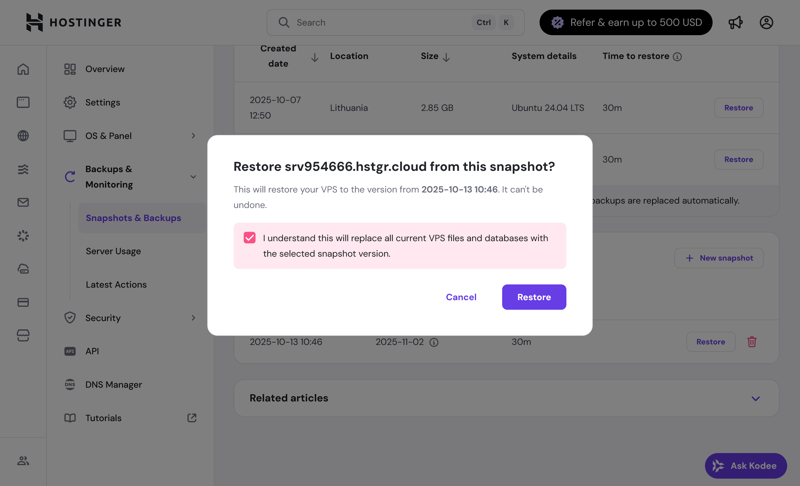
Only one snapshot is included.
Security: Malware Scanner and Firewall
A free malware scanner is included and provides an overview of potentially compromised or infected files. You need to activate it yourself. Cleanup is either done manually or through a paid add-on, which is tied to your VPS contract duration.
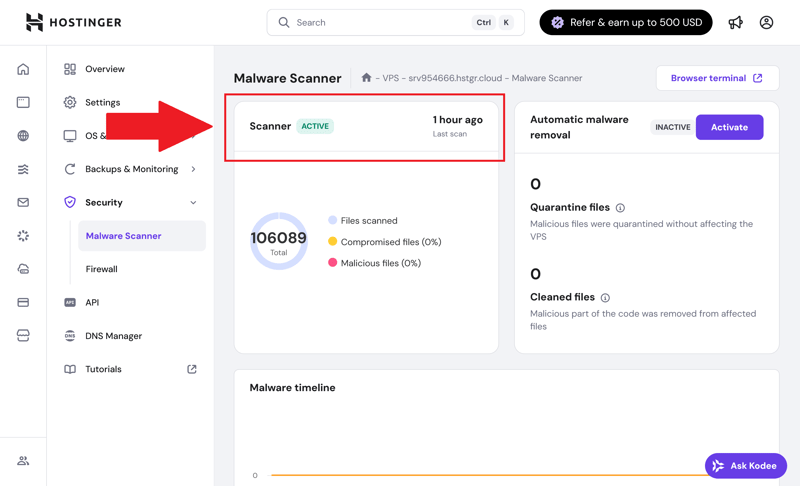
A malware scanner is included, but cleanup is not.
A firewall is not enabled by default. You need to turn it on and configure it yourself. Experienced users won't have any trouble with this, but beginners would benefit from a secure default setup.
Reinstallations and Additional Software
Reinstalling an operating system or an application stack that includes an operating system is simple. Just select the software you want and confirm the installation. Hostinger additionally provides helpful links to documentation and guides.
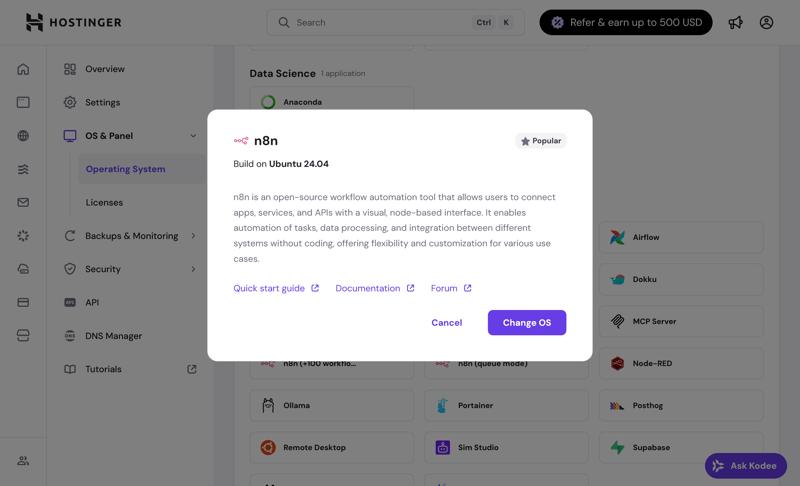
Installing n8n on Ubuntu.
A fresh installation will delete all data and snapshots. If you want to use paid panels like Plesk or cPanel, you'll need to purchase the license through hPanel first.
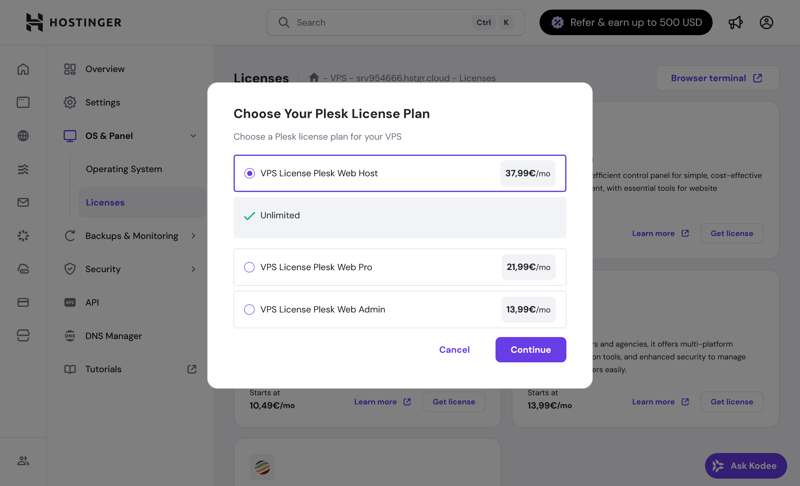
Purchasing Plesk licenses through the hPanel.
API and Scaling
For advanced users, a publicly documented API is available. It lets you automate tasks like restarts, backups, or OS changes. You can also pull performance data in real time, which is great for more complex setups or managing multiple VPS instances.
Hostinger doesn't offer flexible scaling of individual resources like RAM or CPU. To upgrade, you'll need to switch to a higher-tier plan.
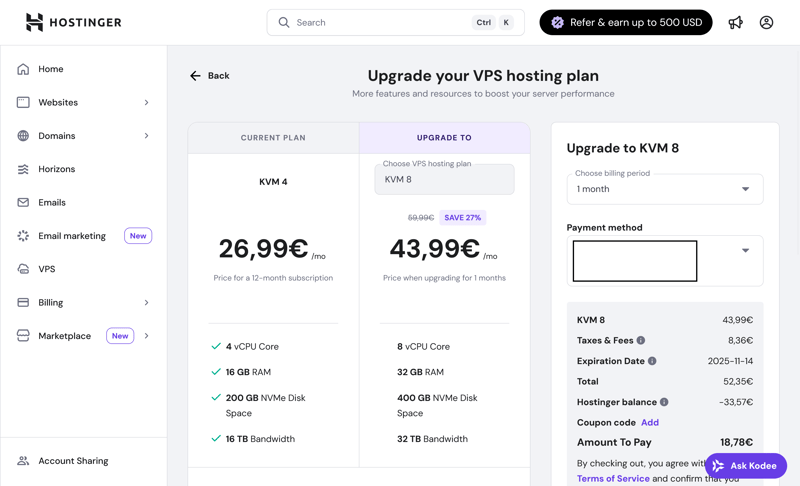
Server scaling through plan upgrades.
The upgrade process is straightforward and usually takes just a few minutes. It ends with a restart of your VPS. The remaining time on your current contract is credited toward the new plan. As with many hosts, renewal prices are significantly higher after the initial term ends.
Here's how Hostinger's server features compare to other providers:
 Hostinger |  OVH |  Hetzner |  DigitalOcean |  IONOS |  GoDaddy |  Contabo | |
|---|---|---|---|---|---|---|---|
| Rescue System | ✓ | ✓ | ✓ | ✓ | ✗ | ✓ | ✓ |
| Web Console | ✓ | ✓ | ✓ | ✓ | ✓ | ✓ | ✗ |
| Monitoring | ✓ | ✓ | ✓ | ✓ | ✓ | ✓ | ✗ |
| Backups | ✓ | ✓ | ✓ | ✓ | ✓ | ✓ | ✓ |
| Snapshots | ✓ | ✓ | ✓ | ✓ | ✓ | ✗ | ✓ |
| Scaling | ✓ | ✓ | ✓ | ✓ | ✓ | ✓ | ✓ |
| Firewall | ✓ | ✓ | ✓ | ✓ | ✓ | ✗ | ✗ |
| Total | 7 | 7 | 7 | 7 | 6 | 5 | 4 |
Hostinger offers one of the most accessible and well-designed management interfaces on the market. hPanel is logically organized, feature-rich, and lets you handle key tasks quickly with just a few clicks.
Server management is designed so that even less technical users can navigate it quickly. The only exception is the firewall, which isn't enabled by default.
Scaling could be more flexible, though. It would be nice to have the option to upgrade individual server resources instead of switching plans.
Performance
| CPU Benchmark | Single-Core: 1,771 Multi-Core: 5,476 | 13/15 |
| RAM Benchmark | 86,477 MiB/sec | 4/5 |
| Disk Benchmark | 120,300 IOPS | 5/5 |
| Network Benchmark | 986 MBit/s | 0/5 |
For our performance comparison, we test various VPS providers using standardized benchmarks. Our goal is to measure the performance of key components as objectively as possible. We test five main metrics:
- 1.
Single-core CPU performance: The speed at which a single processor core performs.
- 2.
Multi-core CPU performance: How well multiple cores are utilized simultaneously.
- 3.
Memory speed: The speed at which data is processed in RAM.
- 4.
Disk performance (IOPS): The speed at which many small read and write operations are completed.
- 5.
Network connection: The actual data transfer rate for uploads and downloads.
The results show how well each provider stacks up against its competitors and which types of workloads the virtual servers are best suited for. The higher the score, the better the result.
You can find more details about our methodology here:

First Place in the Single-Core Test
Hostinger takes first place in single-core performance with 1,771 points. This metric matters for applications that don't use multiple processor cores at once, such as traditional web apps or database queries.
For users who rely on fast response times for individual processes, this result is a strong point in Hostinger's favor.
| Geekbench 6 (Single Core) | |
|---|---|
| 1,771 |
| 1,468 |
| 1,442 |
| 1,105 |
| 1,071 |
| 954 |
| 482 |
Average Multi-Core Performance
The multi-core test tells a different story. With 5,476 points, Hostinger ranks only 7th out of 11. That's a noticeable gap from the top performers. This means that resource-intensive applications using multiple cores at once will run better on other servers. However, for typical hosting purposes, this is rarely a major drawback.
| Geekbench 6 (Multi Core) | |
|---|---|
| 7,945 |
| 7,159 |
| 6,177 |
| 5,476 |
| 1,987 |
| 1,978 |
| 1,652 |
Fast RAM Performance
In the RAM benchmark, Hostinger achieves a throughput of 86,477 MiB per second. This places the provider in the upper mid-range (5th place).
This is a solid result that's more than enough for many web applications and database solutions. If you regularly process large amounts of data in RAM, you'll find slightly faster options with other providers.
| stream copy | |
|---|---|
| 117,934 MiB/sec |
| 105,374 MiB/sec |
| 86,477 MiB/sec |
| 56,064 MiB/sec |
| 47,490 MiB/sec |
| 36,342 MiB/sec |
| 18,921 MiB/sec |
Best SSD Performance in the Review
The disk performance is very impressive. With 120,300 IOPS, Hostinger takes 1st place in our comparison. This is beneficial for data-heavy applications like CMS platforms, e-commerce stores, or databases. This results in fast load times and quick access to many small files.
| fio (Total IOPS, Block Size 4k) | |
|---|---|
| 120,300 IOPS |
| 115,800 IOPS |
| 100,700 IOPS |
| 57,700 IOPS |
| 52,500 IOPS |
| 40,000 IOPS |
| 21,400 IOPS |
Weak Network Performance
The network benchmark results are less encouraging. With an average transfer rate of 986 Mbit/s, Hostinger lands in second to last place in our comparison.
While this speed is still adequate for many use cases, it can become a bottleneck during data-intensive transfers, especially compared to the strong performance in other areas.
| iperf (Receive Speed, IPv4, London) | |
|---|---|
| 6,970 MBit/s |
| 6,220 MBit/s |
| 5,020 MBit/s |
| 4,810 MBit/s |
| 1,950 MBit/s |
| 986 MBit/s |
| 292 MBit/s |
Hostinger delivers solid performance overall, especially when it comes to fast single-core performance and quick storage access. The strong single-core performance and very fast SSD are clear advantages.
However, the performance isn't consistently top-tier. Multi-core performance is only average, and the relatively slow network connection stands out in direct comparisons.
Bottom line: Hostinger is best suited for typical hosting projects where fast single-core performance and good storage access matter more than maximum parallel processing or high network throughput.
Costs
| Price 8 vCPU | $19.99 | 5/7 |
| Price 16 GB RAM | $9.99 | 7/7 |
| Price 250 GB SSD | $19.99 | 5/7 |
| Price 50 TB Traffic | $7.99 | 2/4 |
| Backup costs | $0.00 | 3/3 |
| Billing | Higher price after the first contract term | 0/2 |
Because VPS plans vary so much between providers, a direct comparison is nearly impossible. That's why we evaluate costs based on five fixed performance categories:
- 1.
Price for the cheapest VPS with at least 8 vCPUs
- 2.
Price for the cheapest VPS with at least 16 GB RAM
- 3.
Price for the cheapest VPS with at least 250 GB SSD storage
- 4.
Costs of 50 TB of monthly data transfer
- 5.
Price of automatic backups
We only consider regular list prices, including taxes where applicable, and exclude limited-time discounts or special promotions. This gives you a reliable basis for a fair comparison.
Here's how Hostinger's costs compare to other providers:
| 8 vCPU | 16 GB RAM | 250 GB SSD | 50 TB Traffic | Backup | |
|---|---|---|---|---|---|
| $9.00 | $9.00 | $9.00 | $2.00 | $7.00 |
| $12.75 | $12.75 | $22.08 | $4.20 | $0.00 |
| $14.09 | $19.59 | $19.59 | $7.59 | $5.62 |
| $19.99 | $9.99 | $19.99 | $7.99 | $0.00 |
| $20.80 | $12.00 | $3.96 | $4.95 | $7.34 |
| $64.99 | $44.99 | $64.99 | $16.99 | $0.00 |
| $96.00 | $96.00 | $96.00 | $6.00 | $4.80 |
Hostinger VPS Plans
Hostinger offers four VPS plans that differ significantly in features, performance, and price. All virtual servers use KVM virtualization and fast NVMe SSD storage.
Each plan represents a major performance upgrade, with double the hardware resources of the previous tier.
A heads-up: The prices advertised in the shop only apply to 24-month terms. Shorter terms of twelve months or one month come with noticeably higher VPS prices.
On top of that, a significantly higher "renewal price" kicks in after your initial term ends. Keep this in mind when placing your order.
Here's an overview of the key specs:
vCPUs: Depending on the plan, Hostinger provides 1 to 8 virtual cores.
RAM: Memory sizes range from 4 GB to 32 GB.
Storage: SSD capacities range from 50 GB to 400 GB of NVMe storage.
Backups: Automatic weekly backups are included free with all VPS packages. You can also create manual snapshots.
Network: All virtual servers have a maximum network speed of 1 Gbit/s.
Here's an overview of Hostinger's VPS plans:
| KVM 1 | KVM 2 | KVM 4 | |
|---|---|---|---|
| Monthly Price | from $4.99 | from $6.49 | from $9.99 |
| Contract Period (Months) | 1 - 24 | 1 - 24 | 1 - 24 |
| Performance | |||
| Storage | 50 GB | 50 GB | 200 GB |
| RAM | 4 GB | 4 GB | 16 GB |
| CPU Cores | 1 | 2 | 4 |
| Dedicated Cores | ✗ | ✗ | ✗ |
| Features | |||
| Type | vServer | vServer | vServer |
| OS | Linux | Linux | Linux |
| Managed | ✗ | ✗ | ✗ |
| SSD Storage | ✓ | ✓ | ✓ |
Performance Range and Scaling
Different plans work best depending on your project size and technical requirements. The following table shows an overview of Hostinger's packages and their specs:
Category | Plan | Specs | Potential use cases |
|---|---|---|---|
Entry-level | KVM 1 | 1 vCPU, 4 GB RAM, 50 GB SSD | Personal projects, testing, simple tools |
KVM 2 | 2 vCPU, 8 GB RAM, 100 GB SSD | Small websites, web applications | |
Mid-range | KVM 4 | 4 vCPU, 16 GB RAM, 200 GB SSD | Online stores, APIs, CMS with high traffic |
High-performance | KVM 8 | 8 vCPU, 32 GB RAM, 400 GB SSD | AI tools, data-intensive applications, hosting |
Hostinger falls on the pricier end of the spectrum. The gap between short and long contract terms is especially noticeable and much larger than with many other providers. After your initial term ends, prices jump up again.
Weekly auto-backups are included for free, but Hostinger charges a relatively high extra fee for daily backups. The exact amount depends on your chosen plan.
Reliability & Support
| Own documentation & FAQ | Comprehensive, only in English | 2/3 |
| Email support | Hidden, but works | 2/3 |
| Phone support | Not available | 0/3 |
| Live chat | Quick help | 3/3 |
| Customer feedback from the web | Positive | 6/8 |
Hostinger offers support through several digital channels: an extensive knowledge base, tutorials, YouTube videos, an AI chatbot, live chat, and email. However, phone support is no longer available.
Comprehensive Documentation
The host's knowledge base includes a total of 1,328 articles across 21 topic areas. The VPS section alone contains over 200 entries.
The articles are clearly written and often include screenshots, tables, and additional links. The content is impressive.
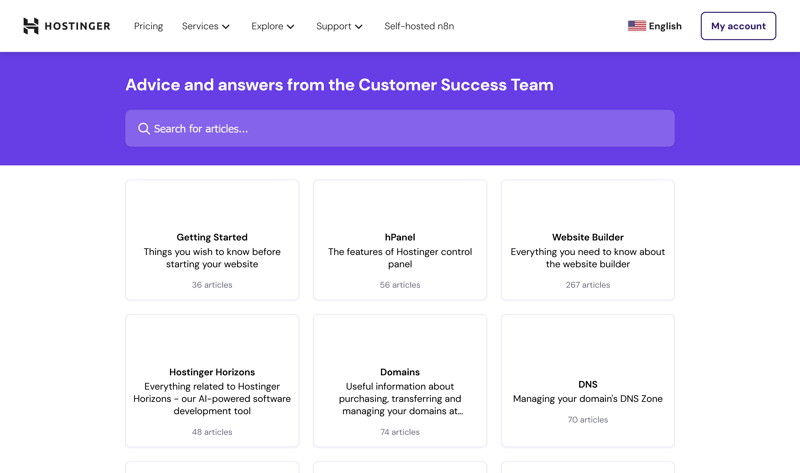
Hostinger's extensive knowledge base.
Tutorials and guides on the Hostinger blog cover online basics in addition to technical topics, but some of them feel more like marketing content. The same goes for the "Hostinger Academy" on YouTube.
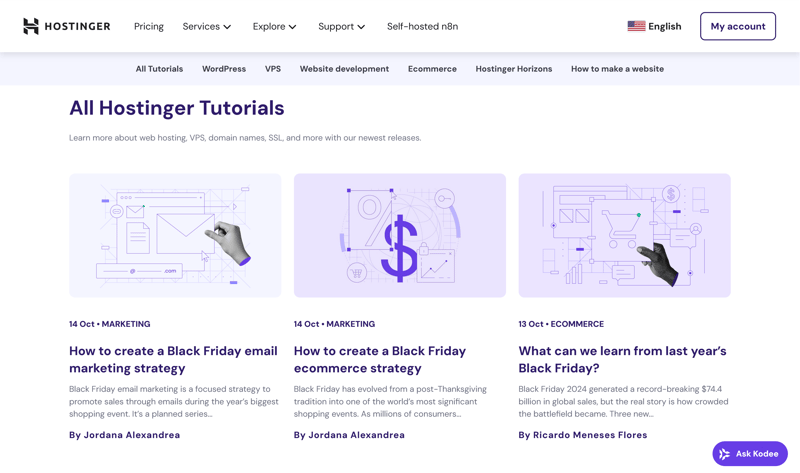
Tutorials on Hostinger's blog.
AI and Live Chat Provide Quick Help
The AI assistant Kodee works reliably and is genuinely helpful. It often provides relevant links to knowledge base articles.
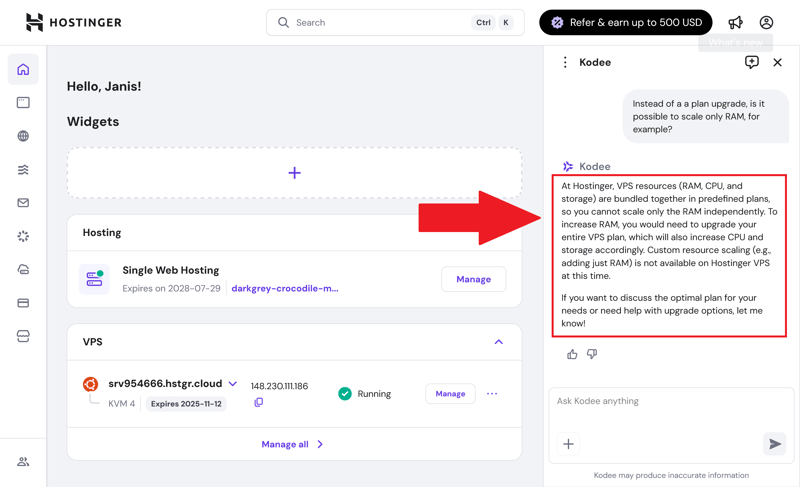
The AI chat can be quite helpful.
A human support agent only joins the conversation when Kodee can't help anymore, and this only happens after multiple follow-up questions. In our review, a support agent responded after about four minutes.
Email Support Is Available, but Hidden
Even though Hostinger barely advertises its email support, it is available. Our review inquiry to support@hostinger.com was answered within 3.5 hours on a Wednesday afternoon. The response was professional and included a helpful link.
Unfortunately, Hostinger no longer offers phone support. The company says this is because its AI chat is more streamlined. For customers who prefer personal advice over the phone, this is a significant downside.
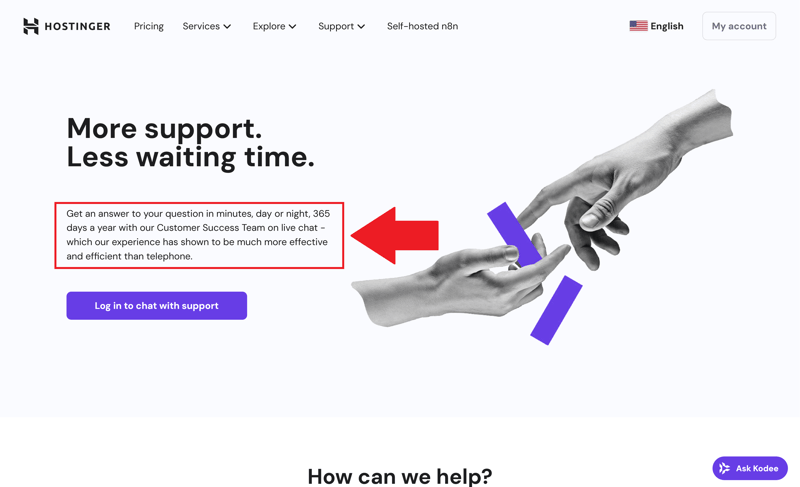
Hostinger does not offer phone support.
Many Customers Are Satisfied with the Support
Customer experiences are mostly positive. The 24/7 live chat and fast response times receive particular praise. At the same time, reviews show that the chat occasionally struggles with more complex technical questions.
Hostinger's support is geared toward tech-savvy users who don't mind searching for answers in the documentation themselves. You get a fast, well-organized knowledge base and an AI chat that can answer many questions and connect you to human agents when needed. The only downsides are the lack of phone support.
Conclusion
Hostinger gets many things right: its VPS plans are a great option if you value quick setup, a modern interface, and a wide selection of software. Performance is also impressive in many areas, especially for single-core workloads, thanks to the fast NVMe SSDs.
Multi-core performance, however, is only average. If you run many parallel processes or resource-intensive applications, you'll hit limits sooner. The relatively slow network connection could also become an issue depending on your project.
That being said, Hostinger's advantages outweigh the drawbacks. If you want straightforward management, are comfortable with English documentation, and don't need phone support, you'll get a solid VPS package with reliable (though not consistently top-tier) performance.

Hostinger User Experiences
What do customers think of Hostinger? We analyzed user reviews from popular platforms and compiled the most common feedback:
Wide selection
Customers especially appreciate the extensive software and Linux options. They find the app selection versatile and quick to install.Modern interface
Customers like Hostinger's hPanel. It looks modern and is easy to navigate. Some beginners find it too technical.Knowledgeable support
The live chat support is quick to reach and helpful. Customers value the staff's expertise when dealing with technical issues.Many server locations
Customers appreciate the choice of numerous data centers across Europe and in other regions such as the Americas and Asia.
Price increase after initial term
Prices rise significantly after the initial contract period, which many users view negatively. The low introductory prices only apply at the start.
Alternatives to Hostinger
Is Hostinger not the right fit for your project? Maybe one of these alternatives will work better for you:
OVH is cheaper than Hostinger across the board. Traffic is included even in smaller VPS plans.
GoDaddy provides better network connectivity. This pays off especially if you frequently need to transfer large amounts of data quickly.
DigitalOcean offers custom scaling of server hardware. This is great if you want to adjust resources flexibly without switching plans.
Here are more alternatives to Hostinger: