
Hetzner VPS Review 2026: How Good Is the Cloud Server Performance?


Hetzner has been a major player in the hosting industry for years. The provider's VPS options are especially appealing to developers, freelancers, and small businesses. But how well does Hetzner's VPS offering perform in real-world use?
We set up a VPS and went through the entire process, covering registration, management, performance, costs, and support. Our analysis offers a realistic picture of what to expect from Hetzner.


Hetzner primarily targets developers and businesses running their own applications or websites. However, it also offers managed servers and smaller web hosting packages for beginners.
Hetzner Server Review
Great Value for Money
Hetzner offers powerful servers that truly represent excellent value. Configurations with generous RAM are especially affordable compared to competitors.Fast Server Deployment
New VPS instances are ready within seconds of ordering, complete with an IP address and management access.Modern and User-Friendly Management
The Hetzner Console is well organized, responds quickly, and offers numerous options to configure your server to your exact needs.Reliable Infrastructure
Hetzner impresses with strong CPU and RAM performance. The servers run stably and benefit from excellent connectivity.
Not Beginner-Friendly
Inexperienced users will find little guidance or recommendation, such as help choosing the right server size or configuration.
Server Setup & Management
| Interface & Usability | Easy-to-understand interface | 2/2 |
| Server Setup | Everything covered | 8/8 |
| Server Management | All important features are ready. | 8/8 |
| Other Features | Load balancer, floating IPs | 1/2 |
Getting started with Hetzner is a straightforward process. After registering via email, you land directly in the dashboard. However, first-time users must complete a verification process before they can proceed.
For our business account, Hetzner requested a commercial register extract. Private users provide ID information instead; in some cases, a copy of their ID may also be required.
Hetzner accepted our commercial register extract without any follow-up questions. About ten minutes later, our account was active, and all features were fully available.
The Hetzner Dashboard: Fast and Intuitive
The Hetzner Console is your central hub for all server-related tasks. Here you can manage not only VPS instances but also load balancers, networks, firewalls, and other infrastructure. Everything is available in one unified interface.
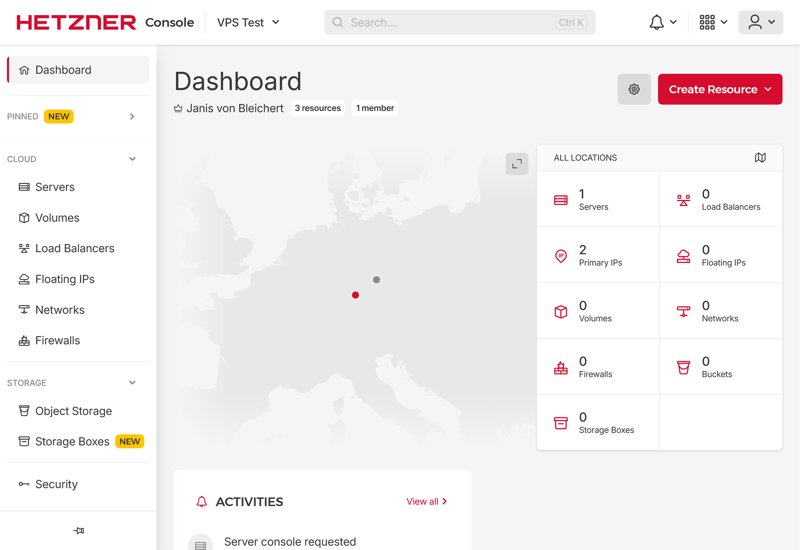
The Hetzner Console dashboard.
The home page displays project details, including the number of rented servers, configured firewalls, and recent user activity. You can customize the view by hiding the world map in the background, for example. There's also a dark mode.
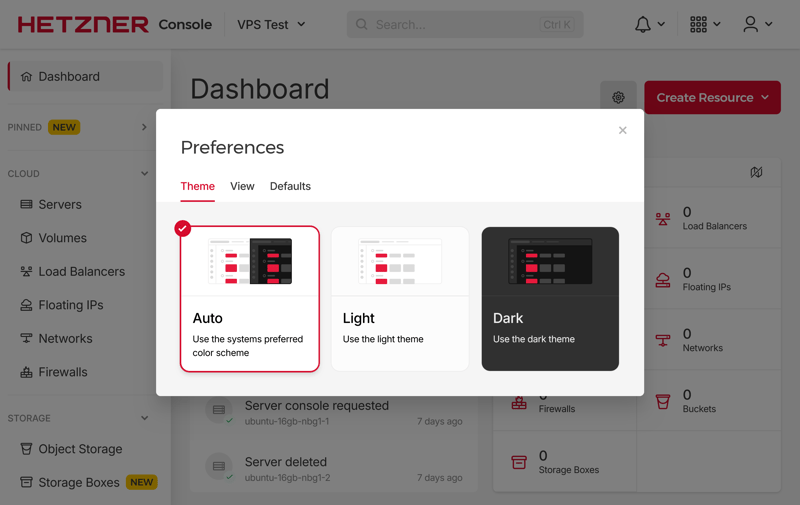
The Hetzner dashboard is available in light and dark mode.

Despite its extensive features, the Hetzner Console is easy to use. The interface is well-organized, responds quickly, and provides fast access to all key settings.
Even beginners should find their way around quickly, although some areas lack brief hints or explanations. Hetzner could improve this to make the experience even more beginner-friendly.
Server Setup at Hetzner: Plenty of Options
Setting up a VPS at Hetzner begins with a wide range of configuration options. Right from the start, you choose which data center your server will run in. Available locations include Nuremberg and Falkenstein (both in Germany), Helsinki, Singapore, and several US sites.
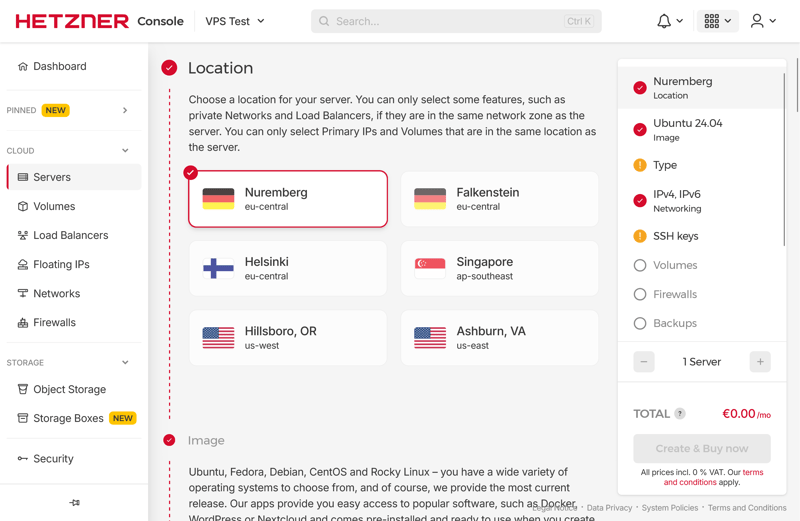
Hetzner offers several server locations.
For operating systems, you can choose from Ubuntu, Fedora, Debian, CentOS, Rocky Linux, AlmaLinux, and openSUSE. You can even upload your own ISO files if needed.
Hetzner also offers pre-configured app images for tools like Docker, WordPress, or Nextcloud. This saves time and simplifies getting started, as you skip the manual installation.
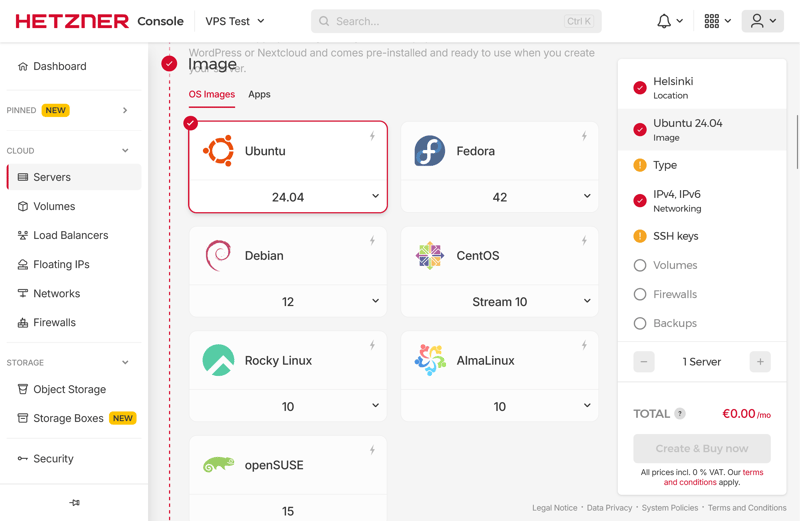
Customers choose from seven Linux distributions.
When selecting a server type, Hetzner distinguishes between shared and dedicated vCPU options. There are 19 configurations available, each featuring different combinations of CPU cores, RAM, and storage. If you exceed the included 20 TB data volume, an extra fee is charged per additional terabyte.
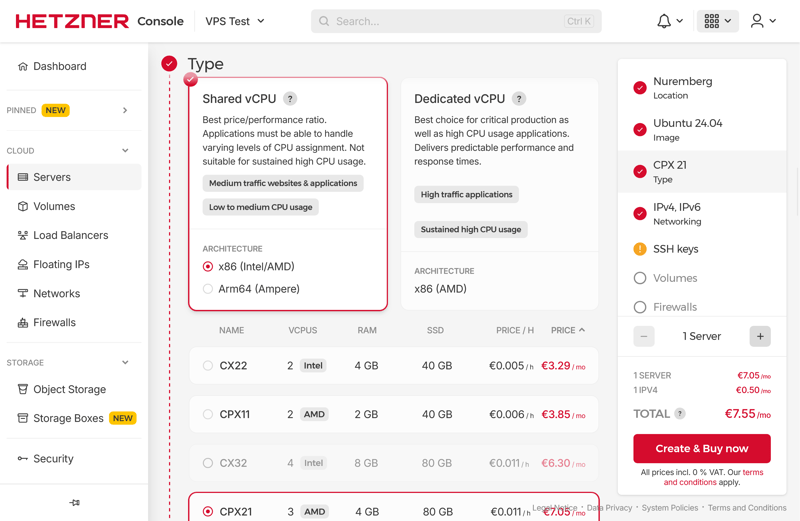
VPS options are available with shared and dedicated vCPUs.
During setup, you can add an SSH key for secure access. You can also enable backups, firewalls, or additional volumes immediately.
As soon as your order is complete, Hetzner starts provisioning your server. It usually takes just a few seconds until your VPS is ready, including an IP address. You also receive an email confirming the successful setup.
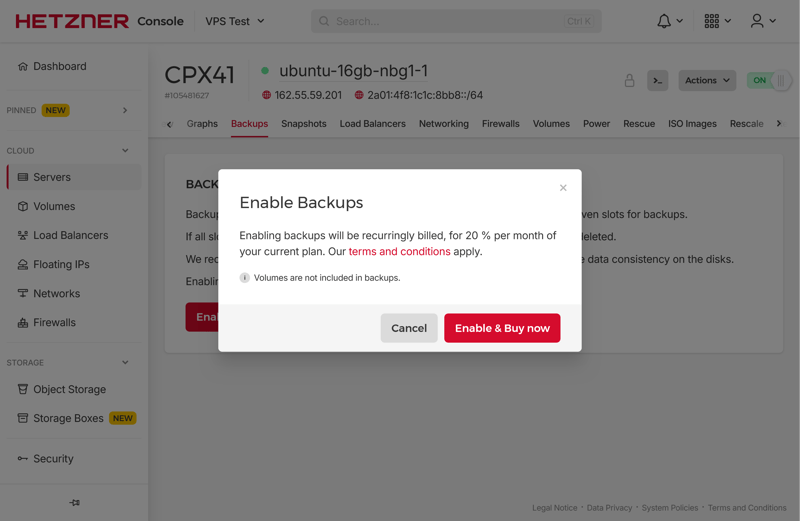
Our VPS was ready in no time.
New servers are ready to use quickly. The ordering process is simple, offering numerous configuration options and support for advanced features like custom SSH keys. If you know exactly what resources you need, you can get started almost immediately.
That said, beginners may struggle without explanations or context-based recommendations. For example, there is no guidance on choosing the right instance type or understanding how CPU, RAM, and storage work together.
Server Management at Hetzner: A Wealth of Options
Hetzner provides a wide range of features for managing your VPS. The options might feel overwhelming at first, but they offer a lot of flexibility and control over your system in day-to-day use.
In the top right corner of the console, you'll find the most important quick actions. These allow you to restart, shut down, or power off your server. You can also enable protection against accidental deletion or move your server to a different project.
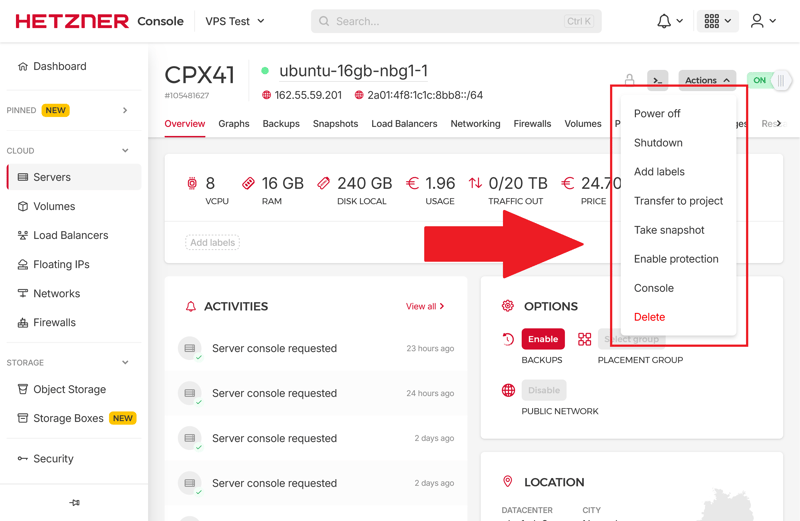
Quick actions in the Hetzner console.
The Rebuild feature allows you to install a new operating system when needed. Hetzner offers dozens of Linux distributions here, including Ubuntu, Debian, and numerous other options. A rebuild usually takes just a few minutes.
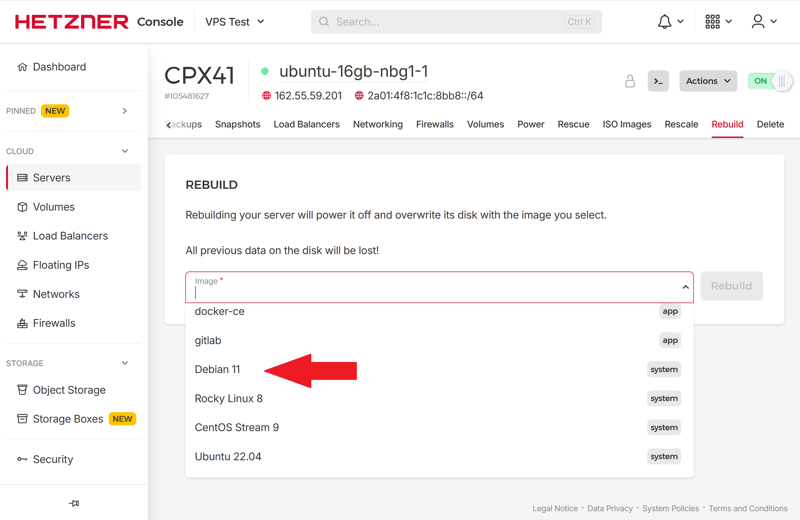
Rebuilding a server with a new Debian image.
If you encounter problems, the built-in rescue system can help. On the next boot, your server will not start normally. Instead, it loads a minimal live system with SSH access. From there, you can fix configuration errors, back up data, or reset the root password.
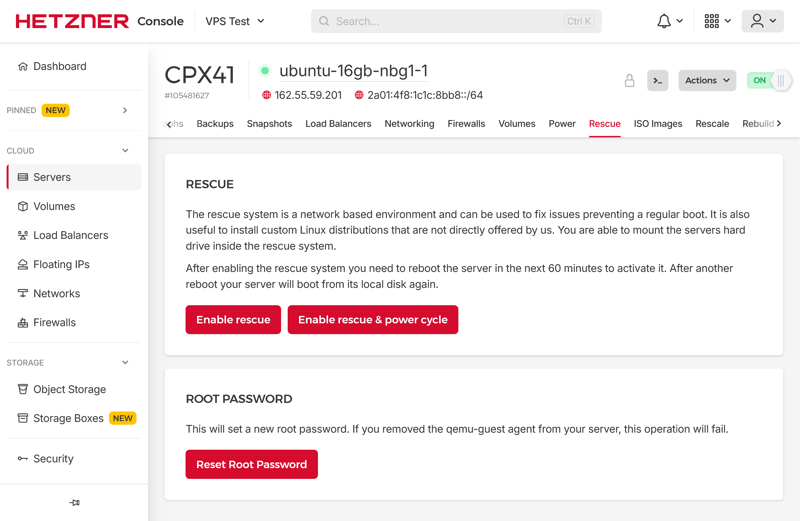
The rescue system.
The monitoring is more detailed than what many other hosts offer. The Console displays CPU load, RAM usage, network traffic, and disk activity in graphical form.
If you require additional monitoring features or alerts, you can connect external tools like Grafana or Prometheus through the open API. This allows you to expand your monitoring options as needed.
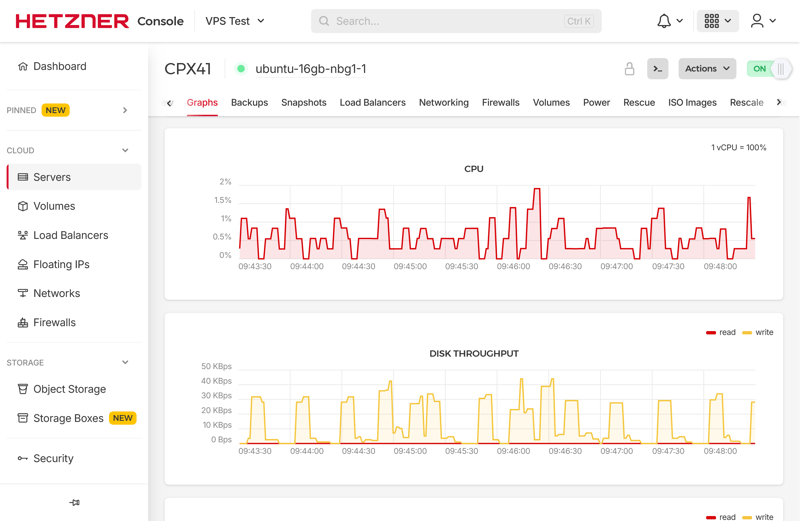
Charts showing server load.
For data protection, a paid backup feature is available. You must activate it separately for each server. It includes daily backups that are stored for seven days.
Once enabled, Hetzner handles all backup management. Billing is proportional to your chosen plan. The higher your plan costs, the more you will pay for auto-backups.
Seven backup slots are available.
Alternatively, you use snapshots to save your current server state. This type of backup is ideal for short-term purposes, such as before an update or installing new software. Snapshots remain stored until you manually delete them. Billing is based on storage usage.
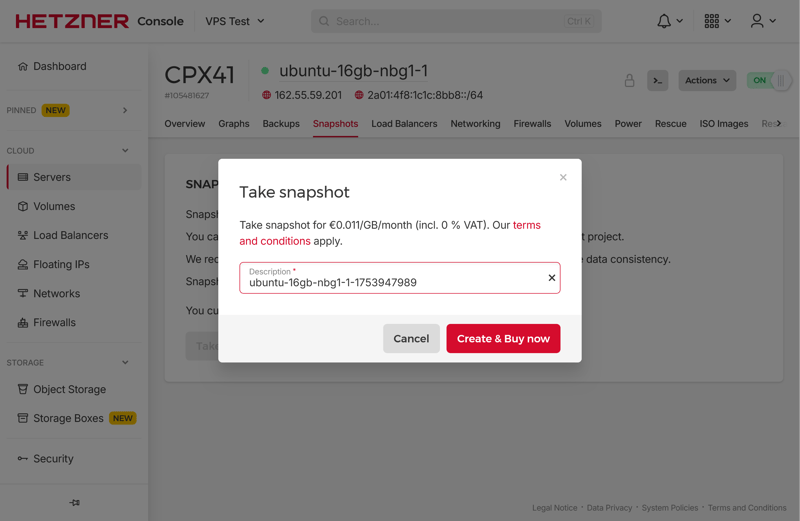
Creating a server snapshot is quick and easy.
If you require more (or less) power, you can use the built-in scaling feature. This allows you to switch directly to a more powerful plan, as long as it is compatible with your existing server architecture.
You can also adjust only the CPU and RAM without changing the disk size. The switch to the new plan happens quickly, and data stored on the disk remains unchanged.
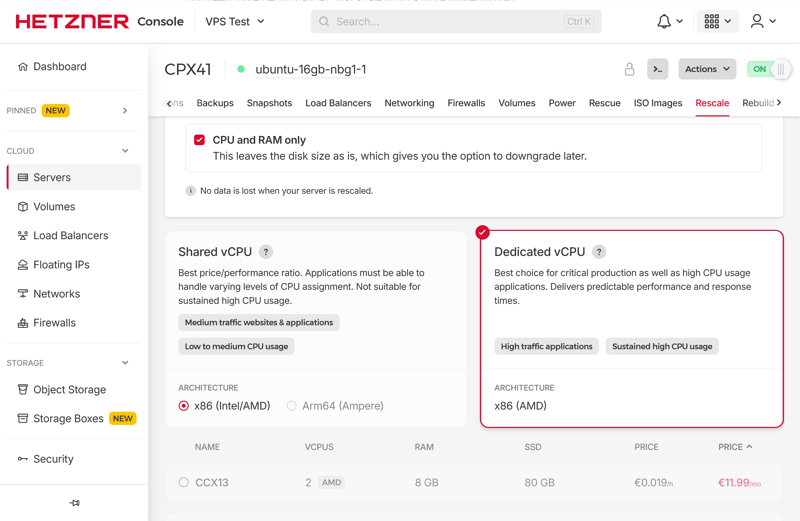
Hetzner is happy to provide more power when you need it.
For protection against DDoS attacks, a filter system is active by default. It detects suspicious network traffic in real time and reroutes it through a central infrastructure.
Activation happens automatically, and no additional settings are required. If you require more control or custom protection profiles, you can use third-party services like Cloudflare.
Here is how Hetzner's key server features compare to other providers:
 Hetzner |  OVH |  Hostinger |  DigitalOcean |  IONOS |  GoDaddy |  Contabo | |
|---|---|---|---|---|---|---|---|
| Rescue System | ✓ | ✓ | ✓ | ✓ | ✗ | ✓ | ✓ |
| Web Console | ✓ | ✓ | ✓ | ✓ | ✓ | ✓ | ✗ |
| Monitoring | ✓ | ✓ | ✓ | ✓ | ✓ | ✓ | ✗ |
| Backups | ✓ | ✓ | ✓ | ✓ | ✓ | ✓ | ✓ |
| Snapshots | ✓ | ✓ | ✓ | ✓ | ✓ | ✗ | ✓ |
| Scaling | ✓ | ✓ | ✓ | ✓ | ✓ | ✓ | ✓ |
| Firewall | ✓ | ✓ | ✓ | ✓ | ✓ | ✗ | ✗ |
| Total | 7 | 7 | 7 | 7 | 6 | 5 | 4 |
At first, Hetzner's server management can feel quite complex. Explanations or practical tips in the Console would make it much easier for beginners to get started.
The numerous options, settings, and automation features are a big plus, but they do require some learning. Without prior experience in server administration, you will need some time to find your way around.
Once you get past that initial hurdle, Hetzner impresses with a powerful and responsive Console. The infrastructure is scalable and covers nearly all important use cases, from small web projects to complex development environments.
Performance
| CPU Benchmark | Single-Core: 1,442 Multi-Core: 7,945 | 10/15 |
| RAM Benchmark | 105,374 MiB/sec | 5/5 |
| Disk Benchmark | 57,700 IOPS | 1/5 |
| Network Benchmark | 5,020 MBit/s | 4/5 |
For our performance review, we analyze five metrics that determine how fast and reliably a VPS performs in everyday use:
- 1.
Single-core performance: How quickly does a single CPU core process tasks?
- 2.
Multi-core performance: How well does the server scale with parallel tasks?
- 3.
Memory speed: How quickly can the RAM process data?
- 4.
SSD performance: How many input/output operations can the SSD handle per second?
- 5.
Network connectivity: How fast does the server send and receive data?
We subject all servers in our comparison to benchmark tests under load. We measure how fast they process, read, and write data. Here's a detailed explanation of how we get our benchmark results:

Single and Multi-Core: Good to Excellent CPU Scores
We use Geekbench 6 for our CPU tests. This benchmark simulates typical tasks like data processing, graphics operations, and AI computations. It measures both single-core performance and the combined performance of all cores.
The tested VPS scored 1,442 points in the single-core benchmark. That's a solid result, but it doesn't quite reach the top spots:
| Geekbench 6 (Single Core) | |
|---|---|
| 1,771 |
| 1,468 |
| 1,442 |
| 1,105 |
| 1,071 |
| 954 |
| 482 |
The machine performs much better in the multi-core test. With 7,945 points, this server ranks among the stronger systems in our comparison.
| Geekbench 6 (Multi Core) | |
|---|---|
| 7,945 |
| 7,159 |
| 6,177 |
| 5,476 |
| 1,987 |
| 1,978 |
| 1,652 |
Very Fast Memory
We measure memory performance using the STREAM benchmark tool. Memory bandwidth is especially important here. It shows how much data the RAM can process per second. The CPX41 delivers an impressive bandwidth of 105,374 MiB/s.
This value is well above what many standard cloud instances offer. For memory-heavy workloads such as in-memory databases, caching, or parallel data processing, this is a clear advantage.
| stream copy | |
|---|---|
| 117,934 MiB/sec |
| 105,374 MiB/sec |
| 86,477 MiB/sec |
| 56,064 MiB/sec |
| 47,490 MiB/sec |
| 36,342 MiB/sec |
| 18,921 MiB/sec |
SSD Performance in the Middle of the Pack
We test SSD speed using the fio tool.The focus is on IOPS (input/output operations per second). Performance with small block sizes matters most, since many applications rely on them frequently.
The tested VPS achieved 57,700 IOPS at a 4k block size. That's a good score and points to a fast, reliable SSD. However, compared to other providers, it only lands in the middle of the pack.
| fio (Total IOPS, Block Size 4k) | |
|---|---|
| 120,300 IOPS |
| 115,800 IOPS |
| 100,700 IOPS |
| 57,700 IOPS |
| 52,500 IOPS |
| 40,000 IOPS |
| 21,400 IOPS |
Hetzner's Network Is Well Connected
For our network test, we measure how quickly the server sends and receives data over the internet. With around 5 Gbit/s to London, Hetzner offers solid connectivity and a stable connection. It doesn't quite reach the top spots, though.
| iperf (Receive Speed, IPv4, London) | |
|---|---|
| 6,970 MBit/s |
| 6,220 MBit/s |
| 5,020 MBit/s |
| 4,810 MBit/s |
| 1,950 MBit/s |
| 986 MBit/s |
| 292 MBit/s |
Hetzner delivers strong results in our performance review. It performs especially well in memory access and CPU power. The performance is stable, fast, and reliable. Network connectivity is solid, even though Hetzner doesn't break any records in this area.
SSD performance isn't quite as strong. For most typical web applications, it's more than sufficient. However, if you're running data-heavy workloads, other providers offer noticeably better results.
Costs
| Price 8 vCPU | $14.09 | 7/7 |
| Price 16 GB RAM | $19.59 | 5/7 |
| Price 250 GB SSD | $19.59 | 5/7 |
| Price 50 TB Traffic | $7.59 | 2/4 |
| Backup costs | $5.62 | 1/3 |
| Billing | Hourly billing | 2/2 |
To compare prices fairly, we analyzed the cost of typical server configurations across different providers. We evaluated five categories that matter most in everyday use:
- 1.
The price for the cheapest VPS with at least 8 vCPUs
- 2.
The price for the cheapest VPS with at least 16 GB RAM
- 3.
The price for the cheapest VPS with at least 250 GB SSD storage
- 4.
The cost for 50 TB monthly data transfer
- 5.
The price for automatic backups
Each category is weighted using a fixed point system. The lower the price (or the shorter the billing cycle), the more points a provider can earn. Our ratings are based on regular list prices including VAT, without discounts or limited-time promotions. This allows for an objective assessment of which provider offers the best value for money.
Here's how Hetzner's costs compare to other providers:
| 8 vCPU | 16 GB RAM | 250 GB SSD | 50 TB Traffic | Backup | |
|---|---|---|---|---|---|
| $9.00 | $9.00 | $9.00 | $2.00 | $7.00 |
| $12.75 | $12.75 | $22.08 | $4.20 | $0.00 |
| $14.09 | $19.59 | $19.59 | $7.59 | $5.62 |
| $19.99 | $9.99 | $19.99 | $7.99 | $0.00 |
| $20.80 | $12.00 | $3.96 | $4.95 | $7.34 |
| $64.99 | $44.99 | $64.99 | $16.99 | $0.00 |
| $96.00 | $96.00 | $96.00 | $6.00 | $4.80 |
Hetzner VPS Plans
Hetzner's shared vCPU plans are organized under the CX series (for example, CX22, CX32, CX42, or CX52). Key specifications increase with each tier:
vCPUs: All plans use shared CPU cores. These cores are assigned to multiple virtual machines, so performance depends heavily on the usage of other users on the same host.
Memory: The smallest plan starts with 4 GB RAM, while the largest offers 32 GB. This covers a wide range of use cases.
Storage: All instances come with fast NVMe-based SSD storage. Depending on the plan, you get between 40 GB and 360 GB. You can add extra volumes if needed.
Data transfer: Each instance includes 20 TB of traffic per month. That's usually more than sufficient, even with heavy usage. Additional traffic costs extra.
Network and IPv4: Every plan includes a paid public IPv4 address. IPv6 is available as an option.
You can pay by the hour, which adds up to the monthly price, or pay a fixed monthly rate for continuous use. It is a transparent and fair system.
Here's an overview of Hetzner's VPS plans:
| CX23 | CAX11 | CX33 | |
|---|---|---|---|
| Monthly Price | $4.09 | $4.59 | $6.59 |
| Contract Period (Months) | 0 | 0 | 0 |
| Performance | |||
| Storage | 40 GB | 40 GB | 80 GB |
| RAM | 4 GB | 4 GB | 8 GB |
| CPU Cores | 2 | 2 | 4 |
| Dedicated Cores | ✗ | ✗ | ✗ |
| Features | |||
| Type | vServer | vServer | vServer |
| OS | Linux | Linux | Linux |
| Managed | ✗ | ✗ | ✗ |
| SSD Storage | ✓ | ✓ | ✓ |
Performance Range and Scaling
The shared vCPU plans cover a wide performance range, from beginner setups to powerful virtual machines that can handle larger applications:
Entry-Level | Mid-Range | Top Tier |
|---|---|---|
|
|
|
|
|
|
The differences are not only in RAM and storage. Higher tiers also handle traffic spikes better, even though the CPU is still shared. However, there's no guaranteed minimum performance. If you need consistently high performance, a dedicated vCPU plan (CCX series) is the better choice.
Hetzner's pricing is a mixed bag. The provider scores well for configurations with lots of RAM. Regular backups are also affordable and won't strain your budget.
On the other hand, costs for larger SSD storage or extra data transfer are less attractive. Overall, Hetzner isn't the cheapest option, but it's not the most expensive either.
Reliability & Support
| Own documentation & FAQ | Comprehensive | 2.5/3 |
| Email support | Quick responses | 3/3 |
| Phone support | Hardly any wait time | 3/3 |
| Live chat | Only AI chatbot | 1.5/3 |
| Customer feedback from the web | Very positive | 7/8 |
Hetzner Docs provides comprehensive technical documentation. The content is available in English and German, covering everything from cloud instances to network settings to API usage. The guides are well-organized, clearly written, and often include screenshots.
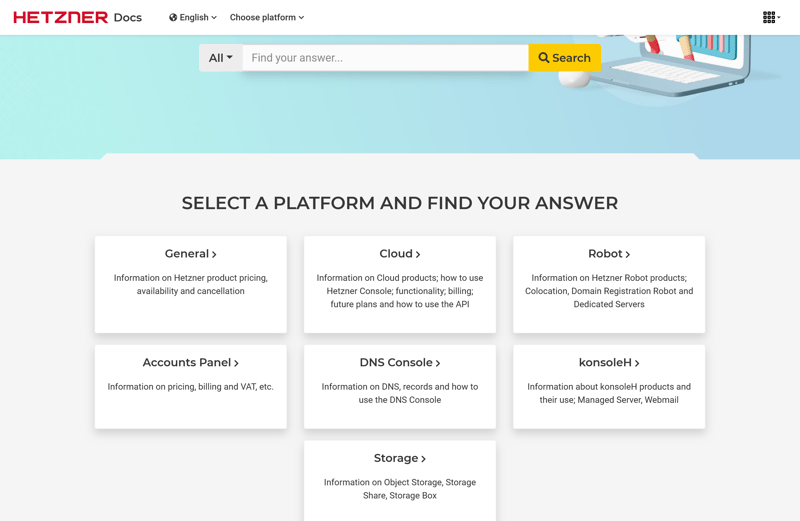
The comprehensive Hetzner documentation.
If you already have a basic technical understanding, you'll almost always find the right solution, often without needing to contact support at all. However, beginners may occasionally miss more accessible help resources. There's also no option to submit a support question directly from the documentation.
Email Support Responds Quickly
Support requests are submitted directly through the Hetzner Console. As you type your question, relevant support articles appear that may help solve your problem. Only after selecting "I need more help" can you actually submit your support request.
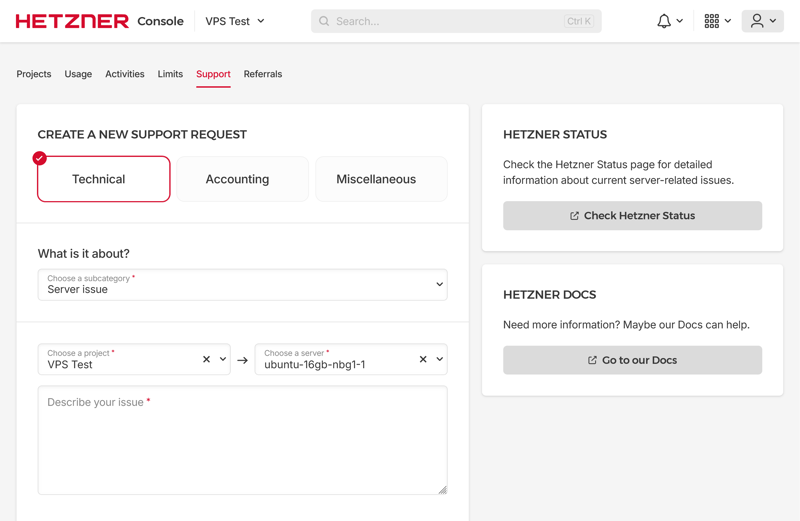
Support request via the Hetzner Console.
In our review, we received an accurate response to a simple support request within 30 minutes. Support is generally limited to infrastructure topics. Hetzner won't help with software questions or CMS issues. The response language depends on your user profile (German or English).
Phone Support Without Long Wait Times
Hetzner offers a phone hotline for general and technical inquiries Monday through Friday from 8 AM to 6 PM. In our review, we connected quickly on a Thursday morning without having to wait on hold for long.
For emergencies involving dedicated hardware, there's a 24/7 on-call service at the data centers. This provides customers with business-critical services an extra layer of security. You'll need an activated phone password or one-time password to use this service.
Hetzner no longer offers a live chat. On product pages, only an AI chatbot is available. It primarily helps customers with pre-sales questions.
However, our review showed that the bot can also assist with technical tasks. It correctly and clearly explained how to move a server between projects.
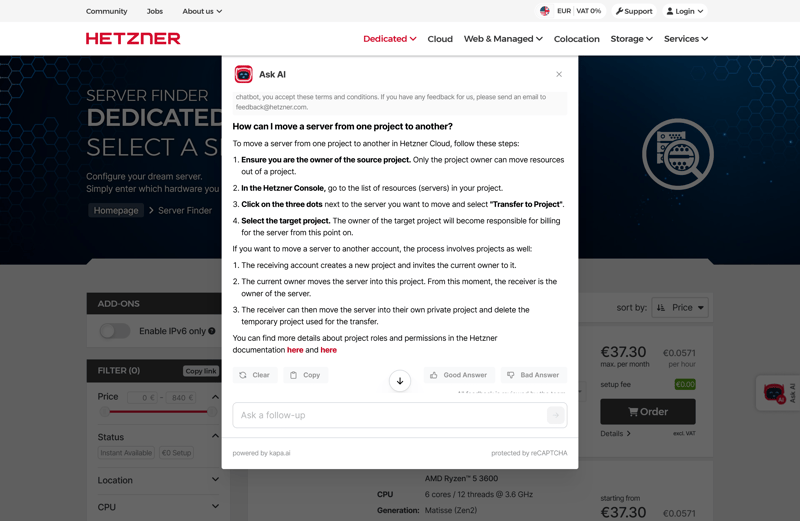
The AI chatbot responds to questions quickly.
When asked, the chatbot can list numerous reasons why new customers should choose Hetzner. However, it prefers not to answer questions about whether customers might be better off with a competitor.
Customer Feedback Is Mostly Positive
User reviews on platforms such as Trustpilot, Reddit, and hosting forums paint an overall positive picture. Customers generally view the support as knowledgeable and fast. Occasional criticism includes sporadic unavailability or unsatisfactory problem resolution attempts.
Hetzner proves that good service doesn't have to come at a premium price. The detailed documentation, fast email support, and easily accessible hotline offer multiple ways to find a solution quickly.
A few areas still have room for improvement: A personal live chat and more beginner-friendly explanations in the documentation would make the overall experience even better.
Conclusion
Hetzner is clearly designed for users who know what they're doing, and it has much to offer this audience. The provider delivers a solid overall package of performance, features, and support at fair prices, especially for the higher-tier plans.
If you value fast CPUs, plenty of RAM, and reliable infrastructure, Hetzner is a great choice. The support team stands out with quick response times and technical expertise, though live chat is no longer available.
Hetzner is less suitable for beginners. If you're looking for a provider that guides you step by step through a simple setup, you should look elsewhere.
Hetzner rewards self-reliance, but in return, you get a system that provides you with almost complete freedom. If you appreciate this approach, you'll find few providers that offer as much server performance for your money.

Hetzner User Reviews
We analyzed ratings on review platforms and summarized the most common feedback. Online reviews generally paint a positive picture of Hetzner's servers:
Great value for money
Many users find the balance between cost and performance to be fair. Root servers and VPS options are frequently rated as highly competitive.High server reliability
The systems run stably with few outages. Even long-term users rarely report technical issues.Robust infrastructure
Users are impressed by the hardware and network connectivity. Performance remains consistent even under heavy load or continuous operation.Fast and helpful support
Quick response times and technical expertise are frequently highlighted in positive reviews.
Inconsistent problem resolution
Some users report that issues weren't resolved immediately or that communication was unclear.Strict account verification
Some users find the verification process cumbersome or unclear, which can delay account creation.
Alternatives to Hetzner
Is Hetzner not the right provider for you? Here are some suitable alternatives:
DigitalOcean is more expensive than Hetzner but offers excellent scalability and a modern, professional management backend. It's ideal for developers or teams who value automation and flexible resource allocation.
GoDaddy impresses with some of the best network performance available. This makes it an excellent fit for projects with high data volumes or applications that benefit from stable, fast network connectivity.
IONOS is one of the most affordable providers in our comparison. It's a good choice for simple web servers, smaller projects, or getting started with hosting.
You can find more alternatives to Hetzner here: